
neuron-core / neuron-ai

A unified layer for building AI-native applications in PHP.
Fund package maintenance!
Requires
- php: ^8.1
- ext-curl: *
- psr/event-dispatcher: ^1.0
Requires (Dev)
- ext-bcmath: *
- ext-igbinary: *
- ext-mongodb: *
- ext-pdo: *
- ext-pdo_pgsql: *
- ext-redis: *
- ext-sodium: *
- amphp/amp: ^3.1.1
- amphp/http-client: ^5.3
- aws/aws-sdk-php: ^3.209
- elasticsearch/elasticsearch: ^8.19|^9.0
- friendsofphp/php-cs-fixer: ^3.75
- google/auth: ^1.49
- guzzlehttp/guzzle: ^7.0|^8.0
- html2text/html2text: ^4.3
- illuminate/database: ^10.21|^11.0|^12.0
- laudis/neo4j-php-client: ^3.4
- mongodb/mongodb: ^2.3
- opensearch-project/opensearch-php: ^2.5
- phpstan/phpstan: ^2.1
- phpunit/phpunit: ^10.0
- psr/http-message: ^1.0|^2.0
- psr/log: ^1.0|^2.0|^3.0
- pusher/pusher-php-server: ^7.2.4
- rector/rector: ^2.0
- spatie/fork: ^1.2
- symfony/mercure: ^0.7|^0.8
- tomasvotruba/type-coverage: ^2.0
- typesense/typesense-php: ^5.0.2
- vlucas/phpdotenv: ^5.6
Suggests
- ext-bcmath: Exact integer tools in the Calculator toolkit (factorial, combinations, gcd, mod_pow, primes).
- ext-igbinary: Smaller/faster durable-step serialization via IgbinarySerializer.
- ext-redis: Redis workflow persistence via RedisPersistence and Pub/Sub streaming via RedisChannel and RedisChannelReader.
- ext-sodium: End-to-end encryption for Pusher streaming channels.
- psr/log: Logging observability events through LogListener.
- pusher/pusher-php-server: Pusher-compatible streaming channels, including encrypted channels (requires >=7.2.4 for HTTP timeout propagation).
- spatie/fork: Parallel evaluation runs via the --concurrency option (requires ext-pcntl and ext-posix).
- symfony/mercure: Mercure streaming channel (^0.8 for hubs speaking Mercure protocol 1.0).
Provides
None
Conflicts
None
Replaces
None
- 5.x-dev
- 4.x-dev
- 4.1.14
- 4.1.13
- 4.1.12
- 4.1.11
- 4.1.10
- 4.1.9
- 4.1.8
- 4.1.7
- 4.1.6
- 4.1.5
- 4.1.4
- 4.1.3
- 4.1.2
- 4.1.1
- 4.1.0
- 4.0.3
- 4.0.2
- 4.0.1
- 4.0.0
- 3.x-dev
- 3.17.2
- 3.17.1
- 3.17.0
- 3.16.15
- 3.16.14
- 3.16.13
- 3.16.12
- 3.16.11
- 3.16.10
- 3.16.9
- 3.16.8
- 3.16.7
- 3.16.6
- 3.16.5
- 3.16.4
- 3.16.3
- 3.16.2
- 3.16.1
- 3.16.0
- 3.15.30
- 3.15.29
- 3.15.28
- 3.15.27
- 3.15.26
- 3.15.24
- 3.15.23
- 3.15.22
- 3.15.21
- 3.15.20
- 3.15.19
- 3.15.18
- 3.15.17
- 3.15.16
- 3.15.15
- 3.15.14
- 3.15.13
- 3.15.12
- 3.15.11
- 3.15.10
- 3.15.9
- 3.15.8
- 3.15.7
- 3.15.6
- 3.15.5
- 3.15.4
- 3.15.3
- 3.15.2
- 3.15.1
- 3.15.0
- 3.14.6
- 3.14.5
- 3.14.4
- 3.4.13
- 3.4.12
- 3.4.11
- 3.4.10
- 3.4.9
- 3.4.8
- 3.4.7
- 3.4.6
- 3.4.5
- 3.4.4
- 3.4.3
- 3.4.2
- 3.4.1
- 3.4.0
- 3.3.14
- 3.3.13
- 3.3.12
- 3.3.11
- 3.3.10
- 3.3.9
- 3.3.8
- 3.3.7
- 3.3.6
- 3.3.5
- 3.3.4
- 3.3.3
- 3.3.2
- 3.3.1
- 3.3.0
- 3.2.13
- 3.2.12
- 3.2.11
- 3.2.10
- 3.2.9
- 3.2.8
- 3.2.7
- 3.2.6
- 3.2.5
- 3.2.4
- 3.2.3
- 3.2.2
- 3.2.1
- 3.2.0
- 3.1.9
- 3.1.8
- 3.1.7
- 3.1.6
- 3.1.5
- 3.1.4
- 3.1.3
- 3.1.2
- 3.1.1
- 3.1.0
- 3.0.10
- 3.0.9
- 3.0.8
- 3.0.7
- 3.0.6
- 3.0.5
- 3.0.4
- 3.0.3
- 3.0.2
- 3.0.1
- 3.0.0
- 2.x-dev
- 2.14.3
- 2.14.2
- 2.14.1
- 2.14.0
- 2.13.0
- 2.12.6
- 2.12.5
- 2.12.4
- 2.12.3
- 2.12.2
- 2.12.1
- 2.12.0
- 2.11.7
- 2.11.6
- 2.11.5
- 2.11.4
- 2.11.3
- 2.11.2
- 2.11.1
- 2.11.0
- 2.10.3
- 2.10.2
- 2.10.1
- 2.10.0
- 2.9.3
- 2.9.2
- 2.9.1
- 2.9.0
- 2.8.19
- 2.8.18
- 2.8.17
- 2.8.16
- 2.8.15
- 2.8.14
- 2.8.13
- 2.8.12
- 2.8.11
- 2.8.10
- 2.8.9
- 2.8.8
- 2.8.7
- 2.8.6
- 2.8.5
- 2.8.4
- 2.8.3
- 2.8.2
- 2.8.1
- 2.8.0
- 2.7.0
- 2.6.7
- 2.6.6
- 2.6.5
- 2.6.4
- 2.6.3
- 2.6.2
- 2.6.1
- 2.6.0
- 2.5.8
- 2.5.7
- 2.5.6
- 2.5.5
- 2.5.4
- 2.4.4
- 2.4.3
- 2.4.2
- 2.4.1
- 2.4.0
- 2.3.5
- 2.3.4
- 2.3.3
- 2.3.2
- 2.3.1
- 2.3.0
- 2.2.14
- 2.2.13
- 2.2.12
- 2.2.11
- 2.2.10
- 2.2.9
- 2.2.8
- 2.2.7
- 2.2.6
- 2.2.5
- 2.2.4
- 2.2.3
- 2.2.2
- 2.2.1
- 2.2.0
- 2.1.1
- 2.1.0
- 2.0.8
- 2.0.7
- 2.0.6
- 2.0.5
- 2.0.4
- 2.0.3
- 2.0.2
- 2.0.1
- 2.0.0
- 1.x-dev
- 1.17.6
- 1.17.5
- 1.17.4
- 1.17.3
- 1.17.2
- 1.17.1
- 1.17.0
- 1.16.23
- 1.16.22
- 1.16.21
- 1.16.20
- 1.16.19
- 1.16.18
- 1.16.17
- 1.16.16
- 1.16.15
- 1.16.14
- 1.16.13
- 1.16.12
- 1.16.11
- 1.16.10
- 1.16.9
- 1.16.8
- 1.16.7
- 1.16.6
- 1.16.5
- 1.16.4
- 1.16.3
- 1.16.2
- 1.16.1
- 1.16.0
- 1.15.22
- 1.15.21
- 1.15.20
- 1.15.19
- 1.15.18
- 1.15.17
- 1.15.16
- 1.15.15
- 1.15.14
- 1.15.13
- 1.15.12
- 1.15.11
- 1.15.10
- 1.15.9
- 1.15.8
- 1.15.7
- 1.15.6
- 1.15.5
- 1.15.4
- 1.15.3
- 1.15.2
- 1.15.1
- 1.15.0
- 1.14.29
- 1.14.28
- 1.14.27
- 1.14.26
- 1.14.25
- 1.14.24
- 1.14.23
- 1.14.22
- 1.14.21
- 1.14.20
- 1.14.19
- 1.14.18
- 1.14.17
- 1.14.16
- 1.14.15
- 1.14.14
- 1.14.13
- 1.14.12
- 1.14.11
- 1.14.10
- 1.14.9
- 1.14.8
- 1.14.7
- 1.14.6
- 1.14.5
- 1.14.4
- 1.14.3
- 1.14.2
- 1.14.1
- 1.14.0
- 1.13.3
- 1.13.2
- 1.13.1
- 1.13.0
- 1.12.18
- 1.12.17
- 1.12.16
- 1.12.15
- 1.12.14
- 1.12.13
- 1.12.12
- 1.12.11
- 1.12.10
- 1.12.9
- 1.12.8
- 1.12.7
- 1.12.6
- 1.12.5
- 1.12.4
- 1.12.3
- 1.12.2
- 1.12.1
- 1.12.0
- 1.11.10
- 1.11.9
- 1.11.8
- 1.11.7
- 1.11.6
- 1.11.5
- 1.11.4
- 1.11.3
- 1.11.2
- 1.11.1
- 1.11.0
- 1.10.20
- 1.10.19
- 1.10.18
- 1.10.17
- 1.10.16
- 1.10.15
- 1.10.14
- 1.10.13
- 1.10.12
- 1.10.11
- 1.10.10
- 1.10.9
- 1.10.8
- 1.10.7
- 1.10.6
- 1.10.5
- 1.10.4
- 1.10.3
- 1.10.2
- 1.10.1
- 1.10.0
- 1.9.37
- 1.9.36
- 1.9.35
- 1.9.34
- 1.9.33
- 1.9.32
- 1.9.31
- 1.9.30
- 1.9.29
- 1.9.28
- 1.9.27
- 1.9.26
- 1.9.25
- 1.9.24
- 1.9.23
- 1.9.22
- 1.9.21
- 1.9.20
- 1.9.19
- 1.9.18
- 1.9.17
- 1.9.16
- 1.9.15
- 1.9.14
- 1.9.13
- 1.9.12
- 1.9.11
- 1.9.10
- 1.9.9
- 1.9.8
- 1.9.7
- 1.9.6
- 1.9.5
- 1.9.4
- 1.9.3
- 1.9.2
- 1.9.1
- 1.9.0
- 1.8.19
- 1.8.18
- 1.8.17
- 1.8.16
- 1.8.15
- 1.8.14
- 1.8.13
- 1.8.12
- 1.8.11
- 1.8.10
- 1.8.9
- 1.8.8
- 1.8.7
- 1.8.6
- 1.8.5
- 1.8.4
- 1.8.3
- 1.8.2
- 1.8.1
- 1.8.0
- 1.7.2
- 1.7.1
- 1.7.0
- 1.6.0
- 1.5.4
- 1.5.3
- 1.5.2
- 1.5.1
- 1.5.0
- 1.4.2
- 1.4.1
- 1.4.0
- 1.3.2
- 1.3.1
- 1.3.0
- 1.2.25
- 1.2.24
- 1.2.23
- 1.2.22
- 1.2.21
- 1.2.20
- 1.2.19
- 1.2.18
- 1.2.17
- 1.2.16
- 1.2.15
- 1.2.14
- 1.2.13
- 1.2.12
- 1.2.11
- 1.2.10
- 1.2.9
- 1.2.8
- 1.2.7
- 1.2.6
- 1.2.5
- 1.2.4
- 1.2.3
- 1.2.2
- 1.2.1
- 1.2.0
- 1.1.3
- 1.1.2
- 1.1.1
- 1.1.0
- 1.0.1
- 1.0.0
This package is auto-updated.
Last update: 2026-10-25 14:35:04 UTC
README
Important
Get early access to new features, exclusive tutorials, and expert tips for building AI agents in PHP. Join a community of PHP developers pioneering the future of AI development. Subscribe to the newsletter
Before moving on, support the Neuron AI community giving a GitHub star ⭐️. Thank you!
What is Neuron
Neuron is a PHP framework for creating and orchestrating AI Agents. It allows you to integrate AI entities into your PHP applications with a powerful and flexible architecture. We provide tools for the entire agentic application development lifecycle, from LLM interfaces, data loading, multi-agent orchestration, to monitoring and debugging. In addition, we provide tutorials and other educational content to help you get started using AI Agents in your projects.
Why Neuron
Your next application will be agentic. A growing share of new software is no longer a web application with AI features added along the way, but an application born agentic, where the agent is the architecture itself, driving how the system reasons, acts, and talks to the user interface. Building this kind of application requires a specific set of foundations: event-driven workflows with checkpointing, human-in-the-loop, interruption, multi-agent orchestration, streaming, and agentic UI integration like AG-UI and the Vercel AI SDK, MCP connectors, and asynchronous execution.
Each one is a chapter of the documentation: Workflow, Human in the loop, Streaming & UI protocols, MCP, Async.
There is also no second framework waiting for you when the project grows. The same Workflow that runs your first agent in the getting started guide runs a multi-agent system with state, loops, and human approvals in production. What you learn on day one is what you ship in future projects.
A Vertical Ecosystem
Neuron is the vertical ecosystem for agentic applications development in PHP. Around the framework there is a registry of extensions, tools, and technologies designed specifically for agentic applications, and a growing number of companies building on the same architecture instead of assembling their own from scattered parts.
For a software house or a product company this is a place to be recognized as a specialist rather than one more team claiming AI experience. For a company that needs an agentic foundation it can commit to for years, it means standardizing on an architecture whose whole direction is this space, not a general-purpose library where AI is a side feature. It also means hiring becomes a solvable problem: as the community grows, so does the number of developers who already know how to design, test, and run agentic applications on this architecture, so the people you bring in tomorrow speak the same language as the system you are building today.
Our Official Channels
Follow the Neuron channels to stay up to date:
- Documentation: https://docs.neuron-ai.dev/
- Newsletter: https://neuron-ai.dev
- Inspector: https://inspector.dev
- E-Book: https://www.amazon.it/dp/B0F1YX8KJB
- Linkedin: https://www.linkedin.com/company/neuron-ai-php-framework
- X: https://x.com/neuronai_php
- Instagram: https://www.instagram.com/neuronai_p
Start With One Prompt
Copy & paste this initial prompt to tell your coding agent how to install and configure Neuron AI in your project.
You are going to set up Neuron AI, a PHP framework for building agentic applications,
in this project, and you must follow three steps in order.

- First: install the framework: check composer.json, and if neuron-core/neuron-ai is not already required, run `composer require neuron-core/neuron-ai`.

- Second: install the agent skills that ship with the package by running `npx skills add ./vendor/neuron-core/neuron-ai/skills -y` from the project root. The skills are symlinked, so they stay current whenever Neuron is
updated through Composer. From then on, load the relevant skill before you write any Neuron code instead of relying on what you remember about the framework, because your memory may
describe an older version.

- Third: work out what kind of app this is. Look at composer.json and the project structure to tell whether it is a Laravel app or a Symfony app, then
activate the matching skill: neuron-laravel-integration or neuron-symfony-integration.

If Neuron is already part of the app go through the skill's foundations checklist item by item. Report what differs from the recommended setup. If Neuron is not
in the app yet, follow the same checklist to do the first setup. If the app uses neither framework, start from a plain PHP agent using the neuron-agent skill.
Finish with a short summary of what you installed and what you found.
Requirements
- PHP: ^8.1
How To
- Getting Started
- AI Providers
- Tools & Toolkits
- MCP Connector
- Structured Output
- RAG
- Workflow
- AI Assisted Development
- Security Vulnerabilities
- Official Documentation
1) Install
composer require neuron-core/neuron-ai
2) Create an Agent
Neuron provides you with the Agent class you can extend to inherit the main features of the framework and create fully functional agents. This class automatically manages some advanced mechanisms for you, such as memory, tools, up to RAG (Retrieval Augmented Generation). You can go deeper into these aspects below.
Let's create an Agent with the command below:
vendor/bin/neuron make:agent DataAnalystAgent
<?php

namespace App\Neuron;

use NeuronAI\Agent\Agent;
use NeuronAI\Chat\Messages\SystemMessage;
use NeuronAI\Providers\AIProviderInterface;
use NeuronAI\Providers\Anthropic\Anthropic;

class DataAnalystAgent extends Agent
{
    protected function provider(): AIProviderInterface
    {
        return new Anthropic(
            key: 'ANTHROPIC_API_KEY',
            model: 'ANTHROPIC_MODEL',
        );
    }

    protected function instructions(): SystemMessage
    {
        return new SystemMessage(
            "You are a data analyst expert in creating reports from SQL databases."
        );
    }
}
3) Talk to the Agent
Bind the agent to a conversation thread, then send it a message and get a response:
$agent = DataAnalystAgent::make()->setThreadId('user-42');


$response = $agent->chat(
    new UserMessage("Hi, I'm Valerio. Who are you?")
)->getMessage();
echo $response->getContent();
// I'm a data analyst. How can I help you today?


$response = $agent->chat(
    new UserMessage("Do you remember my name?")
)->getMessage();
echo $response->getContent();
// Your name is Valerio, as you said in your introduction.
As you can see in the example above, the Agent has memory of the ongoing conversation. Learn more about memory in the documentation.
Supported LLM Providers
With Neuron, you can switch between LLM providers with just one line of code, without any impact on your agent implementation. Supported providers:
- Anthropic
- OpenAI
- OpenAI Responses API
- OpenAI on Azure
- OpenAILike (OpenAI compatible APIs)
- Ollama
- Gemini
- Gemini Vertex
- Mistral
- HuggingFace
- Deepseek
- Grok
- AWS Bedrock Runtime
- Cohere
- ZAI
- Alibaba DashScope
- Neuron Router
Tools & Toolkits
Make your agent able to perform concrete tasks, like reading from a database, by adding tools or toolkits (collections of tools).
<?php

namespace App\Neuron;

use NeuronAI\Agent\Agent;
use NeuronAI\Chat\Messages\SystemMessage;
use NeuronAI\Providers\AIProviderInterface;
use NeuronAI\Providers\Anthropic\Anthropic;
use NeuronAI\Tools\Toolkits\MySQL\MySQLSchemaTool;
use NeuronAI\Tools\Toolkits\MySQL\MySQLSelectTool;
use NeuronAI\Tools\Toolkits\MySQL\MySQLToolkit;

class DataAnalystAgent extends Agent
{
    protected function provider(): AIProviderInterface
    {
        return new Anthropic(
            key: 'ANTHROPIC_API_KEY',
            model: 'ANTHROPIC_MODEL',
        );
    }

    protected function instructions(): SystemMessage
    {
        return new SystemMessage(
            "You are a data analyst expert in creating reports from SQL databases."
        );
    }

    protected function tools(): array
    {
        return [
            MySQLToolkit::make(
                \DB::connection()->getPdo()
            )->only([MySQLSchemaTool::class, MySQLSelectTool::class]),
        ];
    }
}
The select tool runs each query in a read-only transaction, so the database refuses any write. It can still read everything the connection's user can read. For production, consider giving the toolkit its own connection, with a user that can only SELECT the tables the agent needs and a statement timeout.
Ask the agent something about your database:
$response = DataAnalystAgent::make()->setThreadId('demo')->chat(
    new UserMessage("How many orders we received today?")
)->getMessage();

echo $response->getContent();
Learn more about Tools in the documentation.
MCP Connector
Instead of implementing tools manually, you can connect tools exposed by an MCP server with the McpConnector component:
<?php

namespace App\Neuron;

use NeuronAI\Agent\Agent;
use NeuronAI\MCP\McpConnector;

class DataAnalystAgent extends Agent
{
    ...

    protected function tools(): array
    {
        return [
            // Connect to an MCP server
            ...McpConnector::make([
                'command' => 'npx',
                'args' => ['-y', '@modelcontextprotocol/server-everything'],
            ])->tools(),
        ];
    }
}
Learn more about MCP connector in the documentation.
Structured Output
There are scenarios where you need Agents to understand natural language, but output in a structured format, like business processes automation, data extraction, etc. to use the output with other downstream systems.
use App\Neuron\MyAgent;
use NeuronAI\Chat\Messages\UserMessage;
use NeuronAI\StructuredOutput\SchemaProperty;

/*
 * Define the output structure as a PHP class.
 */
class Person
{
    #[SchemaProperty(
        description: 'The user name',
        required: true
    )]
    public string $name;

    #[SchemaProperty(
        description: 'What the user love to eat'
    )]
    public string $preference;
}

/*
 * Talk to the agent requiring the structured output
 */
$person = MyAgent::make()->setThreadId('demo')->structured(
    new UserMessage("I'm John and I like pizza!"),
    Person::class
);

echo $person->name ' like '.$person->preference;
// John like pizza
Learn more about Structured Output on the documentation.
RAG
To create a RAG, you need to attach some additional components other than the AI provider, such as a vector store,
and an embeddings provider.
Let's create a RAG with the command below:
vendor/bin/neuron make:rag MyChatBot
Here is an example of a RAG implementation:
<?php

namespace App\Neuron;

use NeuronAI\Providers\AIProviderInterface;
use NeuronAI\Providers\Anthropic\Anthropic;
use NeuronAI\RAG\Embeddings\EmbeddingsProviderInterface;
use NeuronAI\RAG\Embeddings\VoyageEmbeddingProvider;
use NeuronAI\RAG\RAG;
use NeuronAI\RAG\VectorStore\PineconeVectorStore;
use NeuronAI\RAG\VectorStore\VectorStoreInterface;

class MyChatBot extends RAG
{
    protected function provider(): AIProviderInterface
    {
        return new Anthropic(
            key: 'ANTHROPIC_API_KEY',
            model: 'ANTHROPIC_MODEL',
        );
    }

    protected function embeddings(): EmbeddingsProviderInterface
    {
        return new VoyageEmbeddingProvider(
            key: 'VOYAGE_API_KEY',
            model: 'VOYAGE_MODEL'
        );
    }

    protected function vectorStore(): VectorStoreInterface
    {
        return new PineconeVectorStore(
            key: 'PINECONE_API_KEY',
            indexUrl: 'PINECONE_INDEX_URL'
        );
    }
}
Learn more about RAG in the documentation.
Workflow
Think of a Workflow as a smart flowchart for your AI applications. The idea behind Workflow is to allow developers to use all the Neuron components like AI providers, embeddings, data loaders, chat history, vector store, etc., as standalone components to create totally customized agentic systems.
Agent and RAG classes represent a ready to use implementation of the most common patterns when it comes to retrieval use cases, or tool calls, structured output, etc. Workflow allows you to program your agentic system completely from scratch. Agent and RAG can be used inside a Workflow to complete tasks as any other component if you need their built-in capabilities.
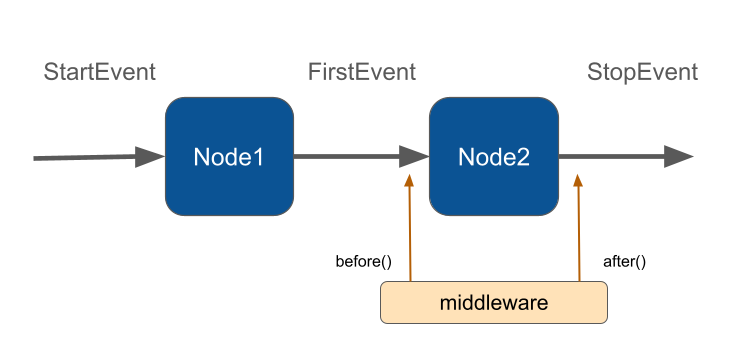
Neuron Workflow supports a robust human-in-the-loop pattern, enabling human intervention at any point in an automated process. This is especially useful in large language model (LLM)-driven applications where model output may require validation, correction, or additional context to complete the task.
Learn more about Workflow on the documentation.
AI Assisted Development
When working with AI coding assistants like Claude Code, Opencode, Cursor, or other similar tools, you have two options to give the AI deep context about Neuron components. This leads to more accurate code suggestions, better understanding of component APIs, and fewer hallucinations when generating Neuron code:
Security Vulnerabilities
If you discover a security vulnerability within Neuron, please send an e-mail to the Inspector team via support@inspector.dev. All security vulnerabilities will be promptly addressed.
Official documentation
Go to the official documentation
Development
To run the full test suite locally, use Docker Compose to spin up all the services required by the CI environment:
# Start all services
docker compose up -d
Run the test suite:
# Install dependencies and run tests
docker compose run --rm php composer update --prefer-stable
docker compose run --rm php vendor/bin/phpunit
To stop all services:
docker compose down