
jmonitor / easyadmin-bundle

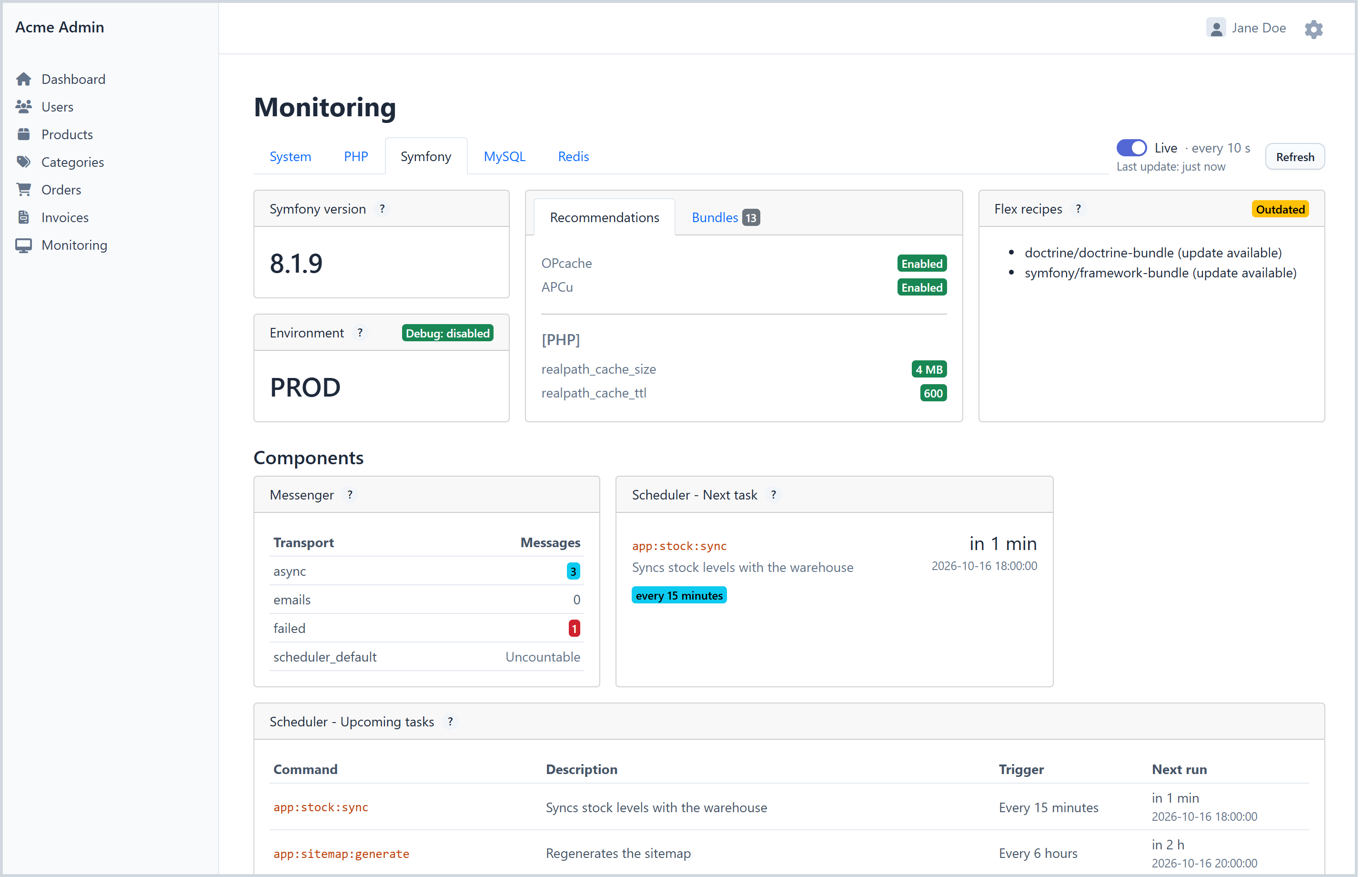
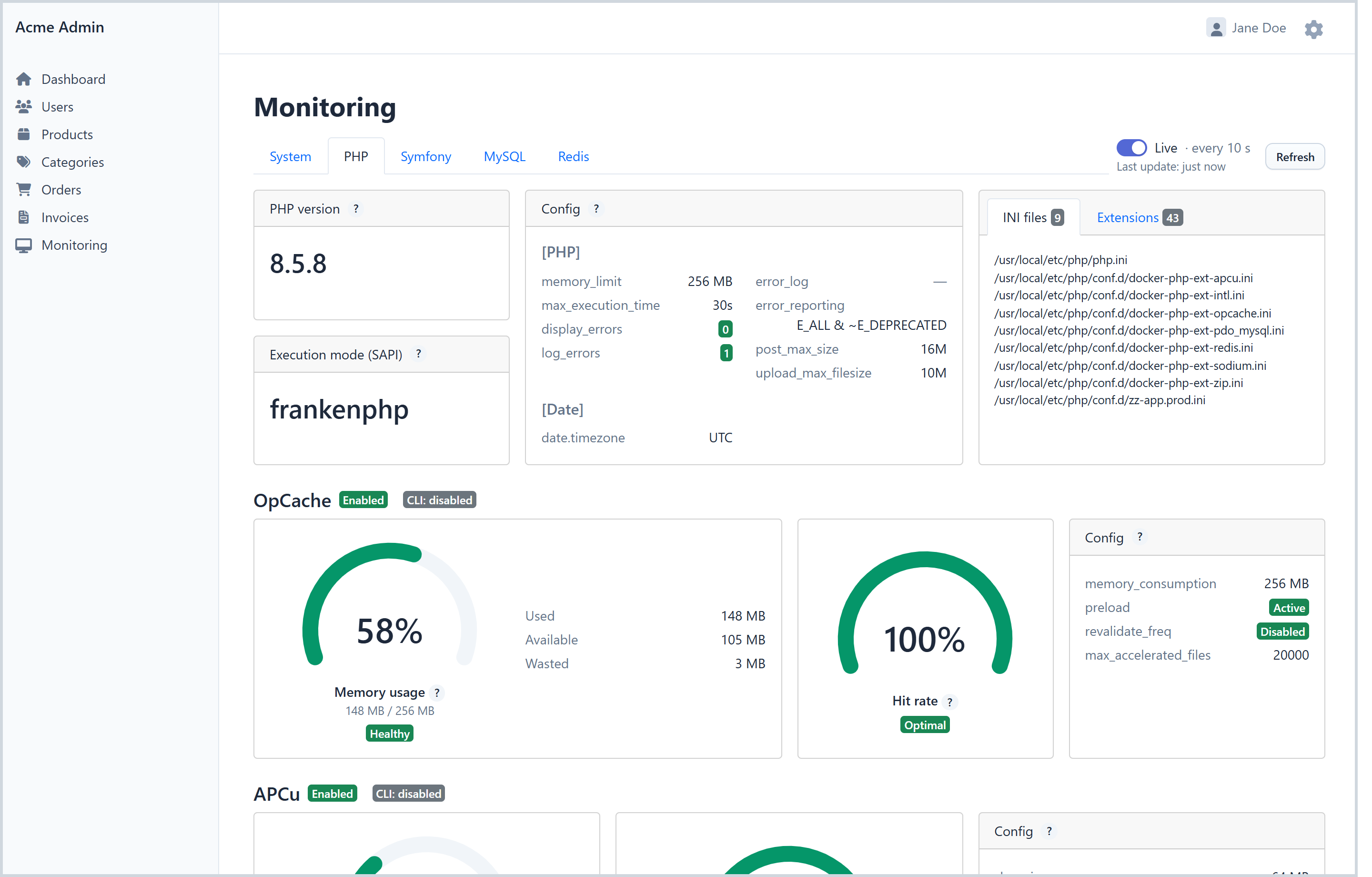
Live monitoring pages inside EasyAdmin: system, PHP, FrankenPHP, MySQL, PostgreSQL, Redis and Symfony metrics collected when you open the page, no worker required.
Package info
github.com/jmonitor/easyadmin-bundle
Type:symfony-bundle
pkg:composer/jmonitor/easyadmin-bundle
Requires
- php: ^8.2
- easycorp/easyadmin-bundle: ^5.2
- jmonitor/collector: ^2.3.0
- psr/cache: ^1.0|^2.0|^3.0
- psr/container: ^1.1|^2.0
- psr/log: ^2.0|^3.0
- symfony/asset: ^6.4|^7.0|^8.0
- symfony/cache: ^6.4|^7.0|^8.0
- symfony/clock: ^6.4|^7.0|^8.0
- symfony/config: ^6.4|^7.0|^8.0
- symfony/console: ^6.4|^7.0|^8.0
- symfony/dependency-injection: ^6.4|^7.0|^8.0
- symfony/framework-bundle: ^6.4|^7.0|^8.0
- symfony/http-foundation: ^6.4|^7.0|^8.0
- symfony/http-kernel: ^6.4|^7.0|^8.0
- symfony/process: ^6.4|^7.0|^8.0
- symfony/routing: ^6.4|^7.0|^8.0
- symfony/security-csrf: ^6.4|^7.0|^8.0
- symfony/service-contracts: ^2.5|^3.0
- symfony/twig-bundle: ^6.4|^7.0|^8.0
- twig/twig: ^3.15
Requires (Dev)
- doctrine/doctrine-bundle: ^2.13|^3.0
- friendsofphp/php-cs-fixer: ^3.86
- phpstan/phpstan: ^2.1
- phpunit/phpunit: ^11.5
- predis/predis: ^2.0|^3.0
- symfony/browser-kit: ^6.4|^7.0|^8.0
- symfony/css-selector: ^6.4|^7.0|^8.0
- symfony/ux-twig-component: ^2.20|^3.0
- symfony/yaml: ^6.4|^7.0|^8.0
- twig/extra-bundle: ^3.15
Suggests
None
Provides
None
Conflicts
None
Replaces
None
This package is auto-updated.
Last update: 2026-10-19 21:42:49 UTC
README
This bundle adds live monitoring pages to your EasyAdmin backend: system, PHP, FrankenPHP, MySQL, PostgreSQL, Redis and Symfony metrics, collected when you open the page and refreshed while it stays open.
No worker to run, nothing to store.
| jmonitor/jmonitor |
jmonitor/collector |
jmonitor/jmonitor-bundle |
|---|---|---|
| Self-hostable backend — not needed with the cloud version | The collectors — install them in the project to monitor | Symfony-specific integration of the collectors |
|
jmonitor/easyadmin-bundle Live monitoring pages inside EasyAdmin — no backend, no worker |
||
| https://jmonitor.io | ||
Supported components
| Category | Components |
|---|---|
| Runtime | |
| Framework | |
| Databases & cache | |
| System |
Requirements
Getting started
1. Install the bundle
composer require jmonitor/easyadmin-bundle
If you do not use Symfony Flex, add the bundle to config/bundles.php and install its assets:
return [
    // ...
    Jmonitor\EasyAdminBundle\JmonitorEasyAdminBundle::class => ['all' => true],
];
php bin/console assets:install
2. Add a menu link
In your dashboard controller, link to the <dashboard route>_jmonitor_index route (admin is the route name of your dashboard, adapt it):
public function configureMenuItems(): iterable
{
    // ...
    yield MenuItem::linkToRoute('Monitoring', 'internal:desktop', 'admin_jmonitor_index');
}
The pages live under the path of your dashboard (/admin/jmonitor for a dashboard at /admin), so the access_control rule protecting your backend covers them.
Configuration
Everything is optional. Components are detected from your application: the Doctrine connections for MySQL and PostgreSQL (every connection of their driver; MySQL connections are grouped by server), the Redis provider of the Symfony cache or the REDIS_URL env var for Redis, the PHP process for PHP, its SAPI for FrankenPHP, /proc for the system.
# config/packages/jmonitor_easyadmin.yaml
jmonitor_easyadmin:
    cache_pool: cache.app      # PSR-6 pool keeping the collected metrics
    polling_interval: 10       # seconds between two live refreshes, 0 disables them
    static_ttl: 3600           # seconds during which versions, configuration and OS data are kept
    permission: ~              # role or voter attribute required to see the pages, e.g. ROLE_SUPER_ADMIN
    exclude_connections: []    # Doctrine connections the MySQL and PostgreSQL tabs leave out, e.g. '*_backup'
    components:
        system: auto           # auto | true | false
        php: auto
        frankenphp:
            enabled: auto
            endpoint: http://localhost:2019/metrics   # Prometheus endpoint of the Caddy admin API
        symfony:
            enabled: auto
            messenger: true    # runs "messenger:stats", defaults to true when Messenger is installed on Symfony 7.2+
            scheduler: true    # runs "debug:scheduler", defaults to true when Scheduler is installed
            flex: true         # runs "composer recipes", defaults to true when Flex is installed
        mysql:
            enabled: auto
            connections: []    # Doctrine connection names, empty = every MySQL/MariaDB connection
        postgresql:
            enabled: auto
            connections: []    # Doctrine connection names, empty = every PostgreSQL connection
            schema: public     # schema whose tables feed the storage, scans and dead rows cards
        redis:
            enabled: auto
            connections: []    # id => DSN, {dsn} or {service}; empty = the Symfony cache provider or REDIS_URL
auto shows the component when it is detected. true always shows it, with the detection error when it fails. false removes it.
permission restricts the pages to the users granted that role or voter attribute, on every dashboard, on top of the security of the dashboard itself; the others get a 403. Hide the menu link the same way: MenuItem::linkToRoute(...)->setPermission('ROLE_SUPER_ADMIN').
connections lists the Doctrine connections to show, each one becoming a pill under the tabs (MySQL groups them by server: a pill per server, then the databases of the selected server); a connection named here is always shown, with its error when it cannot be read. A PostgreSQL connection may have its own schema: connections: { default: ~, dwh: { schema: analytics } }. The former connection option still works and is deprecated.
exclude_connections leaves out of the MySQL and PostgreSQL tabs the Doctrine connections whose name matches one of its patterns, with the * and ? wildcards: the connections your application declares but does not serve, for instance exclude_connections: ['*_backup']. These connections are not even built, which matters when Doctrine opens a connection to read its server version (mapping_types without server_version). A connection listed in connections cannot match it.
For Redis, connections maps an id to a DSN, { dsn: ... } or { service: ... } (a \Redis, \Predis\Client or \Relay\Relay service), each one becoming a pill: connections: { cache: 'redis://localhost', sessions: { dsn: 'redis://sessions:6379/1' }, queue: { service: app.redis_queue } }. The former dsn and service options still work and are deprecated.
Compared to jmonitor.io
This bundle shows the present only: nothing is collected while nobody looks at the page, and nothing is kept.
jmonitor.io, the cloud edition (also self-hostable), collects your metrics continuously with a worker and keeps their history: the dashboards draw their charts, and alerts notify you by email when a threshold is crossed or a version reaches its end of life.
Both use the same collectors and run side by side: install jmonitor/jmonitor-bundle, fill its API key and run its worker to send the same metrics to jmonitor.io.
Good to know
- System: Linux only, read from
/proc. - PHP: the metrics are those of the PHP process serving the admin. The PHP-FPM section needs PHP-FPM, the APCu cards the APCu extension.
- FrankenPHP: shown when the admin is served by FrankenPHP (PHP SAPI
frankenphp). The metrics are read from the Prometheus endpoint of the Caddy admin API,http://localhost:2019/metricsby default; they need themetricsglobal option in the Caddyfile ({ metrics }), otherwise the tab says so. The version runsfrankenphp version, once perstatic_ttl, so the binary should be in thePATHof the web process; when it stays empty, a warning on thejmonitor_easyadminchannel says why, and Refresh runs the command again. In worker mode, every worker script gets its own card, and the Busy threads gauge covers the threads left to regular requests, since a running worker always holds one. - MySQL: every MySQL or MariaDB connection of Doctrine is shown, grouped by server (same socket, or same host and port). With several servers, each gets a pill under the tabs, labelled with its host (
host:portwhen two servers share a host). The page shows the server cards first, then a Database block: its name alone for one database, pills for two, a drop-down from three. A server's cards are collected once, however many databases it holds. With a single connection there is no pill and no selector. Restrict the connections withconnectionsorexclude_connections. The slow queries are read from theperformance_schema; without access to it, that card shows an error and the rest of the tab still works. The InnoDB RAM ratio is only shown on Linux, when MySQL runs on the web host (no host, a loopback host or a Unix socket). Servers are told apart by the host name written in the connection: an IP address and a host name of the same server make two pills, and a proxy in front of several servers makes one. Theperformance_schemakeeps its query statistics per database in a table ofperformance_schema_digests_sizerows: with many databases holding the same queries, the table fills up, the new queries are no longer counted (Performance_schema_digest_lostgrows) and the slow queries of some databases stay empty; raise that variable in the MySQL configuration. - PostgreSQL: the slow queries need the
pg_stat_statementsextension (added toshared_preload_libraries, thenCREATE EXTENSION pg_stat_statementsin the database) and a connection role allowed to read the server settings and the queries of the other sessions:GRANT pg_monitor TO <your role>. Without them, the tab shows the error with what to do and the rest still works. Every PostgreSQL connection of Doctrine gets a pill under the tabs; restrict them withconnectionsorexclude_connections. The storage, scans and dead rows cards cover the tables of the configuredschema, per connection whenconnectionsgives one. The RAM ratio ofshared_buffersis only shown on Linux, when PostgreSQL runs on the web host. - Redis: every server listed in
connectionsgets a pill under the tabs, with its own cache and Refresh; a server that is down or a service that does not exist shows its error on its pill. Withoutconnections, the Redis provider of the Symfony cache orREDIS_URLis monitored. - Symfony: the scheduler is read in the web process. The Messenger stats run
bin/console messenger:stats --format=json(Symfony 7.2+) in a PHP CLI process started by the web server, and the Flex recipes check needscomposerin itsPATH. When one of them fails, its card shows the cause; set its option tofalseto remove the card.
How it works
Opening a tab runs the component's collectors and caches the result: fast-changing data for polling_interval seconds, versions and configuration for static_ttl seconds. The Refresh button drops the cache of the page, including the cards a MySQL server shares with its other databases, for instance after a server restart.
A MySQL or PostgreSQL server that cannot be reached costs one connection attempt per collect, not one per card, and its error is kept for a minute (polling_interval when longer), since each attempt may wait for the connection timeout. One request at a time collects a connection, and one at a time the cards of a MySQL server, whichever database they are opened from: another request opened meanwhile says the collect is in progress instead of waiting for the same timeout, and Refresh starts a new collect anyway. A connection the monitoring opened is closed once collected, so that a worker runtime such as FrankenPHP does not keep one open for each database looked at.
The MySQL and PostgreSQL tabs read the parameters of the Doctrine connections (driver, host, port, socket, database, never the credentials) once per static_ttl seconds and keep them in the cache pool; a connection that cannot be built is tried again after a minute (polling_interval when longer). A new container build, a deployment for instance, or Refresh on one of these tabs reads them again; a connection whose environment variables changed without a new build shows its former server until then. Only the connection of the page is then built.
A Doctrine connection whose service cannot be built is left out of the MySQL and PostgreSQL tabs and logged as a warning on the jmonitor_easyadmin channel, at most once per static_ttl seconds; a connection listed in connections is shown in its tab with the error instead.
Several web servers behind a load balancer are not well handled yet: the System and PHP values depend on the server that answered, and may change from one refresh to the next.
Security
- The pages are protected like the rest of your backend, by your own security configuration (an
access_controlrule on the path of the dashboard, as recommended by EasyAdmin), and by thepermissionoption when it is set. They show data meant for administrators: query texts (the slow queries are normalized,?in the MySQLDIGEST_TEXTand$1in PostgreSQL'spg_stat_statements, but the PostgreSQL Blocking chain card shows the queries ofpg_stat_activity.querywith their literal values, which may hold personal data), the MySQL or PostgreSQL user and host in driver errors, the paths of the PHP INI files. - The pages are reachable under every dashboard of the application, whether its menu links to them or not: with a second dashboard for less trusted users, they answer there too. Set
permissionto a role those users do not have, or add anaccess_controlrule on^/<dashboard path>/jmonitorbefore the rule of that dashboard. - The FrankenPHP tab reads the Caddy admin API, which listens on
localhost:2019by default and is not meant to be exposed: keep it there and pointcomponents.frankenphp.endpointat it; the tab never writes to it. - EasyAdmin applies the
hostof a dashboard to its own route only, not to the routes it generates under it, these pages included: restrict the host in the firewall or in theaccess_controlrule instead. - With a Content-Security-Policy, allow
https://dash.jmonitor.ioinframe-src, where the help pages behind the?links live; otherwise the help panel stays empty and its "Open in a new tab" link still works. The bundle loads its scripts frombundles/jmonitoreasyadmin/, with a nonce whencsp_nonce()is available (NelmioSecurityBundle), and uses no inline script or style.
Need help?
- Anything about this bundle — installation, configuration, the pages in EasyAdmin: open an issue on this repo https://github.com/jmonitor/easyadmin-bundle/issues
- Anything about a metric — a missing or wrong value, a collector that does not gather what you expect: open an issue on https://github.com/jmonitor/collector/issues
- Anything about the help pages or jmonitor.io itself: open an issue on https://github.com/jmonitor/jmonitor/issues
- To report a vulnerability, see SECURITY.md.