
iso-doss / laravel-meridian

Horizon for the database queue driver: dashboard, metrics and code-driven supervisors for Laravel database queues.
Requires
- php: ^8.3
- ext-json: *
- illuminate/contracts: ^12.0||^13.0
- illuminate/queue: ^12.0||^13.0
- inertiajs/inertia-laravel: ^3.0
- spatie/laravel-package-tools: ^1.16
- symfony/process: ^7.0||^8.0
Requires (Dev)
- larastan/larastan: ^3.0
- laravel/pint: ^1.14
- laravel/slack-notification-channel: ^3.0
- laravel/vonage-notification-channel: ^3.0
- nunomaduro/collision: ^8.8
- orchestra/testbench: ^11.0.0||^10.0.0
- pestphp/pest: ^4.0
- pestphp/pest-plugin-arch: ^4.0
- pestphp/pest-plugin-laravel: ^4.0
- phpstan/extension-installer: ^1.4
- phpstan/phpstan-deprecation-rules: ^2.0
- phpstan/phpstan-phpunit: ^2.0
Suggests
- ext-pcntl: Required to pause / continue / gracefully terminate workers.
- ext-posix: Required to signal worker processes.
- laravel/slack-notification-channel: Required to send the long wait notifications to Slack.
- laravel/vonage-notification-channel: Required to send the long wait notifications by SMS.
Provides
None
Conflicts
None
Replaces
None
README

Introduction
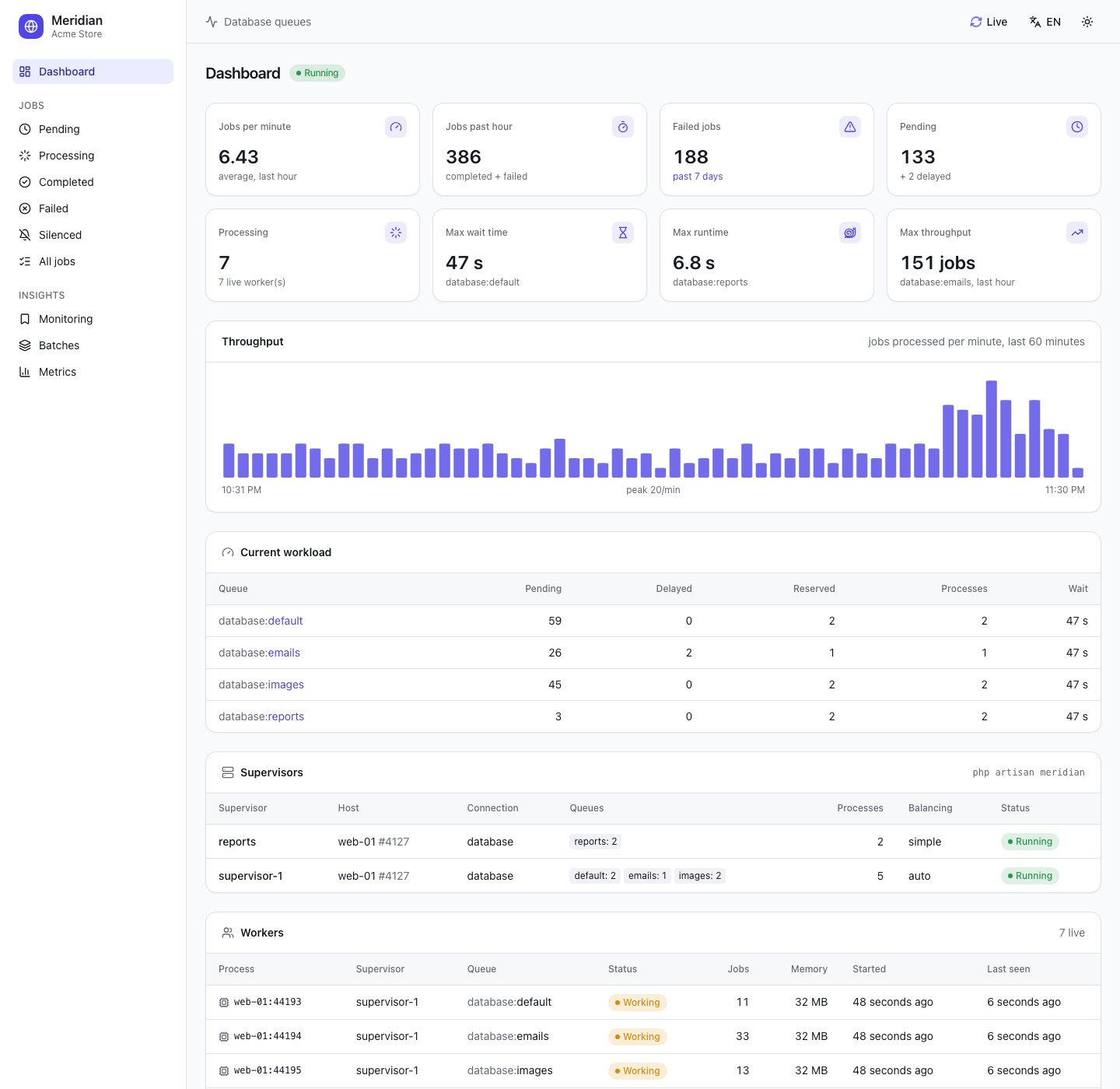
Meridian gives the Laravel database queue driver what Laravel Horizon gives Redis: a beautiful dashboard and code-driven configuration. Monitor the throughput, runtime, wait time and failures of your jobs, search them by tag, retry them in one click, and follow your batches and workers live.
All of your worker configuration lives in a single, simple configuration file. php artisan meridian starts and supervises your queue:work processes and balances them between your queues according to their workload, exactly like Horizon, so your whole team can scale the workers from source control.
- Why Meridian?
- Screenshots
- Installation
- Configuration
- Running Meridian
- The dashboard
- Tags
- Notifications
- Metrics
- Retention
- How it works
- Upgrading
- Contributing
Why Meridian?
Horizon only works with Redis. If your application runs its queues on the database driver, you usually have no visibility on what runs in the background: the jobs table only holds pending jobs, and a job leaves no trace once it is processed. Meridian records the whole life of every job and brings the Horizon experience to the database driver:
- Dashboard: jobs per minute, jobs of the past hour, failures, pending and delayed jobs, max wait time, slowest and busiest queues, throughput chart, workload per queue, supervisors and workers.
- Job history: pending, processing, completed and failed jobs, with their tags, readable data (the properties of the job), payload, exception, attempts, wait time and runtime.
- Monitored tags: watch a customer, an order or any tag; its jobs are listed together and kept longer.
- Search by job class, tag (
App\Models\User:42, or anything returned by atags()method) or UUID. - Actions: retry one failed job or all of them, with the history of each retry, (those matching the filters of the list), cancel a pending job, retry the failed jobs of a batch.
- Batches: progress of your
Bus::batch()batches and of their jobs. - Metrics: per job and per queue (processed, failure rate, average and max runtime, average wait), with a history of snapshots.
- Workers: every
queue:workprocess reports a heartbeat (status, memory, jobs processed), even without Meridian's supervisor. - Supervisors:
php artisan meridianbalances processes between queues (auto,simpleor no balancing), withmeridian:pause,meridian:continueandmeridian:terminate. - Notifications by e-mail, Slack or SMS when a queue waits too long.
- A modern interface: React, Inertia and shadcn/ui, light, dark and system themes, English and French, live refresh. Its compiled assets ship with the package: your application needs neither Node, React nor an Inertia setup of its own.
Screenshots
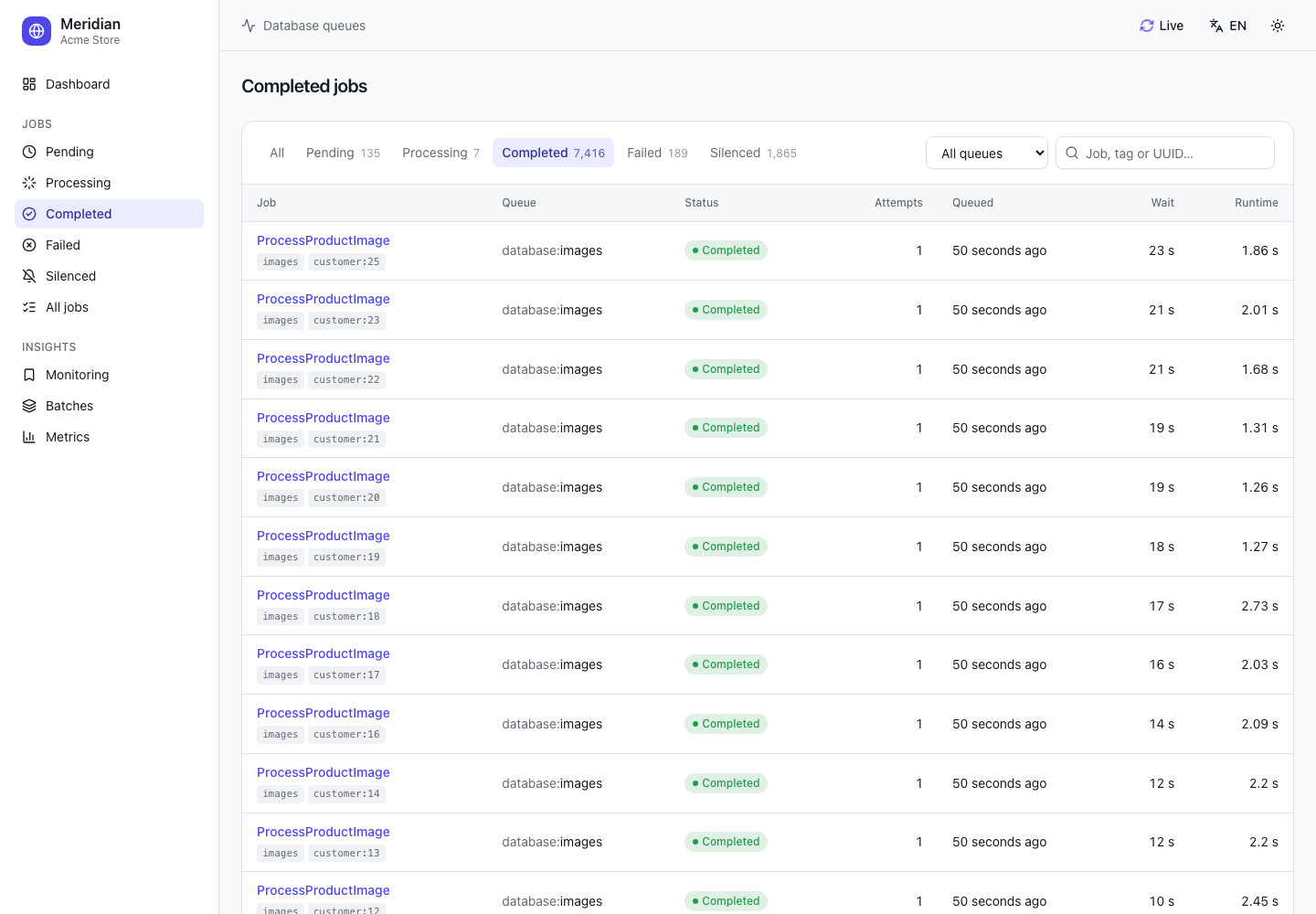
Jobs: by status, filtered by queue or tag, searched by class, tag or UUID |
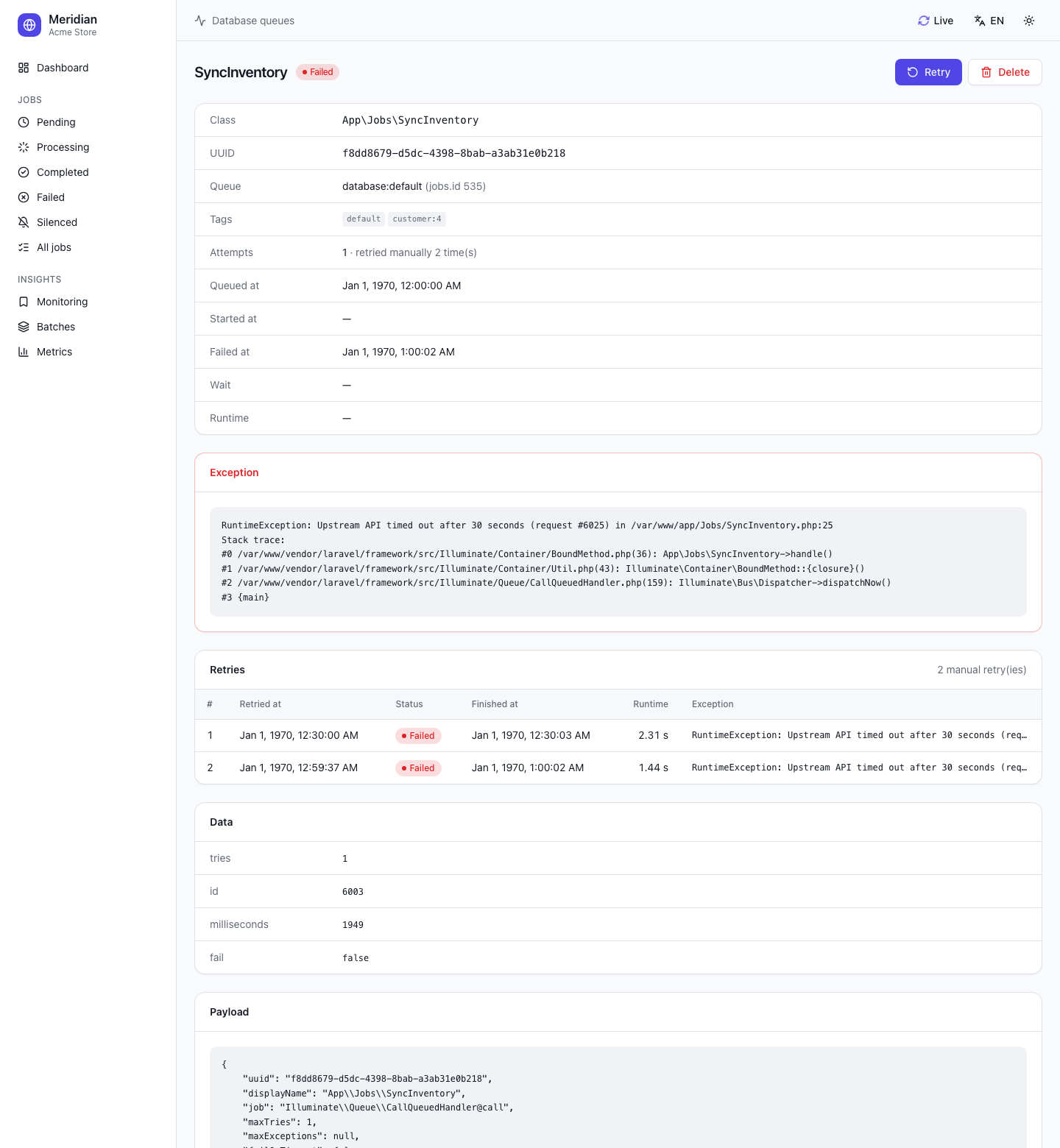
Job details: exception, retry history, readable data, payload |
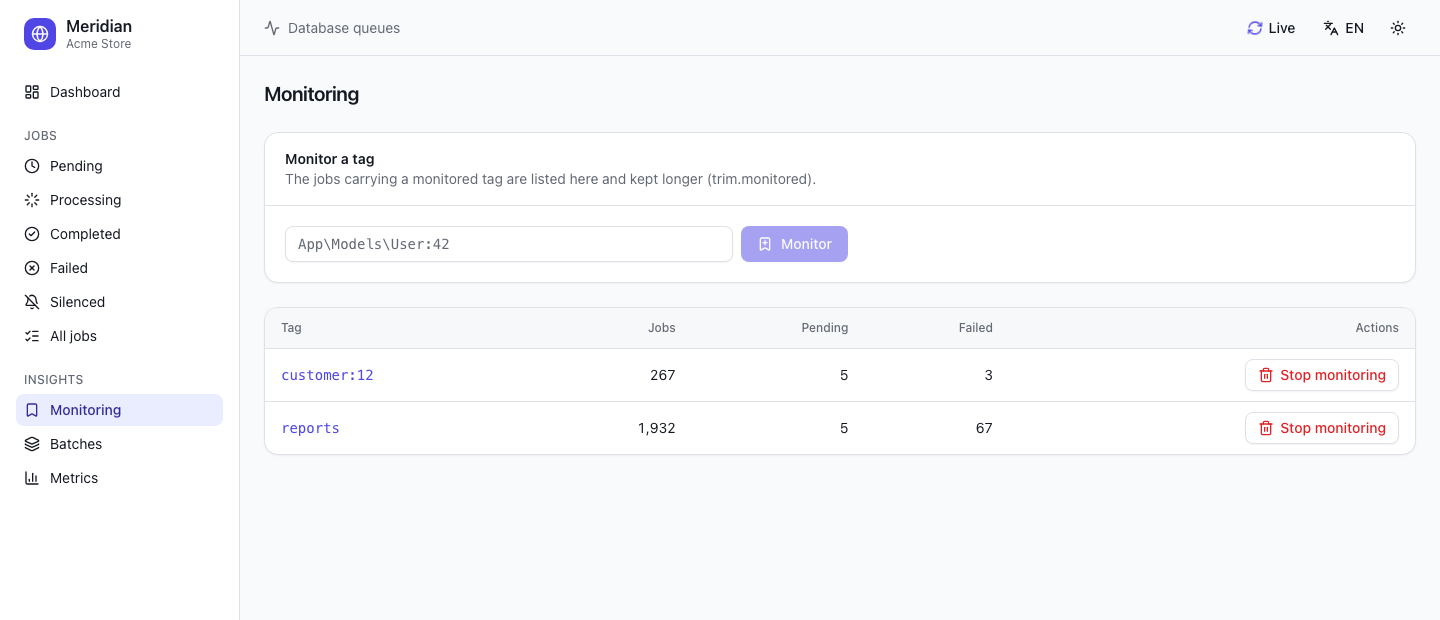
Monitoring: watch tags, keep their jobs longer |
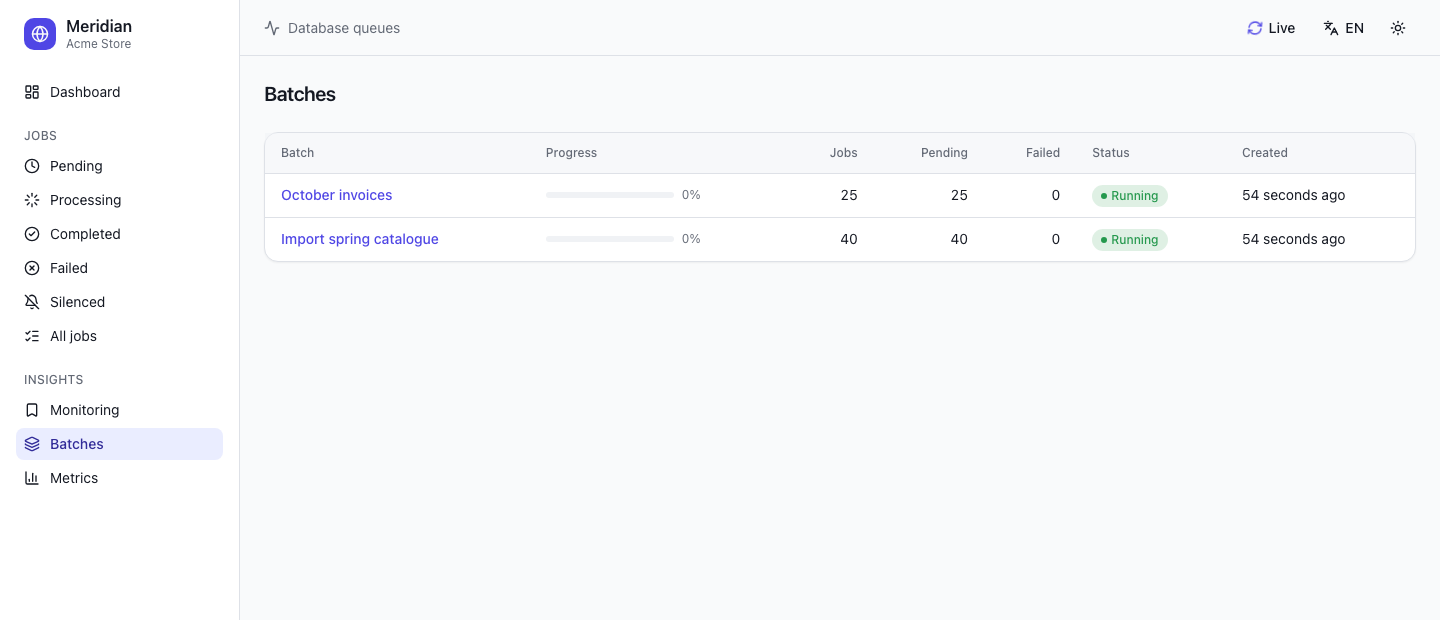
Batches: progress, pending and failed jobs |
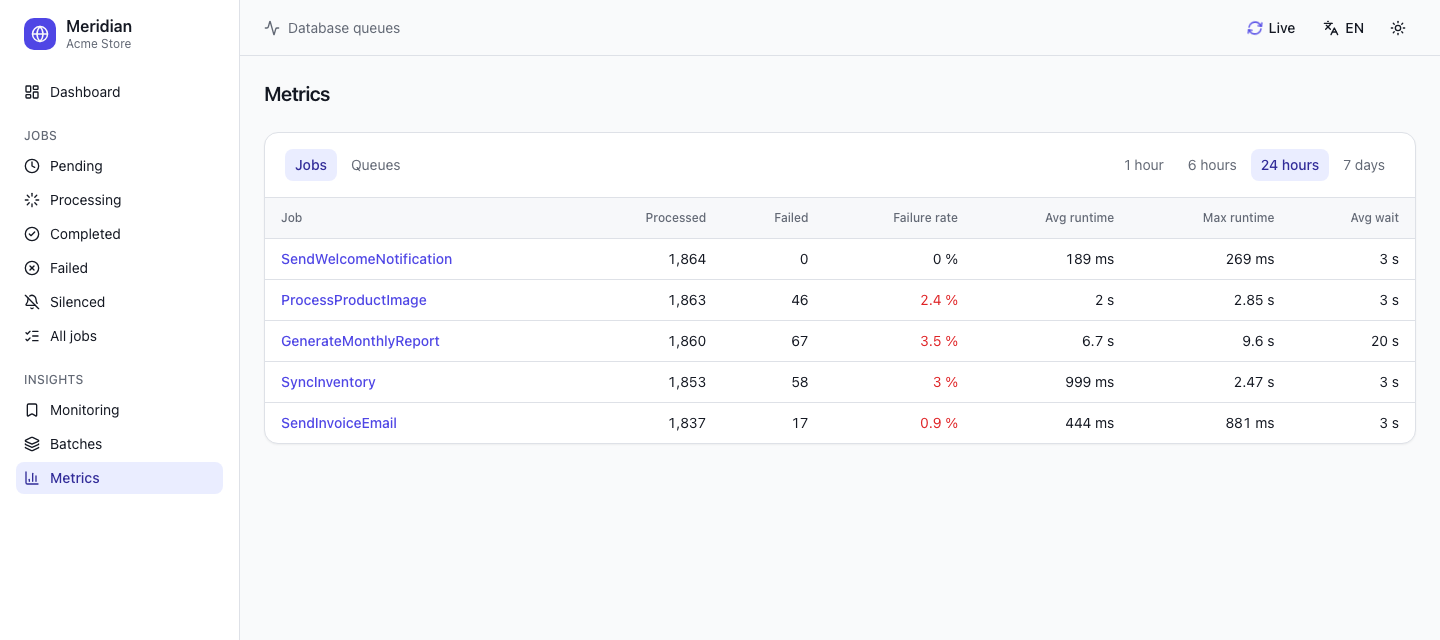
Metrics: per job or per queue, over 1 hour to 7 days |
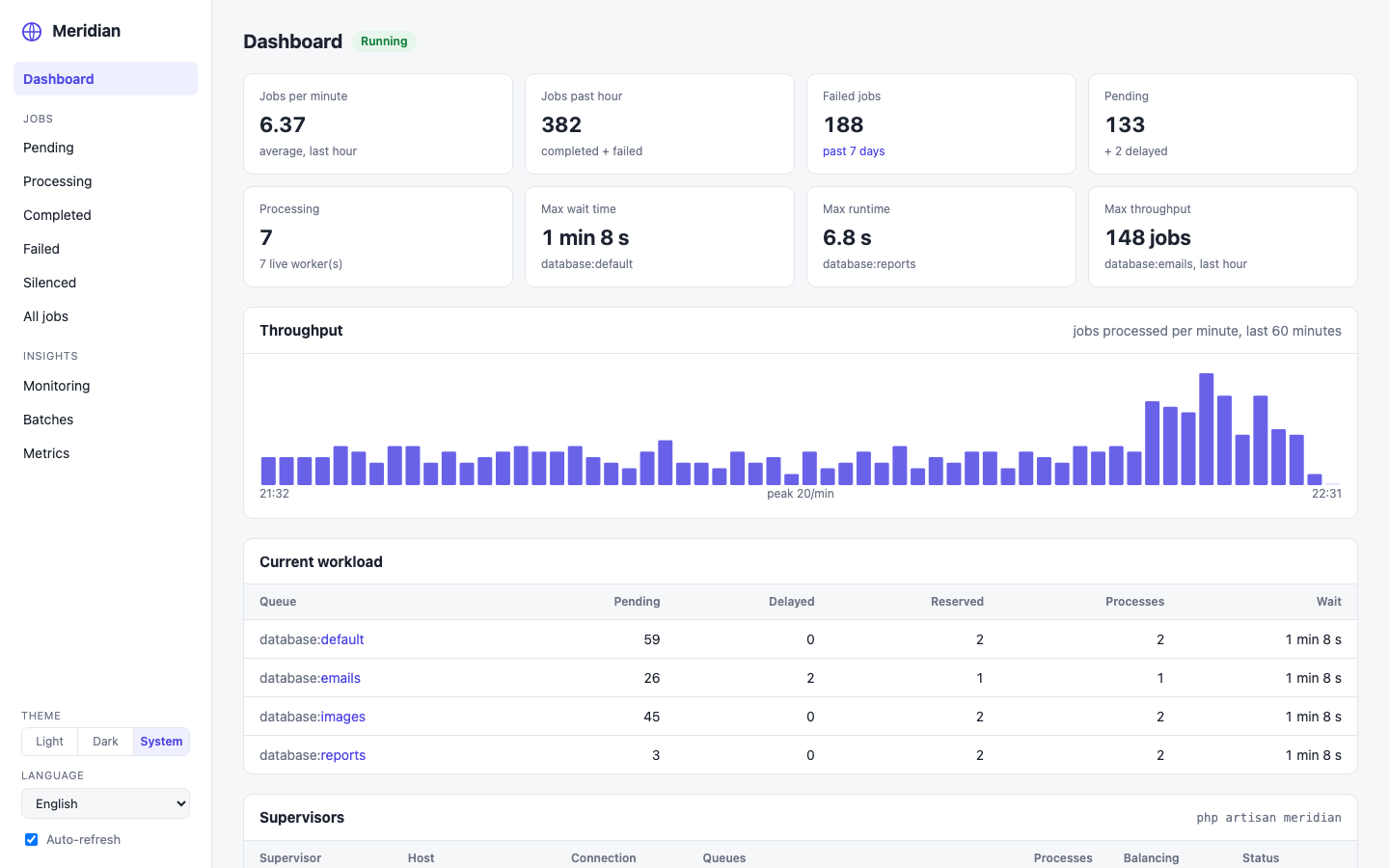
Blade interface: the same pages, server-rendered ( |
The screenshots follow the theme of your GitHub account: switch it to see the other one.
Installation
Meridian requires PHP 8.3+, Laravel 12 or 13, and inertiajs/inertia-laravel v3 (installed with the package).
composer require iso-doss/laravel-meridian
php artisan meridian:install
The install command publishes config/meridian.php, the migration and App\Providers\MeridianServiceProvider (registered in bootstrap/providers.php), then offers to run the migrations.
If your application does not have them yet, create the tables of the database queue driver:
php artisan make:queue-table
php artisan make:queue-failed-table
php artisan make:queue-batches-table
php artisan migrate
Meridian registers meridian:snapshot (every five minutes) and meridian:prune (hourly) in the scheduler: make sure it runs (php artisan schedule:work locally, a cron entry in production), or disable this with meridian.schedule = false and schedule them yourself.
Configuration
After installing Meridian, its configuration lives in config/meridian.php. Each option is documented in the file itself.
Environments and supervisors
The environments option lists, for each environment of your application, the supervisors to run. A supervisor manages a group of worker processes processing one or more queues. The supervisors of the current environment (APP_ENV) are started; a '*' environment is used when none matches.
'environments' => [
    'production' => [
        'supervisor-1' => [
            'connection' => 'database',
            'queue' => ['default', 'emails', 'images'],
            'balance' => 'auto',
            'minProcesses' => 1,
            'maxProcesses' => 10,
            'balanceMaxShift' => 1,
            'balanceCooldown' => 3,
            'tries' => 3,
        ],

        'reports' => [
            'connection' => 'database',
            'queue' => ['reports'],
            'balance' => 'simple',
            'maxProcesses' => 2,
            'timeout' => 300,
        ],
    ],

    'local' => [
        'supervisor-1' => [
            'maxProcesses' => 3,
        ],
    ],
],
The defaults option holds the values shared by every supervisor of the same name, merged with the values of the environment.
Balancing strategies
balance |
Behaviour |
|---|---|
auto (default) |
Each queue gets its own pool of processes; Meridian moves processes towards the queues with the most work, between minProcesses per queue and maxProcesses in total. With autoScalingStrategy: time (default) the work of a queue is its pending jobs × their average runtime, with size only its number of pending jobs, and with log the logarithm of that number, so that one huge queue does not take every process. balanceMaxShift processes are added or removed every balanceCooldown seconds. |
simple |
maxProcesses is split evenly between the queues. |
false |
maxProcesses workers process the queues in the order they are listed, like queue:work --queue=high,default. |
Like with Horizon, the order of the queues does not set priorities with auto balancing: give a resource-heavy queue its own supervisor with a low maxProcesses.
Worker options
| Option | Default | queue:work option |
|---|---|---|
tries |
1 |
--tries |
timeout |
60 |
--timeout (keep it a few seconds below retry_after) |
backoff |
0 |
--backoff |
memory |
128 |
--memory |
sleep |
3 |
--sleep |
maxJobs |
0 |
--max-jobs |
maxTime |
0 |
--max-time |
rest |
0 |
--rest |
nice |
0 |
runs the workers with nice -n |
force |
false |
--force (process jobs in maintenance mode) |
Silenced jobs
Completed jobs listed in the silenced option, implementing IsoDoss\Meridian\Contracts\Silenced, or carrying a tag of the silenced_tags option leave the « Completed » list for the « Silenced » one, like with Horizon. They still count in the metrics and are pruned like the completed jobs. Their failures are always listed with the other failures.
'silenced' => [
    App\Jobs\PingHealthCheck::class,
],

'silenced_tags' => [
    'notifications',
],
Running Meridian
You have two options:
- Keep your workers. Run
php artisan queue:work database ...with Supervisor or systemd as usual: jobs, metrics and workers show up in the dashboard. - Let Meridian supervise them, like Horizon: run one long-lived process and Meridian starts, restarts and balances the
queue:workprocesses of the current environment.
php artisan meridian
| Command | Description |
|---|---|
meridian |
Start the master supervisor |
meridian:status |
Show the status, the supervisors and the workload |
meridian:pause / meridian:continue |
Pause or resume the workers (--all for every host) |
meridian:pause-supervisor {name} / meridian:continue-supervisor {name} |
Pause or resume the workers of one supervisor (--all for every host) |
meridian:supervisors |
List the running supervisors |
meridian:supervisor-status {name} |
Show the status of a supervisor |
meridian:terminate |
Finish the running jobs, then stop the master supervisor (--all for every host) |
meridian:snapshot |
Store a metrics snapshot, import the jobs pushed without event, check the wait times |
meridian:prune |
Delete old completed and failed jobs, metrics and stale heartbeats |
meridian:forget {uuid} / meridian:forget --all |
Delete a failed job, or all of them, from Meridian and from the failed jobs table |
meridian:clear {connection?} --queue= |
Delete the jobs waiting on a queue (asks for confirmation in production, --force to skip it) |
meridian:clear-metrics |
Delete every metrics snapshot |
meridian:listen |
Local development: run Meridian and restart it whenever a PHP file of the application changes |
php artisan meridian requires the pcntl and posix extensions. When its memory exceeds memory_limit (64 MB by default, 0 to disable), it finishes the running jobs and exits with the code 12, so that your process monitor starts it again with fresh memory.
In local development, php artisan meridian:listen runs Meridian and restarts it whenever a PHP file of the directories listed in the watch option changes (app, config, routes…). Unlike horizon:listen, it needs neither Node nor any npm package: it polls the files every second (--poll= to change it).
Deploying Meridian
Keep php artisan meridian running with a process monitor such as Supervisor, and run php artisan meridian:terminate during each deployment: the running jobs finish, Meridian exits, and the process monitor restarts it with your new code.
[program:meridian]
process_name=%(program_name)s
command=php /var/www/app/artisan meridian
autostart=true
autorestart=true
user=forge
redirect_stderr=true
stdout_logfile=/var/www/app/storage/logs/meridian.log
stopwaitsecs=3600
stopwaitsecs must be longer than your longest job.
The dashboard
The dashboard is available at /meridian. Its pages refresh themselves every meridian.poll seconds (switch « Live » in the header).
Dashboard authorization
In the local environment everybody can open the dashboard. In the other environments, access is granted by the viewMeridian gate of app/Providers/MeridianServiceProvider.php:
protected function gate(): void
{
    Gate::define('viewMeridian', function ($user = null) {
        return in_array(optional($user)->email, [
            'taylor@example.com',
        ]);
    });
}
You may also call Meridian::auth(fn (Request $request) => ...) directly. The prefix, domain and middleware of the dashboard and of its API are configured in the route option (MERIDIAN_PREFIX, MERIDIAN_API_PREFIX, MERIDIAN_DOMAIN); the authorization middleware is always added on top of them.
Interfaces, themes and languages
Two interfaces ship with Meridian:
- Inertia (default): React, Inertia and shadcn/ui. It has its own root view, Inertia middleware and asset version: your application's Inertia setup (shared props, SSR, root view) is never involved, even when it uses Inertia too.
- Blade: a lightweight server-rendered interface, with the same pages.
Both offer a light, dark or system theme (kept in the browser) and are translated in English and French: the language follows the application locale and can be changed from the interface (kept in a cookie). Restrict the offered languages with the locales option.
To use the Blade interface, set in your .env:
MERIDIAN_UI=blade
or 'ui' => 'blade' in a published config/meridian.php (republish it with php artisan vendor:publish --tag=meridian-config --force to get the keys added since your version), then php artisan config:clear if the configuration is cached. Both interfaces share the same URLs, route names, actions and JSON API.
Content-Security-Policy
Meridian works under a strict, nonce-based CSP such as script-src 'nonce-…' 'strict-dynamic' 'self': when your application sets a nonce with Vite::useCspNonce(), Meridian puts it on its scripts and styles and passes it to Inertia. There is nothing to configure, and no need to exempt Meridian's routes from your policy.
JSON API
The dashboard data is also available as JSON, behind the same authorization: GET /meridian/api/stats, /meridian/api/workload, /meridian/api/jobs/{status?}?search=&queue= and /meridian/api/jobs/{uuid}.
Tags
Meridian tags jobs, mailables, broadcast events, notifications and queued event listeners like Horizon does. The Eloquent models held by a job are tagged automatically: a RenderVideo job holding the App\Models\Video with the id 1 gets the App\Models\Video:1 tag. To tag a job yourself, give it a tags method:
class RenderVideo implements ShouldQueue
{
    public function tags(): array
    {
        return ['render', 'video:'.$this->video->id];
    }
}
Click a tag anywhere in the dashboard to list every job carrying it. The page of a retried job lists every retry with its outcome, runtime and exception. On the failed jobs page, « Retry all » pushes back every failed job matching the current filters (queue, search): retry all the failed jobs of a queue, or of a customer by searching its tag.
Monitored tags
Like Horizon, the « Monitoring » page lets you watch tags: add App\Models\User:42 or customer:42 and its jobs are listed together, with their number of pending and failed jobs. The jobs carrying a monitored tag are kept trim.monitored minutes (7 days by default) instead of trim.completed.
Monitored tags are stored in the meridian_monitored_tags table. When upgrading from a version older than 1.4.0 (monitored tags) or 1.5.0 (retry history), publish and run the new migrations:
php artisan vendor:publish --tag=meridian-migrations
php artisan migrate
Notifications
When the oldest job of a queue waits longer than its threshold, Meridian fires an IsoDoss\Meridian\Events\LongWaitDetected event and notifies the configured routes, at most once every notifications.cooldown minutes per queue. Like with Horizon, set the routes in the boot method of App\Providers\MeridianServiceProvider:
use IsoDoss\Meridian\Meridian;

public function boot(): void
{
    parent::boot();

    Meridian::routeMailNotificationsTo('ops@example.com');
    Meridian::routeSlackNotificationsTo('https://hooks.slack.com/services/…', '#queues');
    Meridian::routeSmsNotificationsTo('+15555550123');
}
or in your .env: MERIDIAN_NOTIFY_MAIL, MERIDIAN_NOTIFY_SLACK_WEBHOOK (and MERIDIAN_NOTIFY_SLACK_CHANNEL), MERIDIAN_NOTIFY_SMS. Slack requires laravel/slack-notification-channel and SMS laravel/vonage-notification-channel.
The thresholds, in seconds, are set per connection:queue in the waits option. Like with Horizon, a queue not listed uses '*', or 60 seconds when '*' is not set; 0 disables the notifications of a queue:
'waits' => [
    'database:default' => 60,
    'database:reports' => 600,
    '*' => 120,
],
Metrics
The dashboard shows the slowest queue (highest average runtime) and the busiest one (most jobs processed) of the last hour. The metrics page shows, per job class and per queue, the jobs processed and failed, the failure rate, the average and max runtime and the average wait, over the last hour to the last seven days. Each job and queue also has its history of snapshots, stored every five minutes by meridian:snapshot.
Retention
meridian:prune deletes the completed jobs after trim.completed minutes (1 day by default), the failed ones after trim.failed minutes (7 days), the metric snapshots after trim.metrics minutes (7 days) and the stale heartbeats of workers and supervisors after trim.workers minutes. Pending and processing jobs are never pruned. Set store_payload to false to keep the table small on very busy queues.
How it works
| Horizon (Redis) | Meridian (database) |
|---|---|
| Jobs stored in Redis by Horizon's own queue | Laravel's queue events (JobQueued, JobProcessing, JobProcessed, JobFailed, JobReleasedAfterException, JobRetryRequested) are recorded in a meridian_jobs table, keyed by the job UUID |
| Workload read from Redis lists | Workload read from the jobs table: pending, delayed and reserved jobs, oldest available job |
| Supervisors and workers in Redis | meridian_supervisors and meridian_workers tables (heartbeats) |
| Commands through a Redis command queue | Commands written in meridian_supervisors, read by the master every second |
| Metrics snapshots in Redis | meridian:snapshot aggregates them into meridian_metrics |
Jobs inserted without event (Queue::bulk(), used by job batches, pushRaw(), jobs pushed by another application or before Meridian was installed) are imported from the jobs table when a batch is dispatched, when the dashboard is opened and at every snapshot. Recording never breaks your application: every write is guarded and its errors are only reported.
A few notes:
- Keep Meridian's tables on a dedicated connection with
MERIDIAN_DB_CONNECTIONto move the monitoring writes away from your main database. Each job costs two or three small writes. - With SQLite and several workers, Laravel's own
DatabaseQueue::pop()may hitdatabase is lockederrors: enable WAL and a busy timeout ('journal_mode' => 'wal','busy_timeout' => 5000), and prefer MySQL or PostgreSQL in production.
Upgrading
Every release and its upgrade notes are listed in the changelog. Since v1.1.0 the React / Inertia interface is the default one; set MERIDIAN_UI=blade to keep the previous one.
Contributing
composer test
composer analyse
The interface lives in resources/js (React, TypeScript, Tailwind CSS v4, shadcn/ui) and is compiled into dist/, which is committed. The CI checks that dist/ matches the sources.
npm ci
npm run build      # or npm run dev to rebuild on change
npm run typecheck
npm test
Texts go through t('English text') in React and $t('English text') in Blade; add their French translation to lang/fr.json (a test fails when one is missing).
Security Vulnerabilities
Please report security vulnerabilities through the security advisories of the repository rather than in a public issue.
Credits
- Inspired by Laravel Horizon, whose tag extraction is adapted.
- Built on spatie/package-skeleton-laravel.
License
Meridian is open-sourced software licensed under the MIT license.