Search by 
f0ska / auto-grid-bundle

Automatic grid generation for Symfony Doctrine entities.
v2.12.3
2026-05-31 16:27 UTC
Requires
- php: >=8.1
- doctrine/collections: ^2.0
- doctrine/dbal: ^3.0 || ^4.0
- doctrine/orm: ^3.0
- symfony/clock: 6.4.* || 7.4.* || 8.*
- symfony/config: 6.4.* || 7.4.* || 8.*
- symfony/dependency-injection: 6.4.* || 7.4.* || 8.*
- symfony/doctrine-bridge: 6.4.* || 7.4.* || 8.*
- symfony/event-dispatcher-contracts: ^3.0
- symfony/form: 6.4.* || 7.4.* || 8.*
- symfony/framework-bundle: 6.4.* || 7.4.* || 8.*
- symfony/http-foundation: 6.4.* || 7.4.* || 8.*
- symfony/http-kernel: 6.4.* || 7.4.* || 8.*
- symfony/property-access: 6.4.* || 7.4.* || 8.*
- symfony/routing: 6.4.* || 7.4.* || 8.*
- symfony/security-bundle: 6.4.* || 7.4.* || 8.*
- symfony/security-core: 6.4.* || 7.4.* || 8.*
- symfony/string: 6.4.* || 7.4.* || 8.*
- symfony/translation: 6.4.* || 7.4.* || 8.*
- symfony/translation-contracts: ^2.5 || ^3.0
- symfony/twig-bundle: 6.4.* || 7.4.* || 8.*
- symfony/validator: 6.4.* || 7.4.* || 8.*
- symfony/yaml: 6.4.* || 7.4.* || 8.*
- twig/twig: ^3.0
Requires (Dev)
None
Suggests
None
Provides
None
Conflicts
None
Replaces
None
README
AutoGrid automatically generates CRUD interfaces for Doctrine entities.
Demo | Installation | Configuration | Attributes | Optional Factory Arguments | Templates | Customization
Core Features
- CRUD Generation: Full List, Create, Edit, and Delete functionality.
- Metadata-driven: Automatically detects field types from Doctrine metadata.
- Built-in Filtering/Sorting: Integrated search based on database schema.
- PHP 8 Attributes: Configure UI behavior directly in Entity classes.
- Multi-theme Support: Includes Bootstrap 5, Bootstrap 4, Bulma, Flowbite, and Foundation.
Quick Start
-
In your Controller Inject
AutoGridFactoryto create a grid:public function list(AutoGridFactory $factory): Response { $grid = $factory->create(User::class); return $grid->getResponse() ?? $this->render('admin/user.html.twig', ['grid' => $grid]); }
-
In Twig Render the grid:
{{ ag_render(grid) }} -
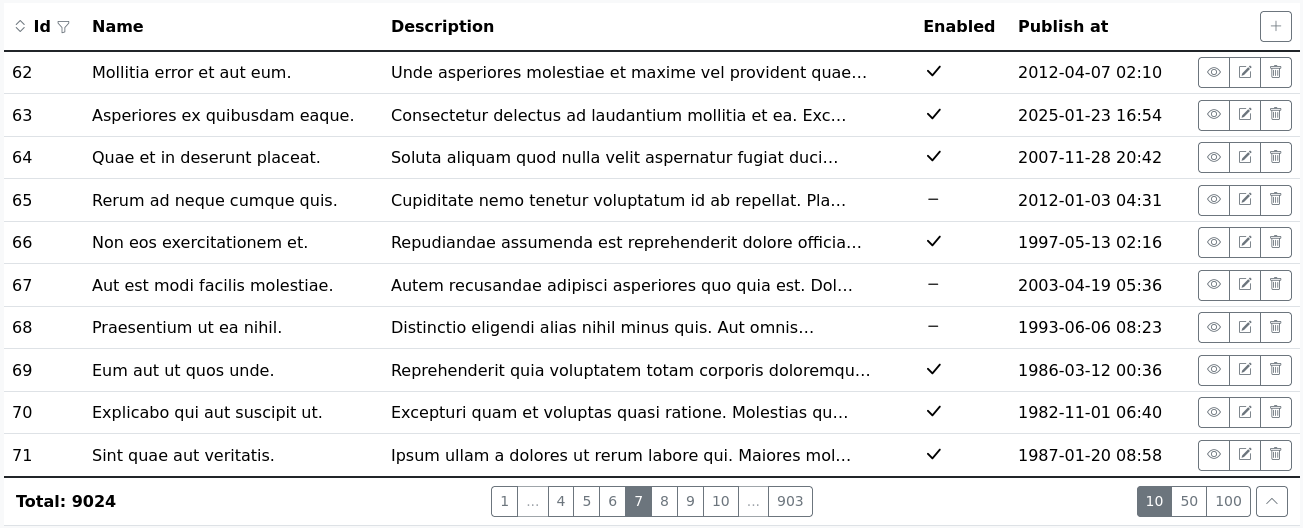
Result

Requirements
- PHP 8.1+
- Symfony 6.4+
- Frameworks: Default templates use Bootstrap 5. You can build your own template and use it with AutoGrid. See templates for custom framework configuration.