
anselmokossa / filament-chatai

An AI assistant for Filament panels — floating chat, a full-page chat and generative UI (KPIs, tables, charts) driven by your own tools.
Requires
- php: ^8.2
- filament/filament: ^5.0
- illuminate/contracts: ^11.0|^12.0|^13.0
- illuminate/support: ^11.0|^12.0|^13.0
- spatie/laravel-package-tools: ^1.16
Requires (Dev)
- anselmocossa/filament-launchpad: ^1.16
- anthropic-ai/sdk: ^0.59.0
- dompdf/dompdf: ^3.0
- laravel/mcp: ^0.6|^0.7
- laravel/pint: ^1.0
- nunomaduro/collision: ^7.0|^8.0
- orchestra/testbench: ^9.0|^10.0|^11.0
- pestphp/pest: ^2.0|^3.0|^4.0
- pestphp/pest-plugin-laravel: ^2.0|^3.0|^4.0
- spatie/laravel-permission: ^6.23
Suggests
- anselmocossa/filament-launchpad: Show the assistant as live tiles (questions, pending changes, cost, suggested questions) on a Fiori-style launchpad.
- anthropic-ai/sdk: Use Claude natively (provider "anthropic") instead of an OpenAI-compatible endpoint.
- dompdf/dompdf: Let the assistant create PDF documents.
- laravel/mcp: Expose your existing Laravel MCP tools to the assistant through LaravelMcpToolProvider.
Provides
None
Conflicts
None
Replaces
None
README
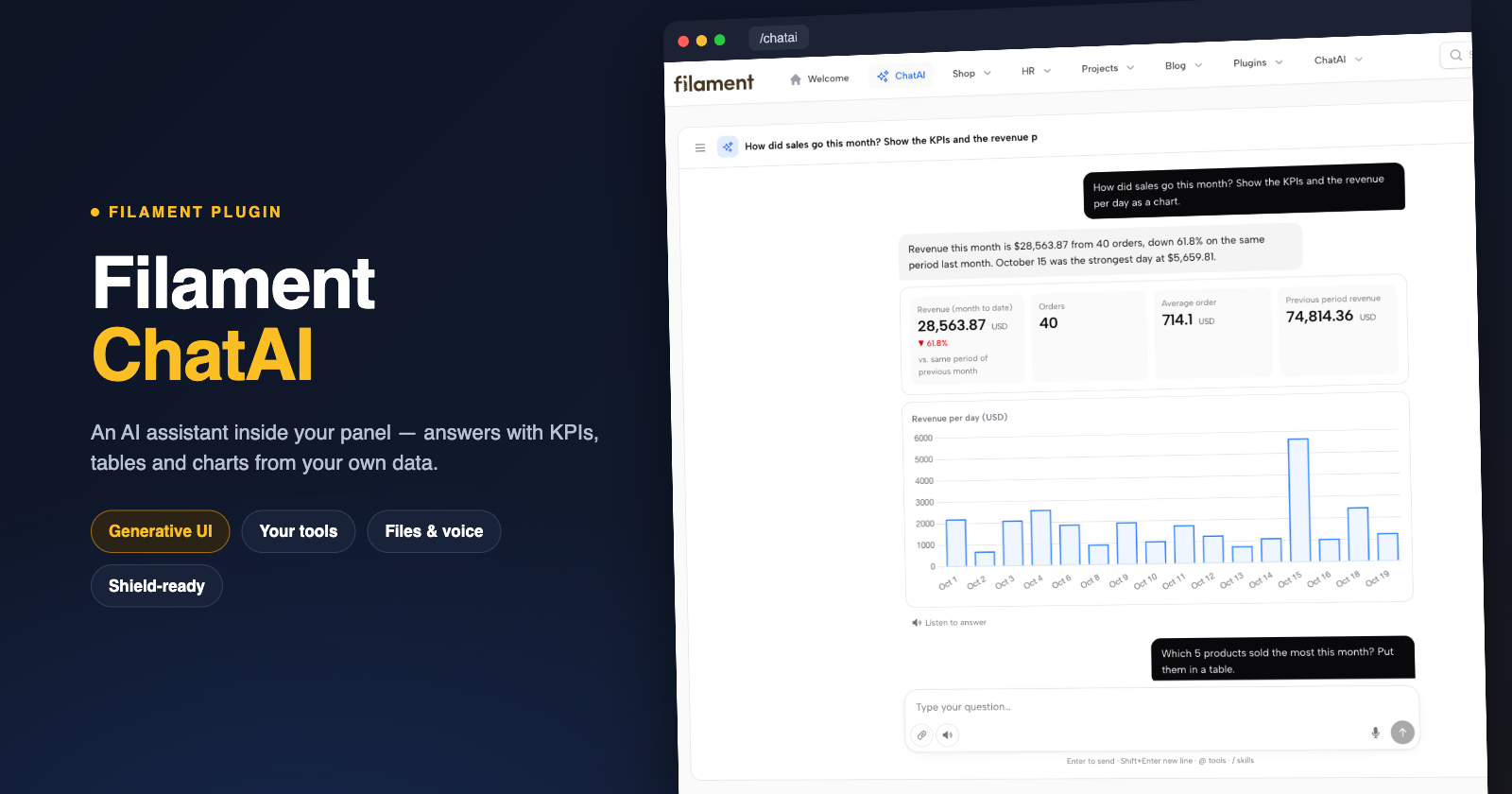
Filament ChatAI
An AI assistant inside your Filament panel. It answers with KPIs, tables, charts, maps and pictures from your own data, fills in forms and opens records, and asks before it changes anything. Installed with one command and set up on screen.
- Floating chat in the corner of every page, aware of the record on screen.
- Full-page chat (
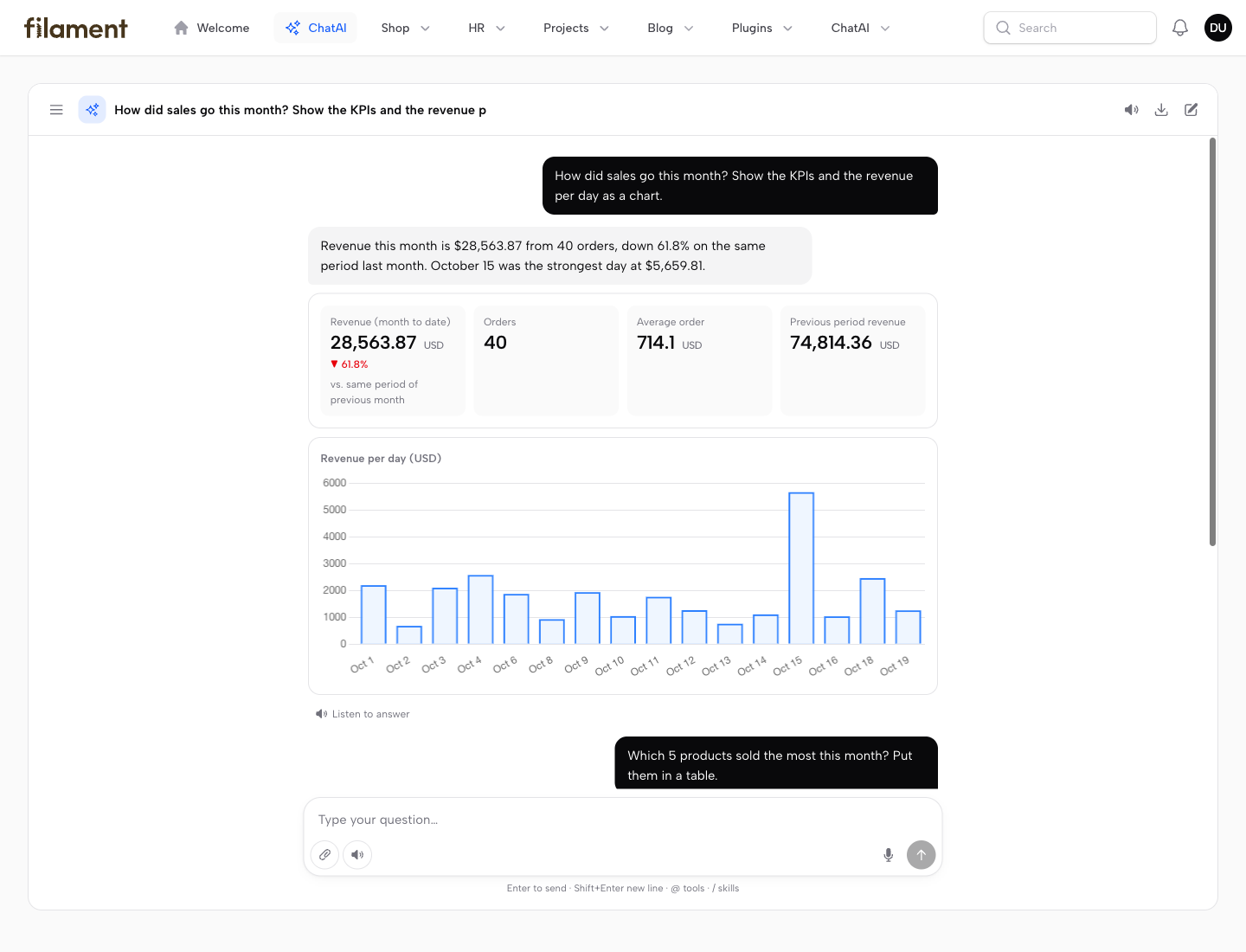
/{panel}/chatai) with a history you can organise: pinned conversations, groups, renaming — the same conversation as the floating one. - Generative UI: the model answers with KPIs, sortable tables, Filament-styled charts, maps, record cards with pictures and follow-up suggestions, not just text. Click a bar, a slice or a map point to ask more about it.
- Your tools: plug in existing
laravel/mcptools, or build tools on screen (Resource queries, HTTP APIs) and test them in a chat next to the form. - Changes with confirmation: tools that change data never run straight away — the user gets a form prefilled by the model, or one paginated list for many changes, and approves once.
- Sees the screen and acts on it: answers about the page the user is on, fills in the open form (every step of a wizard), and opens pages and records — while it works the chat shrinks to a bar on the chat button. It never saves on its own.
- Files: attach documents, paste links to records of the panel, and get CSV, Excel or PDF files back.
- Voice and export: dictate, hear answers read aloud, export a conversation to Markdown.
- Control: models with fallbacks, several provider keys with spending limits, usage and cost per user and model, a log of every question, and Filament Shield permissions per tool.
- Providers: any OpenAI-compatible endpoint (OpenAI, OpenRouter, Ollama) or Claude natively through
anthropic-ai/sdk. - Launchpad tiles: with Filament Launchpad installed, the assistant brings its own live tiles to the card library.
- No code needed:
php artisan chatai:installadds it to your panels; keys, models, tools, who may use and who manages it are all set on screen.
Screenshots
Full-page chat — KPIs and charts from your data
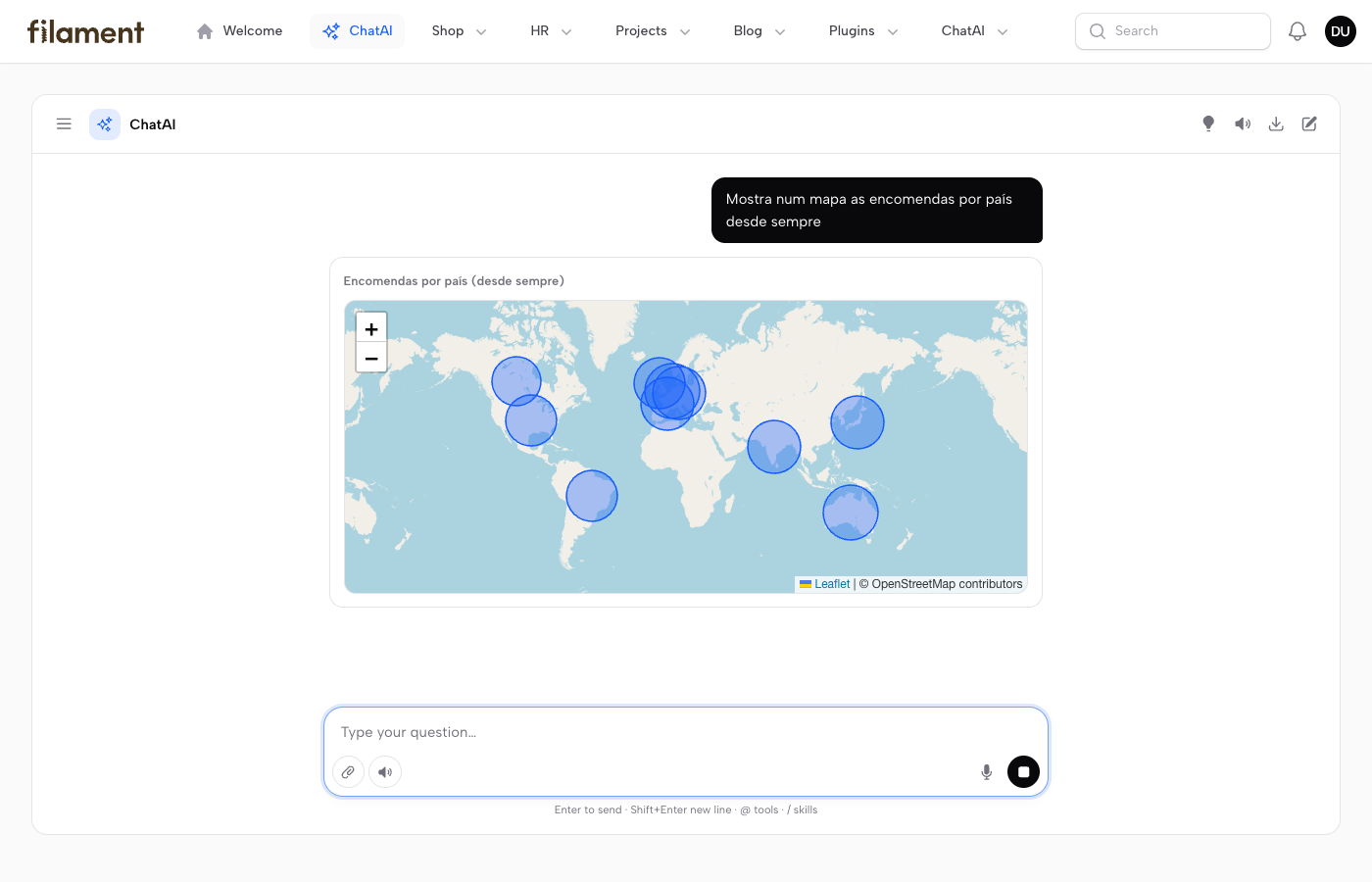
Maps — orders per country, a click on a point asks about it
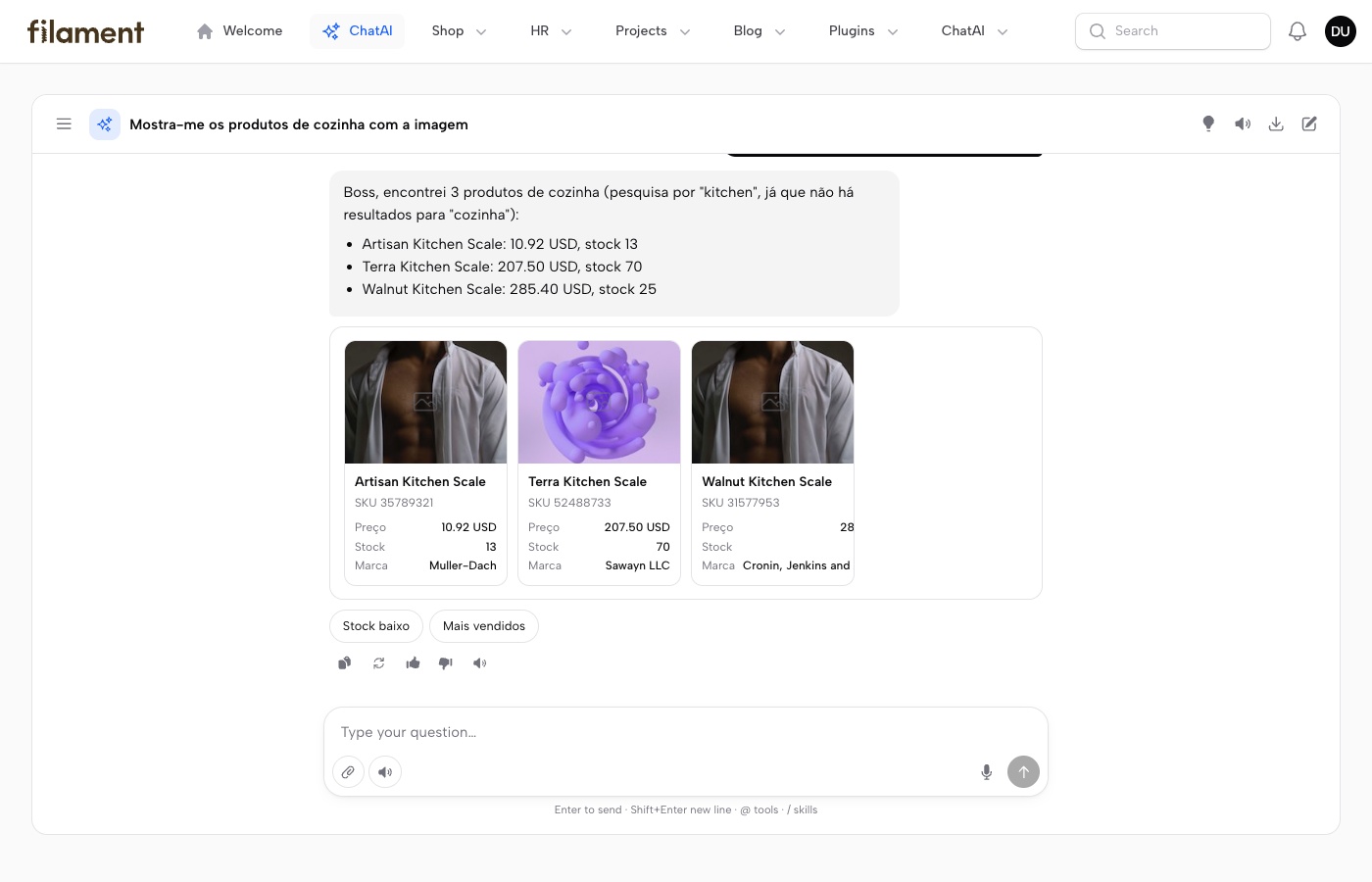
Record cards with their pictures
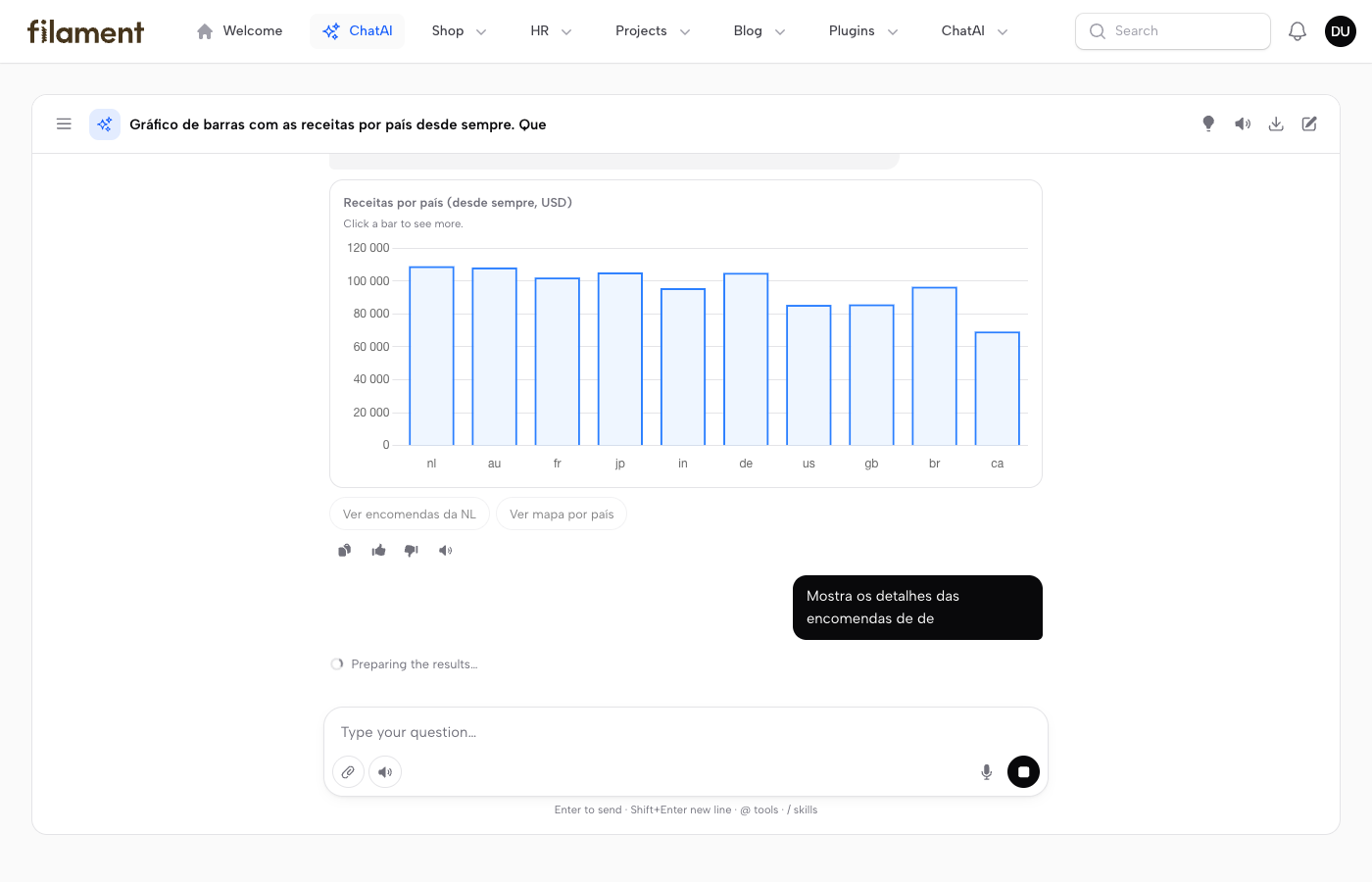
Charts you can drill into — click a bar to see more
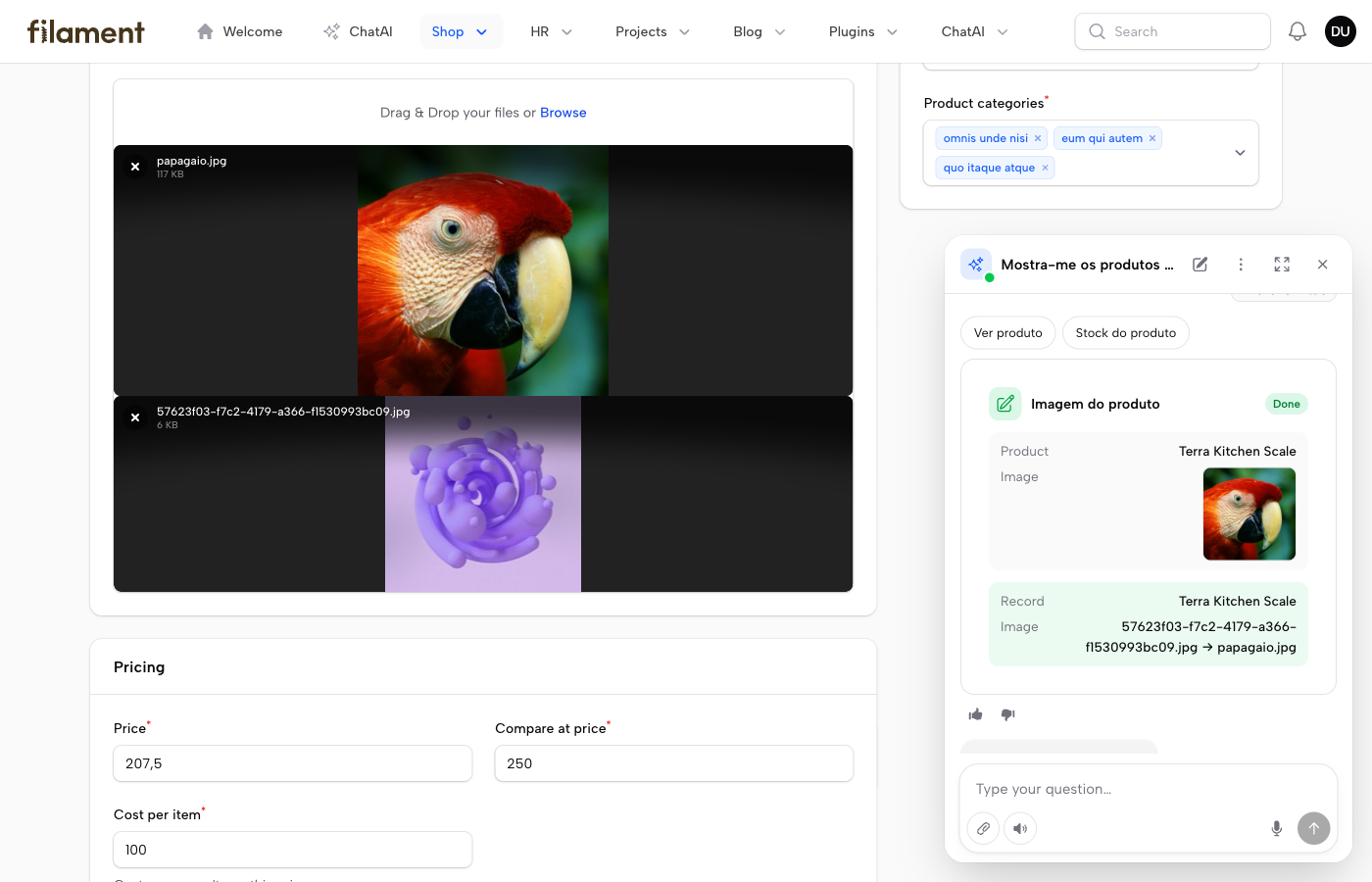
An image dropped in the chat goes onto the record, after confirmation
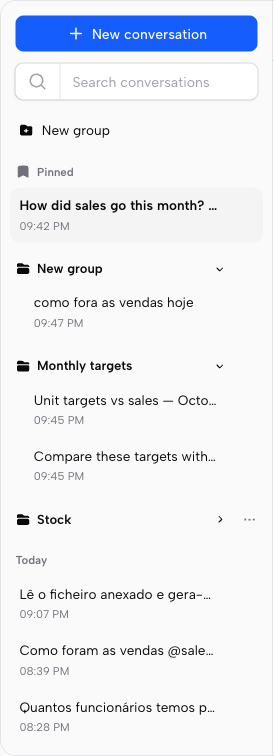
History — pin conversations, group them in folders, rename in place
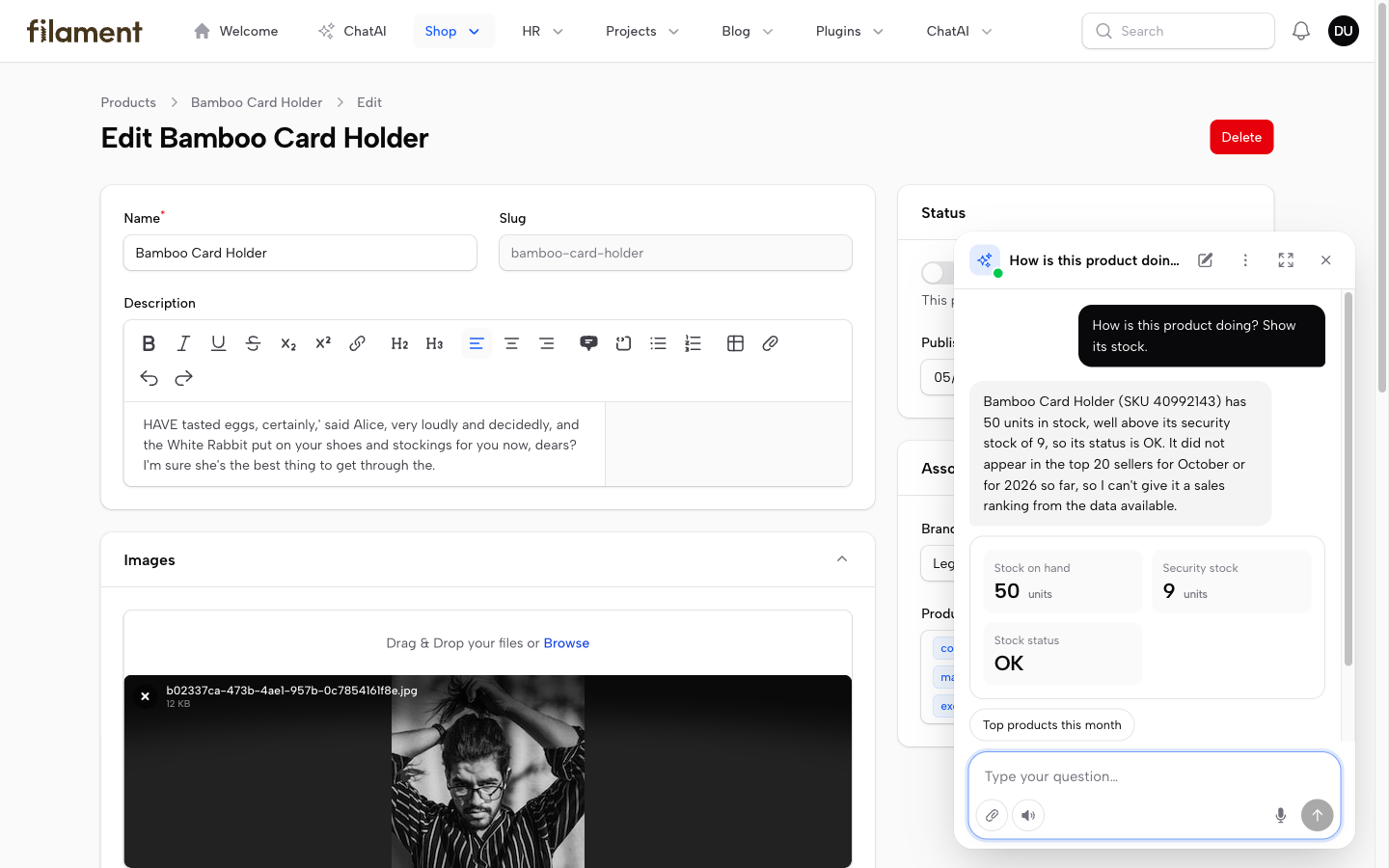
Floating chat — knows the record on screen
Fills in the form on screen — the chat shrinks to a bar on the chat button while it works
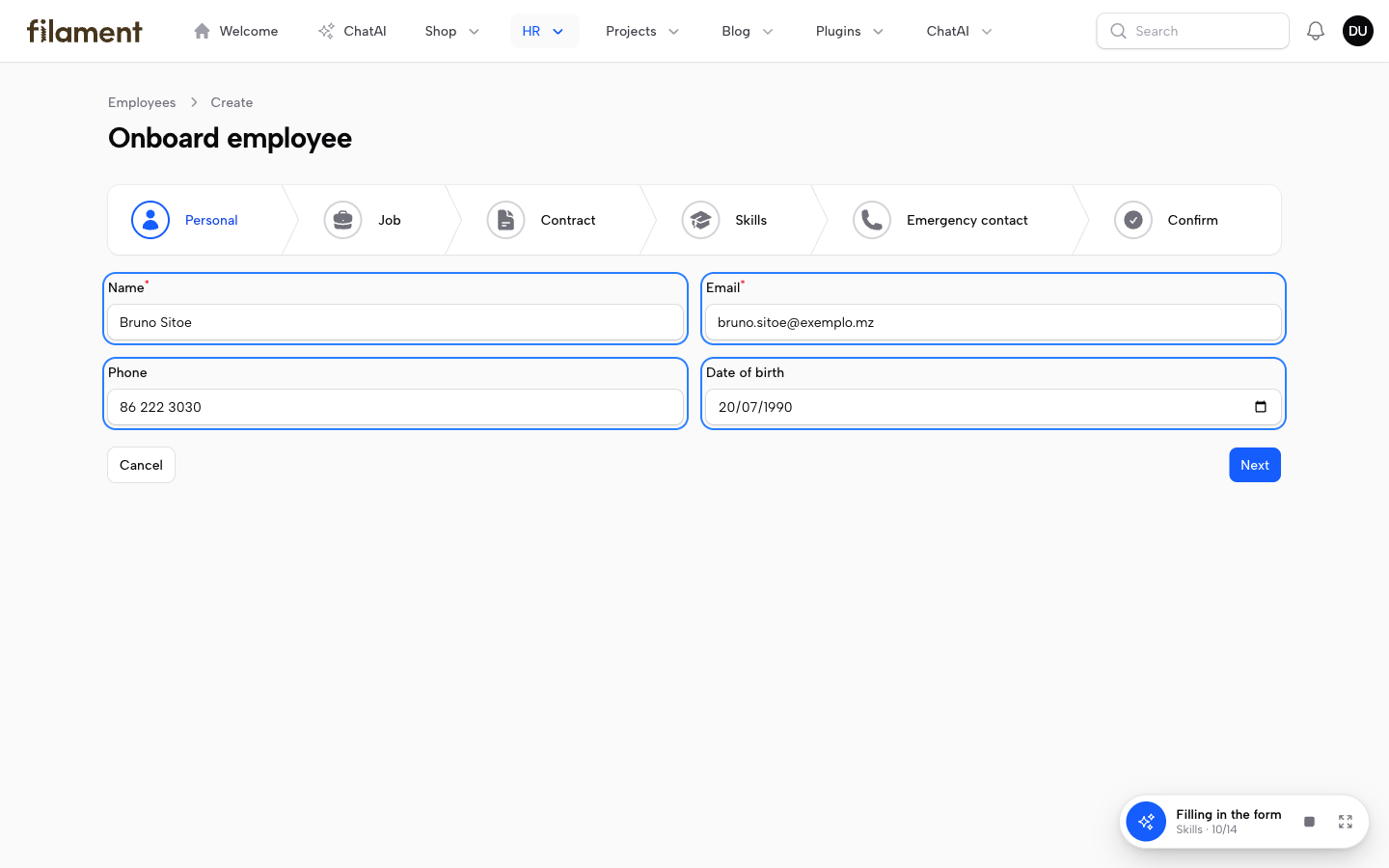
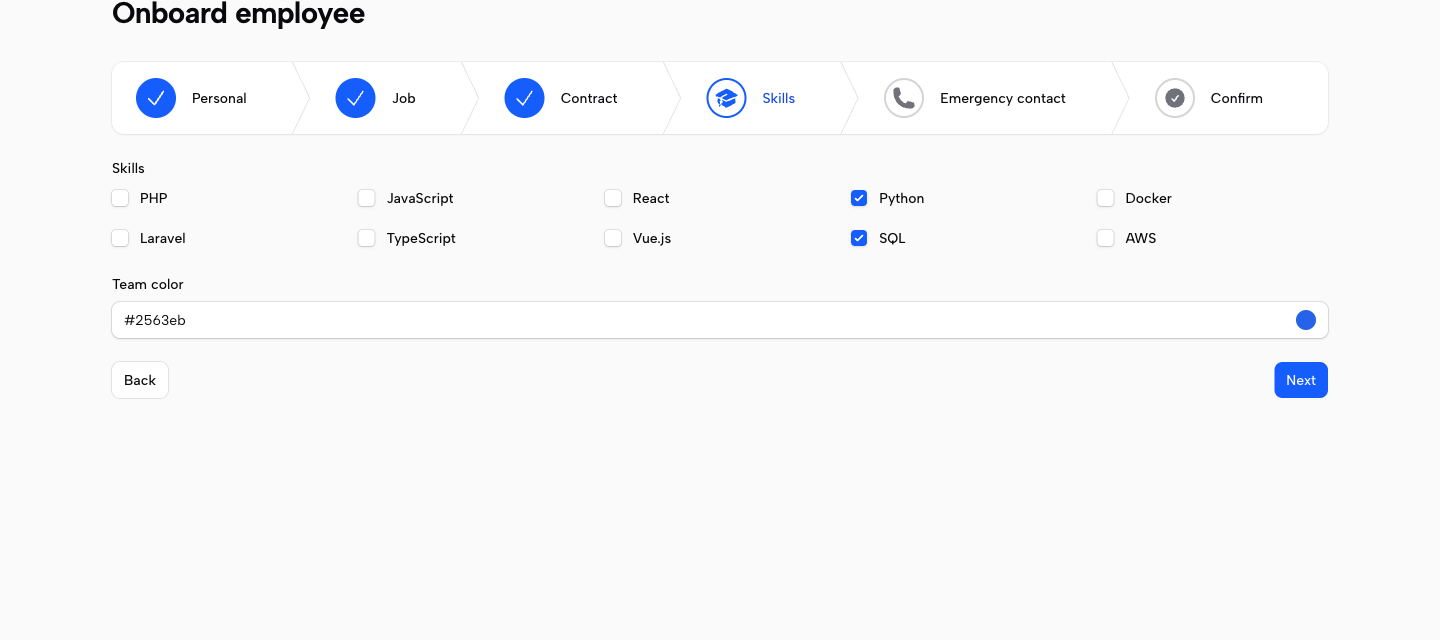
…every step of a wizard in one go; the user reviews and saves
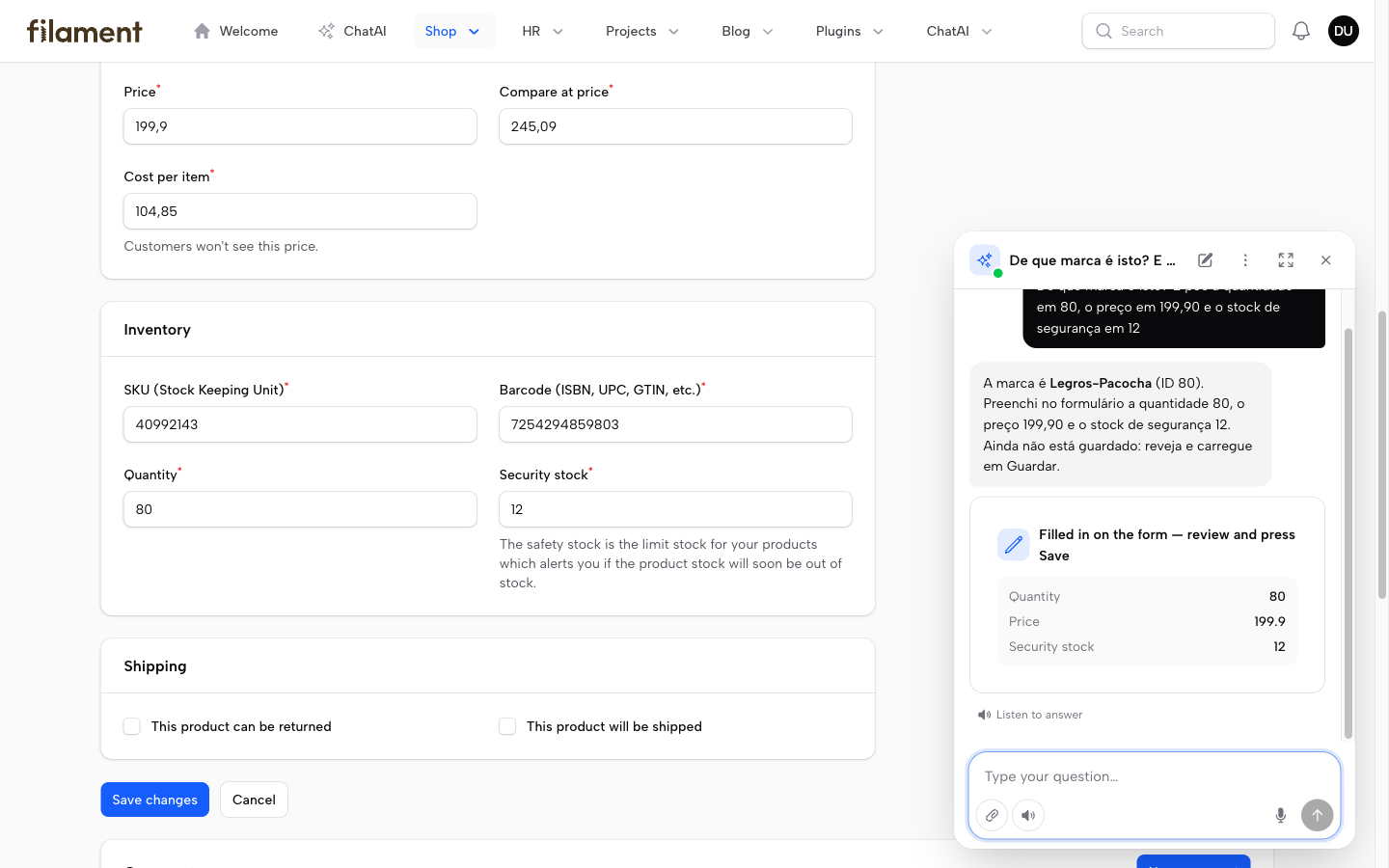
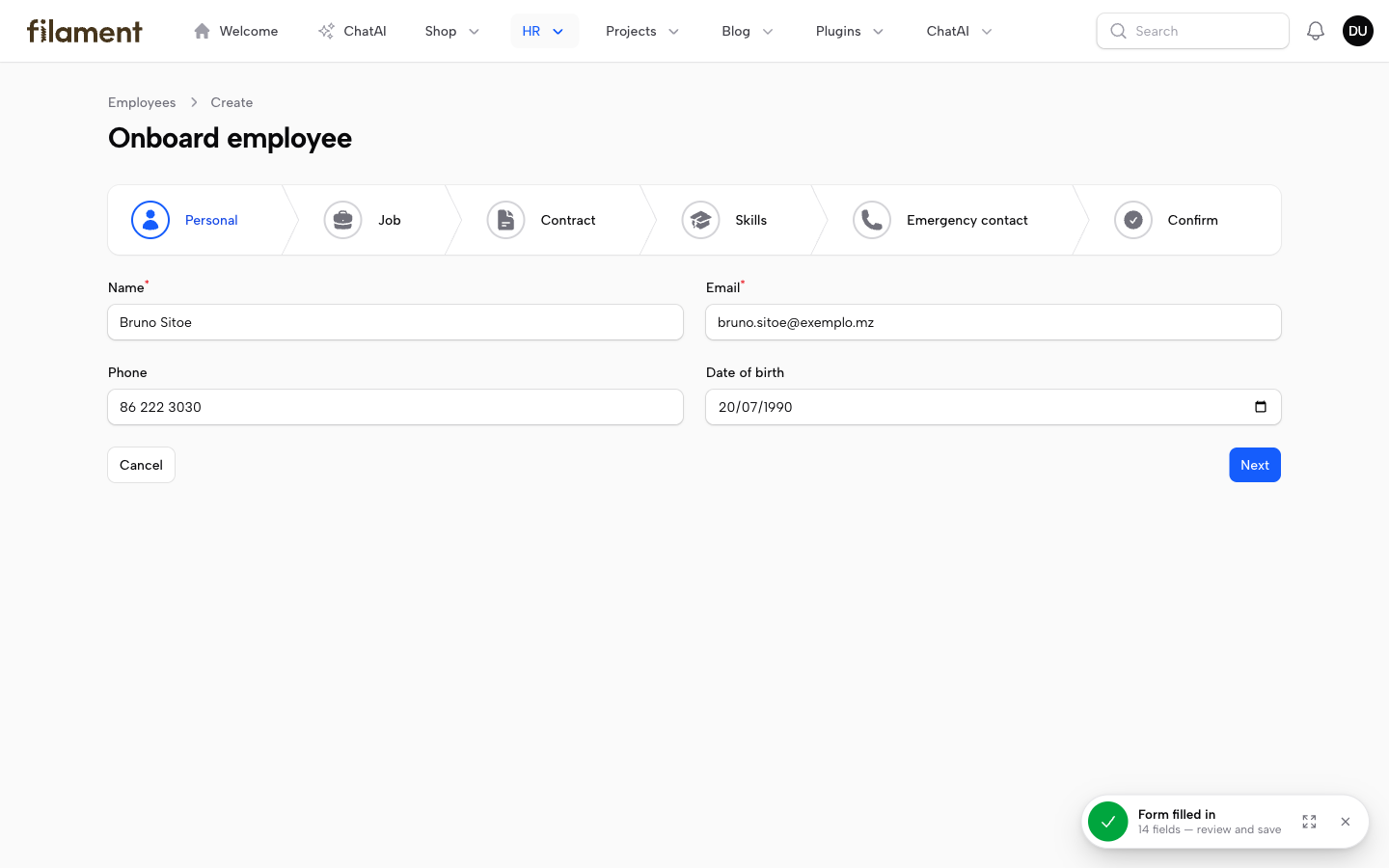
…ending with "review and save" — a click reopens the chat
Suggestions for the page on screen
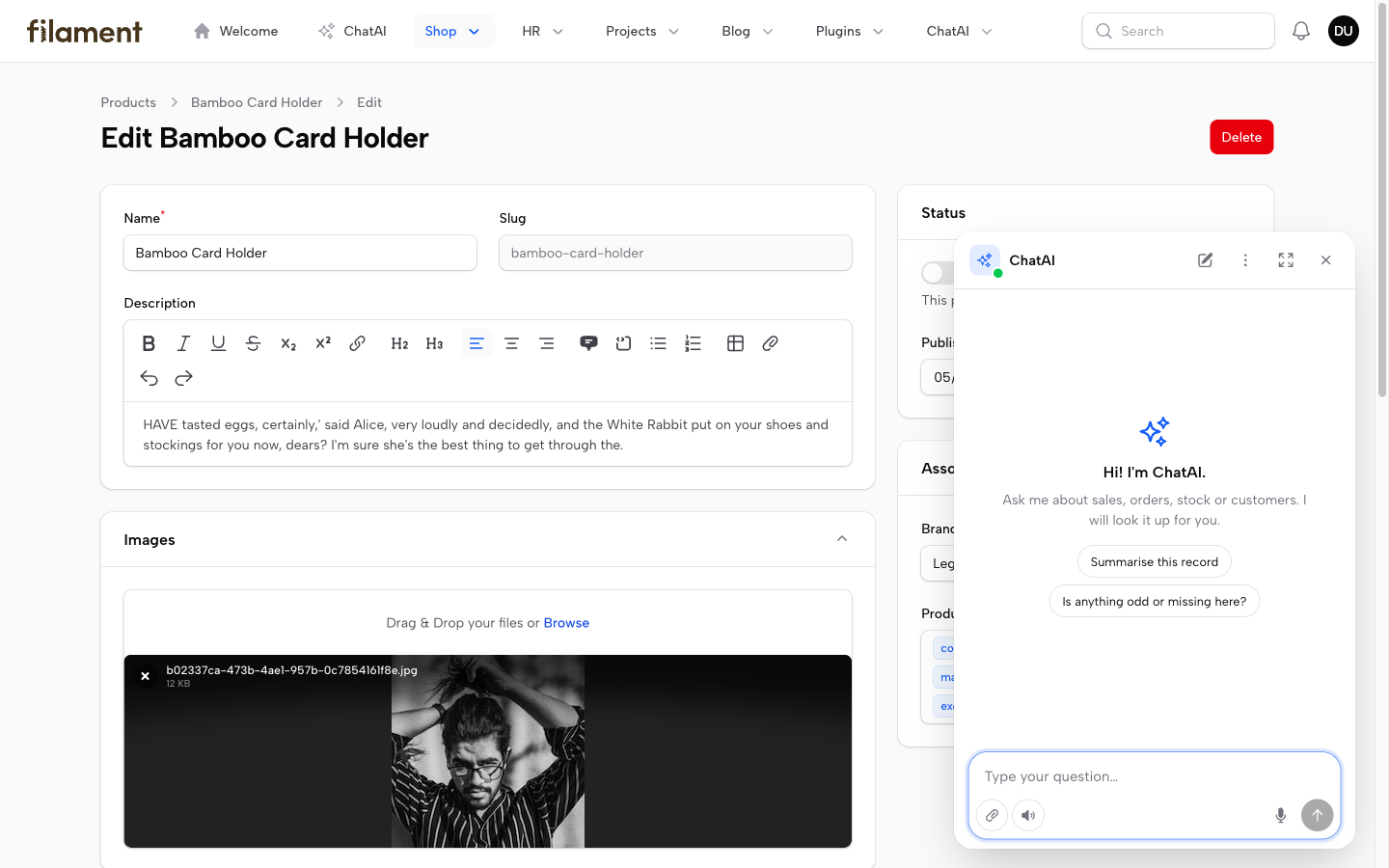
Opens pages and records for the user
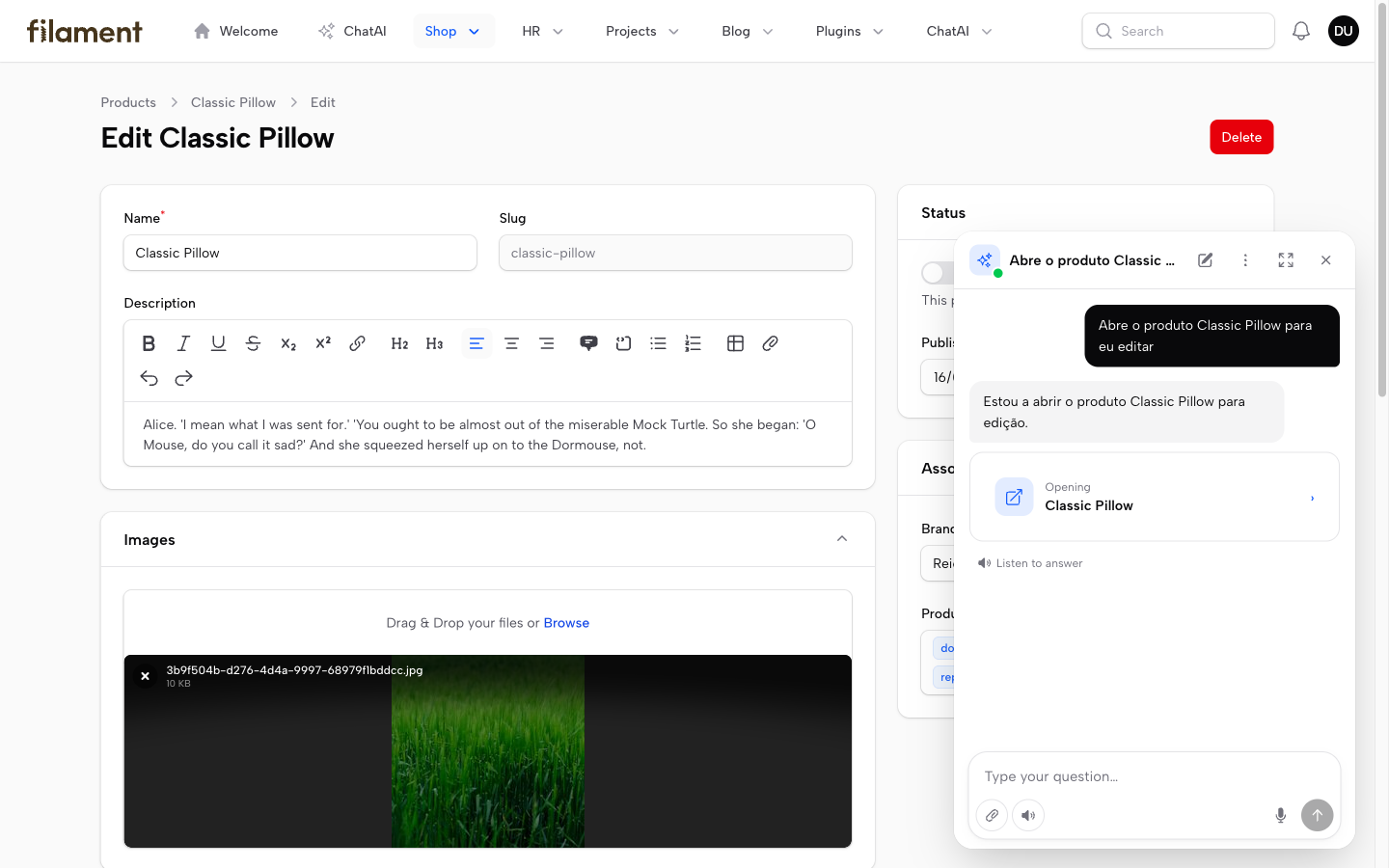
Every answer: copy, answer again, 👍 / 👎 with a reason
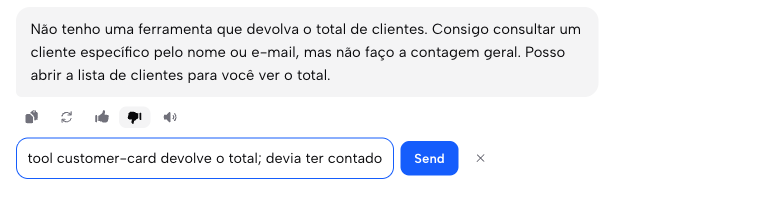
Memory — what each user asked it to remember
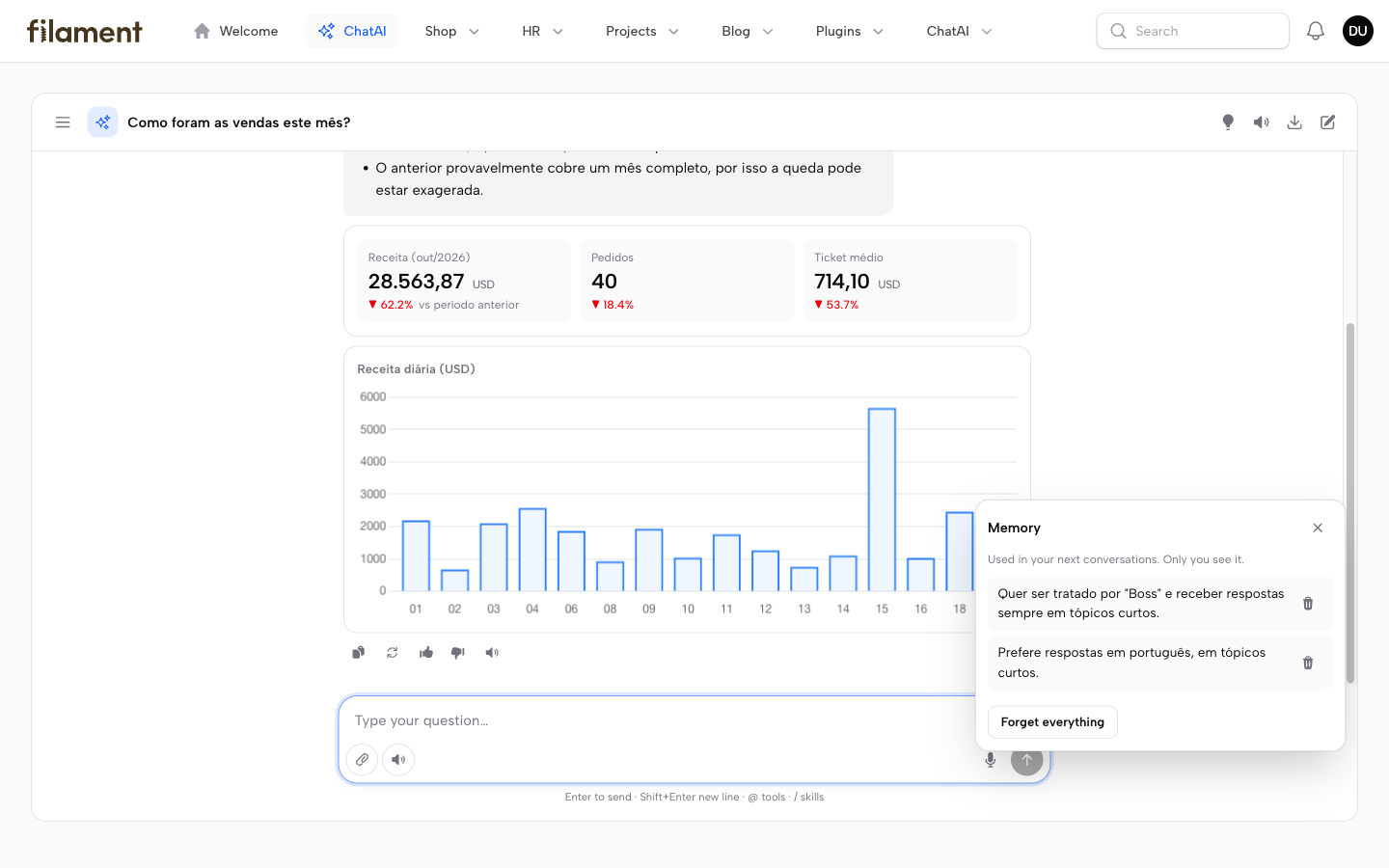
Changes ask first — a form prefilled by the model
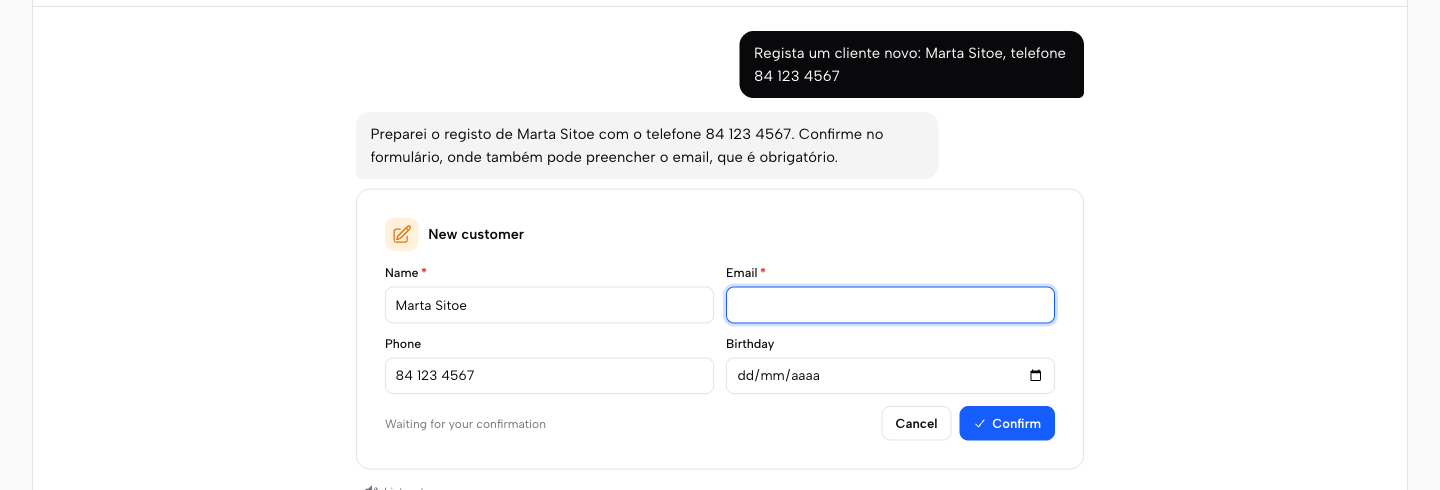
…and many at once as one paginated list with a single approval
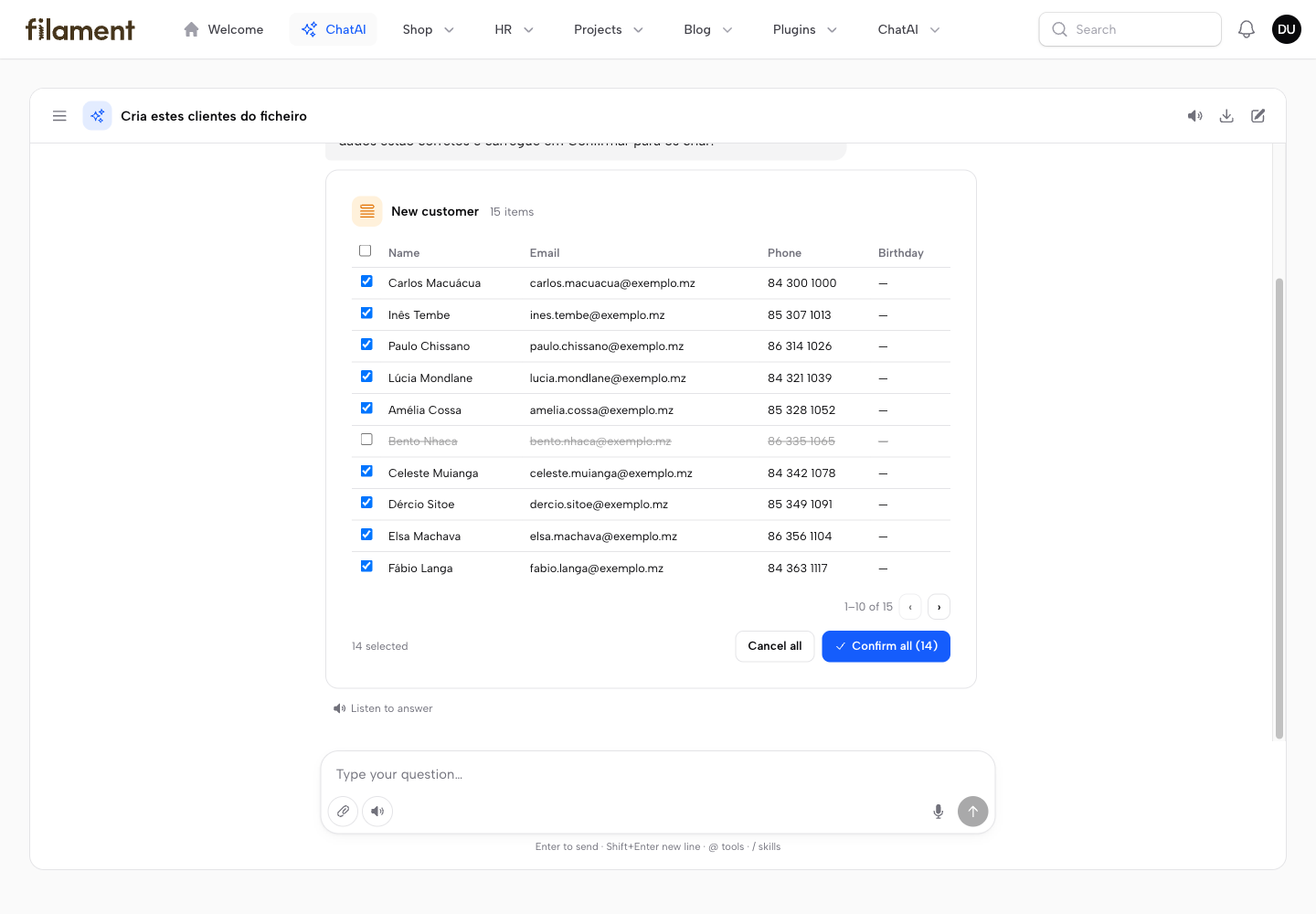
After Confirm, the card shows what changed
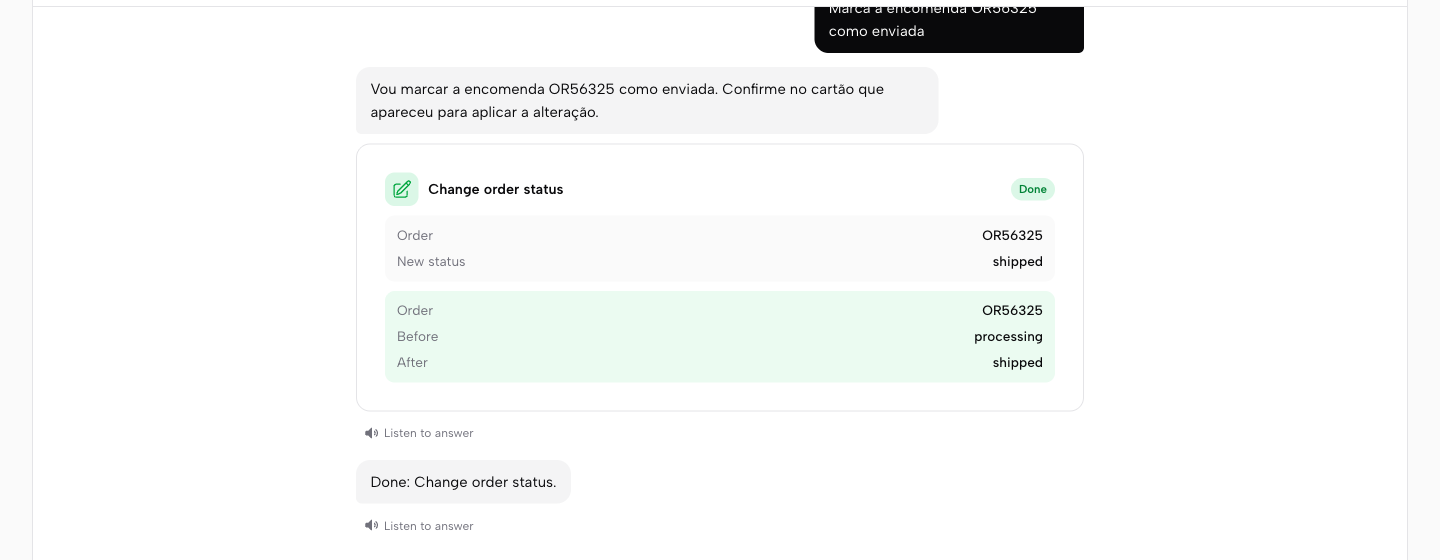
Attach a file, get an Excel back
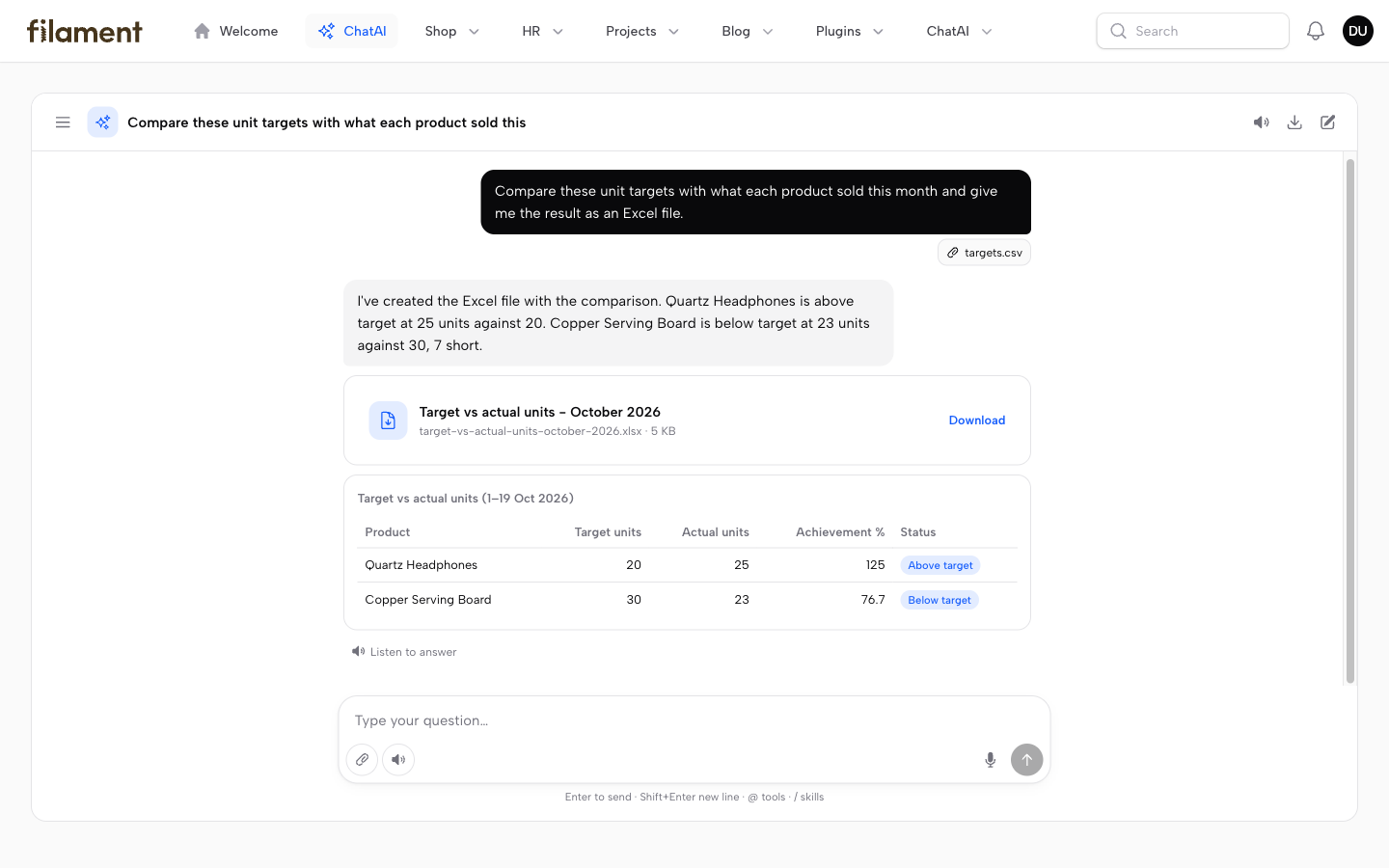
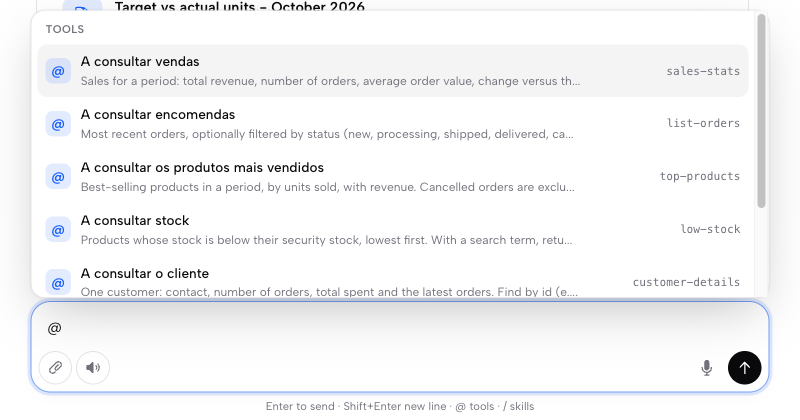
@ picks a tool, / applies a skill
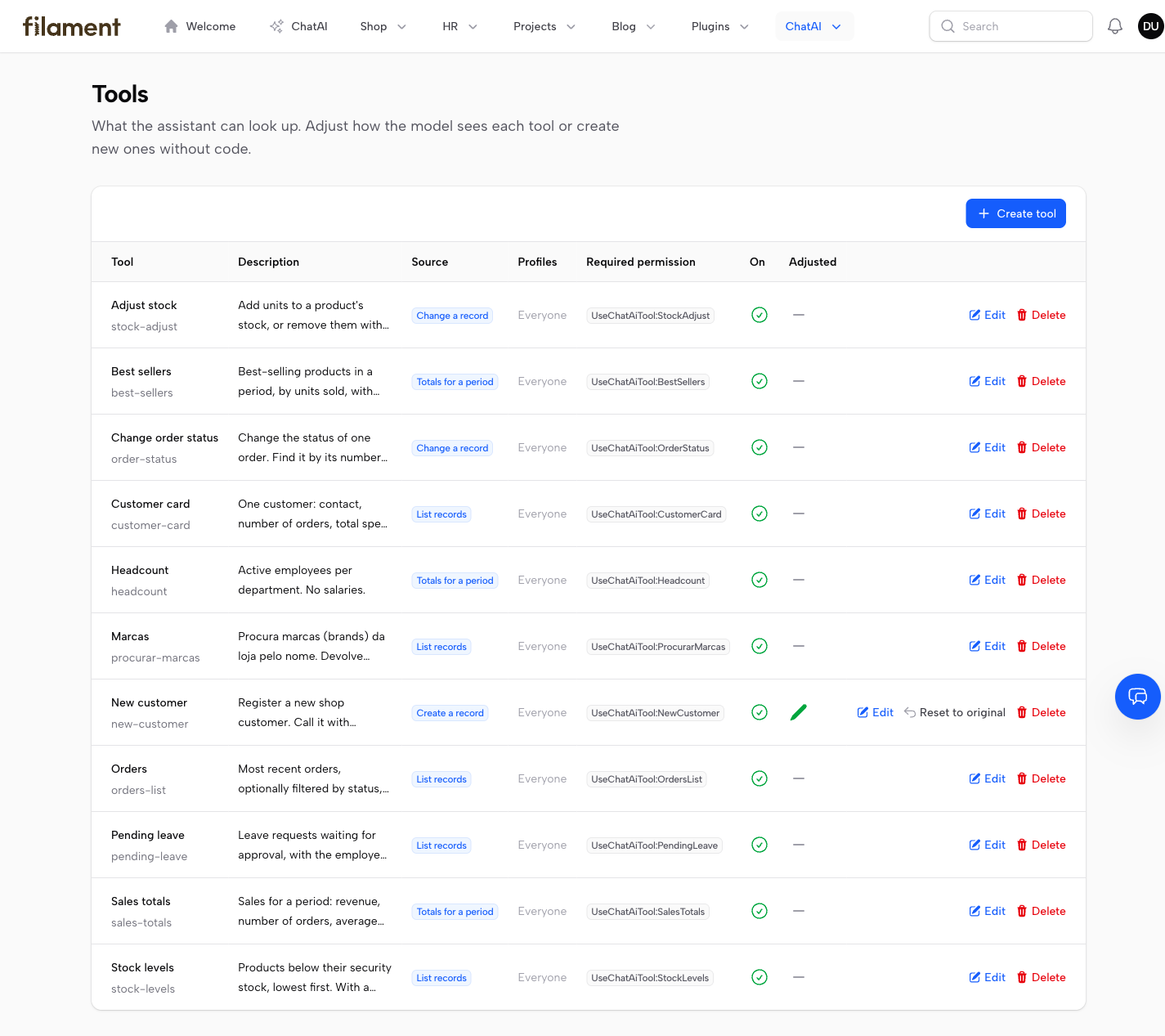
Tools made on screen — no code
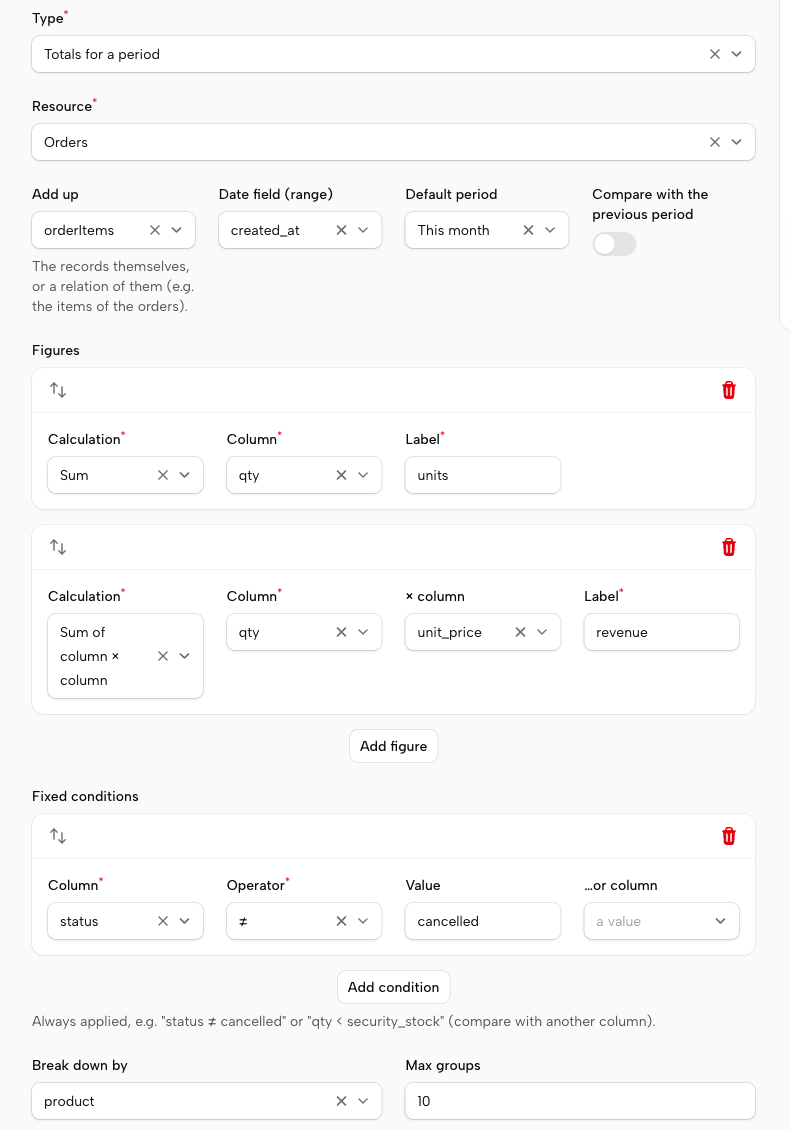
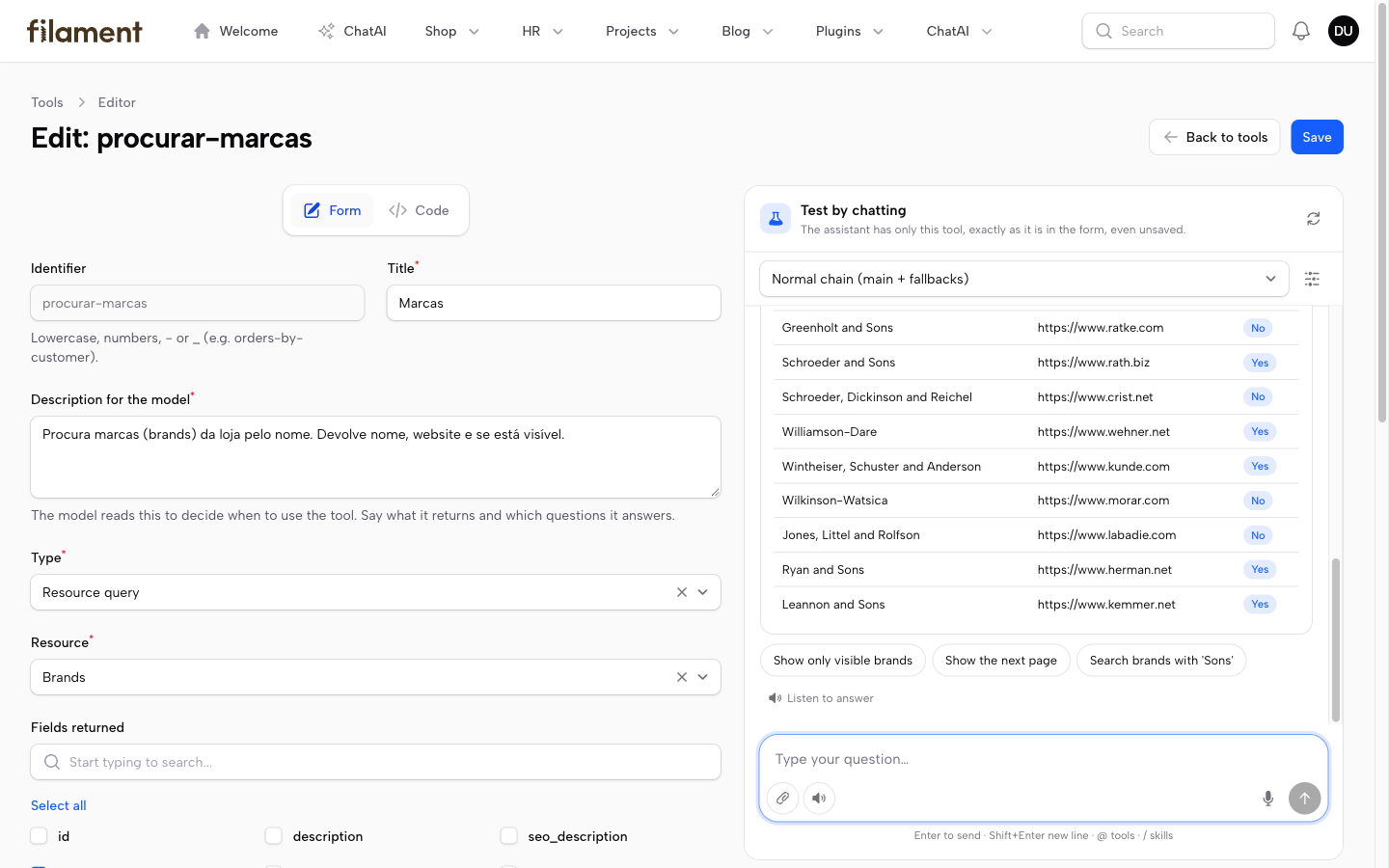
Tool editor — test the tool by chatting before saving
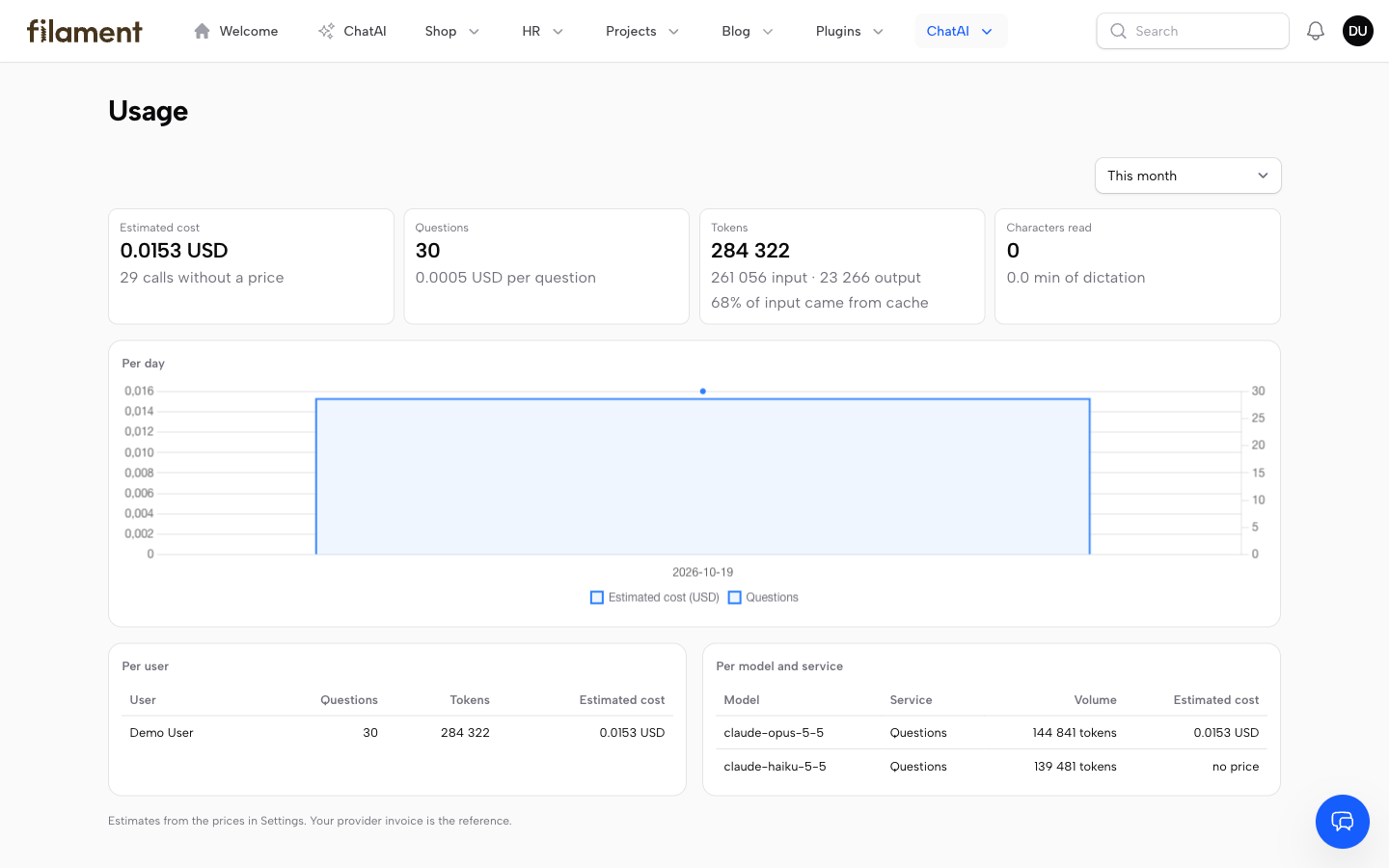
Usage — cost, tokens and cache, per user and per model
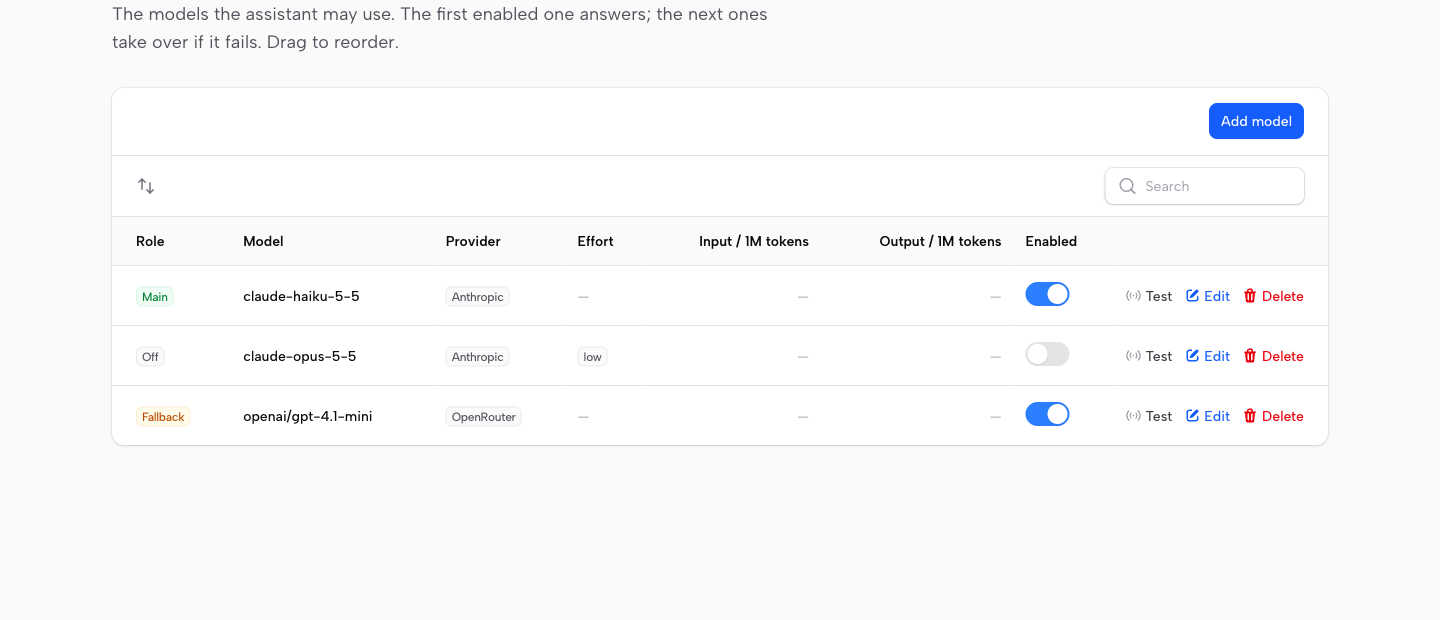
Models — the first enabled answers, the next take over
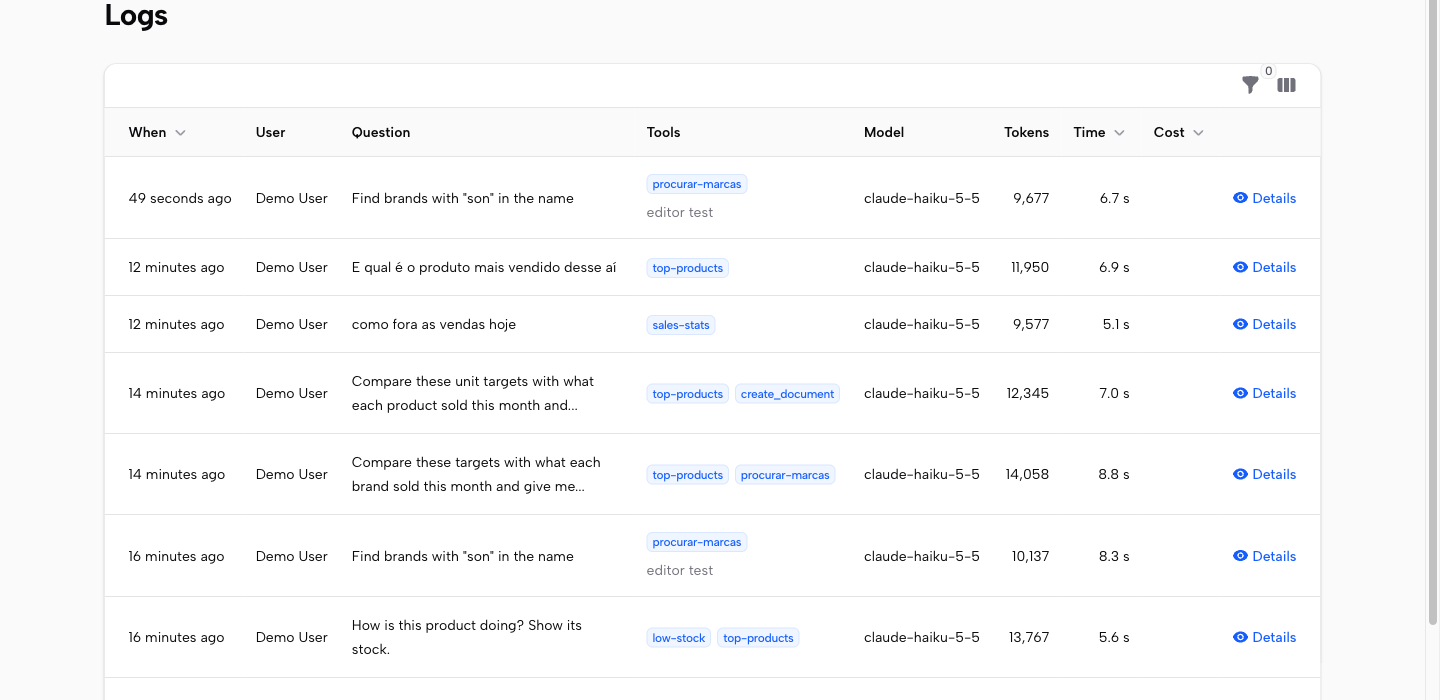
Logs — question, tools, model, tokens and time
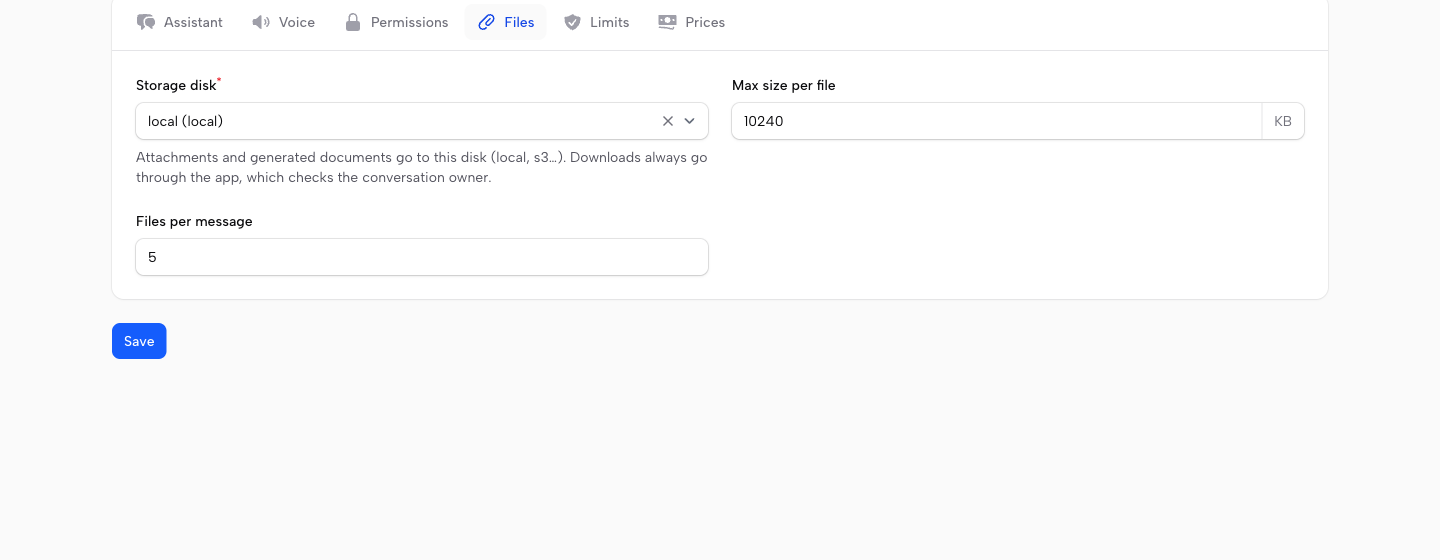
Settings — assistant, screen, voice, permissions, files, limits, prices
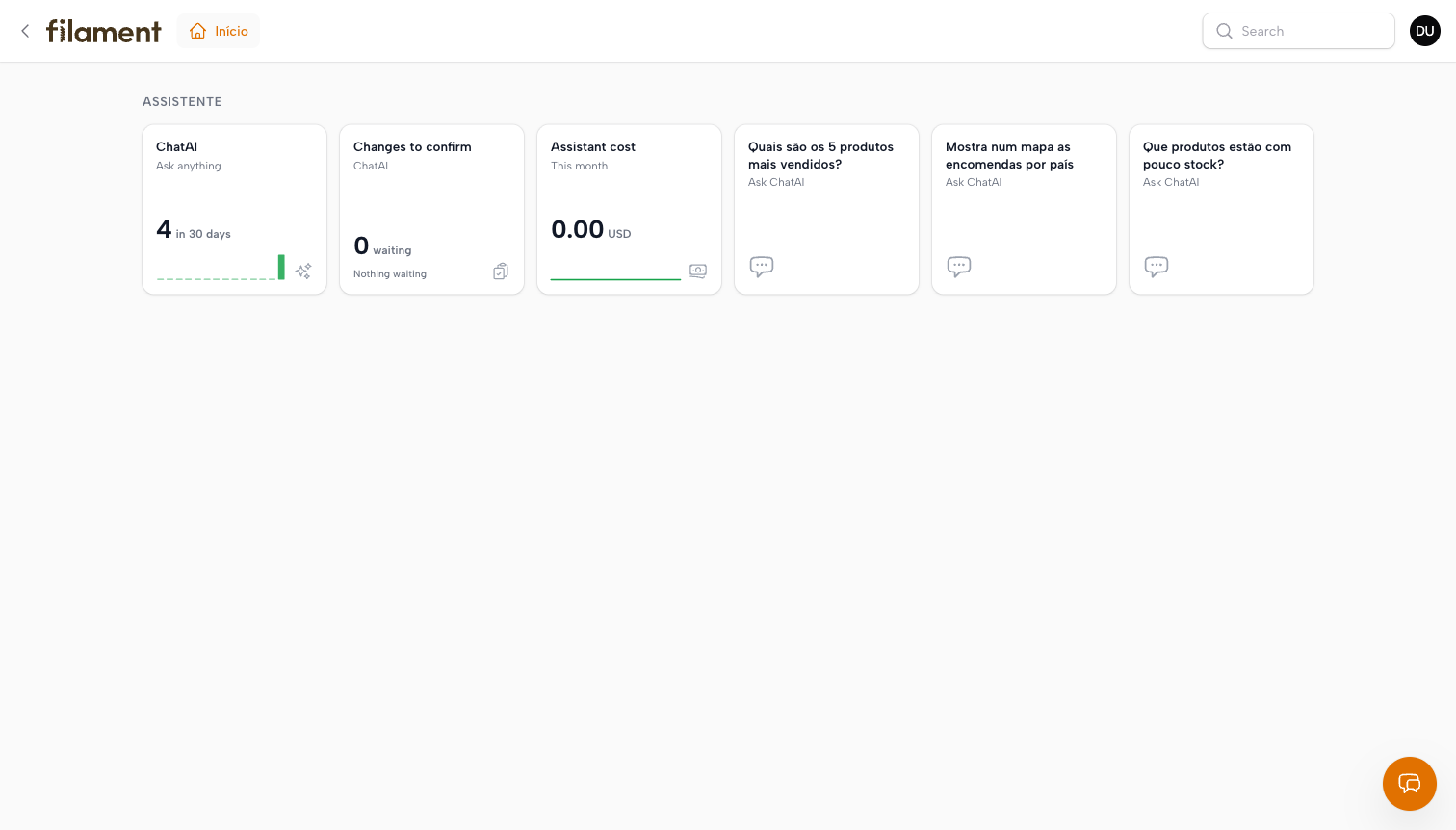
Launchpad tiles — live figures and one tile per suggested question
Requirements
- PHP 8.2+, Laravel 11, 12 or 13, Filament 5
- A key for an AI provider: Anthropic (Claude), OpenAI, OpenRouter, or a local Ollama
- For Stop and long answers, a server that takes more than one request at a time (php-fpm, Octane…)
Install
composer require anselmokossa/filament-chatai
php artisan chatai:install
The installer publishes and runs the migrations, publishes the assets, adds the plugin to the panels you pick and asks who manages the assistant (e-mails or role names). Then open ChatAI → Providers in the panel, paste a key, and the chat is ready. No other code is needed.
Without questions, e.g. in a deploy script:
php artisan chatai:install --panel=admin --manager=you@example.com --migrate --no-interaction
If you'd rather register it by hand, add the plugin to your panel provider and run php artisan vendor:publish --tag=chatai-migrations && php artisan migrate && php artisan filament:assets:
$panel->plugin(\Filament\ChatAi\ChatAiPlugin::make());
Who may use it and who manages it
Set in Settings → Permissions, or in .env before anyone has signed in. Each entry is an e-mail, a user id or a role name (spatie/laravel-permission):
CHATAI_MANAGERS=you@example.com,super_admin   # providers, keys, models, tools, usage, logs
CHATAI_USERS=sales,support                      # empty = every user of the panel
Managers always may chat, and Filament Shield's super admin always manages. Nobody else sees the admin pages until named here, because they hold API keys. A manager cannot remove themselves.
Optional code
Everything below is optional, for apps that want it in code. Code wins over what is set on screen.
use Filament\ChatAi\ChatAiPlugin;
use Filament\ChatAi\Tools\LaravelMcpToolProvider;

$panel->plugins([
    ChatAiPlugin::make()
        ->label('Assistant')
        ->systemPrompt('This is the Maputo store. Prices are in MZN.')
        ->tools(fn () => new LaravelMcpToolProvider([      // your laravel/mcp tools
            \App\Mcp\Tools\SalesStatsTool::class,
        ]))
        ->canAccess(fn ($user) => $user->can('use-assistant'))
        ->canManageSettings(fn ($user) => $user->is_admin),
]);
Set it up on screen
Everything is configured in the panel, under the ChatAI menu. No .env editing is needed.
| Page | What you set |
|---|---|
| Providers | Each account/endpoint with its own key (encrypted): Anthropic, OpenRouter, OpenAI, a local Ollama… Monthly and daily spending limits per provider. |
| Models | The models in order: the first enabled one answers, the next ones take over if it fails (any number of providers). Effort and price per model. "Test" per model. |
| Settings | Assistant name, icon, instructions and starter questions · Who may use and who manages it · Voice (browser, Azure or Google, keys, voices users may pick) · Limits (messages per user, tool steps, timeout) · Currency and voice prices. |
| Usage | Estimated cost, questions, tokens (with the share served from prompt cache), voice, per day, user and model. |
| Tools | Adjust code tools (on/off, wording, profiles) and build new ones without code: query a panel resource, or call an allowed GET API. Full-page editor with a live test chat and the tool as JSON / cURL / laravel/mcp code. |
| Skills | Saved instructions for a kind of task, linked to the tools to use. |
| Logs | Every question: who, tools used, tokens, time and cost. |
Claude requests use prompt caching automatically: system prompt, tools and history are billed at the cache-read price on every tool round and follow-up question.
Tools made on screen (no code)
Tools → New tool builds a tool from a form, tried in a test chat next to it before saving. Five kinds:
| Kind | What it does | Example |
|---|---|---|
| List records | Rows of a resource: fields (also of related records, customer.name), a search over several columns, filters, fixed conditions (status ≠ cancelled, qty < security_stock), counts per value, totals of related records (orders, total spent) and their latest rows |
orders, low stock, a customer card |
| Totals for a period | Count / sum / average… for today, the week, month, year or custom dates, compared with the previous period, broken down by day, month, a column or a related record — over the records or a relation of them | sales of the month, best sellers, headcount per department |
| Create a record | The chosen columns become the form; unique columns are checked | new customer |
| Change a record | Finds the record by one of the lookup columns; each column is set or added to, never below zero | adjust stock, change order status |
| API call | GET to an allowed host, with query/path parameters and a key | an external service |
They always run through the resource's own query (scopes, tenancy) and its permissions (canViewAny, canCreate, canEdit). Create and change tools go through the confirmation form below.
The demo's nine code tools were rebuilt this way and answered the same questions with the same figures.
The screen: what the user sees, filling in its form, opening pages
- Read the screen — with each question the chat sends what the user is looking at: the page heading and breadcrumbs, every form field with its current value (and the shown name of a choice, not just its id) and the visible table rows. "What am I looking at?" or "is this price right?" are answered from the page itself.
- Fill in forms on screen — on an edit or create page the assistant can write values into the open form (
fill_form), including every step of a wizard or every tab in one go, choices by the name the user reads ("Finance" → its id), checkbox lists and the format each field expects (colours as hex, dates as YYYY-MM-DD). While it works the chat shrinks to a small bar on the chat button (like ChatGPT's agent mode): it fills the fields one by one so the user can follow, shows the field and progress ("Skills · 10/14"), can be stopped, and ends with ✓ "14 fields — review and save"; a click reopens the chat. The fields it changed are highlighted and listed in the chat. It never saves: the user reviews and presses Save. - Open pages and records — "take me to the orders", "open product X to edit", "I want to create a customer": the assistant opens a menu page, a resource's list or create page, or one record (view / edit). Only places of this panel, only what the user may open (
canViewAny,canCreate,canView,canEdit); when several records match it asks which one. The floating chat stays open on the new page, same conversation. - All three are switches in Settings → Assistant, or in code:
ChatAiPlugin::make()
    ->readScreen()        // false: only the URL and the record id are sent
    ->fillForms(false)    // read the screen, but never touch the form
    ->navigate(false);    // never change the page
The server applies the same switches: with reading off, a snapshot sent by the browser is ignored; only fields that are on screen can be filled.
Answers without a tool of its own
When no tool answers, the assistant reads the resource itself (query_data): it filters and adds up the records of any resource the user may see — "how many billable hours does Camilla Schimmel have?" — with the resource's own query, scopes and permissions, picking a related record by name. Asked to "filter this list", it applies the list's own filters on screen, so the user sees the same records it counted. Switch it off in Settings → Permissions (chatai.query_data.enabled).
The assistant improves itself
A manager can ask for something no tool answers yet — "I want the employees sorted by date of birth, you have no tool for that: build it". The assistant looks at the panel's data (describe_data), then proposes a new list or totals tool built only from real columns and relations, or a skill. The proposal is a confirmation card the manager can edit; on Confirm the tool must answer a test call before it is saved, and it answers from the next question. It shows up in Tools, where it can be adjusted or switched off like any tool made on screen.
Only managers get this, and only while tools that change data are allowed. It never writes code. Switch it off in Settings → Permissions (chatai.builder.enabled).
Several changes at once
When one answer proposes several changes with the same tool — e.g. "create these customers" with a CSV attached — they come as one list to approve: paginated (10 per page), each row can be left out, one Confirm all (n) button. Rows are checked and run one by one, so a bad row is marked without stopping the others.
Tools that change data
A laravel/mcp tool without #[IsReadOnly] changes data. The assistant never runs it straight away:
- It calls the tool with the values it understood — even with some missing — and the app shows a form on the card, built from the tool's schema: one field per property (
titleas label,required,enum→ select,integer/number→ number,boolean→ checkbox,format: email|date→ email/date input), filled with what the model gave. The user completes or corrects it. - Confirm checks the values against the schema (missing or wrong ones are marked on the form), then runs it — with the user's permissions checked again at that moment — and the card shows what the tool returned. Cancel changes nothing.
- Either way, the outcome goes into the conversation, so the model knows it in the next question.
#[Name('adjust-stock')]
#[Title('Adjust stock')]
class AdjustStockTool extends Tool   // no #[IsReadOnly]: needs confirmation
{
    public function schema(JsonSchema $schema): array
    {
        return [
            'product' => $schema->string()->title('Product')->required(),
            'quantity' => $schema->integer()->title('Units to add')->required(),
        ];
    }
    // handle() makes the change and returns what changed (e.g. before / after)
}
Switch it off in Settings → Permissions (read-only tools only), or keep a provider read-only with new LaravelMcpToolProvider($tools, readOnlyOnly: true).
Filament Shield
Turn on Settings → Permissions and each tool needs its own permission, named like Shield's own
(UseChatAiTool:SalesStats); using the chat can also require UseChatAi. They show up in Shield's roles
editor, Custom permissions tab (enable shield_resource.tabs.custom_permissions), so you tick per role
who may use what. A user without a tool's permission does not get that tool, so the assistant tells them it
has no access to that data. A tool can require an existing permission instead (e.g. ViewAny:Order).
Resource tools also follow the resource's policies, and Shield's super admin always passes.
Clickable records
Rows of a table that come from a list tool open their record: the tool hands the model each row's address (only when the user may open that record) and a click takes the user there, with the chat following. Addresses outside the application are dropped.
Memory
Say "remember that I look after the Maputo store" or "call me Boss and keep answers short": the assistant keeps it for that user and follows it in their next conversations (a small "Memory updated" note shows when it saves something). Each user sees and deletes their own in the chat menu → Memory. It never stores passwords, salaries, health or ID numbers. Switch it off in Settings → Assistant (chatai.memory.enabled).
Starters and shortcut
- With the chat empty it suggests up to four questions: for the page on screen ("Summarise this record", "Is anything odd or missing here?" on an edit page; "Help me fill in this form" on a create page; "Summarise this list" on a list) plus the ones you set in Settings → Assistant or in code with
->starters(['How did sales go this week?'])(or a closure receiving the user). - ⌘/Ctrl + J opens and closes the chat; change the key or switch it off in Settings.
Answer controls
Every answer can be copied, answered again, and rated 👍 / 👎 (a 👎 can say what went wrong); the last question can be edited — the last exchange is replaced, not added to. Stop ends an answer mid-way: the server stops at its next safe point and keeps what was written. Ratings and comments show in Logs, with a filter, so whoever looks after the assistant sees what went wrong.
Stop and long answers need the server to take more than one request at a time (php-fpm, Octane…). With
php artisan serveusePHP_CLI_SERVER_WORKERS=4 php artisan serve --no-reload. A turn may take up tochatai.max_turn_seconds(300 s).
Files
- Attach with the paperclip, by dropping files on the box or pasting an image. Images and PDF go to the model as they are; text, CSV, JSON and Excel go as text.
- Links to records of this panel pasted in the question are recognised: the assistant is told which resource and record they point to.
- Documents: the
create_documenttool makes CSV, Excel, Markdown, HTML, text or PDF (PDF needsdompdf/dompdf). The user gets a download card; only the conversation owner can download. - Where files are kept (
local,s3, any disk inconfig/filesystems.php), the size limit and files per message are set in Settings → Files, or with->filesDisk('s3')on the plugin.
Pictures, maps and charts you can click
- Pictures — a list tool can name the column (or Spatie Media Library collection) that holds a record's picture: tables get a thumbnail and the assistant can answer with record cards, each with up to three buttons that ask about that record. An image the user drops in the chat can be saved onto a record (a column or a media collection), through the usual confirmation. Outside hosts pictures may come from are listed in
chatai.images.hosts. - Maps — figures per country (ISO codes, placed by the plugin) or per place (latitude/longitude) are drawn on a Leaflet map, loaded only when a map is shown. Point
chatai.maps.*at your own copies or tile server if the panel must not call outside hosts, or turn maps off. - Drill-down — a click on a bar, a slice or a map point's «Ask» asks the assistant about it ("Show the orders of Germany").
Filament Launchpad
With anselmocossa/filament-launchpad (1.16+) installed, the assistant adds its own tiles to the launchpad's card library, ready to drag onto a page:
| Tile | Shows | Opens |
|---|---|---|
| Assistant | the user's questions in the last 30 days, a bar per day | the chat |
| Changes to confirm | changes the assistant proposed that wait for the user, with a badge | the chat |
| Assistant cost | this month's cost, an area per day — only for managers | the Usage page |
| One tile per starter question | the questions set in Settings → Assistant | the chat, asking it straight away |
Tiles appear only on panels that use the assistant and only to users who may use it. Nothing happens without the launchpad; switch it off with chatai.launchpad.enabled.
Optional: .env defaults
Handy on servers or CI. A provider saved on screen without a key uses these; values saved on screen win.
ANTHROPIC_API_KEY=...                  # Claude (composer require anthropic-ai/sdk)
CHATAI_API_KEY=...                     # OpenAI-compatible
CHATAI_BASE_URL=https://openrouter.ai/api/v1

CHATAI_SPEECH_PROVIDER=azure           # or google
AZURE_SPEECH_KEY=...
AZURE_SPEECH_REGION=westeurope
On first visit, the Providers and Models pages import whatever is set here, so nothing is typed twice.
At runtime a panel or tenant can still override the model (->llm(fn () => new LlmConfig(...))) and the
voice (->speech(fn () => new AzureSpeech(...))).
How it works
POST /{panel}/chatai/api/conversations/{id}/messages streams server-sent events:
delta, tool_start, tool_end, component, done, error. The model renders UI by calling the
internal show_ui tool. Every component is validated server-side (Ui\ComponentValidator) before it reaches
the browser. The catalog lives in Ui\Catalog, and it is the contract any client (web, mobile) renders.
Each answered question fires Filament\ChatAi\Events\TurnCompleted (model, tokens, latency, tools used),
which you can use for usage logs or quotas.
Test
composer test
Use Filament\ChatAi\Testing\FakeLlmClient::script([...]) to script the model in your own tests.
Changelog
See CHANGELOG.md.
Security
If you find a security issue, please e-mail anselmo.cossa@enh.co.mz instead of opening an issue.
Credits
License
MIT. See LICENSE.md.