
spryker-community / search-debug


Search relevance debugging for Spryker storefronts: per-product Elasticsearch score/token overlay on the search results page, and a token-source page that attributes matched tokens back to the raw product fields they were indexed from.
Requires
- php: >=8.3
- spryker/api-platform: ^1.22.0
- spryker/catalog: ^5.13.0
- spryker/catalog-search-rest-api: ^2.13.0
- spryker/category-storage: ^2.0.0
- spryker/config: ^3.0.0
- spryker/container: ^1.11.0
- spryker/event-dispatcher: ^1.0.0
- spryker/event-dispatcher-extension: ^1.0.0
- spryker/kernel: ^3.30.0
- spryker/permission: ^1.3.0
- spryker/permission-extension: ^1.2.0
- spryker/product-category-storage: ^2.0.0
- spryker/product-storage: ^1.0.0
- spryker/router: ^1.1.0
- spryker/search-elasticsearch: ^1.10.0
- spryker/search-extension: ^1.2.0
- spryker/store: ^1.19.0
- spryker/synchronization: ^1.5.0
- spryker/twig-extension: ^1.0.0
- symfony/security-guard: 5.4.0-BETA1
- twig/twig: ^3.0.0
Requires (Dev)
- codeception/codeception: ^5.0.0
- codeception/module-asserts: ^3.0.0
- dealerdirect/phpcodesniffer-composer-installer: ^1.0.0
- phpmd/phpmd: ^2.15.0
- phpstan/phpstan: ^2.0.0
- phpunit/phpunit: ^10.0.0 || ^11.0.0
- rector/rector: ^2.0
- slevomat/coding-standard: 8.22.1
- spryker/code-sniffer: 0.17.35
- spryker/merchant-storage: ^1.0.0
- spryker/search: ^8.28.0
- spryker/transfer: ^3.25.0
- squizlabs/php_codesniffer: 3.13.6
Suggests
- spryker/merchant-storage: Marketplace shops only: adds merchant-name attribution to the token-source page. Without it every other token source still resolves; merchant names are simply omitted.
Provides
None
Conflicts
None
Replaces
None
README

Developer tools for inspecting, debugging and understanding OpenSearch/Elasticsearch queries in Spryker. Search Debug helps Search Engineers explain ranking decisions—quickly enough that they can confidently answer the business question: "Why did this product rank above that one?"
Part of the Search Relevance project — explore the interactive ranking-formula walkthrough there.
Community extension. Maintained by the community in Spryker's community GitHub org. It is not part of the commercial Spryker product and not covered by Spryker's commercial support.
Contents
- What does this do?
- Status
- Search Debug — Spryker Community Extension
- Requirements
- Installation
- 1. Install the package
- 2. Register the core namespace
- 3. Generate transfers and clear caches
- 4. Register the plugins
- 5. Register the Yves plugins
- 6. Hook up the storefront templates
- 7. Frontend build
- 8. Glossary entries
- 9. Grant the permission
- 10. Verify the installation
- 11. Optional: Glue REST API —
searchDebugon catalog-search
- Word-level analysis page
- How it works
- Extending the overlay
- Limitations
- Testing and CI
- License
- Acknowledgements
What does this do?
A permission-gated user browsing the storefront search results gets a per-product overlay with the real
Elasticsearch _score, which query tokens matched, and — one click deeper — the exact BM25 boost/idf/tf
numbers behind each match, pinned open for comparing two products side by side. Each query token in the
headline also has its own magnifying-glass link (traced through the search-time analyzer — see
"Analysis-path page" below), so how the shopper's own typed words became a search token is one click away
too.
No more "because Elasticsearch said so" — every number on the page traces back to a real, inspectable part of the query.
Status
Feature-complete and verified for its scope: search relevance debugging, including per-token analysis-path visualization and the newer word-level analysis page (see below). More tools are planned.
Verified: dependency floors resolved and checked at their oldest allowed versions (composer check-floors), explanation parsing confirmed against three engines across two Lucene generations (see
"Search engine compatibility"), 324 tests, phpcs and phpstan level 8 clean. The word-level analysis page's
tree-building algorithm has its own unit tests (AnalysisTreeBuilderTest), and its controllers/resolvers
(AnalyzeController/AnalyzeResolver, SkuLookupController/SkuLookupResolver) now have Presentation-suite
(WebDriver) coverage too — badge pinning, the single-tree-replaces-the-previous-one behavior, the removed-token
marker, the SKU-lookup found/not-found/redirect-straight-to-analyze branches, and the permission gate.
Search Debug — Spryker Community Extension
Search relevance debugging for Spryker storefronts, on top of the standard Elasticsearch/OpenSearch catalog search:
-
SRP score overlay — permission-gated customers see, per product on the search results page, the raw Elasticsearch
_score, the analyzer tokens of their query, and which tokens matched with which score contribution (parsed from the Elasticsearchexplaintree into a compact per-token breakdown). A matched token scored by BM25Similarity expands into its own boost/idf/tf breakdown (document frequency, term frequency, field length vs. average field length — every number BM25 actually computes with), collapsed behind its own toggle so the headline total stays the default view. The overlay stays open on click (a pin-toggle button, independent of continued hover) for copying values or comparing two products side by side: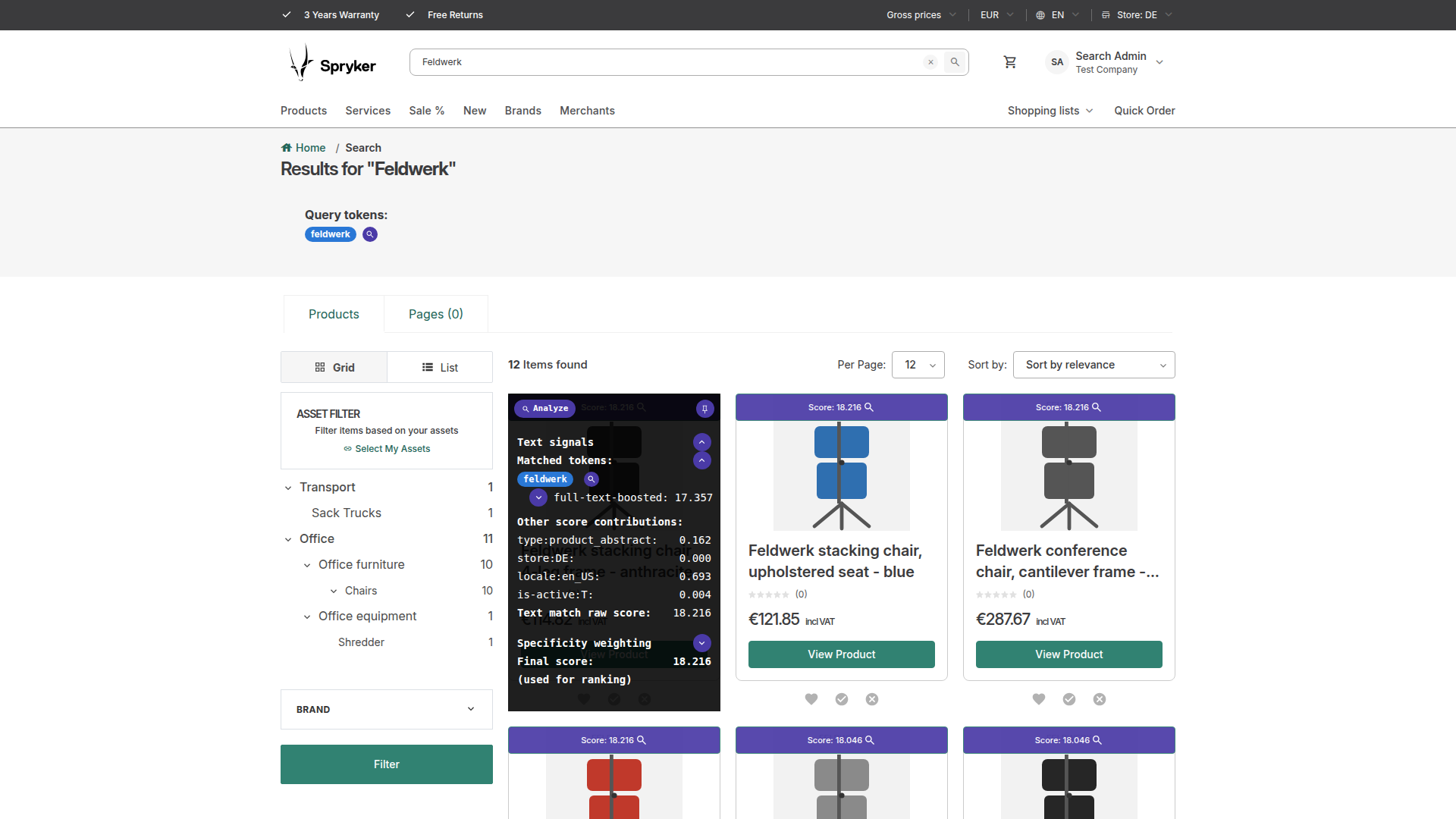
-
Token-source page — a magnifier next to each matched token opens a page that attributes the token back to the raw product fields it was indexed from (name, SKU, variants, descriptions, categories, merchant name). It reads the product's real indexed document and analyzes its elements with the index-time analyzer, so prefix/ngram matches (e.g. searching
ölmatching Ölpapier) and searchable-attribute contributions (Zed → Search Preferences) are attributed correctly — including values no known source claims, which are shown honestly as "other indexed value", carrying a?affordance that explains why and how to name them: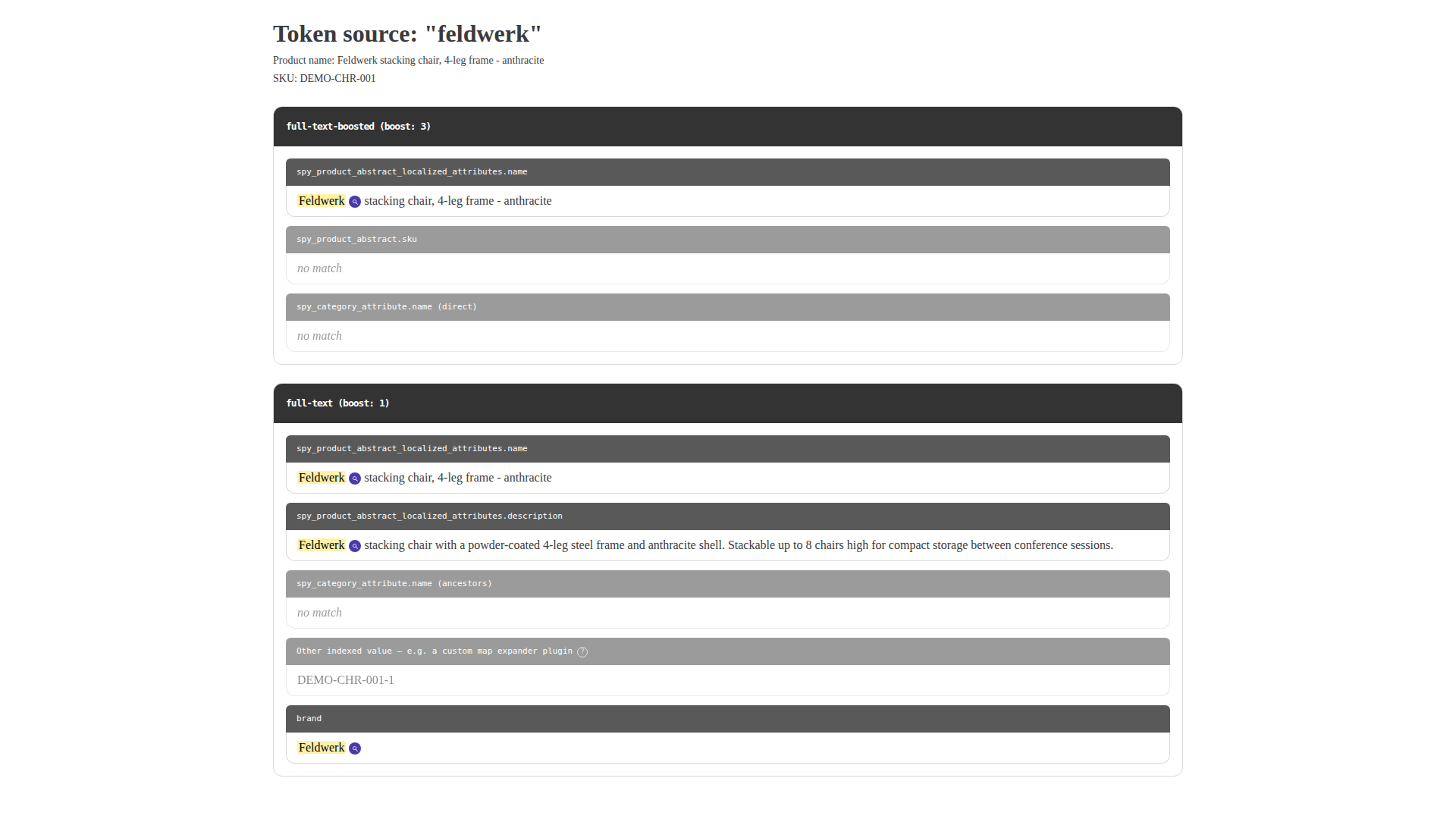
-
Analysis-path page — a second magnifier next to each matched fragment on the token-source page opens a page showing exactly how that raw text became the matched token: one box per analyzer stage (char filters, the tokenizer, every token filter, in chain order), connected by the ES operation that produced each one — e.g.
Ölpapier→ filter: lowercase →ölpapier→ filter: fulltext_index_ngram_filter →öl. Always a straight line, never a tree: even a filter that fans one token into several (ngram, decompounding, synonyms) only contributes the ONE step that actually led to the matched token — the path is reconstructed by walking backward through Lucene's own offsets (which stay relative to the original text across every stage), not by inspecting filter types, so it works for any analyzer chain. Each operation also shows that filter's own configuration, read live from the index's analysis settings (e.g.filter: fulltext_index_ngram_filter→edge_ngram (min_gram: 2, max_gram: 20)) — built-in components used by name only (lowercase,standard) show no definition, since nothing was customized. Every step is colored by its own exact text, cycling a fixed palette — the SAME text anywhere in the path gets the SAME color, so a color CHANGE between neighboring steps is itself the visual tell that a filter actually transformed the text (e.g. a synonym injecting a different word), not just decoration.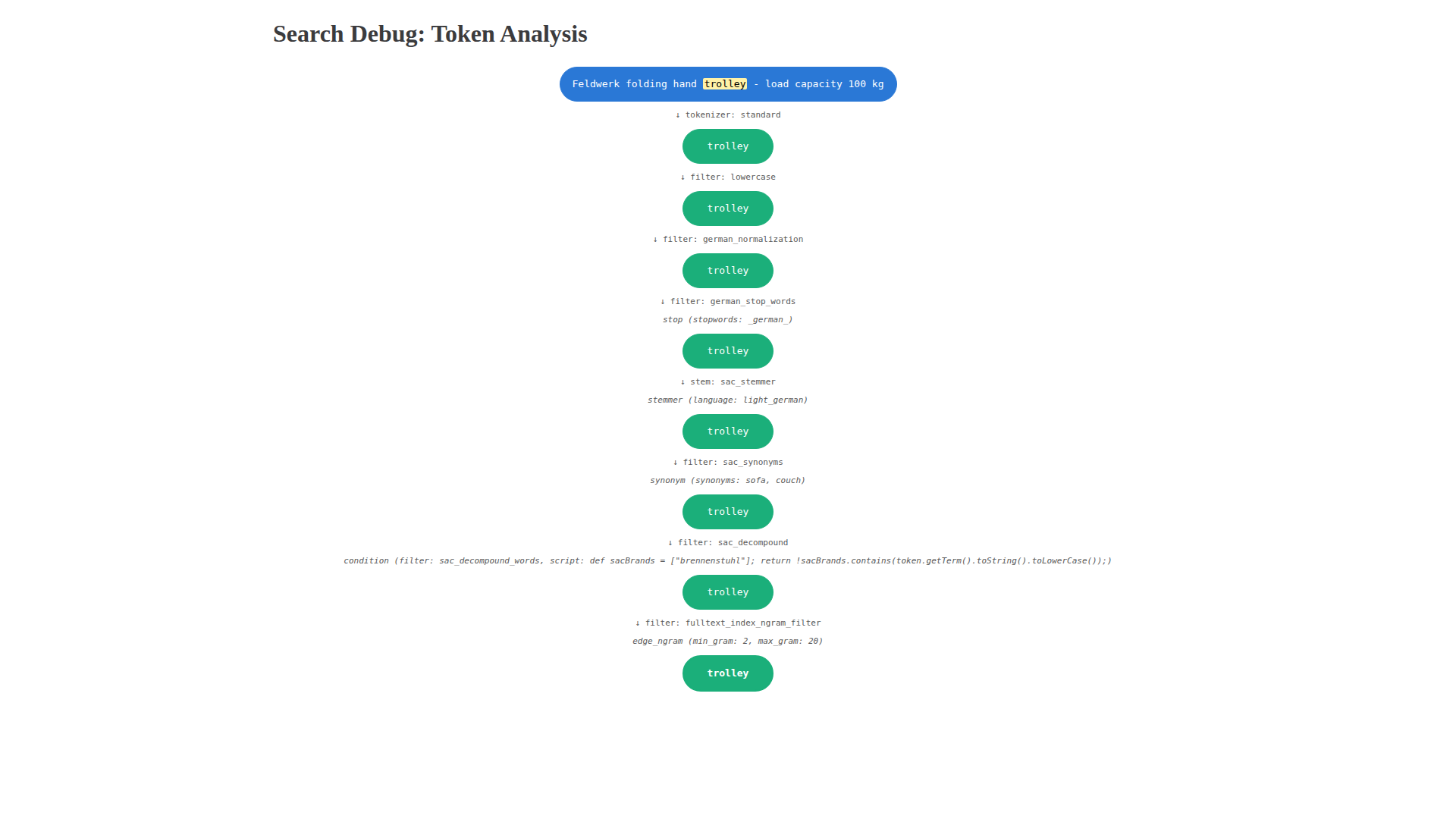
The SRP overlay's own query-token headline has the same magnifier, on each token — traced through the search-time analyzer instead, since a query token was never indexed, only searched. When a shop's index- and search-time analyzers genuinely differ (synonym expansion applied on only one side, different stemming/ngram settings), this is the one that explains how the shopper's own typed words became a search token — the token-source page's index-time trace only ever explains product content.
-
Component-config page — when a filter's configuration is too long to show inline (a
stop/synonymfilter's word list can run into the hundreds), the analysis-path page's definition line shows a preview plus a "view full definition" link instead of dumping everything into one line. It opens a new tab showing that ONE component's config in full, re-fetched server-side by kind+name — nothing is smuggled through the URL. -
Zero analyzer configuration — analyzer names are resolved from the live index's mapping (
analyzer/search_analyzerof thefull-textfield, with Elasticsearch's own fallback rules), not from config, so the package works with anypage.jsoncustomization or the vanilla core schema.


Access is controlled through Spryker's permission system: only customers granted the
SeeSearchDebugInfoPermissionPlugin permission see any debug output. The permission is enforced in the
Client layer, so it also covers non-Yves entry points (e.g. the Glue catalog-search resource).
On B2C shops, granting it needs one extra piece. The permission plugin registers fine anywhere —
spryker/permission ships in B2C too, and the B2C demo shop already has a
Pyz\Client\Permission\PermissionDependencyProvider with a getPermissionPlugins() extension point. What
differs is how permissions are assigned. B2B assigns them per Company Role, so you grant this to one
role and only those users see the overlay. Stock B2C has no company roles: its only permission storage
plugin is CustomerAccessPermissionStoragePlugin, which resolves permissions purely from logged-in vs
logged-out state — so out of the box you could only grant this to every logged-in customer, which is
not what you want for a debug tool. A B2C shop therefore needs a small custom
PermissionStoragePluginInterface implementation that grants the permission to whichever customers it
should apply to (e.g. an allowlist of customer references).
Word-level analysis page
Everything above — the SRP overlay, the token-source page, the analysis-path page — answers one question: why was this product's token matched. Given a real match already happened, they explain it: which score it contributed, which field it came from, which single lineage of transformations produced it. None of them can answer the question a Search Engineer asks before there is a match to explain: which tokens does this product produce in the first place — including the ones that never matched anything, the ones a filter quietly removed, and the branches an earlier tool would have collapsed away.
The word-level analysis page is that other half. A "You miss a SKU? Figure out why it's not here" widget
sits at the bottom of the search results grid, next to the search-feedback ticket form — enter a SKU and
it resolves one of three outcomes: the SKU doesn't exist (a typo), it exists but has no document in this
store/locale's search index (unpublished, inactive, or not yet exported), or it exists and is found — in
which case its real rank in the current filtered result set is shown (re-running the shop's own
CatalogClient query, page by page, never a hand-reconstructed raw query), with the option to open the
full analysis anyway even when it's ranked comfortably on page one. The same page is one click away from
any already-visible product too, via the small "🔍 Analyze" pill next to the pin toggle on the SRP score
overlay.
The page itself shows the current query's own tokens plus one horizontally-scrollable row of clickable
word badges per document field (title, SKU, descriptions, categories, merchant name — the same field
attribution TokenSourceResolver already knows, reused here) — a word already sharing a produced token
with the query is highlighted before anything is even clicked. Clicking any badge pins its full analysis
as a branching diagram: one ROW per analyzer stage (char filters, the tokenizer, every token filter, in
chain order), every token alive at that stage in that row, connected to the specific tokens it produced in
the next row — so a filter that fans one word into several (a decompounder, a synonym expansion, an
edge-ngram filter) is fully visible as multiple branches, not collapsed to the one lineage that happened to
match. A token a filter drops outright (a stop word, a min-length cutoff) gets an explicit ∅ marker
rather than just silently having no more rows underneath it, and a stemming stage is called out as
stem: X rather than buried as one more generic filter: X line.

This is a genuinely different layout from the analysis-path page's own straight-line boxes, and deliberately so — see the analysis-path page's own docblock for why a linear path is the right shape for "trace this one already-matched token backward" (there is structurally only ever one lineage to show), and why that shape would be the wrong one here: this page exists specifically to show every branch a transformation produces, most of which never match anything at all.
Requirements
- Spryker B2B/B2C/Marketplace shop on the
spryker/search-elasticsearchstack - PHP >= 8.3
Dependency floors are verified, not guessed: composer update --prefer-lowest --prefer-stable resolves
the declared constraints to their oldest allowed versions, and every vendor symbol the package references
is checked to exist in that tree. PHP 8.2 is not supported — spryker/store pulls spryker/propel-orm,
and every propel-orm release is either PHP >= 8.3 or depends on a non-stable propel/propel, so no
valid PHP 8.2 resolution exists.
Search engine compatibility
Verified against real _explanation output from all of:
| engine | Lucene | result |
|---|---|---|
| OpenSearch 1.3.4 | 8.10.1 | ✅ |
| OpenSearch 2.11.0 | 9.7.0 | ✅ |
| OpenSearch 3.5.0 | 10.3.2 | ✅ |
| Elasticsearch 8.11.0 | 9.8.0 | ✅ |
On each engine the parser was run against both the plain cross_fields multi_match shape and the
function_score + script_score shape, and on each it extracted the matched-token weights, the full
BM25 boost/idf/tf breakdown, and the pre-function_score relevance score identically — same values, to
the last digit, across both engine lineages and two Lucene generations.
Elasticsearch 7.x has not been run against real output, but sits inside the verified range: it is the fork point OpenSearch 1.x descends from, and both neighbours on either side are verified.
That three-Lucene-generation span is worth something concrete: Lucene did change explain wording between
them (dl, length of field (approximate) in 8.10 became dl, length of field in 9.7). The parser reads
that node by prefix rather than exact string, so it kept working — which is the degradation posture
described below doing its job on a real version change rather than a hypothetical one. OpenSearch 3.5.0
(Lucene 10.3.2) was added the same way: a demoshop upgraded from 1.3.4 end-to-end, the _explanation tree
re-parsed live — same sum of: → function score / match on required clause structure, no parser
change needed. This package needs no code change for OpenSearch 3.x; see
Migrating to OpenSearch 3.x for why the _explanation parser survives
the jump, the capability delta, and the one upgrade-time schema trap every Spryker shop hits.
This package reads _explanation trees and _analyze output, and stays deliberately inside the feature
set both engine lineages share. That subset is not arbitrary: Elasticsearch 7.10.2 (January 2021) was the
last Apache-2.0 release before the SSPL/Elastic License change, and OpenSearch was forked from exactly
that point. Anything at or below the fork exists in both lineages; anything Elastic added afterwards (the
pinned query, for instance) exists only in Elasticsearch. Staying inside the pre-fork subset is what
lets one package serve both.
The residual risk on an unverified engine is that the explanation parser matches on _explanation node
description strings, which Lucene produces and which can shift between Lucene versions (OpenSearch 1.3.4
ships Lucene 8.10.1; Elasticsearch 7.10.2 shipped Lucene 8.7.0). Unrecognized node shapes degrade
gracefully — they are kept verbatim as "other contributions" rather than dropped or mislabeled (see
ExplanationParser) — so the failure mode there is less detail, not wrong numbers.
Installation
1. Install the package
composer require spryker-community/search-debug:^1.4
2. Register the core namespace
Add SprykerCommunity to the core namespaces in config/Shared/config_default.php:
$config[KernelConstants::CORE_NAMESPACES] = [
    'SprykerShop',
    'SprykerEco',
    'Spryker',
    'SprykerSdk',
    'SprykerFeature',
    'SprykerCommunity', // <- add this line
];
This makes the package's modules resolvable like core modules — and, like core modules, extendable from
your project namespace (e.g. Pyz\Client\SearchDebug\SearchDebugConfig).
3. Generate transfers and clear caches
vendor/bin/console transfer:generate
vendor/bin/console cache:empty-all
4. Register the plugins
src/Pyz/Client/Catalog/CatalogDependencyProvider.php — enable explain and the debug result data on
the catalog search query:
use SprykerCommunity\Client\SearchDebug\Plugin\Catalog\SearchDebugQueryExpanderPlugin;
use SprykerCommunity\Client\SearchDebug\Plugin\Catalog\SearchDebugResultFormatterPlugin;

    protected function createCatalogSearchQueryExpanderPlugins(): array
    {
        return [
            // ... existing plugins, before FacetQueryExpanderPlugin
            new SearchDebugQueryExpanderPlugin(),
            new FacetQueryExpanderPlugin(),
        ];
    }

    protected function createCatalogSearchResultFormatterPlugins(): array
    {
        return [
            // ... existing plugins
            new SearchDebugResultFormatterPlugin(),
        ];
    }
src/Pyz/Zed/Permission/PermissionDependencyProvider.php and
src/Pyz/Client/Permission/PermissionDependencyProvider.php — make the permission assignable and
checkable:
use SprykerCommunity\Shared\SearchDebug\Plugin\SeeSearchDebugInfoPermissionPlugin;

    protected function getPermissionPlugins(): array
    {
        return [
            // ... existing plugins
            new SeeSearchDebugInfoPermissionPlugin(),
        ];
    }
src/Pyz/Yves/Router/RouterDependencyProvider.php — register the token-source route:
use SprykerCommunity\Yves\SearchDebugWidget\Plugin\Router\SearchDebugWidgetRouteProviderPlugin;

    protected function getRouteProvider(): array
    {
        return [
            // ... existing plugins
            new SearchDebugWidgetRouteProviderPlugin(),
        ];
    }
5. Register the Yves plugins
src/Pyz/Yves/EventDispatcher/EventDispatcherDependencyProvider.php — marks search-results requests as a
debug context for permitted customers:
use SprykerCommunity\Yves\SearchDebug\Plugin\EventDispatcher\SearchDebugContextEventDispatcherPlugin;

    protected function getEventDispatcherPlugins(): array
    {
        return [
            new SearchDebugContextEventDispatcherPlugin(),
            // ... existing plugins
        ];
    }
src/Pyz/Yves/Twig/TwigDependencyProvider.php — provides the searchDebugTokenColors() template
function used in step 6:
use SprykerCommunity\Yves\SearchDebug\Plugin\Twig\SearchDebugTwigPlugin;

    protected function getTwigPlugins(): array
    {
        return [
            new SearchDebugTwigPlugin(),
            // ... existing plugins
        ];
    }
No controller override is required. Earlier versions of this package asked you to extend your own
CatalogController to set the debug context and compute token colours. That was the most invasive part
of installing it, and a guaranteed merge for the many shops that already override that controller —
so both jobs moved into the two plugins above.
The listener works because the core CatalogController builds its search parameters from
$request->query, and its reduceRestrictedParameters() only strips price parameters — it does not
whitelist, so a parameter set before the controller runs survives into catalogSearch(). Security is
unchanged: the parameter never was the gate. It only marks "this is a search-results page", while
SearchDebugAccessChecker independently re-checks the permission in the Client layer before any debug
data is produced. The listener also unconditionally strips any incoming value of that parameter first, so
a crafted URL cannot smuggle one in.
6. Hook up the storefront templates
In your search view (e.g. a project search.twig), map the raw _view.searchDebug.* result data (nested
under the SearchDebugResultFormatterPlugin::NAME key) into flat data.* entries alongside your other
view data:
{% define data = {
    {# ...your existing entries... #}

    searchDebugTokens: _view.searchDebug.tokens | default([]),
    searchDebugTokenOffsets: _view.searchDebug.tokenOffsets | default([]),
    searchDebugProducts: _view.searchDebug.products | default([]),
    searchDebugFieldBoosts: _view.searchDebug.fieldBoosts | default([]),
    searchDebugTokenColors: searchDebugTokenColors(_view.searchDebug.tokens | default([])),
} %}
Then render the query-token headline — searchString (your view's own raw query string, e.g. _view.searchString) lets each token's magnifying-glass link re-analyze the exact text it was searched as:
{% include molecule('search-debug-tokens', 'SearchDebugWidget') with {
    data: {
        tokens: data.searchDebugTokens,
        tokenColors: data.searchDebugTokenColors,
        tokenOffsets: data.searchDebugTokenOffsets,
        searchString: data.searchString,
    },
} only %}
In your product-grid template (e.g. page-layout-catalog.twig), render the per-product overlay inside
the product loop — fieldBoosts is the query's real, live field=>boost pairs (captured by
QueryFieldBoostReader, e.g. {'full-text': 1, 'full-text-boosted': 5}), forwarded through the
per-token link so the token-source page shows however many fields your query actually searched, at their
real boost values, with no hardcoded field count or boost assumption.
The include must share a positioning wrapper with the product widget, not sit next to it as a plain
sibling. CatalogPageProductWidget's own template renders its product card inside a <div class="col col--sm-12 col--md-6 col--xl-4"> (or col col--sm-12 in list view) — that div IS the SRP grid's actual
grid item. search-debug-product-info.scss's .search-debug-product-wrapper class expects to both
replace that div as the grid item AND act as the position: relative anchor the overlay's position: absolute resolves against. Add the overlay as a bare sibling after {% endwidget %} (the shape a first
read of this section suggests) and the grid breaks visibly: the score badge/overlay becomes its own
stray grid cell instead of anchoring to the product it describes, and the product cards around it
misalign. Wrap both the widget call and the include together, and only for products that actually have
debug data — a product with none should render through the widget exactly as it would without this
package installed, with no extra wrapper div at all:
{% set productSearchDebugInfo = (data.searchDebugProducts | default([]))[product.id_product_abstract] | default([]) %}
{% if productSearchDebugInfo is not empty %}
    <div class="search-debug-product-wrapper {{ data.viewMode == 'list' ? 'col col--sm-12' : 'col col--sm-12 col--md-6 col--xl-4' }}">
        {% widget 'CatalogPageProductWidget' args [
            product,
            data.viewMode,
            data.products,
        ] only %}
        {% endwidget %}
        {% include molecule('search-debug-product-info', 'SearchDebugWidget') with {
            data: {
                debugInfo: productSearchDebugInfo,
                tokenColors: data.searchDebugTokenColors | default([]),
                productAbstractSku: product.abstract_sku,
                fieldBoosts: data.searchDebugFieldBoosts | default([]),
            }
        } only %}
    </div>
{% else %}
    {% widget 'CatalogPageProductWidget' args [
        product,
        data.viewMode,
        data.products,
    ] only %}
    {% endwidget %}
{% endif %}
Finally, add the "You miss a SKU?" lookup widget at the bottom of the results grid, next to any existing
feedback widget (e.g. search-feedback's ticket form) — it needs the same searchDebugTokens check as the
overlay above so it never renders on a query this package has no data for:
{% if data.searchString is defined and data.searchString is not empty and data.searchDebugTokens | default([]) is not empty %}
    {% include molecule('search-debug-sku-lookup', 'SearchDebugWidget') with {
        data: {
            searchString: data.searchString,
        },
    } only %}
{% endif %}
And the SRP overlay's "🔍 Analyze" link (rendered by search-debug-product-info itself, no extra template
change needed) resolves to the search-debug/analyze route registered by this package's own route
provider plugin — nothing further to wire up there.
7. Frontend build
Add the community vendor directory to your Yves builder so the package's components compile — this touches
three separate places in your project's own frontend/settings.js (the paths map, the per-theme path
mapping, and find.componentEntryPoints.dirs), plus one ignoreFiles addition that matters as soon as you
install more than one spryker-community/* package side by side: each one carries its own nested
vendor/spryker-community/* copy of its sibling packages (a normal consequence of them being
independently composer-installable), and without the exclusion the builder bundles both the real copy and
every nested duplicate — whichever one wins is arbitrary, so a component can silently fail to register
(customElements.get() returns nothing, no build error) because the browser loaded a stale duplicate
instead of the file you're actually editing.
All four edits, spelled out together, are in
docs/examples/frontend-settings.js.patch.
Then:
yarn yves
8. Glossary entries
Copy the rows from this package's data/glossary.csv into your project's own
glossary.csv (e.g. data/import/common/common/glossary.csv) — every search_debug.* key the package
references, already translated for en_US/de_DE. Edit the translated text or add further locales as
your project needs; nothing about the KEYS themselves is project-specific. Then re-run:
vendor/bin/console data:import glossary
9. Grant the permission
In Zed → Customer → Company Roles, assign the SeeSearchDebugInfoPermissionPlugin permission to a dedicated role (recommended: a separate "Search Admin" role rather than widening an existing admin role), and assign that role to the users who should see debug output.
10. Verify the installation
vendor/bin/console search-debug:check-installation
Most of the steps above fail silently when missed — the overlay simply does not appear, with nothing in
any log to say why. This command checks the core namespace registration, that every plugin class is
loadable, that the search engine is reachable (reporting its distribution and Lucene version), that a
page index exists, and that the engine really returns _explanation data. It exits non-zero and names the
remedy for whatever is wrong.
It is explicit about its own blind spots: running in Zed, it never bootstraps the Yves DI container, so it cannot confirm that you registered the EventDispatcher/Twig plugins from step 5, the widget routes from step 4, or wired the templates in step 6 — it says so in its output.
Register it in src/Pyz/Zed/Console/ConsoleDependencyProvider.php:
use SprykerCommunity\Zed\SearchDebug\Communication\Console\SearchDebugCheckInstallationConsole;

    protected function getConsoleCommands(Container $container): array
    {
        return [
            // ... existing commands
            new SearchDebugCheckInstallationConsole(),
        ];
    }
Yves-side counterpart. /search-debug/check-installation closes exactly the gap the console command
names above — it runs from inside the real Yves DI container (no new plugin registration needed, it uses
the same SearchDebugWidgetRouteProviderPlugin from step 4), and checks: the Twig helper function from
step 5, the event listener from step 5, and the three widget routes from step 4. It is complementary, not
a replacement: it does not re-check engine reachability, the page index, or explain support — run the
console command for those. Together the two cover everything except the two things neither can prove
generically — your project's own template wiring (step 6) and whether the frontend build picked the
components up (step 7) — which stay a load-the-page check either way.
Reachable only when BOTH hold:
-
The route exists at all — governed by
SprykerCommunity\Shared\SearchDebug\SearchDebugConstants::IS_CHECK_INSTALLATION_PAGE_ENABLED, which defaults to disabled: the route does not register anywhere unless a project explicitly opts in. This matches every other capability in this package (nothing activates without explicit registration) and Spryker core's own idiom for this kind of dev diagnostic —WebProfilerConstants::IS_WEB_PROFILER_ENABLEDlikewise defaults tofalse, turned on only in a dev-tier config. Enable it in your development-tier config (e.g.config/Shared/config_default-development.php) — the page is genuinely useful while wiring up steps 1-9 above, so turning it on there is worth doing as you go, not an afterthought:$config[SearchDebugConstants::IS_CHECK_INSTALLATION_PAGE_ENABLED] = true;
This is deliberately a config flag rather than the package auto-detecting an environment name — since environment names and tier boundaries vary per project, and guessing wrong in either direction is worse than an explicit opt-in. Leaving it off in shared/production-like environments means the URL 404s exactly like any nonexistent path, regardless of permission — a permission check alone would still leak "this route exists and is gated" to an anonymous prober, which not registering the route at all avoids entirely.
-
The visiting customer holds the
SeeSearchDebugInfoPermissionPluginpermission — checked wherever the flag above leaves the route enabled, so opting in on a shared environment does not by itself expose the page to anyone but a permitted customer. Missing the permission there renders a dedicated explanation with the exact remedy (grant the permission, per step 9) at HTTP 403, rather than a bare access-denied response — someone hitting this page without the permission yet is almost always mid-setup, not an incident.
11. Optional: Glue REST API — searchDebug on catalog-search
This package ships an additive Glue API Platform schema
(resources/api/storefront/catalog-search.resource.yml)
that adds a searchDebug property to core's catalog-search resource (spryker/catalog-search-rest-api)
— the same permission-gated payload the SRP overlay above reads (_view.searchDebug), now also on
GET /catalog-search. It only carries the properties: addition; core's own
shortName/operations/provider/etc. are left alone (see the file's own comment for why — those are
scalar keys that would silently clobber whichever layer merges last, so only one place should ever set
them).
Requires one project-level step, shared with spryker-community/search-ranking's own randomImpact
property (register once even if you have both packages installed):
src/Pyz/Glue/CatalogSearchRestApi/resources/api/storefront/catalog-search.resource.yml — the
project-level layer (highest merge precedence) that points provider: at a small Pyz override:
resource:
    name: CatalogSearch
    provider: Pyz\Glue\CatalogSearchRestApi\Api\Storefront\Provider\CatalogSearchStorefrontProvider
src/Pyz/Glue/CatalogSearchRestApi/Api/Storefront/Provider/CatalogSearchStorefrontProvider.php —
extends core's own CatalogSearchStorefrontProvider, duplicates its short provideCollection() body (the
raw $searchResult array — the same one SearchDebugResultFormatterPlugin and search-ranking's
RandomImpactResultFormatterPlugin already populate for Yves — is only reachable there, before it's mapped
into resource data), and injects both packages' keys before denormalizing:
$resourceData['searchDebug'] = $searchResult[SearchDebugConfig::SEARCH_RESULT_KEY] ?? [];
$resourceData['randomImpact'] = $searchResult[SearchRankingConfig::RANDOM_IMPACT_RESULT_KEY] ?? [];
Then regenerate:
vendor/bin/glue api:generate storefront
If you're on a project where spryker-community/* packages are installed via composer path
repositories (symlinked into vendor/spryker-community/*, as this demoshop's own packages are):
spryker/api-platform's schema finder builds its Symfony\Component\Finder\Finder instances without
->followLinks(), so it never descends into a symlinked package directory at all — confirmed directly:
(new Finder())->directories()->in('vendor/spryker-community')->name('storefront') finds nothing for any
symlinked package, the identical call with ->followLinks() finds all of them. sourceDirectories
containing plain 'vendor/spryker-community' is therefore not enough on its own. Fix with a small
project-level override (no vendor patching) — register in config/Glue/ApplicationServices.php:
use Pyz\Glue\ApiPlatformSymlinkFix\SchemaFinder as PyzSchemaFinder;
use Pyz\Glue\ApiPlatformSymlinkFix\ValidationSchemaFinder as PyzValidationSchemaFinder;
use Spryker\ApiPlatform\Schema\Finder\SchemaFinderInterface;
use Spryker\ApiPlatform\Schema\Validation\Finder\ValidationSchemaFinderInterface;

$configurator->services()->set(SchemaFinderInterface::class, PyzSchemaFinder::class)->autowire();
$configurator->services()->set(ValidationSchemaFinderInterface::class, PyzValidationSchemaFinder::class)->autowire();
Pyz\Glue\ApiPlatformSymlinkFix\SchemaFinder/ValidationSchemaFinder (src/Pyz/Glue/ApiPlatformSymlinkFix/)
extend the two upstream classes, duplicating only the Finder-building methods to add ->followLinks() —
see those files' own docblocks for the full analysis. With this in place, a plain
'vendor/spryker-community' entry in sourceDirectories (config/Glue/packages/spryker_api_platform.php)
is sufficient — no per-package real-path entries needed. A normal composer require install (no path
repository) never hits this at all — vendor/spryker-community/search-debug is then a real directory,
not a symlink. After registering the override, clear the compiled Glue container cache
(data/cache/Glue/<env>) once so it's rebuilt with the new service, then re-run api:generate.
searchDebug is present (as []) for any requester without SeeSearchDebugInfoPermissionPlugin, or
when debug output wasn't requested (SearchDebugAccessChecker::isSearchDebugEnabled()); anonymous Glue
requests will always see the empty shape.
How it works
SearchDebugQueryExpanderPluginswitches Elasticsearch inlineexplainon — only when the request was flagged by the controller AND the customer holds the permission (SearchDebugAccessChecker, the single client-layer gate). It also captures the query's realmulti_matchfield=>boost pairs (QueryFieldBoostReader) — whatever fields your query actually searches, at whatever boost, nothing hardcoded — forSearchDebugResultFormatterPluginto include in its output.SearchDebugResultFormatterPluginparses each hit's explain tree (ExplanationParser, a recursive shape-matching walker with an honest fallback for unknown node shapes) into per-token score contributions. Per-field weights for the same term are combined via whichever mode the explain tree's own nodes indicate — max/dis_max or sum/bool-should — detected from the node descriptions, not assumed;function_scoreboost-function contributions (field_value_factor, decay functions, script_score) get their own bucket, separate from other score contributions.- The token-source page (
SearchDebugWidgetYves module) reads the product's indexed document via the synchronization-service document id, and tests every element of every field the query searched (however many that is — seeQueryFieldBoostReaderabove) with the index-time analyzer (_analyzewithexplain: true, offsets included). Each element is labeled by matching it first against the known NAMED source values (title, SKU, description, category, merchant name, ...), then against the product's own searchable attribute values (labeled with the real attribute key, e.g. "brand") — anything neither identifies still shows up, under a generic "other indexed value" label. Tiers render sorted by boost descending, with the real, live boost value shown next to each. - The analysis-path page (
AnalysisPathController/AnalysisPathResolver) re-analyzes one matched fragment's raw text with_analyze?explain=true, but reads the FULL per-stage breakdown (SearchStringAnalyzer::getAnalysisStages()/SearchDebugClientInterface::getTextAnalysisStages()) — char filters, the tokenizer, and every token filter — instead of collapsing straight to the final tokens.AnalysisPathResolverthen walks that stage list BACKWARD from the already-known matched token's offset, picking at each step the one earlier-stage token whose offset range contains the current one. Lucene offsets are always relative to the original text, never re-based per stage, so containment alone determines lineage — no filter-specific logic needed, and no branching: only the one lineage that produced the matched token is ever visited, regardless of how many sibling tokens an earlier stage's token fanned out into. - Each stage's operation is enriched with its own configuration by
ComponentDefinitionFormatter, which looks the component up by name in the live index's analysis settings (IndexSchemaReader::findComponent(), fed byIndexSchemaMapperparsing thetokenizer/filter/char_filterblocks of_settings.analysis— the SAME live schema call already used to resolve analyzer names, so this is not extra I/O). PHP'strue/false→"1"/""string-cast quirk is handled explicitly, and a config list longer than 5 items is shown as a preview with a total count, flaggedtruncatedrather than dumped verbatim — a realsynonym/stopfilter's word list can run into the hundreds. When a stage IS truncated,ComponentConfigControllerre-fetches that same component (SearchDebugClientInterface::getComponentConfig()) andComponentConfigFormatterrenders its config in full for the component-config page — same two shape hazards handled again, just without the length cap, since showing everything is the whole point there.
Extending the overlay
Other packages can contribute additional score sections to the per-product SRP overlay via
SprykerCommunity\Client\SearchDebug\Dependency\Plugin\ProductDebugDataExpanderPluginInterface
(registered by overriding SearchDebugDependencyProvider::getProductDebugDataExpanderPlugins() on
project level). Each plugin receives the parsed per-hit debug data plus the raw document _source
and may append generically-rendered sections (title, label: calculation = value lines, a summary
line and a free-text formula line). This is how spryker-community/search-ranking — a companion
Spryker Community extension, developed alongside this one but not yet released — explains its
business-signal function_score in the same overlay.
For a function_score-wrapped query the explain parser additionally exposes the WRAPPED query's own
relevance as queryScore (shown as "Text match raw score", the number the matched-token breakdown adds
up against), suppresses Elasticsearch's float-max maxBoost sentinel from the output, and the
overlay closes with the final _score actually used for ranking.
Naming your own indexed values on the token-source page
TokenSourceResolver identifies the contributors a default Spryker shop indexes — title, SKU, variant
names/SKUs, descriptions, categories, merchant name. It cannot know what your own ProductPageSearch
map-expander plugins put into the index, and nothing in the cluster records it: the indexing pipeline
flattens every contributed value into one flat full-text array, which is precisely why this feature
exists.
Values it cannot name still appear — attributed to their real product-attribute key where one claims them, otherwise labeled "other indexed value". Nothing is hidden or mislabeled. To give your own values a proper name, register a plugin:
use SprykerCommunity\Yves\SearchDebugWidget\Dependency\Plugin\TokenSourceProviderPluginInterface;

class TechnicalDatasheetTokenSourceProviderPlugin implements TokenSourceProviderPluginInterface
{
    public function getLabelsByValue(
        array $productAbstractStorageData,
        array $productConcreteStorageData,
        string $localeName,
    ): array {
        $datasheetTitle = (string)($productAbstractStorageData['datasheet_title'] ?? '');

        return $datasheetTitle !== ''
            ? [$datasheetTitle => ['acme.search_debug.source.datasheet_title']]
            : [];
    }
}
Register it in src/Pyz/Yves/SearchDebugWidget/SearchDebugWidgetDependencyProvider.php:
    protected function getTokenSourceProviderPlugins(): array
    {
        return [
            new TechnicalDatasheetTokenSourceProviderPlugin(),
        ];
    }
Values that end up unnamed are marked on the page with a ? affordance explaining exactly that, so the
gap is visible where it is encountered rather than only in this README. It is a visible glyph rather than
a bare tooltip on the label, because an invisible hint is only ever found by someone who already knew to
look for it.
The returned key must be byte-identical to the element as it appears in the search document, because
that is what it is matched against. You do not declare a tier. The page walks the real indexed
document tier by tier, so your value is attributed to whichever tier actually contains it — including
both, if you index it into full-text and full-text-boosted alike.
For the same reason, the built-in definitions no longer depend on their declared tier being right: if
your project moves one of them between full-text and full-text-boosted, the value is still
recognised and still labeled correctly — it is simply shown under the tier the document really has.
Display precision
SprykerCommunity\Shared\SearchDebug\SearchDebugConfig::SCORE_DECIMAL_PLACES (default 3) is the
single constant controlling how many decimal places EVERY number in the overlay is rounded and
displayed to — the final _score, matched-token weights, other contributions, and any section a
ProductDebugDataExpanderPluginInterface plugin contributes. Consuming plugins (e.g. the companion
spryker-community/search-ranking's business-signal breakdown) read this same constant for the
calculation/formula strings they pre-build, so the whole overlay always shows one consistent
precision — there is no second place to keep in sync.
Rounding happens only at this display layer. No business-logic class in this package, or in a contributing plugin, rounds a value before it reaches the twig template (or a pre-built display string) — the full-precision float is always what gets computed with; this constant purely controls how the number is shown.
Limitations
-
Assumes Spryker's default single-resource catalog search model.
TokenSourceResolveralways resolves a SKU to aproduct_abstractand reads theproduct_abstractsearch resource's document. Shops with a different catalog/search topology — a tabbed abstract/concrete search, an additional "single" product type with no abstract, or multiple search resources — need to adapt the resource name and SKU→ID lookup to their own model; this is a structural assumption the package does not attempt to generalize away. -
Values from your own map expanders need a plugin to be named.
SOURCE_DEFINITIONSidentifies the contributors a default Spryker shop indexes. Nothing in the indexed document or the live cluster records which source field a value infull-text/full-text-boostedcame from — the pipeline flattens every contributed value into one flat array, which is the whole reason this feature exists. So a project registering its own map-expander plugins gets those values shown but not named: attributed to their real product-attribute key where one claims them, otherwise labeled "other indexed value". This is a labeling gap, never a correctness one — nothing is hidden, mis-tiered or mis-attributed. Register aTokenSourceProviderPluginInterfaceto name them (see "Extending the overlay"). The declaredtierof the built-in definitions is likewise only a hint: a project that moves a field between tiers still gets it recognised, shown under the tier the document really has.The deeper fix would live upstream, not here — but it matters which upstream fix, because the obvious one and the workable one are not the same. The obvious one is to stop flattening the searched field and tag each value inline instead, turning
full-textfrom a bare["val1", "val2", ...]array into[{"field": "name", "value": "val1"}, ...]. That one is a non-starter, and not for the disk cost:full-text/full-text-boostedare plaintextfields today specifically so a simplemulti_matchcan query them directly, and tagging them per-field would forcenested(or dynamically-mappedobject) mappings — a genuinely more expensive query shape (an extra join against hidden child documents) paid on every storefront search, not just the rare debug-permitted one. It would also change how BM25's field-length normalization is computed and require a full catalog reindex. That is real risk to the production relevance engine every shopper depends on, spent to make an occasional debug lookup more precise.The workable version leaves the searched fields exactly as they are and exports the origin map additionally — a separate, debug-only field alongside
full-text, stored but not indexed (index: false), recording which source field each indexed value came from. The search never queries it, so none of the above applies: nonested, no query-shape change, no effect on BM25 or on the relevance every shopper sees — it is purely extra data in_sourcefor the debug tool to read. We still deliberately didn't do it, but now for a narrower and more honest reason: it is a change to the core publish-and-sync export pipeline that every shop would then carry — extra per-product storage and extra export work, catalog-wide — for a payload only the rare debug lookup ever reads. A debug add-on that installs as a drop-in, with zero indexing changes, shouldn't push that cost into a project's core export path; re-analyzing the live document at debug time keeps the cost on the debug request, where it belongs, and the labeling gap stays a labeling gap rather than becoming a catalog-wide tax. -
The BM25
n/Nfigures are per-shard, not whole-index. The "one click deeper" BM25 breakdown showsn(documents containing the term) andN(total documents with the field) exactly as Lucene reports them — and Lucene computes those per shard, not across the whole index. On a single-shard index they coincide with the whole-corpus figures, which is why they read like catalog-wide statistics. On a multi-shard index they will not: every shard scores using its own local term statistics, so the same term can show a differentidfon two products that happen to live on different shards, and neither figure matches what you would get by counting the whole catalog yourself. This is standard Elasticsearch/OpenSearch behaviour, not something this package can correct (search_type=dfs_query_then_fetchis the engine's opt-in for computing global term statistics first, at a real performance cost) — but it is worth knowing before concluding the numbers are wrong. Note this also means a relevance constant calibrated from observed_scorevalues is shard-count-sensitive. -
Category pages don't get debug output — deliberately, not because they can't.
SearchDebugContextEventDispatcherPluginonly marks the full-text search route (search) as a debug context. A category listing page can carry a free-textqtoo (Spryker lets a customer search within a category), but most category page loads have no query string at all, so there would usually be nothing meaningful to explain; enabling it there would mean paying Elasticsearch's realexplaincost on every category page view for output that is thrown away most of the time. This is a one-line extension if you want it: subclass the plugin and overrideisSearchResultsPage()to accept the category route as well. The overlay itself already lives in the SHAREDpage-layout-catalog.twig(search and category pages both render through it), so it starts appearing automatically once debug data exists.
Testing and CI
Automated checks
.github/workflows/ci.yml runs on every push and pull request:
| check | what it protects |
|---|---|
composer validate |
the manifest stays well-formed |
phpcs (PHP 8.3, 8.4) |
coding standard, via this package's own phpcs.xml |
composer check-floors (PHP 8.3, 8.4) |
the declared dependency floors are real |
rector dry-run (PHP 8.3, 8.4) |
no unapplied Rector rule set drifts in |
phpmd (phpmd.xml + phpmd-public-methods.xml) |
cyclomatic/NPath complexity, method/class length stay reasonable — run as two separate invocations because PHPMD merges every loaded ruleset's exclude-pattern into one global file list per run, and only the public-method-count rule should skip Facades/Factories (Spryker's own DI convention gives each one method per capability/collaborator, not a design problem this package can fix) |
phpstan (PHP 8.3, 8.4) |
static analysis, level 8, standalone CI variant — see "Static analysis" below |
portable tests (PHP 8.3, 8.4) |
this package's own @group Portable test subset actually passes — see "Test suite" below |
check-floors is the one worth understanding. This package's require constraints are a promise about
which Spryker versions an adopter may install — and that promise is exactly what a development shop
cannot verify, because a full demo shop has every Spryker module present regardless of what this package
declares. A missing declaration only surfaces on a leaner shop, as a fatal, after installation.
So the check resolves every constraint to its oldest allowed version (composer update --prefer-lowest --prefer-stable --no-dev) and then asserts that every vendor symbol used in src/
actually exists in that tree. It exits non-zero if not. Run it locally the same way:
composer check-floors
It reports three categories: resolved, host-generated (Generated\* classes, created by the host
project's transfer:generate and correctly absent from any vendor tree), and optional-absent (symbols
from suggested modules such as spryker/merchant-storage, whose every use is guarded at runtime).
Test suite
Every test class carries a portability @group, so you can tell at a glance — or with codecept run -g <tag> — what a given test actually needs:
| tag | needs | where it runs |
|---|---|---|
Portable |
nothing beyond Generated\Shared\Transfer\* |
standalone — CI runs exactly this, see below |
NeedsDatabase |
a real Propel connection | host shop only |
NeedsSearch |
a real Elasticsearch/OpenSearch | host shop only |
Portable tests run standalone in CI on every push, via tests/codeception.portable.yml +
tests/_ci-standalone/ — no host shop, no live database, no search engine. The recipe: a direct
TransferBusinessFactory call generates Generated\Shared\Transfer\*, and a direct
spryker/search-elasticsearch IndexMapGenerator call generates Generated\Shared\Search\PageIndexMap
from that package's own default page mapping — both into src/Generated/ (gitignored, exactly like a
real project already gitignores its own — regenerated every run, never committed). Run it yourself the
same way CI does:
composer install
php tests/_ci-standalone/generate-transfers.php
php tests/_ci-standalone/generate-index-map.php
vendor/bin/codecept run -c tests/codeception.portable.yml -g Portable
The rest of the suite — NeedsDatabase/NeedsSearch — runs inside a host shop — they use the host's
test bootstrap (\PyzTest\Shared\Testify\Helper\Environment) and, for the analyzer tests, a live
Elasticsearch/OpenSearch:
vendor/bin/codecept build -c vendor/spryker-community/search-debug/tests/SprykerCommunityTest/Client/SearchDebug
vendor/bin/codecept run -c vendor/spryker-community/search-debug/tests/SprykerCommunityTest/Client/SearchDebug
vendor/bin/codecept run -c vendor/spryker-community/search-debug/tests/SprykerCommunityTest/Yves/SearchDebugWidget
For that reason the suites are not part of CI: a clean runner has neither a Spryker shop nor a search cluster, and standing both up per build would cost far more than it returns. CI therefore covers the static guarantees; the test suite is run against a real shop before a release. A standalone bootstrap that would let CI run them too is on the roadmap.
Browser (Presentation) suite
This suite is a development tool for this package's own reference demoshop — it is not something to install or run against YOUR shop. Every test is written against one specific demoshop's seeded fixture data: exact customer accounts, exact catalog contents (e.g. the query
chairis asserted to return results), exact configured synonym pairs, and a specific Company Role/permission grant. Point it at a different shop and most of it will simply fail on missing data, not on a real defect. It exists to catch UI regressions while developing this package, not as something adopters are expected to run.
Reproducing the fixture on a fresh clone of this demoshop. spencor.hopkin@acme.com
(customer_reference DE--1) is already a base-fixture member of the test-company company with no
company-role assignment — that's the negative-test account (UNPERMITTED_CUSTOMER_EMAIL), nothing to
add. The positive-test account (PERMITTED_CUSTOMER_EMAIL) is not a base fixture; the fastest way to
add it is fixtures/apply.php:
php fixtures/apply.php /path/to/b2b-demo-marketplace
It's idempotent (safe to re-run, safe alongside the sibling packages' own apply.php, since they all
share the same underlying customer/company-user/role rows and each only adds its own permission row).
It edits data/import/common/common/customer.csv, company_user.csv,
company_business_unit_user.csv, company_user_role.csv, company_role_permission.csv (granting
SeeSearchDebugInfoPermissionPlugin) and glossary.csv directly — re-import afterwards:
./docker/sdk console data:import customer
./docker/sdk console data:import company-user
./docker/sdk console data:import company-business-unit-user
./docker/sdk console data:import company-user-role
./docker/sdk console data:import company-role-permission
./docker/sdk console data:import glossary
This is the CSV-fixture equivalent of step 9's Zed GUI grant above — either path works, but the Presentation suite needs the CSV path since it logs in as this exact account.
tests/SprykerCommunityTest/Yves/SearchDebugWidgetPresentation/ is a real WebDriver click-through suite
covering every checklist item from the package's own manual QA pass: the SRP score overlay (badge, pin,
matched-token/BM25 breakdown, business-signals section), the query-token analyzer, the token-source and
analysis-path pages, the component-config page, the word-level analysis page and the SKU-lookup widget
(WordLevelAnalysisCest/SkuLookupCest — badge pinning, the single-tree-replaces-the-previous-one
behavior, the removed-token marker, the found/not-found/redirect-straight-to-analyze branches), the
permission gate (including the two negative-test accounts), and a couple of edge cases (zero results, the
& char filter). It is kept as its own module
directory rather than nested under Yves/SearchDebugWidget/ because that module's Unit suite scans its
whole directory tree recursively — a nested WebDriver suite there would break it.
vendor/bin/codecept build -c vendor/spryker-community/search-debug/tests/SprykerCommunityTest/Yves/SearchDebugWidgetPresentation
vendor/bin/codecept run -c vendor/spryker-community/search-debug/tests/SprykerCommunityTest/Yves/SearchDebugWidgetPresentation
Like the rest of the test suite, this is not part of CI — it needs a real running shop plus the Selenium/
chromedriver service already provisioned in this demoshop's docker-compose.yml.
One branch is deliberately left untested: SearchDebugContextEventDispatcherPlugin::handleRequest()'s
permission-granted path (the one that actually turns debug mode on) calls PermissionAwareTrait::can(),
which reaches through Spryker's global Locator singleton rather than an injected dependency — there is
no constructor seam to substitute a fake permission client. Both early-return paths (non-main request,
non-search route) are covered directly; the permission check itself is exercised only by manually granting
the permission (step 9, Grant the permission) and confirming the overlay
appears.
Static analysis
Static analysis (phpstan, level 8) runs in two variants:
composer phpstan-ci(configphpstan.ci.neon) — what CI runs on every push, standalone. Same transfer/index-map generation recipe as thePortabletest subset above, and treats two categories of class as out of scope rather than faking them: Propel's generatedOrm\Zed\*\Persistence\*entity/query/map classes (need a real schema + database, viapropel:model:build) and the aggregatedGenerated\{Zed,Yves,Client,Service}\Ide\AutoCompletionstub (an aggregate across every module in a real project's full dependency graph, viaconsole dev:ide-auto-completion:generate).composer phpstan(configphpstan.neon) — the full check, run from a host shop: it needs the generatedGenerated\Shared\Transfer\*classes, which only exist once a project has runtransfer:generate, and it needs the shop'sIde/AutoCompletionstub freshly regenerated (console dev:ide-auto-completion:generate) so the magicLocatorcalls in this package's DependencyProviders resolve instead of reporting as undefined methods — so it stays the authoritative check for adopters even though CI can't run it.
vendor/bin/console dev:ide-auto-completion:generate
vendor/bin/phpstan clear-result-cache -c vendor/spryker-community/search-debug/phpstan.neon
vendor/bin/phpstan analyse -c vendor/spryker-community/search-debug/phpstan.neon vendor/spryker-community/search-debug/src
License
MIT — see LICENSE.
Acknowledgements
Search Debug is an original project, but it reflects more than a decade of building search solutions for e-commerce. Along the way, I had the privilege of working with engineers whose ideas and experience shaped my approach to search engineering.
I'd particularly like to thank:
- Martin Loetsch — for the architectural ideas behind Contorion's early search platform.
- Krešimir Slugan — who handed over Contorion's search implementation to me and demonstrated an uncompromising focus on performance.
- Alberto Reyer (formerly Assmann) — for sharing the history and rationale behind Spryker Search's original design decisions and the engineering trade-offs behind them.
I'd also like to acknowledge the Spryker engineering team for creating an extensible platform that made community packages like Search Debug possible.
Any mistakes, questionable design decisions or bugs in this project are, of course, entirely my own.