
micschk / silverstripe-cmstweaks

Small CMS and developer improvements for Silverstripe 6: a system switcher with environment badge, page-type icons, permission codes, ModelAdmin and form-field opt-ins, template helpers, deduplicated error mails and asset repair tasks
Package info
github.com/restruct/silverstripe-admintweaks
Language:SCSS
Type:silverstripe-vendormodule
pkg:composer/micschk/silverstripe-cmstweaks
Requires
- php: ^8.3
- guzzlehttp/guzzle: ^7.0
- silverstripe/framework: ^6
- silverstripe/vendor-plugin: ^3
Requires (Dev)
Suggests
- axllent/silverstripe-cms-tweaks: Some complemental tweaks by Axllent
- restruct/silverstripe-favicons: Generates favicon, touch icon and web manifest variants from one PNG (falls back to the admintweaks FavIcon)
- restruct/silverstripe-login-branding: Reduce Silverstripe branding of the admin login and make it easily configurable
- symbiote/silverstripe-grouped-cms-menu: Group CMS menu items into nested lists
- wedevelopnl/silverstripe-webp-images: WEBP image support (output resized jpeg/png images as webp, GD with WEBP required; no Silverstripe 6 release yet as of 2026-10)
Provides
None
Conflicts
None
Replaces
- micschk/silverstripe-cmstweaks: 1.*
- restruct/silverstripe-cmstweaks: *
- dev-main
- 4.4.2
- 4.4.1
- 4.4.0
- 4.3.2
- 4.3.1
- 4.3.0
- 4.2.1
- 4.2.0
- 4.1.3
- 4.1.2
- 4.1.1
- 4.1.0
- 4.0.2
- 4.0.1
- 4.0.0
- v3.x-dev
- 3.23.2
- 3.23.1
- 3.23.0
- 3.22.1
- 3.22.0
- 3.21.1
- 3.21.0
- 3.20.8
- 3.20.7
- 3.20.6
- 3.20.5
- 3.20.4
- 3.20.3
- 3.20.2
- 3.20.1
- 3.20.0
- 3.19.0
- 3.18.0
- 3.17.1
- 3.17.0
- 3.16.0
- 3.15.0
- 3.14.0
- 3.13.0
- 3.12.0
- 3.11.1
- 3.11.0
- 3.10.0
- 3.9.0
- 3.8.1
- 3.8.0
- 3.7.1
- 3.7.0
- 3.6.3
- 3.6.2
- 3.6.1
- 3.6.0
- 3.5.0
- 3.4.2
- 3.4.1
- 3.4.0
- 3.3.2
- 3.3.1
- 3.3.0
- 3.2.0
- 3.1.0
- 3.0.x-dev
- 3.0.9
- 3.0.8
- 3.0.7
- 3.0.6
- 3.0.5
- 3.0.4
- 3.0.3
- 3.0.2
- 3.0.1
- 3.0.0
- v2.x-dev
- 2.4.0
- 2.3.3
- 2.3.2
- 2.3.1
- 2.2.16
- 2.2.15
- 2.2.14
- 2.2.13
- 2.2.12
- 2.2.11
- 2.2.10
- 2.2.9
- 2.2.8
- 2.2.7
- 2.2.6
- 2.2.5
- 2.2.4
- 2.2.3
- 2.2.2
- 2.2.1
- 2.2
- 2.1.15
- 2.1.14
- 2.1.13
- 2.1.12
- 2.1.11
- 2.1.10
- 2.1.9
- 2.1.8
- 2.1.7
- 2.1.6
- 2.1.5
- 2.1.4
- 2.1.3
- 1.2
- 1.1
- 1.0
- dev-fix-105-v3
- dev-fix-105
- dev-neutral-names-2-v2
- dev-neutral-names-2-3.0
- dev-neutral-names-2-v3
- dev-neutral-names-2-main
- dev-release-3.23.1
- dev-release-4.4.1
- dev-neutral-names
- dev-neutral-names-v3
- dev-empty-toolbar-gap-v3
- dev-empty-toolbar-gap
- dev-readme-presentation
- dev-docs/error-email-env
- dev-archive/ss6-attempt-2025-10
This package is auto-updated.
Last update: 2026-11-02 13:47:28 UTC
README
The small CMS and developer improvements most Silverstripe projects end up writing for themselves, in one module: a switcher that names the CMS and environment you are in and links to your other CMSes, page-type icons in the site tree, permission codes next to every permission checkbox, opt-in ModelAdmin and form-field tweaks, template helpers, deduplicated error mails, and repair tasks for a migrated asset store. A few sensible defaults apply on install; everything else is switched on per project. For Silverstripe 6 (the 3.x line covers Silverstripe 4 and 5).

Maintained by Restruct. If this module saves you time, you can support ongoing maintenance.
Namespace: Restruct\Silverstripe\AdminTweaks
Every project rebuilds the same small things
A stock Silverstripe CMS does the big things well and leaves the small ones to each project. Which of the organisation's CMSes is this, and is it the test server? Which permission code does that checkbox in the Security admin stand for? ModelAdmin offers an Export to CSV that just dumps the summary fields, and a CSV import that is a data-integrity risk on a synced model. An API key in a form needs a copy button. Error mails go out once per error, so a database outage sends hundreds. And a site migrated from Silverstripe 3 or 4 can leave folders that break the Files section and images that render nothing.
This module collects the fixes for those, so a project switches them on with a line of YAML instead of copying code around:
| Area | What you get | Details |
|---|---|---|
| Admin UI | Page-type icons, permission badges, Bootstrap Icon classes, menu grouping, CMS system switcher, GridField and checkbox fixes | Icons |
| ModelAdmin | Search bar open on load, scaffolded CSV buttons and import off | |
| Form fields | CopyTextField, MultivalueSortField, IpAddressField, Bootstrap classes | Form fields |
| GridField | Editable and orderable configs, versioned ordering | GridField |
| Templates | 30+ helper methods, extra iterators, image placeholders | Template helpers |
| SiteConfig | Contact details, social media, theme settings, raw HTML in head/body | SiteConfig |
| Caching | Cached HTTP requests, JSON and JSON-LD parsing | Caching and helpers |
| Email and logging | System sender from env, error mails with deduplication | Email and logging |
| QueuedJobs | Queue report recipient filled from env; ScheduledMethodCall and cleanup-broken-jobs moved to queuedjobs-enhancements |
QueuedJobs |
| Tasks | Repair tasks for a migrated asset store, a read-only ORM query task | Tasks |
What changes as soon as it is installed
In the CMS
-
Page icons: icons for common page types in the site tree (Bootstrap Icons as inline SVG, no font files; FontAwesome optional). See Icons for the list and for adding your own page types.
-
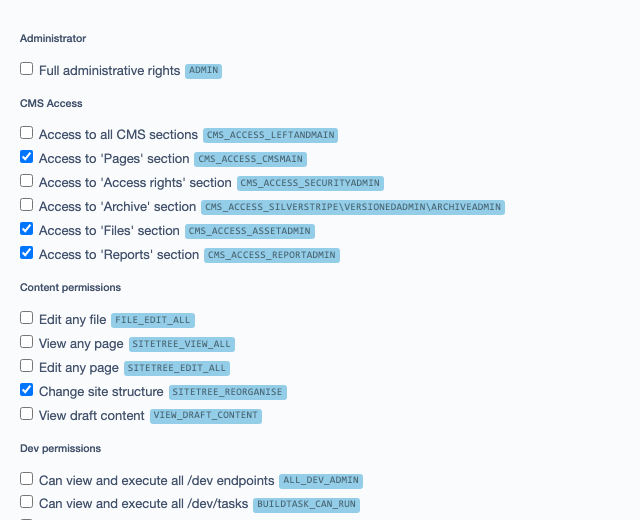
Permission badges: in the Security admin, every permission checkbox on a group shows its permission code, so similarly named permissions can be told apart.
-
Checkbox fixes: unchecked checkboxes in editable GridFields submit a value, so they can be unset.
-
Search-popover fixes: in the GridField "Search options" popover, checkboxset and optionset holders no longer collapse or overlap when a
form-controlclass leaks onto the field holder (for example from project code that decorates scaffolded search fields for front-end reuse), and long option lists scroll within the popover (CSS only). -
One record count:
GridFieldPageCountis removed from the GridField configs that fireupdateConfig(GridFieldConfig_Base,_RecordEditor,_RecordViewer,_RelationEditorand their subclasses), so "View 1-3 of 3" shows once, in the footer. The GridField title row that held it is hidden while it stays empty (no title, nothing in either header fragment), so no blank band is left above the column headers (CSS only).

Defaults
Session.cookie_secure: true: secure session cookies- UserDefinedForm submissions are not stored by default (
DisableSaveSubmissions), for GDPR - Image backend quality 90 (
Image_Backend.Quality) - URL segments:
&becomes-et-instead of core's-and-(no other replacement changed) - Password policy (
_config/passwords.yml): swaps core's defaultEntropyPasswordValidatorforRulesPasswordValidatorwith minimum length 12, history 6 and minimum test score 3 on live; minimum length 5 and no history check on dev/test - Cache lifetimes:
cacheblock(template<% cached %>) 24 hours;appcacheandadminCache1 hour - GoogleSitemap enabled when
wilr/silverstripe-googlesitemapsis installed (1000 objects per sitemap, Google/Bing notification on, honoursShowInSearch) - From env, only when the project has not set them:
Email.admin_emailfromAPP_SYSTEM_EMAIL_ADDRESS+APP_SYSTEM_EMAIL_SENDER,Email.queued_job_admin_emailfromAPP_LOG_MAIL_RECIPIENT
With other modules installed
| Module | Enhancement |
|---|---|
symbiote/silverstripe-grouped-cms-menu |
Groups admin sections under "Advanced Config" |
symbiote/silverstripe-queuedjobs |
Job context in error mails; report recipient from env (see QueuedJobs) |
wilr/silverstripe-googlesitemaps |
Activates sitemap generation |
silverstripe/mimevalidator |
Activates MIME upload validation |
wedevelopnl/silverstripe-webp-images |
Activates WEBP output (no Silverstripe 6 release yet) |
restruct/silverstripe-shortcodable |
Registers the CurrentYear and FeaturedImage shortcodes |
Opt-in tweaks for the CMS
Tell your CMSes apart: the system switcher
For organisations running several Silverstripe CMSes side by side (for example a public site, a document system and an e-learning platform): the admin menu header names the CMS you are in, with the environment, and opens a dropdown with links to the other CMSes (screenshot at the top).
---
Name: app-systemswitcher
---
Restruct\Silverstripe\AdminTweaks\SystemSwitcher:
  current: site            # this CMS's key below; differs per project
  systems:                 # the same block can be shared by every CMS
    site: { display: 'Example SITE', url: 'https://www.example.org/admin' }
    docs: { display: 'Example DOCS', url: 'https://docs.example.org/admin' }
    lms:  { display: 'Example LMS',  url: 'https://learn.example.org/admin' }
---
Name: app-systemswitcher-test
After: '#app-systemswitcher'  # so this fragment merges over the one above
Only:
  environment: test
---
Restruct\Silverstripe\AdminTweaks\SystemSwitcher:
  systems:                 # only the urls differ per environment; display is merged from above
    site: { url: 'https://site-test.example.org/admin' }
    docs: { url: 'https://docs-test.example.org/admin' }
    lms:  { url: 'https://learn-test.example.org/admin' }
- Off until
systemsis configured: the core header ($SiteConfig.Title, linking to the site) and the admin<title>stay exactly as Silverstripe renders them. - Header = the current system's
displayplus an environment suffix:(TEST)ontest,(DEV)ondev, nothing onlive. Without adisplayforcurrent(or withoutcurrent) the name isLeftAndMain.application_name. It replaces$SiteConfig.Titlein the header, so a public site's name does not show there. The suffix shows as a small badge after the name, without its surrounding spaces and one enclosing pair of brackets ((TEST)->TEST,[acceptance]->acceptance); a name too long for the header wraps to two lines and is then cut off with an ellipsis, the badge never is. No suffix (live): no badge. The button's tooltip and accessible name keep the full label (Example SITE (TEST)). - Admin title: while the switcher is on, that same label becomes
LeftAndMain.application_namefor the request, so the browser tab readsExample SITE (TEST) - Pages(also after pjax navigation). The suffix is never doubled, also not whenapplication_namealready ends with it. - Dropdown lists the other systems, links in the same tab (switching moves you to the other
CMS; ctrl/cmd-click opens a new tab as usual). Entries without a
display, or with aurlthat is not an absolutehttp(s)://URL, are left out. Keyboard: the header is a button (aria-expanded), Escape closes. All configured strings are HTML-escaped. - Collapsed menu shows the initials of the name ("Example SITE" ->
ES), with the environment badge under them; setinitialson a system to choose them yourself, for examplesite: { display: 'Example SITE', initials: 'SI', url: ... }. - Suffix strings are configurable per environment type (the admin title uses them as written, the header badge as described above):
Restruct\Silverstripe\AdminTweaks\SystemSwitcher:
  environment_suffixes:
    test: ' [acceptance]'
- With restruct/silverstripe-login-branding
and its
application_name_overrides_title: works the same, the switcher shows its own label in the header either way. To keep one place for the name there, setLeftAndMain.application_nameand leavedisplayout for the current system (it defaults toapplication_name). - Each system keeps its own login. The header template is an override of core's
SilverStripe/Admin/Includes/LeftAndMain_MenuLogo.ss; a theme or project that overrides that include as well takes precedence, and the switcher then does not show.
ModelAdmin: search open, CSV buttons off
ModelAdminExtension is registered on ModelAdmin; enable it per subclass (or project-wide via
YAML on SilverStripe\Admin\ModelAdmin, with per-subclass overrides):
class ProductAdmin extends ModelAdmin
{
    // Open the GridField search bar on load instead of hiding it behind the magnifier icon
    private static bool $auto_expand_gridfield_search = true;

    // Hide the framework-scaffolded Export to CSV / Print / Import CSV buttons
    // (the scaffolded export just dumps summary_fields; the default CsvBulkLoader
    // import is a data-integrity risk on synced/managed models)
    private static bool $hide_scaffolded_csv_buttons = true;
}

hide_scaffolded_csv_buttons also switches the CSV import itself off ($showImportForm = false),
not only its button: without that, ModelAdmin keeps accepting a hand-built import POST. To apply
it to every ModelAdmin:
SilverStripe\Admin\ModelAdmin:
  hide_scaffolded_csv_buttons: true

# SecurityAdmin is a ModelAdmin too; keep its member/group CSV import if you use it
SilverStripe\Admin\SecurityAdmin:
  hide_scaffolded_csv_buttons: false
Hide the Reports and Campaigns sections
Hiding the Reports and Campaigns CMS sections is opt-in since 4.1 (#54), and applied at
runtime so no After: ordering is needed to override it:
SilverStripe\Admin\LeftAndMain:
  hide_rarely_used_menu_sections: true
The sections keep working at their URLs; only the menu items go. While the setting is unset, dev
environments log a one-off notice about the change from 3.x; set it to false to keep the sections
and silence the notice. See UPGRADING.md.
Bootstrap Icon classes
Standard bi bi-* classes for buttons and other admin UI, mirroring core's .font-icon-*
pattern. They need the Bootstrap Icons stylesheet, loaded from a CDN once you switch it on:
SilverStripe\Admin\LeftAndMain:
  include_bootstrap_icons: true
  # optional, this is the default:
  # bootstrap_icons_cdn_url: 'https://cdn.jsdelivr.net/npm/bootstrap-icons@1.13.1/font/bootstrap-icons.min.css'
// Add Bootstrap icon to a button
FormAction::create('add', 'Add Item')->addExtraClass('bi bi-plus-circle');
Menu grouping
With symbiote/silverstripe-grouped-cms-menu installed, the configuration sections (Settings,
Archive, Redirects, Subsites, Queued Jobs and restruct/silverstripe-blockbase's blocks admin, those
that are installed) are grouped under "Advanced Config" in the menu. Nothing to configure.
Form fields and GridField configs
- CopyTextField: a read-only field with a copy-to-clipboard button, which turns green with a check for two seconds after copying.
- MultivalueSortField: a sortable multi-value field.
- IpAddressField: a text field with IP address validation (marked untested in its docs).
- Bootstrap classes: adds Bootstrap's
form-control/form-selectclasses to text, date, email, password, numeric and dropdown fields (opt-in).
CopyTextField::create('ApiKey', 'API Key', $apiKey)
    ->setButtonLabel('Copy')
    ->setShowAlert(true);

SilverStripe\Forms\FormField:
  extensions:
    - Restruct\Silverstripe\AdminTweaks\Extensions\FormFieldBootstrapExtension
GridField configurations:
// Inline editing with drag-drop ordering
$config = GridFieldConfigs::editable_orderable();

// Filterable, orderable with record editor
$config = GridFieldConfigs::filterable_orderable_recordeditor();
More in Form fields and GridField.
Templates, SiteConfig and caching
Template helpers
<!-- Environment checks -->
<% if $IsDev %>Debug mode<% end_if %>

<!-- Image placeholder SVG -->
<% include ImagePlaceholder W=180, H=50, Label='logo' %>

<!-- Theme resource URL -->
<video src="{$themeDirResourceURL('my-theme')}/video.mp4"></video>

<!-- Extra iterators -->
<% loop $Items %>
  <div class="col-{$GroupSize}-of-4">$Title</div>
<% end_loop %>
All helpers: Template helpers.
SiteConfig fields (opt-in)
SilverStripe\SiteConfig\SiteConfig:
  extensions:
    - Restruct\Silverstripe\AdminTweaks\Extensions\SiteConfigExtension
  enable_contact_social_media_fields: true
  enable_raw_head_body_fields: true
  enable_browser_color_theme_field: true
Every option: SiteConfig.
Cached HTTP requests
use Restruct\Silverstripe\AdminTweaks\Helpers\CacheHelpers;

// Cached JSON API request (1 hour TTL)
$data = CacheHelpers::cached_json_request('https://api.example.com/data', 'GET', [], 3600);

// Extract JSON-LD from a webpage
$jsonLd = CacheHelpers::cached_jsonLD_request('https://example.com/product');
More, including GeneralHelpers and the image fallback extensions: Caching and helpers.
Tie a DataObject's permissions to Pages access: EnforceCMSPermission
Ties a DataObject's canView / canEdit / canDelete / canCreate to Pages section access:
each returns Permission::check('CMS_ACCESS_CMSMain') for the current user. The $member
argument is ignored, so canEdit($someOtherMember) still answers for whoever is logged in. Holders
of CMS_ACCESS_LeftAndMain (all CMS sections) and ADMIN pass as well, as Permission::check()
treats those as implying CMS_ACCESS_CMSMain.
use Restruct\Silverstripe\AdminTweaks\Traits\EnforceCMSPermission;

class MyDataObject extends DataObject
{
    use EnforceCMSPermission;
}
Email and error mails
APP_SYSTEM_EMAIL_* fills Email.admin_email when the project has not set it. SMTP is configured
with Symfony Mailer's MAILER_DSN; the APP_SMTP_* variables of the 3.x line (SwiftMailer,
Silverstripe 4 only) do nothing here.
Error mails are sent only when all four APP_LOG_MAIL_* variables are set, so leave them out on
dev and test. They carry the request and server details, and repeats of the same error are
deduplicated, so an outage does not flood the inbox.
APP_SYSTEM_EMAIL_SENDER="My App"
APP_SYSTEM_EMAIL_ADDRESS="noreply@example.com"

MAILER_DSN="smtp://postmaster%40mg.example.com:secret@smtp.mailgun.org:587"

# Error email logging (omit on dev/test to disable)
APP_LOG_MAIL_RECIPIENT="admin@example.com"
APP_LOG_MAIL_SUBJECT="Error on MyApp"
APP_LOG_MAIL_SENDER="noreply@example.com"
APP_LOG_MAIL_LEVEL="error"
Formatter, deduplication settings and troubleshooting: Email and logging.
QueuedJobs
ScheduledMethodCall and the cleanup-broken-jobs task are no longer part of this module. Both live
in restruct/silverstripe-queuedjobs-enhancements
(namespace Restruct\QueuedJobsEnhancements, requires Silverstripe 5.4+), as
Restruct\QueuedJobsEnhancements\Jobs\ScheduledMethodCall and sake dev/tasks/cleanup-broken-jobs
(Silverstripe 5) / sake tasks:cleanup-broken-jobs (Silverstripe 6). See that module's README for usage.
What this module still does for queuedjobs:
- Fills
Email.queued_job_admin_email(the recipient of queuedjobs' broken/stalled job reports) fromAPP_LOG_MAIL_RECIPIENT, only when the project has not set it (_config.php). Set it tofalseto opt out of those mails. - Records the running job and its memory use in
$_SERVER, so error mails from the queue runner name the job (QueuedJobContextExtension, deprecated: queuedjobs-enhancements 1.7.0+ registers its own copy and this one then stays off).
Tasks: repair a migrated asset store, query the ORM
Repair tasks for a site migrated to Silverstripe 5 or 6
Three BuildTasks that fix asset artifacts left behind by a migration from Silverstripe 3 or 4.
All are dry-run by default; pass --apply to write. Run them in this order:
| # | Task | Fixes |
|---|---|---|
| 1 | sake tasks:fix-folder-filefilename |
/admin/assets dies with HashFileIDHelper::buildFileID requires an $hash value. Folder rows must have an EMPTY FileFilename (a folder derives its path from the parent chain); a populated value makes the folder's visibility lookup build a file ID with no hash. Also reports empty-FileHash File rows, which trip the same exception. |
| 2 | sake tasks:fix-misclassified-images |
Image files carried over with ClassName = File instead of Image. Blank tiles in the asset-admin grid, but more importantly, a has_one Image relation pointing at such a record renders nothing on the front end, because Fill()/FitMax()/ScaleWidth() don't exist on File. Resolves the target class via File::get_class_for_file_extension(), so .svg correctly becomes your registered SVG image class rather than Image. |
| 3 | sake tasks:generate-cms-thumbnails |
Blank tiles in the asset-admin file grid. The grid is served by GraphQL and asset-admin deliberately injects a non-generating thumbnail generator (ThumbnailGenerator.graphql -> Generates: false), so it emits the __FitMax[...] URL but never creates the variant. Normal uploads generate variants on save; migrated files never went through SS5, so their variants don't exist and the <img> 404s. SS4 ran ImageThumbnailHelper inside MigrateFileTask; SS5 removed the task but kept the helper. This runs it. |
Order matters: (2) before (3), because the thumbnail helper skips anything whose getIsImage() is
false; a file still stuck on ClassName = File would be passed over.
Prerequisite for (3): the files must actually be migrated (a populated FileHash). On a database
where FileHash is empty there are no stored bytes to make a thumbnail from, and the task will
correctly report that it generated nothing.
Task (3) requires silverstripe/asset-admin; it hides itself if that isn't installed.
Developer tasks
| Task | What it does |
|---|---|
sake tasks:orm-query --class=Member --limit=5 |
Read-only ORM lookups from the command line (CLI and dev mode only): --filter, --exclude, --where, --fields, --sort, --limit, --count, --group-by, --sum/--avg/--min/--max, --sql to show the query, --schema to show the class's fields, relations and extensions. |
sake tasks:qjob-profile --class='My\Jobs\SyncJob' --maxcalls=50 |
Runs a queued job in-process and reports memory, step, jobData size and message count per process() call, to find what a job accumulates. Dev only: it really runs the job. Deprecated: moved to queuedjobs-enhancements 1.7.0 under the same name, and this copy switches itself off when that is installed. |
sake tasks:focuspoint-invert-yaxis |
Inverts all FocusPoint Y values (FocusPoint v2 to v3), for when the module's own migration did not run or went wrong. |
The task invocations changed from 3.x (dev/tasks/... apply=1 became tasks:... --apply); the
full table is in UPGRADING.md.
Technical
Version compatibility
| Branch | Module version | Silverstripe | PHP | Status |
|---|---|---|---|---|
main |
4.x |
6 | 8.3+ | active development |
v3 |
3.x |
4, 5 | as Silverstripe requires | security and bug fixes until Silverstripe 5 EOL (April 2027) |
v2 |
2.x |
4 | as Silverstripe requires | no further releases |
composer.json on each branch is the source of truth for exact constraints. Upgrading from 3.x?
See UPGRADING.md: the CMS menu behaviour and the task invocations both changed.
Release history: CHANGELOG.md.
Installation
composer require restruct/silverstripe-admintweaks:^4   # Silverstripe 6
composer require restruct/silverstripe-admintweaks:^3   # Silverstripe 4 / 5
Then flush and build the database (sake db:build --flush on Silverstripe 6). The defaults above
apply from then on; the rest is switched on in your project's config.
Building the admin assets
The compiled CSS and JS in client/dist/ are committed. To change them, edit client/src/ and
rebuild with Laravel Mix, from a checkout of the module (the lockfile is yarn.lock):
yarn install
yarn run development   # development build
yarn run production    # production build
yarn run watch         # watch mode
Tests
The PHPUnit suite in tests/ needs a Silverstripe 6 host project with
silverstripe/recipe-testing; .github/workflows/ci.yml builds one and is the reference.
Browser tests (Playwright, against a real CMS) live in tests/browser/ and run in
.github/workflows/browser-tests.yml. The screenshots in this README are generated from the same
fixtures; see tests/browser/screenshots/README.md to
regenerate them.
Further reading
- Icons and Bootstrap Icon classes
- Form fields
- GridField configurations
- Template helpers
- SiteConfig extension
- Caching and general helpers
- Email and logging configuration
- Asset path resolution: how
File::getLocalPath()finds a file on disk - UPGRADING.md and CHANGELOG.md
License
MIT, see LICENSE.