
calmfox / sylius-admin-two-factor-plugin

Two-factor authentication for Sylius administrators: passkeys, an authenticator app (TOTP) or a code sent by e-mail, with enforced setup and integration with calmfox/sylius-admin-invitation-plugin.
Package info
github.com/calmfoxpl/sylius-admin-two-factor-plugin
Type:sylius-plugin
pkg:composer/calmfox/sylius-admin-two-factor-plugin
Requires
- php: ^8.2
- bacon/bacon-qr-code: ^3.0
- lbuchs/webauthn: ^2.2
- scheb/2fa-bundle: ^7.13
- scheb/2fa-totp: ^7.13
- sylius/sylius: ^2.1
Requires (Dev)
- calmfox/sylius-admin-invitation-plugin: ^1.0
- phpstan/extension-installer: ^1.4
- phpstan/phpstan: ^2.1
- phpstan/phpstan-doctrine: ^2.0
- phpstan/phpstan-phpunit: ^2.0
- phpstan/phpstan-symfony: ^2.0
- phpunit/phpunit: ^11.5
- sylius-labs/coding-standard: ^4.4
- sylius/test-application: ^2.0.0@alpha
- symfony/browser-kit: ^7.4
- symfony/css-selector: ^7.4
- symfony/debug-bundle: ^7.4
- symfony/dotenv: ^7.4
- symfony/intl: ^7.4
- symfony/web-profiler-bundle: ^7.4
- symfony/webpack-encore-bundle: ^2.2
Suggests
- calmfox/sylius-admin-invitation-plugin: Invited administrators pair a second factor right after setting their password
Provides
None
Conflicts
None
Replaces
None
This package is auto-updated.
Last update: 2026-10-10 16:38:01 UTC
README

Two-factor authentication for the Sylius 2 administration panel, built on scheb/2fa-bundle. Each administrator chooses their second factor: a passkey (fingerprint, face or device PIN), an authenticator app (TOTP) or a code sent by e-mail.
Features
-
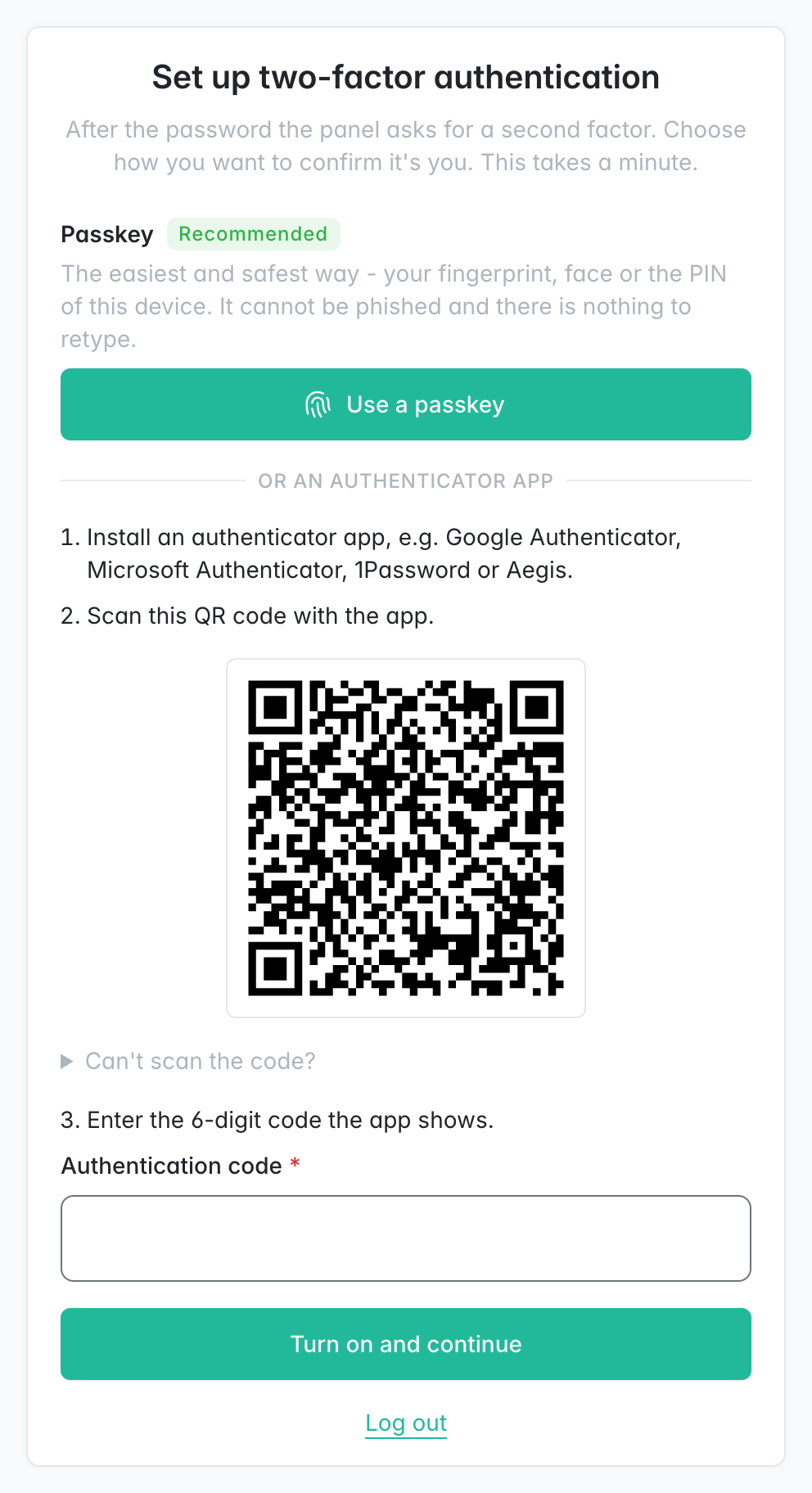
Choice at setup: a passkey is offered first, because it cannot be phished and there is nothing to retype. An authenticator app with a QR code or manual key comes next. Last comes a code by e-mail, for administrators who cannot manage either; the page says plainly that it is the weaker option.
-
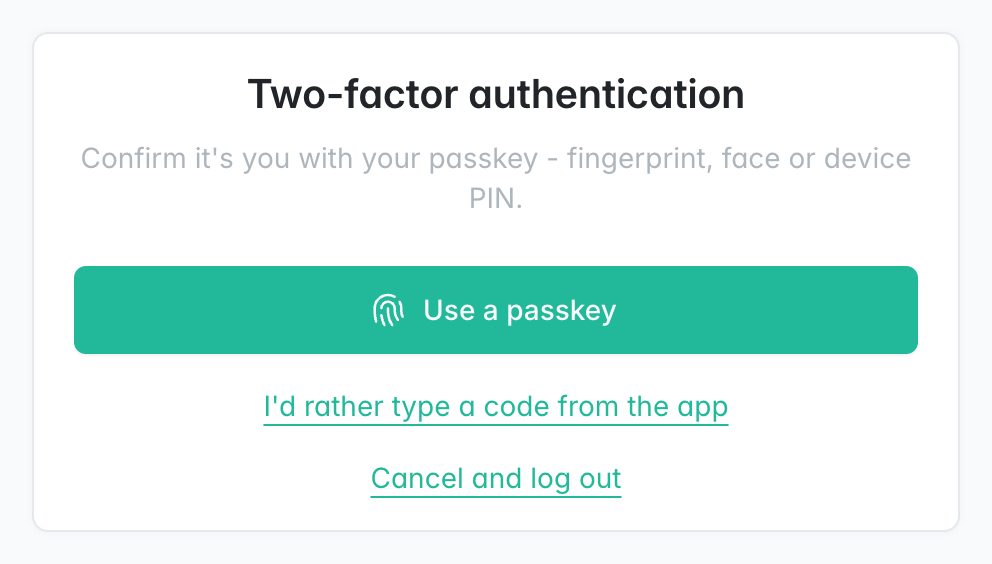
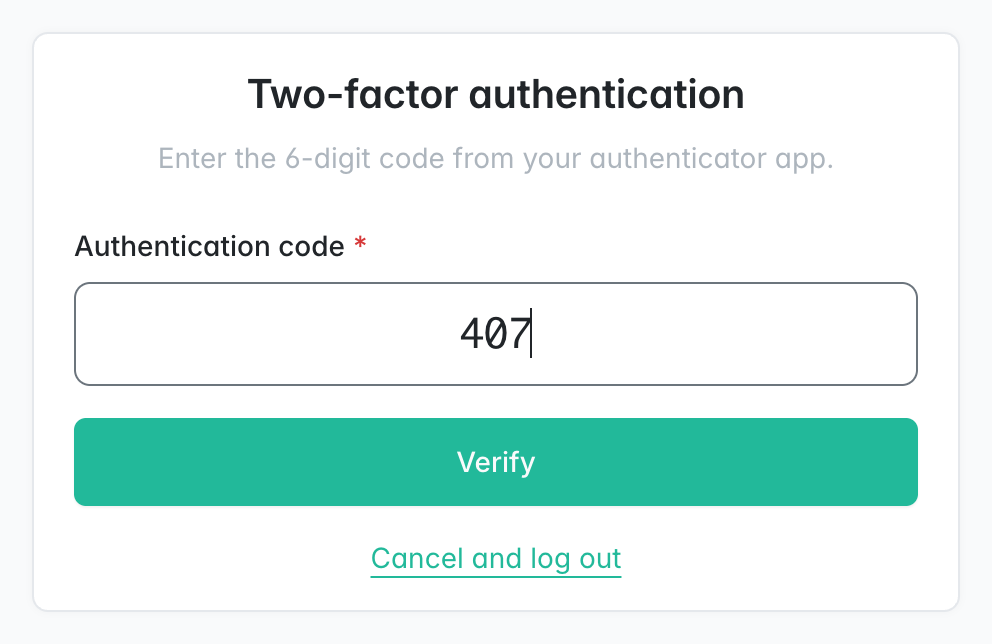
At login: after the password, a passkey takes one gesture, an app takes a 6-digit code and an e-mail brings one. Administrators with several methods can switch between them, e.g. to an e-mail when the phone is at home.
-
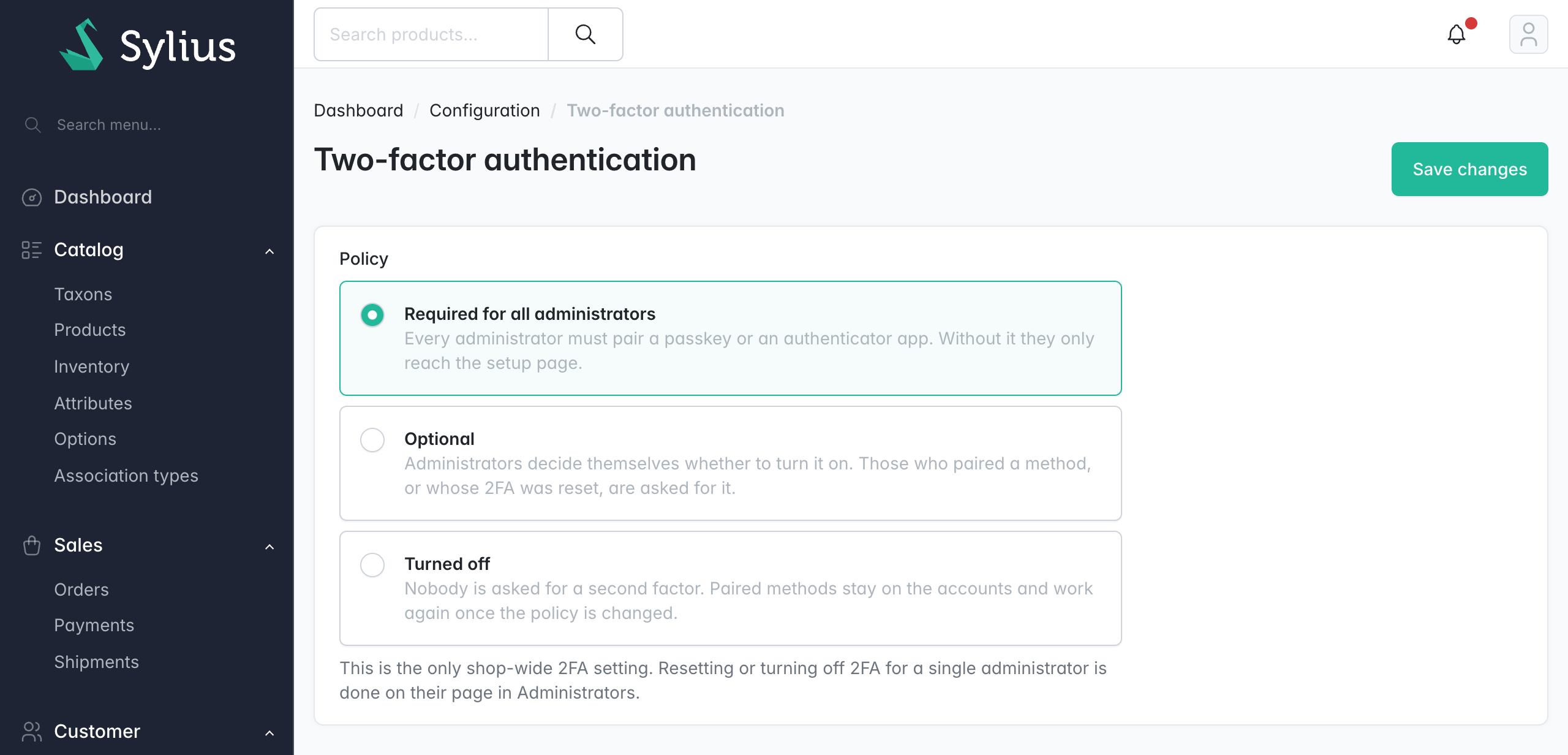
Policy in the panel: Calmfox services → Two-factor authentication has three settings:
- required: administrators without a second factor can only reach the setup page,
- optional: each administrator decides,
- turned off: nobody is asked.
-
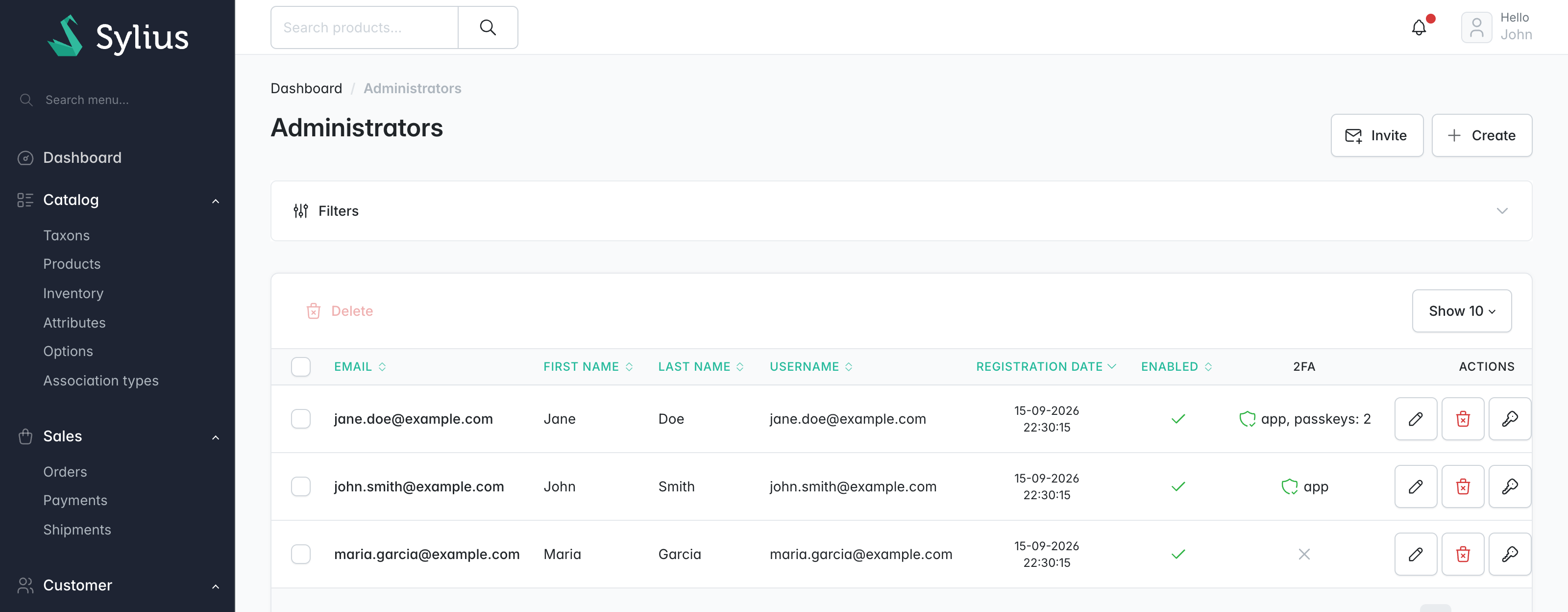
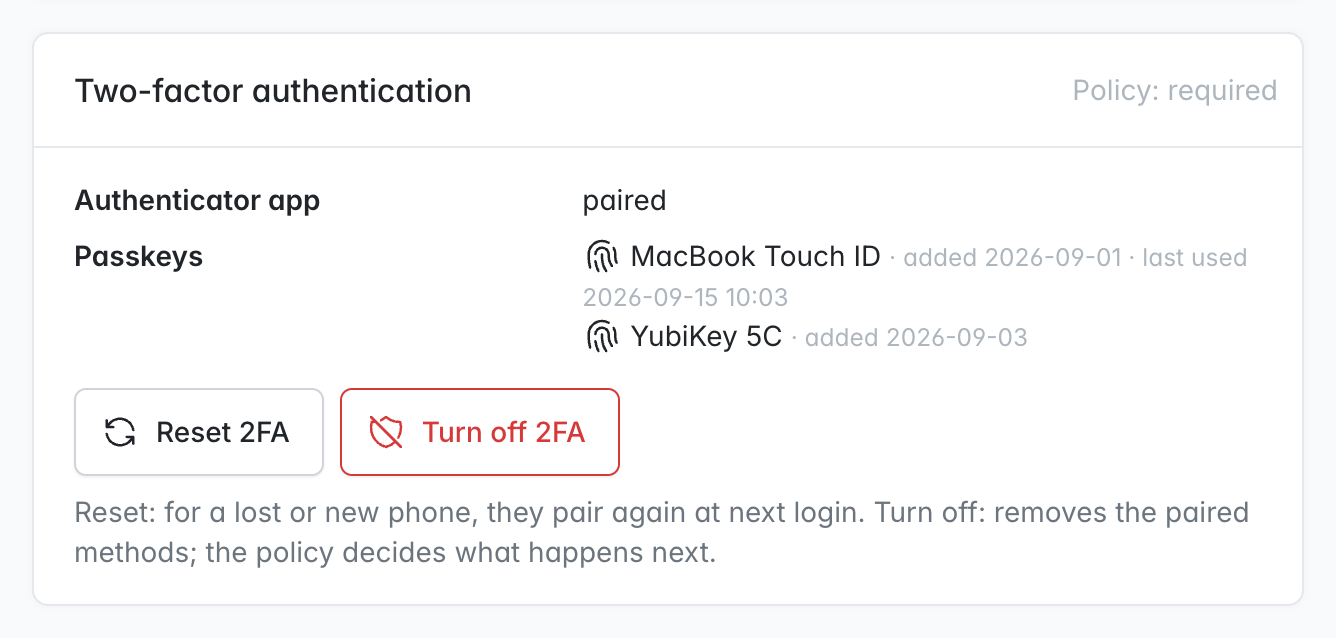
Per administrator: a card on the administrator's edit page lists the paired app, passkeys and e-mail codes, with two separate actions:
- Reset 2FA: removes the methods and requires a new pairing at the next login, whatever the policy. For a lost phone.
- Turn off 2FA: removes the methods and leaves the rest to the policy.
The same is available as
bin/console calmfox:admin:2fa:reset <email> [--disable]. -
Safe setup: a TOTP secret is stored only after a correct code, and a passkey only after its signature is verified.
-
Careful passkeys:
- user verification is required,
- challenges are one-time and bound to the session,
- origins are checked strictly,
- only the account's own keys are accepted,
- only public keys are stored.
Built on lbuchs/webauthn, which has no dependencies.
-
Careful e-mail codes:
- turned on only after the administrator types back a first code, so a mistyped or dead mailbox cannot lock them out,
- the code is kept in the session as a hash, never on the account, and is bound to the administrator,
- it is valid for 10 minutes and works once; 5 wrong tries burn it,
- a new one can be requested once a minute, so the button cannot flood a mailbox,
- it goes out through the Sylius mailer with the shop's sender, in the administrator's panel language,
- when the mail server fails, the login page says so instead of showing an error.
-
No security configuration beyond the firewall: the 2FA pages are opened by route name. The policy condition, form renderer, passkey and e-mail providers apply to administrators only, so the plugin runs next to other scheb/2fa setups, e.g. calmfox/sylius-shop-two-factor-plugin. E-mail codes use the plugin's own provider rather than scheb/2fa-email, which the shop plugin configures for customers.
-
Invitations: with calmfox/sylius-admin-invitation-plugin installed, a new administrator pairs a second factor right after setting their password.
-
Translations: English and Polish.
Screenshots
Setup offers a passkey first and an authenticator app next; at login the administrator confirms with a passkey or a code:
 |
 |
 |
Administrators shows who has which method, the edit page gets a card with Reset 2FA and Turn off 2FA, and the policy has its own page:
Requirements
| Version | |
|---|---|
| PHP | 8.2, 8.3, 8.4, 8.5 |
| Sylius | 2.1, 2.2 |
| Browser for passkeys | any current browser, over https (plain http works on localhost only) |
Installation
-
Require the package:
composer require calmfox/sylius-admin-two-factor-plugin
-
Register the bundles in
config/bundles.php:Scheb\TwoFactorBundle\SchebTwoFactorBundle::class => ['all' => true], Calmfox\SyliusAdminTwoFactorPlugin\CalmfoxSyliusAdminTwoFactorPlugin::class => ['all' => true],
If Flex added a
scheb/2fa-bundlerecipe, delete theconfig/routes/scheb_2fa.yamlit created. -
Import the configuration, e.g. in
config/packages/calmfox_sylius_admin_two_factor.yaml:imports: - { resource: '@CalmfoxSyliusAdminTwoFactorPlugin/config/config.yaml' } calmfox_sylius_admin_two_factor: passkeys: rp_name: 'My Shop' # shown by the device when creating a passkey scheb_two_factor: totp: issuer: 'My Shop' # shown in the authenticator app
-
Import the routes, e.g. in
config/routes/calmfox_sylius_admin_two_factor.yaml:calmfox_sylius_admin_two_factor_admin: resource: '@CalmfoxSyliusAdminTwoFactorPlugin/config/routes/admin.yaml' prefix: '/%sylius_admin.path_name%'
-
Make your
AdminUserentity support two-factor authentication:use Calmfox\SyliusAdminTwoFactorPlugin\Model\TwoFactorAdminUserInterface; use Calmfox\SyliusAdminTwoFactorPlugin\Model\TwoFactorAdminUserTrait; #[ORM\Entity] #[ORM\Table(name: 'sylius_admin_user')] class AdminUser extends BaseAdminUser implements TwoFactorAdminUserInterface { use TwoFactorAdminUserTrait; }
-
Enable two-factor authentication on the admin firewall in
config/packages/security.yaml:security: firewalls: admin: # ... two_factor: auth_form_path: calmfox_admin_two_factor_login check_path: calmfox_admin_two_factor_login_check default_target_path: sylius_admin_dashboard enable_csrf: true
-
Generate and run a migration. It adds the columns
totp_secret,passkey_credentials,email_code_enabledandtwo_factor_setup_requiredtosylius_admin_user, and the tablecalmfox_admin_two_factor_settings:bin/console doctrine:migrations:diff bin/console doctrine:migrations:migrate
Configuration
All options are optional; these are the defaults:
calmfox_sylius_admin_two_factor:
    default_policy: required      # until the policy is set in the panel: required | optional | disabled
    firewall: admin
    passkeys:
        enabled: true
        rp_name: Sylius           # name the device shows when creating a passkey
        rp_id: ~                  # bare domain passkeys are bound to; null = request host. Changing it invalidates paired passkeys.
    email:
        enabled: true             # offer codes by e-mail
        code_lifetime: 600        # seconds a code stays valid
        resend_interval: 60       # seconds before another code can be requested
E-mail codes are sent through the Sylius mailer, so sylius_mailer.sender (name and address) must be set, as it is for Sylius' own e-mails.
Everything else (trusted devices, code leeway, window) is regular scheb/2fa-bundle configuration.
Appearance
The pages reuse the Sylius admin login screen templates, logo included, so an admin theme you already have applies to them. To change them further, work in your application and leave the plugin untouched:
- Templates: override them under
templates/bundles/CalmfoxSyliusAdminTwoFactorPlugin/. To replace only some blocks, extend the original with{% extends '@!CalmfoxSyliusAdminTwoFactorPlugin/…' %}. - Twig Hooks:
calmfox_admin_two_factor.login.page.content: the code at login,calmfox_admin_two_factor.setup.page.content(flashes,header,passkey,steps,form,email,footer): setup,calmfox_admin_two_factor.settings.create.*: the policy page,calmfox_two_factorinsylius_admin.admin_user.update.content.form.sections#right: the administrator card.
- CSS: the setup choices carry
calmfox-two-factor-choice--passkey,calmfox-two-factor-choice--totpandcalmfox-two-factor-choice--email. - E-mail:
email/code.html.twigis built from blocks (heading,lead,code,details) insideemail/layout.html.twig, which frames it like Sylius' own admin e-mails. To send it in your shop's mail layout, override the layout with{% extends '@SyliusCore/Email/layout.html.twig' %}.
Development
Tests run against Sylius Test Application with MySQL. The passkey tests use a software authenticator that signs with real P-256 keys:
composer install
(cd vendor/sylius/test-application && yarn install && yarn build)
vendor/bin/console assets:install vendor/sylius/test-application/public
vendor/bin/console doctrine:database:create
vendor/bin/console doctrine:schema:create

vendor/bin/ecs check          # coding standard
vendor/bin/phpstan analyse    # static analysis, level max
vendor/bin/phpunit            # unit and functional tests
Security
See SECURITY.md for how to report a vulnerability.