
calmfox / sylius-admin-invitation-plugin

Invite Sylius administrators by e-mail: type an address, the invitee sets their own name and password.
Package info
github.com/calmfoxpl/sylius-admin-invitation-plugin
Type:sylius-plugin
pkg:composer/calmfox/sylius-admin-invitation-plugin
Requires
- php: ^8.2
- sylius/sylius: ^2.1
- symfony/validator: ^7.1
Requires (Dev)
- phpstan/extension-installer: ^1.4
- phpstan/phpstan: ^2.1
- phpstan/phpstan-doctrine: ^2.0
- phpstan/phpstan-phpunit: ^2.0
- phpstan/phpstan-symfony: ^2.0
- phpunit/phpunit: ^11.5
- sylius-labs/coding-standard: ^4.4
- sylius/test-application: ^2.0.0@alpha
- symfony/browser-kit: ^7.4
- symfony/css-selector: ^7.4
- symfony/debug-bundle: ^7.4
- symfony/dotenv: ^7.4
- symfony/intl: ^7.4
- symfony/web-profiler-bundle: ^7.4
- symfony/webpack-encore-bundle: ^2.2
Suggests
None
Provides
None
Conflicts
None
Replaces
None
This package is auto-updated.
Last update: 2026-10-10 16:36:25 UTC
README

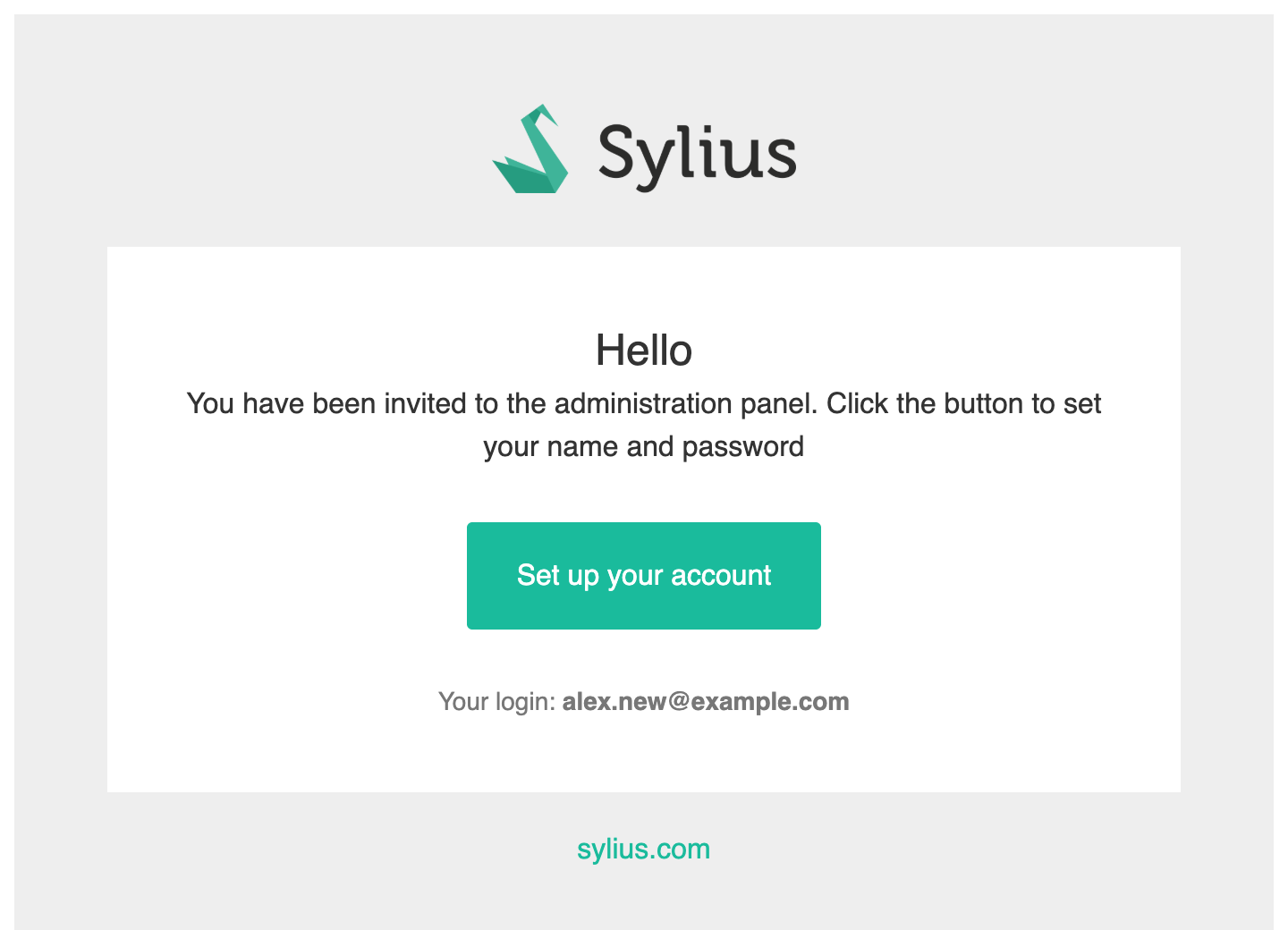
Invite administrators to the Sylius 2 panel by e-mail instead of handing out passwords. Type an address, and the invitee receives a link. On the linked page they set their own name and a strong password, and then land in the panel already logged in.
Features
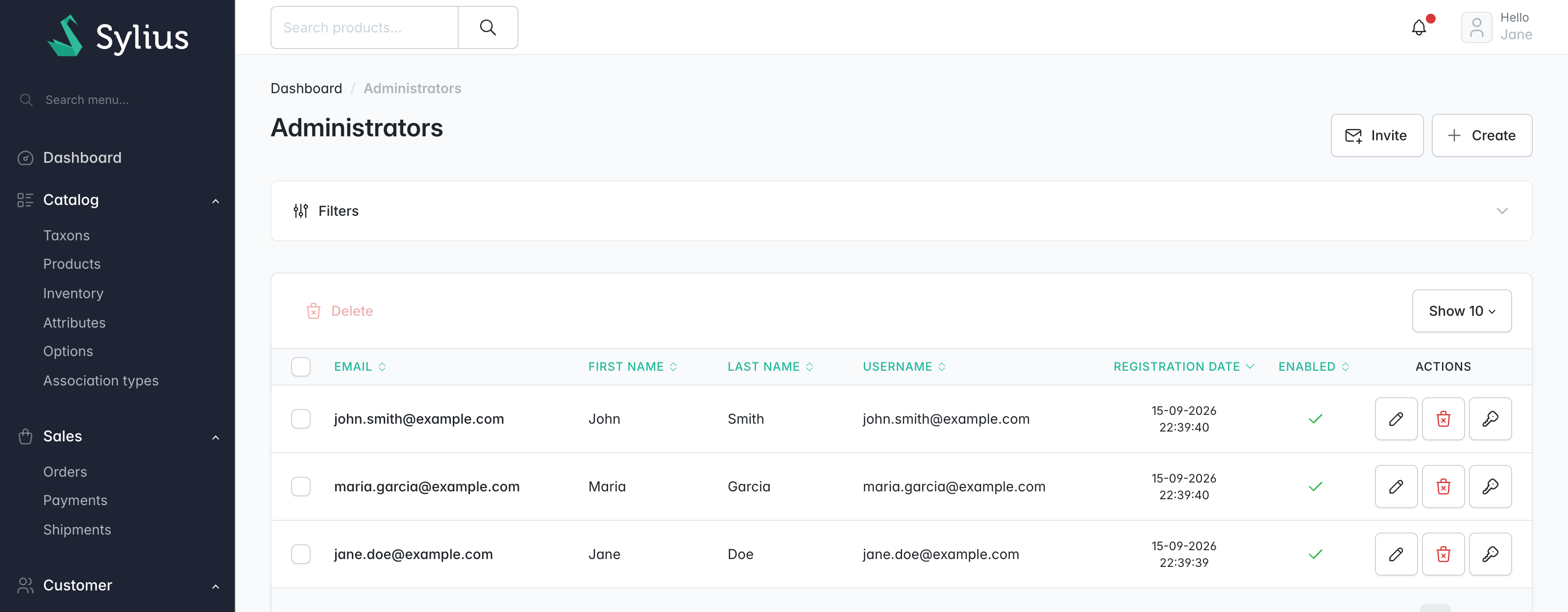
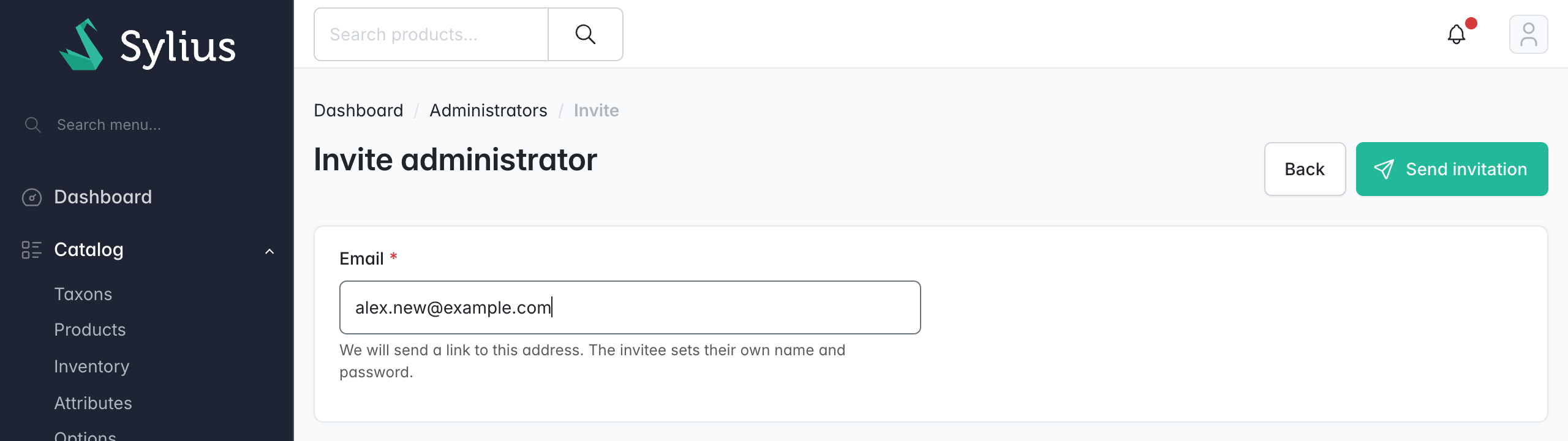
- Invitations: an Invite button on Administrators opens a form with a single e-mail field. The account stays disabled and without a password until the invitation is accepted.
- Strong passwords: a minimum length plus Symfony's
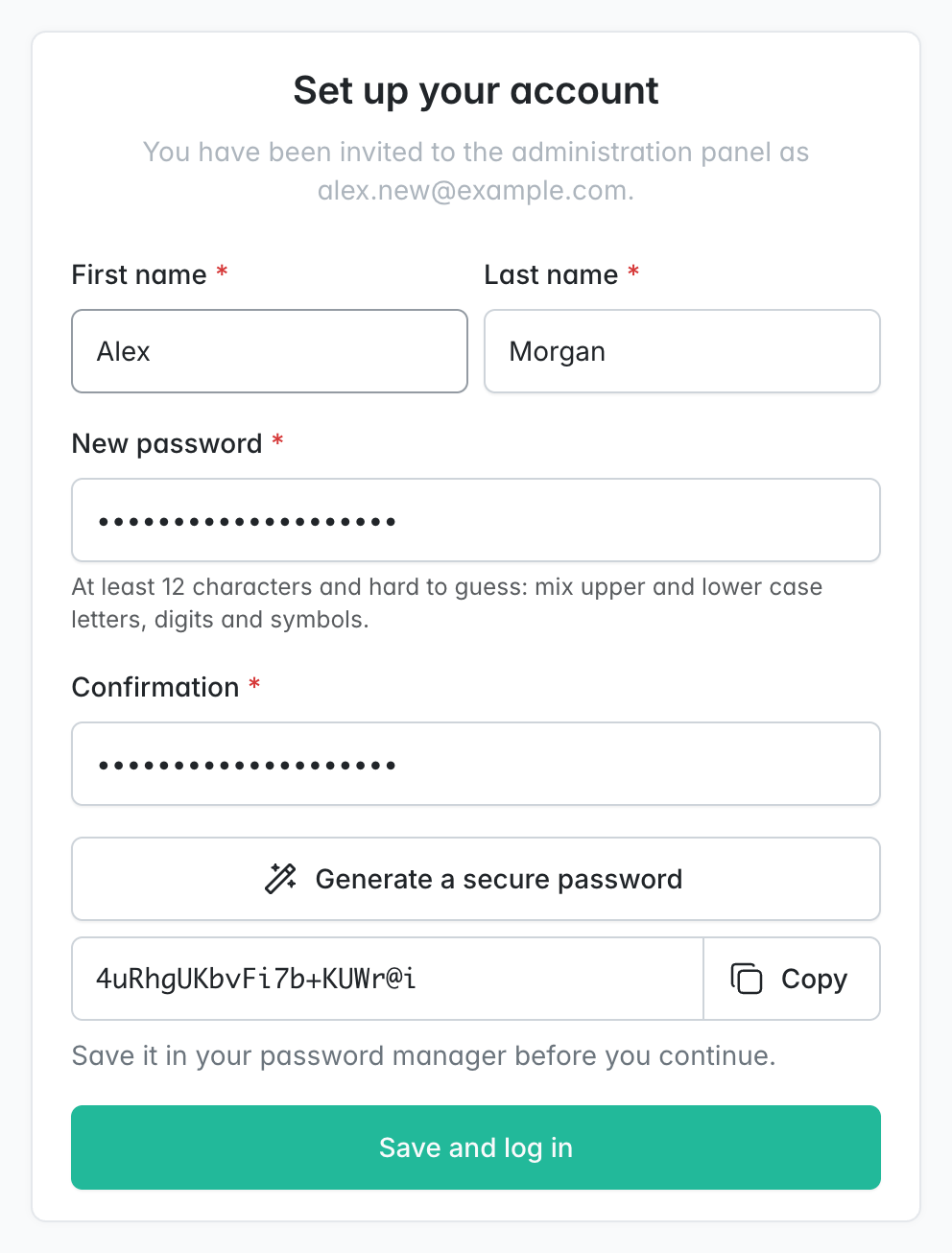
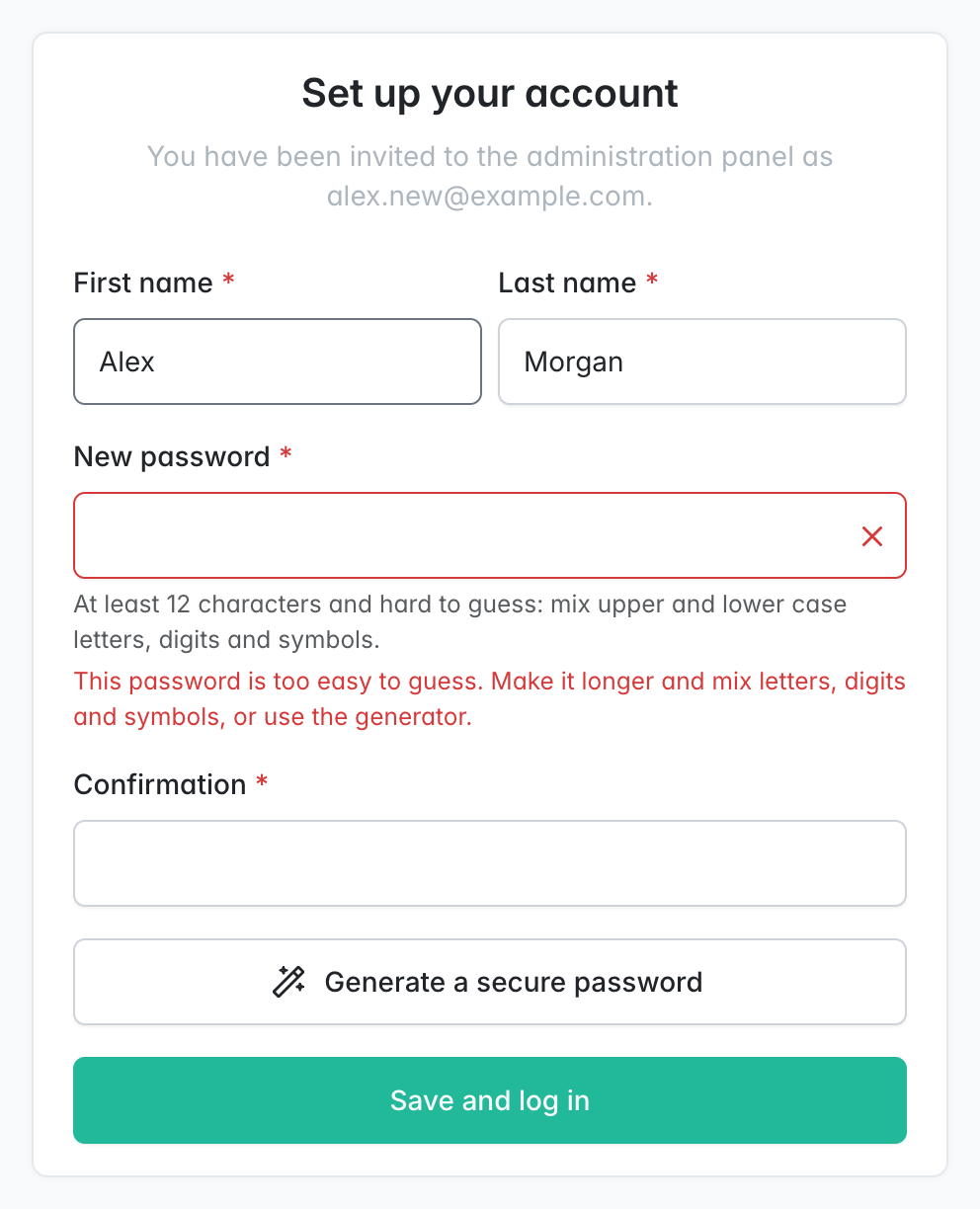
PasswordStrengthscore, optionally checked against known data breaches. A Generate a secure password button creates one in the browser with the Web Crypto API. - Account access: a card on the administrator's edit page and an action on the grid:
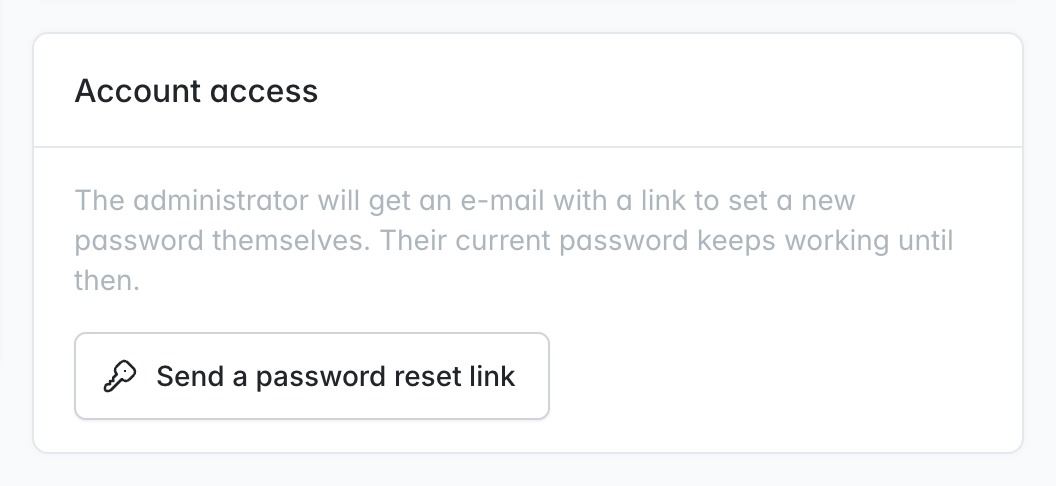
- an account that has not accepted its invitation yet gets it again,
- an active account gets a link to set a new password.
- "Forgot password?" with the same rules: the link from Sylius' own reset e-mail opens the plugin's page, so the password policy applies there too.
- Native look: pages reuse the admin login screen templates through Twig Hooks, and e-mails look like Sylius' admin e-mails. Everything can be overridden (see Appearance).
- No schema changes and no security configuration: tokens use Sylius' password reset fields, and public pages are opened by route name.
- Console:
bin/console calmfox:admin:invite <email>invites the first administrator of a new installation or resends an invitation. - Extension point:
InvitationAcceptedEventlets other packages take over after acceptance. For example, calmfox/sylius-admin-two-factor-plugin sends the new administrator to two-factor setup. - Translations: English and Polish.
Screenshots
Administrators gets an Invite button and a Send a password reset link action; the invite form asks only for an e-mail:
The invitee gets an e-mail and sets their own name and a strong password, with a generator at hand:
 |
 |
 |
The administrator's edit page gets an Account access card:
Requirements
| Version | |
|---|---|
| PHP | 8.2, 8.3, 8.4, 8.5 |
| Sylius | 2.1, 2.2 |
| Symfony | 7.1 or newer |
Installation
-
Require the package:
composer require calmfox/sylius-admin-invitation-plugin
-
Register the bundle in
config/bundles.php:Calmfox\SyliusAdminInvitationPlugin\CalmfoxSyliusAdminInvitationPlugin::class => ['all' => true],
-
Import the configuration, e.g. in
config/packages/calmfox_sylius_admin_invitation.yaml:imports: - { resource: '@CalmfoxSyliusAdminInvitationPlugin/config/config.yaml' }
-
Import the routes, e.g. in
config/routes/calmfox_sylius_admin_invitation.yaml:calmfox_sylius_admin_invitation_admin: resource: '@CalmfoxSyliusAdminInvitationPlugin/config/routes/admin.yaml' prefix: '/%sylius_admin.path_name%'
-
Clear the cache:
bin/console cache:clear.
Configuration
All options are optional; these are the defaults:
calmfox_sylius_admin_invitation:
    ttl: P3D                              # validity of an invitation link (ISO 8601 interval)
    password_reset_ttl: P1D               # validity of a password reset link; keep it equal to Sylius' admin reset token TTL
    replace_native_password_reset: true   # open Sylius' own "Forgot password?" link on the plugin's page
    firewall: admin                       # firewall the invitee is logged into after accepting
    password:
        min_length: 12                    # at least 8
        min_strength: 3                   # PasswordStrength score: 1 weak, 2 medium, 3 strong, 4 very strong
        not_compromised: false            # reject passwords found in data breaches (calls haveibeenpwned.com)
        generated_length: 20              # length of the generated password
Appearance
The plugin looks native. To give it your own look, change your application and leave the plugin untouched:
- E-mails in your shop's mail layout: create
templates/bundles/CalmfoxSyliusAdminInvitationPlugin/email/layout.html.twigcontaining only{% extends '@SyliusCore/Email/layout.html.twig' %}. - Restyle parts of an e-mail: create
templates/bundles/CalmfoxSyliusAdminInvitationPlugin/email/invitation.html.twig(orpassword_reset.html.twig). In it, extend the original with{% extends '@!CalmfoxSyliusAdminInvitationPlugin/email/invitation.html.twig' %}and override only the blocks you need:heading,lead,action,details.- Invitation variables:
adminUser,invitationUrl,localeCode. - Password reset variables:
adminUser,resetUrl,validUntil,localeCode.
- Invitation variables:
- Pages: override any template under
templates/bundles/CalmfoxSyliusAdminInvitationPlugin/, or change the hookables insylius_twig_hooks:calmfox_admin_invitation.admin_user.create.*: the invite form,calmfox_admin_invitation.accept_invitation.*: the acceptance page,calmfox_admin_invitation.password_reset.*: the password reset page,calmfox_account_accessinsylius_admin.admin_user.update.content.form.sections#right: the account access card.
- Texts: override the
calmfox_admin_invitation.*translation keys.
Extending
- After acceptance: listen to
Calmfox\SyliusAdminInvitationPlugin\Event\InvitationAcceptedEvent::NAMEand callsetResponse()to redirect the new administrator elsewhere. - Sending: decorate
Calmfox\SyliusAdminInvitationPlugin\Invitation\InvitationSenderInterface.
How it works
The invite route reuses Sylius' sylius.controller.admin_user::createAction with event: invite. Once the account is saved, a listener on sylius.admin_user.post_invite sends the e-mail. If the mail cannot be sent, the account is kept, and the panel explains how to resend the invitation.
The acceptance page looks the account up by token and checks that it is still pending (disabled, no password) and not expired. It then stores the name and the hashed password, clears the token, enables the account and logs the user in with Security::login().
Development
Tests run against Sylius Test Application with MySQL:
composer install
(cd vendor/sylius/test-application && yarn install && yarn build)
vendor/bin/console assets:install vendor/sylius/test-application/public
vendor/bin/console doctrine:database:create
vendor/bin/console doctrine:schema:create

vendor/bin/ecs check          # coding standard
vendor/bin/phpstan analyse    # static analysis, level max
vendor/bin/phpunit            # unit and functional tests
The database defaults to root:root@127.0.0.1. To use a different one, set DATABASE_URL in tests/TestApplication/.env.local.
Security
See SECURITY.md for how to report a vulnerability.