
amjadiqbal / filament-xlsx-import

Excel (.xlsx) and OpenDocument (.ods) files in Filament's core ImportAction, with your existing Importer classes. Filament 4 and 5.
Package info
github.com/amjadiqbal/filament-xlsx-import
pkg:composer/amjadiqbal/filament-xlsx-import
Requires
- php: ^8.2
- filament/actions: ^4.0|^5.0
- illuminate/contracts: ^12.0|^13.0
- openspout/openspout: ^4.23
- spatie/laravel-package-tools: ^1.16
Requires (Dev)
- filament/filament: ^4.0|^5.0
- larastan/larastan: ^3.0
- laravel/pint: ^1.18
- orchestra/testbench: ^10.0|^11.0
- pestphp/pest: ^3.0|^4.0
- pestphp/pest-plugin-laravel: ^3.0|^4.0
- pestphp/pest-plugin-livewire: ^3.0|^4.0
Suggests
None
Provides
None
Conflicts
None
Replaces
None
README
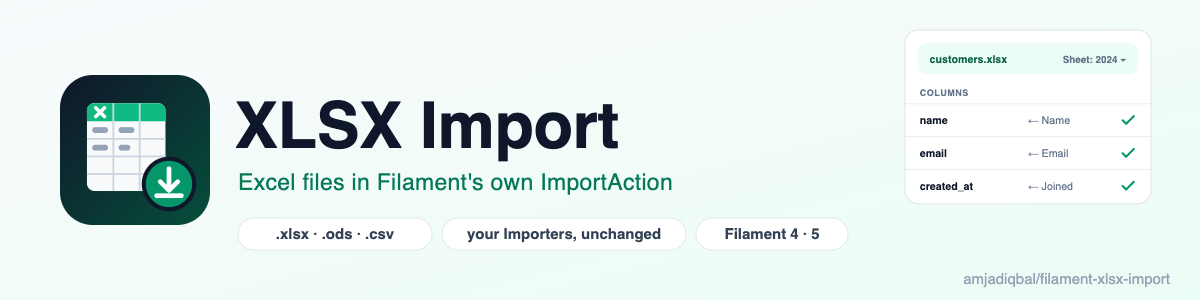
XLSX Import for Filament
Filament's ImportAction reads CSV files only. This plugin is a drop-in replacement that also reads Excel (.xlsx)
and OpenDocument (.ods) workbooks, with a sheet picker. Your existing Importer classes, queued jobs, completion
notifications and the failed-rows download keep working exactly as before. It works with Filament 4 and 5, and adds no
dependencies: it reads workbooks with openspout, which Filament already
installs.
What it does
- Accepts
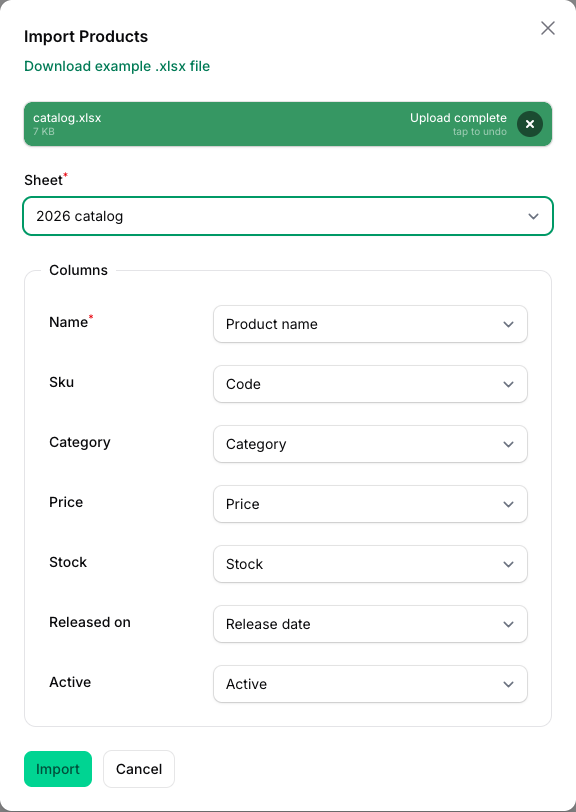
.xlsx,.odsand.csvin the same upload field. CSV files go through core's own reader, unchanged. - Shows a Sheet select when a workbook has more than one visible sheet. It starts on the sheet whose headings match your Importer's columns best, so a cover or notes sheet is passed over (on a tie, the sheet the workbook opens on). Picking another sheet re-guesses the column mapping. Hidden sheets are not offered.
- Guesses the column mapping from the header row the same way core does (
ImportColumn::guess()works as before). - Hands each row to your
Importeras strings, the way the same column would arrive from a CSV file:- dates as
Y-m-d, date-times asY-m-d H:i:s, times asH:i:s(all configurable); - whole numbers without a decimal point (
1500, not1500.0), long numbers without scientific notation (1234567890123), and decimals to Excel's own 15 digits (0.3, not0.30000000000000004); - TRUE/FALSE as
1/0; formulas as their last calculated value; error cells (#N/A) as empty.
- dates as
- Skips empty rows, ignores columns with no heading, and numbers repeated headings (
Name,Name (2)). - Reads the workbook as a stream, row by row, instead of loading the whole file. Rows are chunked and dispatched by
core's
ImportDispatcher, so queued imports,chunkSize(),maxRows()and job batches behave as with CSV. - "Download example" gives an
.xlsxfile built from your Importer's columns and examples (or a CSV file like core's, if you prefer). - Turns away old binary
.xlsfiles with a message that says how to save them as.xlsx.
Requirements
- PHP 8.2+
- Filament 4 or 5, on Laravel 12 or 13
- The PHP
zipextension (openspout already needs it)
Installation
composer require amjadiqbal/filament-xlsx-import
That's all. If you haven't used imports before, set them up as Filament's docs describe (the imports,
failed_import_rows, job_batches and notifications tables).
Usage
Swap ImportAction for XlsxImportAction. Everything you already chain on it still works.
use AmjadIqbal\FilamentXlsxImport\Actions\XlsxImportAction;
use App\Filament\Imports\ProductImporter;

protected function getHeaderActions(): array
{
    return [
        XlsxImportAction::make()
            ->importer(ProductImporter::class),
    ];
}
The same works in a table's headerActions() or toolbarActions(), since Filament 4 and 5 use one action class
everywhere.
Options
XlsxImportAction::make()
    ->importer(ProductImporter::class)

    // Always read this sheet (by name, or index from 0) and hide the sheet picker.
    ->sheet('Products')

    // Or never show the picker: the best-matching sheet is read.
    ->sheetPicker(false)

    // The row that holds the headings, counted from 0 over every row of the sheet, empty ones included
    // (core's own option): headerOffset(2) reads the headings from spreadsheet row 3.
    ->headerOffset(2)

    // How date, date-time and time cells reach your Importer.
    ->dateFormat('d/m/Y')
    ->dateTimeFormat('d/m/Y H:i')
    ->timeFormat('H:i')

    // Workbooks only, or no .ods.
    ->acceptCsv(false)
    ->acceptOds(false)

    // Offer a CSV example file, like core's, instead of .xlsx.
    ->exampleFormat('csv')

    // Seconds the import request may run while it reads a workbook (default 300, only if PHP's limit is lower).
    // null leaves max_execution_time alone.
    ->timeLimit(600)

    // Core's own options work as usual.
    ->chunkSize(500)
    ->maxRows(50_000)
    ->fileRules(['max:20480']);
Dates in your Importer
A date cell arrives as 2026-01-31, so a rule like date or date_format:Y-m-d and a cast like
castStateUsing(fn (string $state) => Carbon::parse($state)) work without guessing. A date typed as text in the
spreadsheet arrives exactly as typed, as it would from a CSV.
Good to know
- Failed rows are still downloaded as CSV, from core's own route.
- Queued imports read the file once, in the request that starts the import, and queue the rows (as core does for CSV). Workers don't need access to the uploaded file.
- Large workbooks: an
.xlsxis a zipped XML file, so it reads much slower than a CSV of the same size. On a heavily loaded test machine, a 100,000-row workbook took 37 to 59 seconds to start importing. When the import starts, the data rows are read once, as a stream, into a temporary file, and the request's PHP time limit is raised totimeLimit()(300 seconds by default). Core'sImportDispatcherthen builds every chunk's job in that request, as it does for CSV, so the request's memory still grows with the row count. A web server timeout (for example nginx'sfastcgi_read_timeout) still applies. - While you map columns, each change re-reads the sheet list and the header rows (not the data rows).
- Remote disks: if Livewire keeps temporary uploads on S3 or another remote disk, the workbook is copied to the local temp directory while it is read, because a workbook is a zip archive that has to be seekable. The copy is removed when the import starts.
- .ods FALSE cells: openspout 4 reads a FALSE cell in an
.odsfile as true. This plugin corrects it before reading, so FALSE arrives as0. - Old .xls files (Excel 97-2003) are not supported. openspout can't read them.
Coming from eightynine/filament-excel-import?
That package imports through Laravel Excel import classes. This one uses Filament's own Importer classes
(php artisan make:filament-importer), so validation, failed rows and notifications come from Filament. Move the
column logic from your import class into an Importer, then use XlsxImportAction.
Testing
composer test
Support
- 🐛 Bug or feature request: open an issue
- 🔒 Security issue: please report it privately through GitHub's security tab
Need this customised, or something built?
I'm available for custom development, package integration, and technical consulting.
More packages
This is part of a family of open-source packages. See all of them.
| filament-deleted-records | A recycle bin for Filament: preview, restore or purge deleted records |
| filament-change-requests | Hold record edits in Filament for approval, with a field-by-field diff |
| filament-url-image-uploader | Upload images to Filament from a URL |
Credits
- Amjad Iqbal
- Workbook reading: openspout/openspout (MIT).
- Thanks to eightynine/filament-excel-import, which showed how many Filament users want Excel imports. This plugin is a separate implementation and shares no code with it.
License
The MIT License (MIT). See LICENSE.md.