
tikhomirov / moonshine-yandex-metrika

Yandex Metrika + Webmaster analytics dashboard for MoonShine 5.x
Package info
github.com/tikhomirov/moonshine-yandex-metrika
pkg:composer/tikhomirov/moonshine-yandex-metrika
Requires
- php: ^8.4
- guzzlehttp/guzzle: ^7.0
- illuminate/support: ^12.0 || ^13.0
- moonshine/moonshine: ^5.0
Requires (Dev)
- orchestra/testbench: ^10.0 || ^11.0
- pestphp/pest: ^3.0 || ^4.0
- pestphp/pest-plugin-laravel: ^3.0 || ^4.0
Suggests
None
Provides
None
Conflicts
None
Replaces
None
This package is auto-updated.
Last update: 2026-11-15 20:29:53 UTC
README
Yandex Metrika and Webmaster analytics inside MoonShine
Traffic, search queries, and indexing status — in one dashboard.
MoonShine Yandex Metrika

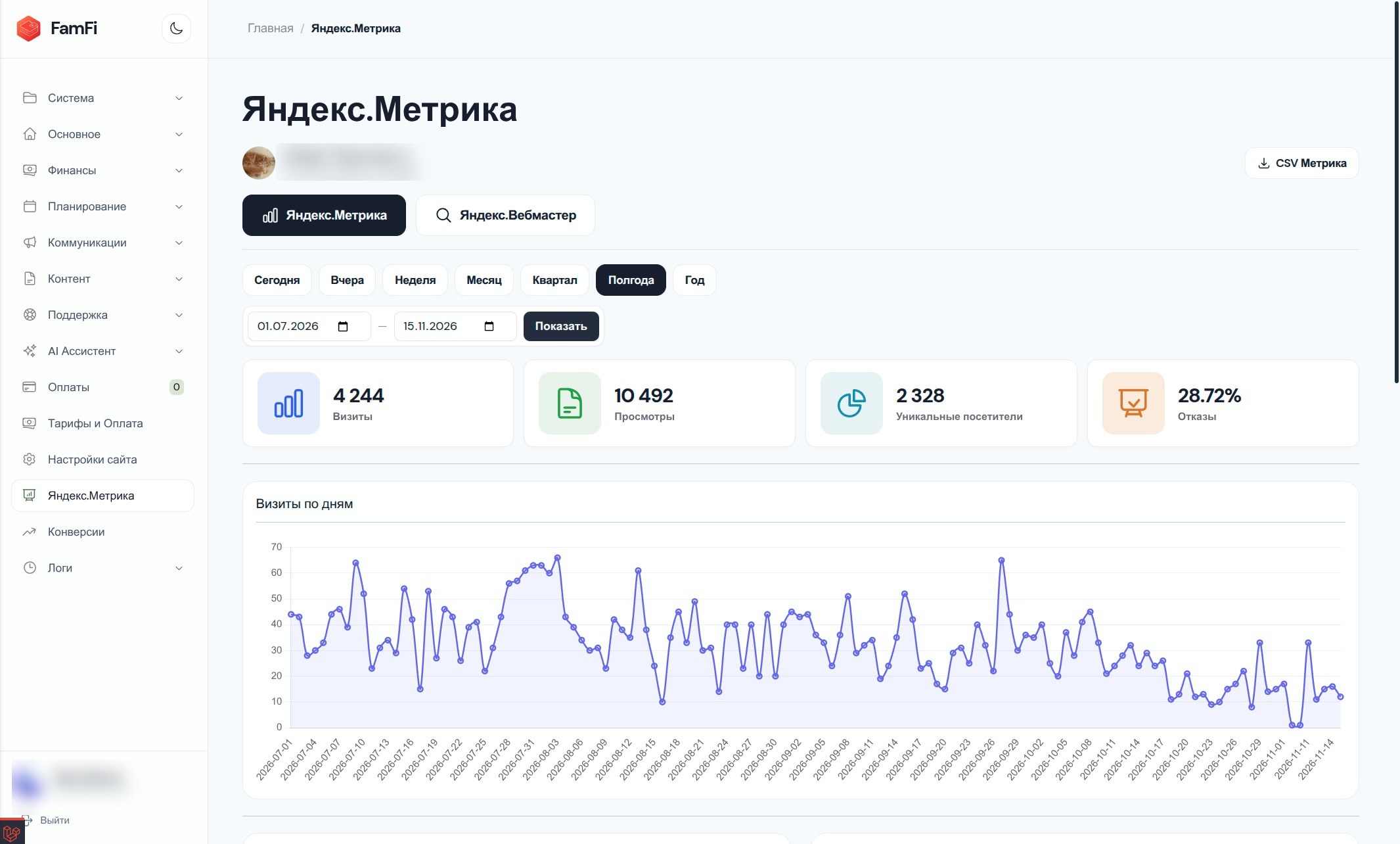
Features
- Yandex Metrika: visits, page views, unique visitors, bounce rate, daily chart, and top pages.
- Yandex Webmaster: indexing summary, site issues, external links, and popular search queries.
- Flexible periods: presets and custom date ranges.
- CSV exports for Metrika statistics and Webmaster queries.
- Yandex account information and API response caching.
- An extensible tab registry for adding third-party analytics without forking the package.
- Russian and English UI translations.
Requirements
| Component | Version |
|---|---|
| PHP | 8.4+ |
| Laravel | 12 or 13 |
| MoonShine | 5.x |
Installation
composer require tikhomirov/moonshine-yandex-metrika
php artisan vendor:publish --tag=moonshine-yandex-metrika-config
Register the page in your MoonShine menu and add it to the custom pages for your layout/provider:
use Tikhomirov\MoonshineYandexMetrika\Pages\MetrikaDashboardPage;

MenuItem::make(MetrikaDashboardPage::class, 'Yandex Metrika');
Yandex setup
Create an application at Yandex OAuth, set the redirect URI to https://oauth.yandex.ru/verification_code, and grant the scopes you need:
| Scope | Purpose |
|---|---|
metrika:read |
Metrika statistics |
webmaster:verify |
Webmaster indexing and search queries |
webmaster:hostinfo |
Host details and external links |
login:info, login:email, login:avatar |
Yandex account email and avatar |
Add your settings to .env:
YANDEX_METRIKA_TOKEN=your_oauth_token
YANDEX_METRIKA_COUNTER_ID=your_counter_id
YANDEX_METRIKA_DEFAULT_PRESET=today
YANDEX_WEBMASTER_HOST_ID=https:example.com:443
YANDEX_WEBMASTER_HOST_ID is required for Webmaster and must use the host format shown in Yandex Webmaster. Metrika keeps working without it.
Periods and exports
Available presets: today, yesterday, week, month, quarter, half year, and year, plus a custom date range. The Webmaster summary shows the site's current state; the selected period applies to search queries.
CSV export routes are available to authenticated MoonShine administrators:
/admin/yandex-analytics/export/metrika/admin/yandex-analytics/export/webmaster
AI agent skill
This package includes a ready-to-use AI agent skill for configuring, extending, and troubleshooting the dashboard. It is intentionally shipped in the Composer distribution at vendor/tikhomirov/moonshine-yandex-metrika/skills/moonshine-yandex-metrika/SKILL.md.
Install llm/skills in the host application to discover the skill from Composer dependencies and sync it into your agent's skills directory:
composer require --dev llm/skills
composer skills:init --quick
composer skills:show
The skill package auto-discovers SKILL.md files in Composer dependencies by default. Keeping this package's skills/ directory in its distribution makes the dashboard instructions available to coding agents in the consuming application.
Localization
The dashboard ships with English and Russian translations and follows the Laravel application's locale. To publish the translation files for customization:
php artisan vendor:publish --tag=moonshine-yandex-metrika-lang
More information
License
MIT. See LICENSE.