
rmb32 / barncept-gui

A web GUI for viewing and editing Barncept concept framings
Requires
- php: ^8.5
- rmb32/barncept: ^5.0
- symfony/console: ^7.0
- symfony/process: ^7.0
Requires (Dev)
- infection/infection: ^0.35.4
- phpstan/phpstan: ^2.2
- phpunit/phpunit: ^13.3
- rector/rector: ^2.6
- squizlabs/php_codesniffer: ^4.0
Suggests
None
Provides
None
Conflicts
None
Replaces
None
README
Part of Barn.
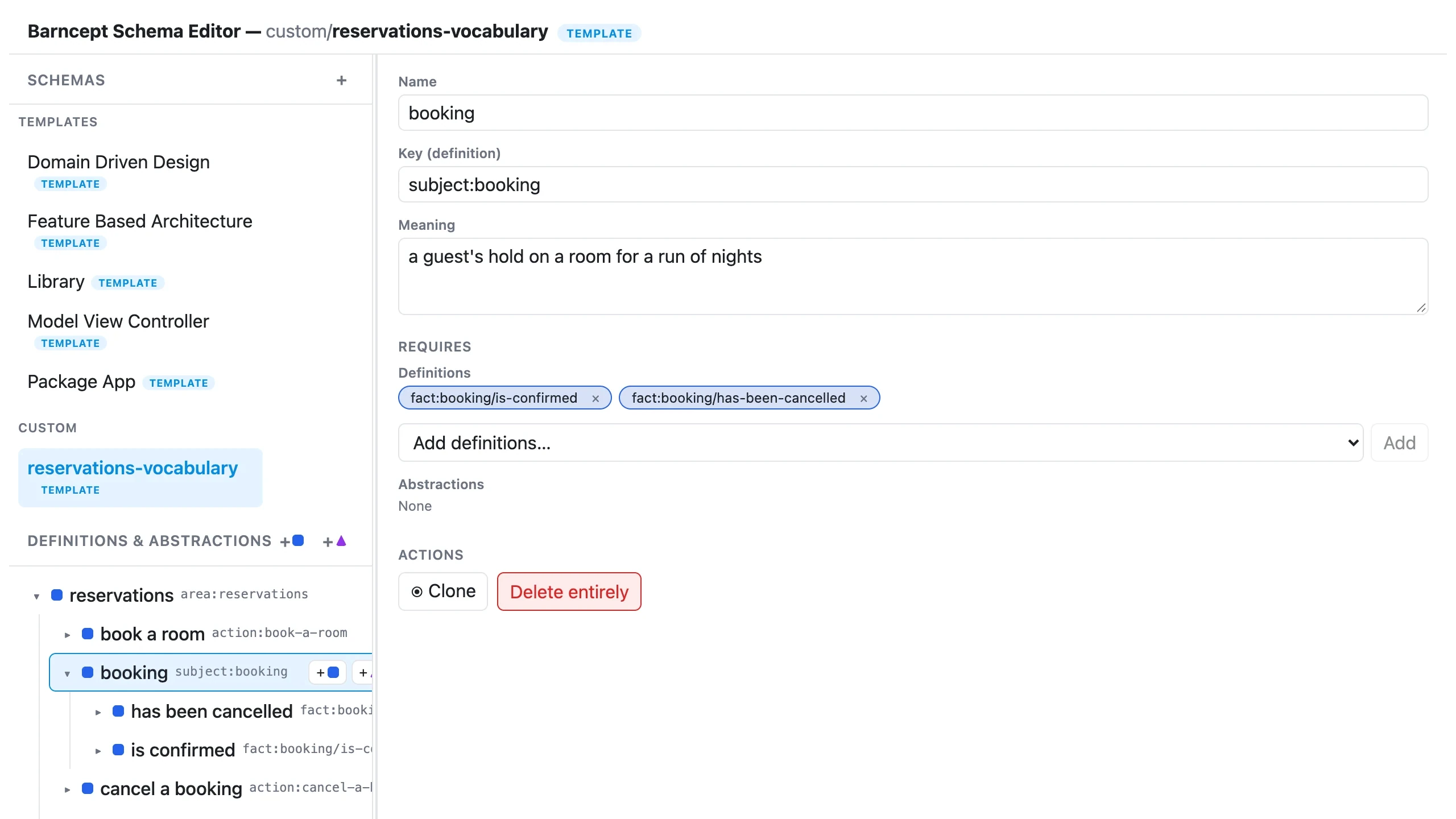
The Barncept Concept Manager: a browser-based editor for Barncept concepts. Each concept is a browsable tree of its thoughts (Parts, Slots and Choices), with validation, and any settled choice can be viewed and exported as a tree, a document, folders or a diagram. Every concept says what it is and what it is for: a new one asks for that description, and you can edit it on the concept's overview.
A concept can also be given a group, such as Home for House, Room and Kitchen.
The side panel lists each group as a heading you can expand and collapse, ahead of
the concepts that have no group, and remembers in your browser which groups you
collapsed. Set or clear the group on the concept's overview, or when you create
it; a duplicate keeps the original's group.
Each concept also has two read-only views, each with a link you can share:
- Thoughts (
/concepts/<name>/thoughts): every thought in one table, which you can filter to Parts, Slots or Choices (?show=part,slot). Click a row to open it in the editor. - Glossary (
/concepts/<name>/glossary): every term with its meaning, sorted and grouped by kind, so a newcomer can learn the concept's vocabulary in one read. It shows only the meanings you wrote and generates nothing. Click a card to open that thought in the editor.
View and export… on a concept's overview (or View and export from here on a Choice) opens a panel: pick an entry point, then view it as
- Tree: every thought by name, indented, for a quick look;
- Document: Markdown for people, a heading per thought with its meaning beneath (shown as its source);
- Folders: a folder per thought, each with a
README.md, for developers and tools, as an expandable tree that shows a folder's README when you select it; - Diagram: a Mermaid flowchart, drawn in the browser, for a README, a pull request or a slide.
Each has an Export button that downloads <concept> - <entry>.<extension>: a .txt,
a .md, a .zip of the folders (built in your browser), or the diagram as an .svg
picture or its .mmd source. The GUI never writes into your project; barncept export
in the CLI does. An entry point with open slots cannot be viewed yet, and the panel
names each slot still to fill and the thought it sits under. A thought whose name cannot
be a folder (Why?, or two siblings that differ only in case) is named in the Folders
tab, and the other views still work. Barncept's shipped House (12 Orchard Lane) and
Dinner Party (Friday) are settled, so they show all four.
Every thought chip, on any screen, opens the thought it names, and a slot lists the choices that fill it.
/?concept=<name> opens a concept in the editor.
Help in the top bar (/help) explains every word the editor uses (concept, root, Part,
Slot, Choice, borrowing, open slots, entry points) beside the icon each one wears, and under
Other terminology the words that have no icon (borrower, locked choice, blank plan and
settled, resolved tree). The
concept you have open stays open, unsaved edits included, so Back returns to it.
Requirements
- PHP 8.5+
- Node.js (only if you want to develop the frontend)
Installation
Install it alongside Barncept CLI, which then offers barncept gui:
composer require --dev rmb32/barncept-cli rmb32/barncept-gui
Run it
If the barncept CLI is installed in the same project, just run:
barncept gui                  # http://localhost:8082, opens your browser
barncept gui --port=9000 --no-open
It serves the concepts of the project you run it in — the conceptDirectory of
the nearest parent directory with a barncept.json (written by barncept
init), else that directory's concepts/ — together with any read-only
borrowFrom sources that file lists, and picks the next free port if the
default is taken. Borrowed concepts can be browsed, viewed and exported but not edited; your own shadow them.
Or serve it by hand:
BARNCEPT_CONCEPT_DIR=/path/to/your-project/concepts php -S localhost:8080 -t public
Open http://localhost:8080. It scans BARNCEPT_CONCEPT_DIR (default: as
above) recursively for *.json concepts, and BARNCEPT_BORROW_FROM (folders
joined by :) for read-only ones. A concept is addressed by its name, not its
file path, and a file that fails to load is listed as a fault without hiding
the rest.
To work on the frontend with hot reload:
cd frontend
npm install
npm run dev # proxies /api to localhost:8080, serves on :5173
JSON API
| Method | Path | Behaviour |
|---|---|---|
| GET | /api/concepts | { concepts, faults }: each concept's name, origin, writable, description, rootKind (part or slot), entryPoints, openSlots and validity, and each file that failed to load |
| POST | /api/concepts | Create a concept ({ name, description, kind? }, where kind is the root's, part by default, or { name, from } to copy one) |
| GET | /api/concepts/{name} | Load one, as written |
| PUT | /api/concepts/{name} | Validate and save a full concept (refused for a read-only one). Answers with the concept as saved plus changes |
| DELETE | /api/concepts/{name} | Delete a concept (refused for a read-only one) |
| POST | /api/concepts/{name}/impact | What { "save": <concept> } or { "delete": true } would do, as { changes }, without writing anything |
| GET | /api/projection-kinds | { kinds }: each projection's kind and label, in the order to offer them; a projector the host registers appears here with no frontend change |
| GET | /api/concepts/{name}/projections/{kind}?entry={key} | One entry point projected: { kind, mediaType, extension, content } for a file, { kind, tree } for folders (each folder { name, files: [{ name, content }], folders }). 422 with problems (each { path, name, fault, message }) when names cannot be folders, and with slots when the entry point has open slots; 404 for an unknown kind |
| GET | /api/concepts/{name}/entry-points | Entry points for the picker, each { key, name, openSlots }, where an open slot is { key, name, under } and under names the thoughts that offer it |
A concept that borrows another reads it afresh each time it is composed, so
saving or deleting one concept can stop another from composing. PUT and
DELETE check that first: if any concept would break, they answer 409 with
{ "type": "BorrowersWouldBreak", "message", "changes" } and write nothing,
unless the request ends in ?acceptBreaks=1. Each change is
{ name, breaks, mends, problem, newlyOpenSlots }, and lists the concept being
changed and each concept that borrows it, directly or through another borrow,
whose status would change. The app asks before going ahead, and does the same
before a rename, since a rename deletes the old name.
Related packages
- Barncept — the concepts and model this edits.
- Barncept CLI —
barncept initfor project setup,barncept checkfor CI, andbarncept exportto write a projection into your project. - Barnscaff — scaffold a PHP codebase's folders from the concepts you edit here.
- Barnark GUI and Barnspec GUI — sibling browser tools.
More docs
Internals · History · Known issues
License
Proprietary. See LICENSE. Copyright (c) Roger Barnfather.