
rmb32 / barnark-gui

A web GUI for cloning a template into a project and making its folder, creating what the template offers, and viewing conformance checks
Requires
- php: ^8.5
- ext-ds: ^2.0
- rmb32/barnark: ^7.0@dev
- symfony/console: ^7.0
- symfony/process: ^7.0
Requires (Dev)
- infection/infection: ^0.35.4
- phpstan/phpstan: ^2.2
- phpunit/phpunit: ^13.3
- rector/rector: ^2.6
- rmb32/barn-layout: ^1.0@dev
- rmb32/barncept: ^5.0@dev
- rmb32/typed-json: ^1.0@dev
- squizlabs/php_codesniffer: ^4.0
Suggests
None
Provides
None
Conflicts
None
Replaces
None
README
Part of Barn.
A browser UI for Barnark: clone a template into a project under a name you give and make its folder, browse the folder's tree, fill the slots its template offers, run conformance checks, and keep templates of your own.
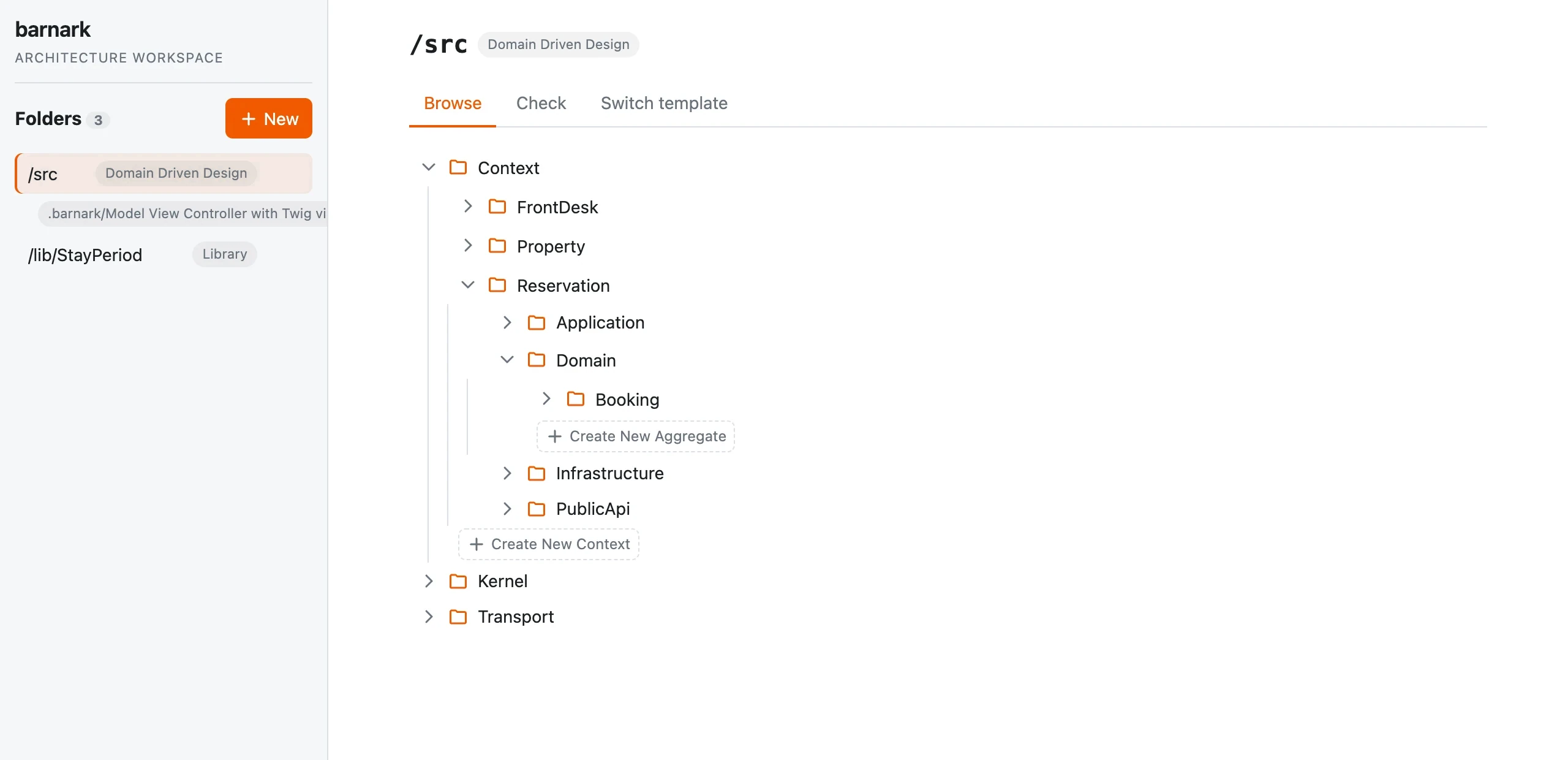
The side panel has two headings. Project holds the project's one bound folder and its template. Templates holds your own templates first, then the shipped ones, marked Shipped, which are read-only. Click a shipped template to see its tree; click one of your own to see its History.
Clone into the project makes the project's template and its folder together. You pick a template, and beside the choice is the shape a folder following it takes: the folders every clone has, ‹named›/ placeholders for the member types you add to yourself, and the members a template of your own already has. Point at any part to see what it is for. You also name the project's template: it is a copy of the one you picked, and changing one never changes the other. A project has one template, so once it has one, cloning is turned off.
Copy makes a new template of your own from any template, shipped, yours or the bound one, members included. Delete removes one of your own templates, and only git brings it back. The project's template and its folder have no Remove: ending a template's life is not built yet.
In Browse, the tree shows a folder's folders (never its files), and wherever the template has a slot for a folder you name, it offers a button for it — on the directory's own row, and inside the directory once it is open. Click, for example, Create New Context, give the new folder a name, and the template's whole structure for it is scaffolded underneath. The folder panel on the left is dragged to whatever width you like (double-click the divider to put it back).
A member is part of the template, so adding or deleting one makes a new revision, with a reason Barnark writes, such as "Added Context/Billing.". Before a member goes, the delete dialog says so. The History tab lists the template's revisions and shows each as a read-only tree of its fixed folders, member types and members.
Requirements
- PHP 8.5+
- Node.js (only if you want to develop the frontend)
Installation
Install it alongside Barnark CLI, which then offers barnark gui:
composer require --dev rmb32/barnark-cli rmb32/barnark-gui
Run it
If the barnark CLI is installed in the same project, just run:
barnark gui                  # http://localhost:8081, opens your browser
barnark gui --port=9000 --no-open
It serves the project at its root (the nearest parent directory holding a .barnark/ folder, or
Barnark 5's barnark-workspace.json, which it then refuses, giving its path) and
picks the next free port if the default is taken. Inside a barn (a project whose root holds
.barn/barn.json) it serves the barn's root, and keeps Barnark's records in .barn/barnark/.
Or serve it by hand:
BARNARK_GUI_PROJECT_ROOT=/path/to/project php -S localhost:8080 -t public
Open http://localhost:8080. BARNARK_GUI_PROJECT_ROOT defaults to the
current directory; folders you add are tracked in its .barnark/tracked-folders.json.
To work on the frontend with hot reload:
cd frontend
npm install
npm run dev     # proxies /api to localhost:8080, serves on :5173
npm test        # Vitest + Testing Library
The served bundle in dist/ is rebuilt with composer build-frontend.
Serving it from your own front controller
BarnarkGuiApp::serve($mountPath, $projectRoot) serves the GUI under a path prefix,
for example /architecture, from any PHP router script:
Rmb32\BarnarkGui\BarnarkGuiApp::serve('/architecture', '/path/to/project');
The JSON API below then lives under the prefix too (/architecture/api/...).
JSON API
| Method | Path | Behaviour |
|---|---|---|
| GET | /api/folders | List the bound folder, with its template |
| POST | /api/folders | Clone a template into the project and make its folder ({ name, baseDir, from, template }, where template names the copy); a refused template name is a 400 |
| GET | /api/folders/{path}/tree?path= | Browse a folder's tree, with the offers (slots that can be filled) at each level and directory |
| DELETE | /api/folders/{path}/tree?path= | Delete a member or a folder the template doesn't know |
| POST | /api/folders/{path}/members | Add a named member ({ collectionPath, memberType, name }) |
| GET | /api/folders/{path}/check | Run a conformance check against the folder's template |
| GET | /api/templates | List every template: the bound one, your own and the shipped ones, each with its description, folder and shipped |
| POST | /api/templates | Copy a template into a new one of your own ({ from, name }) |
| DELETE | /api/templates/{name} | Delete one of your own; a shipped one is a 422 |
| GET | /api/templates/{name}/shape | A template's tree: nested nodes (fixed, memberType or member), each with its meaning |
| GET | /api/templates/{name}/revisions | List the template's revisions, with reasons, timestamps and the current marker |
| GET | /api/templates/{name}/revisions/current | Read the current template tree |
| GET | /api/templates/{name}/revisions/{revisionId} | Read a historical template tree (read-only) |
The JSON API is the bundled frontend's contract with its server, and changes with the frontend in any
release. A {path} or {name} containing / must be URL-encoded as %2F. Folder paths are
canonical: rooted, with a single leading slash (/Widgets).
Related packages
- Barnark — the core library and template catalogue.
- Barnark CLI — the same operations from a terminal.
- Barncept GUI and Barnspec GUI — sibling browser tools.
More docs
Internals · History · Known issues
License
Proprietary. See LICENSE. Copyright (c) Roger Barnfather.