
phattarachai / laravel-ai-docs

Render a folder of markdown — your .ai/documents/ tree — as a searchable documentation site inside your Laravel app.
Requires
- php: ^8.4
- illuminate/contracts: ^12.0|^13.0
- illuminate/support: ^12.0|^13.0
- inertiajs/inertia-laravel: ^2.0|^3.0
- league/commonmark: ^2.4
- symfony/finder: ^6.4|^7.0|^8.0
- symfony/yaml: ^6.4|^7.0|^8.0
- tempest/highlight: ^2.0
Requires (Dev)
- larastan/larastan: ^3.10
- laravel/pint: ^1.24
- orchestra/testbench: ^10.8|^11.0
- pestphp/pest: ^3.0|^4.0
- pestphp/pest-plugin-laravel: ^3.0|^4.0
Suggests
None
Provides
None
Conflicts
None
Replaces
None
- dev-main
- v1.7.0
- v1.6.0
- v1.5.0
- v1.4.0
- v1.3.0
- v1.2.3
- v1.2.2
- v1.2.1
- v1.2.0
- v1.1.1
- v1.1.0
- v1.0.4
- v1.0.3
- v1.0.2
- v1.0.1
- v1.0.0
- v0.6.2
- v0.6.1
- v0.6.0
- v0.5.0
- v0.4.0
- v0.3.0
- v0.2.0
- v0.1.1
- v0.1.0
- dev-claude/ui-switcher-themes
- dev-claude/ai-docs-notes-729f52
- dev-fix/wide-never-covers-outline
- dev-chore/prettier-mermaid
- dev-feat/inline-svg
This package is auto-updated.
Last update: 2026-10-30 03:08:53 UTC
README
Render a folder of markdown — your .ai/documents/ tree, your handbook, your runbooks — as a searchable documentation
site inside your Laravel app, instead of pushing it to a separate wiki that immediately goes stale.
The files stay where they are, next to the code, versioned with it. The panel mounts at /docs, behind your auth
gate, and reads the directory as it is: folders become sidebar groups and nest as deeply as you nested them,
# Heading becomes the nav label, images sitting beside the markdown just work.
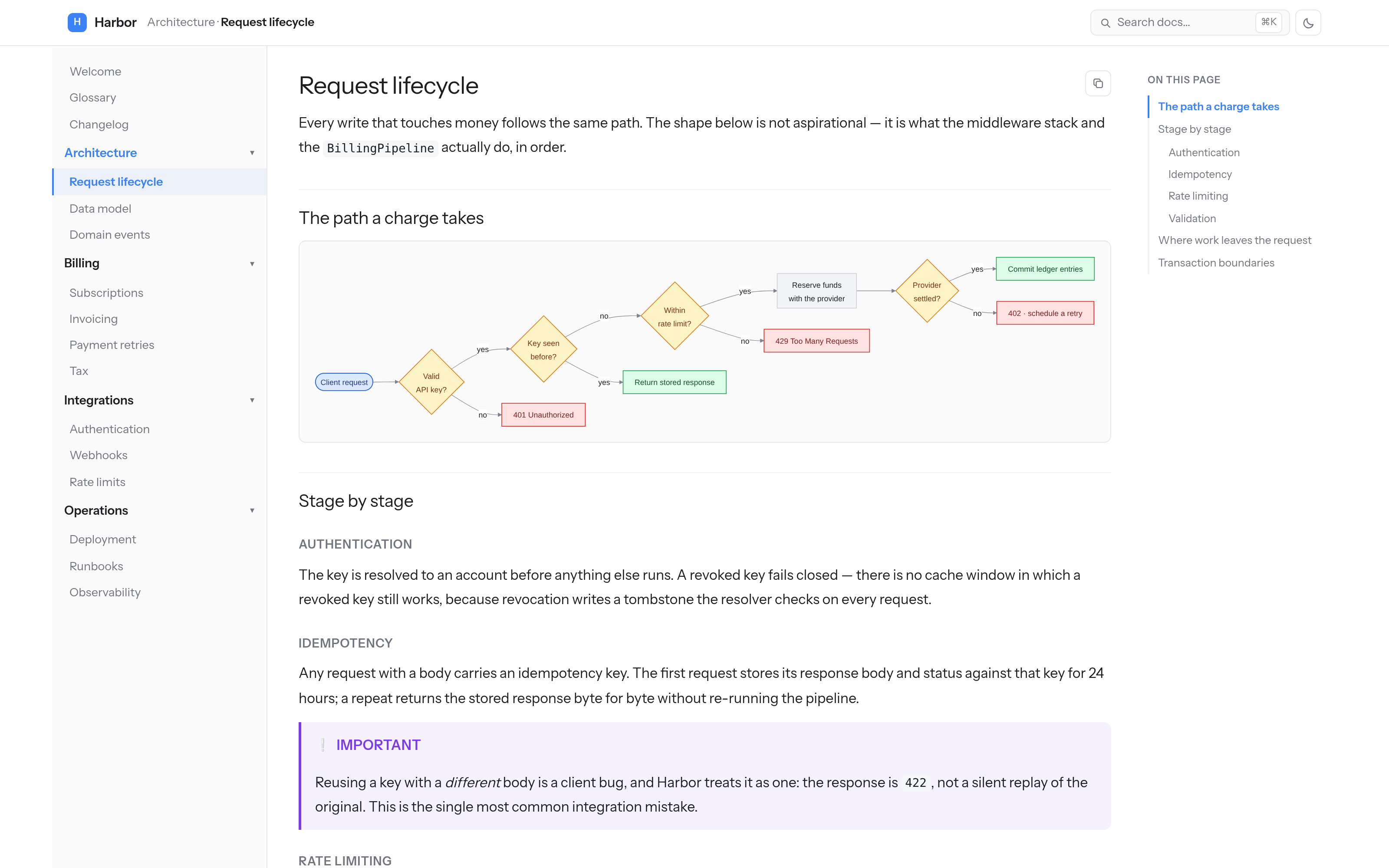
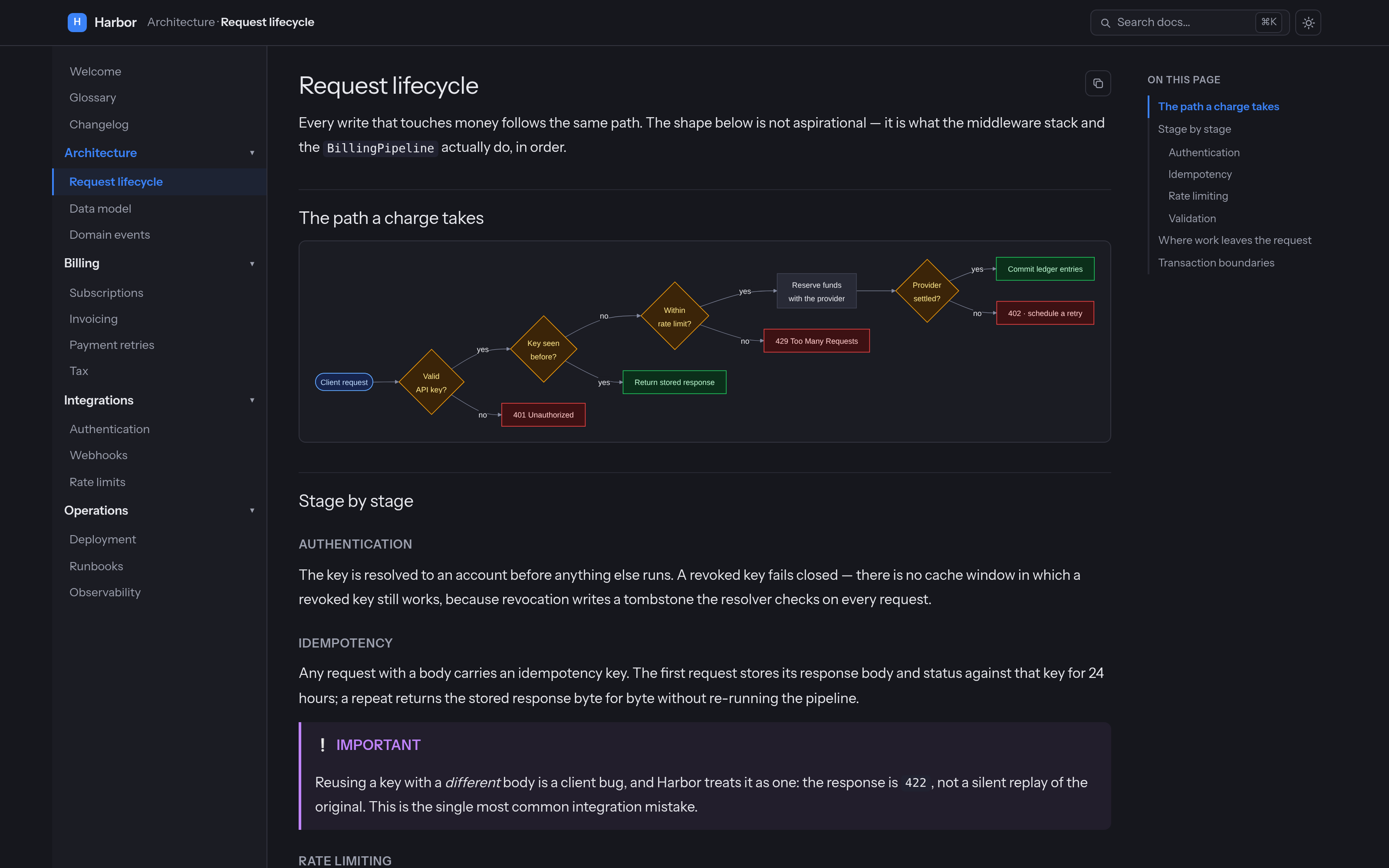
Both screenshots render the fictional documentation tree in art/demo-docs/ — no real project or
person appears in them.
Requirements — read these first
- PHP 8.4+, Laravel 12/13.
- Inertia v2/v3 + React 18/19 in the host app. The panel is an Inertia page, not a Blade view.
- The host app builds its own assets — nothing is precompiled or published as a bundle.
mermaid11 or 12 as an npm dependency. It is a peer dependency, lazy-imported; without it diagram fences degrade to plain text rather than breaking the page.- An access gate. There is no default. Until you register one, every request is refused.
No Tailwind, and no @source line. Like its sibling laravel-db-console, this panel ships plain CSS scoped
under .doc-root, imported by the module itself — so it renders correctly in a host with any CSS setup, or none.
Run php artisan ai-docs:doctor at any point: it checks the routes, the gate, the docs root, the published page, the
Vite alias (in vite.config.js or .ts) and mermaid, and tells you which one is missing.
Install
composer require phattarachai/laravel-ai-docs
php artisan vendor:publish --tag=ai-docs-config     # optional
php artisan vendor:publish --tag=ai-docs-inertia    # required
npm install mermaid
The ai-docs-inertia tag is not optional: it publishes one file, resources/js/pages/AiDocs.jsx, and it has to
live there because the host resolves Inertia pages from resources/js/pages and never looks outside it. The stub is a dozen
lines — a <Head> and <AiDocs {...props} />. The module itself stays in vendor/ and is reached through an alias, so
there is no second copy to drift out of sync.
Add that alias in vite.config.js:
import path from 'node:path'

export default defineConfig({
    resolve: {
        dedupe: ['react', 'react-dom', '@inertiajs/react', 'mermaid'],
        alias: {
            '@ai-docs': path.resolve(
                __dirname,
                'vendor/phattarachai/laravel-ai-docs/resources/js/ai-docs',
            ),
        },
    },
})
dedupe matters when the package is a symlink, as with a composer path repository (symlink: true). Vite then
resolves the module's own imports from its real folder, outside your node_modules, and the build fails with
failed to resolve import "mermaid". dedupe makes those four resolve from your project root. It changes nothing for
an ordinary vendor/ install, and ai-docs:doctor checks for it when the package is symlinked.
Then register the gate, in AppServiceProvider::boot():
use Illuminate\Http\Request;
use Phattarachai\AiDocs\AiDocs;

AiDocs::auth(fn (Request $request): bool => $request->user()?->is_admin === true);
Finally, verify and build:
php artisan ai-docs:doctor
npm run build
Open /docs.
On the Laravel React starter kit
Before npm run build, the kit needs two more edits, because it is TypeScript and wraps every page in its own shell:
-
resources/views/app.blade.phppreloads the current page as.tsx, which fails onAiDocs.jsxwith Unable to locate file in Vite manifest. Load the entry point alone:@vite(['resources/css/app.css', 'resources/js/app.tsx'])
-
resources/js/app.tsxgives every page the kit'sAppLayout, so the panel would sit inside a second sidebar. GiveAiDocsno layout, next towelcome:layout: (name) => { switch (true) { case name === 'welcome': case name === 'AiDocs': return null; // …
The alias snippet above works unchanged in the kit's vite.config.ts.
Access
The gate is closed by default — with no AiDocs::auth() callback registered, the Authorize middleware refuses every
request, including yours. That is deliberate: internal docs are usually the most quotable thing in a codebase, and a
package should not guess who may read them.
The middleware is appended by the service provider after ai-docs.middleware, so it cannot be dropped by editing that
key. A guest who is refused is redirected to redirect_guests_to (default: the login route) with the intended URL
remembered, so signing in lands them on the page they asked for. A signed-in user the gate rejects gets a plain 403,
and so does any request expecting JSON.
Kill it entirely with AI_DOCS_ENABLED=false: no routes are registered at all, so the paths 404 rather than 403.
What it does
The tree is the navigation. Every .md file under root is a page; every folder is its own accordion group,
labelled from the directory name (frontend → Frontend, ui-kit → Ui kit). Root-level pages sit ungrouped at the
top. There is no sidebar config file to keep in sync — add a file, it appears.
Panels — one install can serve several trees. Docs you maintain and task folders you throw away have different half-lives, and merging them into one root buries the first under the second. Give each its own panel and you get its own URL, sidebar and search index, plus a dropdown in the header that names the current panel and lists the others:
'panels' => [
    'docs'  => ['root' => '.ai/documents', 'label' => 'Documents'],
    'tasks' => ['root' => '.ai/tasks',     'label' => 'Tasks'],
],
Links resolve across panels, so a task can link to a doc and back. Leave panels empty for the single tree built from
path / root / exclude; with one panel there is no dropdown.
Collapsing a column — the header carries a toggle for each side column: the page tree on the left, the outline on the right. Collapse either to give a wide table or diagram the whole width; the choice is remembered per browser. The toggles appear only above the width where that column exists — narrower than that, it is already a drawer.
Search — ⌘K opens a palette over a section-level index built server-side and served from /docs/_search.json.
Every heading is its own hit, scored across title, heading and body text, with the matched terms highlighted in a
snippet. Arrows move, Enter jumps straight to the anchor.
Syntax highlighting is server-side, via tempest/highlight with its CSS theme: the HTML carries .hl-* classes,
the colours are CSS custom properties per theme, and no highlighting JavaScript reaches the browser. It lands in the
render cache with the rest of the page.
Mermaid diagrams — a ```mermaid fence becomes a diagram, with mermaid lazy-imported on the first page
that has one. Every theme has its own diagram palette, and a small semantic palette is available to opt into with
class Node decision or Node:::decision — decision, ok, bad, actor.
Diagrams lay out with dagre on either major; mermaid 12's ELK default is not used.
A fence mermaid cannot draw shows its source instead, with the reason in the browser console.
GitHub alerts — > [!NOTE], > [!TIP], > [!IMPORTANT], > [!WARNING], > [!CAUTION] render as titled
callouts, with the title translated.
Images stay private. An image beside your markdown is rewritten to /docs/_media/{path} and streamed through the
same gate, so nothing has to be copied into public/. Only real image extensions inside the docs root are served, and
excluded paths are refused. Every file goes out with X-Content-Type-Options: nosniff, and an SVG also carries a
Content-Security-Policy that allows no script, so opening one directly in the address bar can't run anything inside
it.
Copy the path, not the page. A button on every page copies its repo-relative path —
.ai/documents/billing/payment-retries.md — ready to paste after @ in Claude Code, Cursor, or whatever is reading
your repo. Every heading also gets a #
permalink; clicking it copies the absolute URL rather than navigating.
Full screen — tables, diagrams and images each get a zoom button that opens them in an overlay, because a sequence diagram never fits a documentation column.
Print / Save as PDF — a toolbar button prints the current page through the browser, so any reader can save a PDF
with no server-side dependency. A @media print sheet drops the top bar, both rails and every control, forces every
theme back to ink-on-paper at 100% type, and keeps code blocks, tables and diagrams from splitting across a page — and because the
whole document already lives in the DOM, the export is the entire page, mermaid diagrams and all, not just the viewport.
A tall image or diagram is scaled down to fit one page. When one lands awkwardly — stranded under a heading with a page
of white space above it — size that one element for print without touching the rest: add a print-NN keyword, where
NN is a rough percent of a page (50, 60, 70, 80, 90, or 100 to leave it at full size).
```mermaid print-70 flowchart TD A --> B ``` 
On a diagram it is a second word in the fence info string; on an image it goes in the title slot (and is stripped, so it never shows as a tooltip). It only affects print — on screen both render full size. Any other value is ignored.
Wide figures — wide lets one diagram or image also take the outline rail's width, for the landscape drawing that
needs every pixel. That happens only on a page with no outline (no ## headings), where the rail is empty. A page with
an outline keeps the figure in the column so the outline is never covered; collapse the rail, or use the figure's zoom
button, to see it larger. wide combines with the other keywords in any order. On a narrower screen, where the outline
is a drawer, the figure stays in the column. On a phone, an inlined SVG marked wide keeps a legible size and scrolls
sideways.
```mermaid wide print-70 flowchart LR A --> B ``` 
An image title holding only keywords (inline, wide, print-NN) is read as directives and removed. A title with any
other word in it stays an ordinary tooltip.
Hand-drawn SVG diagrams
Mermaid suits flows. A landscape map with status pills, coloured connectors and Thai labels is easier to draw by hand.
Keep the .svg beside the markdown and add inline to the image title:

The drawing is written into the page instead of being loaded through <img>, which changes four things:
- It uses the panel's font. Leave
font-familyoff your<text>and Thai labels match the prose around them. An<img>SVG can't load web fonts. - It can follow the theme picker through the panel's CSS custom properties, if you draw with them (below).
- Links work.
<a href="billing.md#flow">around a card is resolved like a markdown link, across panels too, and opens that doc in place. An<a href="#heading">jumps to a heading on the same page. - It gets the same zoom button and
print-NNsizing as a mermaid diagram.wideandprint-NNcombine withinline, e.g."inline wide print-80".
inline applies only to an in-tree .svg that sits alone in its paragraph. A remote SVG, one sharing its line with
text, or a file that won't parse stays a plain <img>. The drawing's <text> is added to search, under the heading it
sits beneath. Editing only the .svg refreshes the cached page.
Server-side sanitizing. The SVG is copied element by element, and only drawing elements cross over: shapes, text,
<defs>, <marker>, gradients, patterns, clip paths, masks, filters, <style>. Script, <foreignObject>, animation
elements, comments and every on* attribute are left behind. An href survives only as a #fragment, as a link to
another doc, or as an <image> of an in-tree picture. External, javascript: and data: URLs are dropped, and so is
any url() that would fetch.
Ids are namespaced per figure. id="arrow" becomes id="ds-…-1-arrow", and every url(#arrow), href="#arrow"
and #arrow selector follows it. The same drawing can therefore appear twice on one page, and the full-screen copy
re-namespaces again. The fixed width/height is dropped and the viewBox kept, so the drawing scales with the
column. The <style> block is scoped to the drawing's own root, so .card { … } can't restyle the page around it.
Theme hooks. These properties are set on the panel in every theme. The table lists light and dark; soft and
nord set their own values in ai-docs.css. Write them with a fallback, so the file still renders on GitHub or in an
image viewer:
| Property | Light | Dark | For |
|---|---|---|---|
--doc-bg |
#ffffff |
#16171d |
the page / card fill |
--doc-text |
#1c1d21 |
#e7e8ed |
labels |
--doc-muted |
#71757e |
#9ca0ae |
secondary labels |
--doc-line |
#e6e7ea |
#32333e |
borders, connectors |
--doc-accent |
brand.accent |
same | strokes, tints — not text |
--doc-ok-bg / -line / -text |
#dcfce7 #16a34a #14532d |
#0b2f1a #22c55e #bbf7d0 |
done, migrated |
--doc-warn-bg / -line / -text |
#fef3c7 #d97706 #78350f |
#3b2408 #f59e0b #fde68a |
in progress, dual-run |
--doc-bad-bg / -line / -text |
#fee2e2 #dc2626 #7f1d1d |
#3d1113 #ef4444 #fecaca |
broken, pending |
--doc-actor-bg / -line / -text |
#dbeafe #2563eb #1e3a8a |
#16244d #60a5fa #bfdbfe |
people, outside systems |
--doc-accent is your brand colour, the same in every theme. A dark brand (#3a4a8c) is unreadable as text on the
dark themes, so use it for strokes, outlines and tints, and use --doc-text for labels.
The four tones are the same palette as mermaid's ok / decision / bad / actor classes (warn is decision), so
hand-drawn and generated diagrams on one page agree.
<svg xmlns="http://www.w3.org/2000/svg" viewBox="0 0 320 120">
  <defs>
    <marker id="arrow" viewBox="0 0 10 10" refX="9" refY="5" markerWidth="8" markerHeight="8" orient="auto">
      <path d="M0,0 L10,5 L0,10 z" style="fill: var(--doc-muted, #71757e)"/>
    </marker>
  </defs>
  <a href="billing.md">
    <rect x="10" y="30" width="130" height="60" rx="10"
          style="fill: var(--doc-ok-bg, #dcfce7); stroke: var(--doc-ok-line, #16a34a)"/>
    <text x="75" y="65" text-anchor="middle" style="fill: var(--doc-ok-text, #14532d)">billing</text>
  </a>
  <path d="M140,60 H220" marker-end="url(#arrow)" style="stroke: var(--doc-line, #e6e7ea)"/>
  <text x="270" y="65" text-anchor="middle" style="fill: var(--doc-text, #1c1d21)">Payment gateway</text>
</svg>
Put the variables in style="fill: …", not in a presentation attribute (fill="var(…)"), which doesn't take var()
reliably in every browser. Leave out a full-size white background <rect>, so the panel's own background shows through
and follows the scheme.
Layout — three columns (nav · prose · outline) that collapse into drawers on a phone, a scroll-spy outline, and a
theme picker (below). Type, columns and the top bar are drawn at 110%, as if the browser were zoomed one step, because
docs are read at length; --doc-scale sets it (1 is the earlier, unscaled size).
Render cache — keyed on the file's content, the render pipeline's version and the current locale, so it is
self-invalidating. Edit a file and reload; there is nothing to warm at deploy and nothing to clear. Set
AI_DOCS_CACHE=false while writing if you prefer.
Themes
The swatch at the right of the header opens the theme picker:
| Theme | For |
|---|---|
light |
white ground, near-black ink |
soft |
a slightly darker, warmer off-white with softer ink, for less glare |
nord |
mid-dark, from the Nord palette: Polar Night ground, Snow Storm ink, Frost accents |
dark |
near-black ground |
The pick is remembered per browser in localStorage (ai-docs:scheme); a light or dark choice saved before the picker
existed keeps working. A reader who hasn't picked gets ai-docs.theme if you set one (AI_DOCS_THEME=soft), otherwise
light or dark from the host page's <html class="dark"> or their OS setting. Mermaid diagrams, inline SVGs, code
highlighting and callouts all follow the theme. On nord your brand accent is lightened for link text so a dark brand
stays readable; it is used as-is everywhere else. The theme lives on .doc-root, never on <html>, so the panel never
fights the host app's own theme state.
Embed
Add ?embed=1 to any page URL and the panel renders that page alone: no header, sidebar, outline, search or
copy-path button. It's meant for an iframe inside your own app, such as a help pane beside the screen it explains,
with a link out to the full page.
?scheme=light|soft|nord|darkpicks the theme; it defaults to light. The scheme saved for the full panel is ignored, so the pane matches your app rather than the docs.- A link to another page in the panel stays in the iframe and keeps
embedandscheme. - On load, and after every link followed inside it, the page posts
{type: 'ai-docs:page', title, url}to its parent at the same origin.urlis the full-page address with the embed params removed and the heading kept, ready to use for an "open full page" link. - A heading reached by
#anchorflashes briefly, in the full panel too, so a reader landing mid-page can find it.
Access is the same gate as the panel; the iframe needs a same-origin page, which a default Laravel app allows.
Notes — pages Claude pushes without a commit
The panels above show what was committed and deployed. A note panel shows pages pushed straight to the running app instead: an explanation of how a flow works, written for the people who use the system, published to staging in one command and replaced the next time it changes. Nothing is committed and nothing is deployed.
A note is an ordinary page. It is markdown on disk, so the sidebar, search, mermaid, images, inline SVG, links and the access gate all work as they do for repo docs. It shows "Updated" with the push time and who pushed it.
Set up
Mark a panel as a note panel:
'panels' => [
    'docs'  => ['root' => '.ai/documents', 'label' => 'Docs'],
    'notes' => ['path' => 'docs/notes', 'label' => 'How it works', 'notes' => true],
],
| Key | Default | What it is |
|---|---|---|
notes |
false |
Claude pushes to this panel |
root |
storage/app/ai-docs/<key> |
where pushed pages live on the server; created on the first push |
local |
.ai/<key> |
the working copy ai-docs:pull writes in a checkout |
In the checkout Claude works in, issue a token:
php artisan ai-docs:token --write
--write saves the plaintext as AI_DOCS_REMOTE_TOKEN in the local .env and prints only its sha256. Put the hash in
the server's .env as AI_DOCS_TOKEN_HASHES (a comma list, so a token can be rotated: append the new hash, switch the
client, drop the old one). Set AI_DOCS_REMOTE_URL locally to the app's URL.
The root is under storage/, so it has to survive a deploy the way uploads do: the usual shared storage symlink
does that. With several web servers, it has to be shared storage.
Push
php artisan ai-docs:push price-recalc.md --path=flows/cart/price-recalc
php artisan ai-docs:push ./order-flow --path=flows/order        # a folder: every .md and image in it
php artisan ai-docs:push .ai/notes/flows/order.md               # from the working copy: path and panel inferred
php artisan ai-docs:push flows/order --delete
- The path is the category.
flows/cart/price-recalcis the pageprice-recalcinside Flows › Cart. Folders are labelled like repo folders, so anindex.mdwithgroup:front matter names one. - Images travel with the page. Every relative image a page shows is sent and lands beside it. A missing image, or one whose path would climb out of the panel, stops the push before anything is sent.
- A folder push adds and overwrites.
--prunealso removes what the folder no longer has on the server. --title=sets the page title,--author=the name shown (defaultAI_DOCS_AUTHOR, thenClaude),--panel=another note panel, and--dry-runlists what would be sent.- The last push wins. Two people pushing the same path overwrite each other; there is no conflict check.
--deleteremoves the page and a folder at that path. Images it showed are left on the server.
Pull
php artisan ai-docs:pull                                        # list the notes
php artisan ai-docs:pull flows/cart/price-recalc                # one page and its images
php artisan ai-docs:pull flows                                  # a whole category
php artisan ai-docs:pull https://staging.example.com/docs/notes/flows/order
Pull writes into the working copy (.ai/notes/…), mirroring the path, so pull → edit → push needs no flags. The
first pull adds /.ai/notes/ to .gitignore: the working copy is a scratch pad. A note worth keeping for good moves
into the docs tree and gets committed. A repo panel whose root holds the working copy (one rooted at .ai, say)
skips it, so pulled notes are not listed twice. --to= writes somewhere else.
The copy-path button on a note copies its working-copy path, .ai/notes/flows/order.md, so an agent reading it knows
to pull before editing.
Note or doc?
The package ships a Laravel Boost skill, ai-docs-notes, that tells an agent the
rule below and the commands above; php artisan boost:install picks it up.
| Push a note when… | Commit a doc when… |
|---|---|
| it explains the system to the people who use it | it is for the people who change the code |
| it should be readable now, on staging, before any deploy | it should change with the code, in the same review |
| it is likely to be rewritten from the next round of feedback | it describes a decision or a contract that holds |
The API
ai-docs:push and ai-docs:pull call a JSON API at <path>/_api/v1, with the token as a bearer token. It is
throttled (api.throttle), carries no session, and 404s with the rest of the package when AI_DOCS_ENABLED=false.
| Route | Does |
|---|---|
GET notes |
every note in a panel: slug, title, group, updated, author, url |
POST notes |
write files: [{path, content}] (base64, paths relative to the panel root) |
GET notes/{path} |
the page at {path}.md with its images, plus everything under {path}/ |
DELETE notes/{path} |
remove {path}.md and {path}/ |
Each takes an optional panel; without one it uses the first note panel. A path is letters, digits, _, . and -
in /-separated segments, and only markdown and images are accepted.
Writing docs
Plain markdown works with no front matter at all. When there is none, the nav label is the H1, cut at the first
—, –, ( or : — so a page titled # Payment retries — the backoff schedule lists as
Payment retries.
Front matter overrides any of that, and every key is optional:
---
title: Payment retries — the backoff schedule
nav: Payment retries
order: 10
---

# Payment retries

> [!IMPORTANT]
> A retry never re-runs the pipeline. It resumes from the stored idempotency record.

```mermaid
flowchart LR
    C[Charge failed] --> R{Retryable?}:::decision
    R -->|yes| S[Schedule backoff] --> D[Settled]:::ok
    R -->|no| X[Marked uncollectible]:::bad
```
| Key | Effect |
|---|---|
title |
Page title and browser tab. Defaults to the H1, then the filename |
nav |
Sidebar label. Defaults to the shortened title |
order |
Sort position within its group. Unset sorts as 500 |
updated |
Shown beside the page title as "Updated …", formatted for the app locale |
author |
Shown after the date: "Updated … by …". A pushed note gets it from the push |
group |
On a folder's index.md only: the folder's sidebar label, in place of the folder name |
updated is when the page's content last changed, written by its author: 2026-10-19 16:30 (read in
app.timezone), a date alone, or an ISO 8601 time with its offset. It is front matter rather than git history
because a release built from a shallow clone or a git archive has no per-file history to read. A page without it
shows no date.
Within a group, pages sort by order, then index.md first, then nav label. The landing page is index.md at the
root of the docs folder, or the first page of the first group if there is none.
A folder's index.md is the folder's own page: cart/index.md is served at /docs/cart, and /docs/cart/index
still works. A cart.md beside the folder keeps /docs/cart, and the index then stays at /docs/cart/index.
Subfolders nest inside their parent group rather than listing beside it, so cart/prices/ opens inside Cart
and the breadcrumb reads Cart · Prices. There is no depth limit.
When two docs in one folder shorten to the same label — five pages titled Admin panel — … — the panel switches those
docs to the half of the title after the cut (Form conventions, Table conventions) rather than listing the same
word five times. So a collision usually needs no front matter at all; reach for nav when you want a label the title
doesn't contain.
Links between docs are rewritten to panel URLs and navigate through Inertia — including anchors. A link to a folder
lands on whichever page the sidebar lists first under it, so [#94](../cycle-2/94-billing/) works without naming a
file; a folder with no page of its own hands off to the first one below it. A relative link that points outside every
panel's root renders as plain text unless source_link_base is set, in which case it becomes a link to your code host.
How to organize the folder — flat-first structure, the index.md map, the 500-line rule, how order and nav
interact with the folder grouping — is docs/authoring.md. If an agent writes your docs, those
same conventions ship as a drop-in Claude Code skill in
examples/document-skill/.
Configuration
See config/ai-docs.php.
| Key | Default | Env | Notes |
|---|---|---|---|
enabled |
true |
AI_DOCS_ENABLED |
false registers no routes |
path |
docs |
AI_DOCS_PATH |
where it mounts |
domain |
null |
AI_DOCS_DOMAIN |
optional route domain |
middleware |
['web'] |
— | Authorize is always appended |
redirect_guests_to |
login |
AI_DOCS_LOGIN_ROUTE |
route name or URL; null 403s guests |
root |
.ai/documents |
AI_DOCS_ROOT |
relative to the project root |
exclude |
[] |
— | path prefixes, matched by whole segment |
panels |
[] |
— | several trees; empty means one |
tables |
scroll |
AI_DOCS_TABLES |
scroll or wrap; styling only |
theme |
null |
AI_DOCS_THEME |
default theme; null follows the OS |
source_link_base |
null |
AI_DOCS_SOURCE_BASE |
code-host base URL for out-of-tree links |
cache |
true |
AI_DOCS_CACHE |
render + search cache |
api.tokens |
[] |
AI_DOCS_TOKEN_HASHES |
sha256 hashes, comma list; empty refuses |
api.throttle |
60,1 |
AI_DOCS_THROTTLE |
requests, minutes |
api.max_kb |
20480 |
AI_DOCS_MAX_PUSH_KB |
the largest push |
remote.url |
null |
AI_DOCS_REMOTE_URL |
the app ai-docs:push / pull talk to |
remote.token |
null |
AI_DOCS_REMOTE_TOKEN |
plaintext, local .env only |
remote.author |
Claude |
AI_DOCS_AUTHOR |
shown beside a pushed page's date |
brand.name |
APP_NAME |
AI_DOCS_BRAND |
shown in the header |
brand.accent |
#3b82f6 |
AI_DOCS_ACCENT |
injected as --doc-accent, no rebuild |
brand.url |
/ |
AI_DOCS_BRAND_URL |
where the header logo links back to |
brand.logo |
null |
— | image URL; falls back to the first letter |
exclude matches whole segments relative to root, so 'handbook' drops the handbook/ directory while leaving
handbook.md servable. Excluded paths are dropped from the tree, the search index, direct URLs and _media alike.
A panels entry may set path (defaults to the key), root, label, exclude, and notes and local for a
note panel; whatever it omits falls back to
the top-level key of the same name. Route names gain the panel key — route('ai-docs.tasks.index') — while a single
unnamed panel keeps route('ai-docs.index'). Panels are registered longest-path first, so one nested inside another's
prefix (docs and docs/tasks) still resolves.
Everything else is a CSS custom property you can override:
.doc-root {
    --doc-accent: #16a34a;
    --doc-measure: 80ch;
    --doc-scale: 1; /* type and columns at 100% instead of 110% */
}
The width breakpoints are tuned for the default 1.1. At 1 the outline and the page tree become drawers a little
earlier than they need to, which costs nothing but width.
Translations
Every browser string is handed to React as one flat strings prop from trans('ai-docs::ui'); en and th ship.
Publish and edit them:
php artisan vendor:publish --tag=ai-docs-lang
The React module carries English defaults for the same keys, so it renders standalone even with no lang files at all.
Adding a locale means adding one directory — no JavaScript changes. Note that callout.* and anchor.label are
rendered server-side into the markdown, which is why the render cache is keyed by locale.
Contributing
git clone git@github.com:phattarachai/laravel-ai-docs.git
cd laravel-ai-docs
composer install
composer test
The suite runs on orchestra/testbench against in-memory SQLite — there is no database work in this package, so
nothing heavier is warranted. PHP is formatted with vendor/bin/pint, JavaScript with Prettier (.prettierrc:
2-space, single quote, no semicolons).
Read docs/internals.md before changing the pipeline or the React module. Every note in it is a
bug that already happened once, and the code carries no comment explaining it.
Credits
Built on league/commonmark,
tempest/highlight and Mermaid.
Licence
MIT.
ผู้พัฒนา
พัฒนาและดูแลโดย บริษัท ภัทรชัย อาร์ทิซาน จำกัด (Phattarachai Artisan) บริษัทที่ปรึกษาและพัฒนาเว็บ ที่เรียนรู้และแบ่งปันกับชุมชน Laravel แพ็กเกจนี้แบ่งปันให้ชุมชนนำไปใช้และต่อยอดได้อย่างอิสระ
ดูแพ็กเกจอื่นของเราได้ที่ phattarachai.dev/open-source และติดต่อเราได้ที่ phattarachai.dev