
packstub / filament-agents

An in-panel AI assistant and an MCP server for Filament v5 panels, built on laravel/ai and laravel/mcp through packstub/agents: one tool list for both, the panel's own authorization, approve-in-chat writes, live tables and charts in answers, per-workspace budgets and an operator limits page.
Fund package maintenance!
Requires
- php: ^8.4
- filament/filament: ^5.0
- packstub/agents: ^1.9
- spatie/laravel-package-tools: ^1.93
Requires (Dev)
- laravel/pint: ^1.13
- orchestra/pest-plugin-testbench: ^5.0
- orchestra/testbench: ^11.2
- pestphp/pest: ^5.1
- pestphp/pest-plugin-laravel: ^5.0
- pestphp/pest-plugin-livewire: ^5.0
- phpunit/phpunit: ^13.3
Suggests
- packstub/filament-tenancy: Database-per-tenant panels: the MCP endpoint and the chat follow the workspace automatically.
Provides
None
Conflicts
None
Replaces
None
- dev-main / 1.x-dev
- v1.16.0
- v1.15.0
- v1.14.2
- v1.14.1
- v1.14.0
- v1.13.1
- v1.13.0
- v1.12.1
- v1.12.0
- v1.11.0
- v1.10.0
- v1.9.1
- v1.9.0
- v1.8.0
- v1.7.0
- v1.6.0
- v1.5.0
- v1.4.0
- v1.3.0
- v1.2.0
- v1.1.0
- v1.0.1
- v1.0.0
- v0.1.0
- dev-feat/turn-log-decided-by
- dev-feat/turn-log-decision-detail
- dev-ci/databases
- dev-feat/posted-messages-and-deferred-first-turn
- dev-release/1.14.2-engine-1.7.2
- dev-fix/lock-agent-table-properties
- dev-fix/mention-picker-checks-view
- dev-fix/mcp-and-turns-check-panel-access
- dev-fix/operator-pages-scope-to-tenant
- dev-fix/membership-on-enter
- dev-pro-hooks
- dev-backlog-issues
- dev-laravel-ai-1
- dev-next-chat
- dev-pending-proposals
- dev-proposal-question
- dev-split-core
- dev-headless-context
- dev-context-ring
- dev-agent-middleware
- dev-job-based-turns
- dev-mcp-json-401
- dev-scoped-agent-tokens
- dev-agents-v1
- dev-legacy-grants
This package is auto-updated.
Last update: 2026-10-15 00:54:36 UTC
README
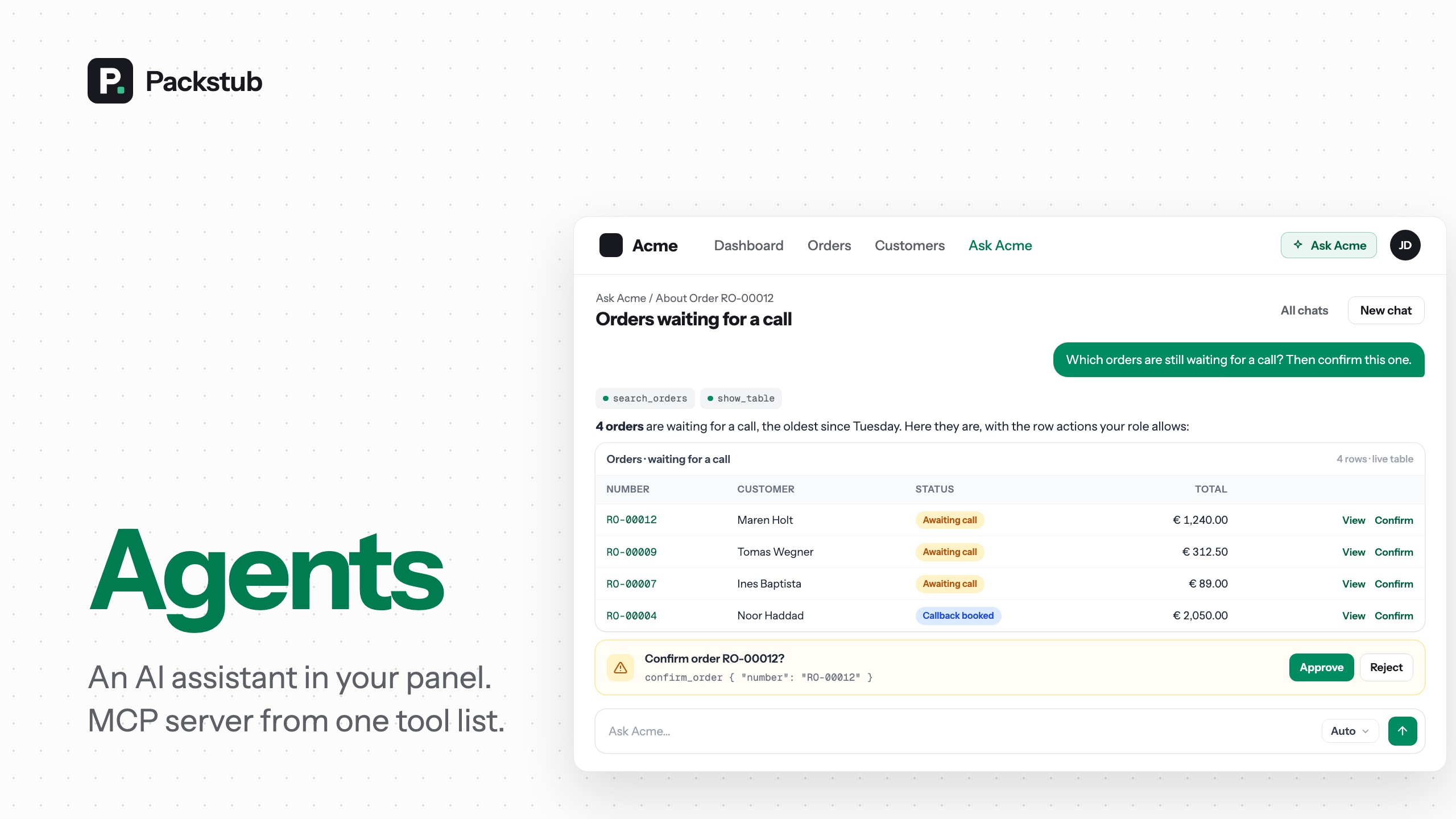
An in-panel AI assistant and an MCP server for your Filament v5 panel, built on laravel/ai and laravel/mcp. Write a tool once and it serves both the chat inside the panel and Claude Code, Claude Desktop, Cursor or any other MCP client, with the panel's own authorization deciding who may run it.
Watch the 90-second demo — install in one line, then a question answered with the live orders table, a chart, a change approved in one click, and the same tools answering in Claude Code over MCP.
Features
- One tool list, two front doors: the panel's chat and any MCP client (Claude Code, Cursor) call the same tools.
- The panel's authorization: the assistant never does more than the signed-in person could, and a token narrows it further.
- Approve-in-chat writes: a change waits as a question with Approve and Reject, showing what it would change.
- A chat that feels current: streamed answers, attachments,
@mentions, a slide-over on any page, chats you can pin and search. - Live tables and charts: the resource's own Filament table under the answer, and charts from the numbers.
- Beyond the records, with guard rails: a cited knowledge base, web search within an allow-list, a prompt guard and redaction.
- A bounded bill: answer and token limits per user and per workspace, edited on an operator page.
- Your assistant, your prompt: a scaffolded agent class on Anthropic, OpenAI, Gemini or xAI, with failover.
- Tenancy-aware: workspace-bound tokens, tenant databases and per-workspace keys, or no tenancy at all.
- Translatable: German, Spanish, Romanian and Russian included.
Compatibility
| Plugin | Filament | Laravel | PHP | laravel/ai | laravel/mcp |
|---|---|---|---|---|---|
| 1.x | 5.x | 13.x | 8.4+ | ^1.0 | ^1.0 |
1.8 and later require packstub/agents ^1.1, which Composer installs with the plugin.
Installation
composer require packstub/filament-agents
php artisan packstub-agents:install
php artisan filament:assets
The install command publishes the config, offers to run the migrations and scaffolds app/Ai/Agents/Assistant.php. Filament v5 only compiles plugin views into a custom theme, so add the package views to yours:
@source '../../../../vendor/packstub/filament-agents/resources/views';
Register the plugin in your panel provider and put a provider key in .env (ANTHROPIC_API_KEY, OPENAI_API_KEY, GEMINI_API_KEY or XAI_API_KEY, with AGENT_PROVIDER=anthropic|openai|gemini|xai):
use Packstub\Agents\AgentsPlugin;

->plugin(
    AgentsPlugin::make()
        ->name('Ask Acme')
        ->agent(\App\Ai\Agents\Assistant::class)
        ->server(\App\Mcp\Servers\AcmeServer::class)
        ->authorizeUsing(fn (string $ability) => auth()->user()->can($ability)),
)
Without a key the chat hides itself and the MCP endpoint still answers. Read more: Installation.
Built on packstub/agents
The engine — the tools, the MCP server and its tokens, the turn job, budgets and limits, the Agent class — is packstub/agents, a package that runs in a plain Laravel app without Filament; this plugin requires it and adds what a panel needs: the chat pages, the Ask button, the Agent access page, the operator pages, show-table and the embedded table. Every class keeps its Packstub\Agents\ name, so nothing changes in your code. Read more: Agents for Laravel.
Writing tools
php artisan packstub-agents:tool SearchOrders --ability=orders.view
php artisan packstub-agents:tool ConfirmOrder --write --ability=orders.manage
A tool extends Packstub\Agents\Mcp\AgentTool, declares its $ability, and implements run(Request): array and schema(JsonSchema): array. Mark reads with #[IsReadOnly]; anything else is approval-gated in the chat and needs a write token over MCP. Domain exceptions come back to the model as tool errors, never to the person as a crash.
#[IsReadOnly]
#[Description('Find orders by number, customer, status and date.')]
class SearchOrders extends AgentTool
{
    protected ?string $ability = 'orders.view';

    protected function run(Request $request): array
    {
        $filters = AgentResources::normalizeFilters('orders', (array) $request->get('filters'));
        $query = AgentResources::apply('orders', Order::query(), $filters);

        return [
            'total' => $query->count(),
            'rows' => $query->limit($this->limit($request))->get()->map(fn (Order $o) => OrderResource::agentSummary($o))->all(),
        ];
    }

    public function schema(JsonSchema $schema): array
    {
        return [
            'filters' => $schema->object(AgentResources::filterSchema($schema, 'orders')),
            'limit' => $schema->integer(),
        ];
    }
}
List the tools on the server class, reads first. The chat agent reads the same list:
class AcmeServer extends \Packstub\Agents\Mcp\AgentServer
{
    protected string $name = 'Acme';

    protected string $instructions = 'The back office of an online shop. Start with search-orders.';

    protected array $tools = [
        Tools\SearchOrders::class,
        \Packstub\Agents\Mcp\Tools\ShowTable::class,
        \Packstub\Agents\Mcp\Tools\DrawChart::class,
        Tools\ConfirmOrder::class,
    ];
}
AgentsPlugin::make()->tools([...]) works instead of a server class when you only want the chat. Read more: Tools.
The chat
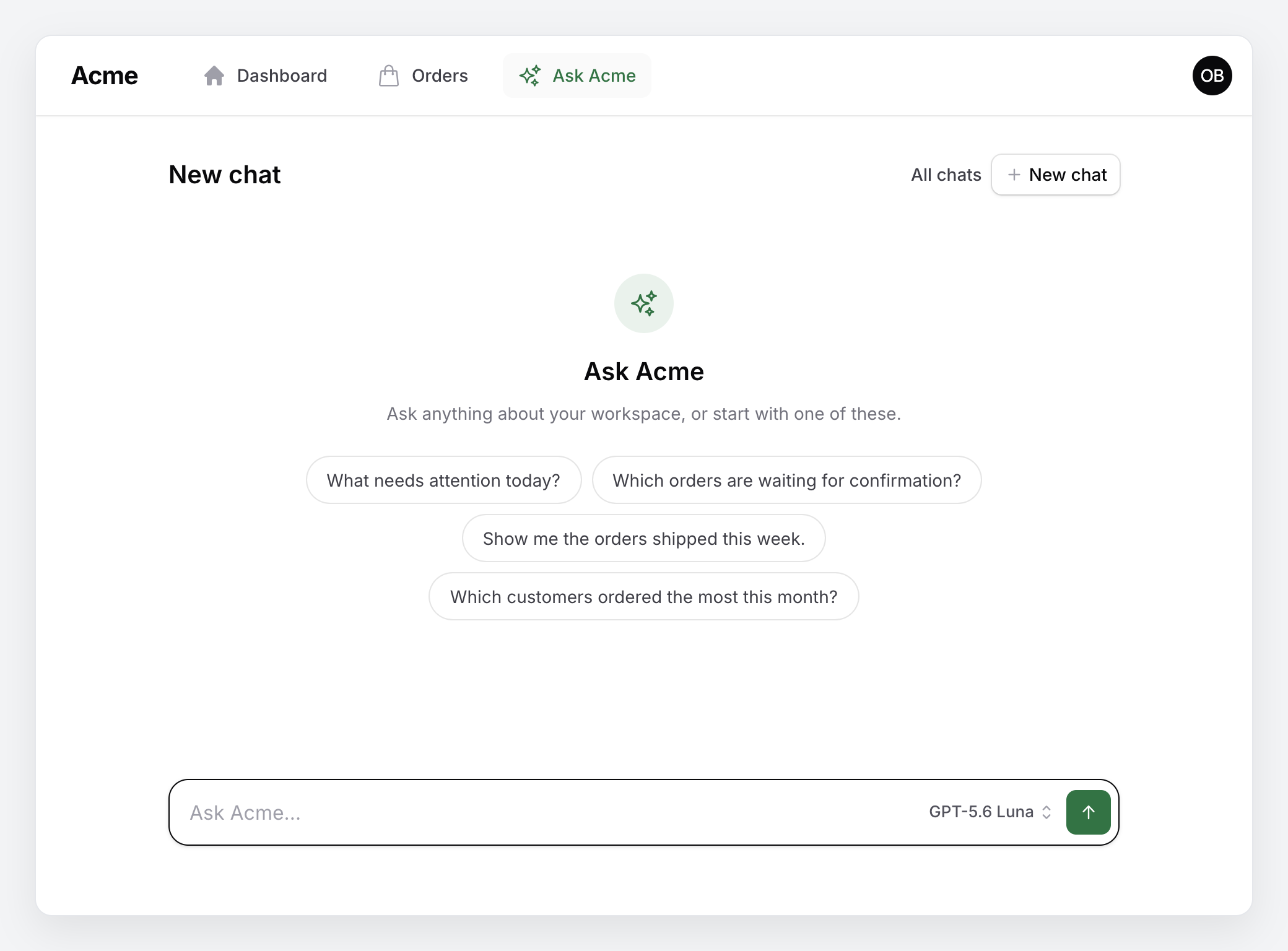
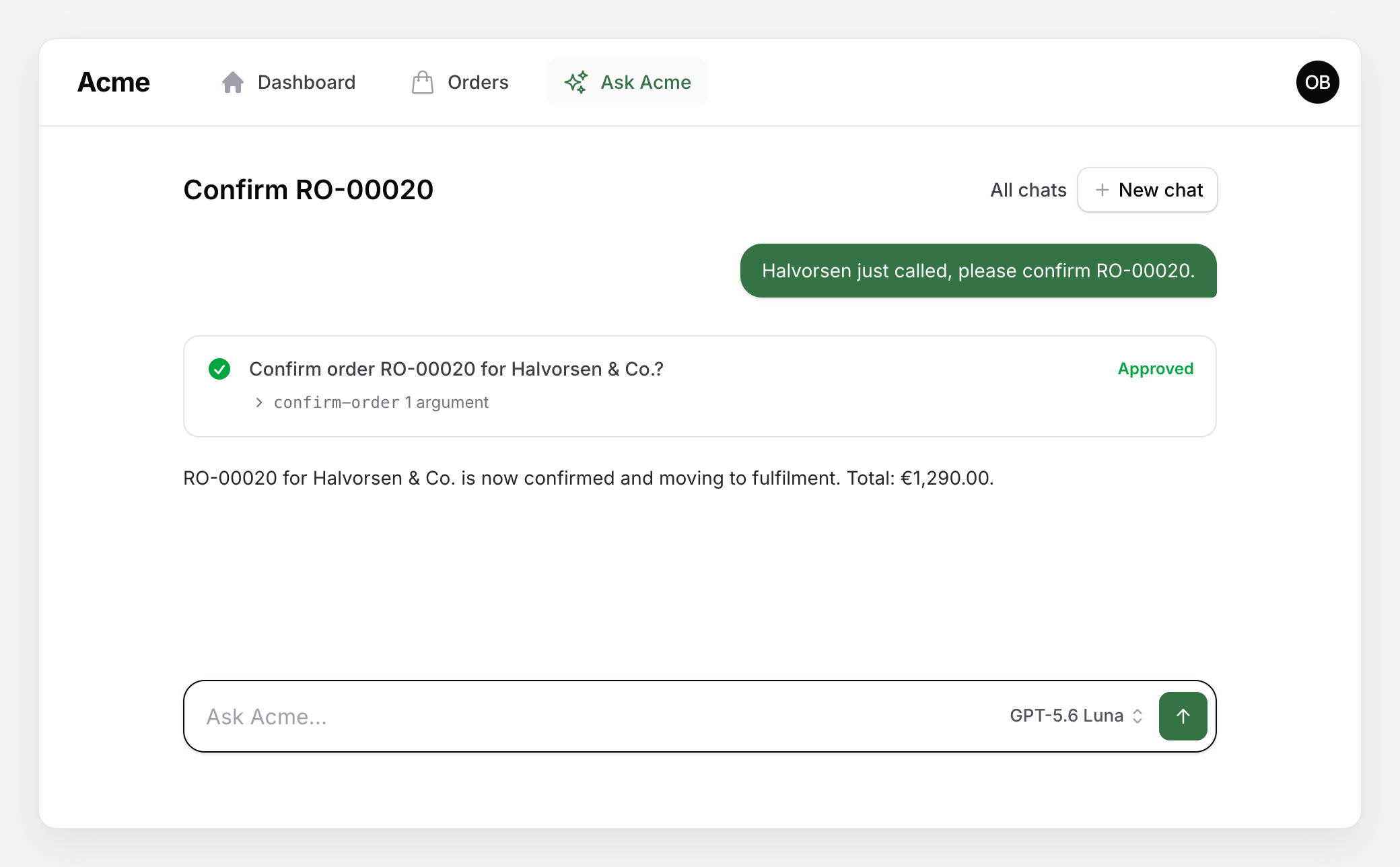
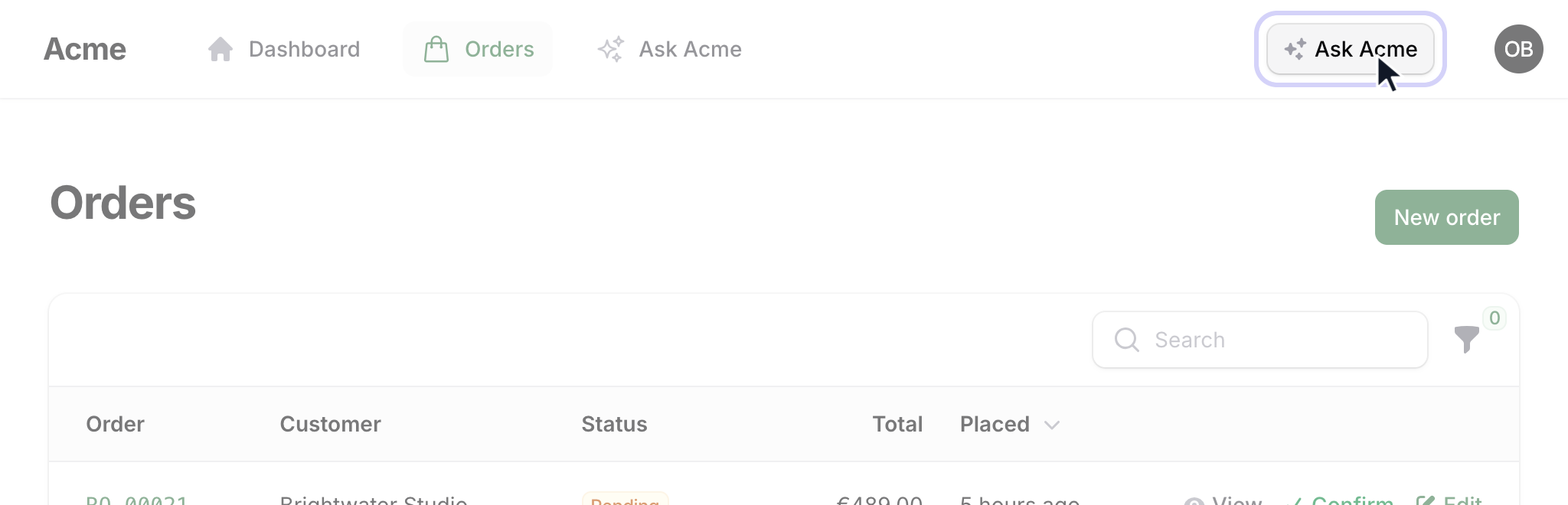
The assistant lives on a chat page with an "Ask …" button in the topbar and the recent conversations in the sidebar (an "Ask …" navigation item on a panel with top navigation). A new chat opens on a row of starter questions from your agent's suggestions(), each sent on click. Answers are produced by a queued job and stream into the page while the agent calls tools — a reload, a closed tab or a second tab picks the answer up where it is, and Stop cuts it short (run php artisan queue:work, or set AGENT_TURN_DRIVER=sync to run the job inside the request). Long chats replay a token-budgeted window with a rolling summary; a context ring in the composer shows the breakdown and what the chat cost, with Compress now and Continue in a new chat. A proposed change shows up as a question with Approve and Reject ("Confirm order RO-00020 for Halvorsen & Co.?", the exact call folded under it), and the turn resumes with the decision. Conversations are stored with laravel/ai's models, follow-ups wait their turn per conversation, the last exchange can be regenerated or edited and sent again, and every answer can be rated with a thumbs up or down. The composer is one row — the question, the model and Send — and the model is a small text button that opens the list by name (Claude Opus 5, Claude Haiku 4.5, Claude Opus 5 · Deep out of the box; entries of more than one provider under provider headings), remembered per session.
Files attach by paper clip, drop or paste, @ mentions a record, / brings back the starter questions, and the "Ask …" button opens the chat as a slide-over on any page (Ctrl/⌘ J). Chats can be renamed, pinned, searched and exported, and a cut-short answer continued.
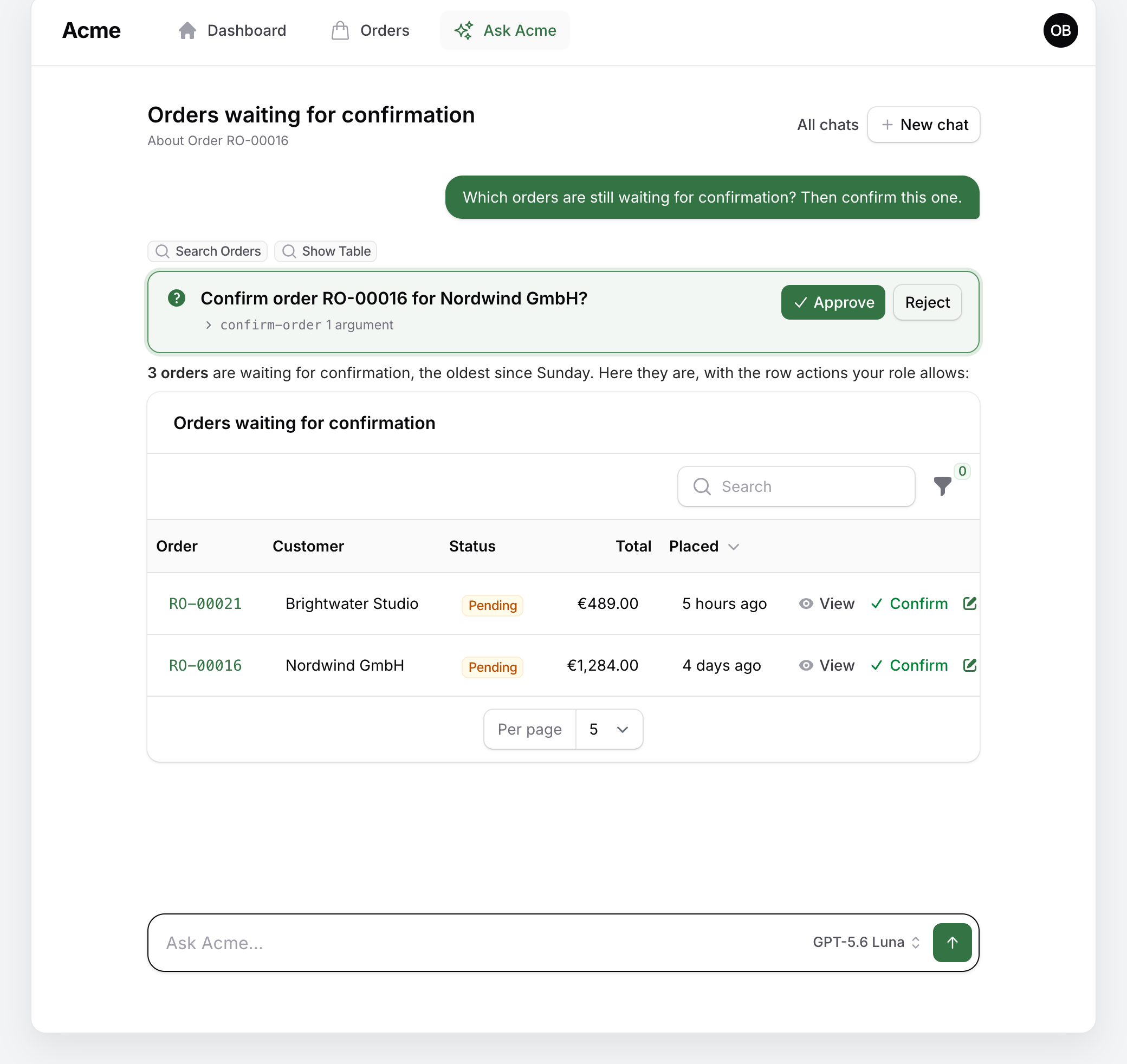
Ask for records and the answer comes with the resource's own table under it, filtered the way the answer says, with the row actions the person's role allows:
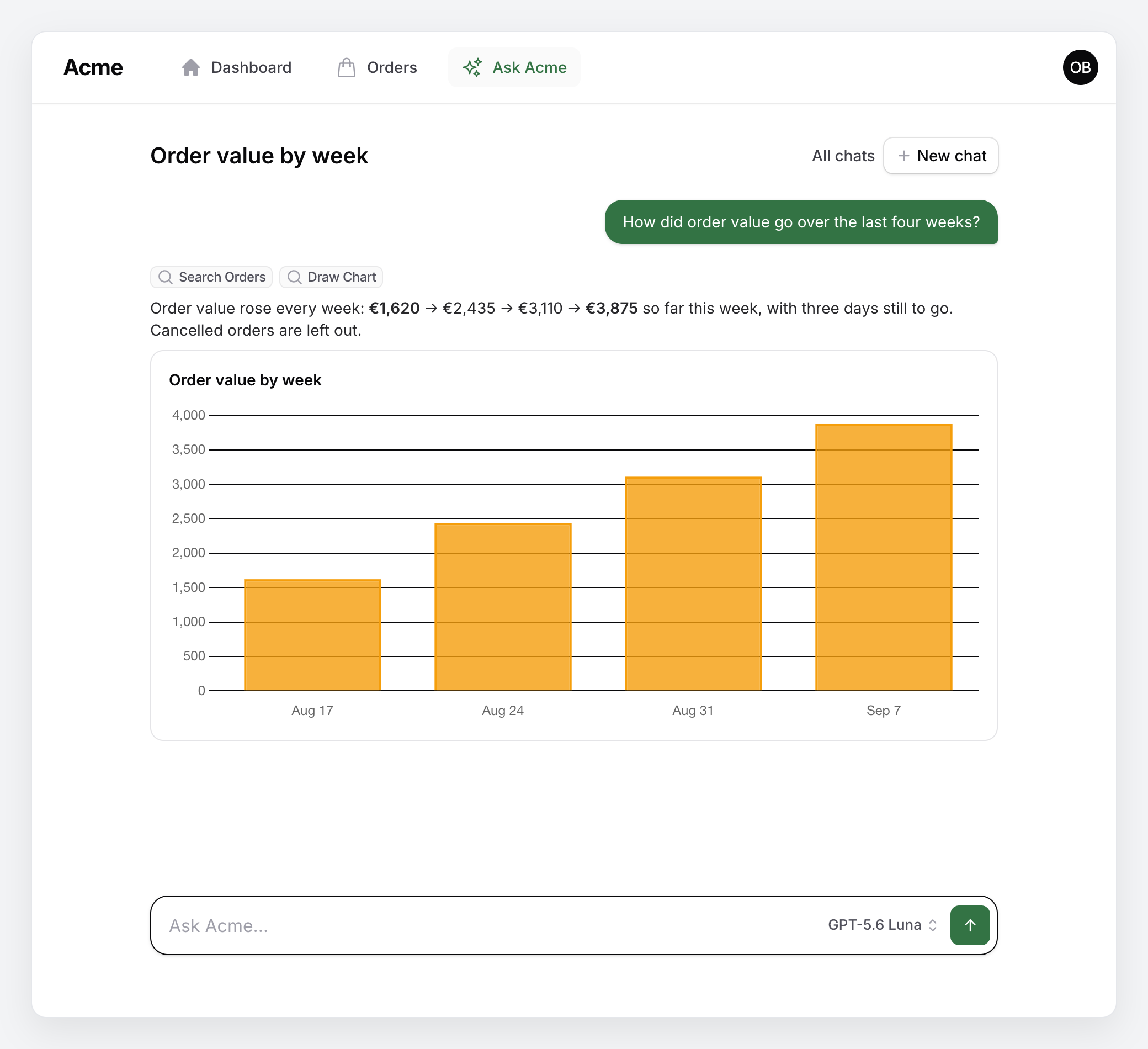
Ask for a trend and the numbers come back drawn as a chart, from draw-chart or from a reporting tool of your own that returns one:
Ask for a change and the turn pauses on a question until the person approves or rejects it; the composer with the model picker waits underneath:
Read more: The assistant.
The assistant
packstub-agents:agent scaffolds App\Ai\Agents\Assistant, a subclass of Packstub\Agents\Ai\Agent with two slots to fill: persona() (who it is) and domain() (what the workspace is). The base class supplies the generic working and answering rules, the dynamic context (date, workspace, person, role, language, page context — sent with the question, so the system prompt and the history stay cacheable) and the provider options (Anthropic cache breakpoints on the instructions and the settled history, reasoning effort or thinking level per model). Append to any of them by overriding workRules(), answerRules() or context() and merging the parent's list.
It runs on Anthropic, OpenAI, Gemini or xAI; any other laravel/ai provider, Ollama included, runs on its smartest and cheapest models. A failover list (AGENT_FAILOVER=gemini,openai) keeps answering when a provider is overloaded, with a note on the answer that says who did.
Your own agent middleware — an audit log, redaction, a tenant check — goes in middleware() on the agent, in AgentsPlugin::make()->middleware([...]) or in the middleware config key, and runs on every turn after the package's guard rails.
class Assistant extends Agent
{
    protected function persona(): string
    {
        return 'You are Ask Acme, the back-office assistant of an online shop.';
    }

    protected function domain(): string
    {
        return <<<'PROMPT'
        - Orders move from placed to paid to shipped; a cancelled order keeps its number.
        - Warehouse staff may confirm and ship; only managers may refund.
        PROMPT;
    }
}
Live tables and charts
A Filament resource opts in by implementing AgentResource with the InteractsWithAgent trait. Defaults come from the resource itself; override what the domain needs:
class OrderResource extends Resource implements AgentResource
{
    use InteractsWithAgent;

    public static function agentSummary(Model $record, bool $full = false): array
    {
        return ['number' => $record->number, 'status' => $record->status, 'url' => static::agentRecordUrl($record)];
    }

    public static function agentFilters(): array
    {
        return [
            Filter::text('query')->description('Order number or customer.')
                ->apply(fn (Builder $q, string $t) => $q->where('number', 'like', "%{$t}%")),
            Filter::enum('status', OrderStatus::class)->multiple()
                ->apply(fn (Builder $q, array $s) => $q->whereIn('status', $s)),
            Filter::date('placed_from')
                ->apply(fn (Builder $q, string $d) => $q->where('placed_at', '>=', $d)),
        ];
    }
}
From that, show-table builds its schema, the embedded table applies the same filters, and the topbar button carries the current record into the chat as page context. draw-chart renders bar, line, pie and doughnut charts from numbers the model already retrieved, and any tool can return a chart key of its own.
Read more: Tables and charts.
MCP clients
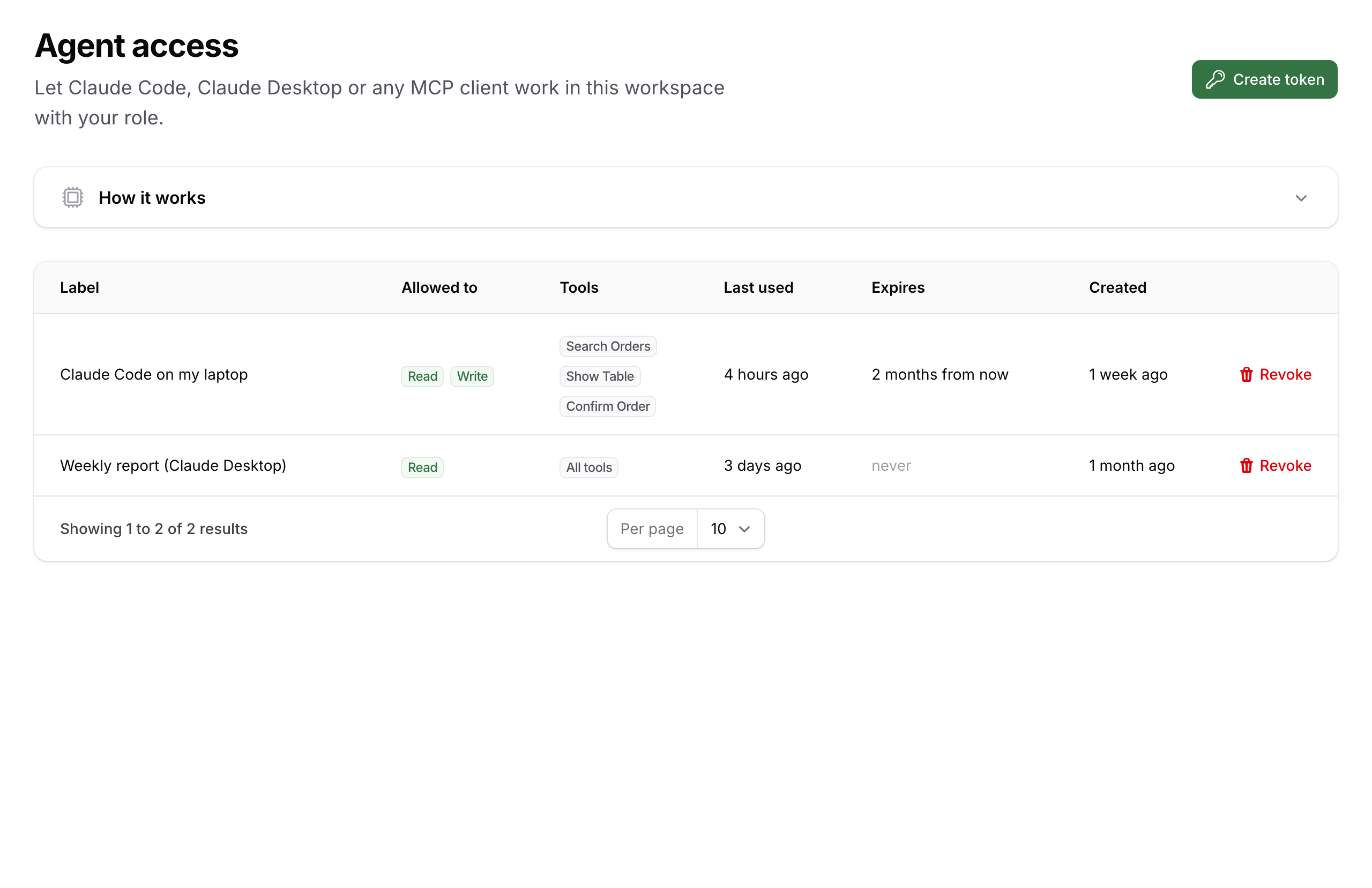
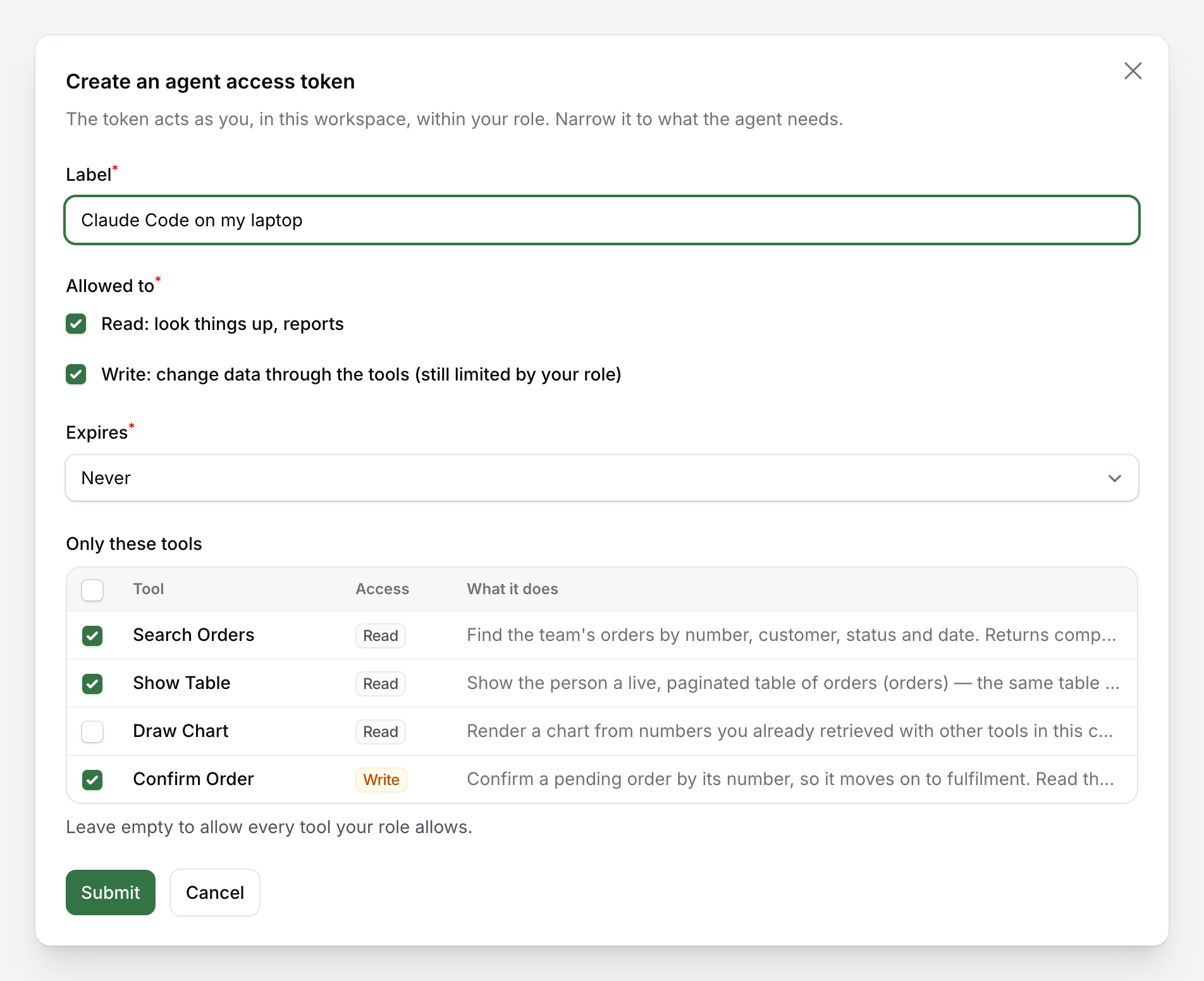
An Agent access page lets a person mint a token for Claude Code, Claude Desktop, Cursor or any MCP client: read or read-and-write, optionally limited to a few named tools, optionally expiring. The token is shown once, carries the workspace when the panel has tenancy, and can be revoked from the same page. The MCP endpoint is POST /mcp by default, behind throttle, auth:sanctum and the package's own middleware, so external agents get exactly the tools the person's role and their token allow.
Read more: MCP clients.
Budgets and the operator page
config/packstub-agents.php holds the platform ceiling (AGENT_TURNS_PER_MINUTE, AGENT_TURNS_PER_DAY, AGENT_TOKENS_PER_DAY, AGENT_TOKENS_PER_MONTH, AGENT_USER_TOKENS_PER_DAY, AGENT_USER_TOKENS_PER_MONTH, AGENT_PROMPT_MAX_CHARS). An operator panel registers
->plugin(AgentsPlugin::make()->chat(false)->agentAccess(false)->limits(authorize: fn () => auth()->user()?->is_admin))
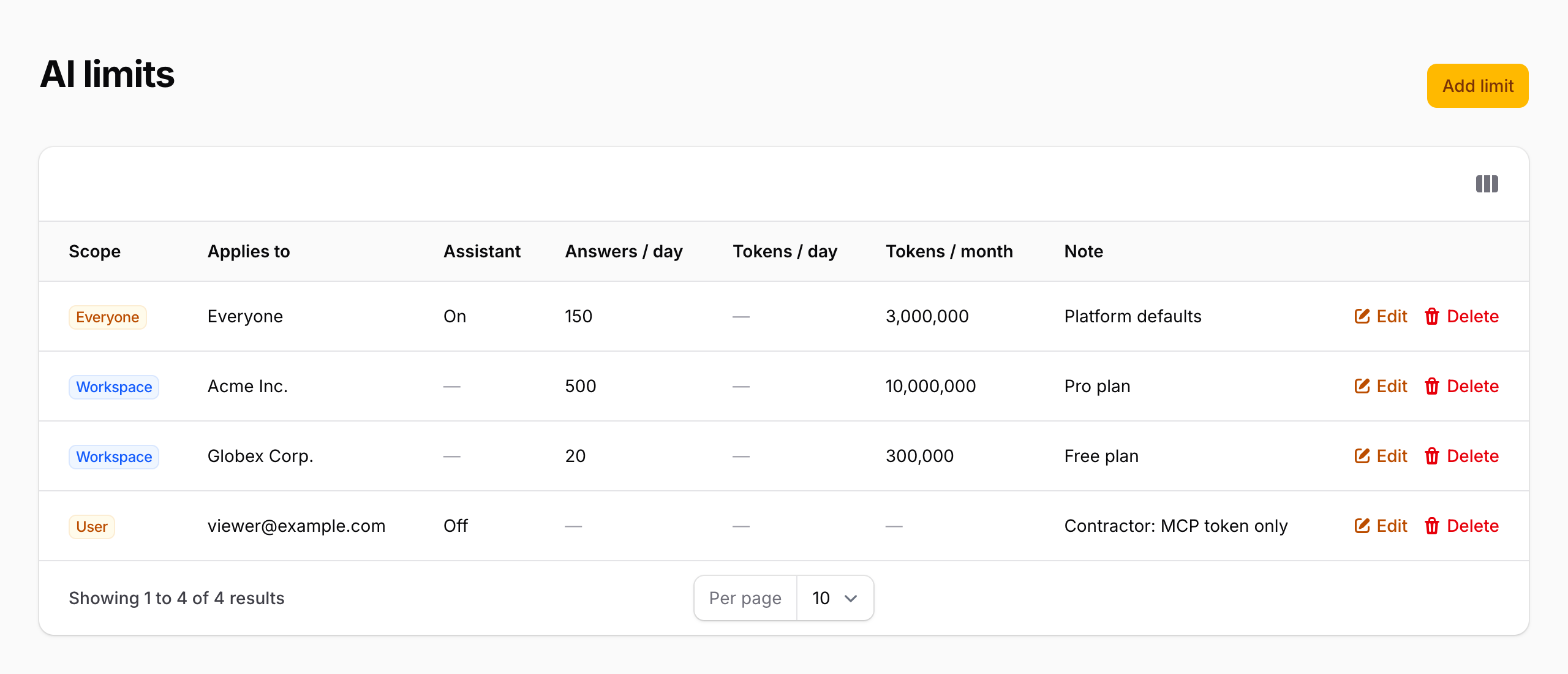
to get the AI limits resource: one global row, optional rows per workspace and per user, empty fields inherit. AgentBudget::summary() gives the numbers for a settings page.
The same panel gets an AI turns page (/agent-turns, ->turnLog()): the week's numbers and a chart of turns per day, then one row per turn with who asked, the model, tokens in and out, the cost, the tools called, the duration, how it ended and how the answer was rated. Every turn also writes one log line to log.channel (AGENT_LOG_CHANNEL).
Read more: Budgets and limits.
Tenancy
Set the MCP path with the workspace in it ('mcp' => ['path' => 'mcp/{tenant}']). The middleware looks the workspace up by the panel's tenant slug, checks the person's membership and the token's tenant:{slug} ability, and sets it on Filament, which fires TenantSet, so Filament Tenancy or any listener switches the database exactly as for a page. A workspace can bring its own provider key through credentialsUsing(), and per-workspace limits live on the operator page.
For a database-per-tenant app set 'run_migrations' => false, publish the migrations, keep create_agent_limits_table central and move create_agent_chat_tables next to your tenant migrations.
Read more: Tenancy.
Configuration
AgentsPlugin::make()
    ->name('Ask Acme')                                   // how the assistant is called in the panel
    ->agent(Assistant::class)                            // your Agent subclass
    ->server(AcmeServer::class)                          // the MCP server class with the tool list
    ->tools([...])                                       // or a plain tool list, chat only
    ->resources([OrderResource::class])                  // explicit AgentResource list (default: discovered)
    ->middleware([AuditLog::class])                      // your own agent middleware, after the guard rails
    ->authorizeUsing(fn (string $ability) => ...)        // how an ability is checked for the current person
    ->roleLabelUsing(fn () => ...)                       // the person's role, for the prompt and refusals
    ->credentialsUsing(fn () => new WorkspaceCredentials(...)) // a workspace's own provider key
    ->chat(true)                                         // the chat pages, the Ask button and recent chats
    ->history(maxTokens: 24000)                          // the history window and the context ring
    ->agentAccess(ability: 'setup.view', group: 'Setup') // the token page
    ->limits(authorize: fn () => ...)                    // the operator's AI limits resource
    ->turnLog(true)                                      // the operator's AI turns page
    ->hideAskButtonOn(['*.pages.dashboard']);            // route patterns without the topbar button
Read more: Configuration.
Documentation
- Installation
- Tools
- The assistant
- Tables and charts
- MCP clients
- Budgets and limits
- Tenancy
- Configuration
- Security
- Testing
Testing
composer test
In your own app, fake the model with Assistant::fake([...]) and drive tools through AcmeServer::tool(ToolClass::class, [...]). Never call a provider from tests. Read more: Testing.
Changelog
See the changelog.
Security vulnerabilities
This package lets a model act inside your panel, so we take reports seriously. Please e-mail support@packstub.dev rather than opening a public issue. The threat model is documented on the Security page.
Credits
License
MIT. See the license file.