
karaodin / filament-dynamic-tables

Supercharge Filament tables with user views, preset views, a favorites bar, quick save, a view manager, multi-column sorting, quick filters, advanced search and an advanced filter builder.
Package info
github.com/karaOdin/filament-dynamic-tables
pkg:composer/karaodin/filament-dynamic-tables
Fund package maintenance!
Requires
- php: ^8.2
- filament/filament: ^4.16|^5.9
- filament/tables: ^4.16|^5.9
- illuminate/contracts: ^12.0|^13.0
- spatie/laravel-package-tools: ^1.15.0
Requires (Dev)
- larastan/larastan: ^3.0
- laravel/pint: ^1.0
- nunomaduro/collision: ^8.0
- orchestra/testbench: ^10.0|^11.0
- pestphp/pest: ^3.7|^4.0
- pestphp/pest-plugin-arch: ^3.0|^4.0
- pestphp/pest-plugin-laravel: ^3.0|^4.0
- rector/rector: ^2.0
Suggests
None
Provides
None
Conflicts
None
Replaces
None
README
Saved views, a favorites bar, multi-column sorting, quick filters, advanced search and a filter builder for Filament tables. One trait adds them to resource tables, relation managers, table widgets, custom pages and standalone Table Builder components.
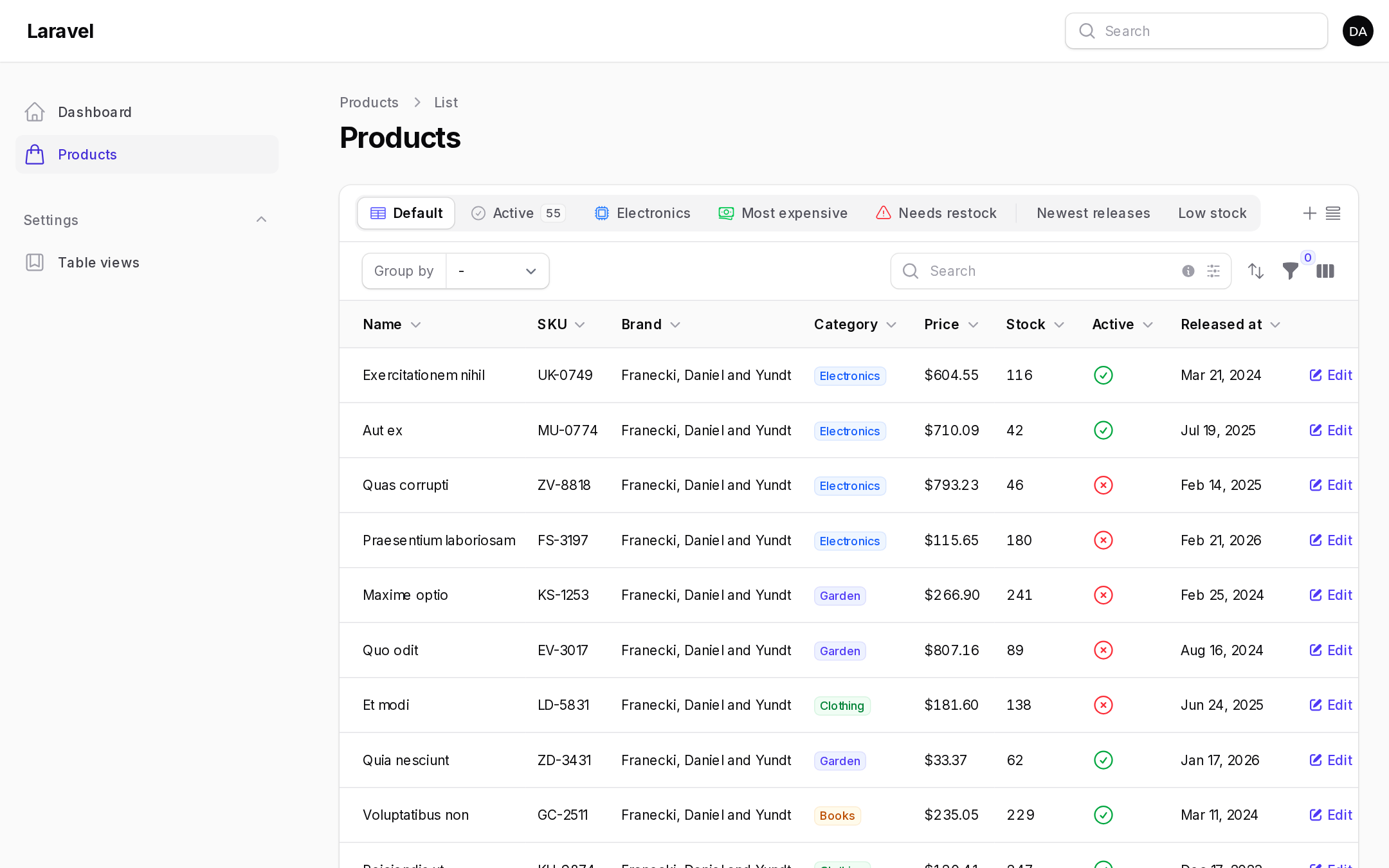
- User views: users save filters, search, column searches, sort, grouping, toggled and reordered columns into named views with an icon and a color.
- Preset views: developers define views in code with query changes, default filters, sorting, grouping and column visibility.
- Favorites bar in six themes: GitHub, Filament, Links, Links simple, Tabs and Tabs simple.
- Quick save: save the current table in one click.
- View manager: search, apply, star, reorder, edit, replace, share and delete views.
- Managed default views: each user picks the view their table opens with.
- Public views and global favorites, with an optional approval workflow.
- User views resource: admins browse, approve, reject, edit and delete every view.
- Multi-sort: sort by several columns, reorder priorities by dragging.
- Quick filters: active filter indicators become clickable chips, and filters can be favorited.
- Advanced search: eight constraints with
-=^$shortcuts, column selection, AND / OR groups and&|syntax. - Advanced filter builder: text, number, date, select and yes/no filters generated from your columns, reusable and combined in OR groups.
- Loading skeleton overlay, multi-tenancy, policy-based authorization, icon aliases, dark mode and English, French, Spanish and Arabic translations.
- Filament 4.16+ and 5.9+, Livewire 3 and 4, Laravel 12 and 13, PHP 8.2+.
Documentation
The full documentation is in the docs folder, with one page per feature and a complete plugin options reference. This README is a summary.
Contents
- Installation
- Adding dynamic tables to a table
- User views
- Preset views
- Favorites bar
- Quick save and the view manager
- Managed default views
- Multi-sort
- Quick filters
- Advanced search
- Advanced filter builder
- Public views, global favorites and approval
- User views resource
- Authorization
- Multi-tenancy
- Configuration reference
- Per-table configuration
- Customizing actions
- Translations and views
- Testing
Installation
Requires PHP 8.2+, Laravel 12+, and Filament 4.16+ or 5.9+. On an older Filament minor version, run composer update "filament/*" first.
composer require karaodin/filament-dynamic-tables
Publish and run the migrations. If your users table is not users, or your user keys are UUIDs or ULIDs, publish the config first and adjust users.table, or edit the published migration.
php artisan vendor:publish --tag="filament-dynamic-tables-config"
php artisan vendor:publish --tag="filament-dynamic-tables-migrations"
php artisan migrate
Or run the installer, which does both:
php artisan filament-dynamic-tables:install
Register the plugin on your panel:
use KaraOdin\FilamentDynamicTables\DynamicTablesPlugin;

public function panel(Panel $panel): Panel
{
    return $panel
        ->plugins([
            DynamicTablesPlugin::make(),
        ]);
}
Add the trait to your user model. It adds the relationships to a user's views and preferences.
use KaraOdin\FilamentDynamicTables\Concerns\HasDynamicTableViews;

class User extends Authenticatable
{
    use HasDynamicTableViews;
}
Publish the stylesheet and scripts with Filament's asset command, which you also run after every update:
php artisan filament:assets
The stylesheet is plain CSS built on Filament's color variables. You don't need a custom theme or a Tailwind build, and it follows your panel colors and dark mode.
Adding dynamic tables to a table
Add the DynamicTables trait to the Livewire component that owns the table.
use KaraOdin\FilamentDynamicTables\DynamicTables;

// Resource table
class ListProducts extends ListRecords
{
    use DynamicTables;
}

// Simple (modal) resource
class ManageCustomers extends ManageRecords
{
    use DynamicTables;
}

// Relation manager
class OrdersRelationManager extends RelationManager
{
    use DynamicTables;
}

// Table widget
class LatestOrders extends TableWidget
{
    use DynamicTables;
}
Custom pages with a table work the same way.
Standalone Table Builder
Livewire components that use Filament's Table Builder outside a panel extend KaraOdin\FilamentDynamicTables\Livewire\Page and use DynamicTables, or replace InteractsWithTable with InteractsWithDynamicTable. Custom panel pages can extend Livewire\CustomPage and custom resource pages Livewire\PanelPage. Render <x-filament-actions::modals /> in the view, and include @filamentStyles and @filamentScripts in your layout. The favorites bar is added to the table header; place <x-filament-dynamic-tables::favorites-bar /> above the table to put it there instead.
use KaraOdin\FilamentDynamicTables\InteractsWithDynamicTable;

class ProductsTable extends Component implements HasActions, HasSchemas, HasTable
{
    use InteractsWithActions;
    use InteractsWithDynamicTable;
    use InteractsWithSchemas;

    public function table(Table $table): Table
    {
        return $table->query(Product::query())->columns([/* ... */]);
    }
}
Outside a panel, options come from config/filament-dynamic-tables.php.
User views
A user view stores the following:
- active filters, including deferred filters and the filter builder
- the global search and column searches
- every sorted column, in priority order
- grouping
- toggled columns and, when the table uses
->reorderableColumns(), column order - records per page
- the advanced search groups
- the preset view it was based on, so the preset's query still applies
Views belong to one table. The key defaults to the component class plus the table identifier. Override getDynamicTableKey() to share views between tables:
public function getDynamicTableKey(): string
{
    return 'orders';
}
When a view is applied and the user changes the table afterwards, the view is marked as modified with a dot. A Save changes link then updates the view in place.
Preset views
Return preset views from getPresetViews(). The array key identifies the view.
use KaraOdin\FilamentDynamicTables\Components\PresetView;

public function getPresetViews(): array
{
    return [
        'active' => PresetView::make('Active')
            ->icon('heroicon-o-check-circle')
            ->modifyQueryUsing(fn (Builder $query) => $query->where('is_active', true))
            ->badge(fn (Builder $query) => $query->count())
            ->favorite()
            ->default(),

        'electronics' => PresetView::make('Electronics')
            ->color('info')
            ->defaultFilters(['category' => ['values' => ['electronics']]])
            ->favorite(),

        'expensive' => PresetView::make('Most expensive')
            ->defaultSort(['price' => 'desc', 'name' => 'asc']),

        'restock' => PresetView::make('Needs restock')
            ->tooltip('Active products with fewer than 20 units')
            ->modifyQueryUsing(fn (Builder $query) => $query->where('stock', '<', 20))
            ->defaultSort('stock')
            ->visibleColumns(['sku', 'brand.name'])
            ->visible(fn () => auth()->user()->can('manage-stock')),

        'by_brand' => PresetView::make('By brand')
            ->defaultGrouping('brand.name', 'asc'),
    ];
}
| Method | Purpose |
|---|---|
label(), icon(), activeIcon(), color(), tooltip() |
Presentation. |
badge(), badgeColor() |
A static badge, or a closure. The closure's $query is the table query with the preset's modification applied. |
modifyQueryUsing() or query() |
Changes the Eloquent query while the view is active. It is not shown as a filter. |
defaultFilters() |
Filter form state, keyed by filter name. It shows filter indicators. |
defaultSort($column, $direction), defaultMultiSort([...]) |
Sorting. |
defaultGrouping($group, $direction) |
Grouping. |
defaultSearch() |
A search term, or advanced search groups. |
defaultColumns([...]) |
These columns in this order; unlisted toggleable columns are hidden. |
visibleColumns([...]) or toggledColumns([...]) |
Only these toggleable columns are visible. |
columnOrder([...]) |
Column order. Requires ->reorderableColumns(). |
defaultFavoriteFilters([...]) |
Quick filter chips shown while the view is active. |
indicator() |
A note in the save form's summary describing the preset's query. |
favorite() |
Shows the view in the favorites bar. Users can still remove it. |
default() |
Applies the view when the table opens without other state. |
visible(), hidden() |
Hides the view entirely. |
preserveFilters(), preserveSearch(), preserveSort(), preserveGrouping(), preserveColumns() (or preserveToggledColumns()), preserveAll() |
Keeps the user's current state when the view is applied. |
Closures can inject $livewire, $table and $key.
The favorites bar starts with a built-in Default view that resets the table. Change its label or icon with defaultViewLabel() and favoritesBarDefaultIcon(), remove it with favoritesBarDefaultView(false) (or hasDefaultView() returning false on the page), or customize it with a preset keyed default: its label, icon, query and defaults are then used for the Default view.
With createUsingPresetView(false) users can't save a view while a preset with a query is active, favoritesBarDivider() separates preset and user views, presetViewLockIcon() marks presets, and presetViewsManageable(false) stops users from reordering presets or changing which are favorites.
Favorites bar
The bar sits above the table toolbar and lists the user's favorite views, followed by the quick save and view manager buttons.
use KaraOdin\FilamentDynamicTables\Enums\FavoritesBarTheme;

DynamicTablesPlugin::make()
    ->favoritesBarTheme(FavoritesBarTheme::Tabs) // Github, Filament, Links, LinksSimple, Tabs, TabsSimple
    ->favoritesBarSize('sm')                     // sm, md, lg
    ->favoritesBarIconPosition('after')          // before, after
    ->favoritesBarIcons(false)
    ->favoritesBarDivider(false)
    ->favoritesBarBadges(false)
    ->favoritesBarLoadingIndicator(false)
    ->favoritesBarHiddenWhenEmpty()
    ->favoritesBar(false);                       // remove the bar entirely
When the bar is disabled, quick save and the view manager move to the table toolbar.
The bar renders inside the table header, which Filament shows when the table has a heading, header actions, search, filters, toggleable columns or grouping.
Quick save and the view manager
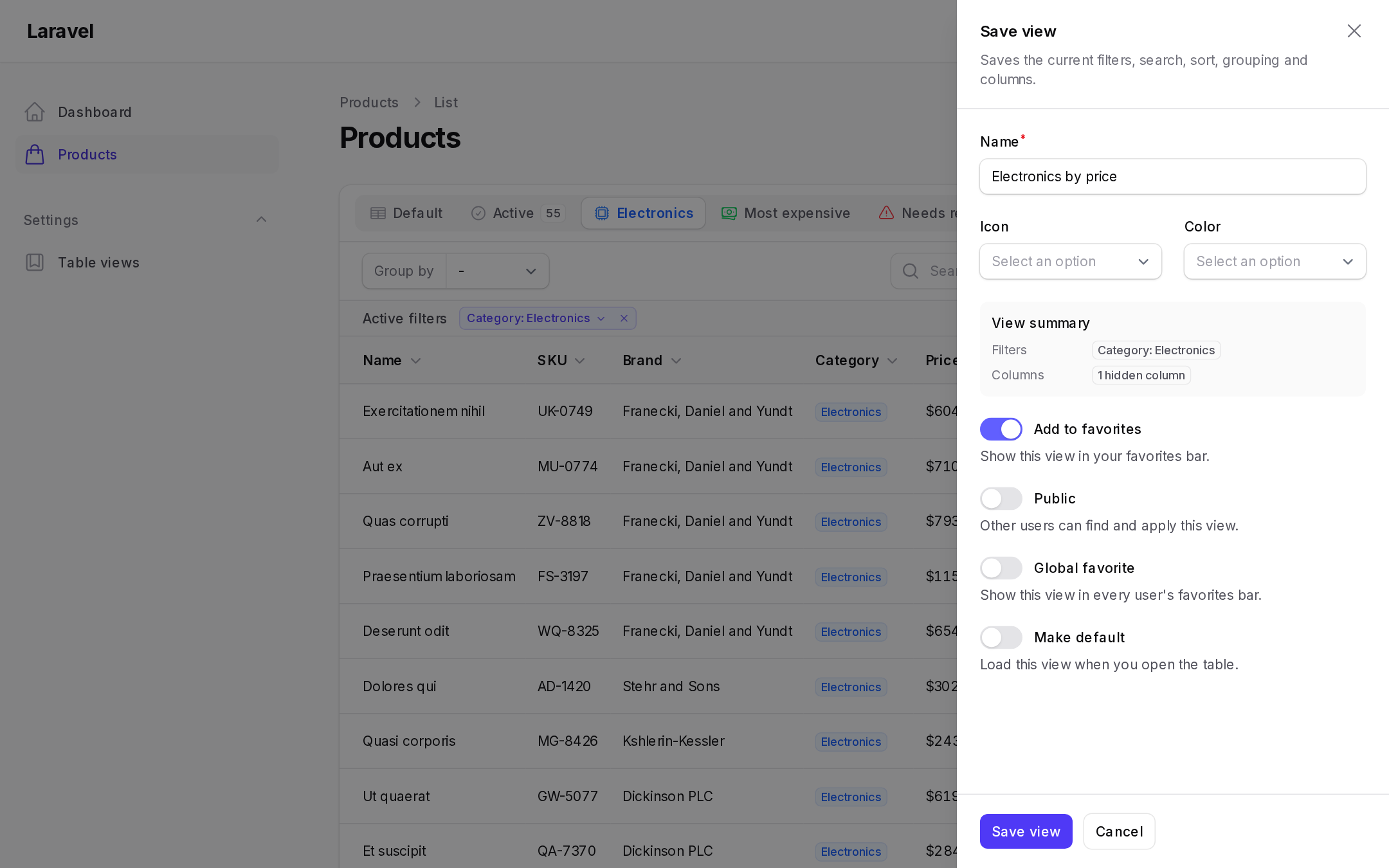
Quick save opens a slide-over (or a modal with quickSaveSlideOver(false)) with the view name, icon, color, a view summary of what will be saved, and the favorite, public, global favorite and default toggles.
DynamicTablesPlugin::make()
    ->quickSaveInFavoritesBar(icon: 'heroicon-o-bookmark', position: 'start')
    ->quickSaveInFavoritesBar(false)->quickSaveInTable()  // move it to the table toolbar
    ->quickSaveTriggerAction(fn (Action $action) => $action->button()->label('Save')->icon(Heroicon::OutlinedStar))
    ->quickSaveIconSelect(false)
    ->quickSaveIncludeSolidIcons(false)       // every Heroicon is available by default
    ->quickSaveColors(['primary', 'warning', 'gray'])
    ->quickSaveColorPicker(false)
    ->quickSaveMakeFavorite(false);
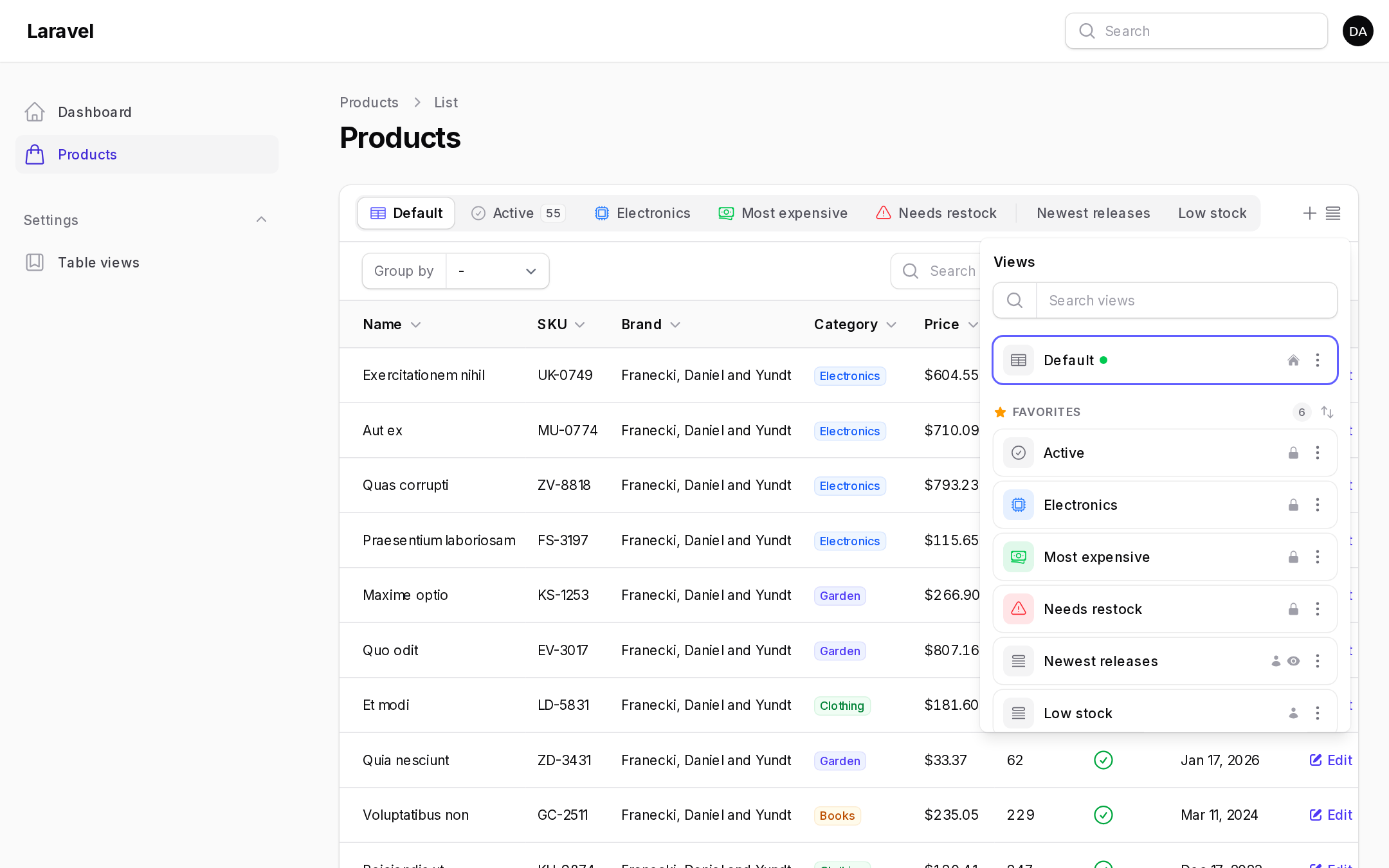
The view manager opens as a dropdown (or a slide-over with viewManagerSlideOver()) with up to five sections: your favorites (preset views first), your views, preset views, other users' public views and global favorites you removed from your favorites. Each view has an action menu to apply it, set or remove it as your default, add or remove it from favorites, and edit, replace, share or delete your own views. Sections can be reordered: click the arrows, then drag.
DynamicTablesPlugin::make()
    ->viewManagerInFavoritesBar(position: 'start')
    ->viewManagerInFavoritesBar(false)->viewManagerInTable(position: 'tables::toolbar.toggle-column-trigger.before')
    ->viewManagerTriggerAction(fn (Action $action) => $action->button()->label('Views'))
    ->viewManagerSlideOver()
    ->viewManagerSearch(false)
    ->viewManagerSaveView()             // "Save view" link (dropdown only)
    ->viewManagerResetView()            // "Reset" link instead of the Default row
    ->viewManagerClickToApply(false)
    ->viewManagerApplyButton(false)
    ->viewManagerActiveViewIndicator(false)
    ->viewManagerActiveViewBadge()
    ->viewManagerViewTypeIcons(false)
    ->viewManagerViewTypeBadges()
    ->viewManagerPublicIndicatorWhenGlobal()
    ->viewIcon(false)
    ->defaultViewIcon('heroicon-o-queue-list'); // for views without an icon
Managed default views
Let each user choose the view a table opens with:
DynamicTablesPlugin::make()->managedDefaultViewsEnabled()
Users set a default with the home icon in the view manager, or with the Make default toggle when saving. The default applies only when the page loads without table state in the query string or in Filament's session persistence. The order of precedence is: the session view (with persistActiveViewInSession()), then the user's default, then the preset marked ->default().
Multi-sort
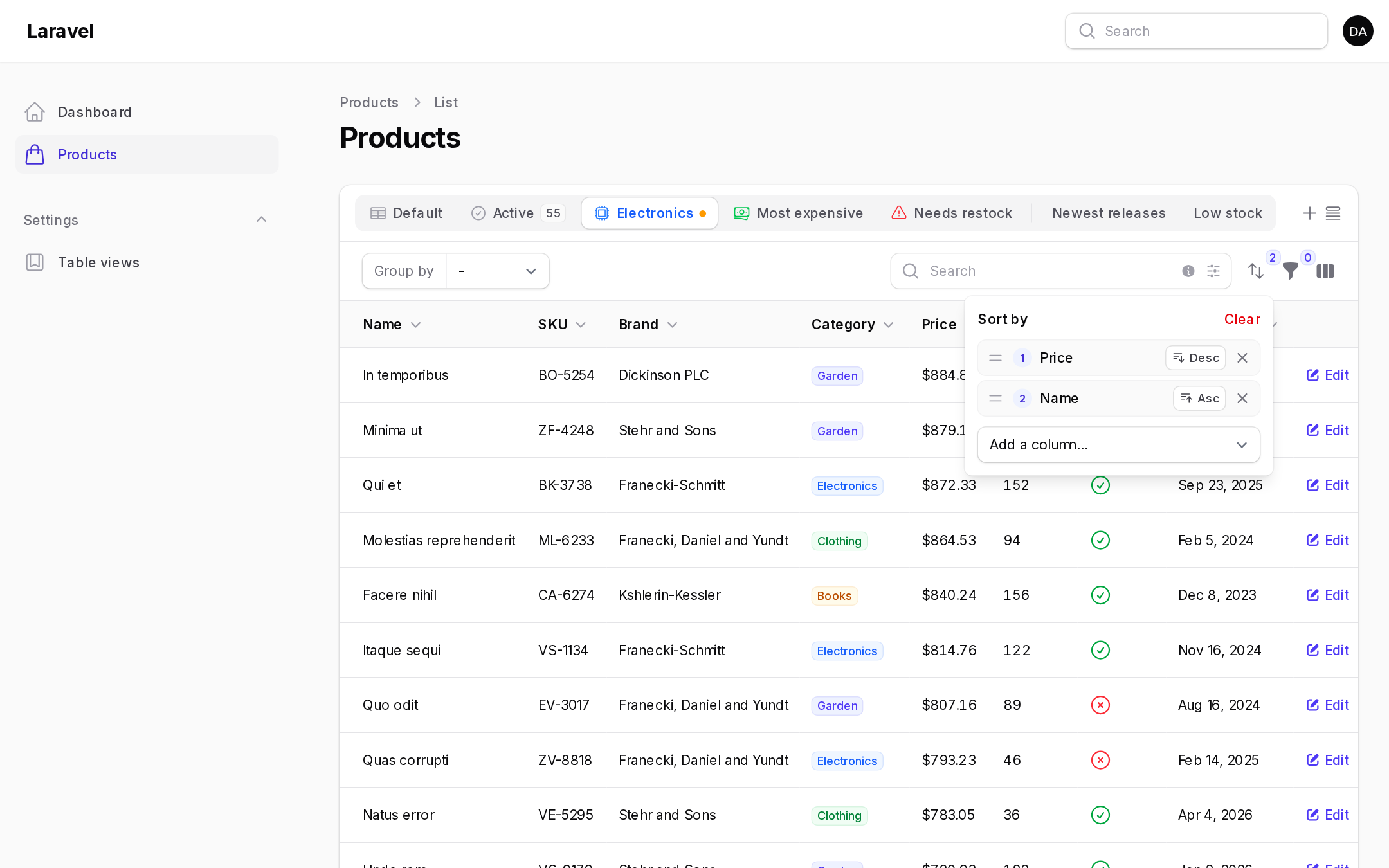
A sort button in the toolbar opens a panel where users add columns, flip directions, drag to change priority and remove sorts. Clicking a column header still works. It replaces the sort list with that column, and clicking the primary column again flips its direction and keeps the others.
DynamicTablesPlugin::make()
    ->multiSortMaxColumns(3) // null for no limit
    ->multiSortTriggerAction(fn (Action $action) => $action->icon('heroicon-s-chevron-up-down')->tooltip('Sort by multiple columns'))
    ->multiSortEnabled(false);
The button only shows when the table has a sortable column. Preset views set several sorts with ->defaultSort(['is_visible' => 'desc', 'price' => 'asc']).
Sorting uses each column's own sortable() logic, so relationship columns and custom sort queries work. When the table persists its sort in the session, the full sort list is persisted too.
Quick filters
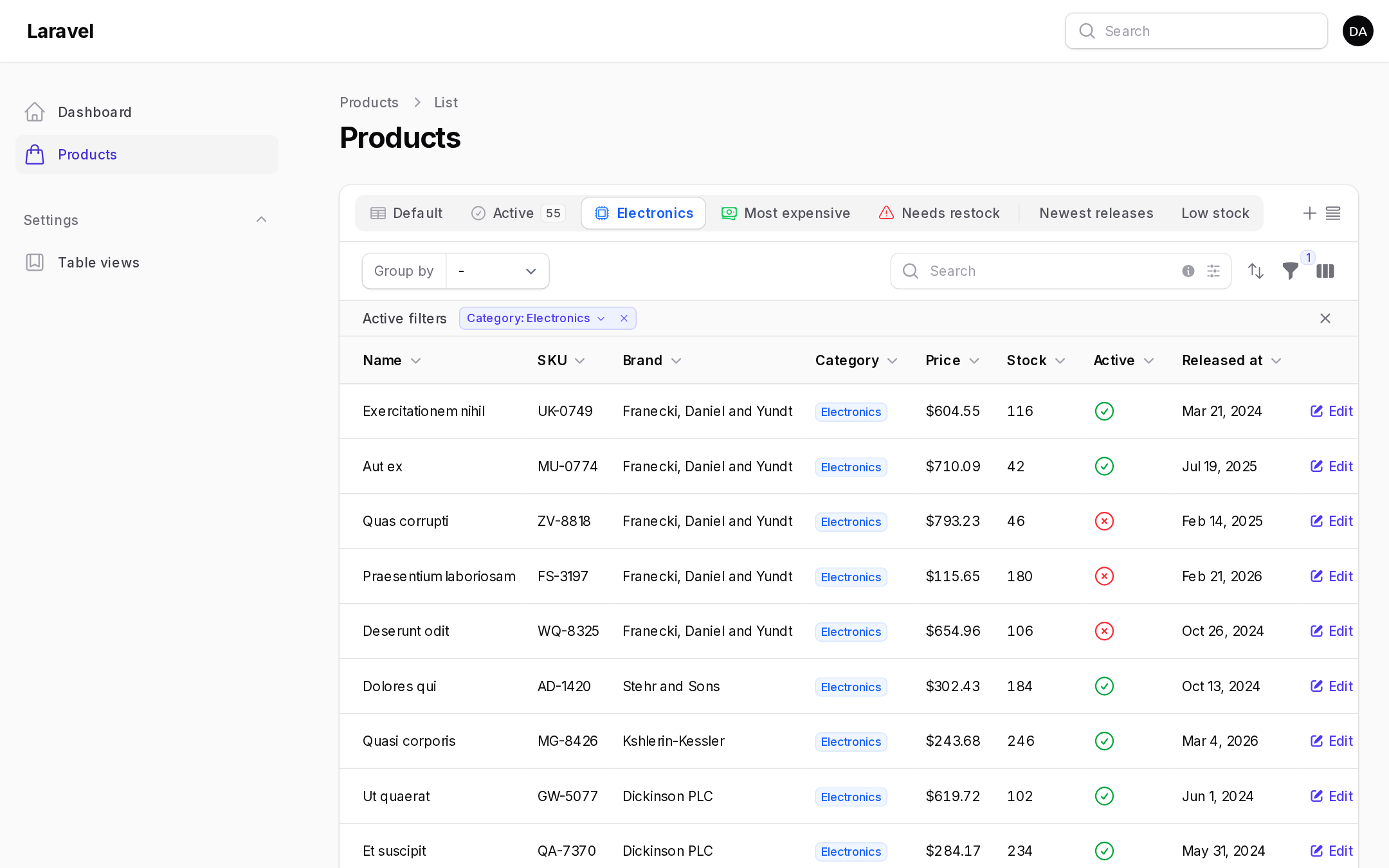
Quick filters are off by default. When enabled, active filter indicators become chips: clicking one opens that filter's fields inline, and with deferred filters an Apply button applies them. The star pins a filter, so its chip stays visible even when the filter is inactive. Pins are saved per user and per table. Each filter of the filter builder gets its own chip.
DynamicTablesPlugin::make()
    ->quickFiltersEnabled()
    ->pinnedFilters(['status', 'is_active']) // pinned for everyone until a user changes them
    ->quickFilterPinning(false);

SelectFilter::make('status')->multiple()
    ->favorite()               // always shown, like a pin
    ->limitIndicatorLabels(3); // "Status: a, b, c & 2 more"

Filter::make('created_at')->form([...])->indicateUsing(...)
    ->multipleIndicators();    // one chip per indicator; ->multipleIndicators(false) for one chip
Advanced search
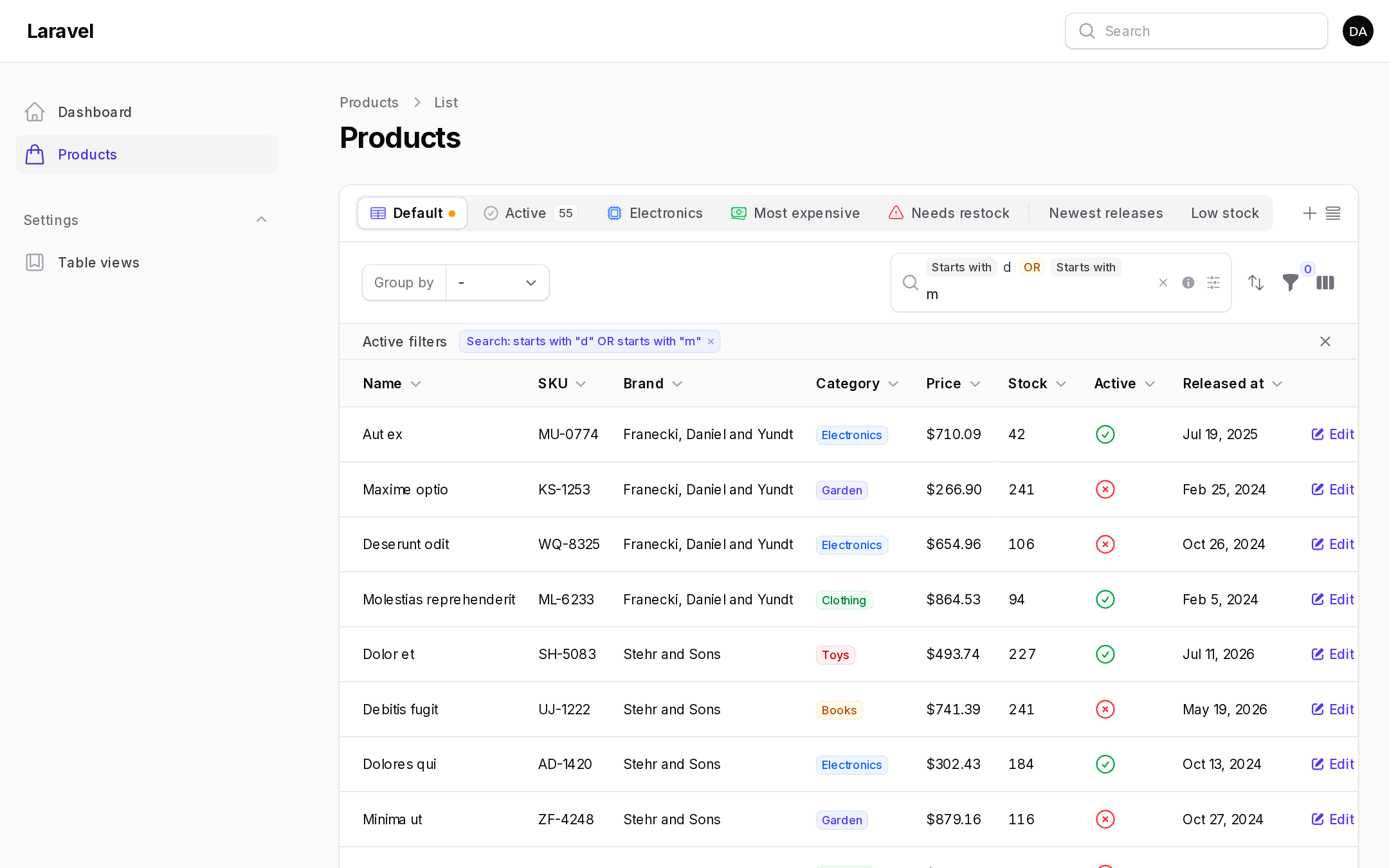
Advanced search replaces the table's search field with a query builder. It is off by default.
DynamicTablesPlugin::make()
    ->advancedSearchEnabled()
    ->advancedSearchColumnsEnabled()          // pick the columns to search
    ->advancedSearchGroupingEnabled()         // AND / OR groups
    ->advancedSearchMaxGroups(3)              // default 5
    ->advancedSearchBooleanSyntaxEnabled()    // type & and | to start a group
    ->advancedSearchConstraintSyntaxEnabled(false) // turn the shortcuts off
    ->advancedSearchMaxWords(5)
    ->advancedSearchDropdownColumnsFirst()
    ->advancedSearchDropdownOpenOnFocus()
    ->advancedSearchKeybindings(['command+k', 'ctrl+k'])
    ->advancedSearchDefaultConstraint(SearchConstraint::StartsWith)
    ->advancedSearchConstraints([SearchConstraint::Contains, SearchConstraint::Equals]);
Turn it off for one table with public static function advancedSearchIsEnabled(): bool { return false; } on the page. Tables using ->searchUsing() keep Filament's search.
Press ↓ or click the input to open the dropdown. It has Constraints, Columns (the table's searchable columns), Database (extra columns passed to the table's ->searchable([...])) and Boolean (AND / OR) sections. Selections show as badges: gray for the constraint, blue for columns, yellow for operators (click one to switch AND / OR). ↑ ↓ navigate, ↵ selects or searches, ⌫ removes the last badge. The info icon shows a reference and the × clears the search.
| Constraint | Shortcut | Matches |
|---|---|---|
| Contains | every word of the term | |
| Does not contain | - |
records missing at least one word |
| Equals | = |
the whole value |
| Does not equal | -= |
|
| Starts with | ^ |
|
| Does not start with | -^ |
|
| Ends with | $ |
|
| Does not end with | -$ |
"quoted text"is one phrase. Tables withsplitSearchTerms(false)always search the whole term.- "Does not" constraints keep records without a value, and records with no related records on relationship columns.
- Equals compares dates by day (
2025-01-15,2025/01/15,2025.01.15or the table's date format, or a full2025-01-15 10:30:00) and numbers by value (5matches5.00). Other terms never match date or number columns. - AND groups narrow, OR groups widen:
(name contains John AND email contains gmail) OR (status equals active).
Columns with a custom search query receive the constraint, always positive (negation is applied around the query):
TextColumn::make('full_name')->searchable(query: function (Builder $query, string $search, $constraint = null) {
    [$operator, $value] = $constraint?->getOperatorAndValue($search) ?? ['like', "%{$search}%"];

    return $query->whereRaw("concat(first_name, ' ', last_name) {$operator} ?", [$value]);
});
Don't type-hint $constraint: Filament also calls the query outside advanced search.
The search lives in $advancedSearch (a list of ['columns' => [], 'constraint' => 'contains', 'value' => '...', 'operator' => null|'and'|'or']) and is bound to the URL as ?advanced_search on List and Manage Related Records pages. Override shouldBindAdvancedSearchToUrl() to change that. A plain ?search=, Filament's searchTable() test helper and views saved without advanced search still work as "contains". Groups are saved in user views, and preset views accept them in defaultSearch().
Page widgets that read the table (InteractsWithPageTable) should use KaraOdin\FilamentDynamicTables\Widgets\Concerns\InteractsWithPageTable, with KaraOdin\FilamentDynamicTables\Widgets\Concerns\ExposesTableToWidgets on the page, so the search, multi-sort and active preset view apply to the widgets too.
Advanced filter builder
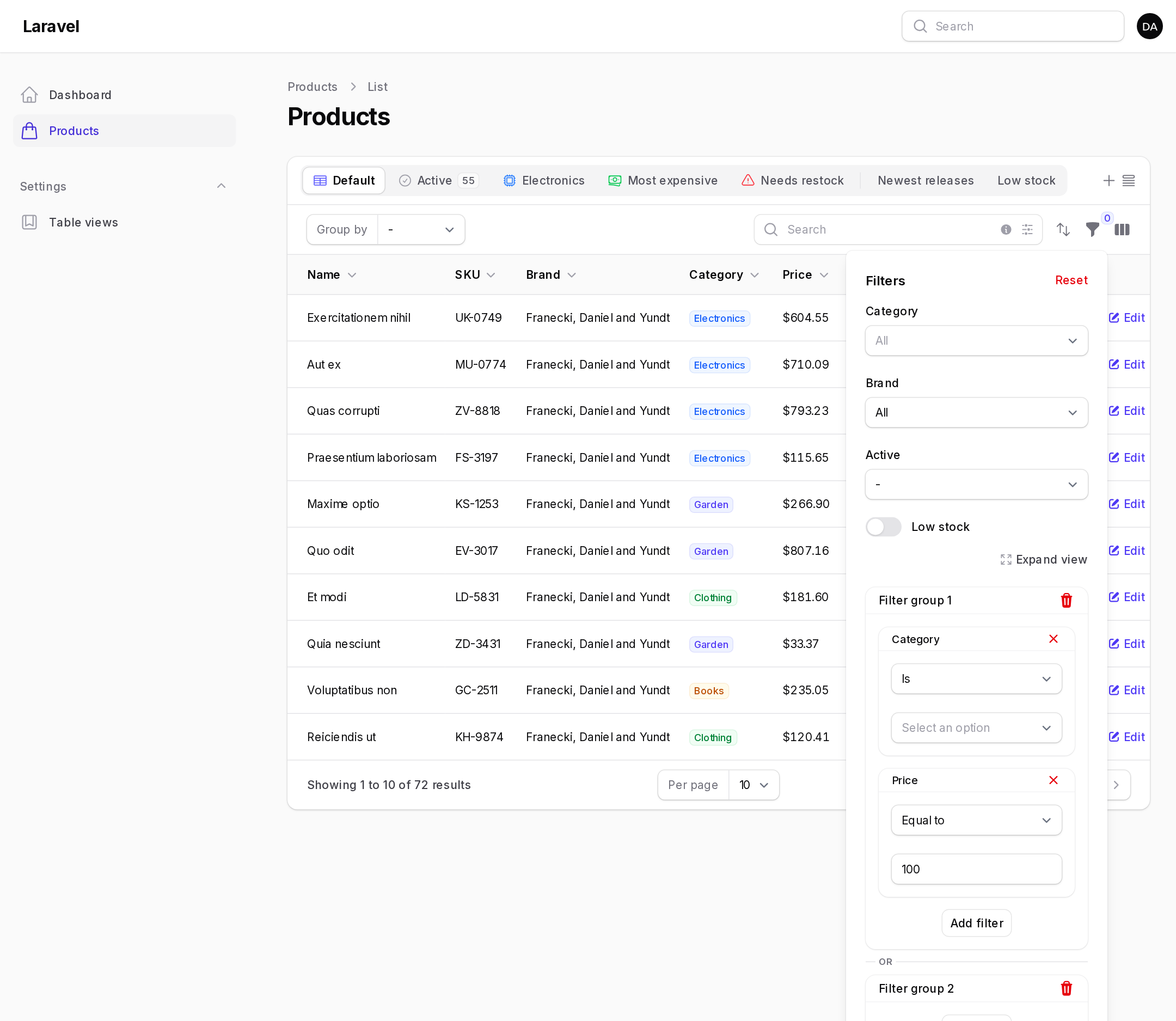
Add AdvancedFilter to the table's filters. Users pick filters from a filter picker, add each one as many times as they like, and combine them in "or" groups: every filter in a group must match, and a record matching any group is shown.
use KaraOdin\FilamentDynamicTables\Filters\AdvancedFilter;

->filters([
    AdvancedFilter::make(),
])
A filter is generated for each column:
| Column | Filter |
|---|---|
TextColumn with ->date() / ->dateTime(), date casts |
DateFilter |
TextColumn with ->numeric() / ->money(), number casts, ->counts() / ->avg() / ->sum() / ->min() / ->max() |
NumericFilter |
SelectColumn, backed enum casts |
SelectFilter |
ToggleColumn, CheckboxColumn, boolean IconColumn, boolean casts |
BooleanFilter |
other IconColumn, ImageColumn |
is empty / is not empty |
other TextColumn |
TextFilter |
Operators:
- TextFilter: is, is not, contains, does not contain, starts with, does not start with, ends with, does not end with, is empty, is not empty. With
->options()or->relationship(), "is" and "is not" become a multi-select. - NumericFilter: equal to, not equal to, greater than (or equal to), less than (or equal to), between, not between, is positive, is negative, is empty, is not empty.
- DateFilter: today, yesterday, tomorrow, in the last / next N days / weeks / months / quarters / years (and "not in"), exactly N … ago / from now, this / last / next week / month / …, is on, before, after, between, not between, is empty, is not empty.
- SelectFilter: is, is not, is empty, is not empty.
- BooleanFilter: is true, is false, is empty, is not empty.
Customize filters by passing them to ->filters(). A filter named like a column replaces the generated one; any other filter, including regular Filament filters, is added to the picker. Filters in the table's own ->filters() stay outside the builder as usual.
use Filament\Tables\Filters\Filter;
use KaraOdin\FilamentDynamicTables\Filters\{AdvancedFilter, DateFilter, NumericFilter, SelectFilter, TextFilter};
use KaraOdin\FilamentDynamicTables\Filters\Operators\{DateOperator, NumericOperator, TextOperator};

AdvancedFilter::make()
    ->filters([
        NumericFilter::make('shipping_price'),
        TextFilter::make('customer.name')->relationship(name: 'customer', titleAttribute: 'name')->multiple()->preload(),
        TextFilter::make('currency')->options(fn () => Currency::pluck('name', 'code')),
        SelectFilter::make('status')->options(OrderStatus::class),
        DateFilter::make('created_at')->excludeOperators([DateOperator::TOMORROW])->defaultOperator(DateOperator::TODAY),
        Filter::make('is_active')->query(fn (Builder $query) => $query->where('is_active', true))->toggle(),
    ])
    ->includeColumns(['status', 'currency', 'customer.name', 'created_at']) // or ->excludeColumns([...])
    ->defaultFilters([['status'], ['status']]) // filters shown in each group to begin with; [] shows none
    ->orGroups(false)                          // a single group
    ->icons(['status' => 'heroicon-o-clock', 'created_at' => 'heroicon-o-calendar'])
    ->filterPickerSearch()
    ->filterPickerColumns(2)                   // or ['sm' => 2]
    ->filterPickerWidth('md')
    ->filterPickerMaxHeight('240px')
    ->prependFilterGroupLabels(prependFilterGroupLabelWhenSoleGroup: true)
    ->indicatorColors(['info', 'success'])     // per group, default primary, info, gray, success, danger, warning
    ->expandViewLink(false);
Each filter supports ->includeOperators([...]), ->excludeOperators([...]) and ->defaultOperator() (closures receive $filter), ->label(), ->icon() and ->attribute(). Configure all filters of a type with TextFilter::configureUsing(fn (TextFilter $filter) => $filter->defaultOperator(TextOperator::CONTAINS)) in a service provider.
Every filter gets its own removable indicator, prefixed with "Filter group N" when there are several groups and colored per group. With the dropdown filter layout, an Expand view link opens the builder in a slide-over; position it with DynamicTablesPlugin::make()->filterBuilderExpandViewStyles(['right: 100px', 'top: 24px']). To always use a slide-over: ->filtersFormWidth('md')->filtersTriggerAction(fn (Action $action) => $action->slideOver()).
The builder is saved in user views. Preset views set it with the short form, one array per group:
PresetView::make()->defaultFilters([
    'advanced_filter_builder' => [
        ['status' => ['value' => 'new'], 'created_at' => ['operator' => 'in_the_last', 'value' => 1, 'unit' => 'months']],
        ['status' => ['value' => 'cancelled']], // or
    ],
]),
Public views, global favorites and approval
A public view is listed in every user's view manager, and users can add it to their favorites. A global favorite shows up in every user's favorites bar. Global favorites are off by default.
use KaraOdin\FilamentDynamicTables\Enums\ViewStatus;

DynamicTablesPlugin::make()
    ->quickSaveMakePublic(false)            // no public views
    ->quickSaveMakeGlobalFavorite()         // allow global favorites
    ->globalUserViewsManageable(false)      // users can't reorder or remove global favorites
    ->newGlobalUserViewSortPosition('after')
    ->initialStatus(ViewStatus::Pending)
    ->minimumStatusForDisplay(ViewStatus::Approved);
Shared views start with initialStatus() and are shown to other users once their status is at least minimumStatusForDisplay() (rejected < pending < approved). Both default to pending, which shows shared views right away. ->approval(), ->publicViewsRequireApproval() and ->globalFavoritesRequireApproval() are shortcuts that require approval. Users who pass the policy's approve ability skip the queue. Approve or reject views in the user views resource, and add notifications with a model observer on UserView.
User views resource
DynamicTablesPlugin::make()
    ->resourceEnabled()
    ->resourceNavigationGroup('Settings')
    ->resourceNavigationIcon('heroicon-o-star')
    ->resourceNavigationSort(1)
    ->resourceNavigationBadge(false)     // count of pending shared views
    ->resourceLoadAllUsers(false)        // search users instead of preloading them
    ->resourcePanels(['admin', 'sales']) // also list views of these panels
    ->canAccessUserViewsResourceUsing(fn (User $user) => $user->is_admin)
    ->userViewsResourceClass(MyUserViewResource::class);
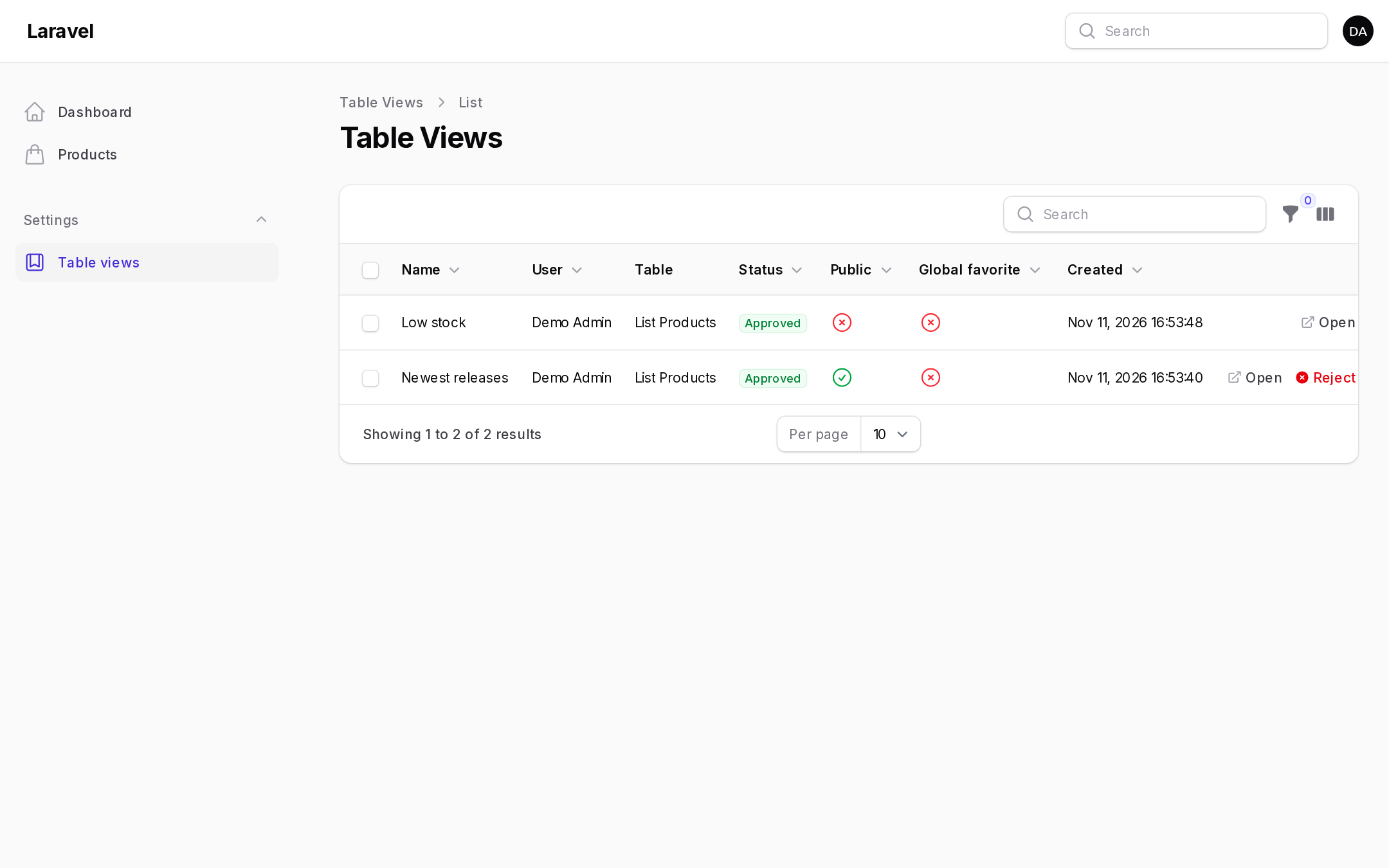
The resource lists every view with its owner, table, status and sharing flags. Click the public and global icons to toggle them. It has an Open action that opens the view's table with the view applied (?table_view=user:12), approve and reject actions (single and bulk), edit and delete. By default it shows the current panel's views and views created without a panel. Set up a policy: without one, the default policy lets owners manage only their own views but anyone with access can browse the resource.
For the standalone Table Builder, route to the included component: Route::get('/user-views', \KaraOdin\FilamentDynamicTables\Livewire\ListUserViews::class)->middleware(['auth']);
Authorization
Every ability goes through a Laravel policy on the user view model. The default UserViewPolicy lets anyone create views, and lets owners update and delete their own views. Nobody can approve. Point the config at your own policy, or register one with Gate::policy():
// config/filament-dynamic-tables.php
'policy' => App\Policies\TableViewPolicy::class,
use KaraOdin\FilamentDynamicTables\Policies\UserViewPolicy;

class TableViewPolicy extends UserViewPolicy
{
    public function makeGlobalFavorite(User $user): bool { return $user->is_admin; }
    public function approve(User $user, ?UserView $view = null): bool { return $user->is_admin; }
    public function update(User $user, UserView $view): bool { return $view->isOwnedBy($user) || $user->is_admin; }
}
| Ability | Controls |
|---|---|
viewAny |
access to the user views resource |
create |
quick save |
update, delete |
editing, replacing, sharing and deleting a view |
makePublic |
the Public toggle |
makeFavorite |
the Add to favorites toggle |
makeGlobalFavorite |
the Global favorite toggle |
selectIcon, selectColor |
the icon and color pickers |
approve |
approving and rejecting, and skipping the approval queue |
Everything the browser sends is checked on the server. Icons and colors must come from the allowed lists, view keys must belong to the table, and sorts must name sortable columns.
Multi-tenancy
Database per tenant, for example stancl/tenancy with a database per tenant: run the migrations in each tenant database (publish them into database/migrations/tenant). Nothing else is needed.
Shared database: tell the plugin about your tenant model.
DynamicTablesPlugin::make()
    ->tenant(Team::class)                                    // Filament tenancy or simple one-to-many tenancy
    // ->tenant(\Spatie\Multitenancy\Models\Tenant::class)  // spatie/laravel-multitenancy
    // ->tenant(\Stancl\Tenancy\Database\Models\Tenant::class) // stancl/tenancy, single database
    ->tenantColumn('account_id')                             // column in the package tables, default tenant_id
    ->scopeToTenancy(false);                                 // share views across tenants
The current tenant comes from Filament, Tenant::current() (Spatie), tenant() (Stancl), or the tenant model's getTenantId() method for simple one-to-many tenancy:
class Team extends Model
{
    public function getTenantId(): ?string
    {
        return auth()->user()?->team_id;
    }
}
->resolveTenantUsing(fn () => ...) resolves it yourself. Outside a panel, set tenancy.model in the config file. If the tables were migrated before, php artisan dynamic-tables:add-tenancy adds the tenant column.
Configuration reference
Every plugin option has a matching key in config/filament-dynamic-tables.php. A plugin value always wins over the config file, and standalone Table Builder components use the config file. Method names follow Advanced Tables, so existing configurations carry over.
| Area | Plugin methods |
|---|---|
| Users | user(), userTable(), userTableNameColumn(), userTableKeyColumn(), authGuard() (config users.*; set before migrating) |
| Models | userView(), managedUserView(), managedPresetView() |
| Tenancy | tenant(), tenantColumn(), scopeToTenancy(), tenancy(), resolveTenantUsing() |
| User views | userViewsEnabled(), quickSaveIconSelect(), quickSaveIncludeOutlineIcons(), quickSaveIncludeSolidIcons(), quickSaveColors(), quickSaveColorPicker(), quickSaveMakeFavorite(), quickSaveMakePublic(), quickSaveMakeGlobalFavorite(), globalUserViewsManageable(), newGlobalUserViewSortPosition(), initialStatus(), minimumStatusForDisplay(), persistActiveViewInSession(), icons(), modifiedIndicator(), viewNameMaxLength() |
| Save form helper texts | quickSaveNameHelperText(), quickSaveFiltersHelperText(), quickSavePublicHelperText(), quickSaveFavoriteHelperText(), quickSaveGlobalFavoriteHelperText(), quickSaveActivePresetViewHelperText() |
| Preset views | presetViews(), presetViewsManageable(), newPresetViewSortPosition(), createUsingPresetView(), presetViewLockIcon() |
| Default view | favoritesBarDefaultView(), favoritesBarDefaultIcon(), defaultViewLabel(), defaultViewIcon() (icon for views without one), managedDefaultViewsEnabled() |
| Favorites bar | favoritesBarEnabled(), favoritesBarTheme(), favoritesBarSize(), favoritesBarIconPosition(), favoritesBarIcons(), favoritesBarDivider(), favoritesBarBadges(), favoritesBarLoadingIndicator(), favoritesBarHiddenWhenEmpty() |
| Quick save | quickSaveEnabled(), quickSaveInFavoritesBar(icon:, position:), quickSaveInTable(), quickSaveSlideOver(), quickSaveTriggerAction(), quickSaveFavoriteByDefault(), quickSavePublicByDefault(), modifyEditViewActionUsing() |
| View manager | viewManagerEnabled(), viewManagerInFavoritesBar(position:), viewManagerInTable(position:), viewManagerSlideOver(), viewManagerTriggerAction(), viewManagerSearch(), viewManagerSaveView(), viewManagerResetView(), viewManagerClickToApply(), viewManagerApplyButton(), viewManagerActiveViewIndicator(), viewManagerActiveViewBadge(), viewManagerViewTypeIcons(), viewManagerViewTypeBadges(), viewManagerPublicIndicatorWhenGlobal(), viewIcon(), viewManagerReorderable(), viewManagerClosesOnApply() |
| Multi-sort | multiSortEnabled(), multiSortTriggerAction(), multiSortMaxColumns() |
| Quick filters | quickFiltersEnabled(), quickFilterPinning(), pinnedFilters() |
| Advanced search | see Advanced search |
| Filter builder | filterBuilderExpandViewStyles() |
| Loading overlay | tableLoadingOverlay(), loadingOverlaySkeletonRows() |
| Resource | see User views resource |
| Notifications | notifications() |
Per-table switches go on the page as (static) methods returning a bool: userViewsAreEnabled(), presetViewsAreEnabled(), favoritesBarIsEnabled(), hasDefaultView(), quickSaveIsEnabled(), viewManagerIsEnabled(), multiSortIsEnabled(), advancedSearchIsEnabled(), quickFiltersAreEnabled(), tableLoadingOverlayIsEnabled().
Icon aliases
Swap any icon app-wide with Filament's icon aliases:
use Filament\Support\Facades\FilamentIcon;
use KaraOdin\FilamentDynamicTables\View\DynamicTablesIconAlias;

FilamentIcon::register([
    DynamicTablesIconAlias::QUICK_SAVE_TRIGGER => 'phosphor-floppy-disk',
    DynamicTablesIconAlias::VIEW_MANAGER_TRIGGER => 'phosphor-list-bullets',
    DynamicTablesIconAlias::MULTI_SORT_TRIGGER => 'phosphor-sort-ascending',
]);
Available: MULTI_SORT_TRIGGER, VIEW_MANAGER_TRIGGER, QUICK_SAVE_TRIGGER, ADD_TO_FAVORITES, APPLY_VIEW, DELETE_VIEW, EDIT_VIEW, REPLACE_VIEW, REMOVE_FROM_FAVORITES, SET_DEFAULT_VIEW, REMOVE_DEFAULT_VIEW, SHOW_VIEW_MANAGER, SORT_ASCENDING, SORT_DESCENDING, FILTER_BUILDER_DELETE, FILTER_BUILDER_SEARCH, FILTER_BUILDER_EXPAND, DRAG_HANDLE, VIEW_MANAGER_ACTION_GROUP, DEFAULT_VIEW_INDICATOR, USER_OWNER_INDICATOR, GLOBAL_VIEW_INDICATOR, PUBLIC_VIEW_INDICATOR, PRESET_LOCKED_INDICATOR, REORDER_VIEWS, REORDER_VIEWS_CONFIRM, FAVORITES_BAR_DEFAULT, ADVANCED_SEARCH_CONSTRAINT, ADVANCED_SEARCH_COLUMN, ADVANCED_SEARCH_EXTRA_COLUMN, ADVANCED_SEARCH_BOOLEAN_AND, ADVANCED_SEARCH_BOOLEAN_OR, ADVANCED_SEARCH_CLEAR.
Per-table configuration
Override configureDynamicTables() on the component to change any option for one table. You receive a copy of the panel plugin, so other tables are unaffected.
use KaraOdin\FilamentDynamicTables\DynamicTablesPlugin;
use KaraOdin\FilamentDynamicTables\Enums\FavoritesBarTheme;

public function configureDynamicTables(DynamicTablesPlugin $config): DynamicTablesPlugin
{
    return $config
        ->favoritesBarTheme(FavoritesBarTheme::Links)
        ->advancedSearch()
        ->multiSortMaxColumns(2);
}
Customizing actions
The quick save, view manager and multi-sort triggers and the edit modal are regular Filament actions:
DynamicTablesPlugin::make()
    ->quickSaveTriggerAction(fn (Action $action) => $action->label('Save as…')->button())
    ->viewManagerTriggerAction(fn (Action $action) => $action->button()->label('My Views')->icon(Heroicon::OutlinedSquares2x2))
    ->multiSortTriggerAction(fn (Action $action) => $action->color('primary'))
    ->modifyEditViewActionUsing(fn (Action $action) => $action->slideOver(false));
You can also override the action methods on the component: dynamicTablesSaveViewAction(), dynamicTablesViewManagerAction(), dynamicTablesMultiSortAction(), dynamicTablesEditViewAction(), dynamicTablesReplaceViewAction() and dynamicTablesDeleteViewAction().
Loading overlay
->tableLoadingOverlay() shows a skeleton over the table while it loads. Columns using ->extraCellAttributes() should pass merge: true.
Translations and views
The package ships English, French, Spanish and Arabic. Publish the translations or views to change them:
php artisan vendor:publish --tag="filament-dynamic-tables-translations"
php artisan vendor:publish --tag="filament-dynamic-tables-views"
The UI is injected through Filament's table render hooks, so Filament's table views are never overridden, and updates to Filament keep working.
Testing
composer test     # Pest
composer analyse  # PHPStan
composer lint     # Pint
A workbench app with products, brands, preset views, a table widget, a standalone table and the user views resource is included:
composer serve # http://127.0.0.1:8000/admin, admin@example.com / password
Changelog
Please see CHANGELOG for more information on what has changed recently.
Contributing
Please see CONTRIBUTING for details.
Security Vulnerabilities
Please review our security policy on how to report security vulnerabilities.
Credits
License
The MIT License (MIT). Please see License File for more information.