
jorijn / laravel-security-checker

Checks your composer.lock against the Packagist security advisories database from Laravel, and reports vulnerabilities in the console, by email or in Slack.
Package info
github.com/Jorijn/laravel-security-checker
pkg:composer/jorijn/laravel-security-checker
Requires
- php: ^8.3
- ext-json: *
- composer/semver: ^3.4
- guzzlehttp/guzzle: ^7.8
- illuminate/bus: ^12.0|^13.0|^14.0
- illuminate/console: ^12.0|^13.0|^14.0
- illuminate/http: ^12.0|^13.0|^14.0
- illuminate/mail: ^12.0|^13.0|^14.0
- illuminate/notifications: ^12.0|^13.0|^14.0
- illuminate/queue: ^12.0|^13.0|^14.0
- illuminate/support: ^12.0|^13.0|^14.0
Requires (Dev)
- enlightn/security-checker: ^2.0
- laravel/slack-notification-channel: ^3.0
- mockery/mockery: ^1.6
- orchestra/testbench: ^10.0|^11.0|^12.0
- phpunit/phpunit: ^11.0|^12.0|^13.0
- squizlabs/php_codesniffer: ^4.0
- symfony/yaml: ^7.0|^8.0
Suggests
- enlightn/security-checker: Only needed for the deprecated "enlightn" driver (FriendsOfPHP database), which will be removed in 5.0.
- laravel/slack-notification-channel: Required for security-check:slack.
Provides
None
Conflicts
None
Replaces
None
- dev-master
- v4.1.0
- v4.0.0
- 3.x-dev
- v3.1.1
- v3.1.0
- v3.0.0
- v2.6.0
- v2.5.0
- v2.4.0
- v2.3.0
- v2.2.1
- v2.2.0
- v2.1.0
- v2.0.0
- v1.2.0
- v1.1.1
- v1.1.0
- v1.0.0
- v0.3.0
- v0.2.2
- v0.2.1
- v0.2.0
- v0.1.1
- v0.1.0
- dev-claude/project-thread-4c2tlk-badge
- dev-claude/project-thread-4c2tlk-only-new
- dev-claude/project-thread-4c2tlk-allow-list-reasons
- dev-claude/project-thread-4c2tlk-severity
- dev-claude/project-thread-4c2tlk-webhook-teams
- dev-claude/project-thread-4c2tlk
- dev-claude/project-thread-e9i8ee
- dev-claude/project-thread-rw6y4l
- dev-claude/project-thread-6pmtnd
- dev-claude/project-thread-smxpse
- dev-claude/project-thread-2wubtc
- dev-claude/wonderful-wozniak-gt0mj8
- dev-meta/prepare-release
- dev-develop
This package is auto-updated.
Last update: 2026-11-25 12:47:14 UTC
README

This package checks your application's composer.lock for packages with known security vulnerabilities, using
Packagist's security advisory database: the same data
composer audit uses, which includes the GitHub Advisory Database and FriendsOfPHP.
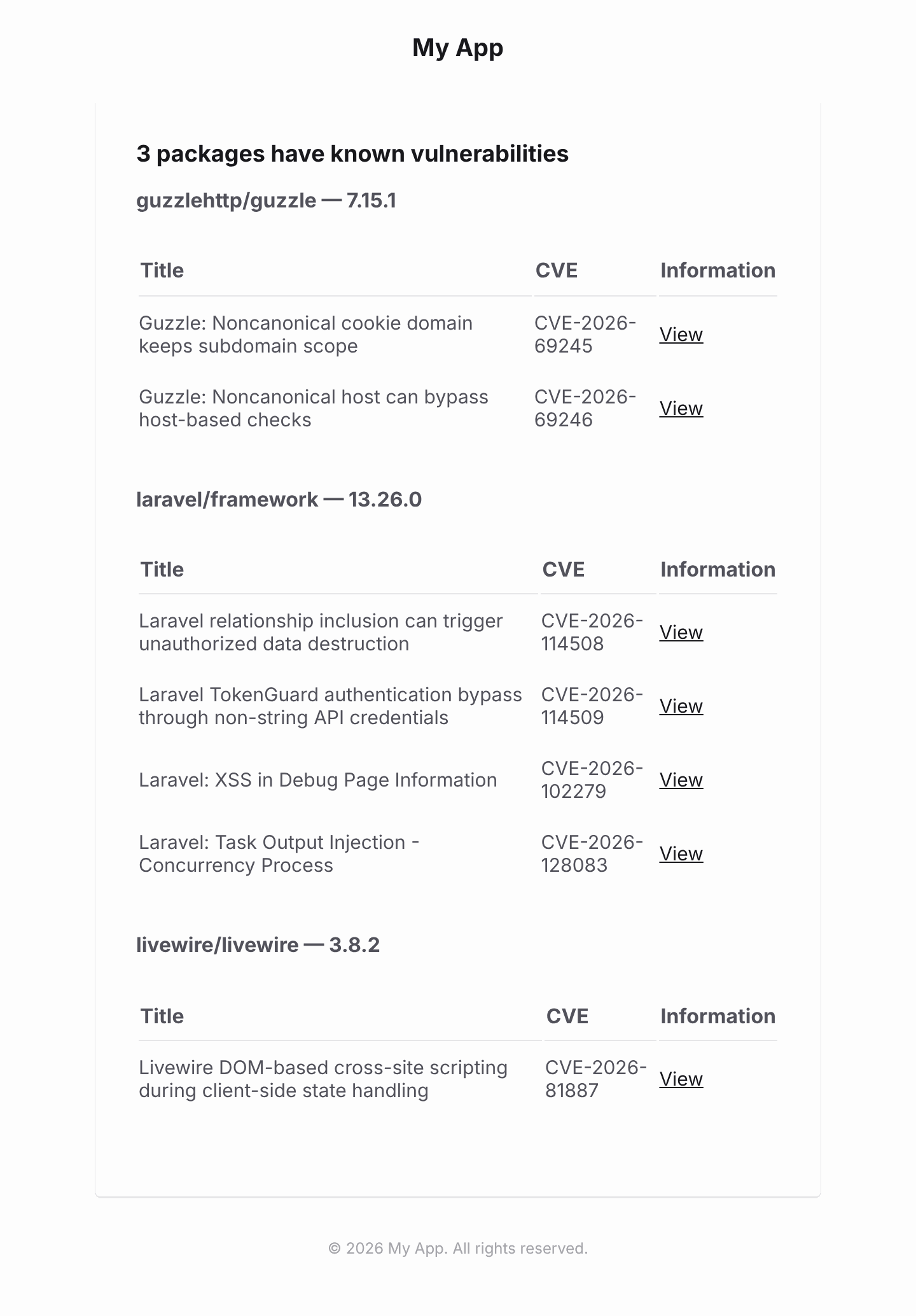
It can display the results in your console, or email them or post them to Slack on a schedule. Mails use Laravel's markdown system, so they fit nicely in your styling.
Note
Upgrading from 3.x? Version 3.x checked against the FriendsOfPHP database only, which holds about a quarter of the
advisories Packagist knows about. Expect 4.x to report vulnerabilities that 3.x never mentioned.
See UPGRADING.md for everything that changed; for most applications it is just composer require jorijn/laravel-security-checker:^4.0.
Screenshot
Installation
Require this package with composer using the following command:
composer require jorijn/laravel-security-checker
Configuration
If you want the package to send reports by email, you'll need to specify a recipient.
Option 1
Add it to your .env file.
LCS_MAIL_TO="someone@example.net"
To send the report to more than one address, separate them with commas:
LCS_MAIL_TO="someone@example.net,someone-else@example.net"
Option 2
Publish the configuration file and change it there.
php artisan vendor:publish --provider="Jorijn\LaravelSecurityChecker\ServiceProvider" --tag="config"
If you want to control on how the email is formatted you can have Laravel export the view for you using:
php artisan vendor:publish --provider="Jorijn\LaravelSecurityChecker\ServiceProvider" --tag="views"
If you published the views with an earlier version of this package, the CVE column of your copy of security-mail.blade.php shows 1 instead of the CVE identifier.
To fix it, replace {{ $information['cve'] or '' }} with {{ $information['cve'] ?? '' }} in that file.
In copies published with 4.0.0 or earlier, every package after the first shows up as a literal ## vendor/package line instead of a heading.
To fix it, add an empty line between @endcomponent and @endforeach near the end of the package loop.
By default, the package won't email you when there are no vulnerabilities found. You can change this setting by adding the following entry to your .env file.
LCS_NOTIFY_WITHOUT_VULNERABILITIES=true
Values like 1, yes and on work as well. This setting also applies to Slack, Teams and the webhook.
Only new findings
A weekly mail that repeats the same vulnerability you cannot fix yet gets ignored, and then the new one gets missed too. To only be told about what is new since the previous run, add:
LCS_NOTIFY_ONLY_NEW=true
Keep in mind:
- This applies to
security-check:email,:slack,:teamsand:webhook, each with its own memory, so every channel hears about a vulnerability once.security-check:nowalways shows everything. - The report then only contains the new findings, and nothing is sent when there are none.
- A finding is a package plus an advisory. One that disappears (say, after an update) and comes back later is new again.
- Which findings were reported is kept in your application's cache. If that is cleared, or on the first run, everything is
reported once more. To keep it in another cache store (for example one that a deploy does not clear), set
LCS_STATE_CACHE_STOREto the name of that store inconfig/cache.php. - When a report cannot be delivered, its findings stay new for the next run.
When the check itself cannot run
If the check cannot run, for example because Packagist cannot be reached or composer.lock is missing,
security-check:email, :slack, :teams and :webhook send a "the security check could not run" message instead, so a broken
check never looks like a quiet week without vulnerabilities. To turn that message off, add:
LCS_NOTIFY_ON_FAILURE=false
The commands exit with code 2 in that case either way (see Exit codes), and the error is logged.
Slack
If you want the package to send the report to a Slack channel, you will need to specify a Slack Webhook
in your .env file.
E.g.:
LCS_SLACK_WEBHOOK=https://hooks.slack.com/services/T00000000/B00000000/XXXXXXXXXXXXXXXXXXXXXXXX
Microsoft Teams
security-check:teams posts the report to a Teams channel. In Teams, add a workflow to the channel with the Workflows app
(template "Send webhook alerts to a channel"), and put its URL in your .env file:
LCS_TEAMS_WEBHOOK=https://prod-00.westeurope.logic.azure.com:443/workflows/...
The connector-based "Incoming Webhook" URLs (...webhook.office.com/...) no longer work: Microsoft retired them in May 2026.
Very long reports are shortened to stay below Teams' message size limit; the message then says how many advisories it left out.
Any other webhook
security-check:webhook POSTs the report as JSON to any URL, for example an incident tool, an automation platform or your own
endpoint:
LCS_WEBHOOK_URL=https://example.com/hooks/security
LCS_WEBHOOK_SECRET=a-long-random-string
The body is the same document as the JSON output, with three extra keys: event (report, or check_failed
with an error message when the check could not run), application (name, url and environment of your app) and
only_new_findings (whether only new findings are reported).
With LCS_WEBHOOK_SECRET set (optional), every request carries an X-Signature-256 header: sha256= followed by the
HMAC-SHA256 of the body. Verify it on the receiving side before trusting the request:
$expected = 'sha256='.hash_hmac('sha256', $request->getContent(), $secret);

if (!hash_equals($expected, (string) $request->header('X-Signature-256'))) {
    abort(403);
}
LCS_NOTIFY_WITHOUT_VULNERABILITIES and LCS_NOTIFY_ON_FAILURE apply to both commands, like they do to email and Slack.
When the report cannot be delivered (the receiver answers with an error, or cannot be reached), the command logs the
error and exits with code 1.
Excluding dev dependencies
If your dev dependencies never reach production, you can leave them out of the check by adding the following entry to your .env file.
LCS_EXCLUDE_DEV=true
Minimum severity
Packagist knows the severity of most advisories: low, medium, high or critical. To only be told about the more
serious ones, add the lowest severity you want to see to your .env file:
LCS_MINIMUM_SEVERITY=high
Keep in mind:
- This applies to every command, including the exit code of
security-check:now. - Advisories without a known severity (a few percent of them) are always reported, because they might be critical.
The deprecated
enlightndriver knows no severities at all, so the setting has no effect there. - An invalid value is ignored and logged as a warning, so nothing is hidden by a typo.
The severity is shown in every report, when it is known.
Allowing known vulnerabilities
Sometimes a reported vulnerability doesn't affect you, or you've accepted the risk. You can stop it from being reported by
adding its CVE identifier or its exact advisory title to the allow list. Many advisories have no CVE; those can be allowed by their
GitHub advisory id (GHSA-...) or Packagist advisory id (PKSA-...) as well. In your .env file, use a single-quoted JSON array:
LCS_ALLOW_LIST='["CVE-2024-1234","GHSA-xxxx-xxxx-xxxx","Example vulnerability title"]'
If you have published the configuration file, you can use a regular PHP array for allow_list instead.
To remember (and tell your colleagues) why an advisory is allowed, write the entry as an object with an id and a reason.
Both forms can be mixed:
LCS_ALLOW_LIST='[{"id":"GHSA-xxxx-xxxx-xxxx","reason":"We never call the affected method"},"CVE-2024-1234"]'
'allow_list' => [
    ['id' => 'GHSA-xxxx-xxxx-xxxx', 'reason' => 'We never call the affected method'],
    'CVE-2024-1234',
],
security-check:now lists the advisories the allow list hides, with their reason, so an accepted risk does not disappear
from sight (also in the JSON output, under ignored). This works with the Packagist drivers.
Keep in mind:
- Entries must match exactly, including case.
- An allowed title is ignored for every package with an advisory by that name.
- An invalid allow list is ignored and logged as a warning, so the check always runs and nothing is hidden by mistake.
Advisory data and privacy
By default, the package downloads Packagist's complete advisory feed (about 0.7 MB, compressed) and matches it against your
composer.lock on your own server. The request is the same for every application, so the list of packages you use never
leaves your server. Nothing calls the composer command line tool, so it works on servers without Composer as well.
If you prefer smaller downloads, you can ask Packagist about your installed packages only:
LCS_DRIVER=packagist-per-package
Keep in mind that Packagist then learns which packages your application uses, including the names of private packages.
| Driver | Data source | What leaves your server |
|---|---|---|
packagist (default) |
Packagist (GitHub Advisory Database, FriendsOfPHP, and more) | nothing about your application |
packagist-per-package |
Packagist, for your installed packages only | the names of your installed packages |
enlightn (deprecated) |
FriendsOfPHP only, through enlightn/security-checker |
nothing about your application |
The enlightn driver is the 3.x behaviour. It is deprecated, misses most advisories, and will be removed in 5.0. To keep using it for now,
install its dependency yourself with composer require enlightn/security-checker and set LCS_DRIVER=enlightn.
If your server can only reach a mirror of Packagist that serves the same /api/security-advisories/ endpoint, set LCS_PACKAGIST_URL.
LCS_PACKAGIST_TIMEOUT sets the timeout per request in seconds (default: 30).
Adding your own driver
A driver implements Jorijn\LaravelSecurityChecker\Contracts\Checker and returns the same report shape as the built-in ones
(see the interface for the details). Register it from a service provider and select it with LCS_DRIVER:
use Jorijn\LaravelSecurityChecker\CheckerManager;

public function boot(): void
{
    $this->app->make(CheckerManager::class)->extend('my-driver', fn ($app) => new MyChecker());
}
A driver that cannot run must throw an exception (preferably Jorijn\LaravelSecurityChecker\Exceptions\CheckFailedException)
instead of returning an empty report, so the failure is reported as such.
Scheduling
The package exposes a new command for you:
php artisan security-check:email
You can hook it up into a regular crontab or add it to the Laravel Scheduler in routes/console.php like this:
use Illuminate\Support\Facades\Schedule;

Schedule::command('security-check:email')->weekly();
Use security-check:slack, security-check:teams or security-check:webhook instead to send the report elsewhere.
Running as a command
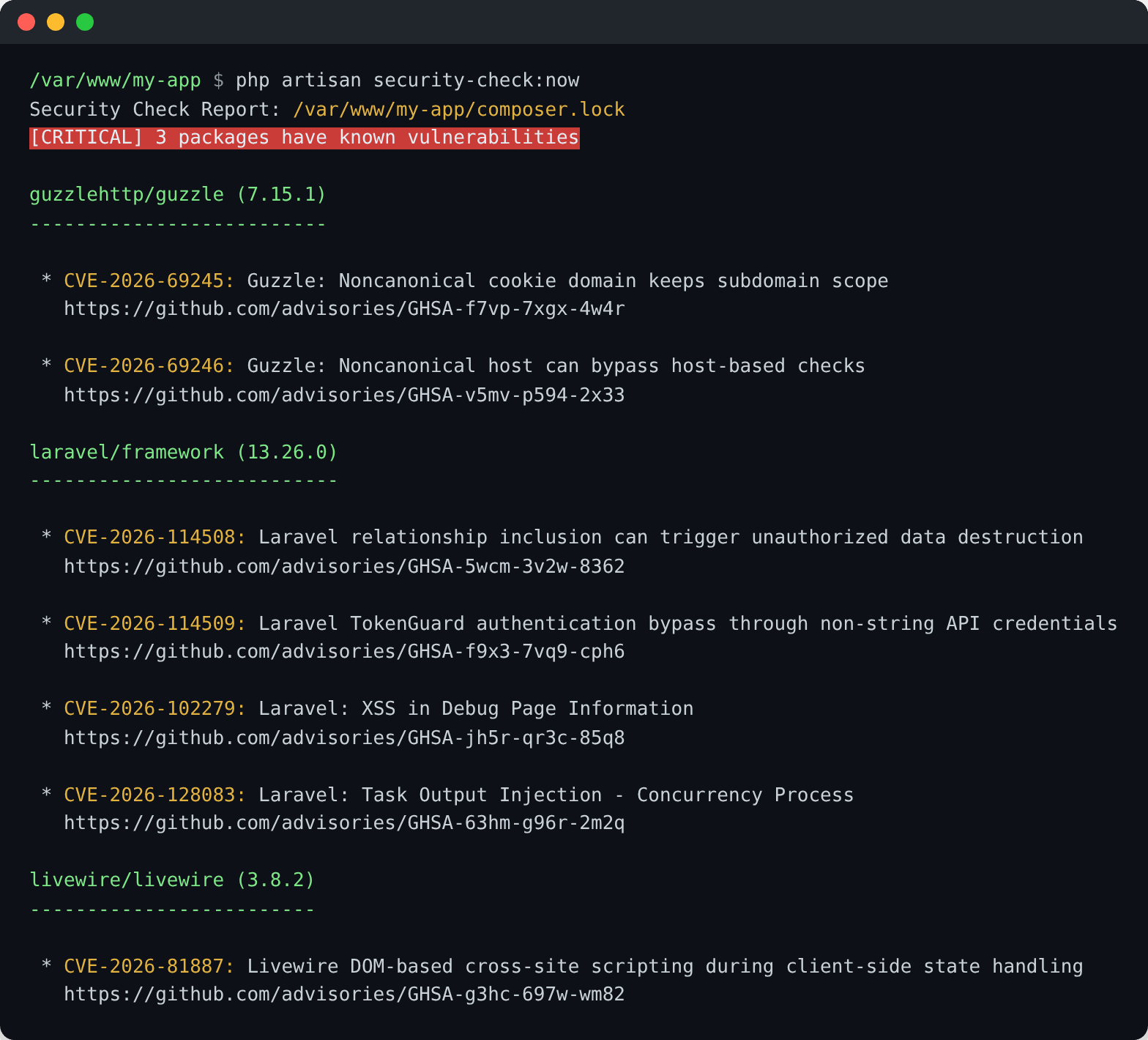
You can run the check yourself with php artisan security-check:now, for example in a CI pipeline or a deploy script.
JSON output
Add --format=json to get the report as JSON, for example to process it in a CI pipeline:
php artisan security-check:now --format=json > security-report.json
{
    "lock_file": "/var/www/app/composer.lock",
    "vulnerable_package_count": 1,
    "advisory_count": 1,
    "packages": {
        "laravel/framework": {
            "version": "12.0.0",
            "time": "2025-02-24T13:40:17+00:00",
            "advisories": {
                "PKSA-xxxx-xxxx-xxxx": {
                    "title": "Example vulnerability title",
                    "link": "https://github.com/advisories/GHSA-xxxx-xxxx-xxxx",
                    "cve": "CVE-2025-1234",
                    "severity": "high"
                }
            }
        }
    },
    "ignored": {}
}
packagesandignoredare always objects, also when they are empty ({}).ignoredlists the advisories hidden by the allow list, in the same shape, withallowed_by(the matching allow list entry) andreasonadded to each advisory.severityislow,medium,high,critical, ornullwhen unknown.- Only the JSON document is written to stdout. Warnings and errors go to stderr.
- When the check could not run, the document holds an
errormessage instead ofpackages, and the exit code is2. - The exit codes are the same as for the text output.
Exit codes
| Exit code | Meaning |
|---|---|
0 |
The check ran and found no vulnerabilities (or the mail/Slack report was sent). |
1 |
security-check:now found vulnerabilities, security-check:email has no recipients configured, or security-check:teams/:webhook has no URL configured or could not deliver the report. |
2 |
The check could not run, for example because Packagist could not be reached. This does not mean there are no vulnerabilities. |
Translations
If you need to translate this package into your own language you can do so by publishing the translation files:
php artisan vendor:publish --provider="Jorijn\LaravelSecurityChecker\ServiceProvider" --tag="translations"
The files are published to lang/vendor/laravel-security-checker (or resources/lang/vendor/laravel-security-checker if your application still uses resources/lang).
Please consider helping out by creating a pull request with your language to help out others.