
ipatco / filament-profile

Breeze-style user profile for Filament panels — profile info, password, browser sessions, and account deletion.
Fund package maintenance!
Requires
- php: ^8.2
- filament/filament: ^5.0
- spatie/laravel-package-tools: ^1.15.0
Requires (Dev)
- larastan/larastan: ^3.0
- laravel/pint: ^1.0
- nunomaduro/collision: ^8.0
- orchestra/testbench: ^9.0|^10.0|^11.0
- pestphp/pest: ^3.7|^4.0
- pestphp/pest-plugin-arch: ^3.0|^4.0
- pestphp/pest-plugin-laravel: ^3.0|^4.0
- pestphp/pest-plugin-livewire: ^3.0|^4.0
- rector/rector: ^2.0
Suggests
None
Provides
None
Conflicts
None
Replaces
None
This package is not auto-updated.
Last update: 2026-10-17 11:58:53 UTC
README
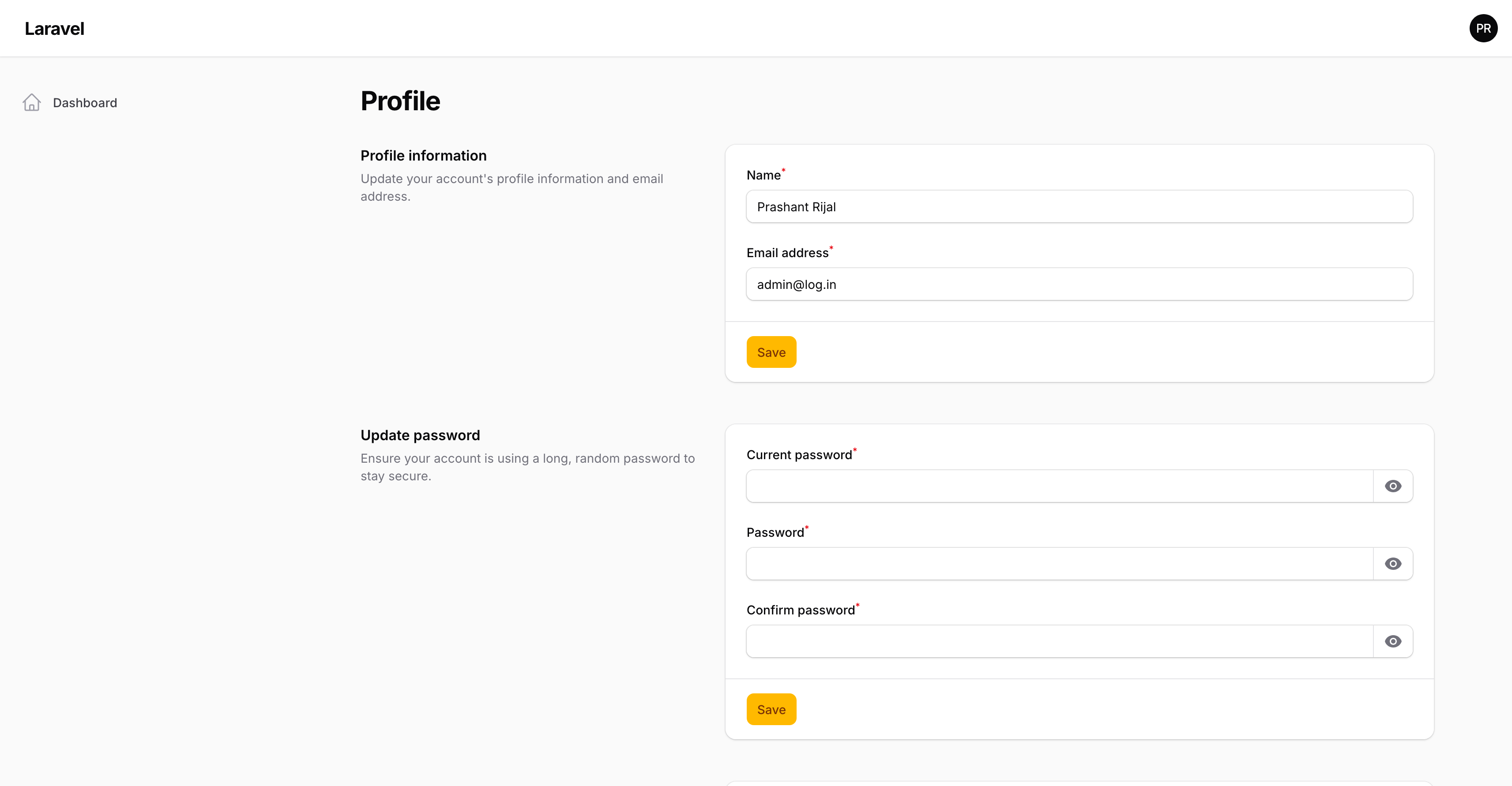
A ready-made user profile page for your Filament panel — the kind of account settings screen most apps need, without building it from scratch.
Inspired by Laravel Breeze and Jetstream, built to feel at home in Filament.
If this package helps you, you can support the work here:
What it does
After install, your users get a profile page where they can:
- Update profile information — name, email, and any extra fields you add
- Change their password
- Manage browser sessions — see where they’re signed in and log out other devices
- Delete their account — with a clear warning and password confirmation
You also get:
- A Profile link in the user menu (and optionally in the sidebar)
- An optional dashboard widget with a Profile button next to Sign out
- An easy way to customize profile fields in your own app file — not buried in the panel provider
Browser sessions only appear when your app stores sessions in the database (SESSION_DRIVER=database).
Why it was created
Most Filament apps still need a full account settings screen. Filament gives you the panel and auth, but not a complete Breeze-style profile experience out of the box.
This package fills that gap so you can focus on your product instead of rebuilding the same profile page again and again.
Requirements
- PHP 8.2+
- Filament 5
- A Filament panel with a custom theme
Quick start
1. Install the package
composer require ipatco/filament-profile
2. Run the installer
php artisan filament-profile:install
This publishes the config and a ProfileInformationForm class you can edit in your app.
3. Register the plugin
In your panel provider:
use Filament\Support\Icons\Heroicon;
use Ipatco\FilamentProfile\FilamentProfilePlugin;

->plugins([
    FilamentProfilePlugin::make()
        ->showOnDropdown()
        ->icon(Heroicon::OutlinedUserCircle)
        ->label('Profile'),
])
Want the dashboard Profile widget too? Add ->accountWidget() and remove Filament’s default account widget so you don’t get two cards.
4. Include the views in your theme
In your panel theme CSS file (for example resources/css/filament/admin/theme.css):
@source '../../../../vendor/ipatco/filament-profile/resources/**/*.blade.php';
Then rebuild your frontend assets (npm run build or npm run dev).
5. Open the profile page
Sign in and visit /admin/profile (or your panel path + /profile).
Customizing profile fields
Edit the published class:
app/Filament/Profile/ProfileInformationForm.php
Add phone, avatar, or any other fields there. Keep those attributes fillable on your user model so they can be saved.
That’s the intended place for customization — keep your panel provider lean.
Useful options
FilamentProfilePlugin::make()
    ->showOnDropdown()      // Profile in the avatar menu (default)
    ->showOnSideNav()       // Also show in the sidebar
    ->label('My profile')
    ->icon(Heroicon::OutlinedUserCircle)
    ->group('Account')      // Sidebar group
    ->sort(-1)
    ->accountWidget()       // Optional dashboard widget
    ->simpleProfile();      // Compact layout without the sidebar
You can hide or show the menu link with ->hidden() / ->visible() when needed.
Support
This package is free and open source. If you’d like to support continued development:
Changelog
Please see CHANGELOG for recent changes.
Contributing
Please see CONTRIBUTING for details.
Security
Please review our security policy for how to report vulnerabilities.
Credits
License
The MIT License (MIT). Please see License File for more information.