
bokshorn-it / filament-activity-timeline

A Filament plugin that turns spatie/laravel-activitylog into a readable audit trail: a record timeline, a filterable activity resource, and diffs that resolve enums, dates and foreign keys to human labels.
Package info
github.com/Bokshorn-IT/filament-activity-timeline
pkg:composer/bokshorn-it/filament-activity-timeline
Requires
- php: ^8.3
- filament/filament: ^5.0
- illuminate/contracts: ^12.0|^13.0
- spatie/laravel-activitylog: ^4.12|^5.0
- spatie/laravel-package-tools: ^1.92
Requires (Dev)
- laravel/pint: ^1.27
- orchestra/testbench: ^10.0|^11.0
- pestphp/pest: ^4.0
- pestphp/pest-plugin-laravel: ^4.0
Suggests
None
Provides
None
Conflicts
None
Replaces
None
README
Filament Activity Timeline
A Filament plugin that makes spatie/laravel-activitylog readable.
The log stores raw database values. A change comes back looking like this:
{ "status": 2, "author_id": 14, "due_date": "2026-08-14T00:00:00.000000Z" }
Accurate, and useless to look at. This package renders the same entry as Status: Draft → Published, Author: Alex Rivera → Sam Okafor, Due date: 14.08.2026, by running every value back through the subject model's own casts and relationships. A diff ends up reading the way the record does on screen.
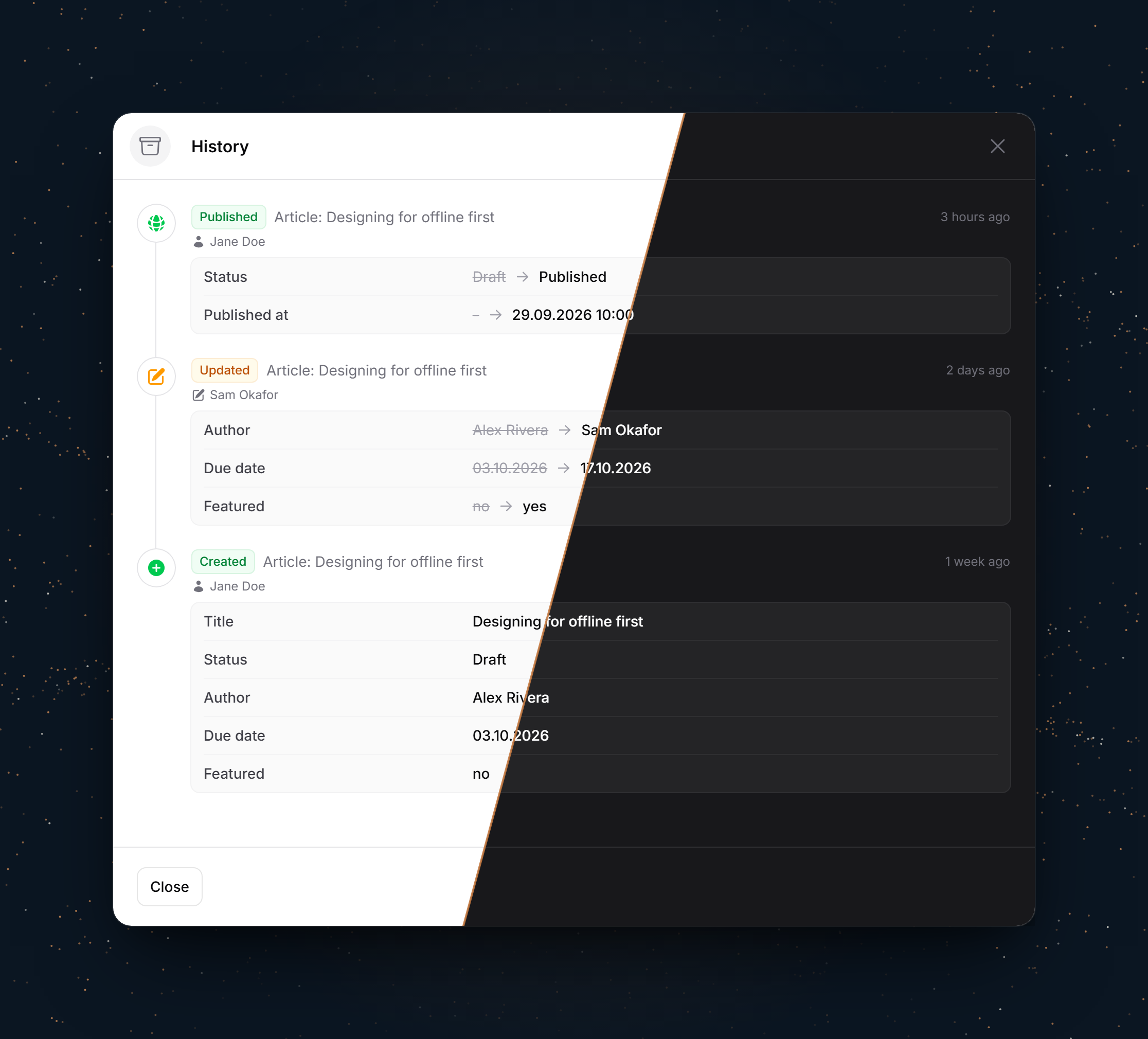
There are two ways to read the log: that slide-over timeline on a record, and a filterable resource across everything.
Features
- Record timeline, optionally pulling related records into the same stream
- Readable diffs: enum casts as labels, date casts as dates, foreign keys - polymorphic ones included - as the related record's name, booleans as words
- Models can render their own columns, for the money, quantities and custom casts no schema explains
- Activity resource with filters for event, record type, causer and date range
- Your own events beyond create/update/delete, each with its own icon and colour
- Users, customers, API clients and unattended jobs are told apart as causers
- Opt-in restore, limited to the models you nominate
- Colours come from Filament's palette, so a custom brand colour works
- Ships English and German; every label is translatable
Compatibility
| Plugin | Filament | Laravel | PHP | activitylog |
|---|---|---|---|---|
| 1.x | 5.x | 12.x, 13.x | 8.3+ | 4.12+, 5.x |
Every one of those is covered by CI, on SQLite, MySQL 8 and PostgreSQL 17.
activitylog v5 keeps the before/after values in an attribute_changes column instead of inside properties. The plugin reads whichever your installed version writes, so there is nothing to configure either way: follow Spatie's upgrade guide when you move, and your timelines carry on reading the same. Note that v5 itself requires PHP 8.4 and Laravel 12.
Installation
Install the package via composer:
composer require bokshorn-it/filament-activity-timeline
Important
This package ships Blade views that Tailwind has to scan. If you have not set up a custom theme yet, follow Creating a custom theme in the Filament docs first, otherwise there is no theme CSS file to register the views with and the timeline will render unstyled.
Add the package's views to your theme CSS file:
@source '../../../../vendor/bokshorn-it/filament-activity-timeline/resources/**/*.blade.php';
Then rebuild your assets with npm run build.
If activitylog is not set up yet, publish and run its migrations. This package adds no tables of its own:
php artisan vendor:publish --provider="Spatie\Activitylog\ActivitylogServiceProvider" --tag="activitylog-migrations"
php artisan migrate
Register the plugin on your panel:
use BokshornIt\FilamentActivityTimeline\ActivityTimelinePlugin;

public function panel(Panel $panel): Panel
{
    return $panel
        ->plugin(ActivityTimelinePlugin::make());
}
Optionally publish the config file:
php artisan vendor:publish --tag="filament-activity-timeline-config"
The views and translations are publishable too, if you would rather edit them than configure them:
php artisan vendor:publish --tag="filament-activity-timeline-views"
php artisan vendor:publish --tag="filament-activity-timeline-translations"
Usage
Logging a model
Use spatie's trait as usual, and implement ProvidesActivityTitle so the model can say what it is called:
use BokshornIt\FilamentActivityTimeline\Contracts\ProvidesActivityTitle;
use Spatie\Activitylog\LogOptions;
use Spatie\Activitylog\Traits\LogsActivity;

class Article extends Model implements ProvidesActivityTitle
{
    use LogsActivity;

    public function getActivitylogOptions(): LogOptions
    {
        return LogOptions::defaults()
            ->logFillable()
            ->logOnlyDirty()
            ->dontSubmitEmptyLogs();
    }

    public function activityTitle(): ?string
    {
        return $this->title;
    }
}
That one method does three jobs: it names the record as the subject of an entry, as the causer of one, and as the resolved value of any foreign key pointing at it.
If your models use $guarded rather than $fillable, reach for logUnguarded() instead, and exclude the timestamps:
return LogOptions::defaults()
    ->logUnguarded()
    ->logExcept(['created_at', 'updated_at'])
    ->logOnlyDirty()
    ->dontSubmitEmptyLogs();
The timeline action
use BokshornIt\FilamentActivityTimeline\Actions\ActivityTimelineAction;

protected function getHeaderActions(): array
{
    return [
        ActivityTimelineAction::make(),
    ];
}
A record's history often lives partly on its children. Pull them into the same stream:
ActivityTimelineAction::make()
    ->withRelations(['revisions', 'comments'])
    ->limit(25)
Field labels
Only your application knows what its columns mean, so diff labels come from a translation file on your side. Create lang/en/changes.php, keyed by column name:
return [
    'author_id' => 'Author',
    'due_date' => 'Due date',
    'published_at' => 'Published',
];
Unmapped columns fall back to a headline-cased version of the key, so a new column is readable straight away and you can fill these in gradually. Point it somewhere else with ->fieldLabelNamespace('...').
Field values
Diffs resolve what the schema can tell them: enum casts, date casts, foreign keys, morph columns, booleans. What a column means is a different matter - that price_cents is money, that a quantity carries three decimals it should not show, that a custom cast holds a calendar day. Implement ProvidesActivityValues and the model decides for the columns it knows:
use BokshornIt\FilamentActivityTimeline\Contracts\ProvidesActivityValues;

class Article extends Model implements ProvidesActivityValues
{
    public function formatActivityValue(string $key, mixed $value): ?string
    {
        if (str_ends_with($key, '_cents')) {
            return Number::currency((int) $value / 100, 'EUR');
        }

        return null;
    }
}
Return null for everything else and it falls through to the formatter's own handling, so claiming one column costs you nothing on the rest. The value arrives as it was logged - the raw database value, not the cast one - and empty values and booleans are settled before the model is asked, so an implementation never has to answer for those. A formatter that throws is caught and falls through, since a diff has to render either way.
Put it on a base model or a trait of your own to cover a whole application at once.
Foreign keys
A key resolves through the relationship named after it: author_id follows author() and shows what ProvidesActivityTitle returns, so the diff reads "Ada Lovelace" rather than "14". Soft-deleted records are found too - history keeps pointing at records that have since gone, and their name is the reason for looking them up at all.
Polymorphic keys work the same way, with no configuration: notable_id follows notable(), reads the type from the notable_type logged beside it, and resolves through a morph map if you registered one. When only the id was logged and the type was not, the raw value stays.
Your own events
Log what your domain actually does, not just CRUD:
activity()
    ->performedOn($article)
    ->causedBy($user)
    ->event('published')
    ->log('published');
Give each one an icon and a colour so it reads as a first-class entry rather than a grey fallback:
ActivityTimelinePlugin::make()
    ->events([
        'published' => ['icon' => 'heroicon-m-globe-alt', 'color' => 'success'],
        'archived' => ['icon' => 'heroicon-m-archive-box', 'color' => 'gray'],
        'escalated' => ['icon' => 'heroicon-m-arrow-trending-up', 'color' => 'warning'],
    ])
Labels come from lang/{locale}/activity_events.php, configurable with ->eventLabelNamespace(). Unregistered events still render, just neutrally.
Record type labels
A subject's type is labelled by its Filament resource. Models that no resource manages, such as child records and pivots, take their label from lang/{locale}/activity_subjects.php, keyed by the snake cased class name:
return [
    'article_revision' => 'Revision',
    'line_item' => 'Line item',
];
Configurable with ->subjectLabelNamespace(). Without an entry, the class name is used.
A record can provide its own type label with ProvidesActivitySubjectLabel:
use BokshornIt\FilamentActivityTimeline\Contracts\ProvidesActivitySubjectLabel;

class Document extends Model implements ProvidesActivitySubjectLabel
{
    public function activitySubjectLabel(): ?string
    {
        return $this->status === DocumentStatus::Signed
            ? __('Contract')
            : __('Draft');
    }
}
Null keeps the resource label. The record type filter and morph columns in a diff use the resource label.
The "open record" link is only shown when the resource's getEloquentQuery() finds the record.
Causers
Not every actor is a user. Give each type its own icon:
ActivityTimelinePlugin::make()
    ->causerIcons([
        User::class => 'heroicon-m-user',
        Customer::class => 'heroicon-m-building-office',
        ApiClient::class => 'heroicon-m-cpu-chip',
    ])
    ->systemCauserIcon('heroicon-m-cog-6-tooth')
Names resolve through ProvidesActivityTitle and fall back to the model's name attribute. An entry with no causer shows as "System" instead of an empty cell.
Worth knowing: activitylog attaches the authenticated user by itself. An entry ends up without a causer when nobody was signed in, which is what you want for queue jobs and scheduled commands. Pass causedBy() yourself when the actor is not the logged-in user, for example someone acting through a customer portal.
Bulk writes are usually not worth logging at all. Wrap an import or a sync so it does not bury the changes people actually made:
activity()->withoutLogs(fn () => $this->import($rows));
Restore
Writing old values back onto a record is destructive, and on records that are meant to stay as written it is simply wrong, so it stays off until you name the models it applies to:
ActivityTimelinePlugin::make()
    ->restorable([
        Article::class,
        Category::class,
    ])
It writes past $fillable on purpose, since the values came out of the record itself. It tells you when there was nothing to restore rather than claiming success, and logs the restore as its own entry.
Scoping the log
The resource and the timelines share one callback, so a scope cannot be applied in one place and forgotten in the other. Multi-tenant applications filter here:
ActivityTimelinePlugin::make()
    ->modifyQueryUsing(fn (Builder $query) => $query
        ->where('tenant_id', Filament::getTenant()?->getKey()))
Navigation
ActivityTimelinePlugin::make()
    ->navigationGroup(fn (): string => __('navigation.group.system'))
    ->navigationIcon('heroicon-o-archive-box')
    ->navigationSort(10)
    ->registerNavigation(false) // hide it but keep the routes
Authorisation
No policy is registered for you. One is included that uses the permission names filament-shield generates, if that suits you. Note that Activity is a vendor model, so Laravel will not discover a policy for it by convention. Register it yourself:
use BokshornIt\FilamentActivityTimeline\Policies\ActivityPolicy;
use Spatie\Activitylog\Models\Activity;

Gate::policy(Activity::class, ActivityPolicy::class);
It denies create, update and delete outright.
Swapping the resource
Subclass it to change the table, the filters or the labels, and hand it back to the plugin. Useful when you want the resource to keep an existing name, URL or set of permissions:
class AuditResource extends ActivityResource
{
    public static function getModelLabel(): string
    {
        return __('audit.model.singular');
    }
}

ActivityTimelinePlugin::make()->resource(AuditResource::class);
Other options
ActivityTimelinePlugin::make()
    ->ignoredKeys(['search_index'])   // never show these in a diff
    ->dateFormat('d.m.Y')
    ->dateTimeFormat('d.m.Y H:i')
    ->timelineLimit(50)
    ->placeholder('-')
Trying it
The repository ships a demo application, and the screenshots are taken from it. It runs a stock Filament panel with a few articles that already have a history worth looking at:
composer install
npm install && npm run demo:css
vendor/bin/testbench workbench:build
vendor/bin/testbench db:seed --class="Workbench\Database\Seeders\DatabaseSeeder"
vendor/bin/testbench serve
Then open /demo and sign in with demo@example.com / password.
Testing
composer test
Changelog
Please see CHANGELOG for what has changed recently.
Contributing
Please see CONTRIBUTING for details.
Security Vulnerabilities
Please review our security policy on how to report security vulnerabilities.
Credits
License
The MIT License (MIT). Please see License File for more information.