
aristonis / filament-shortcut-keys

Keyboard shortcuts for a Filament panel, assigned automatically from its resources, pages, actions and tables.
Package info
github.com/aristonis/filament-shortcut-keys
pkg:composer/aristonis/filament-shortcut-keys
Fund package maintenance!
Requires
- php: ^8.2
- filament/filament: ^4.0|^5.0
- illuminate/contracts: ^12.0|^13.0
- spatie/laravel-package-tools: ^1.15.0
Requires (Dev)
- larastan/larastan: ^3.0
- laravel/pint: ^1.0
- nunomaduro/collision: ^8.0
- orchestra/testbench: ^10.0|^11.0
- pestphp/pest: ^3.7|^4.0|^5.0
- pestphp/pest-plugin-arch: ^3.0|^4.0|^5.0
- pestphp/pest-plugin-laravel: ^3.0|^4.0|^5.0
- rector/rector: ^2.0
- spatie/laravel-ray: ^1.26
Suggests
None
Provides
None
Conflicts
None
Replaces
None
README
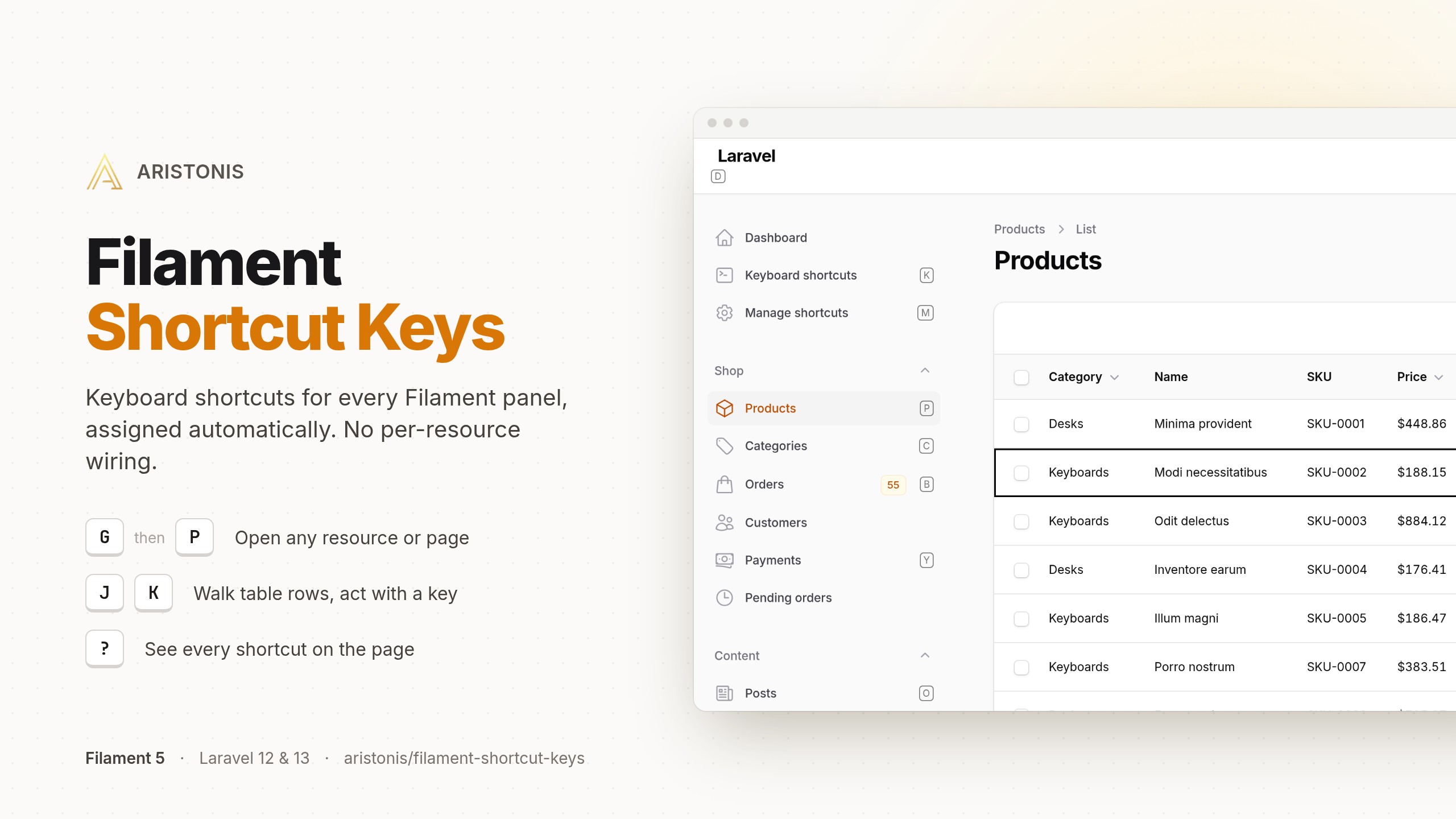
Keyboard shortcuts for a Filament panel, assigned automatically. The plugin walks the panel's registered resources, pages, and actions, gives each one a letter, and injects the resulting keymap into every page. There is no per-resource wiring: add a resource and it gets a shortcut.
Admins can remap or disable their own keys, and a developer you trust can edit the shared map that everyone else starts from.
Status: 1.0. Filament 4 or 5 on Laravel 12 and 13, PHP 8.2 or newer.
Install
composer require aristonis/filament-shortcut-keys
php artisan vendor:publish --tag="filament-shortcut-keys-migrations"
php artisan migrate
The migrations store admins' own keys and shared presets. If you set keys only in the config file
('customization' => 'config'), nothing is stored and you can skip them.
Register the plugin on your panel:
use Aristonis\FilamentShortcutKeys\FilamentShortcutKeysPlugin;

public function panel(Panel $panel): Panel
{
    return $panel->plugin(FilamentShortcutKeysPlugin::make());
}
Then publish the client script:
php artisan filament:assets
Run it once after registering the plugin, even on an app set up with filament:install: its
filament:upgrade hook ran during composer require, before the plugin was on a panel, so it
published nothing for it. After that, the hook republishes the script on every composer install or
update; without the hook, run php artisan filament:assets after every update. See the Getting started guide.
Documentation — two audiences
- For developers → documentation site — human guides: getting started, the shortcuts, row actions, customization, custom bindings, configuration, pruning, translations, security, troubleshooting and limitations.
- For AI agents → Laravel Boost — the package ships Boost guidelines and
skills in
resources/boost/. Pick the package when the interactivephp artisan boost:installasks for third-party packages, or add it toboost.jsonunderpackagesand runboost:installagain; your coding agent then loads the guideline and thefilament-shortcut-keys-*skills.
What it does
- Shortcuts with no wiring. Every registered resource and page gets a
G-then-letter navigation key, header actions get bare letters, and every table gets the same fixed keys:/search,J/Krow cursor,Spaceselect,Enteredit,Deletedelete, arrows to move and page. - Keys that stay out of the browser's way. Nothing is held down by default, keys match the physical key on any layout, and nothing fires while you type or while a modal, menu or select has the keyboard.
- Safe defaults. A header action is keyed only when a stray press is harmless (it opens a page, a modal or a confirmation); hidden and disabled actions get no key.
- Row actions you name (
->rowActions(['approve', 'reject'])) get one stable letter across the panel, including relation manager and table widget tables. - Real controls, real permissions. A shortcut clicks the Filament control or follows the route you would have used, so authorization and confirmations stay Filament's.
- Customization.
personalmode lets each admin remap, disable and add their own bindings;lockedgives everyone one shared map. A trusted admin, behind a gate you supply, edits the shared presets.configmode takes keys from the config file alone and needs no database. - Discoverability and accessibility. A
?cheatsheet, a reference page, key badges witharia-keyshortcuts, and a switch that turns single-key shortcuts off per browser. - Maintenance.
shortcut-keys:pruneremoves stored overrides whose target no longer exists.
Testing
composer test   # PHP suite on SQLite; FSK_DB_DRIVER=pgsql|mysql runs it on a real driver
npm test        # browser client, on node alone
Changelog
Please see CHANGELOG for more information on what has changed recently.
Contributing
Please see CONTRIBUTING for details.
Security Vulnerabilities
Please review our security policy on how to report security vulnerabilities.
Credits
License
The MIT License (MIT). Please see License File for more information.