
agelgil / filament-easy-footer

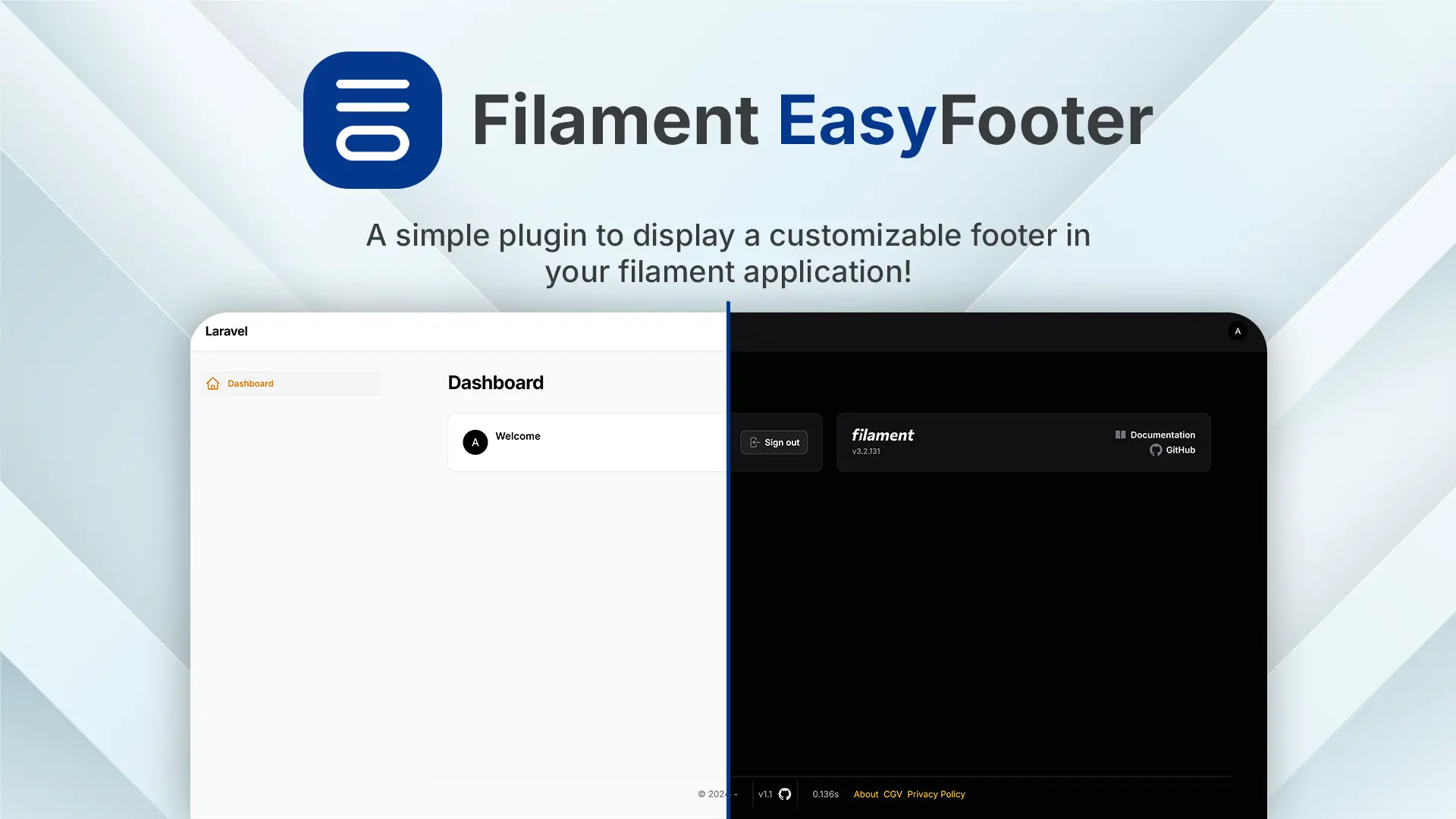
A simple plugin to display a customizable footer in your filament application!
Requires
- php: ^8.1|^8.2|^8.3|^8.4
- filament/filament: ^4.0|^5.0
- spatie/laravel-package-tools: ^1.15.0
Requires (Dev)
- larastan/larastan: ^2.9||^3.0
- laravel/pint: ^1.0
- nunomaduro/collision: ^8.1.1||^7.10.0
- orchestra/testbench: ^10.0.0||^9.0.0||^8.22.0
- pestphp/pest: ^2.20|^3.7
- pestphp/pest-plugin-arch: ^2.0|^v3.0.0
- pestphp/pest-plugin-laravel: ^2.0|^v3.1.0
- pestphp/pest-plugin-livewire: ^2.1|^v3.0.0
Suggests
None
Provides
None
Conflicts
None
Replaces
None
This package is auto-updated.
Last update: 2026-10-19 18:08:06 UTC
README
| FilamentPHP | Package version | Branch |
|---|---|---|
| v3.x | v1.x | filament-v3 |
| v4.x | v2.x | main |
| v5.x | v2.x | main |
This filament Plugin provides an easy and flexible way to add a customizable footer to your FilamentPHP application. This plugin integrates seamlessly with Filament's admin interface, enabling you to enhance your application's user experience with a good looking footer.
Navigation
- Installation
- Usage
- Configurations
- Testing
- Contributing
- Changelog
- Security Vulnerabilities
- Credits
- License
Installation
First, you can start to install the package via composer:
composer require agelgil/filament-easy-footer:^2.0
You can publish the config file with. This file is needed if you want to change the default:
php artisan vendor:publish --tag="filament-easy-footer-config"
Optionally, you can publish the views using
php artisan vendor:publish --tag="filament-easy-footer-views"
This is the contents of the published config file:
return [
    'app_name' => null,

    'github' => [
        'repository' => null,
        'token' => null,
        'cache_ttl' => 3600,
    ],
];
Usage
To start using this plugin, simply add it to the Filament provider's plugin array.
use Agelgil\FilamentEasyFooter\EasyFooterPlugin;

->plugins([
    EasyFooterPlugin::make(),
])
Custom theme
You will need to create a custom theme for the footer styles to be applied correctly.
Once that is done, add this line to your theme.css file before compiling everything with npm run build.
@source '../../../../vendor/agelgil/filament-easy-footer/resources/views/**/*';
Configurations
Enable or Disable the Footer
You can enable or disable the footer entirely using the following configuration:
use Agelgil\FilamentEasyFooter\EasyFooterPlugin;

->plugins([
    EasyFooterPlugin::make()
    ->footerEnabled() // true by default,
]);
Without this configuration, the footer will be enabled by default.
Footer position
You can choose the position of the footer by using this configuration :
use Agelgil\FilamentEasyFooter\EasyFooterPlugin;

->plugins([
    EasyFooterPlugin::make()
    ->withFooterPosition('footer'),
])
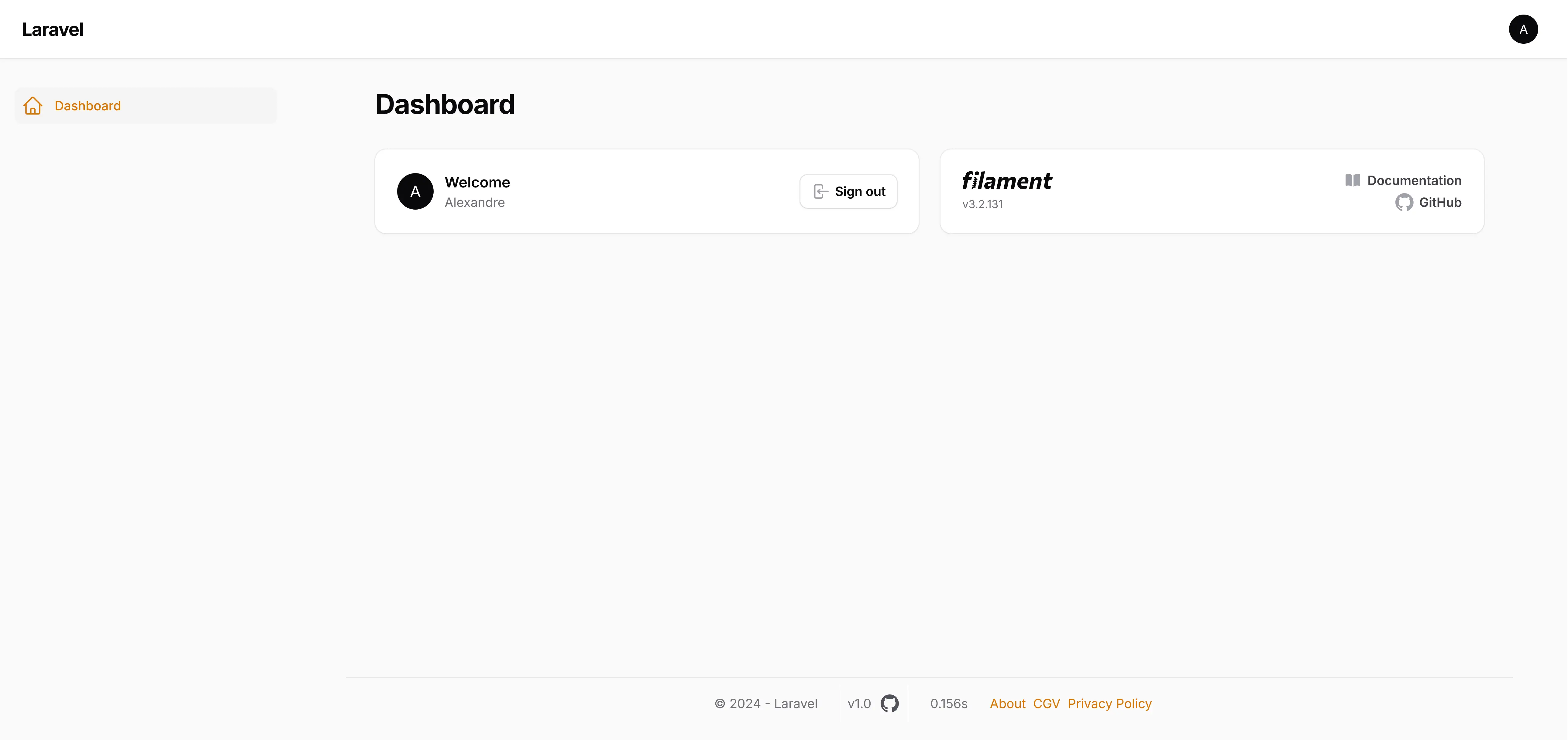
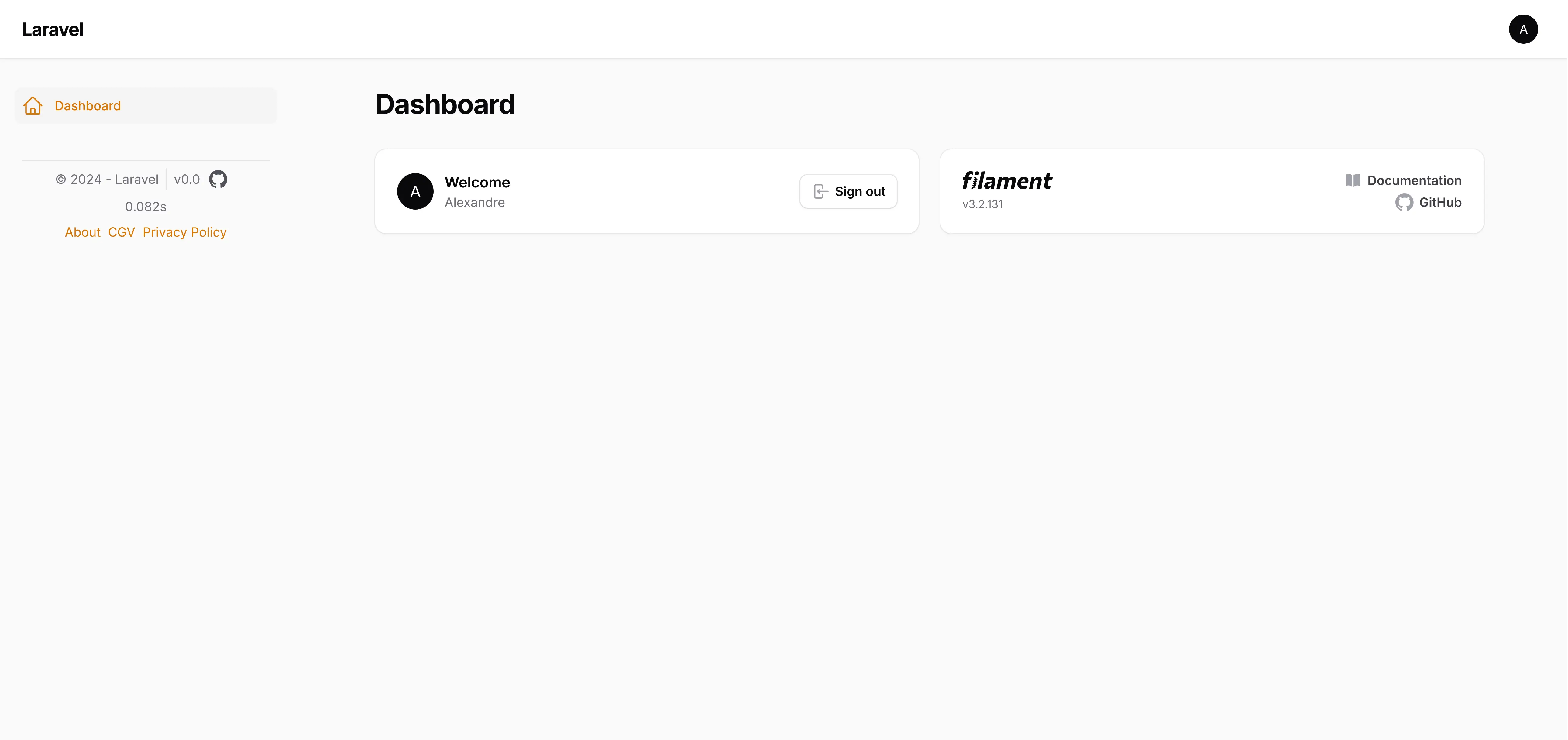
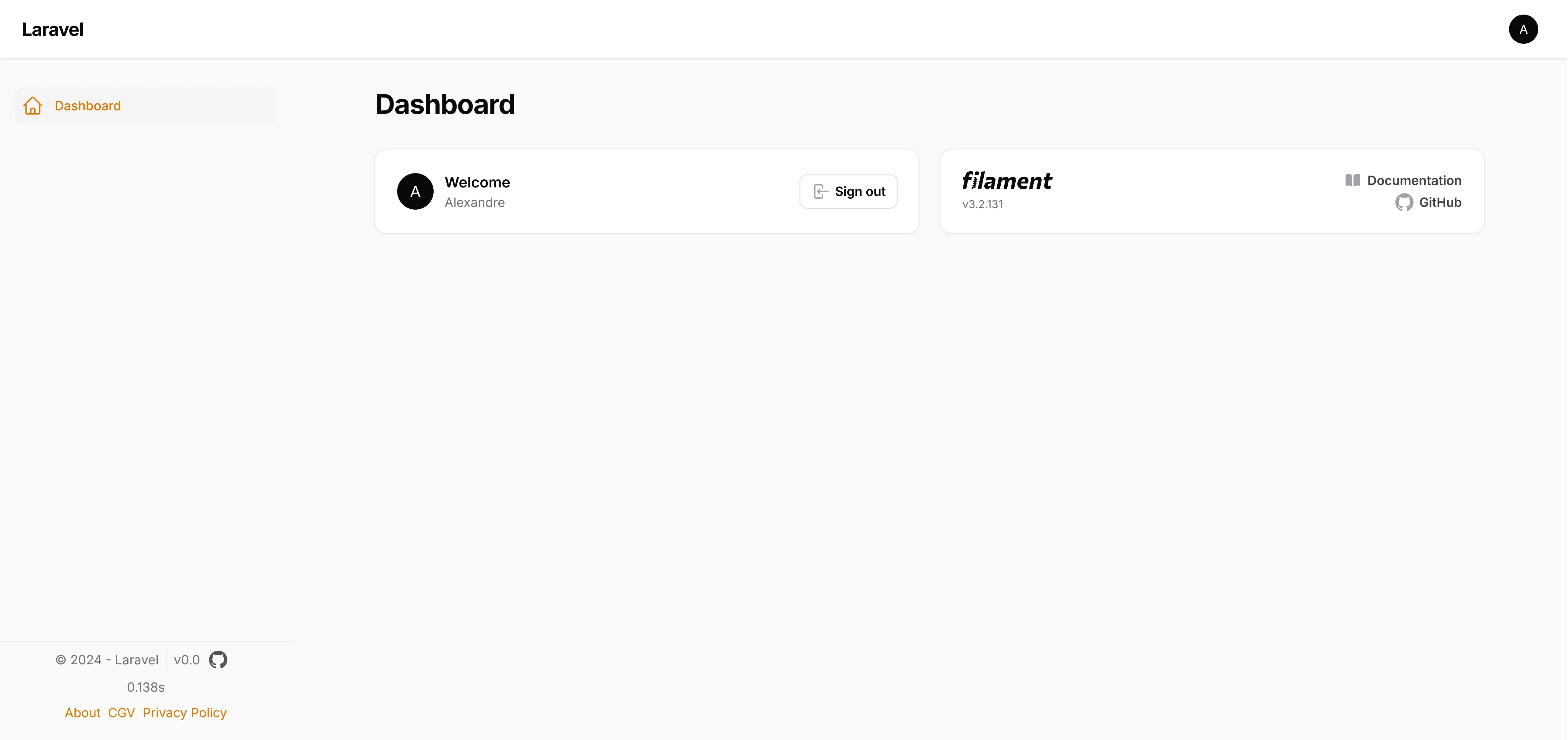
You can choose between 3 positions, represented by their corresponding render hooks
footer: panels::footer (by default)sidebar: panels::sidebar.nav.endsidebar.footer: panels::sidebar.footer
use Agelgil\FilamentEasyFooter\EasyFooterPlugin;

->plugins([
    EasyFooterPlugin::make()
    ->withFooterPosition('footer'),
])
use Agelgil\FilamentEasyFooter\EasyFooterPlugin;

->plugins([
    EasyFooterPlugin::make()
    ->withFooterPosition('sidebar'),
])
use Agelgil\FilamentEasyFooter\EasyFooterPlugin;

->plugins([
    EasyFooterPlugin::make()
    ->withFooterPosition('sidebar.footer'),
])
Custom sentence

By default, the plugin will display the name of your application (configured from your .ENV), or the app_name key in the plugin config file,next to the copyright. You can change the phrase by publishing the plugin configuration file.
If you prefer a more personalized approach, you can use the following method:
use Agelgil\FilamentEasyFooter\EasyFooterPlugin;

->plugins([
    EasyFooterPlugin::make()
    ->withSentence('your sentence'),
])
The method accepts a string or HTMLString as a parameter. With this, you can get the result you want. For example, for the result shown in the image above :
use Agelgil\FilamentEasyFooter\EasyFooterPlugin;

->plugins([
    EasyFooterPlugin::make()
    ->withSentence(new HtmlString('<img src="https://static.cdnlogo.com/logos/l/23/laravel.svg" style="margin-right:.5rem;" alt="Laravel Logo" width="20" height="20"> Laravel'))
,
])
The authorized tags are as follows: <strong><img><a><em><span><b><i><small>.
Show GitHub version

You can show the GitHub version of your application by using this configuration :
use Agelgil\FilamentEasyFooter\EasyFooterPlugin;

->plugins([
    EasyFooterPlugin::make()
    ->withGithub(showLogo: true, showUrl: true)
])
- showLogo : Display the GitHub logo next to the version
- showUrl : Add an
<a>tag to the Github URL around the logo
To make this one work, you need to publish the plugin configuration file and set the following keys :
return [
    'app_name' => null,

    'github' => [
        'repository' => null, #user/name-of-the-repo
        'token' => null, # Recommended but not compulsory for all repos, required for private repos
        'cache_ttl' => 3600, # in seconds, 3600 by default
    ],
];
If needed, you can generate a token here. The token need to have at least the read-only permission on the "Contents" scope in Repository permissions.
Load time

If you want to display the page load time, you can use this configuration :
use Agelgil\FilamentEasyFooter\EasyFooterPlugin;

->plugins([
    EasyFooterPlugin::make()
    ->withLoadTime(),
])
You can also display a prefix by using this configuration :
use Agelgil\FilamentEasyFooter\EasyFooterPlugin;

->plugins([
    EasyFooterPlugin::make()
    ->withLoadTime('This page loaded in'),
])

Custom logo with link

Custom logo with link
You can add a custom logo with optional link and text to the footer by using this configuration:
use Agelgil\FilamentEasyFooter\EasyFooterPlugin;

->plugins([
    EasyFooterPlugin::make()
        ->withLogo(
            'https://static.cdnlogo.com/logos/l/23/laravel.svg', // Path to logo
            'https://laravel.com'                                // URL for logo link (optional)
        )
])
You can customize the logo further with optional text and height:
use Agelgil\FilamentEasyFooter\EasyFooterPlugin;

->plugins([
    EasyFooterPlugin::make()
        ->withLogo(
            'https://static.cdnlogo.com/logos/l/23/laravel.svg', // Path to logo
            'https://laravel.com',                               // URL for logo link (optional)
            'Powered by Laravel',                                // Text to display (optional)
            35                                                   // Logo height in pixels (default: 20)
        )
])
If you don't need the link, you can pass null for the second parameter:
use Agelgil\FilamentEasyFooter\EasyFooterPlugin;

->plugins([
    EasyFooterPlugin::make()
        ->withLogo(
            'https://static.cdnlogo.com/logos/l/23/laravel.svg', // Path to logo
            null,                                                // No link
            null,                                                // No text
            60                                                   // Logo height in pixels
        )
])
Links

You can add custom links (3 links max) to the footer by using this configuration :
use Agelgil\FilamentEasyFooter\EasyFooterPlugin;

->plugins([
    EasyFooterPlugin::make()
    ->withLinks([
        ['title' => 'About', 'url' => 'https://example.com/about'],
        ['title' => 'CGV', 'url' => 'https://example.com/cgv'],
        ['title' => 'Privacy Policy', 'url' => 'https://example.com/privacy-policy']
    ]),
])
Border on top
You can add a border on the top of the footer by using this configuration :
use Agelgil\FilamentEasyFooter\EasyFooterPlugin;

->plugins([
    EasyFooterPlugin::make()
    ->withBorder(),
])
Hiding from specific pages
By default, the footer is also showed on the 3 auth pages : admin/login, admin/forgot-password and admin/register. You can hide it by using this configuration :
use Agelgil\FilamentEasyFooter\EasyFooterPlugin;

->plugins([
    EasyFooterPlugin::make()
    ->hiddenFromPagesEnabled(),
])
If you would like to hide the footer on other pages, you can use this configuration :
use Agelgil\FilamentEasyFooter\EasyFooterPlugin;

->plugins([
    EasyFooterPlugin::make()
    ->hiddenFromPagesEnabled()
    ->hiddenFromPages(['sample-page', 'another-page', 'admin/login', 'admin/forgot-password', 'admin/register']),
])
Note that anything set in hiddenFromPages() will override the default behavior.
Testing
You can run the test with this command
composer test
Changelog
Please see CHANGELOG for more information on what has changed recently.
Contributing
Please see CONTRIBUTING for details.
Security Vulnerabilities
Please review our security policy on how to report security vulnerabilities.
Credits
- Devonab (Original Author)
- Agelgil
- All Contributors
License
The MIT License (MIT). Please see License File for more information.