
victorio / filament-acceptance

Send any Filament record for approval: sealed, tamper-evident versions and provable accept or decline decisions on public links.
Requires
- php: ^8.3
- filament/filament: ^4.0|^5.0
- illuminate/contracts: ^12.0|^13.0
- spatie/laravel-package-tools: ^1.16
- victorio/filament-public-links: ^0.2
- victorio/support: ^0.3
Requires (Dev)
- larastan/larastan: ^3.0
- laravel/pint: ^1.18
- orchestra/testbench: ^10.0|^11.0
- pestphp/pest: ^3.0|^4.0
- pestphp/pest-plugin-laravel: ^3.0|^4.0
Suggests
None
Provides
None
Conflicts
None
Replaces
None
This package is auto-updated.
Last update: 2026-10-22 08:12:14 UTC
README
Send any record for approval — an offer, a contract, a design — and let your customer accept or decline it without logging in. Every version is sealed and hashed, every decision is bound to exactly the version it was made on, and you can prove it later.
- Send for approval from Filament with no code to write: say which fields the customer sees
- A public decision page on public links: one form with Accept and Decline, declining confirmed on a second page — in eight languages
- Sealed, tamper-evident versions (canonical JSON + SHA-256) and race-free decisions bound to them
- Stored documents with their hash, an activity log, a verify button
- Evidence is never deleted automatically; one deliberate, logged way to erase it
A decision recorded by this package is a simple electronic signature under eIDAS, not an advanced or qualified electronic signature.
Requirements
- PHP 8.3+
- Laravel 12 or 13
- Filament 4 or 5
- victorio/filament-public-links 0.2+ (installed with it)
Installation
composer require victorio/filament-acceptance
php artisan filament-public-links:install   # if you have not yet: links, access log
php artisan filament-acceptance:install     # publishes config and migrations, offers to migrate
Non-interactive runs (-n, CI, deploys) do not migrate: run php artisan migrate afterwards.
Schedule model:prune for the audit log and public-links' access log, both in one call (see
Retention and erasure). Already scheduling public-links' prune? Add
AuditEntry::class to that call instead of adding a second one:
// routes/console.php
use Illuminate\Support\Facades\Schedule;
use Victorio\Acceptance\Models\AuditEntry;
use Victorio\PublicLinks\Models\PublicLinkAccess;

Schedule::command('model:prune', ['--model' => [AuditEntry::class, PublicLinkAccess::class]])->daily();
Quick start — no code to write
Send any record for approval from Filament: the customer opens a link without logging in, reads the record's fields and accepts or declines. Three steps, no handler, no view:
1. The model says which fields the customer sees, with a label per language:
// app/Models/Document.php
namespace App\Models;

use Illuminate\Database\Eloquent\Model;
use Illuminate\Database\Eloquent\SoftDeletes;
use Victorio\Acceptance\Approval\ApprovalField;
use Victorio\Acceptance\Concerns\HasSealedVersions;

class Document extends Model
{
    use HasSealedVersions;
    use SoftDeletes;   // recommended: a sealed record can be soft deleted, never force deleted

    public function approvalTitle(): ?string
    {
        return $this->title;
    }

    public function approvalFields(): array
    {
        return [
            ApprovalField::make('body')->multiline()->label(['en' => 'Document', 'hu' => 'Dokumentum']),
            ApprovalField::make('price_eur')->integer()->label(['en' => 'Price (EUR)', 'hu' => 'Ár (EUR)']),
            ApprovalField::make('valid_until')->date()->label(['en' => 'Valid until', 'hu' => 'Érvényes']),
        ];
    }
}
Or keep the model untouched and say it on the panel plugin, which wins over the model:
use App\Models\Document;
use Victorio\Acceptance\AcceptancePlugin;
use Victorio\Acceptance\Approval\ApprovalField;

$panel->plugins([
    AcceptancePlugin::make()->approvable(Document::class, title: 'title', fields: [
        ApprovalField::make('body')->multiline()->label(['en' => 'Document', 'hu' => 'Dokumentum']),
    ]),
]);
2. The resource gets the decisions table, which has a "Send for approval" button:
use Victorio\Acceptance\Filament\RelationManagers\DecisionsRelationManager;

public static function getRelations(): array
{
    return [DecisionsRelationManager::class];
}
SendForApprovalAction also works on its own, as a page or table row action:
use Victorio\Acceptance\Filament\Actions\SendForApprovalAction;

protected function getHeaderActions(): array
{
    return [SendForApprovalAction::make()];
}
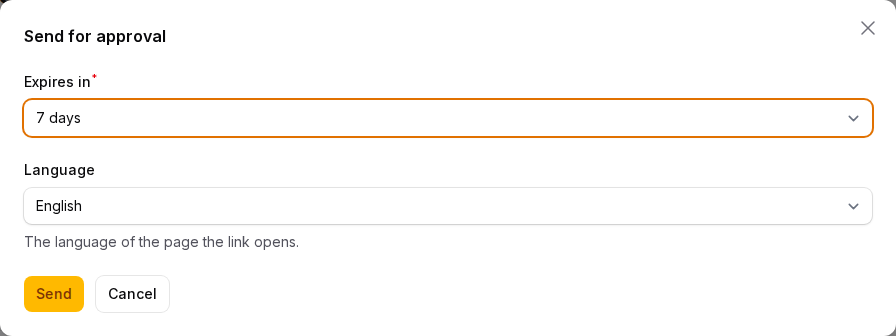
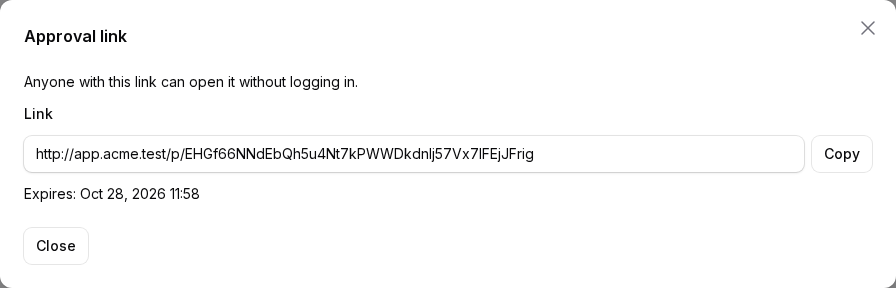
3. Send it. The action asks for the expiry and the language, seals the record's fields in
that language and shows the link (no usage limit) to copy. The customer's page, the consent text
and the error messages are in that language, whatever their browser says; sending in another
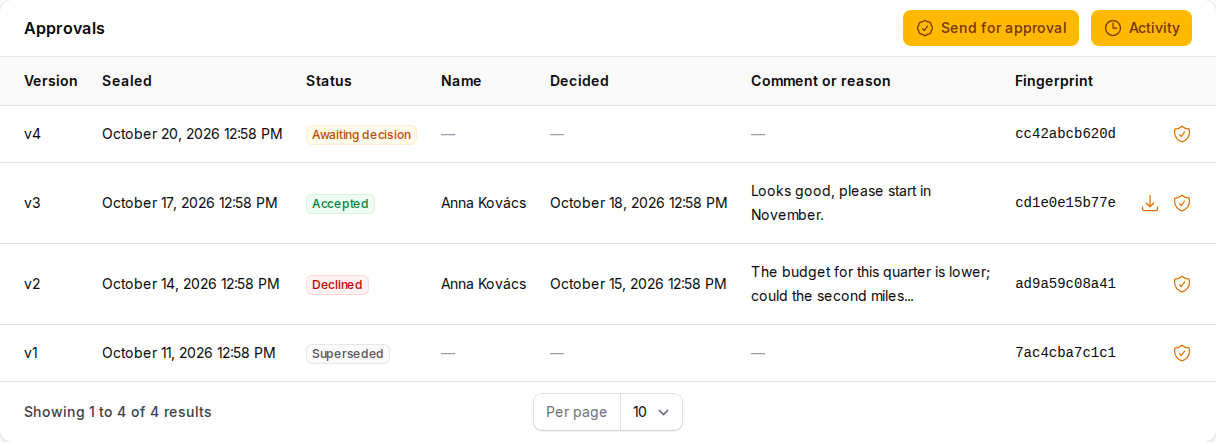
language seals a new version. The table shows each version's status (awaiting decision,
accepted, declined, superseded), who decided when, the comment or reason, the fingerprint, the
stored document, a verify button and the activity. Seeing it needs view on the record, sending
needs update — the record's own policy, as for public links.
Values are text, multi-line text, integers, booleans or dates; a float is refused (sealed content
holds no floats — store money in minor units, or as a decimal string with text()).
Need more than fields — your own layout, a status change on acceptance? Write a handler (below).
|
|
Filament
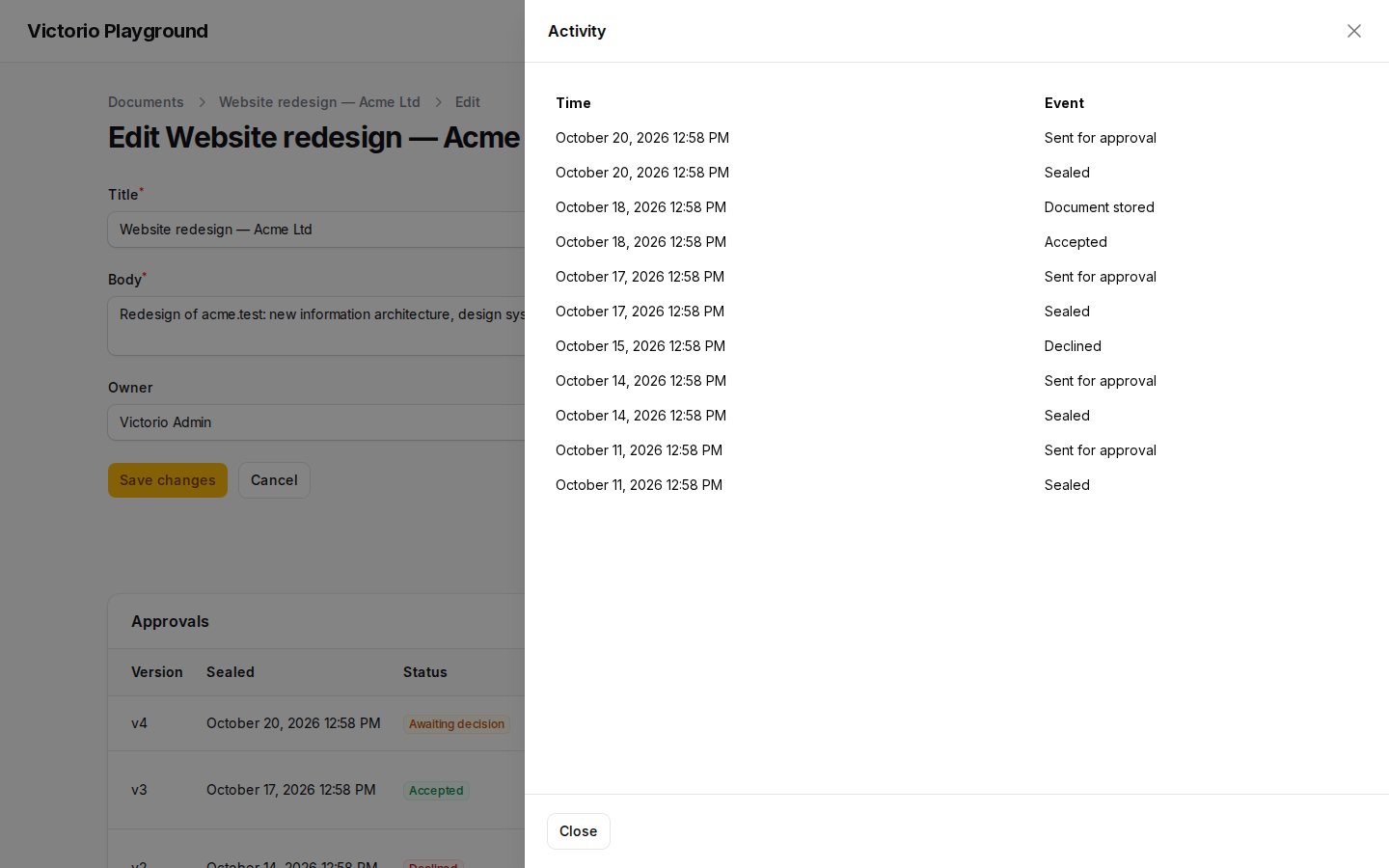
DecisionsRelationManager lists a record's sealed versions: version, when it was sealed, the
status (awaiting decision, accepted, declined, superseded), who decided when, the comment or
reason and the fingerprint. Per version you can download the stored document (after its hash is
checked) and verify the version, its decision and the document. The header has "Send for
approval" and the activity log.
|
|
Permissions follow the record's policy, as in public links: view to see the approvals, the
documents and the activity, update to send for approval; without a policy the panel's
strictAuthorization() decides. With Filament tenancy, only the current tenant's versions show.
Appearance
The approvals table is wide, so its row actions are icon buttons with their label as tooltip — a
look Filament uses too. Change it on the plugin, or change any action of the package wherever it
appears with Filament's configureUsing():
use Filament\Actions\Action;
use Victorio\Acceptance\AcceptancePlugin;
use Victorio\Acceptance\Filament\Actions\VerifySealedVersionAction;

$panel->plugins([
    AcceptancePlugin::make()
        ->rowActions('group')        // 'icons' (default), 'labels' or 'group' (one menu)
        // Keyed by name; return them in your order, leave some out, change or add your own.
        ->modifyRowActionsUsing(fn (array $actions): array => [
            $actions['verifySealedVersion'],
            Action::make('remind')->icon('heroicon-o-bell')->action(/* … */),
        ])
        ->modifyHeaderActionsUsing(fn (array $actions): array => [$actions['sendForApproval']])
        ->modifyToolbarActionsUsing(fn (array $actions): array => [/* your bulk actions */]),
]);

// In a service provider's boot(), for every table and page:
VerifySealedVersionAction::configureUsing(fn (VerifySealedVersionAction $action) => $action->color('success'));
The actions are public classes — SendForApprovalAction, ViewActivityAction (also as a page
action of the record), DownloadEvidenceAction, VerifySealedVersionAction — for your own
tables of sealed versions. Icons are heroicons; hidden actions stay hidden, and refused, in every
layout.
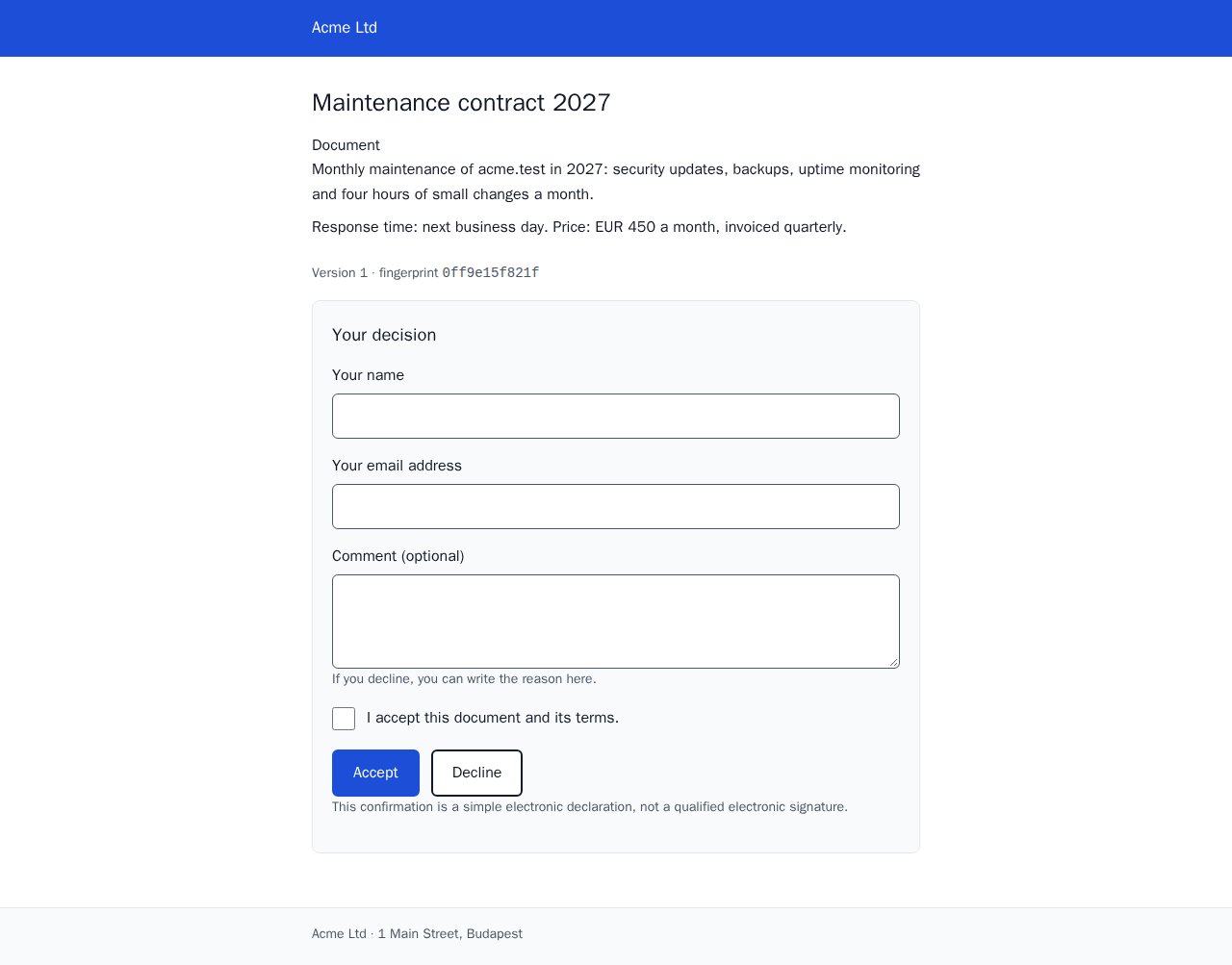
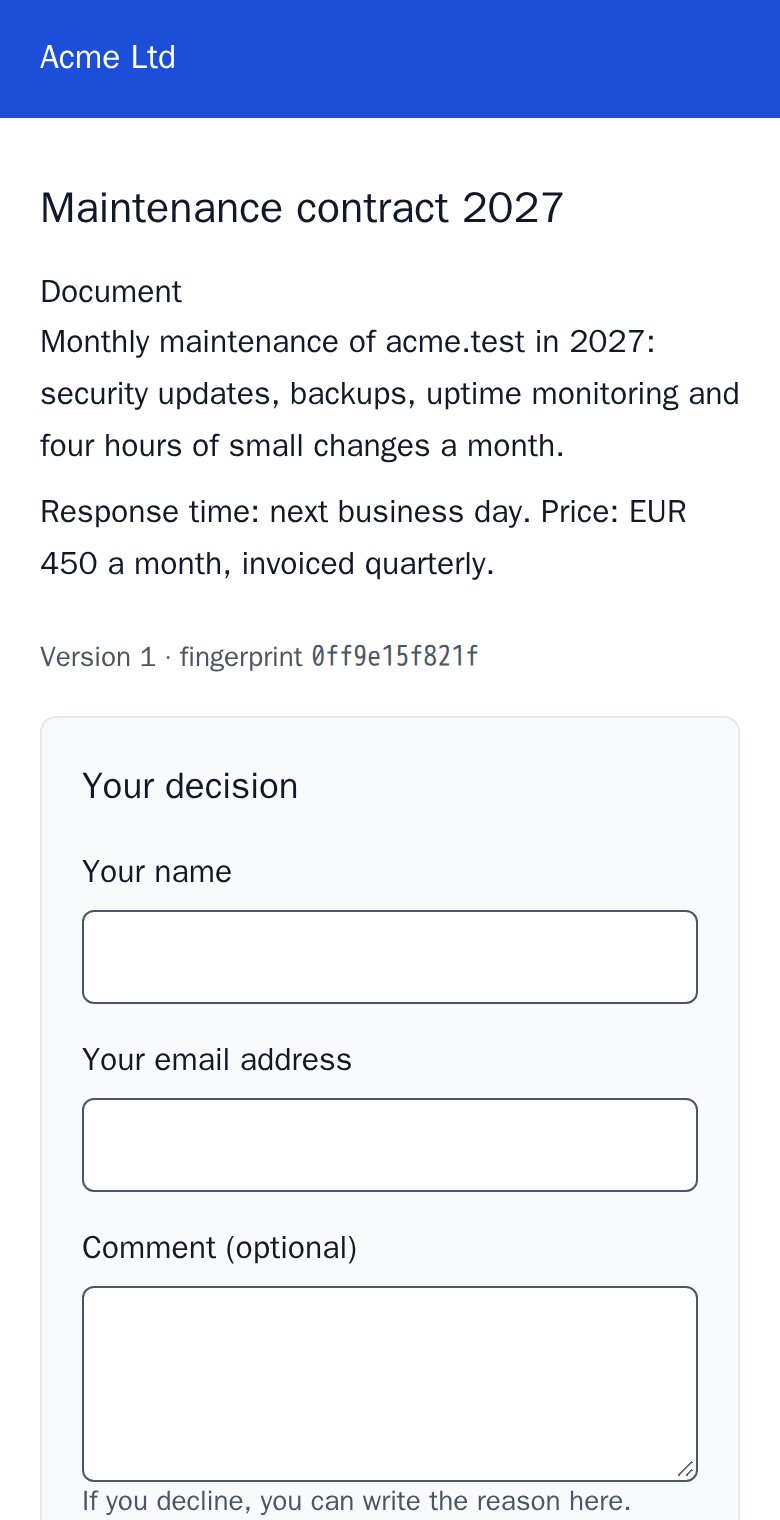
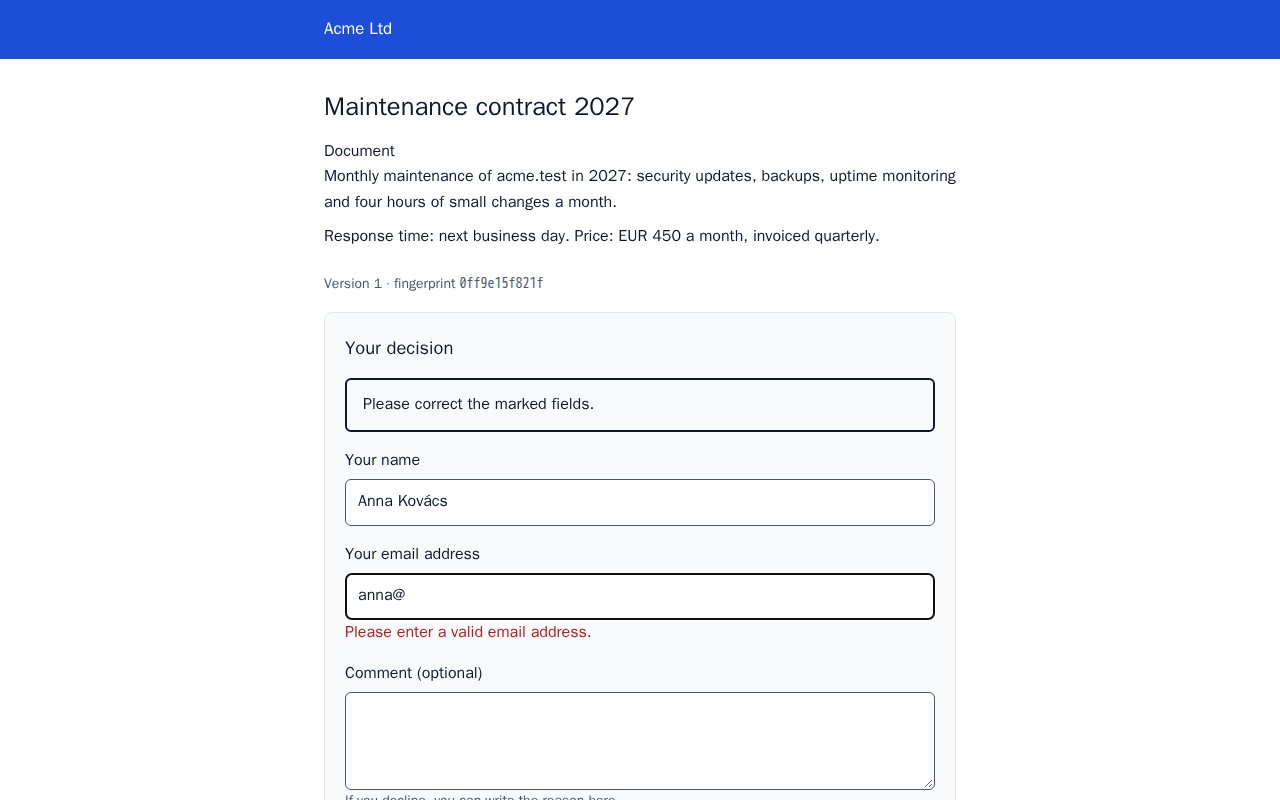
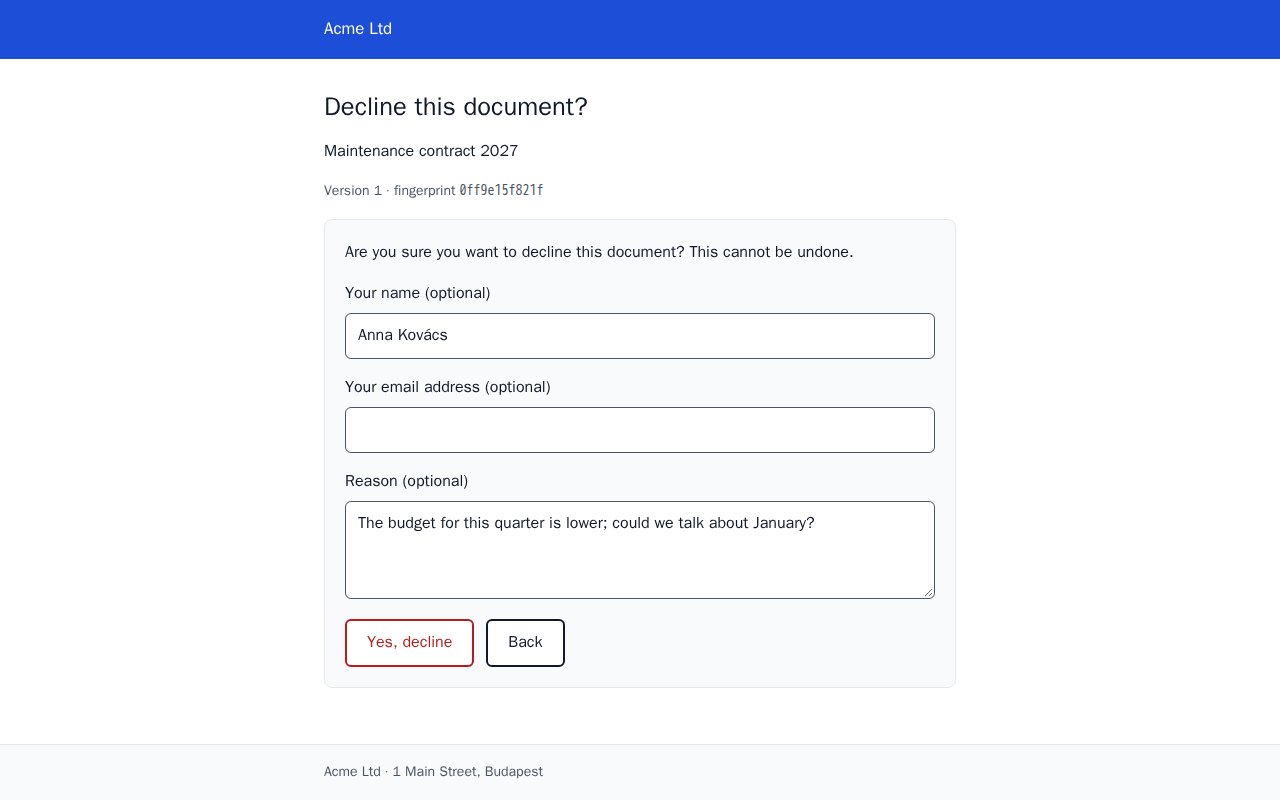
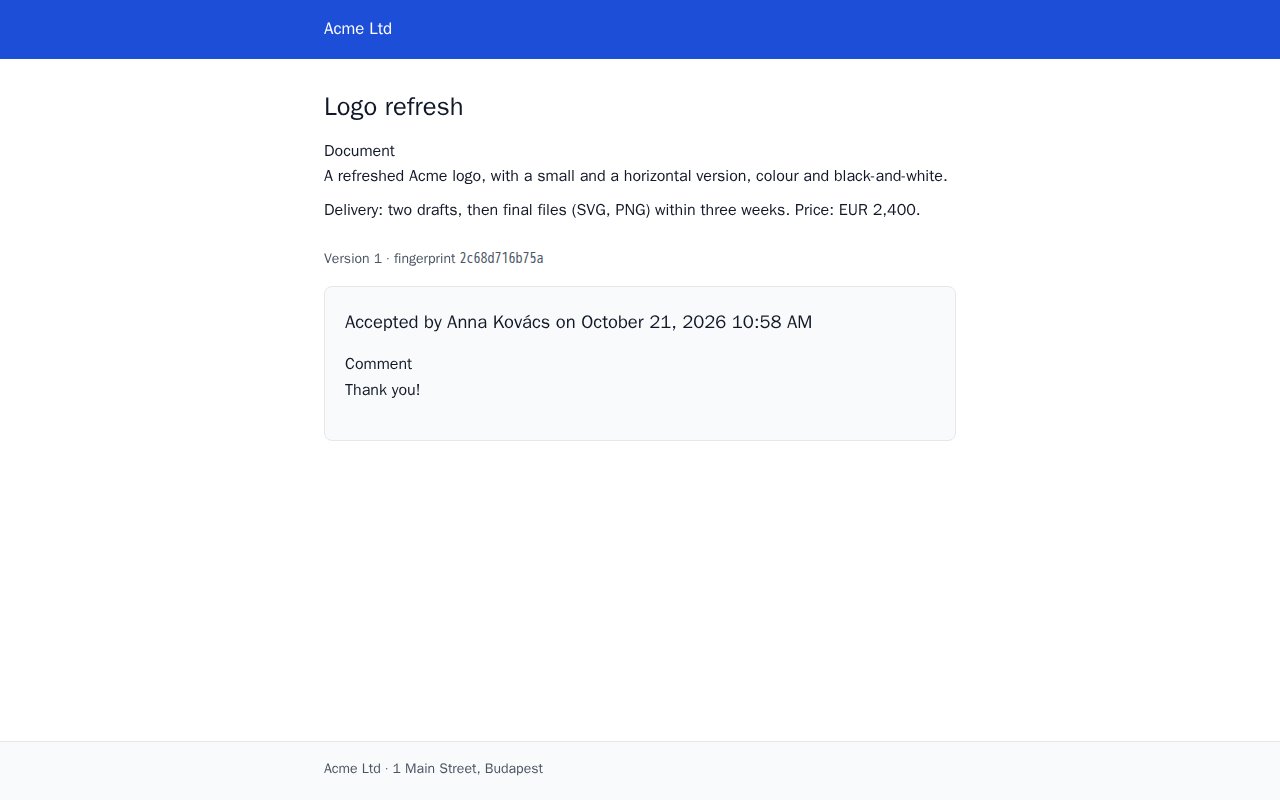
The customer sees one form with an Accept and a Decline button; Decline asks once more before recording anything. Errors stay next to their fields, in the page's language, and after the decision the page confirms it:
 |
 |
Customization
Start at the top of this list and stop at the first step that does the job.
-
Config —
config/filament-acceptance.php: tables and models, tenancy, the evidence disk and path, the audit log's retention (audit.prune_after_days), comment and reason lengths, the approval purpose. The look of the public pages comes from public-links' branding (name, logo, colour, footer, contact address). -
Translations — every user-facing string, in eight languages:
php artisan vendor:publish --tag="filament-acceptance-translations". -
Per-record consent text —
approvalConsentText()on the model replaces the checkbox text of the built-in page for that record; null keeps the translation. The page asks for it in the language the version was sent in, and stores exactly the text shown:public function approvalConsentText(): ?string { return $this->brand === 'nordwind' ? __('documents.nordwind_consent') : null; }
-
Per-record handler —
SendForApprovalActionsends to the built-in page by default; give it a purpose, fixed or per record, to send some records to your own handler (below) with the same button, form and URL modal:use App\Models\Document; use Victorio\Acceptance\Filament\Actions\SendForApprovalAction; SendForApprovalAction::make() ->purpose(fn (Document $record): string => $record->is_brief ? 'brief' : 'approval');
-
Your own handler — for your own page content and behaviour (below).
-
Views — last resort.
php artisan vendor:publish --tag="filament-acceptance-views".A published view is a copy: it no longer receives the package's fixes and new features. Re-check it after every upgrade, and prefer the steps above whenever they can do the job.
Your own handler
The built-in page shows fields. For your own layout (a quote with its lines and totals), a status change on acceptance, or a check before deciding, render the content yourself; the package keeps doing the rest — forms, validation, the confirmation, the superseded and closed states:
// app/Acceptance/DocumentDecision.php
namespace App\Acceptance;

use Illuminate\Contracts\Support\Htmlable;
use Victorio\Acceptance\Http\DecisionLinkHandler;
use Victorio\Acceptance\Models\SealedVersion;
use Victorio\PublicLinks\Builders\PendingPublicLink;
use Victorio\PublicLinks\Data\PublicLinkVisit;
use Victorio\PublicLinks\Facades\PublicLinks;

final class DocumentDecision extends DecisionLinkHandler
{
    protected function renderContent(SealedVersion $version, PublicLinkVisit $visit): Htmlable
    {
        return view('documents.decision', ['document' => $version->content()]);   // escape with {{ }}
    }

    protected function title(SealedVersion $version): string
    {
        return 'Document '.$version->content()['number'];
    }

    // Optional: isActionable(), unavailableNotice(), unavailableNoticeHasContact(), consentText(),
    // locale(), timezone(), transition()
}

// In a service provider's boot():
PublicLinks::handle(SealedVersion::class, 'document', DocumentDecision::class, 'Document');

// Send a sealed version ($document->seal(), below):
$url = (new PendingPublicLink($version, 'document'))->expiresIn(days: 30)->issue()->url;

// Or from Filament: SendForApprovalAction::make()->purpose('document') seals the approval fields
// and sends them to this handler.
When isActionable() says no, the page shows "This document can no longer be accepted or
declined." and the contact address. unavailableNotice() replaces that sentence with your own
(an Htmlable, e.g. "This quote expired on 31 October 2026."); the contact address still
follows once, unless unavailableNoticeHasContact() returns true because your notice has its own.
- The page shows your content, the version's fingerprint and one form (name, e-mail, comment, consent checkbox) with an Accept and a Decline button, without JavaScript. Accept needs the name, e-mail and consent and stores the comment; Decline needs nothing, stores the comment as the reason and first shows a confirmation page ("Yes, decline" or "Back", values kept). After the decision the link shows a read-only confirmation, with a download of the evidence file if you stored one.
- Issue decision links without a usage limit. A recorded decision spends one use; with
maxUses(1)the confirmation page would answer 410. Two decisions are impossible anyway. - The consent text the customer saw is exactly what is stored with the acceptance; if it changes while the page is open, the customer is asked to confirm again.
- A superseded version explains that a newer one was prepared, with your contact address
(public-links'
branding.contact_email). - Eight languages (below); labels, error messages tied to their fields, 44 px buttons, no JavaScript, right-to-left languages supported.
The building blocks
The Filament parts and the built-in page are made of these; use them directly for anything else.
Sealed versions
use Illuminate\Database\Eloquent\Model;
use Victorio\Acceptance\Concerns\HasSealedVersions;

class Document extends Model
{
    use HasSealedVersions;
}

$version = $document->seal(
    kind: 'document',
    content: ['number' => 'D-2026-0042', 'total' => 2_057_400],   // public, hashed
    internal: ['cost' => 1_200_000],                              // admin only, encrypted
    by: auth()->user(),
);

$version->number;           // 1, 2, 3 … per document; sealing a new one supersedes the previous
$version->content_hash;     // SHA-256 of the stored canonical JSON
$version->verify();         // true while the stored content is exactly what was sealed
$document->sealedVersions;     // newest first
$document->latestSealedVersion();
Every seal, decision and stored evidence file also lands in the document's timeline
($document->auditEntries); add your own events with AuditLog::record($document, 'sent', ...).
No personal data goes into it, and the IP only as the access log's HMAC.
Content must be integers, strings, booleans, null and arrays: a float anywhere throws
NotCanonicalizable, so money has to be in integer minor units. With Filament tenancy, a version
stores the current tenant (or seal(tenant: $team) in a queued job), and sealedVersions and
SealedVersion::query()->forCurrentTenant() show only that tenant's versions.
The internal part and the app key
The internal part is encrypted with your APP_KEY and is not part of the hash. Rotating the key
without keeping the old one in APP_PREVIOUS_KEYS makes the internal part unreadable
(internal() throws InternalPartUnreadable), but it does not affect the content, its hash or
verify().
What "immutable" covers
Through Eloquent, a sealed version or a decision cannot be changed or deleted: save(), update(),
increment(), delete(), forceDelete(), destroy() and their quiet variants throw, and so do
update(), upsert(), increment(), delete(), truncate() and friends on
SealedVersion::query(), Decision::query() and their relations. Neither is ever pruned.
What no PHP code can stop: DB::table(), ->toBase(), raw SQL and anyone with direct database
access. The package makes such changes detectable — verify() returns false after a single
changed byte — not impossible. To make them impossible, revoke UPDATE and DELETE on the
victorio_sealed_versions and victorio_decisions tables from the application's database user.
Decisions
use Victorio\Acceptance\Data\DecisionInput;
use Victorio\Acceptance\Facades\Decisions;

$decision = Decisions::record(
    $version,
    DecisionInput::accept(name: 'Anna Kovács', email: 'anna@example.test', consentText: $checkboxLabel),
    request: $request,                                    // hashed IP and user agent
    transition: fn (): bool => $document->markAccepted(), // your status change, same transaction
);

DecisionInput::decline(reason: 'Too expensive');          // name, e-mail and reason optional
$decision->verify();     // the version is intact and is the one that was decided on
A version has at most one decision: a second accept, or an accept racing a decline, throws
DecisionAlreadyMade and writes nothing (a unique index backs this up). A superseded version
(VersionSuperseded), a tampered one (ContentHashMismatch) or your transition returning false
(DecisionRefused) refuse the decision, and everything rolls back. DecisionAccepted and
DecisionDeclined fire after the commit.
Decisions are business records with personal data (name, e-mail) — your app is responsible for them. The IP is never stored: the decision keeps the same HMAC that filament-public-links writes into its access log, plus the id of that request's access row, so the two can be matched. Decisions are never pruned.
Evidence files
$decision->storeEvidence($pdfBytes, 'D-2026-0042-v2.pdf');   // once, on evidence.disk, with its SHA-256
$decision->evidenceContents();                               // the bytes, after checking the hash
Use a private disk. The package never deletes an evidence file.
The canonical form
Anyone can re-check a version without this package: content_hash is the SHA-256 of the stored
content, which is canonical JSON — object keys sorted by UTF-16 code units, lists in order, no
whitespace, integers within ±(2^53 − 1), no floats, strings escaping only ", \ and control
characters (\b \t \n \f \r, others as \u00xx), everything else literal UTF-8. For such data
this is exactly RFC 8785 (JCS), so any JCS
implementation reproduces the bytes. Strings are not Unicode-normalized.
Languages
The pages ship in English and Hungarian, checked by hand, and in German, Spanish, French,
Italian, Dutch and Brazilian Portuguese, machine-assisted — corrections are welcome. They are
shown in the link's language (->locale() when issuing it), else the visitor's browser
language, else your app's; locale() on your handler overrides it.
Have the consent text and the legal note reviewed in your own language. The checkbox label ("I accept this document and its terms.") and the note that the confirmation is a simple electronic declaration, not a qualified electronic signature, are legal in nature. The machine-assisted translations are a starting point, not legal wording: override
consentText()or publish the translations (php artisan vendor:publish --tag="filament-acceptance-translations") and have them checked.
Events
| Event | When |
|---|---|
VersionSealed |
a version was sealed |
DecisionRecorded |
a decision was recorded (accept or decline) |
DecisionAccepted |
a version was accepted |
DecisionDeclined |
a version was declined |
All live in Victorio\Acceptance\Events and fire after the database transaction commits, never
for a decision that was rolled back. public-links' events (opened, first opened, …) fire as well.
Security
- Tamper-evident. A sealed version stores canonical JSON and its SHA-256; a decision stores
the hash it was made on; a stored document has its own hash.
verify()checks all three. Eloquent refuses every change or delete of a version, a decision or an audit entry; for direct database access, revokeUPDATEandDELETEon those tables. - Race-free. One decision per version, by a locked transaction and a unique index; two tabs or a double click get a friendly "already decided" page.
- What the customer agreed to. The consent text stored with an acceptance is exactly the one the page showed; if it changed while the page was open, the customer is asked again.
- No raw IPs. Decisions and audit entries keep public-links' IP HMAC, matching its access log.
- The public pages inherit public-links' token handling, rate limits and
no-referrer,noindex,no-storeheaders; the token appears in the HTML only in form actions.
Please report vulnerabilities privately, as described in SECURITY.md.
Retention and erasure
What the package deletes on its own — only once you schedule model:prune (rule of thumb:
daily, Schedule::command('model:prune', ['--model' => [AuditEntry::class]])->daily()):
| Deleted automatically? | |
|---|---|
| Sealed versions, decisions, evidence files | Never |
| Audit entries of a decided version, or of a version that can still be decided | Never |
| Erasure records (see below) | Never |
| Other audit entries | After audit.prune_after_days (90 days; null keeps them forever) |
A model with sealed versions cannot be deleted for good: a force delete (or, without
SoftDeletes, any delete) throws EvidenceIsPermanent. Use SoftDeletes on your subjects; a
soft delete works as usual. Mass deletes that bypass model events (Document::query()->delete(),
a MassPrunable subject) cannot be stopped, but the sealed versions survive them.
Why keep it? Proof of what was accepted is the point of this package. Under the GDPR, the right to erasure does not apply where processing is necessary for the establishment, exercise or defence of legal claims (Article 17(3)(e)); keeping acceptance evidence may rest on that. Whether it does in your case, and for how long, is your decision — this is not legal advice.
If your assessment requires erasure, there is one deliberate, logged way; nothing in the package ever calls it:
use Victorio\Acceptance\Facades\Erasure;

// Removes name, e-mail, comment, reason, user agent and IP hash from the decisions,
// and the IP hashes from the audit log. Hashes, sealed content and evidence files stay,
// so verify() still holds.
Erasure::anonymize($document, reason: 'GDPR request #123', by: auth()->user());

// Removes every sealed version, decision, evidence file and audit entry of the document.
Erasure::purge($document, reason: 'GDPR request #123', by: auth()->user());
php artisan filament-acceptance:erase "App\Models\Document" 42 --reason="GDPR request #123" [--purge]
anonymizedoes not touch the sealed content. If the snapshot itself holds personal data — the customer's name and address in a quote — that data stays, and so does the evidence file (a PDF of the quote). Onlypurgeremoves it.
Both need a reason, write an erasure record into the audit log (mode, reason, counts; for a
purge also the removed versions' numbers and hashes, never their content) and log a notice with
ids only. The command works by type and id, so it also reaches the evidence of a quote that no
longer exists.
Testing
composer test
Changelog
See CHANGELOG.md. Breaking changes are listed under "Breaking" and only land in a new major version (or a new minor version before 1.0).
License
MIT — see LICENSE.md. Part of the Victorio suite of Filament plugins; contributions are welcome — see CONTRIBUTING.md.