
shipaurora / cms

Aurora: a content management system for Laravel, built on Filament.
Requires
- php: ^8.3
- althinect/filament-spatie-roles-permissions: ^4.0
- blade-ui-kit/blade-heroicons: ^2.7
- blade-ui-kit/blade-icons: ^1.10
- carljanzell/filament-page-builder: ^0.4.2
- codeat3/blade-phosphor-icons: ^2.4
- datlechin/filament-menu-builder: ^1.1
- eslam-reda-div/filament-copilot: ^1.8
- filament/filament: ^5.10
- filament/spatie-laravel-media-library-plugin: ^5.10
- james-heinrich/getid3: ^1.9.27
- lara-zeus/spatie-translatable: ^2.0
- laravel/ai: ^0.11
- laravel/framework: ^13.17
- laravel/mcp: ^1.0
- laravel/passport: ^13.10
- laravel/scout: ^11.9
- livewire/livewire: ^4.4
- marcelweidum/filament-passkeys: ^3.0
- pragmarx/google2fa-qrcode: ^4.0
- shipaurora/borealis-theme: ^1.0
- spatie/image: ^3.9
- spatie/laravel-medialibrary: ^11.23
- spatie/laravel-passkeys: ^1.8
- spatie/laravel-permission: ^8.3
- spatie/laravel-sluggable: ^4.0
- spatie/laravel-translatable: ^6.14
- spatie/laravel-translation-loader: ^2.8
- stechstudio/filament-impersonate: ^5.6
- usamamuneerchaudhary/filament-command-palette: ^2.0
- wallacemartinss/filament-icon-picker: ^2.0
- webonyx/graphql-php: ^15.38
Requires (Dev)
None
Suggests
None
Provides
None
Conflicts
None
Replaces
None
README
A content management system for Laravel, built on Filament. Editors compose pages visually on the real design of the website. Developers keep plain Laravel: Eloquent models, Blade components, service providers and tests. AI assistants work on the same content with exactly the permissions of the person using them.
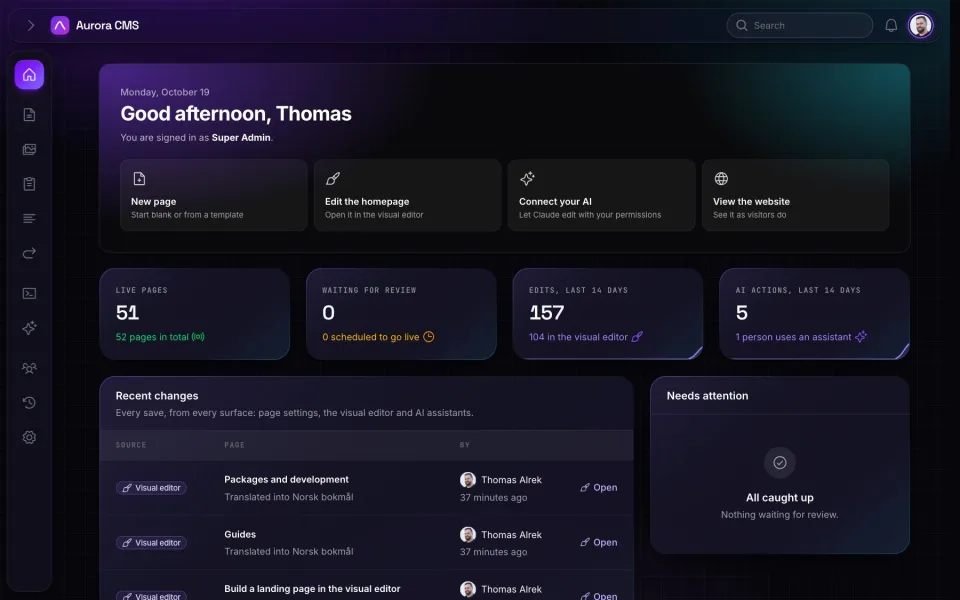
Features
- A visual editor on the real design. Pages are built from blocks on a canvas that renders the website's own Blade components and stylesheet. Editors type straight onto the page, drag blocks into columns, and switch between desktop, tablet and mobile.
- Structured content. Every block is a PHP class with a Filament form, defaults and validation. Pages store blocks as validated JSON, so the same content serves the website, the REST and GraphQL APIs and AI assistants.
- A safe publishing workflow. Drafts, review, scheduled publishing, and revisions with one-click restore. Changes to a live page wait until someone publishes them, and edit locks stop two people from overwriting each other.
- AI that respects permissions. An MCP server lets Claude and other AI apps read and edit the CMS as the signed-in person, over OAuth. The same tools power an assistant inside the admin, and every AI action is logged.
- Everything else a site needs. A media library, a form builder, menus, redirects and a trash. Users with passkeys, two-factor sign-in and roles. Several languages and several websites from one admin. Search, SEO checks, a page cache and webhooks.
- Just Laravel. Your website is a Laravel app, and the CMS is a package in it that updates with
composer update.
Requirements
- PHP 8.3 or newer, with the GD or Imagick extension
- Laravel 13
- A database: SQLite, MySQL/MariaDB or PostgreSQL
Installation
The quickest start is the starter app, a Laravel application with Aurora already set up:
composer create-project shipaurora/aurora my-site   # asks a few questions and sets it all up
cd my-site
To add Aurora to an existing Laravel application:
composer require shipaurora/cms
php artisan aurora:install
aurora:install sets up the database and what the CMS needs, publishes the admin's assets and the
page layouts, creates your admin account, and offers to build the website's front end (--build
to do it without asking). The starter app runs it for you at the end of create-project. Then
sign in at /admin.
Aurora comes with its default admin theme, Borealis. Minimal is a second one to choose from.
Usage
php artisan aurora:make-block "Pricing table"   # a block of the website's own
php artisan make:aurora-layout "Campaign"        # a page layout, registered for editors to pick
php artisan make:aurora-user                     # a person, with a role
php artisan aurora:reindex                       # rebuild the search index
Blocks live in the app (app/Blocks), with their views in resources/views/components/blocks.
The page layouts are published to resources/views/vendor/aurora/layouts, to make your own.
Documentation
The documentation is at shipaurora.com/docs. It covers the visual editor, blocks, layouts, users and roles, languages, AI, the APIs and configuration.
License
Aurora is open-source software licensed under the MIT license.