
scalecommerce / videooptimizer-typo3

Integrates ScaleCommerce VideoOptimizer into TYPO3: pick, upload and manage CDN-delivered videos in the backend and embed them with five ready-to-use content elements.
Package info
github.com/ScaleCommerce/videooptimizer-typo3
Type:typo3-cms-extension
pkg:composer/scalecommerce/videooptimizer-typo3
Requires
- php: ^8.4
- guzzlehttp/guzzle: ^7.16 || ^8.3
- typo3/cms-backend: ^14.3
- typo3/cms-core: ^14.3
- typo3/cms-extbase: ^14.3
- typo3/cms-fluid: ^14.3
- typo3/cms-fluid-styled-content: ^14.3
- typo3/cms-frontend: ^14.3
Requires (Dev)
None
Suggests
None
Provides
None
Conflicts
None
Replaces
None
README
🎬 VideoOptimizer for TYPO3
Pick, upload and manage CDN-delivered videos — right inside the TYPO3 backend.
Product · API & docs · Report a bug
Give your editors adaptive, CDN-streamed video without ever leaving TYPO3. This extension adds five ready-to-use content elements (hero, single video, grid, list, detail), a visual library and video picker, a backend module to manage libraries, videos, thumbnails and subtitles, and previews in the page layout — while the organization's API token stays on the server. Editors just pick a video and publish.
Built and maintained by ScaleCommerce GmbH, the team behind VideoOptimizer. Part of the
scalecommerce/videooptimizer-<platform>plugin family.
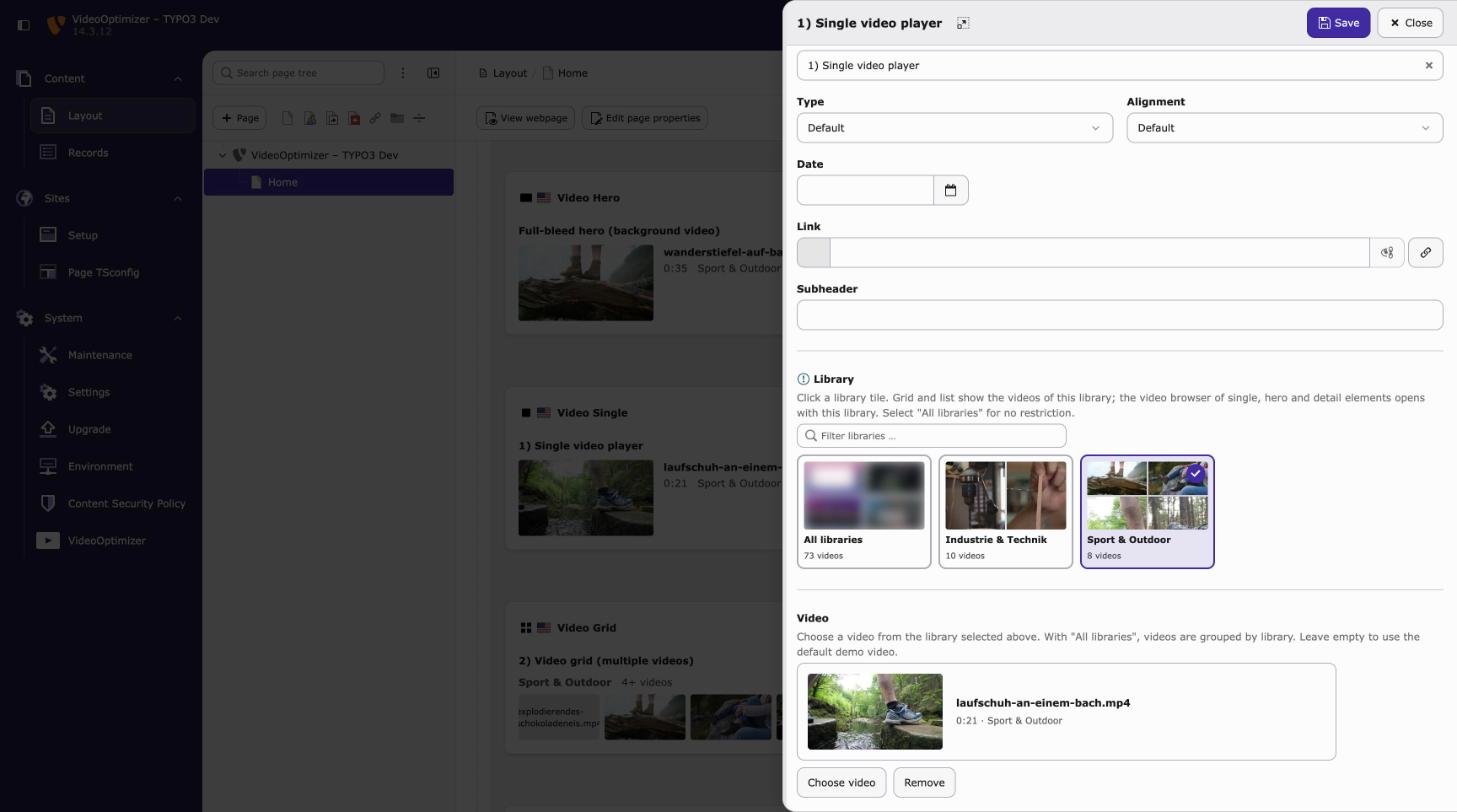
Pick a library as a thumbnail tile, then a video from it. (Only some libraries shown; the "All libraries" preview is blurred because it contains people.)
✨ Highlights
- 🧱 Five content elements —
Video Hero(full-bleed background video),Video Single,Video Grid,Video List(paginated) andVideo Detail, in the Video group of the new-content-element wizard. - 🗂️ Visual pickers — libraries as thumbnail tiles (with filter and keyboard support), videos in a dialog with thumbnail grid, title search and a "ready only" toggle. Library and video stay in sync.
- 🎛️ Per-element player options — autoplay, loop, muted, controls, start time, cover fit, subtitle language; hero options for eyebrow, subtitle, button (new tab / lightbox / link / none), overlay, height and alignment.
- 🛠️ Backend module — create, edit, reprocess and delete libraries; upload videos or import them
from a public
https://URL; rename, tag and delete videos; pick thumbnails; upload subtitles (.vtt/.srt). Native TYPO3 look, English and German. - 👀 Previews in the page layout (Content → Layout) — every element shows its poster, title, duration, library and the options that differ from the defaults.
- 🔎 SEO built in — schema.org
VideoObject/ItemListstructured data (JSON-LD), one entry per video, switchable per site. - ⚡ Fast and resilient — API responses cached with stale-while-error, page-cache tags per video, short frontend timeouts; signed webhooks (or a schedulable command) refresh exactly the affected pages when a video changes.
- 🔐 Token never touches the browser — stored in the extension configuration or an environment variable; every API call is made server-side.
Why deliver video through VideoOptimizer's CDN?
Compared to serving .mp4 files from your own TYPO3 installation or embedding YouTube/Vimeo:
- Fast, global playback — cached on edge servers near each viewer, so streams start quickly with minimal buffering, worldwide.
- Adaptive bitrate (HLS) — every upload is transcoded into a resolution ladder; the player serves the right quality for each connection and device.
- Traffic stays off your server — the CDN absorbs campaign peaks, and you avoid origin bandwidth costs on every view.
- Your brand, no ads — no foreign logos, no "up next" suggestions pulling visitors away.
- Privacy-friendly — streamed from an EU-based CDN without ad tracking (see Privacy).
- Effortless for editors — upload once; posters, thumbnails and renditions are generated automatically.
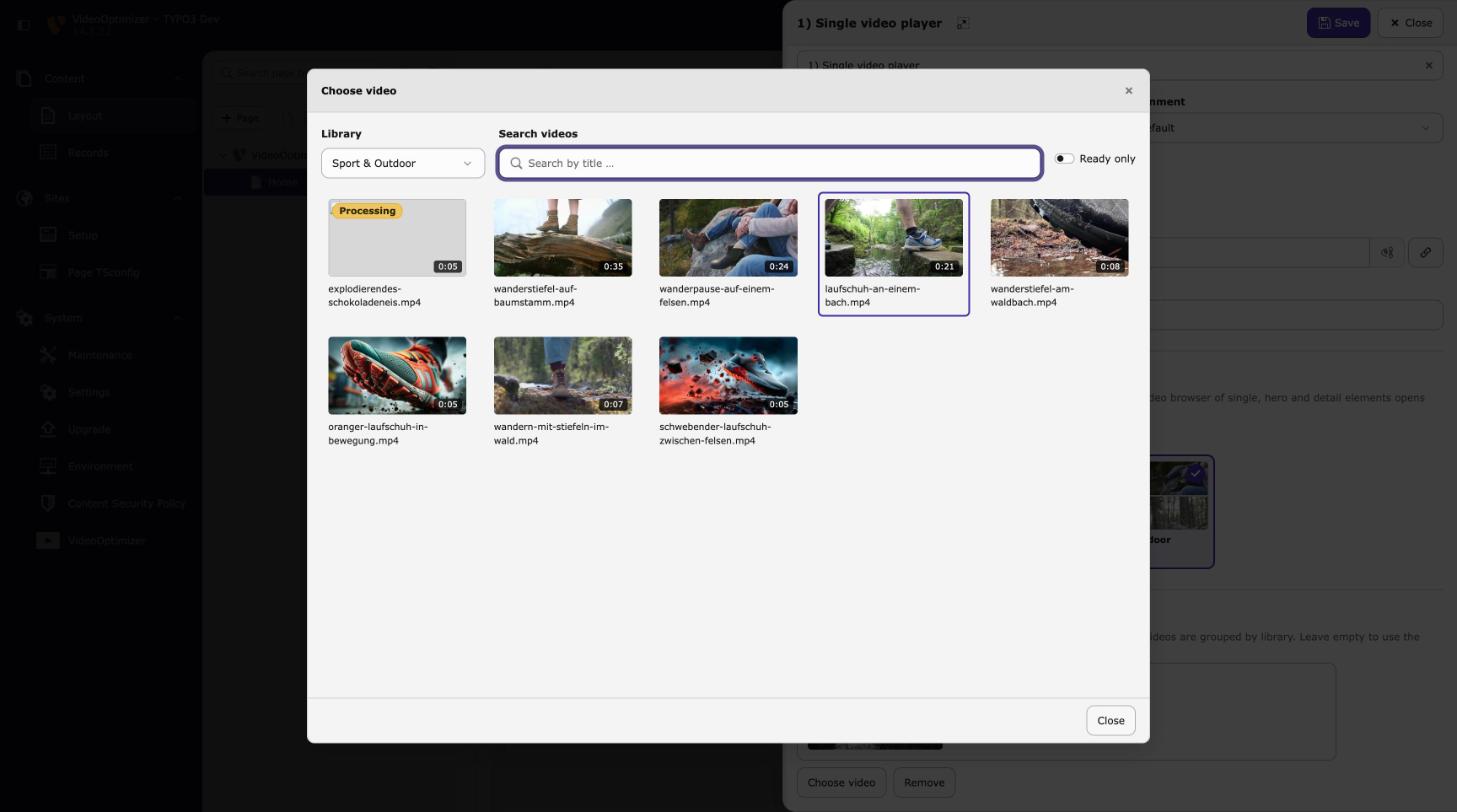
The video picker: filter by library, search by title, see duration and processing status at a glance.
Requirements
| TYPO3 | 14.3 LTS, Composer mode |
| PHP | 8.4 or 8.5 |
| Extensions | fluid_styled_content (installed as a dependency; the site set builds on it) |
| A VideoOptimizer account | grab an API token (vp_…) at videooptimizer.eu → Organization → API tokens |
The token needs the library:view permission (the extension lists videos across all libraries). Uploads,
URL import, reprocessing and thumbnail changes require a library that is managed by VideoOptimizer
("media managed"); delivery-only libraries can be browsed and embedded.
🚀 Quick start
- Install
composer require scalecommerce/videooptimizer-typo3
vendor/bin/typo3 extension:setup
- Add your token. System → Settings → Extension Configuration → videooptimizer → API token —
or set the environment variable
VO_API_TOKEN(see Configuration). - Add the site set. Sites → Setup, edit your site, tab General, field Sets for this Site: add
VideoOptimizer content elements (
scalecommerce/videooptimizer) and save. Or inconfig/sites/<site>/config.yaml:dependencies: - scalecommerce/videooptimizer
- Place a video. In Content → Layout, click Create new content, choose an element from the Video group, pick a library and a video, save.
- Manage videos. Open System → VideoOptimizer to create libraries, upload videos and maintain thumbnails and subtitles.
CSS and the small lightbox script are added automatically by the element templates (only on pages that use them) — no build step, no TypoScript to include.
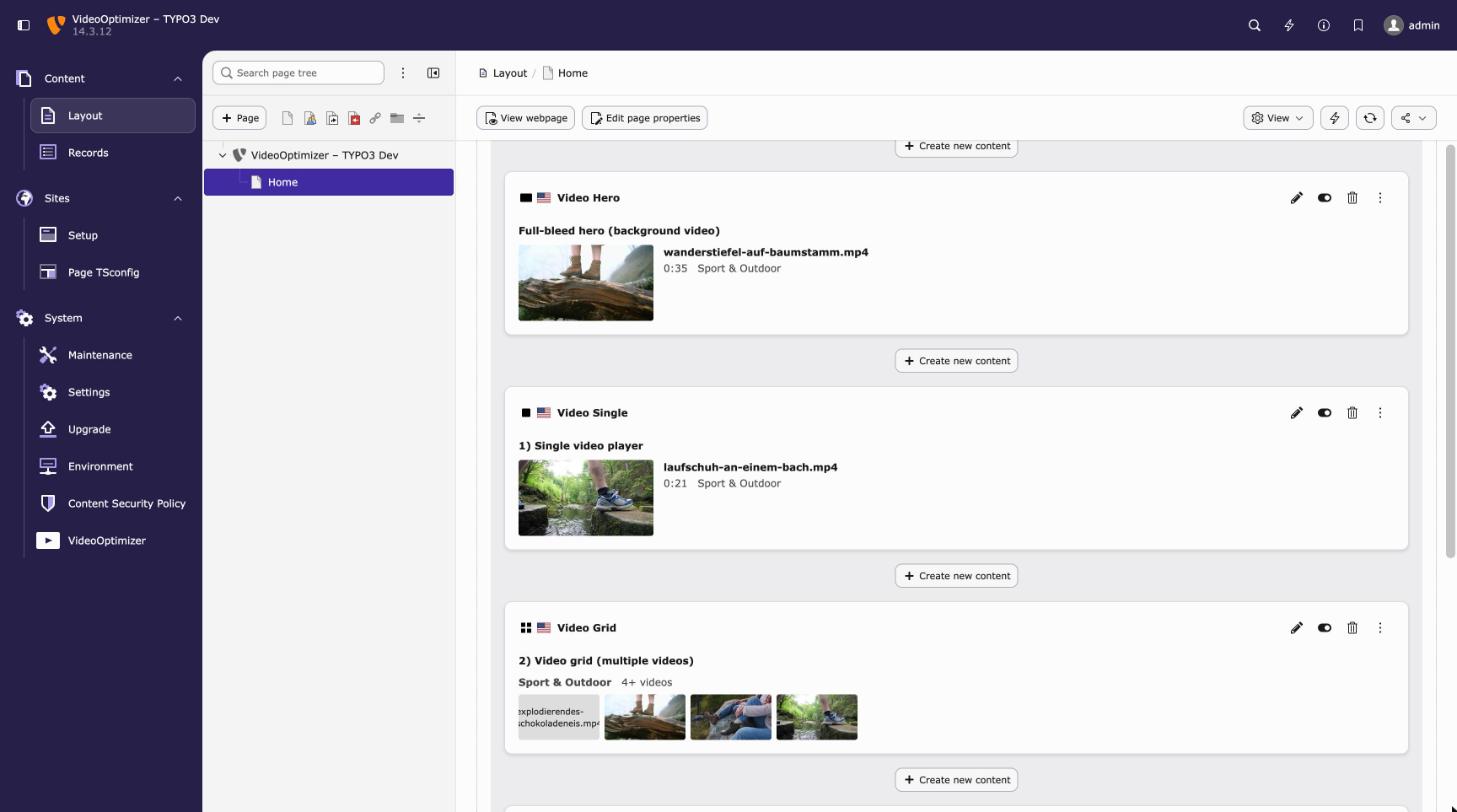
Previews in Content → Layout: poster, title, duration and library at a glance.
Configuration
Extension configuration (System → Settings → Extension Configuration → videooptimizer):
| Setting | Environment variable | Description |
|---|---|---|
apiToken |
VO_API_TOKEN |
Your VideoOptimizer API token (vp_…). The extension configuration wins; the environment variable is the fallback. |
cacheTtl |
VO_CACHE_TTL |
Soft TTL in seconds for cached API responses (default 300). Stale copies are still served for up to 24 h if the API is unreachable. Here the environment variable wins. |
demoVideoUuid |
VO_DEMO_VIDEO_UUID |
Fallback video for elements without a selected video. Leave both empty in production. |
webhookSecret |
VO_WEBHOOK_SECRET |
Signing secret of the VideoOptimizer webhook. Empty = webhook receiver disabled. |
Production tip: values from the extension configuration are stored in
config/system/settings.php. For the API token and the webhook secret, prefer the environment variables (VO_API_TOKEN,VO_WEBHOOK_SECRET) so they stay out of files that end up in backups or version control.
Site setting (site set scalecommerce/videooptimizer):
| Setting | Default | Description |
|---|---|---|
videooptimizer.structuredData |
true |
Output schema.org JSON-LD for the video elements. |
Cache backend. API responses live in the videooptimizer cache (database backend by default). The
extension only sets it if you haven't, so you can switch to Redis/Valkey in config/system/additional.php:
$GLOBALS['TYPO3_CONF_VARS']['SYS']['caching']['cacheConfigurations']['videooptimizer'] = [
    'frontend' => \TYPO3\CMS\Core\Cache\Frontend\VariableFrontend::class,
    'backend' => \TYPO3\CMS\Core\Cache\Backend\RedisBackend::class,
    'options' => ['defaultLifetime' => 86400 /* , Redis connection options */],
    'groups' => ['all'],
];
Keep a tag-capable backend — cache invalidation works with tags.
Permissions
Admins can do everything. For editors, edit their backend user group (be_groups record, e.g. via the
Backend Users module):
| Tab → field | Grant | Allows |
|---|---|---|
| Module Permissions → Allowed modules | VideoOptimizer | Open the backend module (read-only without the options below) |
| Module Permissions → Custom module options → VideoOptimizer module | Manage libraries and videos | Create/edit libraries, rename and tag videos, thumbnails, subtitles |
| Upload and ingest videos | File upload and URL import | |
| Delete and reprocess | Delete libraries, videos and subtitles; reprocess a library | |
| Record Permissions → Table permissions | modify tt_content |
Use the content elements |
| Record Permissions → Explicitly allow field values | the five VideoOptimizer types (only if the group restricts content types) | Insert the content elements |
Every change in the module is a POST with a form token; the module never exposes the API token.
Good to know:
- Module access alone allows reading (libraries, videos, thumbnails, subtitles); the three custom options only gate changes.
- The API token is organization-wide, so the custom options apply to all libraries and videos of the organization — there is no per-library permission.
- The library/video pickers in content elements are available to admins, users who may modify
tt_content, and users with module access.
Usage
Content elements
| Element | What it renders | Video source |
|---|---|---|
| Video Hero | Full-bleed section with a muted, looping background video, poster, eyebrow, title, subtitle and a button | one video |
| Video Single | A responsive player with title | one video |
| Video Grid | A grid of up to 12 videos; click opens a lightbox | a library or all libraries |
| Video List | A paginated list (24 per page) with duration and views | a library or all libraries |
| Video Detail | Player plus metadata (duration, resolution, views, date) | one video |
- Library → video. Pick a library tile first; the video picker then opens with that library. Picking a video selects its library tile. Without a video, the element falls back to the configured demo video.
- Player options tab: autoplay (muted), loop, muted, controls, start position, cover fit, subtitle language.
- Hero tab: eyebrow, subtitle override, button label and action (open player in a new tab — the default —, lightbox, link to a page/URL, or no button), overlay strength, height (compact / default / full screen) and text alignment.
- Videos that are still processing (or failed) render a neutral placeholder instead of a broken player.
- Video List pagination uses the parameter
tx_videooptimizer_videolist[cursor], protected by TYPO3's cHash: only links generated by TYPO3 open another page (a wrong cHash ends in a 404, a missing one shows page 1). Keep it that way — don't add the parameter to$GLOBALS['TYPO3_CONF_VARS']['FE']['cacheHash']['excludedParameters']and leave['FE']['pageNotFoundOnCHashError']enabled; otherwise anyone could fill the API and page cache with arbitrary list pages.
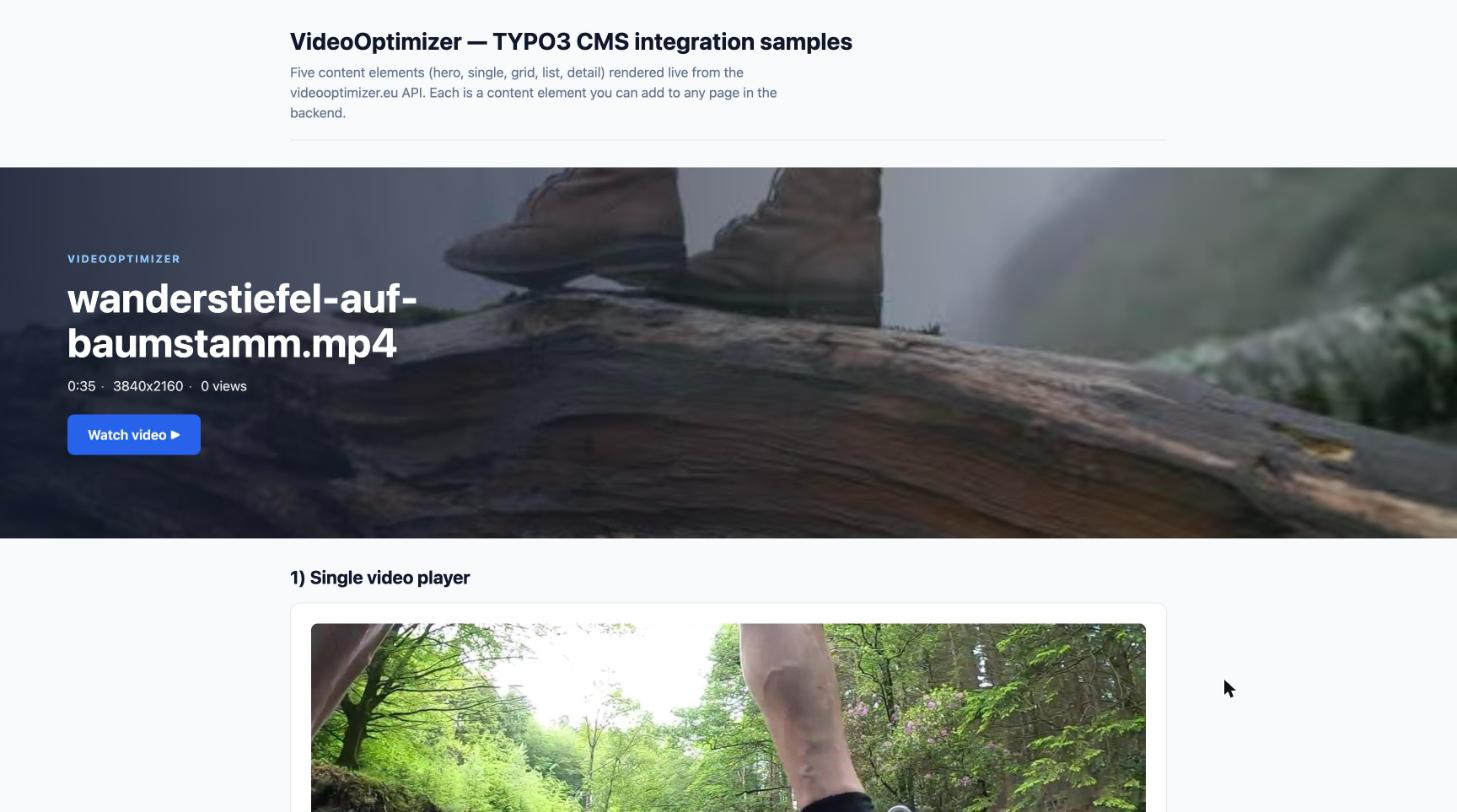
The hero element on the demo page (shown with its poster; the background video plays muted behind the text).
Backend module
System → VideoOptimizer lists your libraries with video count, codec, resolutions and media management:
- Create a library, edit name, description and encoding ladder, reprocess all of its videos, delete it.
- Open a library to upload a video file or import one from a public
https://URL (with title, tags and metadata), filter by tag, rename/tag/delete videos. - Thumbnail: pick one of the auto-generated frames as poster.
- Subtitles: upload or replace
.vtt/.srttracks per language, delete tracks.
Destructive actions ask for confirmation in a TYPO3 dialog. While videos are encoding, the page refreshes itself (but not while you're typing).
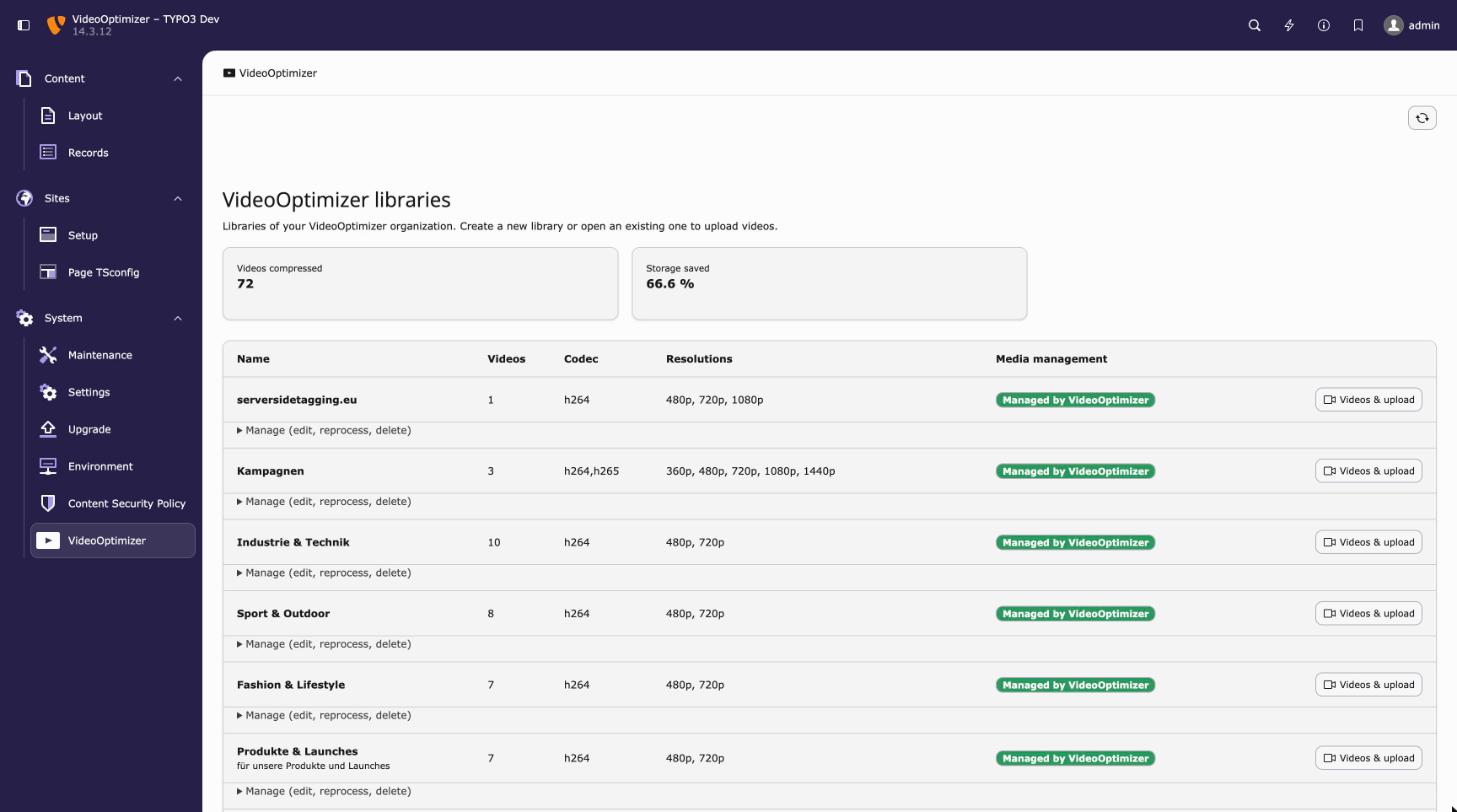
The backend module in TYPO3's native module layout. (Internal test libraries hidden for the screenshot.)
Keeping pages up to date
Pages that show videos are cached by TYPO3 like any other page. To refresh them when a video changes (new title, new poster, finished encoding):
- Webhook (recommended). In the VideoOptimizer app, create a webhook under Organization → Webhooks
with the URL
https://<your-site>/videooptimizer/webhookand put its secret intowebhookSecret.video.*events then flush the cached API data and exactly the pages tagged with that video. - Polling fallback. Run the console command periodically — via cron, or with
typo3/cms-schedulerand its task for console commands:vendor/bin/typo3 videooptimizer:cache:refresh # flush pages of changed/removed videos vendor/bin/typo3 videooptimizer:cache:refresh --dry-run # only report vendor/bin/typo3 videooptimizer:cache:refresh --warm # also pre-fetch every video
- Without either, pages refresh on their own: their cache lifetime is capped at
max(cacheTtl, 900 s).
Structured data (SEO)
Hero, single and detail elements output a schema.org VideoObject (name, description, thumbnail, upload
date, ISO 8601 duration, embed URL); grid and list output an ItemList of the videos shown. A video that
appears several times on a page is described once. Turn it off per site with
videooptimizer.structuredData: false.
Troubleshooting
| Symptom | Cause | Fix |
|---|---|---|
| Elements show nothing on the website | API error, token missing/invalid, or video not found. Visitors never see error details. | Log into the backend (or use the Development context) and reload: the element then shows the reason. Check var/log/ for VideoOptimizer warnings. |
| Element shows "No VideoOptimizer API token configured." (to backend users) | No token in the extension configuration or VO_API_TOKEN |
Set the token (see Configuration). |
| Content elements render nothing at all / no styling | The site set is not added to the site | Add VideoOptimizer content elements to the site's sets. |
| Library tiles or the video picker show a warning | The API was unreachable or rejected the token when the form loaded | Check the token and its library:view permission; the stored selection is kept. |
| Editors can open the module but can't upload or delete | Missing custom module options | Grant the VideoOptimizer options in the editor group (see Permissions). |
| Upload fails for large files | PHP or web-server upload limits | Raise upload_max_filesize / post_max_size (and e.g. nginx client_max_body_size); the module accepts up to 5 GiB. |
| Webhook answers 503 | No webhookSecret configured |
Set the secret. |
| Webhook answers 401 | Wrong secret, or the delivery is older than 5 minutes (clock skew) | Copy the secret again; check the server time. |
| A changed video shows up late | No webhook and no refresh command | Set up the webhook or videooptimizer:cache:refresh; or flush the caches. |
Upgrading
composer update scalecommerce/videooptimizer-typo3
vendor/bin/typo3 extension:setup
vendor/bin/typo3 cache:flush
Check the CHANGELOG before upgrading — it lists every notable change and any manual follow-up.
Uninstalling
- Remove the VideoOptimizer content elements from your pages.
- Remove the site set VideoOptimizer content elements from every site (Sites → Setup, field
Sets for this Site, or the
dependenciesinconfig/sites/<site>/config.yaml), so the site configuration keeps no reference to a set that no longer exists. - Remove the package:
composer remove scalecommerce/videooptimizer-typo3
vendor/bin/typo3 cache:flush
The vo_* columns of tt_content stay in the database until you remove them via System → Maintenance →
Analyze Database Structure.
🔐 How it works
The API token is read from the extension configuration (or the environment) and used only on the server:
the frontend controllers, the backend module, the pickers' AJAX endpoints and the webhook receiver all
call the VideoOptimizer REST API through TYPO3's HTTP client (so proxy and TLS settings apply). The
browser only receives video metadata and https://*.videooptimizer.eu media URLs; every ID that ends up
in an API path is validated first.
API responses are cached per token in the videooptimizer cache with a soft TTL. When a refresh fails,
the last good copy is served for up to 24 hours and the failure itself is cached for 30 seconds, so an
API outage never blocks page rendering (frontend timeouts are 2 s to connect, 8 s overall, with at most
one retry). Rendered pages carry cache tags per video (vo_video_<uuid>) and for lists (vo_lists), which
the webhook and the refresh command use to flush exactly the affected pages.
🔒 Privacy
The extension sets no cookies. The hosted player embedded on your pages sets no cookies and loads no
analytics either (checked in November 2026; it only stores a light/dark display preference in
localStorage). As with any embedded media, the visitor's IP address reaches the VideoOptimizer CDN —
mention VideoOptimizer in your privacy policy and conclude a data processing agreement.
Development
Code style: PSR-12, strict types; backend JavaScript is plain ES modules (no build step), styles are plain
CSS. The extension ships an optional demo site set (scalecommerce/videooptimizer-demo) and the console
command videooptimizer:demo (Development context only), which place all five elements on the root page.
Automated tests (unit tests for the API client, functional render tests) are planned; until then, changes are verified manually against a demo installation.
Contributing
Issues and pull requests are welcome at github.com/ScaleCommerce/videooptimizer-typo3.
License
Released under the MIT License, © ScaleCommerce GmbH.