
scalecommerce / videooptimizer-sulu

Integrates ScaleCommerce VideoOptimizer into the Sulu 3.0 admin: pick, upload and manage CDN-delivered videos without a separate VideoOptimizer login.
Package info
github.com/ScaleCommerce/videooptimizer-sulu
Type:sulu-bundle
pkg:composer/scalecommerce/videooptimizer-sulu
Requires
- php: >=8.2
- ext-sodium: *
- doctrine/dbal: ^3.6 || ^4.0
- doctrine/orm: ^2.15 || ^3.0
- sulu/sulu: ^3.0
- symfony/config: ^6.4 || ^7.0
- symfony/console: ^6.4 || ^7.0
- symfony/dependency-injection: ^6.4 || ^7.0
- symfony/http-client: ^6.4 || ^7.0
- symfony/http-foundation: ^6.4 || ^7.0
- symfony/http-kernel: ^6.4 || ^7.0
- twig/twig: ^3.0
Requires (Dev)
- phpspec/prophecy-phpunit: ^2.1
- phpstan/phpstan: ^1.12 || ^2.0
- phpunit/phpunit: ^10.5 || ^11.0
- symfony/cache: ^6.4 || ^7.0
Suggests
None
Provides
None
Conflicts
None
Replaces
None
This package is auto-updated.
Last update: 2026-09-29 13:58:30 UTC
README
🎬 VideoOptimizer for Sulu
Pick, upload and manage CDN-delivered videos — right inside the Sulu admin.

Product · API & docs · Report a bug
Give your editorial team adaptive, CDN-streamed video without ever leaving Sulu. This bundle adds a
video_optimizer content field, a selection & upload dialog, library management, and four
ready-to-use content blocks to the Sulu 3.0 admin — while the organization's API token stays on the
server, encrypted at rest. Editors just pick a video and hit publish.
Built and maintained by ScaleCommerce GmbH, the team behind VideoOptimizer. Part of the
scalecommerce/videooptimizer-<platform>plugin family.
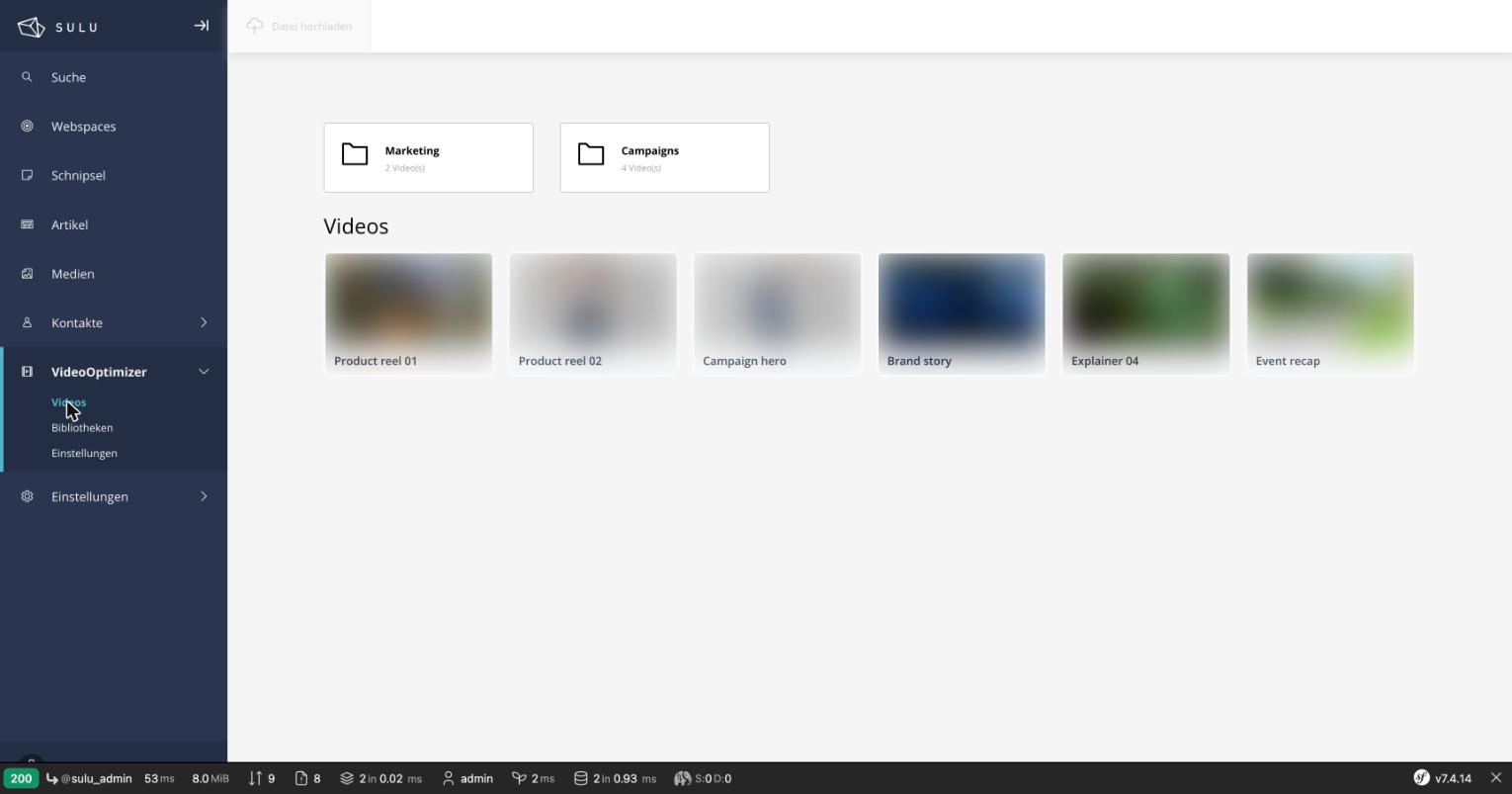
Browse videos right inside Sulu — libraries as folder tiles, videos as a thumbnail grid. (Thumbnails and titles blurred/renamed for the demo.)
✨ Highlights
- 🎥
video_optimizerfield type — drop it into any page, snippet or article template. - 🗂️ Media-style admin — browse libraries as folder tiles, videos as a thumbnail grid, with title search and a "ready only" filter.
- ⬆️ Big-file uploads — presigned multipart upload straight from the browser to storage, with live processing status. Or ingest from a remote URL.
- 🖼️ Full asset control — pick auto-generated thumbnails, upload a custom poster (from disk or the Sulu media library), edit titles and player options, delete videos.
- 🧱 Four content blocks —
media split,background hero,spotlightand avideo grid, with facade / lightbox / direct presentation modes. - 🔐 Token never touches the browser — stored server-side, encrypted with libsodium; all API calls are proxied.
- ⚡ Core-Web-Vitals friendly — lazy poster loading,
IntersectionObserver-gated players,above-the-foldpriority hint, and a single lightweight embed per video. - 🌍 Global CDN delivery — adaptive-bitrate HLS, edge-cached worldwide, resilient under traffic spikes.
Why deliver video through VideoOptimizer's CDN?
Compared to serving .mp4 files from your own origin:
- Fast, global playback — cached on edge servers near each viewer, so streams start quickly with minimal buffering, worldwide.
- Adaptive bitrate (HLS) — every upload is transcoded into a resolution ladder; the player serves the right quality for the connection and device.
- Scales under load — the CDN absorbs traffic spikes, so campaigns or viral pages never overload your CMS origin, and you avoid origin bandwidth costs on every view.
- Resilient — multiple edge locations mean high availability; one node or origin outage doesn't break playback.
- Effortless for editors — upload once and posters, thumbnails and renditions are generated automatically; embedding is a single lightweight iframe that keeps heavy media off the page's critical path (better Core Web Vitals & SEO).
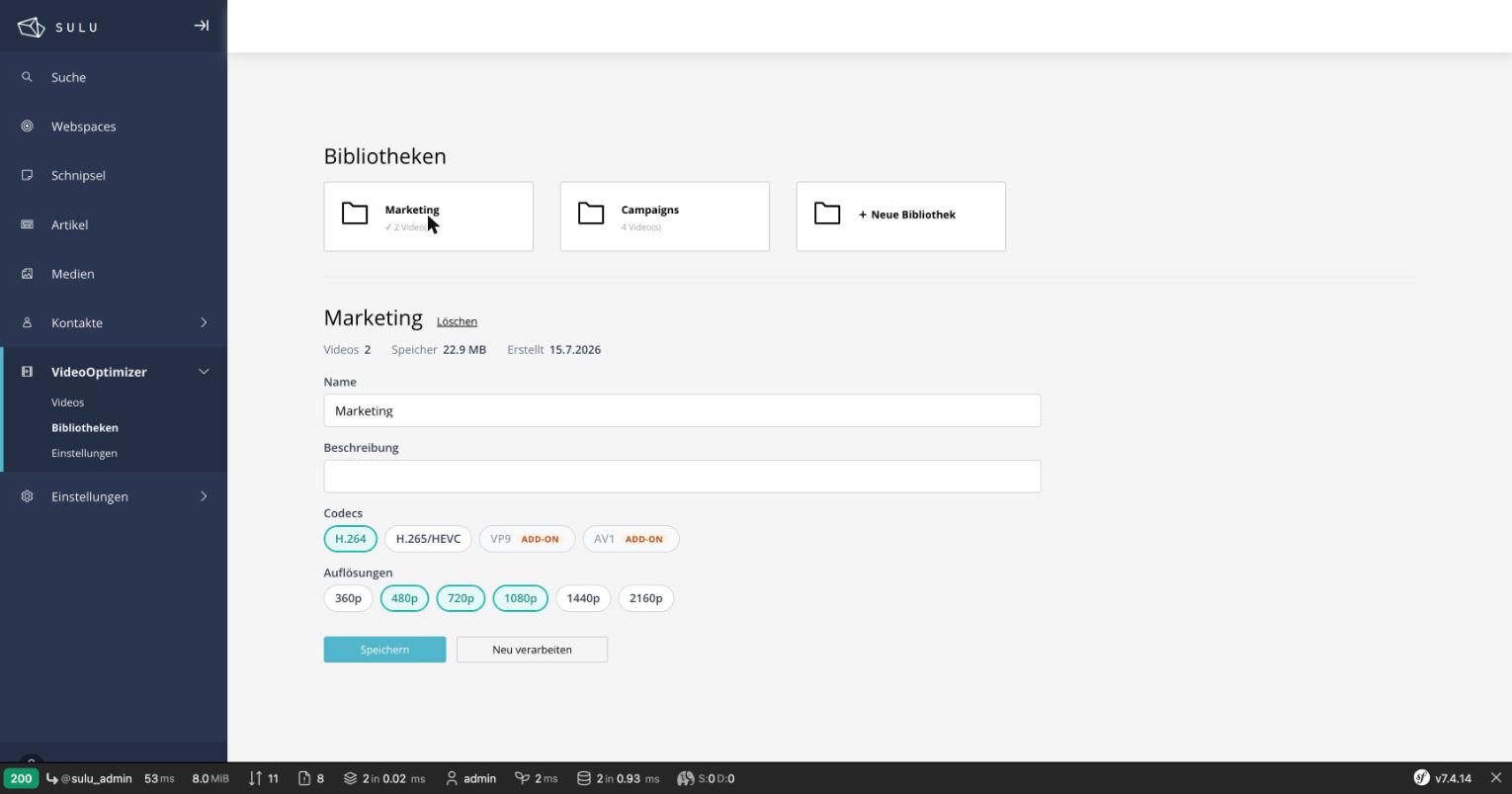
Library cockpit: manage the encoding ladder as codec/resolution chips, with paid add-ons clearly flagged.
Requirements
| PHP | ≥ 8.2 with ext-sodium |
| Sulu | ^3.0 |
| Symfony | ^6.4 || ^7.0 |
| A VideoOptimizer account | grab an API token at videooptimizer.eu → Account → API Tokens |
🚀 Quick start
TL;DR (with Symfony Flex, which registers the bundle for you):
composer require scalecommerce/videooptimizer-sulu
bin/adminconsole scale:videooptimizer:install        # routes + admin JS wiring + settings table
bin/adminconsole cache:clear                         # so the new routes are served
(cd assets/admin && npm install && npm run build)    # build the admin frontend
Then open Settings → VideoOptimizer in the admin and paste your API token. That's it. The detailed steps follow.
1. Install
composer require scalecommerce/videooptimizer-sulu
2. Register the bundle. Symfony Flex does this automatically on composer require. Only if you run
without Flex, add it to config/bundles.php yourself:
Scale\VideoOptimizerBundle\ScaleVideoOptimizerBundle::class => ['all' => true],
3. Run the installer. The bundle ships a console command that does the steps a plain
composer require cannot — it imports the admin API routes, wires its (pre-compiled) admin JS into
assets/admin, and creates the settings table:
bin/adminconsole scale:videooptimizer:install
bin/adminconsole cache:clear                 # so the freshly imported routes are served
The installer is idempotent (safe to re-run) and only fills in what's missing; add --dry-run to
preview. The cache:clear is a separate command on purpose — clearing the cache from inside the
running installer would delete the cache it is still using.
What it does — or set it up by hand instead
-
Admin API routes — creates
config/routes/scale_videooptimizer_admin.yaml:scale_videooptimizer_api: resource: "@ScaleVideoOptimizerBundle/Resources/config/routing_admin.yaml" prefix: /admin/api
-
Admin JS wiring — adds the dependency to
assets/admin/package.jsonand imports it inassets/admin/app.js(the JS ships pre-compiled, so nowebpack.config.jschange is needed):"videooptimizer-sulu": "file:../../vendor/scalecommerce/videooptimizer-sulu/src/Resources/js"
import 'videooptimizer-sulu';
-
Settings table — creates
vo_settingsfrom theVideoOptimizerSettingsentity. If your team tracks schema through migrations, runbin/adminconsole doctrine:migrations:diffthen:migrateinstead.
4. Build the admin frontend:
cd assets/admin && npm install && npm run build
This is Sulu's standard admin build — the admin is a webpack app compiled in your project, so it's a
plain npm run build (use npm run watch while developing). bin/console sulu:build is unrelated — it
builds the data layer (database/content), not the admin JS.
Do not use
sulu:admin:update-buildto install this bundle. That command syncsassets/adminwith the official Sulu skeleton (it either downloads the pre-built skeleton assets — which do not include this bundle's JS — or offers to overwrite yourassets/adminfiles). Its default forpackage.jsonis to overwrite, which would strip thevideooptimizer-suludependency thatscale:videooptimizer:installadded. Always build the admin JS withcd assets/admin && npm install && npm run build.
After updating the bundle, hard-reload the admin (the build hash changes) so the browser doesn't run the stale bundle.
5. Add your token. In the Sulu admin, open Settings → VideoOptimizer and paste your vp_… API
token. It's stored encrypted and never returned to the browser. Done — editors can now pick videos. 🎉
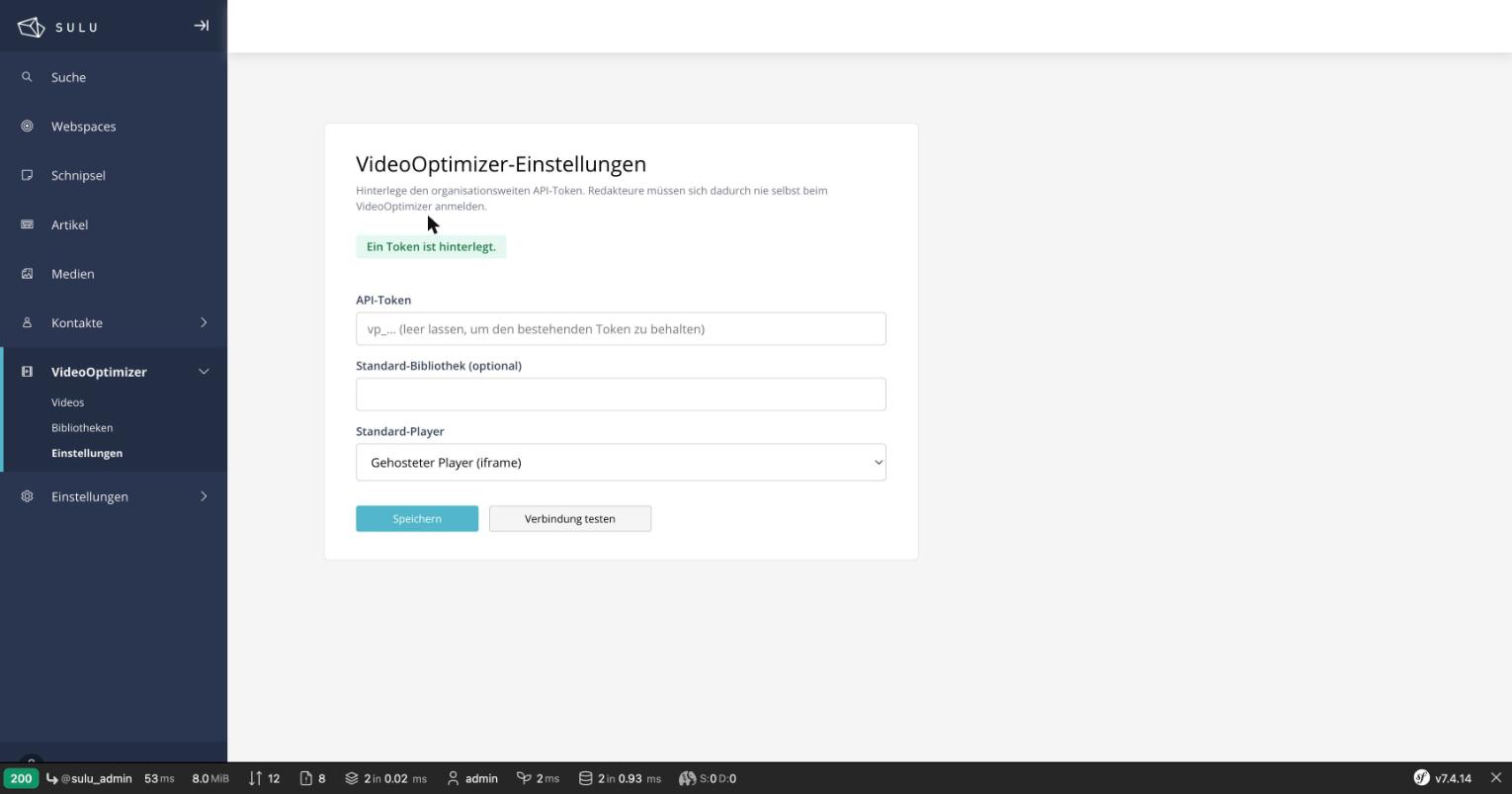
One organization-wide token, stored encrypted server-side — the write-only field never echoes it back.
6. See the blocks in action (optional). Run bin/console assets:install, then create a page with the
"VideoOptimizer showcase" template (shipped by the bundle, no setup) — it already has all four
content blocks wired up and renders them on a self-contained page. See Content blocks.
Optional: a Symfony Flex recipe is included that can register the bundle (step 2) automatically.
Optional: zero-config install with Symfony Flex
A Symfony Flex recipe is included in the repository
under .recipe/. It is not published to
symfony/recipes-contrib — the steps above are the
supported path. If you want a Flex-enabled project to register the bundle in config/bundles.php and
import the admin routes on composer require, you can submit the recipe yourself; see
.recipe/README.md. The scale:videooptimizer:install command still handles the
admin JS wiring and the settings table.
Troubleshooting
| Symptom | Cause | Fix |
|---|---|---|
| The VideoOptimizer navigation appears but clicking does nothing / no view opens | The admin JS was not wired into the build | Run bin/adminconsole scale:videooptimizer:install, then cd assets/admin && npm run build, then hard-reload the admin |
| Views open but show "…admin API is not reachable (404)" | The proxy routes are not imported, or the cache is stale | Run bin/adminconsole scale:videooptimizer:install (imports the routes) then bin/adminconsole cache:clear |
| A view says "No VideoOptimizer token is configured yet" | No API token stored | Open Settings → VideoOptimizer and save your vp_… token |
| Settings shows an error but the form is still usable | Expected on a fresh/misconfigured install — the form never blocks so you can always enter the token | Enter the token and save; fix routes if the error mentions 404 |
Upgrading
Because this package follows semantic versioning, the ^1.0 constraint written by composer require
receives every 1.x feature and fix automatically — updating is a one-liner plus a rebuild:
# 1. Pull the latest 1.x release
composer update scalecommerce/videooptimizer-sulu

# 2. Republish the bundle's frontend assets (new/changed CSS/JS land in public/)
bin/console assets:install

# 3. Rebuild the compiled admin UI so new views/labels ship
cd assets/admin && npm run build

# 4. Clear the caches (admin translations + website container/routes)
bin/adminconsole cache:clear
bin/console cache:clear
Then hard-reload the admin in your browser (the build hash changes, so a normal reload may serve
the old bundle). Skipping step 2 leaves stale frontend assets in public/; skipping step 3 or 4 makes
new admin labels show their raw translation key.
Check the CHANGELOG before upgrading across a minor version — it lists every notable change, and any manual follow-up (e.g. a new config option or a migration) is called out there. To pin a specific version instead of tracking
^1.0, set the exact constraint in yourcomposer.json(e.g."scalecommerce/videooptimizer-sulu": "1.5.2").
Configuration (optional)
The API and embed base URLs default to VideoOptimizer's production hosts. Override them (e.g. to point
at a staging API) under the scale_video_optimizer key:
# config/packages/scale_video_optimizer.yaml
scale_video_optimizer:
    api_base_url: 'https://api.videooptimizer.eu/api/v1'
    embed_base_url: 'https://videooptimizer.eu'
    auto_inject_assets: true   # default; set false to load the frontend CSS/JS manually (see below)
Frontend assets load automatically
Once the bundle assets are published (bin/console assets:install), the frontend CSS/JS load
automatically on any page that renders a VideoOptimizer surface — no template edit required. A
kernel.response listener injects the stylesheet before </head> and the deferred script before
</body>, only when the page actually contains a VideoOptimizer block or embed, and never twice.
Set auto_inject_assets: false to opt out (e.g. strict CSP or ESI setups where you need full control
over the <head>), then load the assets yourself from a page view's {% block stylesheets %}:
{% block stylesheets %}{{ parent() }}
    {{ include('@ScaleVideoOptimizer/partials/assets.html.twig', { blocks: content.content }) }}
{% endblock %}
Uninstalling
bin/adminconsole scale:videooptimizer:uninstall # add --force to skip the drop-table confirmation
Removes the route import and admin-JS wiring and drops the vo_settings table (which holds the
encrypted token, so it asks for confirmation first; --dry-run previews). Afterwards remove the bundle
from config/bundles.php and run composer remove scalecommerce/videooptimizer-sulu.
Usage
Add the field to a template (config/templates/pages/*.xml):
<property name="video" type="video_optimizer">
    <meta>
        <title lang="en">Video</title>
    </meta>
</property>
Render the CDN player in Twig:
{% if content.video and content.video.uuid %}
    {{ video_optimizer_embed(content.video, content.title) }}
{% endif %}
The stored value is { uuid, libraryId, title, posterUrl }; the embed points at
https://videooptimizer.eu/embed/<uuid>.
Rendering your own markup: video_optimizer_sources()
The rendering functions above emit finished markup with fixed bundle classes. When your theme's markup is bound to a design of its own, ask for the data instead and render it yourself:
{% set vo = video_optimizer_sources(content.video) %}
{% if vo %}
    <video class="my-hero__video" muted autoplay loop playsinline poster="{{ vo.poster }}"
           {% if vo.hlsUrl %}data-vo-hls data-hls="{{ vo.hlsUrl }}"{% endif %}>
        {% for source in vo.sources if source.type == 'video/mp4' %}
            <source src="{{ source.src }}" type="{{ source.type }}">
        {% endfor %}
    </video>
{% endif %}
Returns null when no video is selected, otherwise:
| Key | Type | Notes |
|---|---|---|
poster |
string|null |
falls back to the stored posterUrl |
srcset |
string|null |
responsive poster srcset |
hlsUrl |
string|null |
HLS master playlist |
sources |
list |
each { src, type, label } — HLS plus the MP4 renditions |
width / height / duration |
int|null |
native dimensions, seconds |
theme |
array|null |
the library's player theme overrides |
The entries keep the resolver's own key names — the vocabulary of an HTML <source> element. The
function passes data through; it does not adapt it to any particular consumer's field names.
⚠️ HLS on this path needs two things, and one of them is not the assets. Automatic injection is gated on a sentinel that the rendering functions emit; a data payload cannot carry one. So for HLS playback in your own markup:
- Include the assets yourself —
@ScaleVideoOptimizer/partials/assets.html.twigfrom your{% block stylesheets %}.- Mark the element with
data-vo-hls, alongsidedata-hls="{{ vo.hlsUrl }}".The second step is not optional.
vo-blocks.jsreads the playlist URL fromdata-hls, but it only looks at elements it has been pointed at: its own block class, and any<video>carrying thedata-vo-hlsopt-in marker. It deliberately does not wire every<video>with adata-hlsattribute, because the native player path excludes facade and lazy-loading videos on purpose. Assets without the marker is the silent failure: the script loads, nothing claims the element, and the video simply never plays — with no console error.Markup that only uses the MP4 sources natively needs neither the CSS nor the JS, and no marker.
Since 1.6.2 a background video is wired only when it is actually rendered: if your stylesheet hides it (
display:none, e.g. below a breakpoint), it does not stream. It is wired as soon as it becomes rendered, so a viewport change still starts playback. Being below the fold does not count as hidden — such a video is wired immediately, exactly as before.Since 1.7.0 a background video is also wired only after the page has finished loading (or after 6 seconds, whichever comes first), so it does not compete with page content for bandwidth. The video then starts roughly 0.8 s (fast mobile) to 2.6 s (slow mobile) later. Add
data-vo-hls-eagerto start a single video right away; its absence is the default. In thevo_background_heroblock, "Prioritize loading" (for an above-the-fold hero) implies this and additionally preloads the poster withfetchpriority="high"; "Load video immediately" only removes the deferral.
🧱 Content blocks
Beyond the single field, the bundle ships four ready-to-use Sulu content blocks for richer video-driven pages — each delivered as an XML template fragment plus a matching Twig view, so there's nothing to copy-paste.
| Block type | Purpose | Twig view |
|---|---|---|
vo_media_split |
Video beside text, side left/right |
blocks/vo_media_split.html.twig |
vo_background_hero |
Full-bleed native <video> HLS background |
blocks/vo_background_hero.html.twig |
vo_spotlight |
Poster that opens the video in a lightbox | blocks/vo_spotlight.html.twig |
vo_video_grid |
Repeatable grid of videos, each opening a lightbox | blocks/vo_video_grid.html.twig |
Fastest path: the shipped showcase template
The bundle ships a ready-to-use "VideoOptimizer showcase" page template with all four blocks already
wired in and a self-contained view. It is registered automatically — nothing to copy. After
bin/console assets:install, pick it when creating a page, add blocks, publish, and you're done.
Use this to explore the blocks immediately, or as a reference for wiring them into your own templates (below).
Wiring blocks into your own templates
Prefer your own theme/template? The bundle registers its block directory globally, so all four blocks
are available as referenceable block types in every page and snippet template — no XInclude, no
file paths to juggle. Add one <type ref="…"/> line per block wherever you define a block property:
<block name="content" default-type="intro" minOccurs="0">
    <types>
        <type name="intro">...</type>
        <type ref="vo_media_split"/>
        <type ref="vo_background_hero"/>
        <type ref="vo_spotlight"/>
        <type ref="vo_video_grid"/>
    </types>
</block>
The ref keys (vo_media_split, vo_background_hero, vo_spotlight, vo_video_grid) match the
blocks' <key> values. In the admin block picker they show up prefixed with [VO] so editors can tell
they come from this bundle. Because the block types are registered globally (via the bundle's DI
prepend()), there is nothing to copy and the same ref works in any template.
Want the blocks available in all templates? Sulu has no single switch for that — each template lists its own block types. Add the four
<type ref="…"/>lines to every page/snippet template that should offer the VideoOptimizer blocks.
Registering assets & Twig dispatch
Publish the bundle's CSS/JS like any other bundle asset:
bin/console assets:install
That's it — the assets load automatically. The bundle's AssetInjectionListener injects the
stylesheet before </head> and the deferred script before </body> on any page that renders a
VideoOptimizer surface, and never twice. You don't hardcode asset paths or include a partial.
To opt out (scale_video_optimizer.auto_inject_assets: false), load them yourself from a page view's
{% block stylesheets %} — the bundle still owns the paths, so you never hardcode them:
{% block stylesheets %}{{ parent() }}
    {{ include('@ScaleVideoOptimizer/partials/assets.html.twig', { blocks: content.content }) }}
{% endblock %}
Omit the blocks argument to always emit the tags (e.g. on a template guaranteed to show the blocks).
Then dispatch the blocks to the bundle's views. Wrap them in a container with data-vo-base so
vo-blocks.js can locate the bundled hls.light.min.js (it otherwise falls back to
/bundles/scalevideooptimizer/):
<div class="vo-blocks" data-vo-base="{{ asset('bundles/scalevideooptimizer/') }}">
    {% for block in content.content %}
        {% include '@ScaleVideoOptimizer/blocks/' ~ block.type ~ '.html.twig' with { block: block } only %}
    {% endfor %}
</div>
Theming
vo-blocks.css scopes all block styling under .vo-blocks via CSS custom properties, so a host theme
can restyle everything without touching the bundle's CSS:
| Property | Purpose |
|---|---|
--vo-accent |
Accent color (links, controls) |
--vo-text |
Primary text color |
--vo-muted |
Secondary/muted text color |
--vo-bg |
Block background color |
--vo-surface |
Card/surface background color |
--vo-radius |
Corner radius for cards/media |
--vo-gap |
Vertical rhythm between sections |
--vo-max-width |
Max content width |
--vo-overlay |
Gradient overlay on media/hero |
--vo-shadow |
Drop shadow for cards/media |
--vo-font |
Font family (defaults to inherit) |
🔐 How it works
The API token is stored once, organization-wide, encrypted with libsodium's secretbox. Editors
never see or handle it. Every call to VideoOptimizer is proxied through the bundle's admin controllers
so the token stays server-side — the browser only ever receives short-lived presigned URLs for the
direct-to-storage part uploads. List endpoints are cursor-paginated and resolved server-side into a flat
array; rate limits (429) are retried once, honoring Retry-After.
Development
composer install
vendor/bin/phpunit
Working on the admin UI
The admin UI source lives under src/Resources/js (React 17 + MobX). It is shipped pre-compiled
to src/Resources/js/dist (via Babel, mirroring Sulu's own config) so consumers don't need to widen
their webpack babel config. After editing the source, rebuild the compiled output and commit it:
cd src/Resources/js && npm install && npm run build # regenerates dist/
CI verifies dist/ is in sync with the source, so a stale build fails the pipeline. State mutations in
admin field/view handlers must be wrapped in MobX @action (the Sulu production build enforces actions).
Contributing
Issues and pull requests are welcome at
github.com/ScaleCommerce/videooptimizer-sulu.
Please run vendor/bin/phpunit before opening a PR.
License
Released under the MIT License, © ScaleCommerce GmbH.
Ships hls.js (Apache License 2.0) for HLS playback in the content blocks — see THIRD-PARTY-NOTICES.md.