
sabitahmadumid / laravel-launchpad

Laravel Installation and Update Wizard Package - Ship your Laravel web app easily with automated installation and update wizards
Package info
github.com/sabitahmadumid/laravel-launchpad
pkg:composer/sabitahmadumid/laravel-launchpad
Fund package maintenance!
Requires
- php: ^8.0
- guzzlehttp/guzzle: ^7.0
- illuminate/contracts: ^11.0||^12.0
- spatie/laravel-package-tools: ^1.16
Requires (Dev)
- larastan/larastan: ^3.0
- laravel/pint: ^1.14
- nunomaduro/collision: ^8.8
- orchestra/testbench: ^10.0.0||^9.0.0
- phpstan/extension-installer: ^1.4
- phpstan/phpstan-deprecation-rules: ^2.0
- phpstan/phpstan-phpunit: ^2.0
Suggests
None
Provides
None
Conflicts
None
Replaces
None
README
Laravel Launchpad is a comprehensive installation and update wizard package that makes it incredibly easy for developers to ship their Laravel applications and for end-users to install them. With professional UI components, license validation, environment checking, and a streamlined automatic process, Launchpad transforms complex deployments into simple, guided experiences.
Perfect for SaaS applications, commercial Laravel products, or any Laravel application that needs professional installation and update capabilities.
📸 Screenshots
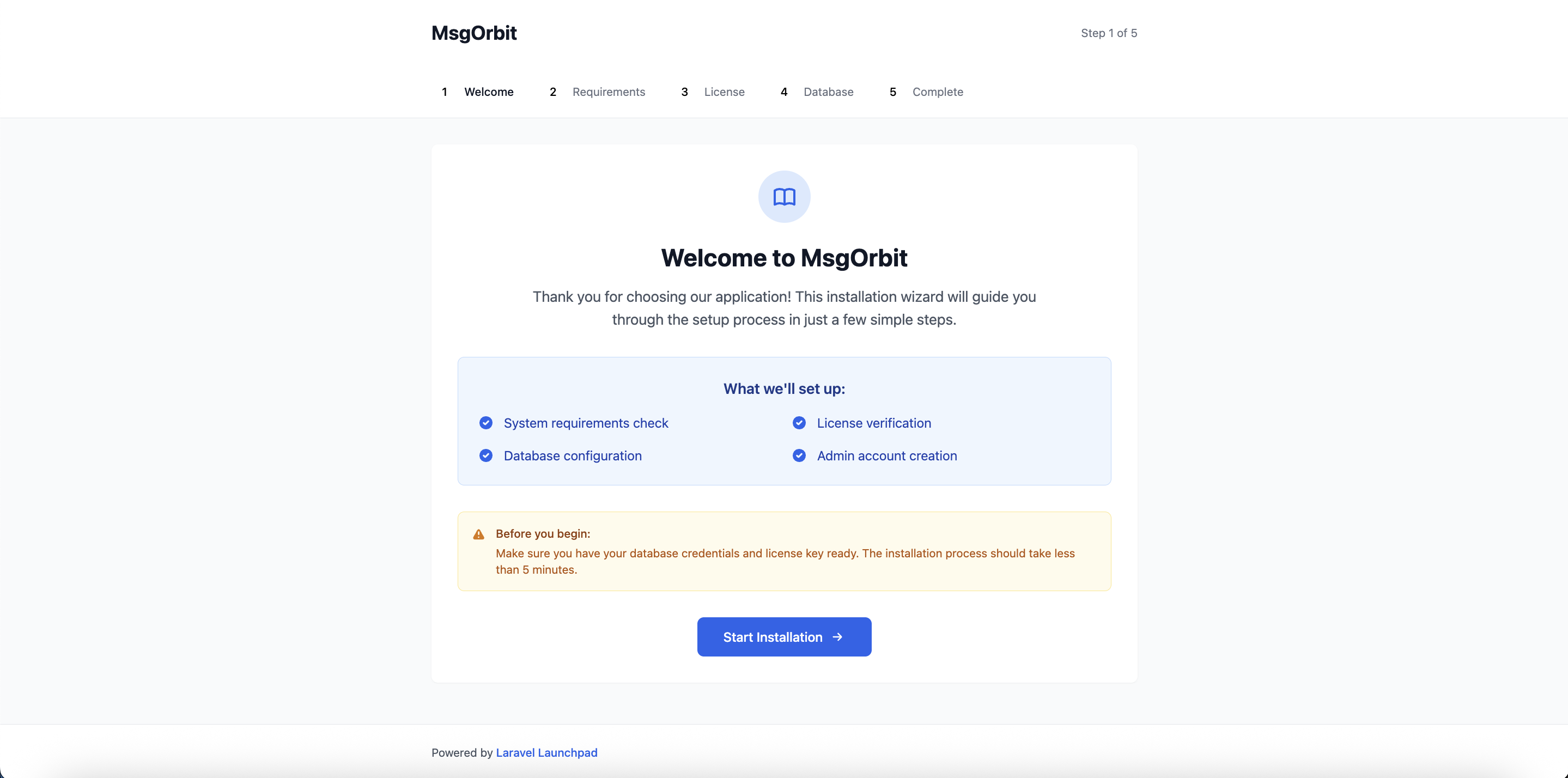
Installation Wizard
Update Wizard
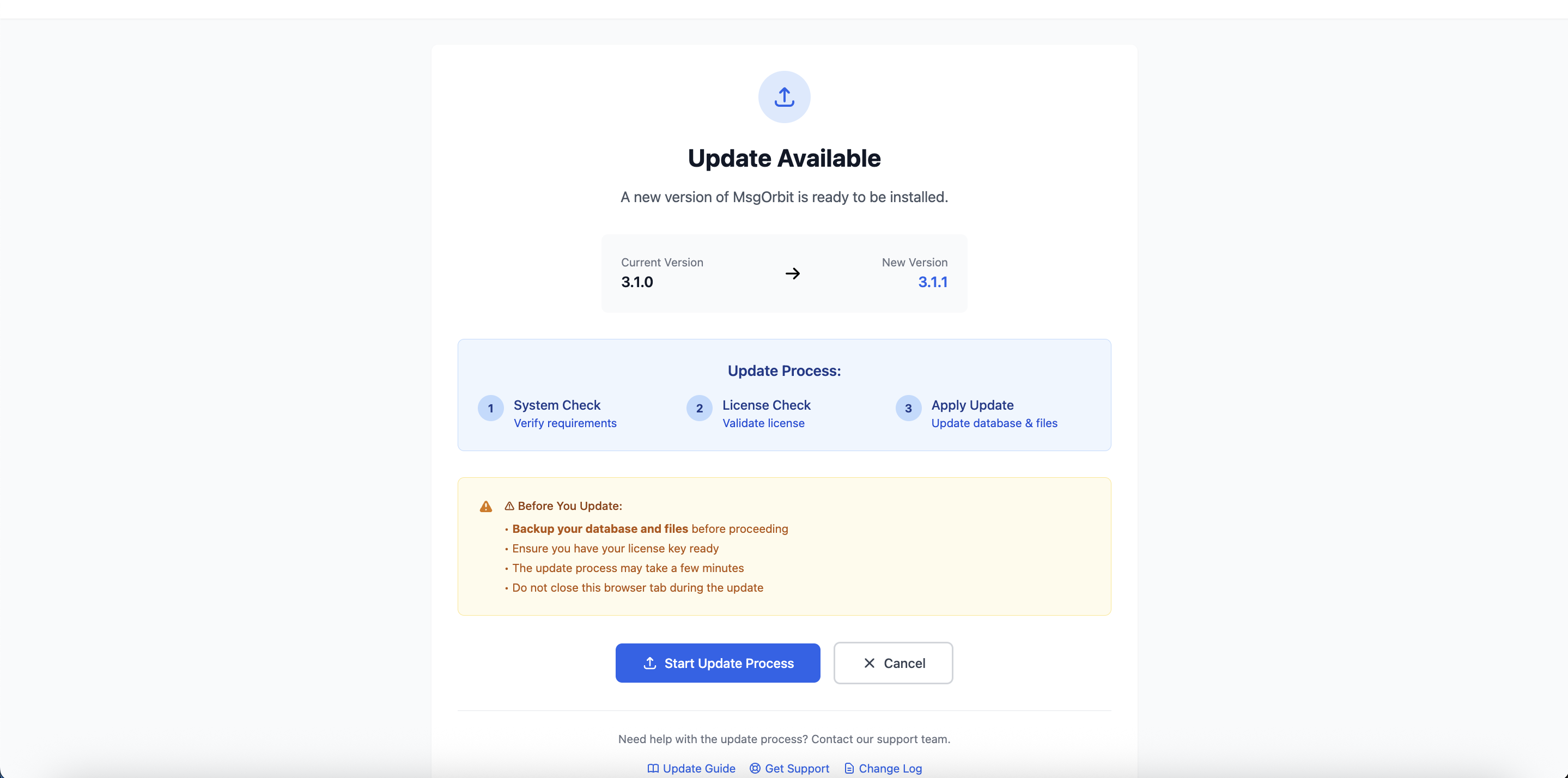
📝 Note: Screenshots show the default Tailwind CSS styling. All views are fully customizable through Blade templates.
✨ Features
- 🎯 Automatic Installation Wizard - 5-step guided installation process with automatic configuration-based setup
- 🔄 Automatic Update Wizard - 5-step guided update process with automatic version upgrades
- 🌍 Multi-Language Support - Built-in internationalization system, easily extendable to any language
- ⚠️ Mutually Exclusive Modes - Installation and update wizards are designed to run independently (never simultaneously)
- 🤖 Configuration-Driven Flow - No user choices required - all operations automatic based on configuration
- 🔒 Auto-Security - Installation/update routes automatically disabled after successful completion
- 🛡️ License Validation - Flexible license verification system with external server support
- ⚙️ Environment Checking - PHP version, extensions, and directory permissions validation
- 🎨 Professional UI - Modern, responsive interface built with Tailwind CSS and Alpine.js
- 🔄 Language Switcher - Beautiful dropdown with flag icons and native language names
- 🔧 Self-Contained Configuration - All settings managed in config files, minimal environment dependencies
- 🏗️ Clean Architecture - Service-oriented design with proper separation of concerns
- 📱 Mobile Responsive - Works perfectly on all devices and screen sizes
- 🎉 User Experience - Smooth animations, progress indicators, and celebration effects
📋 Requirements
- PHP 8.1 or higher
- Laravel 10.0 or higher
- Composer
📦 Installation
Install the package via Composer:
composer require sabitahmadumid/laravel-launchpad
Publish the configuration file:
php artisan vendor:publish --tag="laravel-launchpad-config"
Optionally, publish the views for customization:
php artisan vendor:publish --tag="laravel-launchpad-views"
Optionally, publish the language files for customization:
php artisan vendor:publish --tag="laravel-launchpad-lang"
Or use the dedicated command:
php artisan launchpad:publish-lang
🌍 Internationalization (i18n)
Laravel Launchpad supports multiple languages out of the box, making it perfect for global applications.
🗣️ Supported Languages
- English (en) - Default language
- Multiple Languages - Easily add any language with simple translation files
🚀 Quick Start with Languages
The package automatically detects and applies user language preferences. No additional setup required!
🎛️ Language Features
- 🔄 Dynamic Language Switching - Users can switch languages during installation/update
- 🎨 Beautiful Language Switcher - Dropdown with flag icons and native names
- 📱 RTL Support Ready - Infrastructure for right-to-left languages
- 🔤 Smart Fallbacks - Falls back to English if translation missing
- 💾 Session Persistence - Remembers user's language choice
📁 Language File Structure
resources/lang/vendor/launchpad/
├── en/
│   ├── common.php      # Common UI elements
│   ├── install.php     # Installation wizard
│   └── update.php      # Update wizard
└── {lang}/
    ├── common.php      # Translated UI elements
    ├── install.php     # Translated installation wizard
    └── update.php      # Translated update wizard
🛠️ Adding Custom Languages
-
Publish language files:
php artisan launchpad:publish-lang
-
Create new language directory:
mkdir resources/lang/vendor/launchpad/es # For Spanish -
Copy and translate files:
cp -r resources/lang/vendor/launchpad/en/* resources/lang/vendor/launchpad/es/ -
Update configuration:
// config/launchpad.php
'language' => [
    'available' => [
        'en' => ['name' => 'English', 'native' => 'English', 'flag' => '🇺🇸'],
        'es' => ['name' => 'Spanish', 'native' => 'Español', 'flag' => '��'],
        'fr' => ['name' => 'French', 'native' => 'Français', 'flag' => '��'],
        // Add any language you want
    ],
],
🎯 Language Configuration Options
'language' => [
    'default' => 'en',                              // Default language
    'auto_detect' => true,                          // Auto-detect from browser
    'session_key' => 'launchpad_language',          // Session storage key
    'switcher' => [
        'enabled' => true,                          // Show language switcher
        'show_flags' => true,                       // Show flag icons
        'show_native_names' => true,                // Show native language names
        'position' => 'top-right',                  // Switcher position
    ],
],
🔧 Programmatic Language Control
// Get language service
$languageService = app(\SabitAhmad\LaravelLaunchpad\Services\LanguageService::class);

// Switch language
$languageService->setLanguage('es'); // or any available language

// Get current language
$current = $languageService->getCurrentLanguage();

// Check available languages
$available = $languageService->getAvailableLanguages();

// Check if RTL
$isRtl = $languageService->isRtl();
🌐 API Endpoints
# Switch language via POST
POST /launchpad/language/switch
{
    "language": "es",
    "redirect": "/install"
}

# Get available languages
GET /launchpad/language/available

# Get current language info
GET /launchpad/language/current
🔒 License System
Laravel Launchpad includes a robust license validation system that automatically handles license key storage during the installation and update process. Users simply enter their license key during setup, and the system handles everything automatically.
Quick Setup
-
Publish the license validator:
php artisan launchpad:license-stub
-
Configure your environment:
LAUNCHPAD_VALIDATOR_CLASS=App\Services\SimpleLicenseValidator
LAUNCHPAD_LICENSE_KEY=your-license-key
-
For development, disable license checks:
php artisan launchpad:license disable
How It Works
During Installation/Update Flow
- User enters license key in the installation or update wizard
- System validates the license with your license server
- Automatic storage - If valid, the license key is automatically saved to the project's
.envfile - Future verification - The
isLicenseVerified()method automatically checks the stored license
For Developers (Simple API)
use SabitAhmad\LaravelLaunchpad\Services\LicenseService;

$licenseService = app(LicenseService::class);

// Simple boolean check - handles everything automatically
if ($licenseService->isLicenseVerified()) {
    // License is valid, proceed with functionality
    return view('premium-feature');
} else {
    // License is invalid or missing
    return redirect()->route('license.required');
}
Security Features
- Automatic Environment Storage: License keys automatically saved to
.envfile during verification - Encrypted Local Backup: Secondary encrypted storage with restricted permissions
- Bypass Protection: Cannot be easily disabled via config manipulation in production
- Grace Period: Temporary failures don't immediately block access
- Retry Mechanism: Automatic retry with exponential backoff for network issues
- 🔒 Secure by Default - Hard to bypass for normal users
- 👨💻 Developer Friendly - Easy disable options and development keys
- 🎛️ Route-Specific Control - Disable license checks for specific routes
- 🔄 Flexible Validation - Support for multiple license server types
- 💾 Encrypted Storage - Secure bypass file storage
- 🌍 Domain Binding - License validation tied to specific domains
Development License Keys
For local development, these keys work automatically:
dev-license-keylocal-developmenttesting-licensebypass-license-check
License Commands
Basic License Management
# Disable license validation (development)
php artisan launchpad:license disable

# Enable license validation
php artisan launchpad:license enable

# Disable only for installation routes
php artisan launchpad:license disable --install

# Disable only for update routes
php artisan launchpad:license disable --update

# Force disable (ignore confirmations)
php artisan launchpad:license disable --force

# Publish validator stub
php artisan launchpad:license-stub
Advanced License Management
# Check license status
php artisan launchpad:license status

# Manually verify license key
php artisan launchpad:license verify

# Verify with specific key (will auto-save to .env if valid)
php artisan launchpad:license verify --key=your-license-key

# Remove stored license
php artisan launchpad:license remove

# Force remove without confirmation
php artisan launchpad:license remove --force

# Clear license cache
php artisan launchpad:license clear-cache
Local Development Commands
# Enable license enforcement in local environment
php artisan launchpad:license enable-local

# Disable license enforcement in local environment
php artisan launchpad:license disable-local
Note: Local enforcement commands only work in local development environment and use encrypted flags for security.
Envato CodeCanyon Integration
Create a custom validator for Envato CodeCanyon products:
<?php

namespace App\Services;

use SabitAhmad\LaravelLaunchpad\Contracts\LicenseValidatorInterface;
use Illuminate\Support\Facades\Http;

class EnvatoLicenseValidator implements LicenseValidatorInterface
{
    public function validate(string $licenseKey, array $options = []): array
    {
        // Development bypass for local testing
        if (app()->environment(['local', 'testing'])) {
            $devKeys = ['ENVATO-DEV-BYPASS', 'dev-license-key', 'envato-test-key'];
            if (in_array($licenseKey, $devKeys)) {
                return [
                    'valid' => true,
                    'message' => 'Development license bypass'
                ];
            }
        }

        // Validate with Envato API
        try {
            $response = $this->validateWithEnvato($licenseKey);

            if ($response['valid']) {
                return [
                    'valid' => true,
                    'message' => 'Valid Envato purchase code',
                    'data' => $response['data']
                ];
            }

            return [
                'valid' => false,
                'message' => $response['message'] ?? 'Invalid Envato purchase code'
            ];

        } catch (\Exception $e) {
            return [
                'valid' => false,
                'message' => 'Envato validation error: ' . $e->getMessage()
            ];
        }
    }

    private function validateWithEnvato(string $purchaseCode): array
    {
        $token = env('ENVATO_API_TOKEN');

        if (!$token) {
            throw new \Exception('Envato API token not configured');
        }

        $response = Http::withHeaders([
            'Authorization' => 'Bearer ' . $token,
            'User-Agent' => config('app.name', 'Laravel Application')
        ])->timeout(30)->get("https://api.envato.com/v3/market/author/sale?code={$purchaseCode}");

        if ($response->successful()) {
            $data = $response->json();
            return [
                'valid' => true,
                'data' => [
                    'item_id' => $data['item']['id'] ?? null,
                    'item_name' => $data['item']['name'] ?? null,
                    'buyer' => $data['buyer'] ?? null,
                    'purchase_date' => $data['sold_at'] ?? null,
                ]
            ];
        }

        $error = $response->json();
        return [
            'valid' => false,
            'message' => $error['description'] ?? 'Invalid purchase code'
        ];
    }
}
Environment Configuration for Envato:
# Envato Integration
LAUNCHPAD_VALIDATOR_CLASS=App\Services\EnvatoLicenseValidator
ENVATO_API_TOKEN=your-envato-api-token

# License Configuration
LAUNCHPAD_LICENSE_KEY=your-envato-purchase-code
LAUNCHPAD_LICENSE_TIMEOUT=30
LAUNCHPAD_ACCEPT_DEV_KEYS=true
Custom License Server Integration
Create a validator that connects to your own license server:
<?php

namespace App\Services;

use SabitAhmad\LaravelLaunchpad\Contracts\LicenseValidatorInterface;
use Illuminate\Support\Facades\Http;

class CustomServerLicenseValidator implements LicenseValidatorInterface
{
    public function validate(string $licenseKey, array $options = []): array
    {
        // Development bypass
        if (app()->environment(['local', 'testing'])) {
            $devKeys = ['CUSTOM-DEV-KEY', 'dev-license-key', 'server-test-key'];
            if (in_array($licenseKey, $devKeys)) {
                return [
                    'valid' => true,
                    'message' => 'Development license bypass'
                ];
            }
        }

        $serverUrl = config('launchpad.license.server_url');

        if (!$serverUrl) {
            return [
                'valid' => false,
                'message' => 'License server URL not configured'
            ];
        }

        try {
            $response = Http::timeout(30)->post($serverUrl, [
                'license_key' => $licenseKey,
                'domain' => request()->getHost(),
                'product' => config('app.name'),
                'version' => config('launchpad.update.current_version'),
                'ip' => request()->ip(),
            ]);

            if ($response->successful()) {
                $data = $response->json();

                return [
                    'valid' => $data['valid'] ?? false,
                    'message' => $data['message'] ?? 'License validation completed',
                    'data' => $data['license_data'] ?? []
                ];
            }

            return [
                'valid' => false,
                'message' => 'License server error: HTTP ' . $response->status()
            ];

        } catch (\Exception $e) {
            return [
                'valid' => false,
                'message' => 'Connection error: ' . $e->getMessage()
            ];
        }
    }
}
Environment Configuration for Custom Server:
# Custom License Server
LAUNCHPAD_VALIDATOR_CLASS=App\Services\CustomServerLicenseValidator
LAUNCHPAD_LICENSE_SERVER=https://your-license-server.com/api/validate

# License Configuration
LAUNCHPAD_LICENSE_KEY=your-license-key
LAUNCHPAD_LICENSE_TIMEOUT=30
LAUNCHPAD_ACCEPT_DEV_KEYS=true
Example License Server Response:
{
  "valid": true,
  "message": "License is valid",
  "license_data": {
    "type": "standard",
    "expires_at": "2024-12-31",
    "max_domains": 1,
    "features": ["installation", "updates", "support"]
  }
}
Environment Configuration
# License Configuration
LAUNCHPAD_VALIDATOR_CLASS=App\Services\SimpleLicenseValidator
LAUNCHPAD_LICENSE_KEY=your-license-key
LAUNCHPAD_LICENSE_TIMEOUT=30
LAUNCHPAD_LICENSE_CACHE=3600
LAUNCHPAD_ACCEPT_DEV_KEYS=true

# For Envato Integration
ENVATO_API_TOKEN=your-envato-api-token

# For Custom Server
LAUNCHPAD_LICENSE_SERVER=https://your-license-server.com/api/validate
Custom License Validators
⚙️ Configuration
The package comes with a comprehensive configuration file located at config/launchpad.php. Most settings can be controlled via environment variables for better security and deployment management.
Basic Settings
return [
    'installation' => [
        'enabled' => false, // Set to true for new installations
        'route_prefix' => 'install',
        'route_middleware' => ['web'],
        'completed_file' => storage_path('app/installed.lock'),
    ],

    'update' => [
        'enabled' => false, // Set to true for updates
        'route_prefix' => 'update',
        'route_middleware' => ['web'],
        'version_file' => storage_path('app/version.lock'),
        'current_version' => '1.0.0', // Update this for new versions
    ],

    'license' => [
        // License key from environment
        'key' => env('LAUNCHPAD_LICENSE_KEY'),

        // Custom validator class (SimpleLicenseValidator is recommended)
        'validator_class' => env('LAUNCHPAD_VALIDATOR_CLASS', 'App\\Services\\SimpleLicenseValidator'),

        // Request timeout for license validation
        'timeout' => env('LAUNCHPAD_LICENSE_TIMEOUT', 30),

        // Cache duration for license validation results (in seconds)
        'cache_duration' => env('LAUNCHPAD_LICENSE_CACHE', 3600),

        // Development bypass options (only works in local/testing environments)
        'development' => [
            'accept_dev_keys' => env('LAUNCHPAD_ACCEPT_DEV_KEYS', true),
            'dev_keys' => [
                'dev-license-key',
                'local-development',
                'testing-license',
                'bypass-license-check',
            ],
        ],
    ],

    'ui' => [
        'app_name' => env('APP_NAME', 'Laravel Application'), // Only env dependency
        'logo_url' => null, // Optional logo URL
        'primary_color' => '#3B82F6',
    ],

    'requirements' => [
        'php' => [
            'min_version' => '8.0.0',
            'recommended_version' => '8.2.0',
        ],
        'extensions' => [
            'required' => [
                'openssl', 'pdo', 'mbstring', 'tokenizer', 'xml',
                'ctype', 'json', 'bcmath', 'curl', 'fileinfo', 'zip',
            ],
            'recommended' => ['gd', 'imagick', 'redis', 'memcached'],
        ],
        'directories' => [
            'writable' => [
                'storage', 'storage/app', 'storage/framework',
                'storage/logs', 'bootstrap/cache',
            ],
        ],
    ],

    'importOptions' => [
        // Database setup configuration (choose one method)
        'dump_file' => [
            'enabled' => true,  // ✅ Use SQL dump import (recommended for complex apps)
            'path' => database_path('dump.sql'),
            'description' => 'Import initial database dump',
        ],
        'migrations' => [
            'enabled' => false, // ❌ Disable when using dump (mutually exclusive)
            'description' => 'Run database migrations',
        ],
        'seeders' => [
            'enabled' => true,  // ✅ Optional: Can be used with either method
            'description' => 'Run database seeders',
        ],
    ],

    'update_options' => [
        // Update process configuration (choose one method)
        'dump_file' => [
            'enabled' => true,
            'path' => database_path('updates/update.sql'),
            'description' => 'Import update database dump',
        ],
        'migrations' => [
            'enabled' => false, // ❌ Disable when using dump
            'description' => 'Run update migrations',
        ],
        'cache_clear' => true,  // Automatically clear cache after updates
        'config_cache' => true, // Automatically cache config after updates
    ],

    'admin' => [
        'enabled' => true,
        'model' => 'App\\Models\\User',
        'fields' => [
            'name' => [
                'type' => 'text',
                'label' => 'Full Name',
                'required' => true,
                'validation' => 'required|string|max:255',
            ],
            'email' => [
                'type' => 'email',
                'label' => 'Email Address',
                'required' => true,
                'validation' => 'required|email|unique:users,email',
            ],
            'password' => [
                'type' => 'password',
                'label' => 'Password',
                'required' => true,
                'validation' => 'required|min:8|confirmed',
            ],
        ],
    ],

    'post_install' => [
        'redirect_url' => '/admin',
        'actions' => [
            'generate_app_key' => true,
            'optimize_clear' => true,
            'config_cache' => true,
            'route_cache' => false,
            'view_cache' => false,
        ],
    ],
];
Dynamic Fields
You can add custom fields to the admin creation step:
'additional_fields' => [
    [
        'name' => 'company',
        'label' => 'Company Name',
        'type' => 'text',
        'required' => false,
        'placeholder' => 'Enter your company name',
    ],
    [
        'name' => 'phone',
        'label' => 'Phone Number',
        'type' => 'tel',
        'required' => false,
    ],
],
Database Setup Methods
⚠️ IMPORTANT: Database Import Conflicts
SQL Dumps and Migrations are mutually exclusive and should NEVER be enabled simultaneously. This would cause database conflicts and unpredictable behavior. Choose the appropriate method based on your application structure:
- SQL Dump Method: For applications with complex initial data or specific database structure
- Migrations Method: For applications using Laravel's migration system
Method 1: SQL Dump Import (Recommended for Complex Apps)
When to use: Applications with complex initial data, views, stored procedures, or non-Laravel database structures.
// config/launchpad.php - Database configuration
'database' => [
    'import_options' => [
        'dump_file' => [
            'enabled' => true,  // ✅ Enable SQL dump import
            'path' => database_path('dump.sql'),
            'description' => 'Import initial database dump',
        ],
        'migrations' => [
            'enabled' => false, // ❌ Disable migrations when using dump
            'description' => 'Run database migrations',
        ],
        'seeders' => [
            'enabled' => true,  // ✅ Optional: Additional seed data
            'description' => 'Run database seeders',
        ],
    ],
],
Setup Steps:
- Create Database Dump: Export your complete database structure and data
- Place Dump File: Save as
database/dump.sql(or configure custom path) - Configure Settings: Enable dump import, disable migrations
- Test Import: Ensure dump file imports successfully
Advantages:
- ✅ Handles complex database structures
- ✅ Includes initial data and configurations
- ✅ Faster installation for large datasets
- ✅ Works with non-Laravel database designs
Method 2: Laravel Migrations (Recommended for Standard Laravel Apps)
When to use: Standard Laravel applications using migration system for database structure.
// config/launchpad.php - Database configuration
'database' => [
    'import_options' => [
        'dump_file' => [
            'enabled' => false, // ❌ Disable dump when using migrations
            'path' => database_path('dump.sql'),
            'description' => 'Import initial database dump',
        ],
        'migrations' => [
            'enabled' => true,  // ✅ Enable Laravel migrations
            'description' => 'Run database migrations',
        ],
        'seeders' => [
            'enabled' => true,  // ✅ Run database seeders after migrations
            'description' => 'Run database seeders',
        ],
    ],
],
Setup Steps:
- Prepare Migrations: Ensure all migration files are ready
- Create Seeders: Prepare initial data seeders (optional)
- Configure Settings: Enable migrations, disable dump import
- Test Migrations: Verify migrations run successfully
Advantages:
- ✅ Version-controlled database changes
- ✅ Laravel-native approach
- ✅ Easier to maintain and update
- ✅ Better for team development
Update Process Database Methods
For updates, you can also choose between SQL dumps or migrations:
// config/launchpad.php - Update configuration
'update_options' => [
    // For SQL-based updates
    'dump_file' => [
        'enabled' => true,  // ✅ Use update SQL file
        'path' => database_path('updates/update.sql'),
        'description' => 'Import update database dump',
    ],
    'migrations' => [
        'enabled' => false, // ❌ Disable when using dump
        'description' => 'Run update migrations',
    ],

    // OR for migration-based updates
    'dump_file' => [
        'enabled' => false, // ❌ Disable when using migrations
        'path' => database_path('updates/update.sql'),
        'description' => 'Import update database dump',
    ],
    'migrations' => [
        'enabled' => true,  // ✅ Use Laravel migrations
        'description' => 'Run update migrations',
    ],
],
Database Configuration Examples
Example 1: E-commerce App with Complex Data
// Uses SQL dump for complex product catalogs and configurations
'import_options' => [
    'dump_file' => ['enabled' => true, 'path' => database_path('ecommerce.sql')],
    'migrations' => ['enabled' => false],
    'seeders' => ['enabled' => true], // Additional demo products
],
Example 2: Standard Laravel CRM
// Uses migrations for clean, version-controlled structure
'import_options' => [
    'dump_file' => ['enabled' => false],
    'migrations' => ['enabled' => true],
    'seeders' => ['enabled' => true], // Demo contacts and companies
],
Example 3: Legacy Database Integration
// Uses SQL dump to preserve existing database structure
'import_options' => [
    'dump_file' => ['enabled' => true, 'path' => database_path('legacy.sql')],
    'migrations' => ['enabled' => false],
    'seeders' => ['enabled' => false], // Data already in dump
],
🎯 Usage
⚠️ IMPORTANT: Installation vs Update Modes
Installation and Update wizards are mutually exclusive and should NEVER be enabled simultaneously. This would create routing conflicts and confuse users. Choose the appropriate mode based on your deployment phase:
- Installation Mode: For fresh deployments (new installs)
- Update Mode: For existing installations (version updates)
All installation and update operations are now completely automatic - no user choices or checkboxes! The system automatically:
- ✅ Runs all enabled operations from configuration
- ✅ Disables routes after completion for security
- ✅ Updates config files directly (no env dependencies)
- ✅ Provides clear progress feedback to users
- ✅ Handles errors gracefully with proper messaging
Installation Mode (For New Deployments)
When to use: Deploying your Laravel application for the first time to end users.
Configuration:
// config/launchpad.php
'installation' => [
    'enabled' => true,  // ✅ Enable installation wizard
],
'update' => [
    'enabled' => false, // ❌ Disable update wizard
],

// Configure automatic database setup
'importOptions' => [
    'dump_file' => ['enabled' => true, 'path' => database_path('dump.sql')],
    'migrations' => ['enabled' => false], // Choose one method
    'seeders' => ['enabled' => true],
],
Setup Steps:
- Configure Settings - Set operations in
config/launchpad.php - Set License Validation - Configure your license server (optional)
- Deploy Application - Upload files WITHOUT running migrations
- Share Install URL - Provide users with
https://yourapp.com/install
Installation Flow - Users experience this automatic process:
https://yourapp.com/install
- Welcome & Overview - Introduction to the automatic installation process
- Environment Check - Validates PHP version, extensions, and permissions
- License Validation - Verifies license key (if enabled)
- Database Setup - AUTOMATIC: Runs all configured database operations
- Admin Creation - Creates the administrator account
- Success - Installation completion + routes automatically disabled
Update Mode (For Existing Installations)
When to use: Updating an already installed Laravel application to a newer version.
Configuration:
// config/launchpad.php
'installation' => [
    'enabled' => false, // ❌ Disable installation wizard
],
'update' => [
    'enabled' => true,  // ✅ Enable update wizard
    'current_version' => '2.0.0', // Your new version
],

// Configure automatic update operations
'update_options' => [
    'dump_file' => ['enabled' => true, 'path' => database_path('updates/update.sql')],
    'migrations' => ['enabled' => false], // Choose one method
    'cache_clear' => true,
    'config_cache' => true,
],
Setup Steps:
- Switch to Update Mode - Disable installation, enable updates
- Upload New Files - Replace application files with new version
- Update Version - Set
current_versionin config - Share Update URL - Provide users with
https://yourapp.com/update
Update Flow - Users experience this automatic process:
https://yourapp.com/update
- Update Overview - Shows current and target versions
- Environment Check - Ensures environment compatibility
- License Verification - Validates license for updates
- Update Process - AUTOMATIC: Runs all configured update operations
- Success - Update completion + routes automatically disabled
Deployment Workflow Examples
Scenario 1: Initial Product Launch
// For first release v1.0.0
'installation' => ['enabled' => true],
'update' => ['enabled' => false],
Scenario 2: Releasing Update v1.1.0
// For update release
'installation' => ['enabled' => false],
'update' => [
    'enabled' => true,
    'current_version' => '1.1.0',
],
Scenario 3: Supporting Both (NOT RECOMMENDED)
// ⚠️ DO NOT DO THIS - Will cause conflicts!
'installation' => ['enabled' => true],  // ❌ BAD
'update' => ['enabled' => true],        // ❌ BAD
Configuration Management
Self-Contained Approach: All settings are managed directly in the config file for better version control and deployment:
// config/launchpad.php - Direct configuration management
'installation' => ['enabled' => true],  // No env dependency
'update' => ['enabled' => false],       // No env dependency
'license' => ['enabled' => true],       // No env dependency
'update' => ['current_version' => '1.1.0'], // No env dependency
Only APP_NAME uses environment:
'ui' => [
    'app_name' => env('APP_NAME', 'Laravel Application'), // Only env dependency
],
Automatic Route Security: After successful installation/update completion:
- Installation routes automatically disabled (
installation.enabled→false) - Update routes automatically disabled (
update.enabled→false) - Config file updated and cached automatically
- No manual intervention required
Middleware Protection
The package includes middleware to:
- Redirect to installation if not installed
- Prevent access to installation if already installed
- Protect update routes based on configuration
Programmatic Usage
You can also interact with the package programmatically:
use SabitAhmad\LaravelLaunchpad\Services\InstallationService;
use SabitAhmad\LaravelLaunchpad\Services\LicenseService;
use SabitAhmad\LaravelLaunchpad\Services\DatabaseService;

// Check if application is installed
$installationService = app(InstallationService::class);
if ($installationService->isInstalled()) {
    // Application is installed
}

// Validate license
$licenseService = app(LicenseService::class);
$isValid = $licenseService->validateLicense('your-license-key');

// Test database connection
$databaseService = app(DatabaseService::class);
$canConnect = $databaseService->testConnection([
    'host' => 'localhost',
    'database' => 'your_db',
    'username' => 'user',
    'password' => 'pass',
]);
🛡️ Security
The package includes several security measures:
- Installation tracking prevents re-installation
- Middleware protection controls access to wizard routes
- Environment validation ensures secure configuration
- License validation prevents unauthorized usage
- Routes automatically disabled after successful completion
🔧 Troubleshooting
Common Issues
Both Installation and Update Enabled
// ❌ BAD - Will cause route conflicts!
'installation' => ['enabled' => true],
'update' => ['enabled' => true],

// ✅ GOOD - Choose ONE mode
'installation' => ['enabled' => true],  // For new installs
'update' => ['enabled' => false],
Both SQL Dump and Migrations Enabled
// ❌ BAD - Will cause database conflicts!
'importOptions' => [
    'dump_file' => ['enabled' => true],
    'migrations' => ['enabled' => true], // ❌ Conflict
],

// ✅ GOOD - Choose ONE database method
'importOptions' => [
    'dump_file' => ['enabled' => true],
    'migrations' => ['enabled' => false],
],
Routes Not Automatically Disabled
If routes remain accessible after completion:
php artisan config:clear
Config Changes Not Taking Effect
php artisan config:clear
php artisan cache:clear
php artisan route:clear
🎉 Version 2.0 Key Improvements
🤖 Fully Automatic Operation Flow
- No User Checkboxes: Configuration determines all operations
- Streamlined Flow: "Start Automatic Installation/Update" buttons
- Consistent Experience: Same flow every time based on your config
- Error-Free: No risk of users choosing wrong options
🔒 Enhanced Security & Management
- Auto-Disable Routes: Installation/update routes disabled after completion
- Config File Management: Direct config file updates instead of env dependencies
- Self-Contained: All settings in version-controlled config files
- Runtime Updates: Both file and memory config updated simultaneously
⚙️ Simplified Configuration
- Single Source of Truth: All settings in
config/launchpad.php - Version Control Friendly: Config changes tracked in git
- Deployment Friendly: No env file manipulation required
- Only APP_NAME env dependency: Everything else config-based
🚀 Developer Experience Improvements
- Automatic Mode Switching: Routes disable themselves after completion
- Clear Progress Indicators: Users see exactly what's happening
- Better Error Handling: Graceful failures with helpful messages
- Simpler Deployment: Update config, deploy files, share URL
Please see CHANGELOG for more information on what has changed recently.
🤝 Contributing
Please see CONTRIBUTING for details.
🔒 Security Vulnerabilities
Please review our security policy on how to report security vulnerabilities.
👨💻 Credits
📄 License
The MIT License (MIT). Please see License File for more information.