
rmb32 / barnark

PHP architecture management — scaffold a codebase from an architecture template, and check it conforms.
Requires
- php: ^8.5
- ext-ds: ^2.0
- ext-mbstring: *
- php-ds/php-ds: ^2.0
- rmb32/barn-layout: ^1.0@dev
- rmb32/barncept: ^5.1@dev
Requires (Dev)
- deptrac/deptrac: ^4.7
- infection/infection: ^0.35.4
- phpstan/phpstan: ^2.2
- phpunit/phpunit: ^11.0
- rector/rector: ^2.6
- rmb32/barnscaff: ^2.0@dev
- rmb32/barnspec: ^2.0@dev
- rmb32/barnspec-cli: ^2.0@dev
- rmb32/barnspec-gui: ^2.0@dev
- rmb32/filesystem: ^1.0@dev
- rmb32/menu: ^1.0@dev
- rmb32/port-generator: ^3.0@dev
- rmb32/scenario-bridge: ^1.2@dev
- rmb32/scenario-runner: ^1.0@dev
- rmb32/typed-input: ^1.0@dev
- rmb32/typed-json: ^1.0@dev
- squizlabs/php_codesniffer: ^4.0
Suggests
None
Provides
None
Conflicts
None
Replaces
None
README
Part of Barn.
Architecture management for PHP projects. Barnark keeps a catalogue of architecture templates — Domain Driven Design, Feature Based Architecture, Model View Controller, Library, Package App. You clone one into a template of your own, under a name you give it, and Barnark makes a new folder to that template and checks that the folder keeps to it. It isn't tied to any single architectural style.
In a barn it is the Architecture tab, beside Barnspec's story map. It works on its own in any project too.
Its templates are written as Barncept concepts. This package is the core library; the command line and browser UI are separate packages.
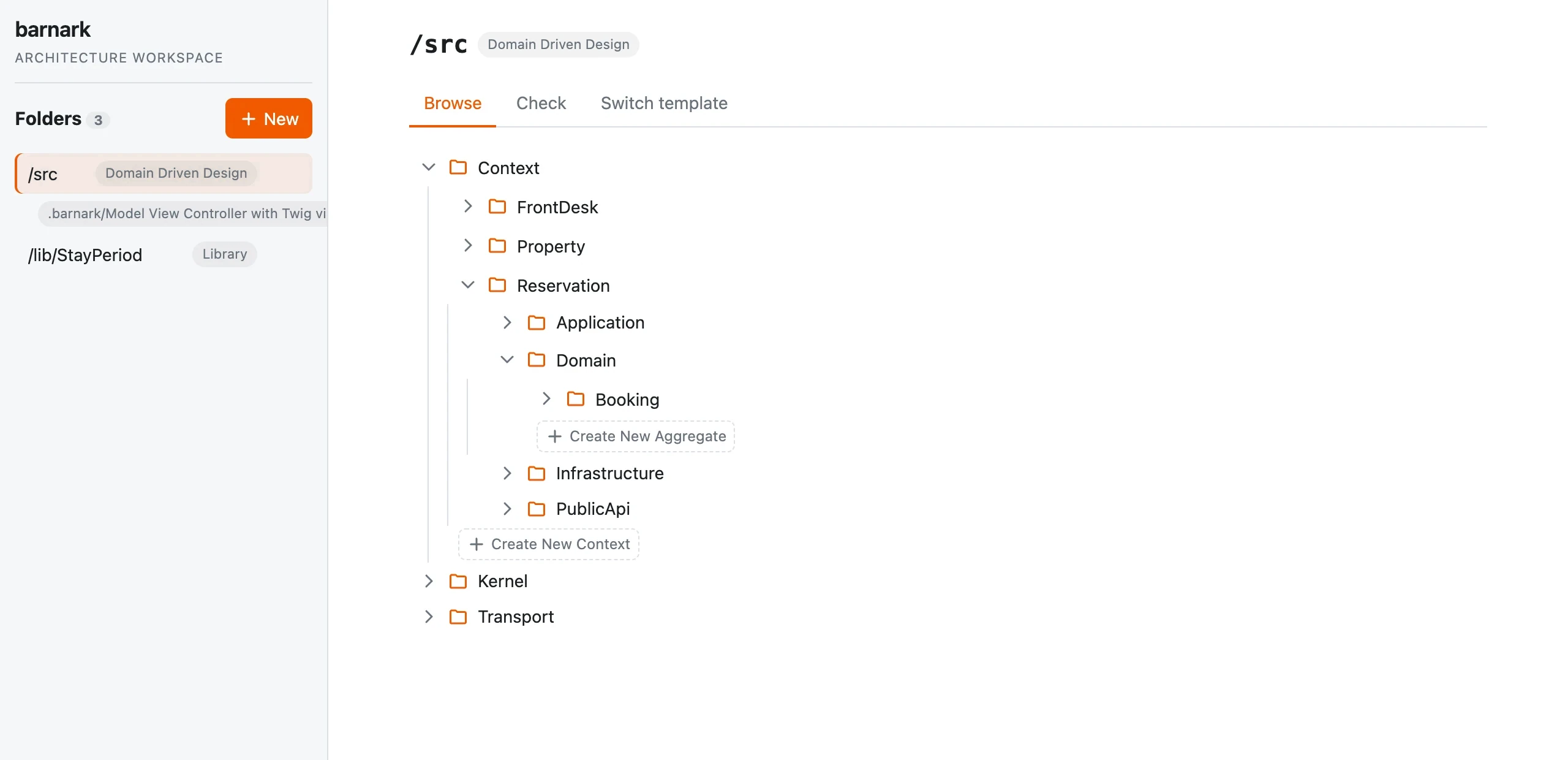
The easiest way to use it is Barnark GUI, in your browser: create a folder, browse its tree, create what its template offers, and run checks. The command line does the same from a terminal, and is the better fit for scripts, CI and AI agents.
Requirements
- PHP 8.5+
- Composer
Installation
composer require --dev rmb32/barnark-cli rmb32/barnark-gui
./vendor/bin/barnark gui        # opens the GUI in your browser
The command line brings this library in with it, and the GUI adds its gui
command. Leave the GUI out where only the command line is needed.
docs/installation.md covers a global install and the
files Barnark keeps in your project.
Barnark is for new projects. Barnark 6 reads no record written by Barnark 5 or earlier, and converts
none: it refuses a project that still has Barnark 5's barnark-workspace.json (.barn/barnark-workspace.json
in a barn), and says where it is. Delete that file, or move it out of the project and the folders above
it, to start afresh. A tracked-folders.json that binds several folders, as Barnark 6 did, is refused
the same way. To keep a folder
bound, scaffold it again under the same path in a new, empty scratch project of the same kind (a barn,
for a barn), and copy that project's Barnark folder (.barnark/, or .barn/barnark/ in a barn) into yours.
Quick start
barnark template:list                                     # the project's template, your templates and the shipped ones
barnark template:clone "Library" "Billing" ./src          # a template called Billing, cloned from Library, and src/ made to it
barnark template:check                                    # check the bound folder against its template
barnark template:check "Library" ./other-package          # check a folder against a shipped template
barnark template:offers src/Internal/Feature              # what the template lets you create here
barnark template:new Feature Invoicing src/Internal/Feature  # create one, with the structure it carries
barnark template:copy Billing Invoicing                   # a new template of your own, members included
| Command | Description |
|---|---|
barnark template:list | List the project's template, your templates and the shipped ones |
barnark template:clone | Clone a template into the project, under a name you give, and make its folder |
barnark template:check | Check the bound folder against its template, or a given directory against a shipped template |
barnark template:copy | Copy any template into a new template of your own |
barnark template:delete | Delete one of your templates |
barnark template:offers | List what the template lets you create inside a folder |
barnark template:new | Add a folder you name to the template, as a new revision, and make it |
Run barnark <command> --help for every option.
Templates, bound and unbound
A shipped template is a read-only catalogue entry. Cloning one makes a template of your own: a copy under a name you give it, with nothing tying it to the one it came from. If the shipped template changes in a later Barnark, yours doesn't. Nobody calls their project "Domain Driven Design", so no shipped template's name can be used for one of yours.
A project has one bound template, made with its folder by the GUI's Clone into the project or
template:clone. Barnark records the folder it is bound to in .barnark/tracked-folders.json, and
keeps each of the project's templates in .barnark/templates/<name>/. Commit both. While a template
is bound, another clone is refused. The project's other templates are unbound, made by copying any
template (shipped, yours or the bound one, members included). An unbound template can be cloned into
a project with nothing bound, like a shipped template, its members' folders included, or deleted; git
keeps it if you need it back. Nothing unbinds the project's template or removes its folder: ending a
template's life is not built yet.
Each of the project's templates is kept as revisions, and none is changed in place. Its first revision is the copy, and the GUI's History tab shows each revision as a read-only tree. A folder you name and add (a context, a feature) is part of the template, so adding one makes a new revision, and so does deleting one. Barnark writes each revision's reason, such as "Added Context/Billing.". Nothing changes inside the folders it brings with it: every context has the same shape.
Inside a barn
In a barn (a project whose root holds .barn/barn.json), Barnark keeps the record and the templates
in .barn/barnark/, and finds them from any folder inside the barn. The bound folder's path stays
relative to the barn's root. Everywhere else nothing changes.
Checking a real project
A template describes a shape, not your code. Its parts are the folders it
names itself (DDD's Kernel, Library's Api); its slots are the places your
own folders go (Context, Aggregate). A template says only what folders there
are, so files are never checked: what goes in a folder is yours to write. Where the template leaves a
folder no choice (every folder in Context/ is a Context), template:check
checks it as filling that slot on its own, so your real contexts and aggregates
are checked where they actually are. A folder made by hand isn't added to the
template: where it leaves the folder a choice of slots, the folder is reported as
unexpected. A folder in the template that has been deleted by hand is reported as
missing.
Barnark's own folder (.barnark/, or .barn/ in a barn) is never part of the bound folder.
Creating by the template
template:new fills a slot the template offers with a folder you name, which
arrives with its fixed structure: a Context comes with its Domain,
Application, Infrastructure and PublicApi. Barnark never creates a file in
your folders, except a .gitkeep so that git keeps a folder created empty.
The check leaves no folder out: one the template has no place for is reported until it is gone.
From PHP
Each factory in Rmb32\Barnark\Api\Factory gives you one part of Barnark.
use Rmb32\Barnark\Api\Factory\ArchitectureFactory;
use Rmb32\Barnark\Api\Factory\ProjectFactory;
use Rmb32\Barnark\Api\Factory\TemplateProfileRegistryFactory;

$names = new TemplateProfileRegistryFactory()->create()->names(); // the shipped templates
To see what a template looks like, read its tree: each Node is a folder every
scaffold has, and each MemberType is a kind of folder you create and name,
each with the meaning the template gives it.
$template = new TemplateProfileRegistryFactory()->create()->get('Domain Driven Design');
$template->description();                // what it is and what it suits
$template->root()->nodes[0]->name;       // "Kernel", a folder every scaffold has
$template->root()->nodes[0]->memberTypes; // MemberType[]: what you may create in it

new ArchitectureFactory()->create()->planScaffold('Library'); // ["Api", "Api/Contract", ...]

$project = new ProjectFactory()->create('/path/to/project');
$project->createFolder('src', '', 'Library', 'Billing');      // the template Billing, and src/ made to it
$project->check('/path/to/project/src', 'Billing', $project->slotsFor('src'));
ProjectFactory::create($root) manages a project's bound folder and its templates, bound and unbound
(listTemplates, copyTemplate, deleteTemplate), and
CheckFactory checks a directory against a shipped template, returning a Violation
for each folder that is missing or not part of it.
Related packages
- Barnark CLI — the
barnarkcommand. - Barnark GUI — clone a template into the project, browse its folder, create what its template offers, run checks and keep templates of your own, in a browser.
- Barncept — the concepts the templates are written as.
More docs
Installation · Internals · History · Known issues
License
Proprietary. See LICENSE. Copyright (c) Roger Barnfather.