
pixelegg / pxe-compareslider

Before/after image comparison slider content element for TYPO3. Dependency-free vanilla JavaScript, keyboard-accessible, horizontal or vertical.
Package info
github.com/pixelegg/pxe-compareslider
Type:typo3-cms-extension
pkg:composer/pixelegg/pxe-compareslider
Requires
- php: ^8.2 || ^8.3 || ^8.4
- typo3/cms-backend: ^13.4 || ^14.0
- typo3/cms-core: ^13.4 || ^14.0
- typo3/cms-extbase: ^13.4 || ^14.0
- typo3/cms-fluid: ^13.4 || ^14.0
- typo3/cms-fluid-styled-content: ^13.4 || ^14.0
- typo3/cms-frontend: ^13.4 || ^14.0
Requires (Dev)
- friendsofphp/php-cs-fixer: ^3.65
- phpstan/phpstan: ^2.1
- phpunit/phpunit: ^11.5 || ^12.0
- saschaegerer/phpstan-typo3: ^2.2 || ^3.0
- ssch/typo3-rector: ^3.0
- typo3/coding-standards: ^0.8 || ^0.9
- typo3/testing-framework: ^8.2 || ^9.0
Suggests
None
Provides
None
Conflicts
None
Replaces
None
README

A content element that stacks two images and lets visitors drag a handle to reveal more of the "before" or the "after" image – horizontally or vertically. Vanilla JavaScript (~3 KB, no jQuery, no CDN), keyboard and touch accessible, responsive images.

Horizontal slider on a demo page with a minimal theme, handle at the start position 50 %.
Features
- Content element Compare slider (before/after) in the tab "Typical page content" of the new content element wizard
- Core Header / Subheader fields and the full Appearance tab (header layout, frame, spacing) – it behaves like any fluid_styled_content element
- Horizontal or vertical split, start position 0–100 %, optional labels on both images
- Responsive images:
srcset/sizes,width/height(no layout shift), native lazy loading with a per-element "load immediately" switch, FAL crop respected,altfrom the file metadata - Image formats: gif, jpg, png, svg, webp, avif
- Accessibility: the handle is an ARIA
slidernamed after the header; arrow keys, Page Up / Down, Home / End; visible focus; forced-colors mode - CSS and JavaScript are added only on pages that contain a slider (optional site-wide include for themes that concatenate assets)
- Backend module Compare slider: every slider of the installation with health checks (missing images, hidden elements) and links to edit the element or open its page
Requirements
| TYPO3 | 13.4 LTS or 14 |
| PHP | 8.2, 8.3, 8.4 |
| Extensions | fluid_styled_content (rendering uses lib.contentElement) |
Installation
composer require pixelegg/pxe-compareslider
Non-composer installations: install pxe_compareslider from the TER via the Extension
Manager.
Then load the TypoScript in the way that matches your site:
A – Site Set (sites configured entirely through sets, no root sys_template record)
Edit your site (TYPO3 13.4: Site Management → Sites, TYPO3 14: Sites → Setup) and add
the set Compare slider (before/after) (pixelegg/compareslider), or list it under
dependencies of your own set. The set
depends on typo3/fluid-styled-content and pulls it in automatically. Settings can be
changed in the site's Settings editor.
B – Static template (sites with a root sys_template record)
Module TypoScript (TYPO3 13.4: under Site Management, TYPO3 14: under Sites) → edit
the root TypoScript record → tab Advanced Options → Include TypoScript sets → add
Compare slider (before/after) after Fluid Styled Content. Settings are TypoScript
constants (see below).
Both load the same setup. Note that TYPO3 13/14 ignore set TypoScript as soon as the root
page has a sys_template record, so on such sites only B takes effect.
Flush caches afterwards. No database changes are needed: all element data lives in
tt_content.pi_flexform and sys_file_reference.
Usage
-
Add a content element, choose Compare slider (before/after) from the tab Typical page content (same name in TYPO3 13.4 and 14).
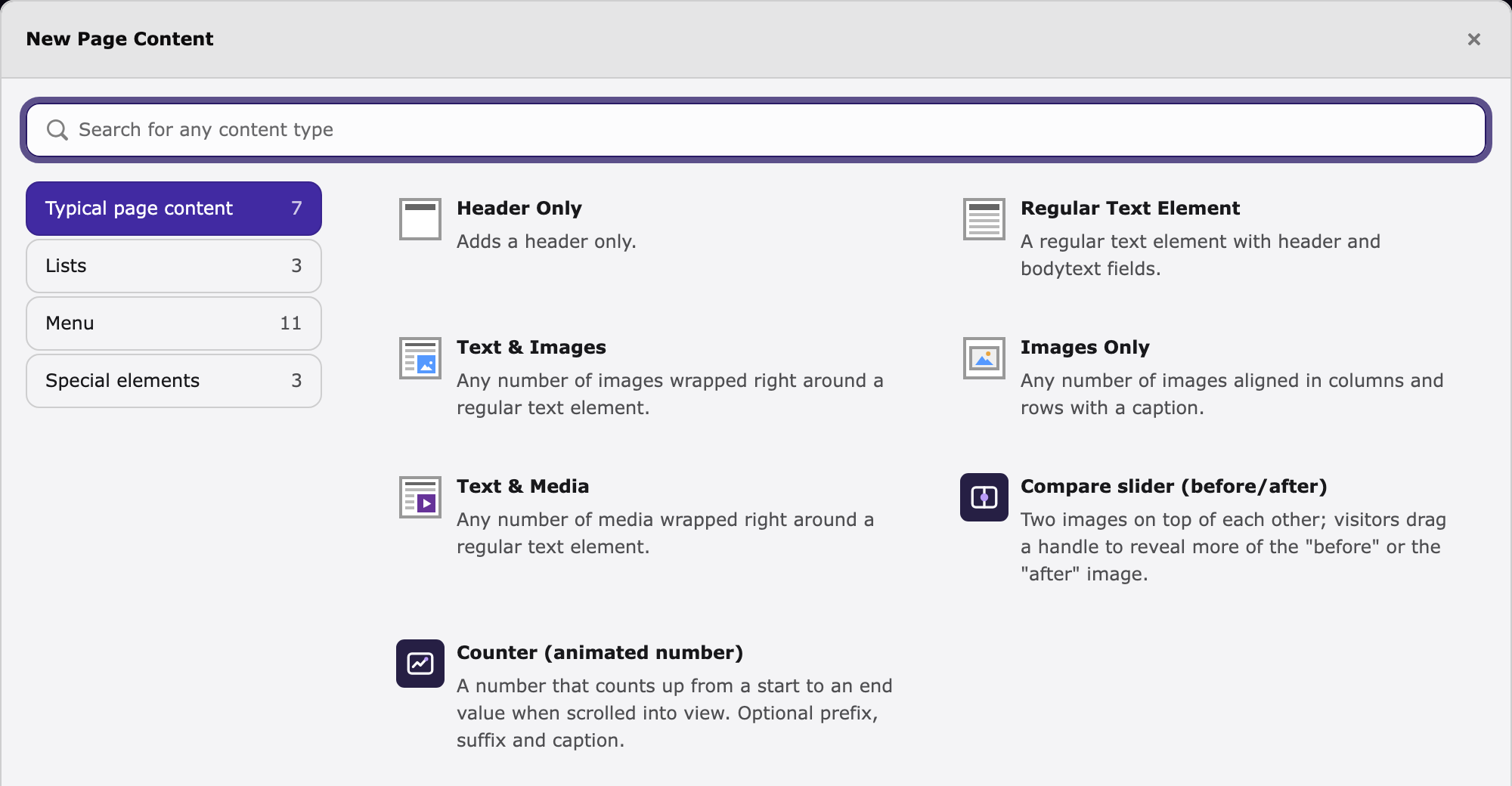
The element in the new content element wizard (TYPO3 14, tab "Typical page content").
-
General tab: header (optional – it is also the accessible name of the handle) and subheader.
-
Slider tab:

| Field | Meaning |
|---|---|
| Image "before" | Shown left (horizontal) / top (vertical). Fitted onto the size of the "after" image. |
| Image "after" | Defines the size of the slider. Use the same aspect ratio for both images. |
| Label "before" / "after" | Optional captions rendered on the images. Also the alt fallback when the file has no alternative text / title. |
| Orientation | Horizontal (handle moves left/right) or vertical (up/down). |
| Start position | Initial handle position in percent, default 50. |
| Load images immediately | Switches loading="lazy" off for a slider that is visible without scrolling. |

Editing form, tab "Slider".
- Appearance tab: header layout, frame class, spacing – as for every core element.
The slider renders only when both images are set; otherwise nothing is shown. Header layout Hidden keeps the header out of the markup but still uses it as the handle's accessible name.

Vertical orientation.
Keyboard and touch
The handle has role="slider". Arrow keys move it by 2 %, Shift + arrow by 10 %,
Page Up / Page Down by 10 %, Home / End jump to 0 % / 100 %. On touch devices a vertical
swipe over a horizontal slider scrolls the page; horizontal swipes move the handle
(touch-action: pan-y, reversed for vertical sliders). Right-clicks and multi-touch are
ignored. Without JavaScript the slider is shown at the start position (browsers with typed
attr(); others at 50 %) and the "after" image remains fully visible underneath.
Configuration
TypoScript constants (static template) and Site Set settings have the same keys:
| Constant | Default | Meaning |
|---|---|---|
plugin.tx_pxecompareslider.view.templateRootPath |
EXT:pxe_compareslider/Resources/Private/Templates/ContentElements/ |
Directory with your own Compareslider.html |
plugin.tx_pxecompareslider.settings.includeAssetsGlobally |
0 |
0: CSS/JS via AssetCollector only on pages with a slider. 1: site-wide via page.includeCSS / page.includeJSFooter (for themes that concatenate assets, e.g. t3sbootstrap). |
plugin.tx_pxecompareslider.settings.image.maxWidth |
1540 |
Longest edge the images are scaled down to (never upscaled) |
plugin.tx_pxecompareslider.settings.image.srcsetWidths |
480,768,1024,1540 |
Widths for srcset; empty disables srcset |
plugin.tx_pxecompareslider.settings.image.sizes |
100vw |
Value of the sizes attribute |
Lazy loading follows fluid_styled_content's styles.content.image.lazyLoading.
Template override
Set plugin.tx_pxecompareslider.view.templateRootPath to a directory of your sitepackage
and copy Resources/Private/Templates/ContentElements/Compareslider.html there. The
template uses the Default layout and the Header/All partial of fluid_styled_content;
your own partialRootPaths / layoutRootPaths for lib.contentElement apply as usual.
Variables: data (tt_content row), flexform, image_before / image_after
(FileReference arrays), settings. The ViewHelper cs:srcset(image, widths) builds the
srcset string (xmlns:cs="http://typo3.org/ns/Pixelegg/PxeCompareslider/ViewHelpers").
Styling
BEM block compareslider (compareslider--vertical, compareslider__media--before,
compareslider__media--after, compareslider__handle, compareslider__label--before,
compareslider__label--after). CSS custom properties on .compareslider:
| Property | Default | |
|---|---|---|
--cs-pos |
50 |
Current handle position (0–100); updated by the script, readable in your CSS |
--cs-handle-color |
#fff |
Line and knob colour |
--cs-handle-width |
3px |
|
--cs-knob-size |
38px |
|
--cs-focus-color |
#2b6cb0 |
Focus ring |
--cs-label-color / --cs-label-bg |
#fff / rgba(0,0,0,.6) |
Label text / background |
Labels sit in a corner of their own image: horizontal "before" top left / "after" top right, vertical "before" top left / "after" bottom left. They are covered together with their image when the handle moves over them, so a label never ends up on the wrong image.
There are no animations, so nothing needs a prefers-reduced-motion override.
Markup contract (for custom templates)
<div class="compareslider compareslider--horizontal" data-orientation="horizontal" data-start="50">
  <div class="compareslider__media compareslider__media--after"><img class="compareslider__img" …></div>
  <div class="compareslider__media compareslider__media--before"><img class="compareslider__img" …></div>
  <div class="compareslider__handle" role="slider" tabindex="0" aria-label="…"
       aria-valuemin="0" aria-valuemax="100" aria-valuenow="50" aria-orientation="horizontal"></div>
</div>
The script initialises every .compareslider once (also elements added to the DOM later)
and writes --cs-pos on the root element.
Backend module
Compare slider is a top-level entry of the module menu, placed after the page module group (Web in TYPO3 13.4, Content in TYPO3 14). It lists all slider elements with page, status (OK, missing image, hidden, language) and buttons to edit the element or open the page. Available to all backend users; restrict it via the usual module access settings if needed.

The backend module. A hidden draft with only one image is flagged as "Missing image". German interface: screenshot.

Optional: pxe_hub
If the separate extension pxe_hub is installed, the module is shown as a card in the hub
and the standalone module is hidden from the menu. Without pxe_hub nothing of this is
loaded.
Upgrading from 2.1.x
Title and subtitle moved from the FlexForm to the core Header / Subheader fields.
Existing records keep working: the old FlexForm values are rendered as a caption and used
as the handle name as long as the header field is empty. Move the text into the header
field at your convenience. Sites that previously relied on the site-wide include (e.g. with
t3sbootstrap's asset concatenation) should set includeAssetsGlobally = 1.
Development
composer install
composer ci:cs              # php-cs-fixer (typo3/coding-standards)
composer ci:stan            # PHPStan level 8
composer ci:rector          # rector dry-run
composer ci:test            # unit tests
composer ci:test:functional # functional tests (sqlite, ImageMagick required)
CI runs the matrix TYPO3 13.4 × PHP 8.2/8.3/8.4 and TYPO3 14 × PHP 8.3/8.4
(.github/workflows/ci.yml). Tags v* are published to the TER
(.github/workflows/publish-ter.yml, secret TYPO3_API_TOKEN).
Changelog
See CHANGELOG.md.
License
GPL-2.0-or-later, see LICENSE.txt. Made by pixelegg.