
phattarachai / laravel-db-console

An in-app web DB client for Laravel — browse PostgreSQL, MySQL and MariaDB tables and run guarded SQL, without Adminer.
Package info
github.com/phattarachai/laravel-db-console
pkg:composer/phattarachai/laravel-db-console
Requires
- php: ^8.4
- illuminate/contracts: ^12.0|^13.0
- illuminate/database: ^12.0|^13.0
- illuminate/support: ^12.0|^13.0
- inertiajs/inertia-laravel: ^2.0|^3.0
Requires (Dev)
- larastan/larastan: ^3.10
- laravel/pint: ^1.24
- orchestra/testbench: ^10.8|^11.0
- pestphp/pest: ^4.0
- pestphp/pest-plugin-laravel: ^4.0
Suggests
None
Provides
None
Conflicts
None
Replaces
None
README
An in-app web DB client for Laravel — browse your PostgreSQL, MySQL or MariaDB tables and run guarded SQL in the browser, instead of installing Adminer next to every project.
Read-only by default. Writes are opt-in per connection, a row delete always asks before it runs, and DDL is never allowed in any mode.
More screenshots — SQL console, dark scheme
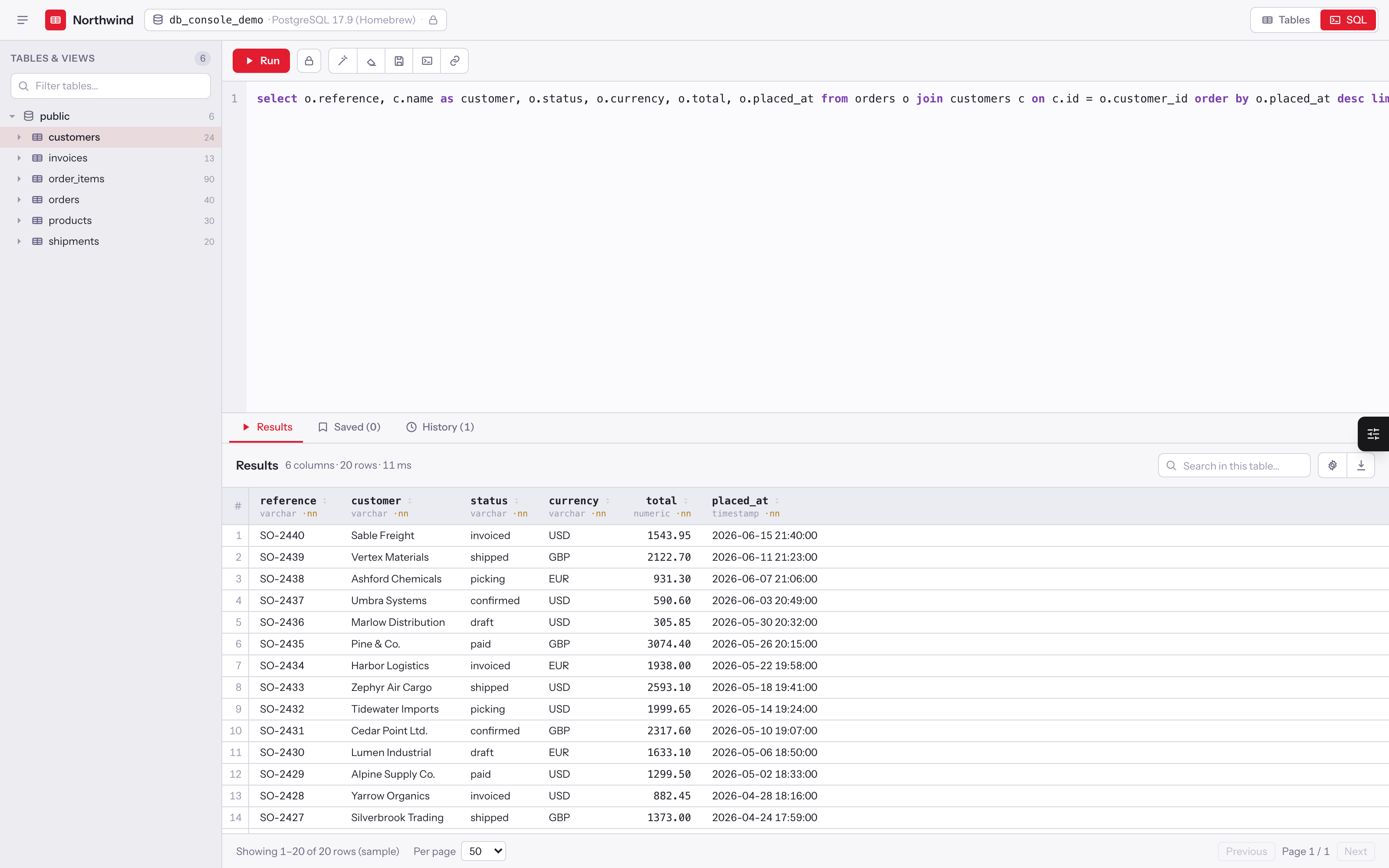
SQL console — editor with highlighting and a formatter, a read/write guard chip, results with row count and elapsed time, saved queries, run history, EXPLAIN, and a share link.
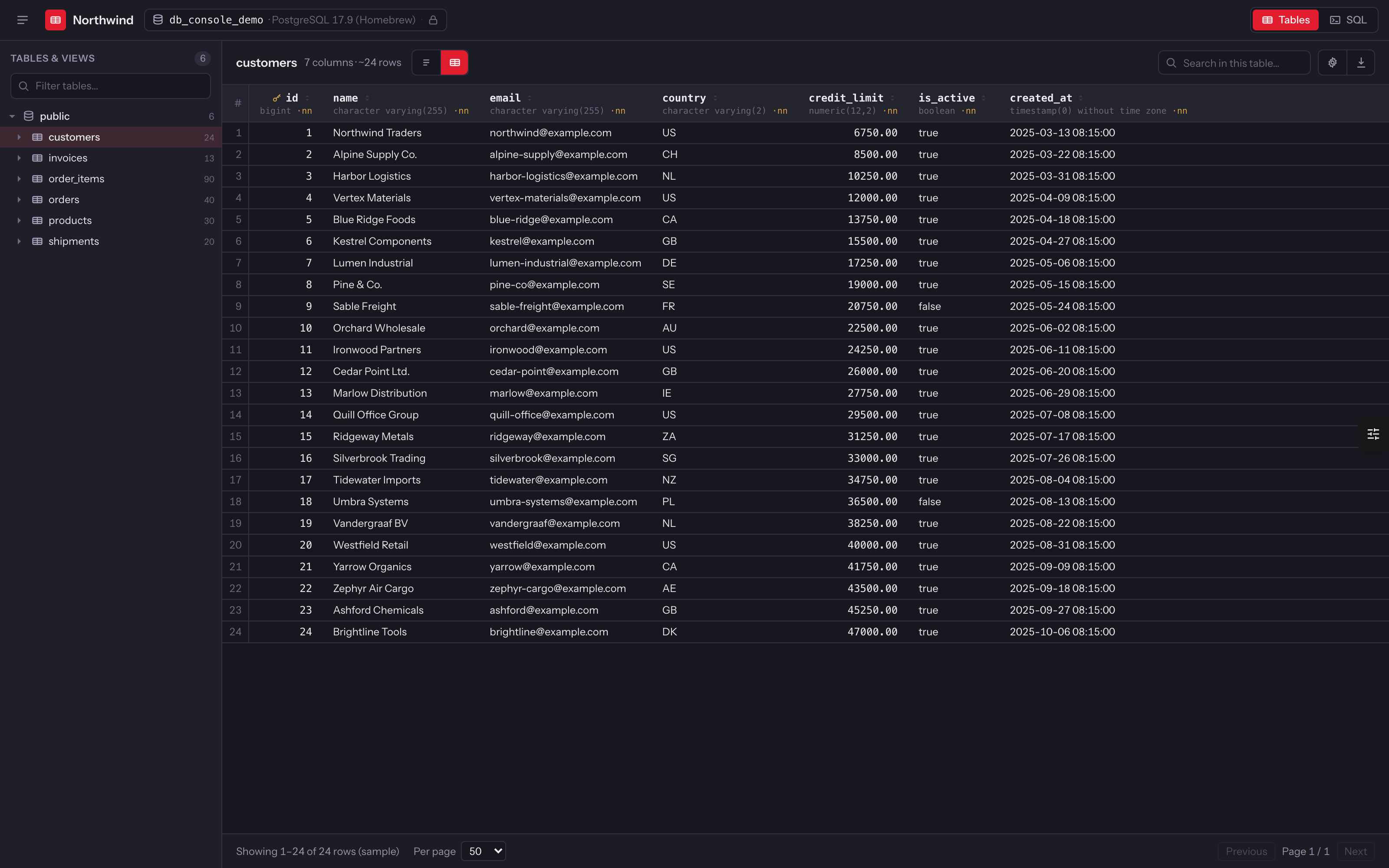
Dark scheme — brand.scheme set to dark; auto follows a .dark ancestor class from the host app.
Every screenshot runs against the fictional demo database in art/demo-data.sql
(PostgreSQL) or art/demo-data-mysql.sql (MySQL / MariaDB) — no real company or person
appears in them.
Requirements — read these first
This package is deliberately narrow. If any of these do not hold, it will not work, and it says so rather than half-working:
- PostgreSQL, MySQL 8 or MariaDB. The suite runs on PostgreSQL 17, MySQL 8.4 and MariaDB 11.4. Any other driver (SQLite, SQL Server) fails with a message naming the connection and its driver. See MySQL and MariaDB for where they differ from Postgres.
- Inertia (v2 or v3) + React 19 in the host app. The console is an Inertia page, not a Blade view.
- The host app builds its own assets — nothing is precompiled or published as a bundle.
- PHP 8.4+, Laravel 12 or 13.
No Tailwind, and no @source line. The console ships plain CSS scoped under .dc-root, imported by the module
itself — so it renders correctly in a host with any CSS setup, or none. Re-skin it by overriding the --dc-* tokens
(see Theming).
Run php artisan db-console:doctor at any point: it checks the driver of every connection, the migrations, the
routes, the published page and the Vite alias, and tells you exactly which one is missing.
Install
composer require phattarachai/laravel-db-console
php artisan vendor:publish --tag=db-console-config
php artisan vendor:publish --tag=db-console-inertia
php artisan migrate
Then add the module alias to vite.config.js (or vite.config.ts):
import { fileURLToPath } from 'node:url'

export default defineConfig({
    // …your plugins
    resolve: {
        alias: {
            '@db-console': fileURLToPath(
                new URL('./vendor/phattarachai/laravel-db-console/resources/js/db-console', import.meta.url),
            ),
        },
    },
})
Then npm run build, and open /db-console. No Tailwind entry, @source, or prefix() is needed — the module
imports its own scoped stylesheet.
Only the Inertia page is published into resources/js/pages/. The module itself stays in vendor/ and is reached
through the alias, so there is no second copy to drift out of sync.
The Laravel React starter kit
The starter kit works with the same steps; nothing in it needs editing. What makes that so:
- The page matches the app's language. When
resources/js/app.tsxexists, the publish tag writespages/DbConsole.tsx(the kit's root view asks Vite forpages/{component}.tsx, so a.jsxpage answers with a 500), plusresources/js/types/db-console.d.tssotsccan resolve the@db-consolealias. - The page opts out of the app layout. The kit's
createInertiaApp({ layout })wraps every page in its sidebar layout. The console is a full-screen app, so its page sets its own empty layout, which takes precedence. - It is SSR-safe. Under
npm run build:ssrthe server renders an empty shell and the console mounts in the browser, so nothing touchesdocumentorlocalStorageon the server. vite.config.tsis read. The doctor checks.ts,.js,.mtsand.mjs.
Upgrading from 1.0? Republish the page — the 1.0 page reads document during render and inherits the host's
default layout. The doctor flags an outdated page.
php artisan vendor:publish --tag=db-console-inertia --force
Access
local is always open — the console's whole point is being there while you debug your own machine. Everywhere else,
declare who may open it, in a service provider:
use Phattarachai\DbConsole\DbConsole;

DbConsole::auth(fn (Request $request) => $request->user()?->isAdmin() === true);
With no callback registered it falls back to a viewDbConsole gate if the app defines one, and denies otherwise. The
Authorize middleware is appended by the service provider, so it cannot be dropped by editing db-console.middleware.
A guest who is denied is redirected to redirect_guests_to (default: the login route) with the intended URL
remembered, so signing in lands them back on the console. A signed-in user the gate rejects gets a plain 403 — no
point sending them to a form they already passed — and so does any XHR.
Kill it entirely with DB_CONSOLE_ENABLED=false: no routes are registered at all, so the paths 404 rather than 403.
What it does
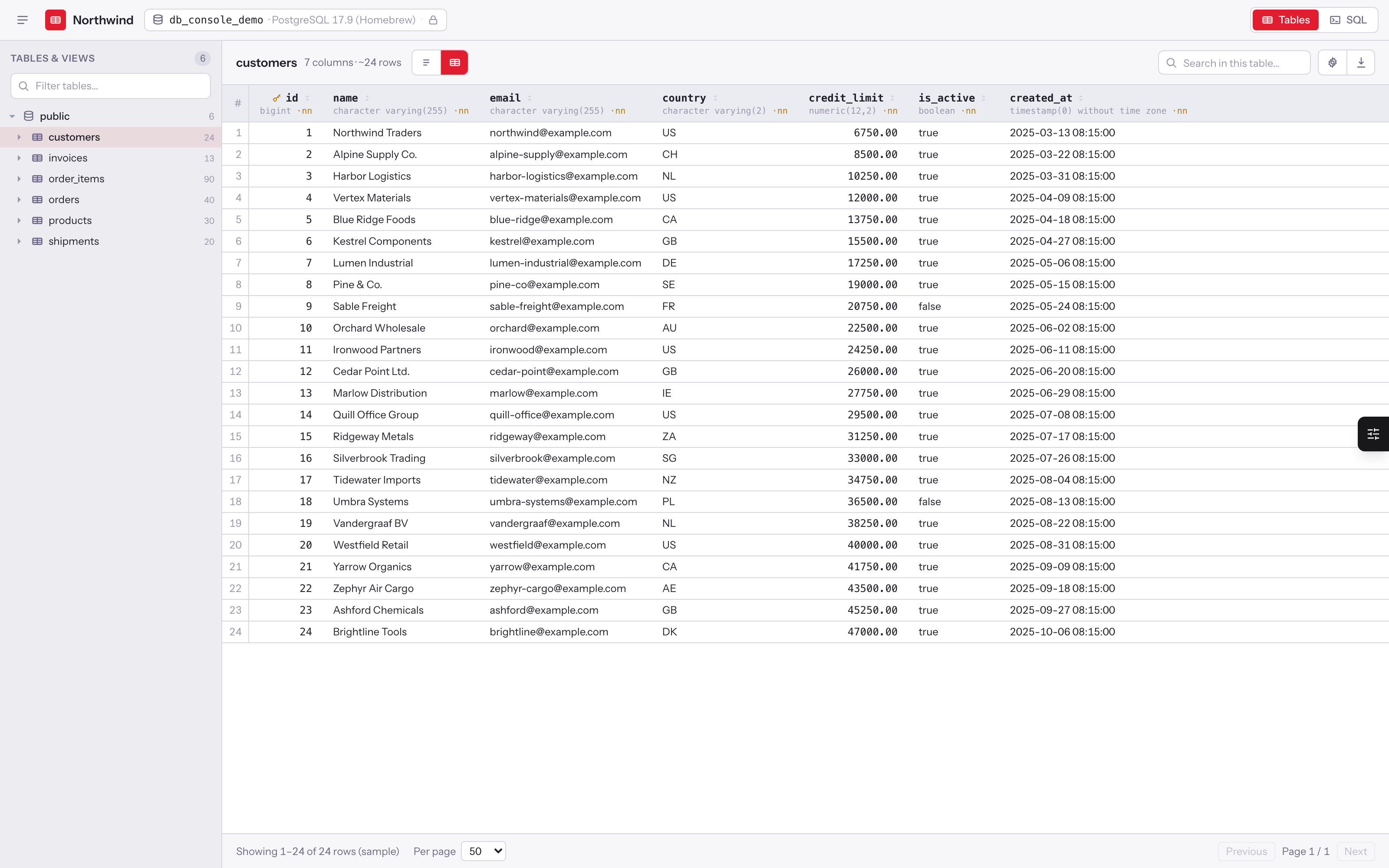
Explorer — schema tree with a filter and estimated row counts, per-table Structure (columns with types, nullability, defaults, indexes, foreign keys) and Data tabs, a server-driven grid with sorting and pagination, CSV export of the current view. Click a foreign-key value and the referenced table opens filtered to that one row, as an ordinary per-field filter you can edit or clear. Star a table to add it to your favourites, and the star beside the filter box narrows the tree to those alone — the working set of a 150-table database is usually a dozen. Columns are drag-resizable from their right edge (double-click a handle to reset), and the widths are remembered per table in the browser. A View menu toggles the column-type line on and off.
Per-field filters — build conditions column by column, Adminer-style, without writing SQL. Pick a column and the
operators offered match its type — = ≠ < ≤ > ≥ between in for numbers, contains / starts with / ends with for text,
is true / is false for booleans, a date picker for timestamps — and is null / is not null throughout. Conditions are
ANDed and run against the whole table on the server (not the loaded sample), each compiled through the query builder
with bindings; masked columns are never offered. A quick-search box still scans every text column at once. The whole
view — selected table, filters, sort, page and search — lives in the URL, so a refresh or a shared link reopens
exactly what you were looking at.
The value panel — double-click any cell to open a side panel with the full value, pretty-printed and
syntax-highlighted for JSON (json, jsonb, or any text that parses as JSON — MariaDB stores JSON as longtext),
with a Raw toggle. The panel is resizable and remembers its width.
Right-click any cell for everything else: inspect the value, jump to the referenced row when the column is a
foreign key, copy the value, copy the whole row as JSON or as plain text, and — on a write connection — edit or
delete the row. There is no actions column stealing horizontal space.
SQL console — editor with highlighting, a formatter, a read/write guard chip that updates as you type, result
grid, EXPLAIN (Postgres's plan, MySQL's FORMAT=TREE, MariaDB's EXPLAIN table), saved queries, run history, and a
copyable share link.
Row editing — on a write connection only. The generated SQL is shown before it runs. Delete always asks for a
typed confirmation, whatever confirm_writes says, because it is one irreversible click; insert and update follow
confirm_writes. Tables without a primary key stay read-only, and masked columns can never be written.
Multiple connections — list more than one in connections and a picker appears in the toolbar, each with its own
mode badge and its configured label. A Postgres and a MySQL connection can sit side by side, and a read-only
connection next to a writable one without either being able to affect the other.
Constant-cost page load — opening the console reads object names, kinds and row counts, and nothing else: four
queries and a few KB, whether the schema has ten tables or a thousand. A table's columns, indexes and foreign keys are
fetched when you select or expand it and cached for the life of the page; the grid's rows are paged from the server as
you filter, sort and page, fetching one page at a time (perPage + 1, so "next page?" costs nothing extra) rather than
counting or loading the whole table.
Safety model
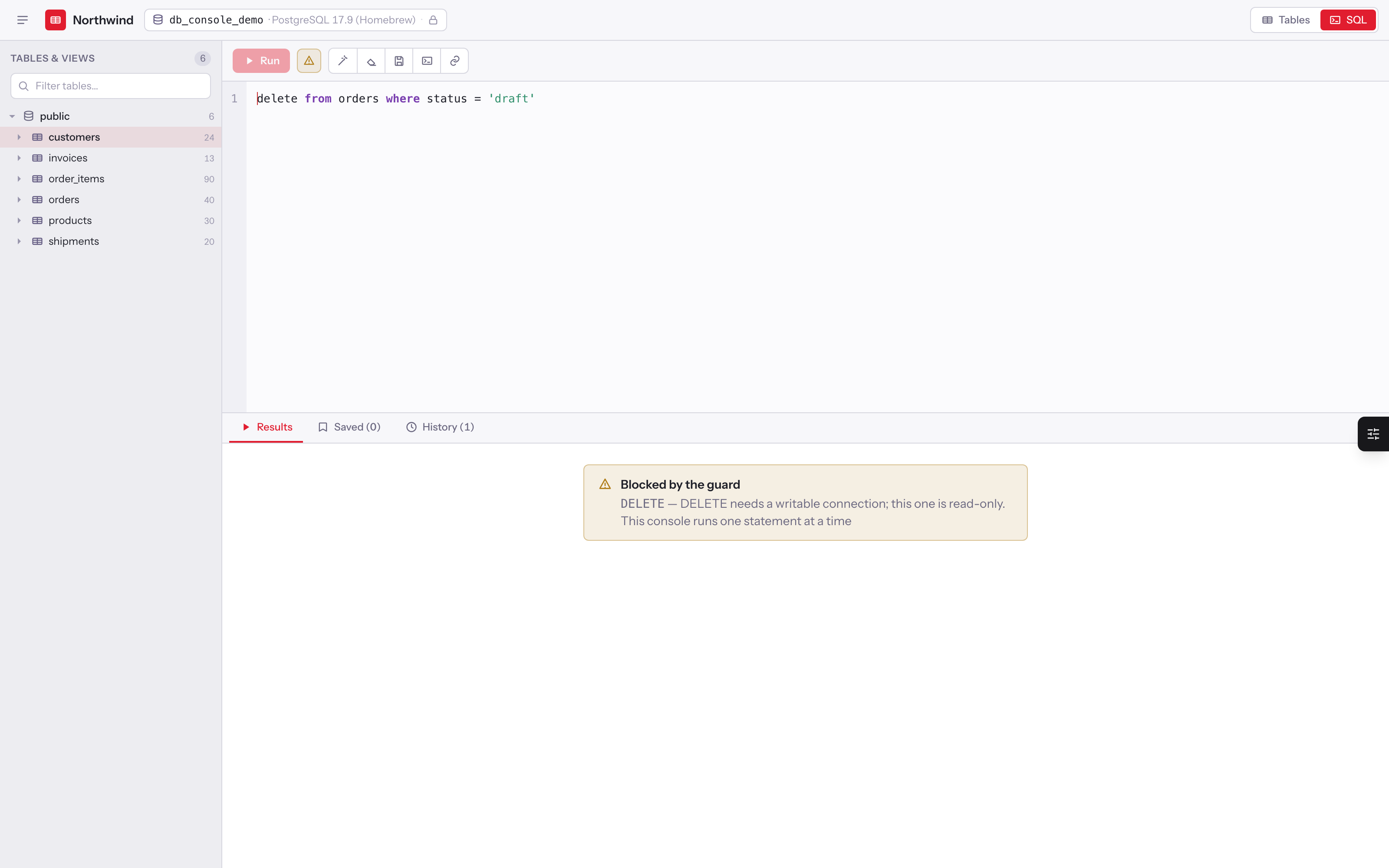
Layered, so no single check is load-bearing:
- Client guard — instant feedback while typing. UX only, never the enforcement.
- App guard — string literals, quoted identifiers and comments are removed with the connection's own quoting
rules (Postgres
$tag$andE'..'strings and nested comments; MySQL backslash escapes, backticks,#comments and the/*! .. */comments it executes), read both with and without backslash escapes so a session setting can't change the answer. Then: one statement per run, and the first keyword is checked against read / DML / blocked sets. DDL, session, transaction, server-admin and dynamic-SQL keywords (SET,LOCK,HANDLER,LOAD DATA,CALL,DO,PREPARE,FLUSH,KILL, …) are blocked in every mode. A read may not containINTO(SELECT … INTO OUTFILE, a table or a variable), and functions that act outside the transaction (LOAD_FILE,pg_read_file,dblink,set_config,pg_terminate_backend, …) are refused. Any identifier matchinghidden_tablesrefuses the statement. - Engine — a
readstatement runs inside aREAD ONLYtransaction with a timeout, and the transaction is always rolled back. The database itself rejects a write that slips past the keyword guard: Postgres refusesSELECT nextval(...), InnoDB refuses a function that inserts with error 1792, and both refuseSELECT … FOR UPDATE. Every statement is sent as one server-side prepared statement, which both engines refuse to treat as a batch. - Confirmation — with
confirm_writeson (or for any row delete), a write answers409with a single-use token bound to the exact SQL. Editing the statement by one character invalidates it. - Row cap — results stop at
max_rows; one further available row setstruncated.
hidden_tables and masked_columns both ship empty — the console shows your database as it is until you say
otherwise, including its own db_console_* tables. When you do set masked_columns, matches are replaced with ***
server-side, so the secret never reaches the browser.
The guard can't know every function a database offers. For a production read connection, the strongest layer is
one the console doesn't own: connect it as a database user that can only read — no FILE privilege on MySQL, no
superuser or pg_read_server_files on Postgres.
MySQL and MariaDB
The console behaves the same on all three engines, except where the engine itself differs:
| PostgreSQL | MySQL 8 | MariaDB | |
|---|---|---|---|
schemas |
schemas, default public |
databases, default the connection's own | same as MySQL |
| Read timeout | statement_timeout |
max_execution_time |
max_statement_time |
| Write timeout | statement_timeout |
innodb_lock_wait_timeout only (see below) |
max_statement_time |
| Row counts | pg_class estimate |
information_schema.TABLES.TABLE_ROWS estimate |
same as MySQL |
| Text filters, search | ILIKE |
LIKE — follows the column collation |
same as MySQL |
| Booleans | boolean |
tinyint(1) |
tinyint(1) |
| EXPLAIN | plan text | EXPLAIN FORMAT=TREE |
EXPLAIN table |
- Write timeouts on MySQL. MySQL has no statement timeout for
UPDATE/DELETE. The console bounds how long a write waits for row locks, in whole seconds, but a write that scans a huge table runs until it finishes. MariaDB bounds both. - The timeout is set and put back. MySQL keeps it in a session variable, not the transaction, so the console restores the previous value after every statement — the connection is your app's.
- Row counts are estimates on every engine (the grid shows
~, the sidebar's tooltip says so). InnoDB samplesTABLE_ROWSand MySQL caches it forinformation_schema_stats_expiry(a day by default), so a busy table can lag. A table reported as empty is counted exactly. - Text matching follows the collation. Under the default
utf8mb4_0900_ai_ciit is case- and accent-insensitive, like Postgres'sILIKE; under a_binor_cscollation it is case-sensitive. - A config file published before 1.1 lists
schemas => ['public']. On MySQL thatpublicmeans the connection's database, so it keeps working; setnullto say so explicitly.
Configuration
See config/db-console.php — every key is documented inline. The essentials:
| Key | Default | Notes |
|---|---|---|
enabled |
true |
false registers no routes |
path / domain |
db-console |
where it mounts |
middleware |
['web'] |
Authorize is always appended |
redirect_guests_to |
login |
route name or URL; null 403s guests instead |
defaults.mode |
read |
read or write, per connection |
defaults.confirm_writes |
false |
typed confirmation; a row delete always asks |
defaults.max_rows / timeout |
5000 / 5000 |
rows, milliseconds |
defaults.schemas |
null |
public, or the MySQL connection's database |
defaults.label |
null |
toolbar name; the database name when unset |
connections |
['default' => []] |
only what is listed is reachable |
hidden_tables / masked_columns |
empty | glob patterns; nothing hidden or masked until set |
history.keep_days / keep_rows |
30 / 500 |
pruned by db-console:prune |
share.expires_days |
7 |
null never expires |
brand.name / url |
APP_NAME / / |
the toolbar logo links back to your app |
brand.accent / scheme |
#e11d2f / auto |
injected as --dc-accent |
locale |
app locale | en and th ship |
A second connection is two lines:
'connections' => [
    'default' => [],
    'reporting' => ['mode' => 'read', 'label' => 'Reporting replica'],
],
Commands
php artisan db-console:doctor   # install checks, each with the fix
php artisan db-console:prune    # trim history and expired share links
prune deletes history past keep_days, trims each owner to the newest keep_rows, and drops expired share links.
Saved queries are never pruned. The package schedules it daily while history.store is database.
Theming
brand.accent is injected inline, so rebranding needs no rebuild. Everything else is a CSS custom property you can
override:
.dc-root {
    --dc-bg: #0b0d10;
    --dc-accent: #16a34a;
}
Dark mode follows a .dark ancestor class, matching the Tailwind convention. brand.scheme may be light, dark, or
auto to follow the host — but it is only the default: a toolbar button cycles light → dark → auto and remembers
the viewer's choice in localStorage, so the theme is a preference of that browser rather than of the installation.
light wins even inside a host app that is itself dark.
Translations
Copy lives in lang/{en,th}/ui.php (the browser strings, handed to React as one strings prop) and
lang/{en,th}/guard.php (the server's rejection messages). Publish and edit them:
php artisan vendor:publish --tag=db-console-lang
The React module ships English defaults, so it renders standalone even with no lang files at all. Adding a locale means adding one directory — no JavaScript changes.
Contributing
git clone git@github.com:phattarachai/laravel-db-console.git
cd laravel-db-console
composer install
createdb db_console_testing          # PostgreSQL, empty; the suite builds the schema
composer test
The suite runs against a real database — the console's guarantees are engine-level (READ ONLY transactions,
statement timeouts, catalog introspection), so an SQLite stand-in would prove nothing. PostgreSQL is the default; run
it on MySQL or MariaDB with DB_CONNECTION:
mysql -e 'create database db_console_testing'
DB_CONNECTION=mysql DB_PORT=3306 DB_USERNAME=root DB_PASSWORD= composer test
CI runs every combination of Laravel 12/13, lowest/stable dependencies and PostgreSQL 17 / MySQL 8.4 / MariaDB 11.4.
Override the connection with the usual DB_* env vars, or copy phpunit.xml.dist to phpunit.xml and edit it there.
The tests own their schema: tests/database/migrations/ creates dc_users, dc_owners, dc_items and dc_hidden,
which exist purely to exercise primary keys, foreign keys with on delete cascade, binary values, column masking and
the hidden_tables filter. On MySQL it also creates dc_write_probe(), a function that inserts a row, so the suite can
prove the READ ONLY transaction stops it. Postgres runs each test in a rolled-back transaction; MySQL can't nest the
console's read-only transaction inside one, so its tests truncate instead.
Licence
MIT.
ผู้พัฒนา
พัฒนาและดูแลโดย บริษัท ภัทรชัย อาร์ทิซาน จำกัด (Phattarachai Artisan) บริษัทที่ปรึกษาและพัฒนาเว็บ ที่เรียนรู้และแบ่งปันกับชุมชน Laravel แพ็กเกจนี้แบ่งปันให้ชุมชนนำไปใช้และต่อยอดได้อย่างอิสระ
ดูแพ็กเกจอื่นของเราได้ที่ phattarachai.dev/open-source และติดต่อเราได้ที่ phattarachai.dev