
orion-soft / notify-rules

Rule-based Telegram notifications for Filament, configured from the admin panel.
Requires
- php: ^8.2
- filament/filament: ^5.10
- spatie/laravel-package-tools: ^1.15.0
Requires (Dev)
- larastan/larastan: ^3.0
- laravel/pint: ^1.0
- nunomaduro/collision: ^8.0
- orchestra/testbench: ^9.16|^10.0|^11.0
- pestphp/pest: ^3.7|^4.0
- pestphp/pest-plugin-arch: ^3.0|^4.0
- pestphp/pest-plugin-laravel: ^3.0|^4.0
- rector/rector: ^2.0
Suggests
None
Provides
None
Conflicts
None
Replaces
None
README
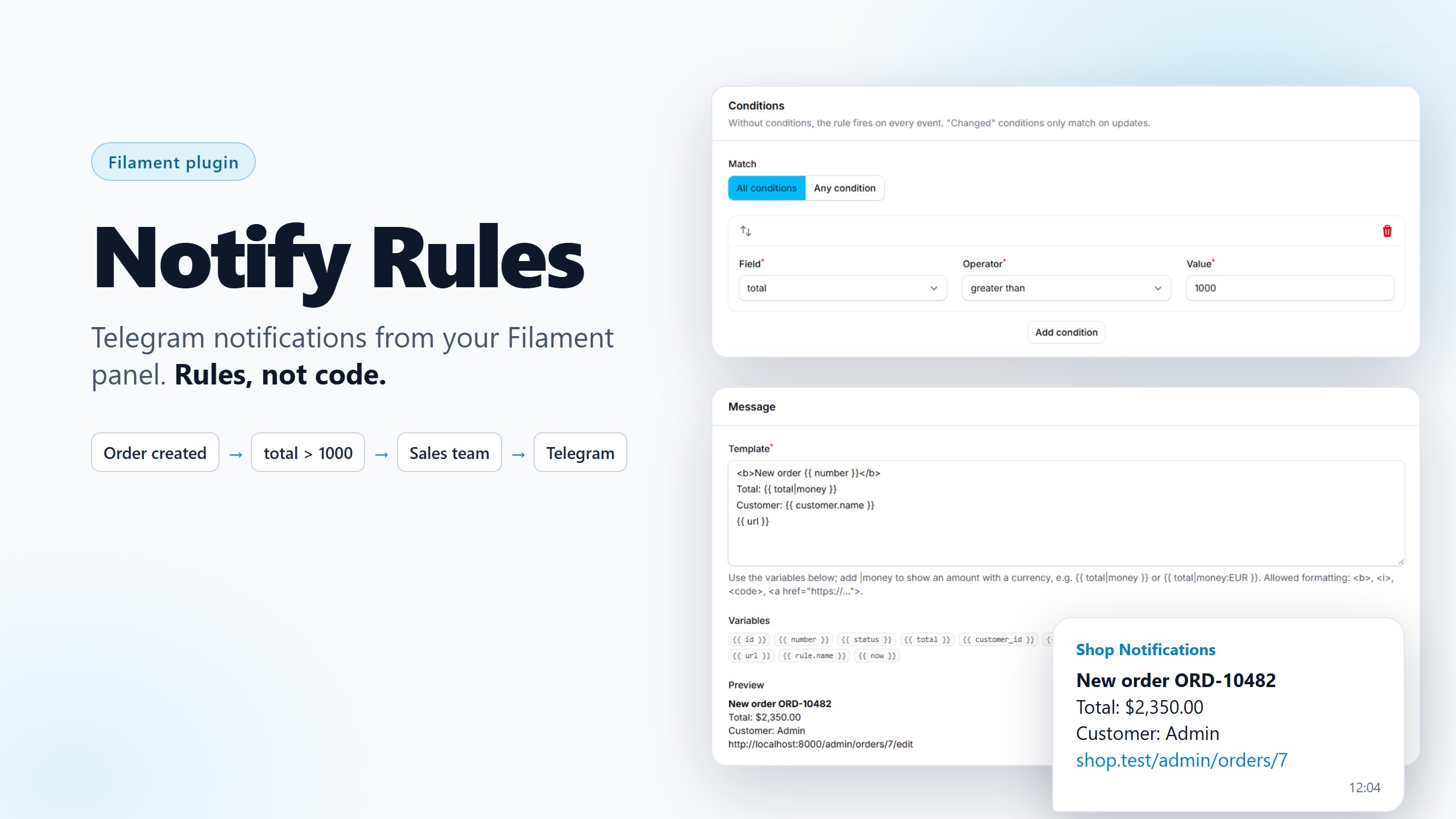
Send Telegram notifications from your Filament panel without writing code. Admins create rules right in the panel: when a record changes, check the conditions, pick the recipients and write the message. Every message is logged and can be resent.
A new order over $1,000? Your sales team gets a Telegram message within seconds, with the order number, the customer and a link to the order in the panel.
Features
- Rules in the panel. Choose a model and an event (created, updated, deleted, a field changed), add conditions, recipients and a message template. No deploy needed for a new notification.
- Connect Telegram in one click. Users press "Connect Telegram" in the user menu and "Start" in the bot. Nobody has to look up a chat ID.
- Templates with live preview. Use the record's fields, related records, previous values, a link to the record and money formatting. See the preview on your latest record and send yourself a test message before saving.
- Delivery log. Every message with its status, attempts and error. Resend failed messages one by one or in bulk.
- Reliable sending. Queued after the database transaction commits, retried with back-off, Telegram's rate limits respected, blocked chats switched off automatically.
- Groups and channels, users by role (spatie/laravel-permission), multi-tenancy, policies, English and Russian translations.
Requirements
- PHP 8.2+ (Laravel 13 needs PHP 8.3+)
- Laravel 11, 12 or 13
- Filament 5.10+
No custom theme is needed: the plugin is built from Filament's own components.
Installation
composer require orion-soft/notify-rules
php artisan notify-rules:install
The install command publishes the config file and the migration and offers to run it. To do it by hand:
php artisan vendor:publish --tag="notify-rules-config"
php artisan vendor:publish --tag="notify-rules-migrations"
php artisan migrate
If your panel uses multi-tenancy, set notify-rules.tenancy.column before running the migration (see Multi-tenancy).
Register the plugin
use App\Models\Lead;
use App\Models\Order;
use OrionSoft\NotifyRules\NotifyRulesPlugin;

public function panel(Panel $panel): Panel
{
    return $panel
        // ...
        ->plugin(
            NotifyRulesPlugin::make()
                ->models([
                    Order::class,
                    Lead::class => 'Leads', // optional label
                ])
                ->navigationGroup('Notifications')
                ->deliveryLog()
                ->connectTelegramInUserMenu()
                ->canManageRules(fn ($user) => $user->is_admin),
        );
}
| Method | What it does |
|---|---|
models([...]) |
The models rules can be created for. Only these models are listened to. |
navigationGroup() |
Navigation group of the rules and the delivery log. |
deliveryLog() |
Adds the read-only delivery log. |
connectTelegramInUserMenu() |
Adds the "Telegram" item to the user menu. |
canManageRules() |
Who can see and edit rules and the delivery log. Everyone with panel access by default. |
tenantOwnership() |
The relationship from your models to the tenant (multi-tenant panels only). |
Create the bot
- Open @BotFather in Telegram, send
/newbotand follow the steps. - Add the token and the bot's username to
.env:
NOTIFY_RULES_TELEGRAM_BOT_TOKEN=123456789:AA...
NOTIFY_RULES_TELEGRAM_BOT_USERNAME=my_company_bot
NOTIFY_RULES_TELEGRAM_WEBHOOK_SECRET=a-long-random-string
The token stays in .env: it is never stored in the database or written to logs.
Receive bot updates
The bot needs to receive /start to connect users.
In production, register the webhook (it needs HTTPS):
php artisan notify-rules:webhook set
php artisan notify-rules:webhook info
The webhook is served at POST /notify-rules/telegram/webhook and rejects every request without the secret header.
Locally, where Telegram cannot reach your machine, use long polling instead:
php artisan notify-rules:poll
Queues
Messages are sent by a queued job, so run a queue worker. Any queue driver works. To use a dedicated connection or queue:
NOTIFY_RULES_QUEUE_CONNECTION=redis
NOTIFY_RULES_QUEUE=telegram
With the sync driver, messages are sent right away. A message that hits Telegram's rate limit or a temporary error is then marked as failed instead of retried; resend it from the delivery log.
Connecting Telegram
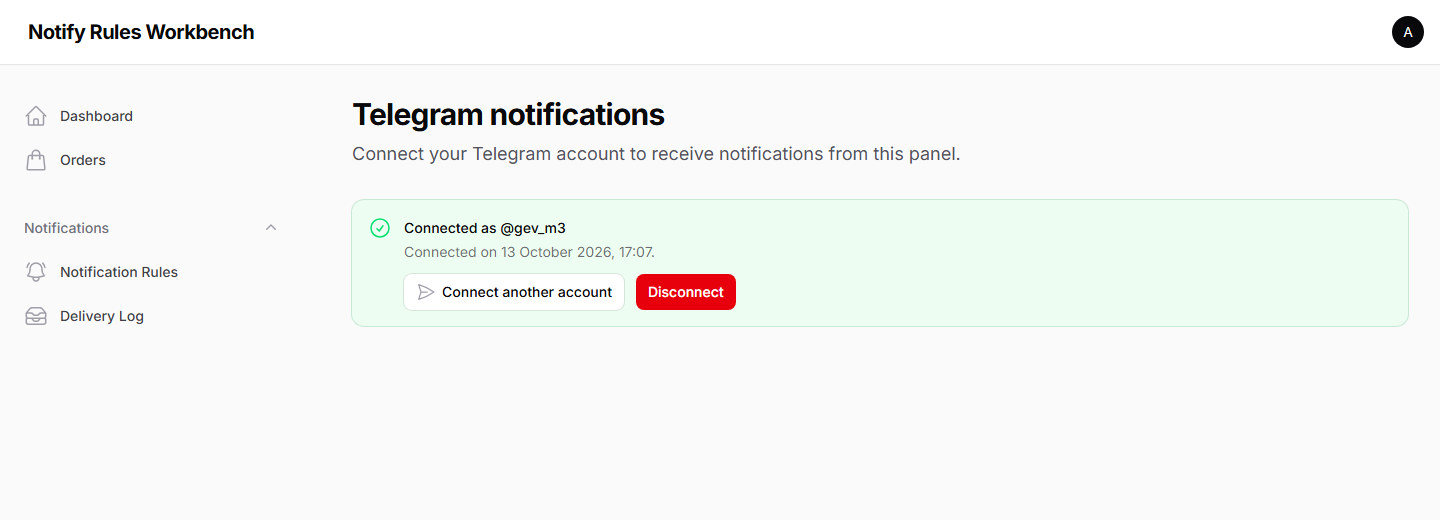
Each user opens Telegram in the user menu, presses Connect Telegram and then Start in the bot. The link works once and expires after 15 minutes. The page shows when the account is connected and lets the user disconnect.
Creating a rule
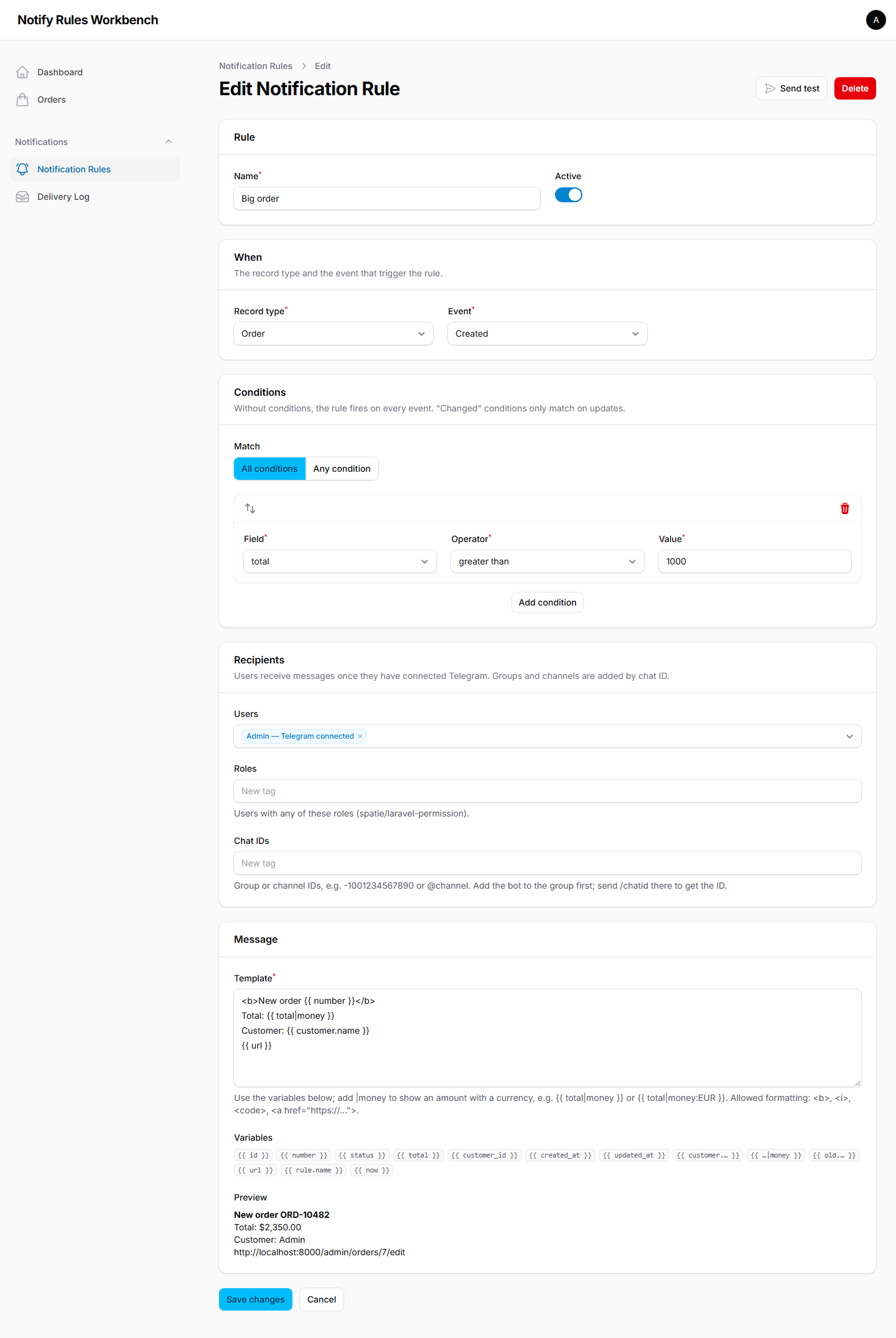
A rule has four parts:
- When: the model and the event: created, updated, deleted, or a specific field changed.
- Conditions: optional. Match all of them or any of them.
- Recipients: users (the list shows who has connected Telegram), roles, and chat IDs of groups or channels.
- Message: the template, with the list of available variables and a live preview on the latest record.
Send test sends the preview to your own Telegram, without saving the rule.
Conditions
| Operator | Matches when the field... |
|---|---|
=, != |
equals / does not equal the value. Numbers are compared as numbers. |
>, >=, <, <= |
is greater / less than the value. Works with numbers and dates. |
contains |
contains the text (case-insensitive). |
in |
is one of the comma-separated values. |
is_empty, is_not_empty |
is empty / is not empty. |
changed |
was changed by this update. |
changed_to, changed_from |
was changed to / from the value by this update. |
The changed operators only match on updates. Fields hidden on the model ($hidden), password and remember_token are never offered; add more in excluded_fields.
Templates
<b>New order {{ number }}</b>
Total: {{ total|money }}
Customer: {{ customer.name }}
Status: {{ old.status }} → {{ status }}
{{ url }}
| Variable | Value |
|---|---|
{{ field }} |
A field of the record. |
{{ relation.field }} |
A field of a related record (belongsTo, hasOne, morphTo...). The relation method must declare its return type. |
{{ old.field }} |
The value before the update. |
{{ field|money }} |
An amount in the default currency (NOTIFY_RULES_CURRENCY), formatted for the locale: $1,500.00, 1 500,00 ₽. |
{{ field|money:EUR }} |
An amount in the given currency. |
{{ field|money:currency }} |
An amount in the currency stored in the record's currency field. |
{{ url }} |
A link to the record in the panel, when the panel has a resource for the model. |
{{ rule.name }}, {{ now }} |
The rule's name, the current date and time. |
Formatting: <b>, <i>, <code> and <a href="https://...">. Everything else is escaped, including the values from the record, so a template can never run code. Messages longer than Telegram's 4,096 characters are cut with "…".
Recipients
- Users receive messages once they have connected Telegram.
- Roles use spatie/laravel-permission when it is installed; it is not required. To use your own roles, bind an implementation of
OrionSoft\NotifyRules\Engine\Roles\RoleUserResolverin the container. - Groups and channels: add the bot to the group, send
/chatidthere and paste the ID (for example-1001234567890) into the rule. A channel can also be given by its@username.
Delivery log
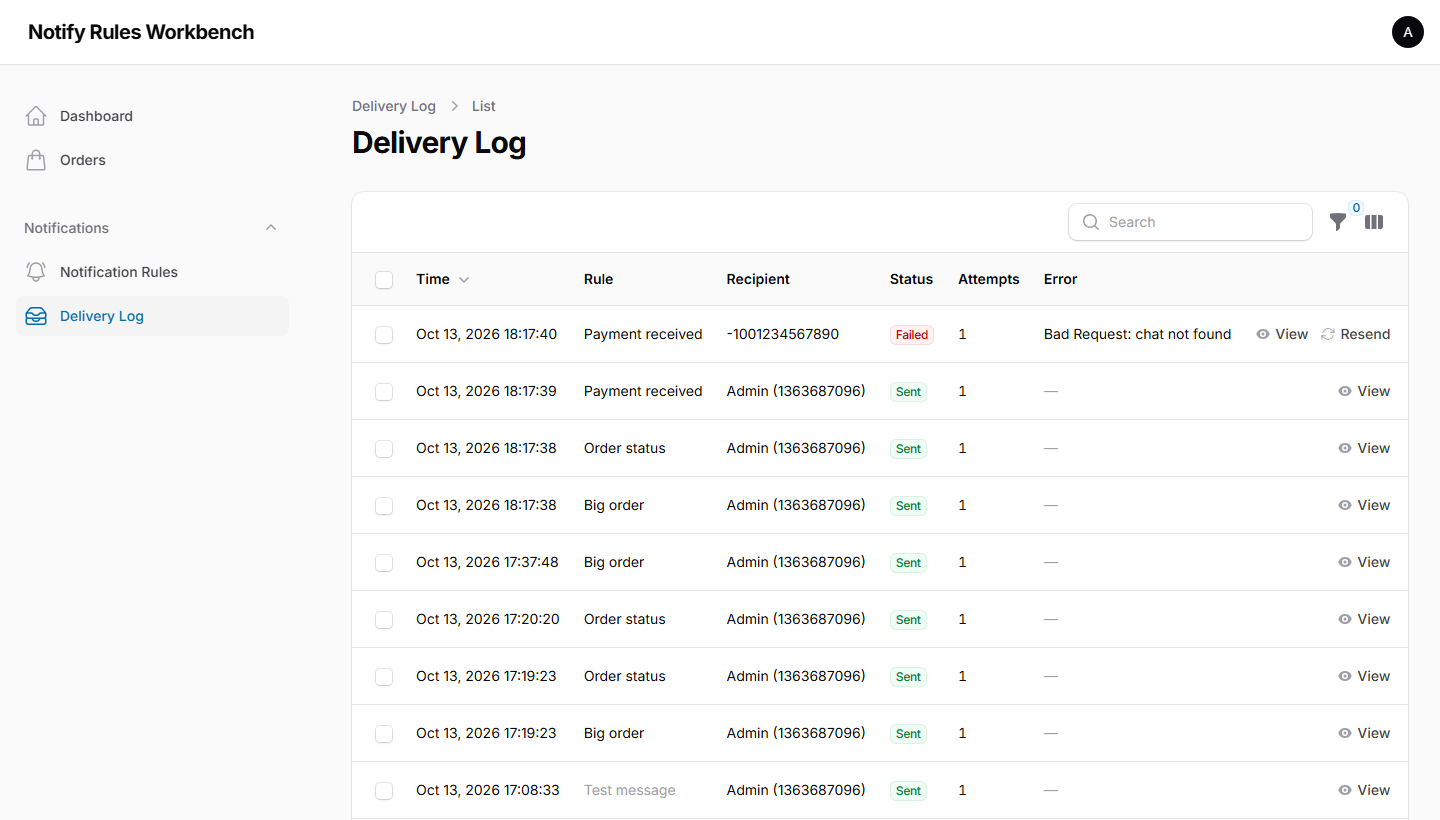
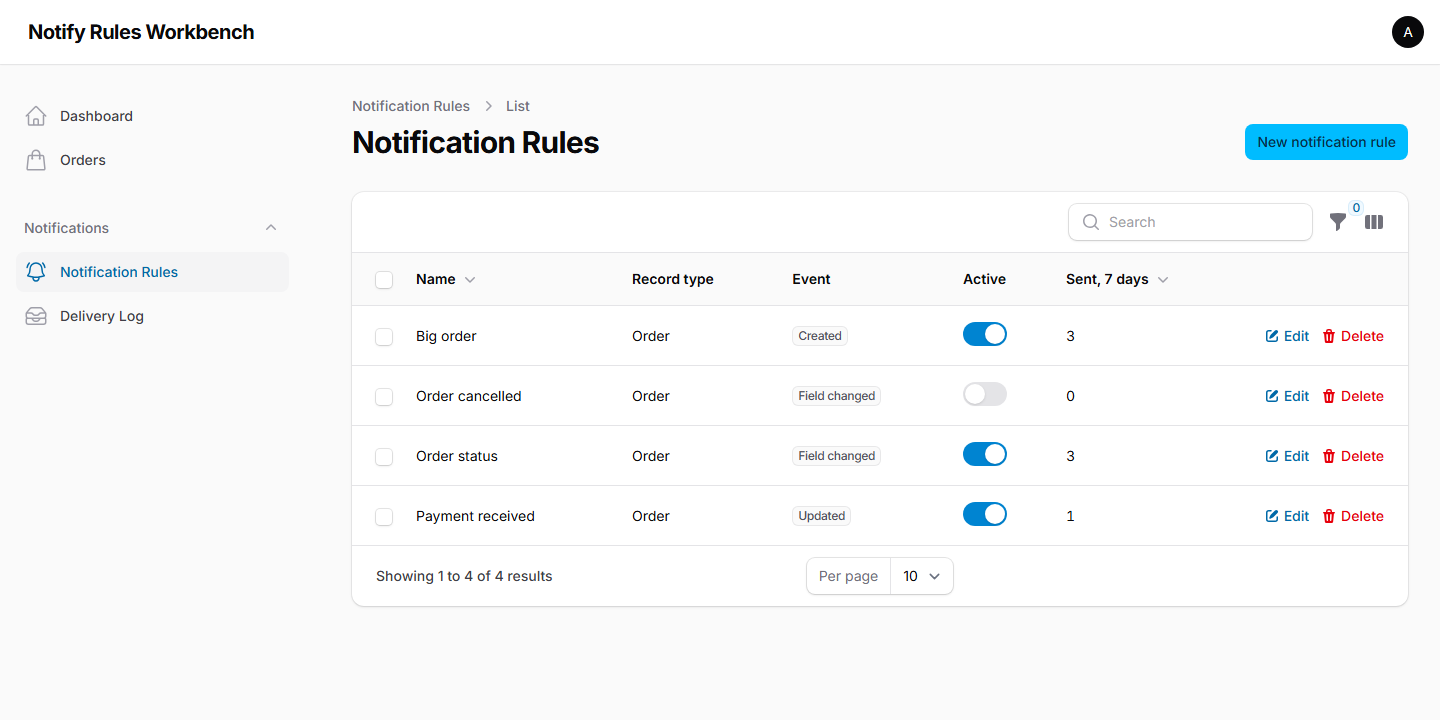
Every message is logged with its rule, recipient, status, attempts and error. Filter by status, rule or period, open a message, and resend failed ones.
Delete old entries with the prune command, ideally on a schedule:
// routes/console.php
use Illuminate\Support\Facades\Schedule;

Schedule::command('notify-rules:prune --days=30')->daily();
Pending messages are never pruned.
Multi-tenancy
In a panel with tenancy, every team manages its own rules and sees only its own delivery log.
- Choose the column that stores the tenant on rules and deliveries, before running the migration:
// config/notify-rules.php
'tenancy' => [
    'column' => 'team_id',
],
- Tell the plugin how your models belong to a tenant:
NotifyRulesPlugin::make()
    ->models([Order::class])
    ->tenantOwnership('team') // Order::team()
A record runs the rules of its own tenant and the global rules created in panels without tenancy. If the tenant of a record cannot be determined, only global rules run, so one tenant's rules never see another tenant's data. Previews, test messages and the list of recipients are limited to the current tenant.
Authorization
canManageRules() decides who can manage rules. The package registers NotificationRulePolicy and DeliveryPolicy, which use it and check the tenant of each record. To change the rules, register your own policies:
use Illuminate\Support\Facades\Gate;
use OrionSoft\NotifyRules\Models\NotificationRule;

Gate::policy(NotificationRule::class, App\Policies\NotificationRulePolicy::class);
Configuration
The published config/notify-rules.php lets you change:
| Key | Default | |
|---|---|---|
telegram.link_token_ttl |
15 |
Minutes a "Connect Telegram" link is valid. |
telegram.webhook_path |
notify-rules/telegram/webhook |
The webhook route. |
queue.connection, queue.name |
default | Where the sending jobs go. |
money.currency, money.locale |
USD, app locale |
Defaults of the money filter. |
cache.store |
default store | Where active rules are cached. |
tables.* |
notify_* |
Table names. |
prune_after_days |
30 |
Default for notify-rules:prune. |
tenancy.column |
null |
See Multi-tenancy. |
user_model, user_title_attribute |
App\Models\User, name |
The users Telegram is connected to, and the column shown when picking them. |
excluded_fields |
password, remember_token |
Fields never offered in conditions and templates. |
Translations
The plugin is translated into English and Russian. To change the texts or add a language:
php artisan vendor:publish --tag="notify-rules-translations"
Testing
composer test
Changelog
See CHANGELOG.
Security
If you discover a security issue, please email gevorgmanukyan349@gmail.com instead of opening an issue.
Credits
- Orion Soft (Gevorg Manukyan)
License
Notify Rules is open-source software licensed under the MIT license.