finity-labs / fin-codex
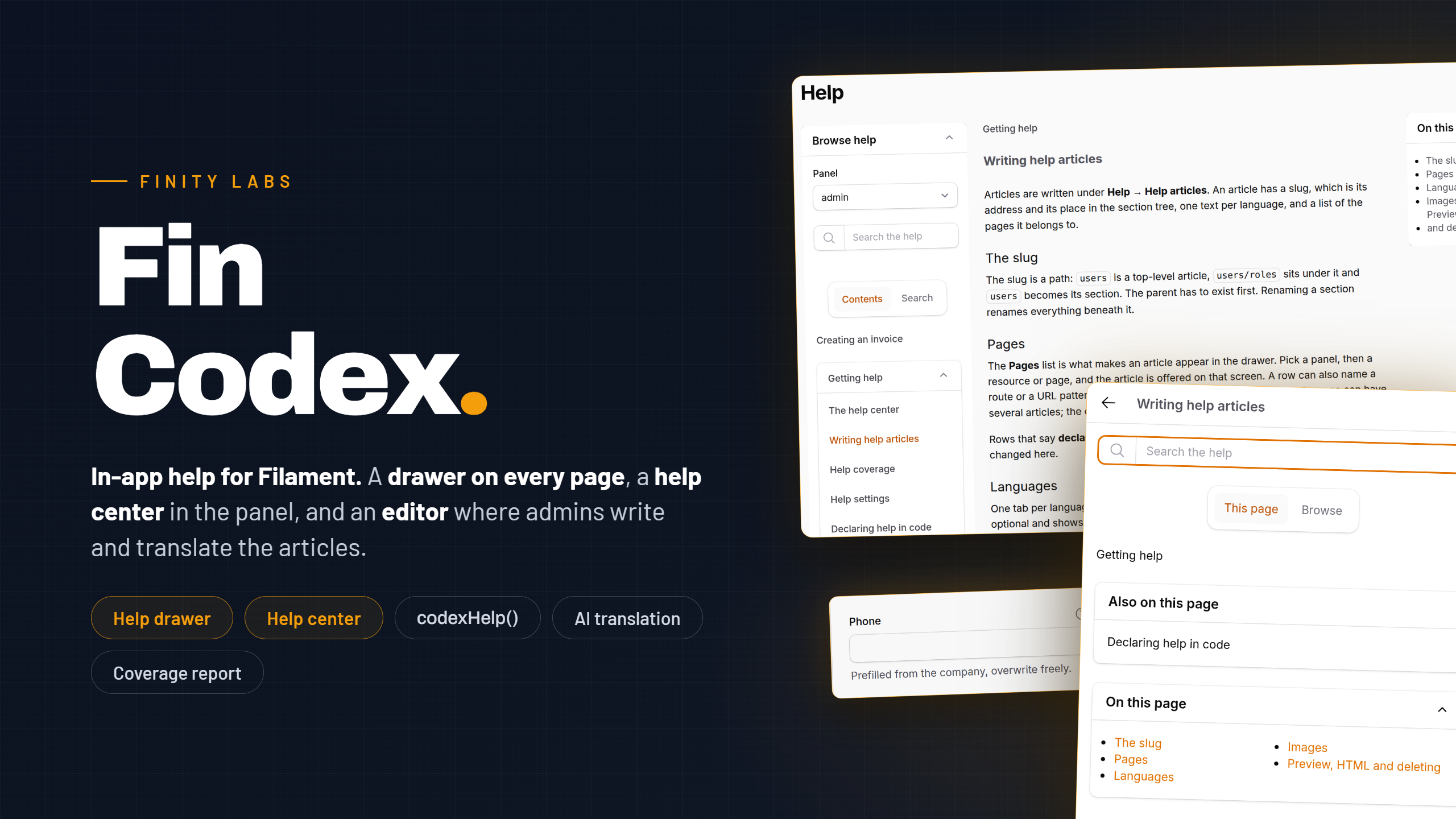
In-app help for Filament. A contextual help drawer, help buttons on resources and pages, and an article editor, built on lin-codex.
Requires
- php: ^8.2
- filament/filament: ^4.0|^5.0
- filament/spatie-laravel-settings-plugin: ^4.0|^5.0
- finity-labs/fin-modal-table-select: ^1.1.1
- finity-labs/fin-support: ^0.1
- finity-labs/lin-codex: ^0.2.2
- illuminate/contracts: ^11.28|^12.0|^13.0
- league/html-to-markdown: ^5.1
- spatie/laravel-package-tools: ^1.92
Requires (Dev)
- larastan/larastan: ^3.0
- laravel/pint: ^1.0
- orchestra/testbench: ^9.0|^10.0|^11.0
- pestphp/pest: ^3.0|^4.0
- pestphp/pest-plugin-laravel: ^3.0|^4.0
Suggests
- bezhansalleh/filament-shield: Optional page permissions for the settings and coverage pages (^4.0).
- finity-labs/fin-ai: AI settings UI for drafting, rewriting, and translating articles from the editor.
Provides
None
Conflicts
None
Replaces
None
This package is auto-updated.
Last update: 2026-09-09 19:29:53 UTC
README
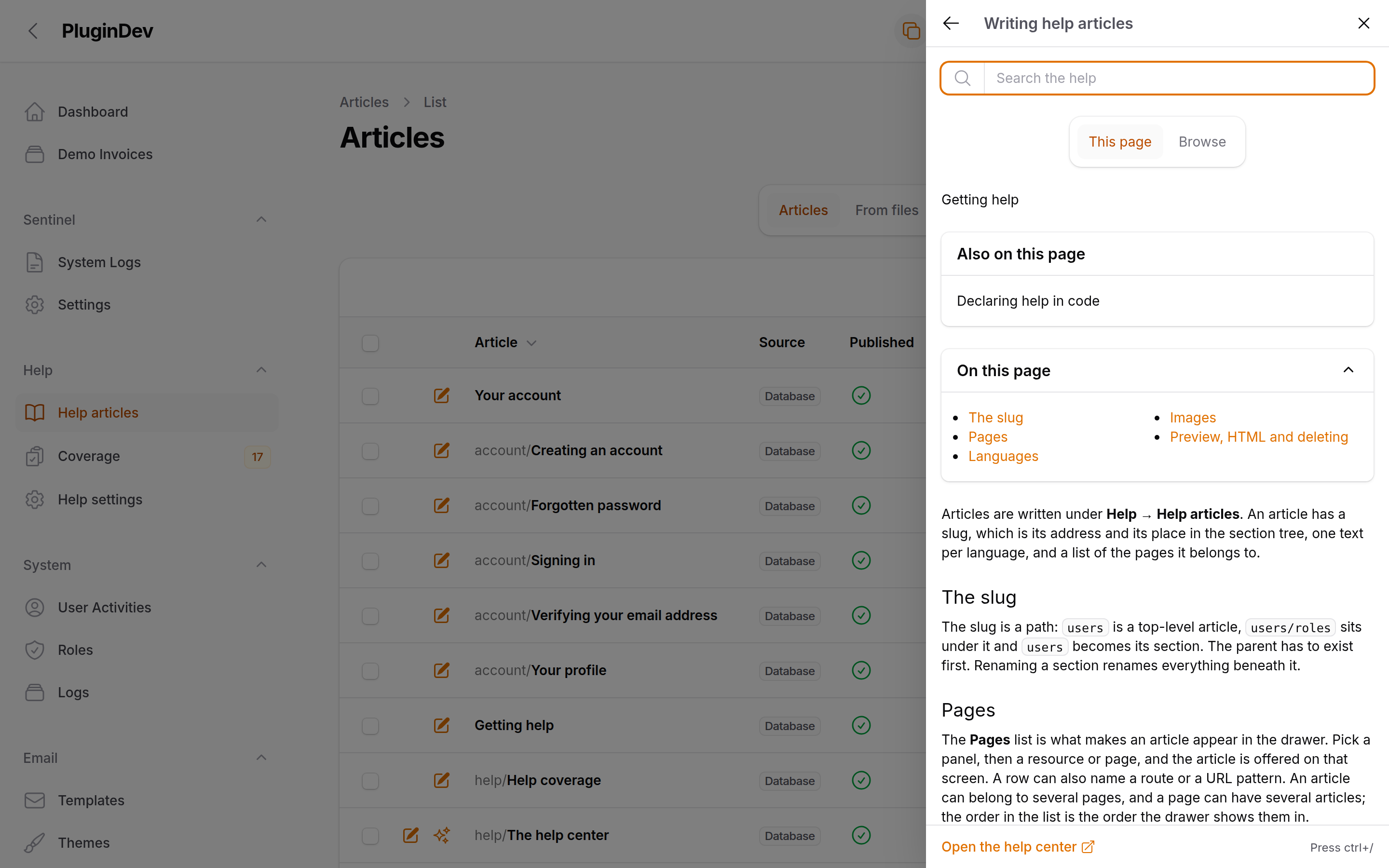
In-app help for Filament panels. Codex puts a help drawer in the topbar, shows a badge on every page that has an article, and gives admins an editor to write and translate those articles without leaving the panel. Content, search and the JSON API come from lin-codex, so the same articles also serve the parts of your app that live outside Filament.
Features
- Help drawer on every panel page, opened from the topbar button, a keyboard shortcut, a
?codex=sluglink or acodex:openbrowser event. - Contextual help — the drawer opens on the articles attached to the current resource or page. Attach them from the editor, or declare them in code with
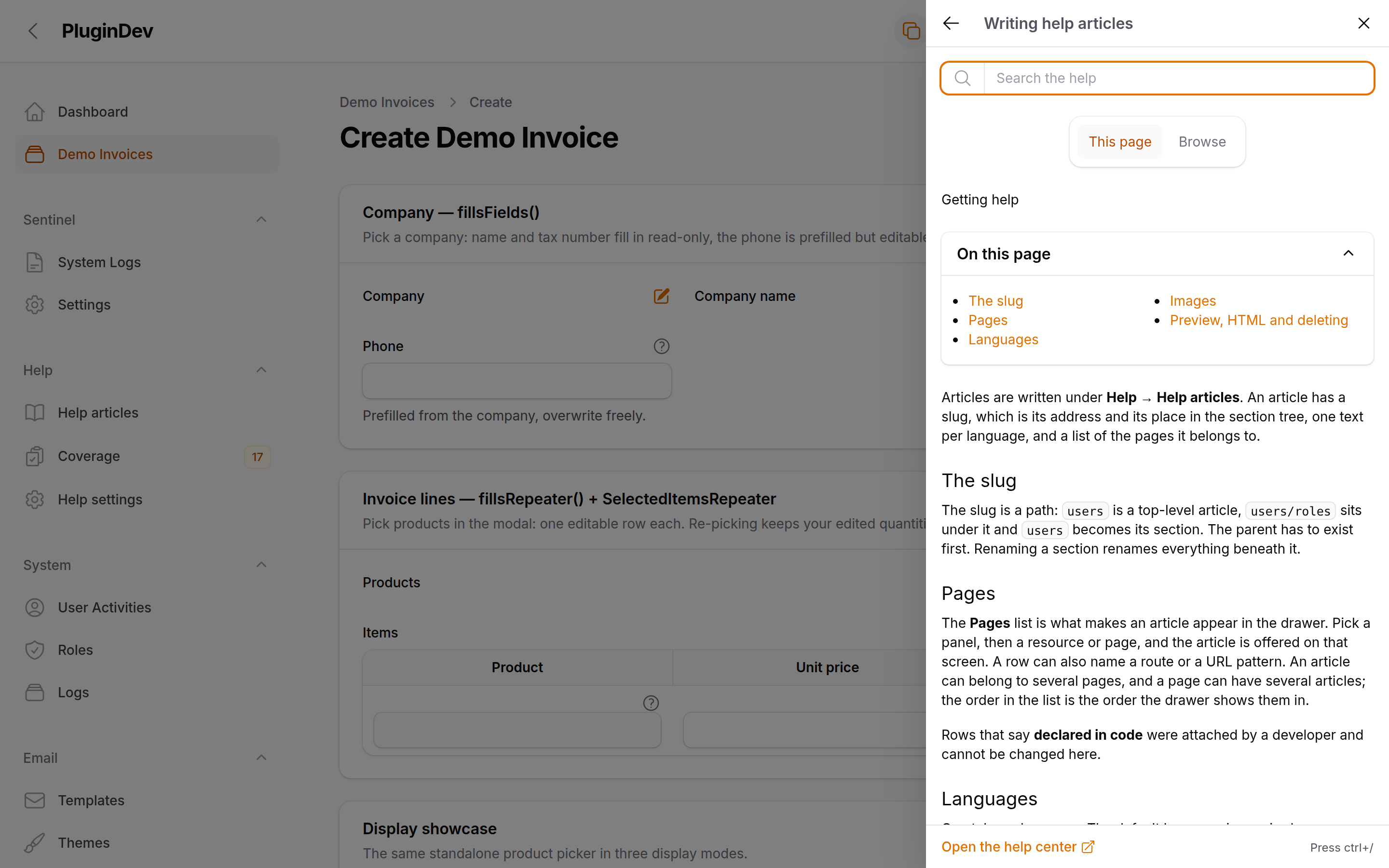
HasHelp. - Field hints — a question-mark button next to a form field that opens the article at a specific heading.
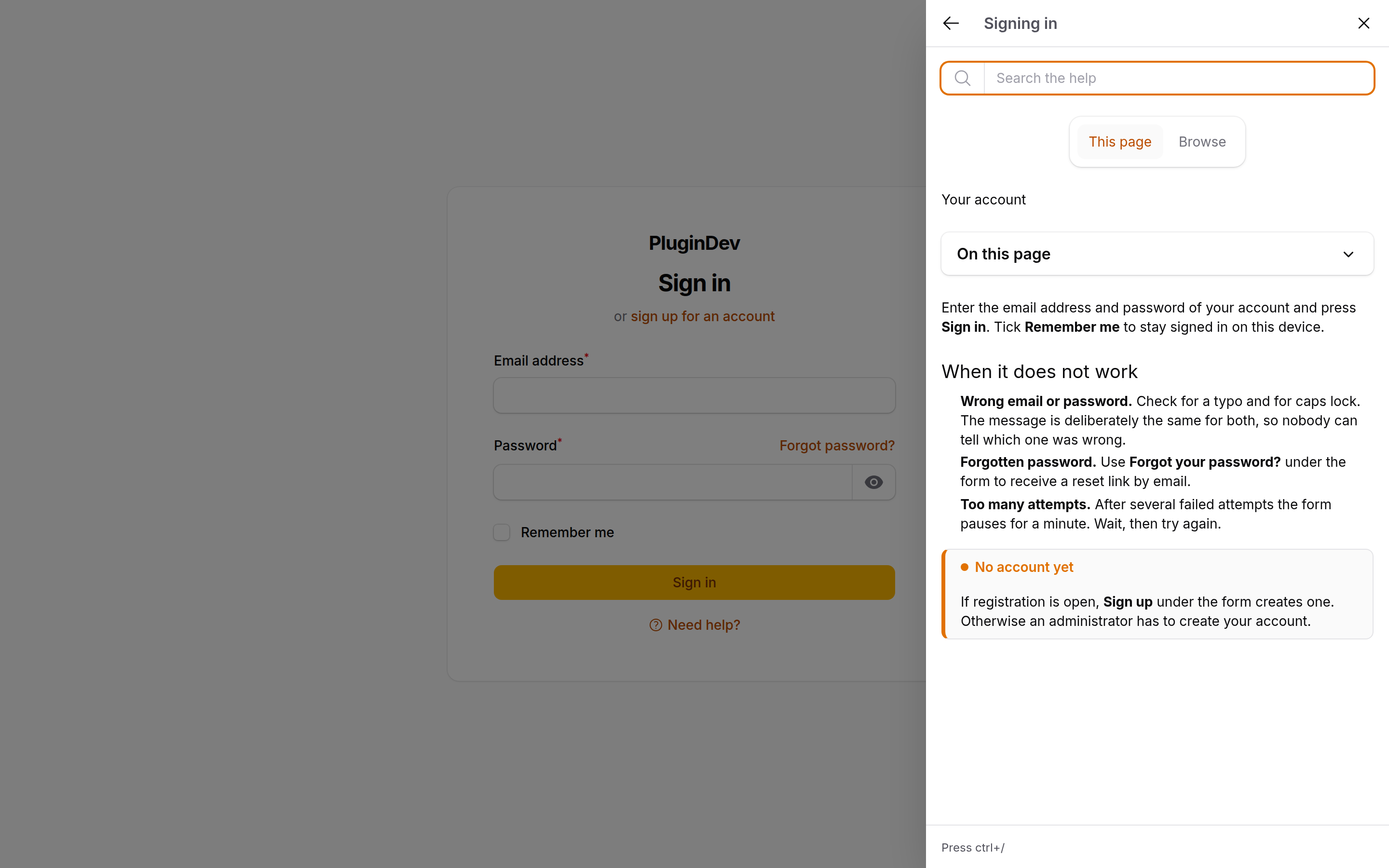
- Guest support. The login, registration and password-reset pages get their own "Need help?" link and the same drawer.
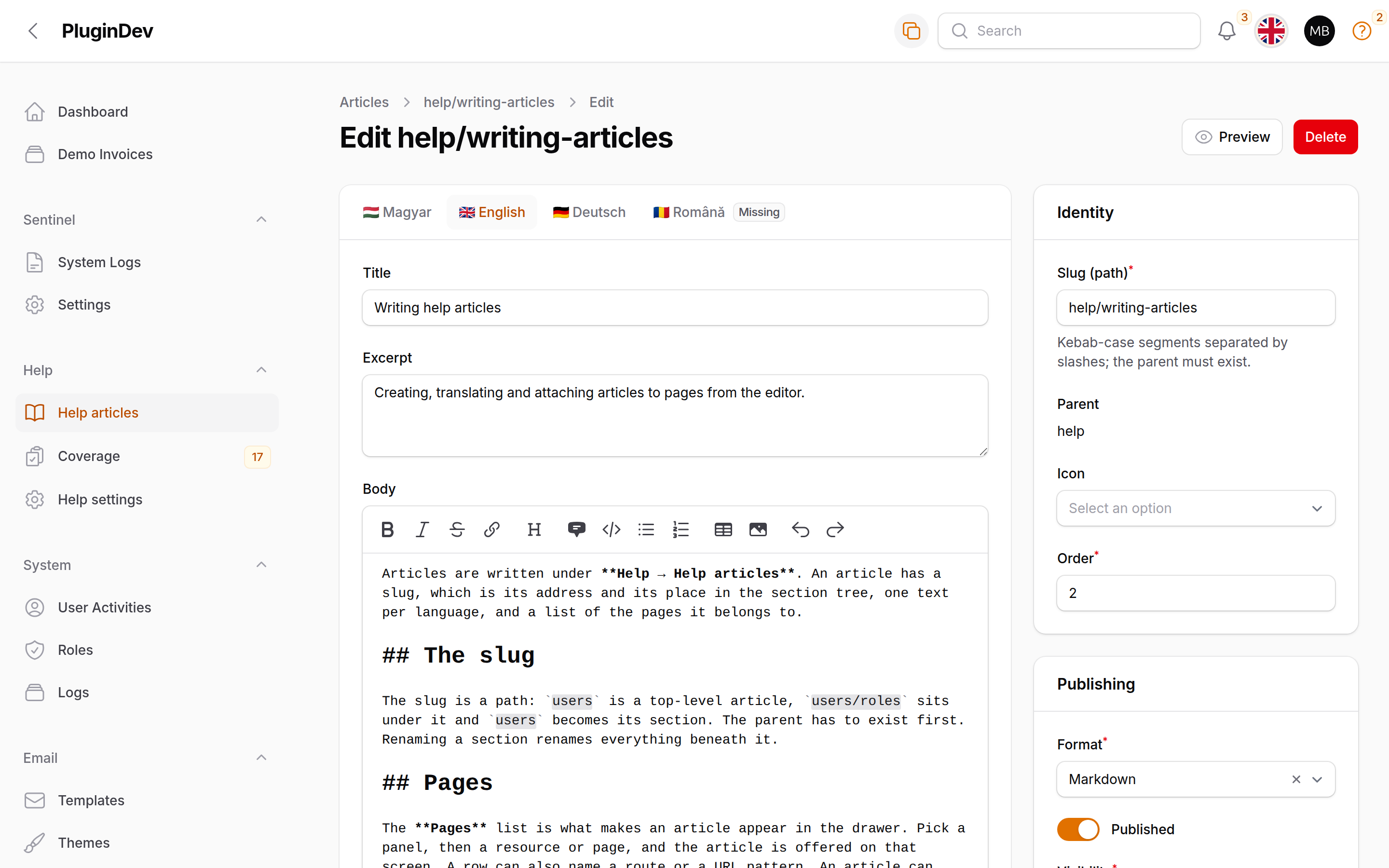
- Article editor with Markdown, language tabs, image uploads, a preview, and an HTML → Markdown conversion for imported content.
- File and database articles side by side. Articles that live as Markdown files on disk show up in the editor and can be imported with one click.
- Revision history with a rendered preview and one-click restore, kept per language with a configurable ceiling.
- Media manager on the article, with a delete that refuses while a body still points at the file.
- Settings page for languages, the default language, the fallback behaviour and revision retention.
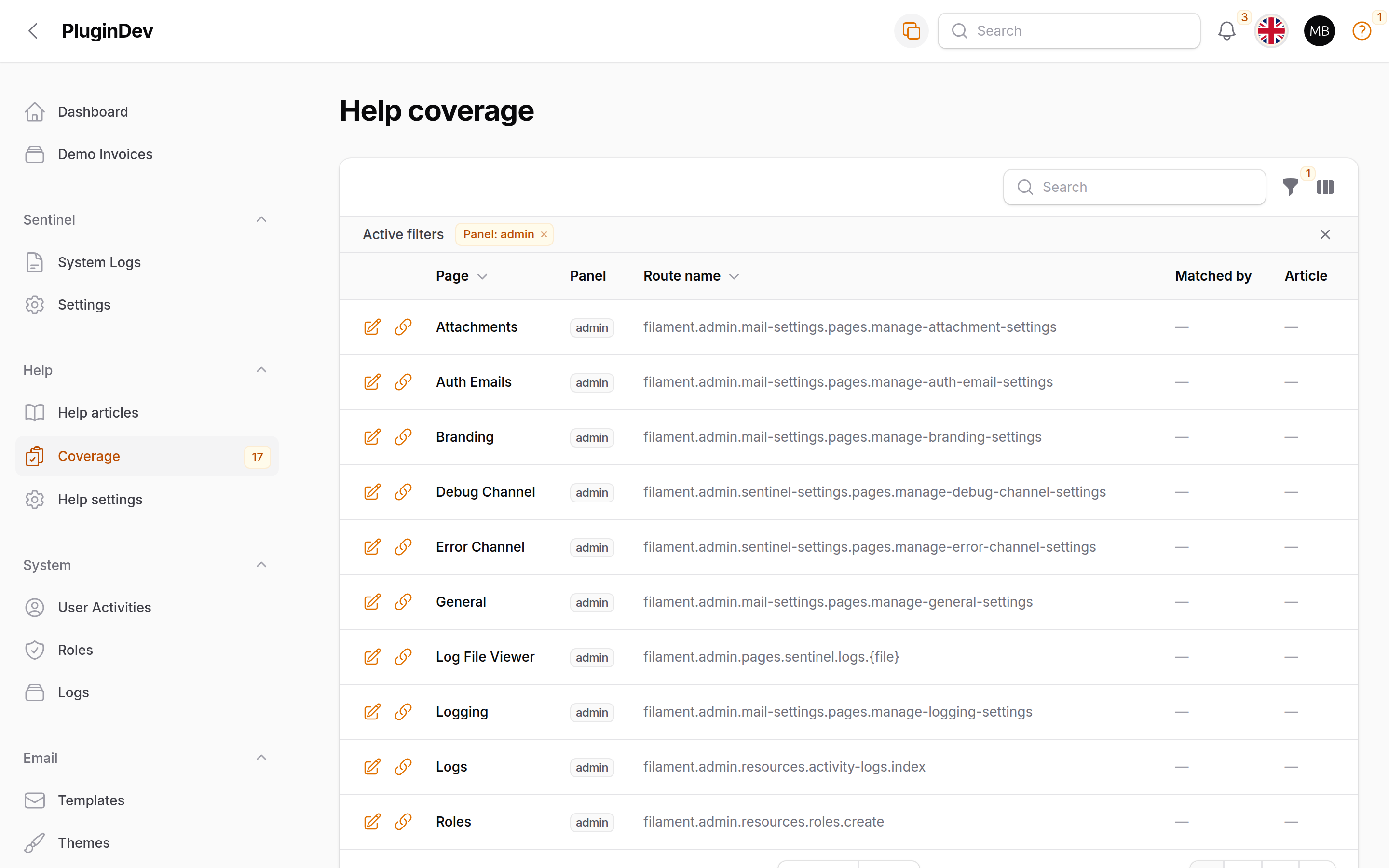
- Coverage report listing every screen in the panel and which of them have no article yet, with row actions that write, attach or import one.
- Source warnings — broken front matter, duplicate slugs and
HasHelpdeclarations naming articles that do not exist, in one collapsed panel above the article list. - Optional global search integration, off by default, appending a gated Help category to the panel's own search field.
- Authorization through a shipped
ArticlePolicyyou can replace, with Filament Shield support for the two pages and the resource. - English, German and Hungarian out of the box.
Requirements
- PHP 8.2+
- Laravel 11, 12 or 13
- Filament 4 or 5
finity-labs/lin-codex^0.2
Codex is split across two packages, and it matters for where you configure things. lin-codex owns the content: the codex_* tables, the Markdown renderer, the filesystem source, visibility rules, search, translations and the JSON API. It ships its own config file, its own install command and its own Blade drawer, and it works in any Laravel app with no Filament at all.
fin-codex — this package — is the panel layer on top: the drawer mount, the help button, the editor, the settings and coverage pages, and the authorization. It has no config file of its own. Anything about content (the media disk, search tuning, the help-center route, the article gate) is configured in config/lin-codex.php; anything that can differ between two panels is a fluent option on the plugin.
Installation
composer require finity-labs/fin-codex
lin-codex comes along as a dependency. Install its schema and settings first:
php artisan codex:install
Then wire the panel:
php artisan fin-codex:install
The install command:
- Checks that lin-codex's articles table exists, and offers to run
codex:installif it doesn't. - Registers
FinCodexPlugin::make()in one of your panel providers (it lists the panels it found; pass--panel=adminto skip the prompt). - Asks which languages the help articles are written in, with the locales your application already translates pre-selected, and writes them to the Codex settings. Pass
--locales=en,deto answer without the prompt. The application locale stays the default language when it is among them. - Offers to import eleven starter articles in the configured languages (they exist in en, de and hu): an authenticated Help section about the help system itself — getting help, writing articles, coverage, settings, and declaring help in code — and a public Your account section for Filament's own screens — signing in, creating an account, a forgotten password, email verification and the profile page (the profile article is authenticated). The account section is public on purpose: lin-codex hides an article whose ancestor the reader may not open, so a visitor on the sign-in page only sees articles whose whole path is public. They land as ordinary database articles, attached to the pages they describe and to the panel the plugin was installed on, and are yours to edit or delete.
--skip-starter-articlesleaves them out; a slug that already exists is left alone. - Offers to publish the translations and the views. Both default to no — a published copy stops receiving upstream changes.
- Registers the article resource in
config/filament-shield.phpif Filament Shield is installed, and runsshield:generate.
It never publishes or migrates anything belonging to lin-codex. That is codex:install's job, and running it twice is safe.
Pass --force to overwrite already-published files, and --no-interaction to take every default (the first panel it finds, the installed locales, the starter articles, no publishing, Shield wiring on if the config is there).
Register the plugin by hand
If you would rather not let a command rewrite a provider:
use FinityLabs\FinCodex\FinCodexPlugin; public function panel(Panel $panel): Panel { return $panel ->plugins([ FinCodexPlugin::make(), ]); }
Register it on as many panels as you like. Each panel gets its own options, its own drawer and its own copy of the pages.
Styles
There is nothing to do. The help button, the guest link and the drawer's chrome — its header buttons, search field, tabs and footer link — are Filament's own components, so they follow your panel's colours, radii and font as any other control does. Article content inside the drawer is rendered by lin-codex's partials and styled by its stylesheet, which arrives through the core's hashed route, injected into <head> on every panel page; fin-codex remaps that stylesheet's tokens onto the panel's grey and primary scales for light and dark mode. You do not need a custom Filament theme for any of that. The editor's modal pickers (related articles, the context key, the coverage page's attach dialog) are fin-modal-table-select components with views of their own, so if you do run a custom theme, add them to its @source list:
/* resources/css/filament/admin/theme.css */ @source '../../../../vendor/finity-labs/fin-modal-table-select/resources/**/*.blade.php';
The core drawer view stays what a page outside Filament gets. Inside a panel, fin-codex renders its own Livewire\HelpDrawer, a subclass of the core component that only names a different view, so every property, action and the Alpine glue are the core's.
Plugin options
Every option that can differ between two panels is a fluent method. All of them accept a closure as well as a literal, evaluated when the option is read.
FinCodexPlugin::make() ->shortcut('ctrl+/') // keyboard shortcut, null or '' disables it ->drawerWidth(480) // drawer width in pixels ->helpButton() // show the topbar button (default: true) ->guestDrawer() // drawer and link on simple-layout pages (default: true) ->globalSearch() // Help category in the panel search (default: false) ->helpButtonRenderHook(PanelsRenderHook::USER_MENU_AFTER) ->navigationGroup('Help') ->navigationSort(90) ->policyNamespace('App\\Policies') ->articleResource(MyArticleResource::class) ->settingsPage(MyHelpSettings::class) ->coveragePage(MyHelpCoverage::class)
| Method | Default | What it does |
|---|---|---|
shortcut(string|Closure|null) |
'ctrl+/' |
The keyboard shortcut that opens the drawer. null or '' turns it off for that panel. |
drawerWidth(int|Closure) |
480 |
Drawer width in pixels. |
helpButton(bool|Closure) |
true |
Renders the topbar help button. false removes the button only — the drawer, its shortcut and field hints stay. |
guestDrawer(bool|Closure) |
true |
The "Need help?" link and the drawer on simple-layout pages: login, register, password reset, email verification and any host SimplePage. false removes all three there; signed-in pages are unaffected. |
globalSearch(bool|Closure) |
false |
Appends a Help category to the panel's global search results. See Global search. |
helpButtonRenderHook(string|Closure) |
USER_MENU_AFTER |
Where the button renders. Set it explicitly and Codex honours it as given. Leave it alone and the button sits beside the user menu: in the topbar's end group next to the notification bell, or in the sidebar footer on a panel with ->topbar(false). A panel with ->userMenu(false) gets it at TOPBAR_END, or SIDEBAR_FOOTER without a topbar. Under SPA mode Filament persists the topbar's end group across navigations, so the badge there keeps the count of the first page; name TOPBAR_END if you want it live. |
navigationGroup(string|UnitEnum|Closure|null) |
NavigationGroup::Help |
The navigation group for the resource and both pages. The default enum's label follows the panel locale. |
navigationSort(int|Closure|null) |
null |
Sort for the article resource. Help settings files at +1 and Help coverage at +2, so ->navigationSort(90) gives 90, 91 and 92. Leave it null and Filament sorts the group by label. |
policyNamespace(string) |
'App\Policies' |
Where Codex looks for your own ArticlePolicy. See Authorization. |
articleResource(class-string) |
built-in | Swap in a subclass of FinityLabs\FinCodex\Resources\ArticleResource. |
settingsPage(class-string) |
built-in | Swap in a subclass of FinityLabs\FinCodex\Pages\HelpSettings. |
coveragePage(class-string) |
built-in | Swap in a subclass of FinityLabs\FinCodex\Pages\HelpCoverage. |
The three class overrides must name a real subclass of ours. Filament calls
registerRoutes()andregisterNavigationItems()statically on whatever string you pass at panel registration time, so a typo or a class that doesn't extend the built-in one is a fatal error on the next request, not a quietly ignored option. Keep the built-in slug (or overridegetPages()too) so the internal links keep resolving.
Extending is the intended way to adjust things. All three built-ins are non-final, and a subclass inherits the list, the filters, the "From files" tab, the form, the relation managers and every header action for free. The built-in pages resolve their resource through the plugin of the panel serving the request, so whatever you override on the subclass — the form, the table, getEloquentQuery(), the relation managers, the navigation statics — takes effect on those pages, and two panels can name two different subclasses:
use FinityLabs\FinCodex\Resources\ArticleResource; class MyArticleResource extends ArticleResource { public static function getNavigationBadge(): ?string { return null; // skip the warnings count on this panel } }
Contextual help
An article shows up in the drawer on a given screen because it has a context pointing at that screen. Contexts come from two places: articles carry them in the database, added from the editor, and classes declare them in code.
Declaring help in code
Implement HasHelp on a resource, a resource page or a custom page, and use the WithHelp trait to answer it from a property:
use FinityLabs\FinCodex\Help\HasHelp; use FinityLabs\FinCodex\Help\WithHelp; class UserResource extends Resource implements HasHelp { use WithHelp; protected static array $helpArticles = ['users', 'user-roles']; }
Best article first. The property can also be a map, when one class needs different articles per panel:
protected static array $helpArticles = [ '*' => ['users'], 'staff' => ['staff-users', 'users'], ];
'*' is the entry for panels without a key of their own. A panel with neither gets nothing.
The class must still implements HasHelp — a trait cannot implement an interface, and the scanner looks for the interface. WithHelp only fills in getHelpArticles(string $panelId): array from the property; skip the trait and write the method yourself if you'd rather compute the list.
What a declaration becomes
A declaration on a resource covers the whole resource: it folds in as a panel-scoped class: context on the resource, plus one route: context per registered page (list, create, edit, view). A declaration on a resource page like EditUser covers that page's route only. A declaration on a custom page covers that page class.
Declared slugs lead the drawer in the order you wrote them, count towards the topbar badge, count as covered on the coverage page, appear in lin-codex's JSON API, and go through the core's visibility gate like any stored article.
Three rules are worth knowing before you spread declarations around:
- A page-level declaration refines, it doesn't lead. The core sorts
class:contexts beforeroute:ones regardless of order, so anEditUserdeclaration always follows the resource's list on the edit page. Declare on the resource whatever should come first. - A declaration suppresses panel-less stored contexts on that page. The core's panel-scoped pass wins when it is non-empty, so a stored context with no panel id stops appearing on a page whose class or route carries a declaration in that panel. Store panel-scoped contexts (or declare them) when both should show.
- A slug that doesn't exist is skipped, not shown. It is reported once per class, panel and slug through lin-codex's source warnings, so the typo turns up on the coverage page rather than in the drawer.
Multi-configuration resources are not scanned. The scanner walks Panel::getResources() and Panel::getPages(). Filament 5's getResourceConfigurations() — the same resource registered several times with different configurations — is not walked, so declarations on those registrations do nothing until a later release adds it.
Field hints
CodexHelp puts a small question-mark button next to a form field. Clicking it opens the drawer on the article, scrolled to the heading if you named one.
The shortest form is the codexHelp() macro, available on every Filament field:
use Filament\Forms\Components\Select; use Filament\Forms\Components\TextInput; TextInput::make('slug')->codexHelp('articles/slugs'); Select::make('role')->codexHelp('users', 'assigning-a-role');
The macro is sugar over hintAction(CodexHelp::make(...)). Since CodexHelp::make() returns a plain Filament Action, it drops anywhere an action is accepted:
use Filament\Infolists\Components\TextEntry; use Filament\Schemas\Components\Section; use FinityLabs\FinCodex\Forms\CodexHelp; // Next to a section heading Section::make('Permissions') ->afterHeader([CodexHelp::make('users/permissions')]); // On an infolist entry TextEntry::make('status') ->hintAction(CodexHelp::make('orders', 'order-statuses')); // In a table header $table->headerActions([CodexHelp::make('orders')]);
Only fields get the macro; everything else takes CodexHelp::make().
The hint is invisible when there is nothing to open. If the slug doesn't exist, or the core's gate says this viewer may not read that article, the action hides and the field renders as if no hint were set. The tooltip is the article's title in the reader's language.
The button is a real link. Its href is the help-center URL for the article, and the Alpine handler only cancels the navigation when a drawer is present on the page. On a page without one — or with JavaScript off — the click goes to the help center in the same tab.
On an SPA panel, Codex appends the help-center route pattern to Filament's SPA exceptions when the plugin boots. Without that, Livewire's navigate listener starts on mousedown and wins the race against the Alpine intercept, so the click would leave the panel even with a drawer open. A custom lin-codex.routes.help_center prefix is honoured, and chaining ->spaUrlExceptions([...]) after ->plugin() keeps working — the plugin appends rather than replaces.
Locale and theme
The drawer locks app()->getLocale() when it mounts and keeps it across later Livewire requests. The chrome around it — the button's tooltip and aria-label, the guest link, the drawer's tab labels — is rendered by __() on each request instead, so it follows the locale of whatever request drew it.
If you set the panel locale in middleware, register that middleware as persistent:
$panel->middleware([ SetLocale::class, ], isPersistent: true);
Without isPersistent: true, Livewire update requests skip the middleware and the chrome falls back to the app's default locale after the first interaction.
One accepted rough edge: on a panel with dark mode, a machine whose OS prefers dark while the stored panel theme is light can show the drawer and button in dark colours for the few dozen milliseconds before Alpine's theme binding adds the light class. Filament's own dark-mode loader has the mirror-image race. Panels without dark mode get a static light class and never flash.
The article editor
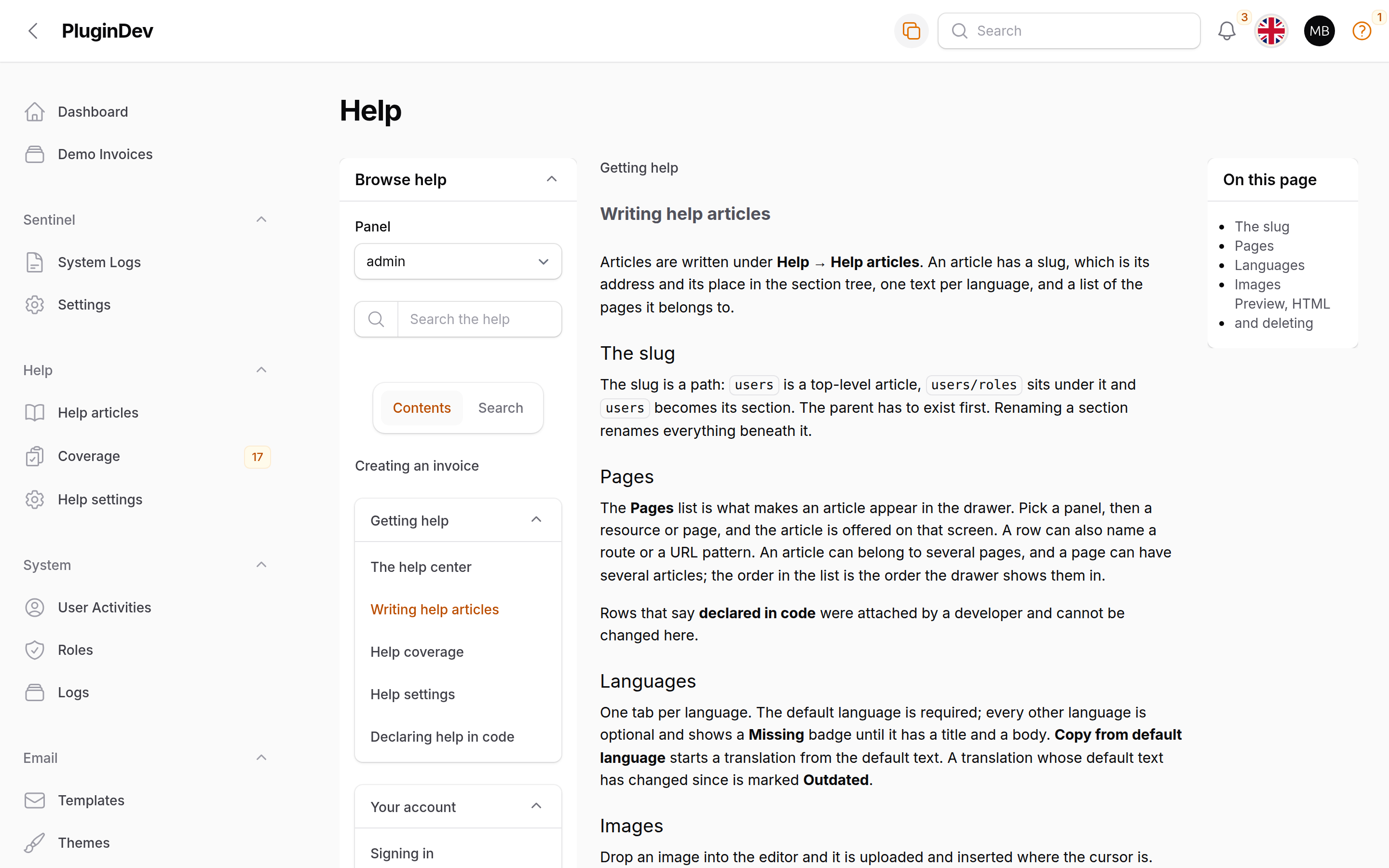
Help → Help articles is a normal Filament resource over lin-codex's Article model. Titles are shown in the panel's language, falling back to the default language. A Panels column shows which panels an article's pages target ("any panel" for a context without one), and the filters cover published state, visibility, format, source, panel and per-language translation state.
Next to the article list sits a From files tab. If lin-codex is reading articles off disk as well as out of the database, every file article that has no database row yet is listed there with an Import and edit button. Importing creates the database row through the core's importer and opens it. The import is idempotent: if a row already exists for that slug it is handed back rather than overwritten, so pressing the button twice opens what the first press created. Re-importing changed file content over an existing article is not supported yet.
A database article shadows its file completely. Once a slug exists in the database, the file version is ignored for every language, and the edit page says so. Nothing is deleted from disk.
A slug is permanent. It becomes the article's identity and its file path, so the editor does not let you change it after creation and never guesses one for you. The parent segment must already exist — but a file-only parent counts, and a child imported before its parent keeps a null parent until the parent arrives and the core relinks it.
Contexts
The Contexts repeater in the form's sidebar is where you say which screens an article shows up on. Contexts are always picked, never typed — the panel and the type are selects, and the target opens a modal table of what the chosen panel actually registers for that type: for class: every resource and custom page with its navigation label, class, kind, path and panels; for route: every named GET route with the page it leads to, its name, path and panel. The picked page shows its label with the class, or the route name and path, underneath. * means "any panel", widens the table to every panel, and is stored as a null panel id. The modal is fin-modal-table-select, which the related-articles field and the coverage page's attach dialog use too.
Contexts that come from a HasHelp class are listed above the repeater as read-only rows and never enter form state. The mapping lives in code, so that's where you change it.
Languages
One tab per language from the settings. Each tab holds the title, excerpt and body for that language, plus Copy from default language for starting a translation from the current default text. A non-default tab is optional as a whole: it is saved when title and body are both filled, refused with a validation message when only one of them is, and deleted when both are emptied — after a snapshot while revisions are on, so the text it held is one restore away.
A language is either translated or Missing, in the tabs and in the list's languages column, with a Missing language filter. There is no "outdated" marking: the editor cannot tell a corrected typo in the default text from a rewrite, and a badge that fires on both is soon ignored. Editor\OutdatedTranslations still computes which translations were saved before the default language, and the scope behind it, for a host that wants to surface that itself.
Images
Drop an image into a Markdown body and it uploads to lin-codex's media.disk and media.directory. Those are core config, not plugin options — a host that wants help images somewhere else sets them in config/lin-codex.php. The directory takes the placeholders {Y}, {m} and {d}, expanded at upload time to the year, month and day, and the core's default is codex/{Y}/{m}, so a busy site's images spread over dated folders instead of one flat directory. A stored image keeps the path it was written under.
An image in a preview, in the revision preview and in the Media tab opens full size when clicked, the way it does in the drawer. The Media tab's Download action streams the file through the application with its original name, so it works on any disk.
Documents. A PDF or an office file comes in through the Media tab's Upload file action, since the body editor's drop zone takes images only. FinCodexPlugin::make()->documentTypes([...]) replaces the accepted MIME types (PDF, Word, Excel, PowerPoint, plain text and CSV by default; never an archive, a script or an SVG) and ->documentMaxSize(20480) the ceiling in kilobytes. Documents land in the same dated folders as images, with the same row. Every upload is stored under its own name, slugified for the URL — User Guide (final).pdf becomes user-guide-final.pdf, and a repeat in the same month gets -2 — so the link an article carries and the name a browser saves the file as both read like the upload; the media row keeps the original name.
Reusing a file. An upload belongs to the article it was dropped into, but any article may use it: Insert file under each Markdown body opens a table of every upload of any article — thumbnail, file name, type, the article it was uploaded to, size and date — and appends the chosen one's Markdown to the body: an image as an image, a document as a link with the file name as its text. The core stamps a link to a document with a download attribute, so in the drawer and the previews it saves the file rather than leaving the article. Deleting a file is refused while any article's body still references it, whichever article uploaded it.
Every upload is public. Images and documents sit on the public disk and are reachable by anyone holding the URL, which is what help material usually wants. Internal documents would need authenticated delivery — a per-file flag, a private disk and a gated download route — which is planned (EXT-09 in the package's planning notes) and not built.
The disk needs a url, or the editor cannot show what was just uploaded. SVG is refused. Removing an image from a body leaves its codex_media row behind for the media manager to clean up.
Preview, converting and deleting
Preview renders the language tab you are on, through the core renderer, in the panel's theme. One tab at a time; per-tab buttons and a live preview are not in this release.
An HTML article is converted, not edited. Its body stays read-only until one confirmed action rewrites every translation as Markdown in a single transaction. The original HTML survives as a revision whether or not revisions are switched on, so the conversion is reversible by restoring it; while they are off the confirmation says so, because the Revisions tab stays hidden until you enable them.
Renaming a section renames every descendant with it. The rename is refused, on the slug field, when one of the slugs the descendants would take is already in use.
Deleting says what else it takes with it. The modal names the child articles that lose this parent and where each one lands, and the media rows that lose their article. If the article is authenticated and has public children, those children would become guest-visible once the parent is gone — so the modal offers a checkbox, on by default, that sets them to authenticated instead. Untick it deliberately.
Revisions and media
Both relation managers live on the article edit page. Both are lazy: they load when you scroll to them, not with the page. If you want one to load eagerly, extend it and set protected static bool $isLazy = false;. Neither carries a count badge — getBadge() is the hook if you want one, at one extra query per page render.
Revisions
Every saved change to a language is recorded while revisions are on, with the author, the time and a reason. Reason labels come from lin-codex's own lang files and follow the panel locale, so retranslating them means overriding the core's file, not this package's. A revision whose author has since been deleted reads "Unknown"; revisions are never orphaned by a user delete.
Preview renders a revision through the core renderer, in the revision's own format — an HTML snapshot of an article that has since been converted to Markdown still reads correctly. It is a rendered article, not a diff.
Restoring loses nothing. The text about to be replaced is written to the same history first, tagged as a restore, so any restore can be undone by restoring the row it created. Restoring a pre-conversion HTML revision turns the article back into an HTML article. The edit page reloads after a restore, so the form shows the restored text rather than what it held before.
Turning revisions off removes the Revisions tab. With Media left as the only visible relation manager, Filament renders no tab strip at all and the Media table appears bare. That is expected, and the settings toggle's helper text says so.
Media
The Media tab has no upload button on purpose — a file uploaded there would be one no article body points at. Uploads only ever arrive through the Markdown editor.
A delete is refused while any translation body still shows the file, and the refusal names each article slug and language. Known limitation: the scan looks for the URL the file's disk builds today. A body written while the disk's url config was different won't match, and such a file would delete without a warning. Changing a media disk's URL root after articles exist is not supported.
Deleting a file removes both the row and the file. A missing file, and a disk that has been taken out of filesystems.disks, both delete cleanly. A file whose disk is gone, and any non-image upload, show a "No preview" box rather than breaking the tab.
Deleting an article leaves its codex_media rows with a null article_id. Those orphans appear on no Media tab, and cleaning them up is out of scope for 0.1.
Settings
Help → Help settings holds the languages, the default language, the missing-translation fallback and revision retention. It writes to lin-codex's codex settings group, so the values apply everywhere the core reads them, not only in the panel.
Nothing is written until you press Save. A fresh install opens on the packaged defaults — one language derived from app.locale, revisions off, ten kept — and the settings rows appear on the first save. The page also works before the settings migration has run: a missing row and a missing table fall back the same way.
Removing a language asks what to do with its texts. Dropping a code opens a confirmation that names each language going away with how many translations it holds, counted live from what the form says right now, and one checkbox: Keep the translations, ticked by default. Ticked, the language leaves the editor tabs and the reader's fallback chain and nothing is deleted; add the code back and every text returns exactly as it was. Unticked, every translation and revision in those languages is deleted in the same transaction as the settings write. A save that removes no language never asks.
The current default language is the one removal the page refuses. It reports twice — once on the language list and once on the default-language select — because those are the two fields that have to agree. Pick a different default first and the same edit goes through in one save.
Lowering "Revisions kept per language" prunes nothing retroactively. It moves the ceiling from that point on. Stored revisions stay until new ones push them out, one article and one language at a time, inside the core's snapshot path. Saving settings never triggers a bulk delete.
Coverage and warnings
Help → Coverage lists every screen in the application and whether it has a help article. The page opens on the panel you are on, with the screens that have no article at the top; clear the panel filter to see every panel at once. "Outside panels" holds the application's own routes plus Filament's export and import download routes.
The coverage page is an editor surface. It deliberately bypasses the article gate and lists every article regardless of the viewer's own read access, so an editor sees the whole picture. Gate the page itself if that matters to you — see Authorization.
Its number is not codex:coverage's. lin-codex's console command counts routes and credits only what the core's route report matched. The page counts screens — a resource's list, create and edit pages fold into one row — and additionally credits a resource-class context. The two numbers legitimately differ, and the navigation badge is the page's.
The panel and coverage filters sit behind the table's filter button and are deferred, Filament's default: nothing happens until you press Apply.
The badges cost one report per panel page render. Navigation is built on every page and both badges are read eagerly. The content source is read once per request and shared by the drawer, the coverage report and the warnings (the core rebuilds its set once more for warnings, so two reads in all), and the route report is built once. On a large knowledge base that is still a full hydration of every article on every page; if you don't want to pay it, extend the page, return null from getNavigationBadge(), and name your class through ->coveragePage(...) — and the same for the warnings count on ->articleResource(...).
Closing a gap from a row
Each uncovered row offers Write article or Attach to an article, and a covered row offers Edit article:
- One row prefills exactly one context. A screen behind a Filament page prefills
class:{page or resource}; a standalone route prefillsroute:{name}. Never both, and never aurl:pattern. - The slug is never guessed. The create form opens with the title and context filled and the slug empty, because the slug is permanent and stays your decision.
- A duplicate attach is refused; a wider one is not. Attaching a context the article already carries writes nothing and says so. A context scoped to another panel, an "any panel" version of one already there, or a
route:context overlapping aclass:one are all legitimate and are added without comment. No overlap heuristics — a warning that fires on legitimate input trains people to ignore warnings. - A row covered by a declaration in code can't be edited from here. It shows the slug in grey with "Declared in code" underneath and no link. Change the
HasHelpclass instead. - A row covered by a file article offers "Import and edit" rather than a link, and imports before opening.
- Attaching a
class:context on a custom page covers that page on every panel. The core's route report walks every panel id when it matches, so an article attached to the admin Dashboard row also covers Dashboard elsewhere. A resource-class context does not spread this way.
Source warnings
When a content source has something to report — broken front matter, a duplicate slug, a HasHelp class naming an article that does not exist — a collapsed amber panel appears above the article list and above the coverage table, grouped by kind.
Nothing in fin-codex names or styles a kind: the headings and the sentences come from lin-codex, translated in English, German and Hungarian. Declaration warnings and file warnings share the surface and are told apart only by their heading.
The section is collapsed by default and does not remember. There is no dismiss control and no per-admin state; it re-opens collapsed on every page load, and it isn't there at all when the sources are happy.
One number per navigation item. Help articles shows how many content warnings there are. Coverage shows how many screens have no article. Different questions, different numbers, neither standing in for the other. Both amber, both hidden at zero. The escape hatch is the same as the coverage badge's: return null from getNavigationBadge() on a subclass named through ->articleResource(...).
Global search
Off by default. Turn it on per panel and the panel's search field gains a Help category:
FinCodexPlugin::make()->globalSearch()
Results go through the same gated search the drawer uses, so nothing appears that the viewer could not already read.
FinCodexPlugin::globalSearch() is not Panel::globalSearch(). Ours is a bool|Closure opt-in for the Help category. Filament's takes a provider class string or a bool and decides which provider the panel uses. They are unrelated and they compose — ->globalSearch(MyProvider::class) on the panel plus FinCodexPlugin::make()->globalSearch() on the plugin gives MyProvider's categories with Help appended.
Four things to know:
- The search field stays hidden on a panel with no globally searchable resource. Filament renders the field only when some resource answers
canGloballySearch(). Turning our option on does not force it; if you want a search field on a panel that has none, make one of your own resources searchable. - The article resource is deliberately not globally searchable. Filament's default would query the model directly — unpublished and members-only articles included, the gate never consulted, file articles missing, and every row linking to the edit page. A subclass registered through
->articleResource()inherits thatfalse. Re-enabling it is a visibility leak, not a feature. - The panel search and the help drawer share one rate limit. lin-codex keys it per user or IP over a 60-second window, defaulting to 120 searches for a signed-in user and 30 for a guest. Global search fires one search per debounced keystroke, so sustained typing in the panel's search field can throttle the same person's help drawer for the rest of the minute. Raise
lin-codex.search.rate_limit.userif your admins live in the search box. Queries shorter thanlin-codex.search.min_lengthcost nothing. - Help results are capped at five in the dropdown, independent of
lin-codex.search.limit, which is tuned for the full-height drawer. The category is always appended last, so your owngetGlobalSearchSort()ordering is untouched, and it is left out entirely when the search is throttled or matches nothing.
Authorization
fin-codex ships a policy for lin-codex's Article and registers it for you. Out of the box it answers yes to any authenticated panel user, which is what a panel with no policy already does — the difference is that a panel with strictAuthorization() renders instead of throwing.
Replacing it
Write your own class at {policyNamespace}\ArticlePolicy — App\Policies\ArticlePolicy unless you say otherwise — and Codex registers yours instead of the shipped one. Extending the shipped policy is the shortest way there; it is not final and none of its methods are static.
namespace App\Policies; use FinityLabs\LinCodex\Models\Article; use Illuminate\Contracts\Auth\Authenticatable; class ArticlePolicy extends \FinityLabs\FinCodex\Policies\ArticlePolicy { public function update(Authenticatable $user, Article $article): bool { return $user->hasRole('editor'); } }
Don't edit the shipped file in vendor/ — an update overwrites it.
The namespace is a per-panel option and is registered when that panel boots for a request, so two panels can name two policies. Outside any panel — console commands, queue workers, routes of your own — the default panel's namespace applies, or App\Policies when the plugin is not on the default panel.
If your application already has an
App\Models\Article, read this one. The lookup matches on class basename, so your existingApp\Policies\ArticlePolicy— written for your Article — would be registered against lin-codex's model too, and would start answering questions it was never written for. Point Codex somewhere else:FinCodexPlugin::make()->policyNamespace('App\\Policies\\Codex')Codex then looks for
App\Policies\Codex\ArticlePolicyand falls back to the shipped policy when it isn't there. Your own article's policy is left alone.
The abilities
| Ability | Guards |
|---|---|
viewAny |
The article list and the navigation item |
view |
Reading one article in the editor |
create |
The create page |
update |
The edit page, the media tab and media deletion |
delete |
Deleting an article |
restore |
Restoring a revision — Article has no soft deletes |
import |
Adopting a file article into the database |
convert |
Rewriting an HTML article's body as Markdown |
The first five are Filament's. The last three are ours, and a policy that only defines the first five keeps working: restore and convert fall through to the article's update, and import falls through to create. You should not have to learn our vocabulary to keep the editor running.
The fallback fills a missing method; it never overturns a no. Define restore() and return false and the restore button stays gone.
import gates every file-to-database adoption, not just the buttons. Opening a file-only article for editing needs it too, because the adopter enforces it at the choke point rather than only in the UI. A user who cannot import cannot cause an import by any route.
There is no MediaPolicy and no revision policy, by design. Revisions, translations, contexts and media are only ever edited through the article, so they answer to the owning article's abilities — the media relation manager and its delete both ask for update on the article. One policy to override, not four.
Reading help is not editing help
The drawer, the help button, the field hints and the global-search Help category go through lin-codex's ArticleGate and never touch ArticlePolicy. A user with a deny-everything article policy still reads exactly the help the core's visibility rules allow. Editor permissions have nothing to do with reading help, and there is a test in the suite that keeps it that way.
Gating the settings and coverage pages
Without Shield, both pages are open to any authenticated panel user until you define an ability named after the page class:
use Illuminate\Support\Facades\Gate; Gate::define('page_HelpSettings', fn ($user) => $user->isAdmin()); Gate::define('page_HelpCoverage', fn ($user) => $user->isAdmin());
Define nothing and nothing changes. The ability is named after the class actually registered on the panel, so if you supply your own settings page through ->settingsPage(MyHelpSettings::class), the ability is page_MyHelpSettings.
Filament Shield integration
Filament Shield is optional. Install it and the pages and the resource pick up Shield permissions on their own; without it, authorization works exactly as described above.
fin-codex:install writes the article resource into config/filament-shield.php with all eight abilities and runs shield:generate. The two pages need nothing written for them — Shield 4 discovers pages from the panel and only reads pages.exclude from config — so the command prints the nudge instead:
php artisan shield:generate --page=HelpSettings,HelpCoverage
Because policies.merge is on by default, the resource's own methods are folded into Shield's list, which is how restore, import and convert end up on the generated policy. That policy lands at App\Policies\ArticlePolicy — the same place Codex already looks — so a Shield install takes over the article authorization with no extra wiring and no Shield branch in our code.
On page_HelpSettings and page_HelpCoverage: those are fin-codex's own Gate hook for hosts without Shield. They are not Shield's naming. Shield 3 used page_{Class}, but Shield 4 renamed every permission — separator :, pascal case, a view prefix for pages — so on a Shield install the settings page's permission is View:HelpSettings by default, and something else entirely on a reconfigured one. Codex never builds that name: it asks Shield for it, which is why a customised filament-shield.php keeps working.
fin-codex:uninstall removes the resource entry from the Shield config and deletes the permission rows for the resource and both pages, asking Shield for their names rather than rebuilding them. If Shield cannot answer, nothing is deleted and the command says so.
Translations
English, German and Hungarian ship with the package. To adjust the wording:
php artisan vendor:publish --tag=fin-codex-translations
The files land in lang/vendor/fin-codex/{locale}/fin-codex.php. There is one file per locale and the key sets are identical across all three, enforced by a test.
Enum labels — article formats, visibility, context types, revision reasons, fallback behaviours, warning kinds — come from lin-codex, not from here. Retranslating one of those overrides the core's lang file:
php artisan vendor:publish --tag=lin-codex-translations
A second test asserts that fin-codex never redefines a core enum label, so the two files cannot drift into disagreeing about the same word.
Views can be published too, if you need to change the markup:
php artisan vendor:publish --tag=fin-codex-views
Both are opt-in during fin-codex:install, and both default to no, because a published copy stops receiving upstream changes.
Uninstalling
Run the uninstall command before removing the package:
php artisan fin-codex:uninstall composer remove finity-labs/fin-codex
It removes FinCodexPlugin::make() from every panel provider that carries it, drops the article resource from the Shield config, deletes the Shield permission rows, and offers to delete the published views and translations.
It does not touch your content. Articles, translations, contexts, revisions, media files and the Codex settings all belong to lin-codex and survive removing the Filament layer. If you want those gone too:
php artisan codex:uninstall
It also leaves app/Policies/ArticlePolicy.php alone, even though shield:generate may have written it. That is exactly the path where an application with its own App\Models\Article keeps its own policy, the command cannot tell the two apart, and deleting it is unrecoverable. Remove it yourself if it was ours.
Known limitations
Nothing here is speculative — these are the things this release knows it doesn't do, or hasn't checked.
Three behaviours are proven by contract in the test suite but have never been clicked in a real browser. This package has no browser runner, and the harness cannot render the surfaces involved:
- Global search's "Open here". The result action dispatches the drawer-open event, but Filament's own result anchors carry an Alpine
close()that ours does not, so the search dropdown may stay open behind the drawer. The harness renders no search field at all on any fixture panel, which is limitation 1 in the Global search section biting the tests too. - The field hint's drawer open. The rendered handler string, the absent
wire:navigateand the SPA exception list are all asserted; the click itself is not. - The
?codex=slug#headingdeep link. The drawer scrolls to a heading after the article renders, which is Alpine behaviour with no server round trip and nothing to assert against.
Also worth knowing:
- Changing a media disk's URL root after articles exist is not supported. The in-use check that protects a media file from deletion looks for the URL the disk builds today.
- Media rows orphaned by an article delete are not cleaned up. They keep their file and lose their
article_id, and appear on no Media tab. - Re-importing a file article over an existing database row is not available; the import hands back the existing row instead.
- Filament 5's multi-configuration resource registrations are not scanned for
HasHelpdeclarations.
Testing
composer test # Pest composer analyse # PHPStan (larastan), level 5 composer format # Pint
CI runs the suite across Filament 4 and 5 (Livewire 3 and 4 respectively) on Laravel 12 and 13, PHP 8.2 to 8.4. The Laravel 11 row is there but allowed to fail: Composer's security audit blocks every tagged 11.x release, so it resolves the 11.x branch.
License
MIT. See LICENSE.