
astrophp / verse

AstroPHP Verse: a static site generator. Write in Markdown, design with Blade, publish anywhere.
Requires
- php: ^8.4
- ext-intl: *
- ext-json: *
- ext-mbstring: *
- illuminate/view: ^13
- league/commonmark: ^2.10
- symfony/console: ^8.1
- symfony/process: ^8.1
- symfony/yaml: ^8.1
- tempest/highlight: ^2.29
Requires (Dev)
- laravel/pint: ^1
- phpstan/phpstan: ^2
- phpunit/phpunit: ^13
Suggests
- ext-pcntl: Clean Ctrl-C handling in `verse serve`
Provides
None
Conflicts
None
Replaces
None
This package is auto-updated.
Last update: 2026-10-23 20:33:18 UTC
README

Write in Markdown. Design with Blade. Publish anywhere.
A static site generator written in PHP.

Install · Quick start · Configuration · Roadmap
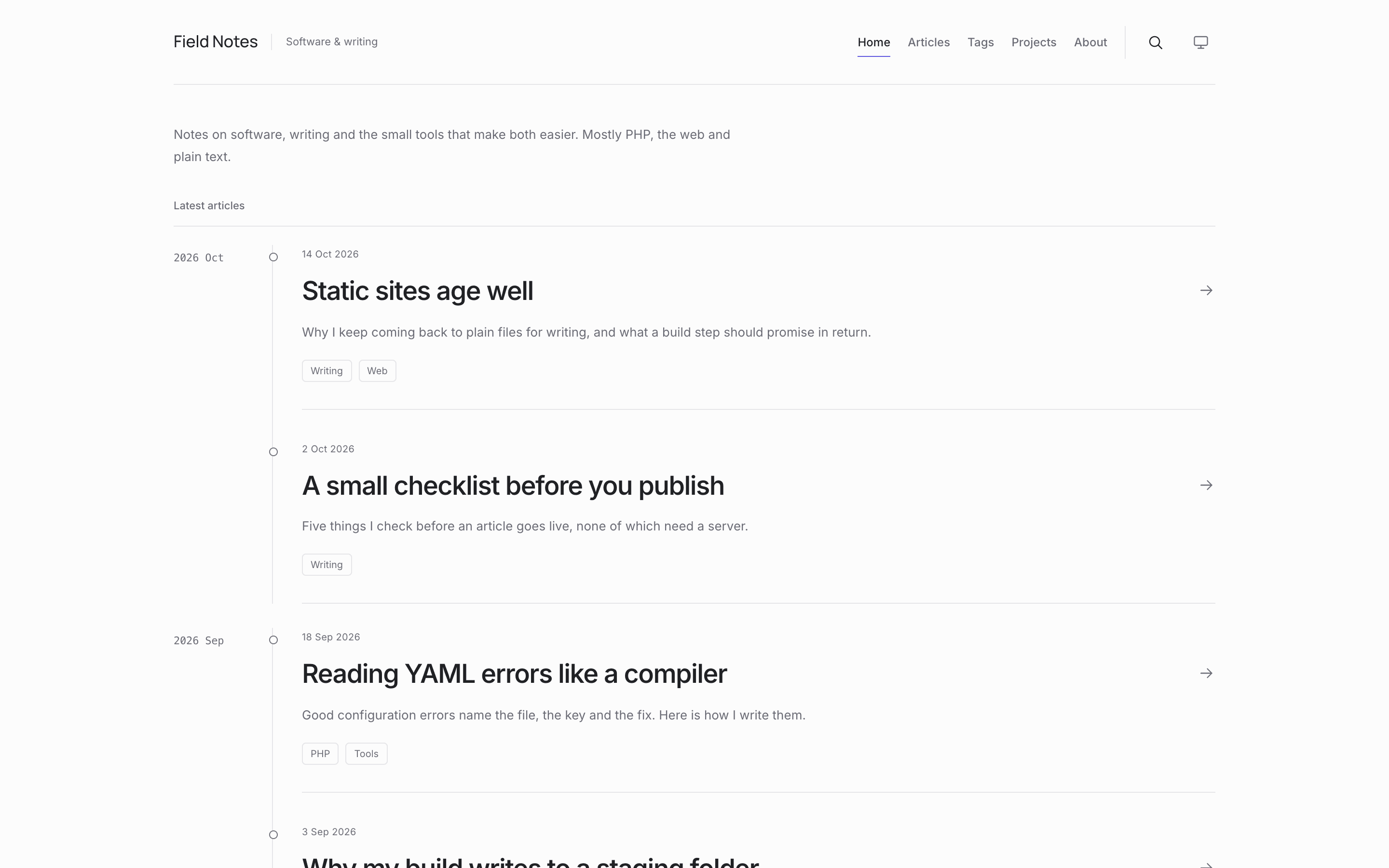
Verse is a command-line static site generator written in PHP. A website is an ordinary folder of
Markdown files with YAML front matter and one verse.yaml; Verse renders it through a bundled Blade
theme into plain static HTML, CSS and JavaScript that any static host can serve.
Warning
Verse is early software. Until v1.0.0, a minor version may change commands, configuration keys, theme views and output; the changelog lists every change.
- Four commands:
verse init,verse serve,verse check,verse build. - Articles, pages, page bundles with attachments, tags, drafts and scheduled posts, external articles.
- One complete bundled theme (
default) with light/dark mode, a table of contents, code highlighting and ⌘K / Ctrl K search over a static index. - Websites contain no theme files and never need Node.js.
Requirements
- PHP 8.4.1 or later (CLI) with the
intlandmbstringextensions - Composer
- Optional:
pcntl, for clean Ctrl-C handling inverse serve
Node.js is needed only to work on the bundled theme inside this repository, never to build a website.
Installation
Install Verse globally with Composer from Packagist:
composer global require astrophp/verse
verse --version
Composer puts verse in its global bin directory. If your shell cannot find the command, add that
directory to your PATH; composer global config bin-dir --absolute prints it. Update with
composer global update astrophp/verse.
A website can also pin its own Verse version, for example to build it in CI. Run this in the website
folder (after verse init, which only works in a new or empty folder) and add /vendor/ to its
.gitignore:
composer require --dev astrophp/verse
vendor/bin/verse build
To run unreleased code from main, clone this repository, run composer install and use
bin/verse. Its --version prints the branch and the commit of the last composer install, for
example Verse dev-main (f8d2498).
Quick start
verse init my-site
cd my-site
verse serve            # preview at http://127.0.0.1:8000 with live reload
verse check            # run the production build in temporary storage, without writing dist/
verse build            # write the production site to dist/
verse init creates a verse.yaml, an About page, a first article and a .gitignore in a new or
empty folder. It also adds content/articles/markdown-showcase/, a draft that shows every Markdown
feature the theme renders; verse serve shows it, verse build never publishes it. Until you
replace the placeholder values (https://example.com/, Your Name, your-username), verse build
warns about them.
verse check runs everything verse build runs (configuration, theme, content, routes, rendering,
assets and output validation) in a private temporary folder that it deletes afterwards. It never
writes dist/ or .verse/, so it is safe to run at any time, also while verse serve or
verse build is running. It validates the files as it reads them; it does not take a snapshot of a
site you are editing at the same time. Errors and warnings are reported exactly as verse build
reports them.
Website layout
my-site/
├── verse.yaml
├── content/
│   ├── about.md                     # → /about/
│   ├── articles/                    # the articles folder (fixed)
│   │   ├── an-article.md            # → /articles/an-article/
│   │   └── another-article/
│   │       ├── page.md              # page bundle → /articles/another-article/
│   │       └── diagram.png          # attachment → /articles/another-article/diagram.png
│   └── legal/
│       └── privacy.md               # plain folder → /legal/privacy/
├── public/                          # copied to the output root unchanged (optional)
├── theme/
│   └── hooks/                       # Blade snippets added to the theme's pages (optional)
├── .verse/                          # private generated state (ignored)
└── dist/                            # production output (ignored)
- Every
.mdfile incontent/articles/(or bundle folder in it) is an article; every other Markdown file undercontent/is a page. - A folder containing
page.mdis a page bundle: every other file in it is an attachment, served relative to the page's URL. page.mdcannot sit directly incontent/orcontent/articles/, subfolders ofcontent/articles/must be bundles, andindex.md/_index.mdare reserved. Verse fails with an error naming the file and suggesting a fix.- Hidden files are ignored; symbolic links under
content/,public/ortheme/are rejected.
Front matter
---
title: Hello, Verse
description: A first article to show how a Verse site is written.
date: 2026-10-20
tags: [Verse]
---
Markdown starts here.
| Field | Meaning |
|---|---|
title |
Required. Also the menu label of a page. |
description |
Summary for listings and meta tags. |
date |
Required for articles. YYYY-MM-DD, YYYY-MM-DDTHH:MM[:SS], optionally with Z or ±HH:MM. |
updated |
Date of the last substantive update. |
draft |
true keeps the item out of production builds. |
tags |
List of tag labels. |
slug |
Replaces the last segment of the URL. |
permalink |
Full site-relative URL, such as /essays/trace/. |
canonical |
Canonical URL when the content is published elsewhere first. |
image |
Social / featured image. |
external_url |
Articles only: list the article but link to another site instead of rendering a page. |
menu, order |
Pages only: show the page in the main menu, ordered by order. |
extra |
Free-form map for your own values. |
Unknown keys are rejected; put custom values under extra. Articles with draft: true or a future
date are drafts and scheduled items: verse build leaves them out of every page, listing,
menu and the search index. External articles appear in listings, tag pages and search, marked with ↗,
but produce no local page.
Markdown supports headings, lists, links, images with captions, tables, footnotes, fenced code with
server-side highlighting, and callouts (> [!NOTE]). Raw HTML in Markdown is escaped, and content is
never executed as PHP or Blade. Relative links to other Markdown files and attachments are resolved to
their final URLs.
Configuration: verse.yaml
title: My Site
url: https://example.com/          # required by `verse build`; may include a base path: https://example.com/notes/
description: A short description of my site.
tagline: Your role or a short tagline
author: Your Name                  # or {name, url, email}
social_links:
  github: https://github.com/your-username
language: en
timezone: Europe/Berlin
sitemap: true                      # the default; false leaves sitemap.xml out of `verse build`
theme:
  name: default
  logo: null                       # path or URL
  accent: '#2f6feb'                # or {light: '#…', dark: '#…'}
  toc: true
extra:
  anything: you want
| Key | Default | Meaning |
|---|---|---|
title |
required | Site name, shown in the header. |
url |
required for build |
Production origin plus an optional directory base path. |
description |
none | Intro text on the home page and its meta description. |
tagline |
none | Short text beside the site name in the header. |
author |
none | A name, or {name, url, email}. |
social_links |
{} |
Footer links in the order written. GitHub, LinkedIn, Medium, X, Mastodon, Bluesky, YouTube and Email get fixed labels. |
language |
en |
<html lang> and date formatting. |
timezone |
UTC |
Used for dates without an offset and for deciding what is scheduled. |
sitemap |
true |
verse build writes sitemap.xml; false leaves it out. |
theme |
{name: default} |
The bundled theme and its settings (logo, accent, toc for default). |
extra |
{} |
Your own values, available to templates. |
Unknown keys and invalid values fail with an error naming the field.
sitemap.xml lists the home page, pages, articles, archive pages and tag pages as absolute URLs
built from url. Drafts, scheduled articles, external articles, pages whose canonical is on another
host and 404.html are left out. A page's lastmod is its date. A public/sitemap.xml is an error
unless you set sitemap: false.
Routes
| URL | Content |
|---|---|
/ |
Site description, the 5 newest articles and an "All articles" link. |
/articles/ |
Archive of all articles, newest first, grouped by month, 10 per page (/articles/page/2/, …). |
/articles/<name>/ |
An article (or its slug / permalink). |
/tags/ |
Every tag with its article count, with a client-side filter. |
/tags/<tag>/ |
Articles with that tag, paginated like the archive. |
/<path>/ |
Pages, following the folder structure under content/. |
/404.html |
Not-found page. |
/search.json |
The static search index. |
/sitemap.xml |
The sitemap, unless sitemap: false. |
The main menu is Home · Articles · Tags, followed by pages with menu: true (by order, then by title).
verse serve
verse serve [--port=8000] [--no-drafts]
Builds the site into .verse/preview/, serves it on 127.0.0.1 and rebuilds when verse.yaml,
content/, public/ or theme/ change; open pages reload automatically. Drafts and scheduled articles are
shown with a badge and a noindex instruction. --no-drafts previews exactly what verse build will
publish, except that the preview does not generate sitemap.xml and that hooks can tell the preview
apart (verse()->isPreview(), see Hooks). A failed rebuild prints the error
and shows it as an overlay on open pages, which keep the last good preview.
verse build
Builds the site in the current folder into dist/. The build is written to a staging folder under
.verse/ first and swapped into place only when every step succeeds, so a failing build leaves the
previous dist/ untouched. Verse marks its output with a .verse-output file and refuses to replace a
dist/ folder that does not carry that marker. Upload the contents of dist/ to any static host.
Themes
Themes live in this repository under themes/<name>/ and are selected with theme.name; only
default ships today. A theme has a theme.yaml (name, description, Vite entries, settings with
defaults), Blade views in views/, sources in src/ and prebuilt assets in dist/. Websites cannot
override views or styles yet; they can add hooks.
To work on the default theme you need Node.js:
npm install
npm run build      # rebuild themes/default/dist/
npm run watch      # rebuild on change
A verse serve running from the same checkout picks up view and asset changes. The built
themes/default/dist/ is committed, so installing Verse never requires Node.js; commit it together
with the source change.
Hooks: adding to every page
A website can add its own markup (an analytics tag, a banner, a script) to the pages of the theme
without changing the theme. Put a Blade file named after a hook in theme/hooks/, for example
theme/hooks/head.blade.php. The theme renders it at that place on every page it applies to; a hook
without a file renders nothing.
| Hook | Where the default theme renders it | Pages |
|---|---|---|
head |
last thing in <head>, after the theme's own tags |
all |
body-start |
right after <body>, before the skip link |
all |
main-start |
first thing inside <main> |
all |
main-end |
last thing inside <main> |
all |
body-end |
right before </body> |
all |
article-before |
right before the article's text, after the mobile table of contents | articles |
article-after |
right after the article's text | articles |
page-before |
right before a standalone page's text | standalone pages |
page-after |
right after a standalone page's text | standalone pages |
"All" means the home page, standalone pages, the archive, articles, the tag index, tag archives and the
404 page. The position in the table is where a hook appears in the HTML, not the order Verse renders
them in: an article's article-before is rendered before the layout's head.
A hook receives the data of the view that includes it: $layout, $site (the verse.yaml
configuration, $site->extra holds your own keys), $theme (the resolved theme settings), $menu,
$page (the Markdown page; null on generated pages such as the home page, the archive and the tag
pages), $articles (null on standalone pages and the 404 page), and the role's own data such as
$article on article pages. A hook shared by several kinds of page should check what it uses
(@isset($article)). The verse() helper works too: verse()->url('/'), verse()->asset('logo.svg')
and verse()->isPreview(), which is true while verse serve renders the site and false for
verse build and verse check.
# verse.yaml
extra:
  umami_id: 00000000-0000-0000-0000-000000000000
{{-- theme/hooks/head.blade.php: Umami analytics, left out of verse serve --}}
@unless (verse()->isPreview())
<script defer src="https://cloud.umami.is/script.js" data-website-id="{{ $site->extra['umami_id'] }}"></script>
@endunless
{{ }} escapes what it prints; {!! !!} prints it as it is. Unlike a theme's views, a hook never
fails silently: an undefined variable or any other error in it fails the build with
theme error in theme/hooks/head.blade.php: …, and the previous dist/ stays as it was.
Only theme/hooks/<hook>.blade.php is supported in theme/; any other file or folder there, a
misspelled hook name or a symbolic link is an error that names the path.
Hooks are Blade, and Blade compiles to PHP, so a website's theme/ folder is code that the site's
owner writes, like a theme: building the website runs it. Markdown and front matter still never
execute.
Development
composer install
composer test        # PHPUnit
composer analyse     # PHPStan (level 8)
composer lint        # Pint (--test)
composer check       # all three
Not implemented yet: an RSS feed and robots.txt.
Contributing
Issues and pull requests are welcome. Read CONTRIBUTING.md for the setup, the commands to run and the rules a change has to keep, and the roadmap for what Verse is and is not meant to do. Report security problems privately, as SECURITY.md describes. Changes are listed in the changelog.
License
Verse is open-source software licensed under the MIT license.