
winter / wn-altcha-plugin

Provides support for the Altcha spam prevention service
Package info
github.com/wintercms/wn-altcha-plugin
Type:winter-plugin
pkg:composer/winter/wn-altcha-plugin
Requires
- altcha-org/altcha: ^2.3.0
- composer/installers: ~1.0
- winter/wn-backend-module: ^1.2.8 || dev-develop
Requires (Dev)
None
Suggests
None
Provides
None
Conflicts
None
Replaces
None
This package is auto-updated.
Last update: 2026-10-21 03:02:35 UTC
README
This plugin provides support for the ALTCHA anti-spam service, helping to prevent form spam and bot registration on your Winter CMS install. By default, this plugin works with the User plugin to protect the user registration form, but can be extended to any Winter CMS plugin.
Installation
This plugin is available for installation via Composer.
composer require winter/wn-altcha-plugin
After installing the plugin you will need to run the migrations and (if you are using a public folder) republish your public directory.
Usage
With the User plugin
If you have the Winter User plugin installed, this plugin provides a drop-in replacement for the default registration form. You may select the page that is using the Account component, and add the Altcha component to the page.
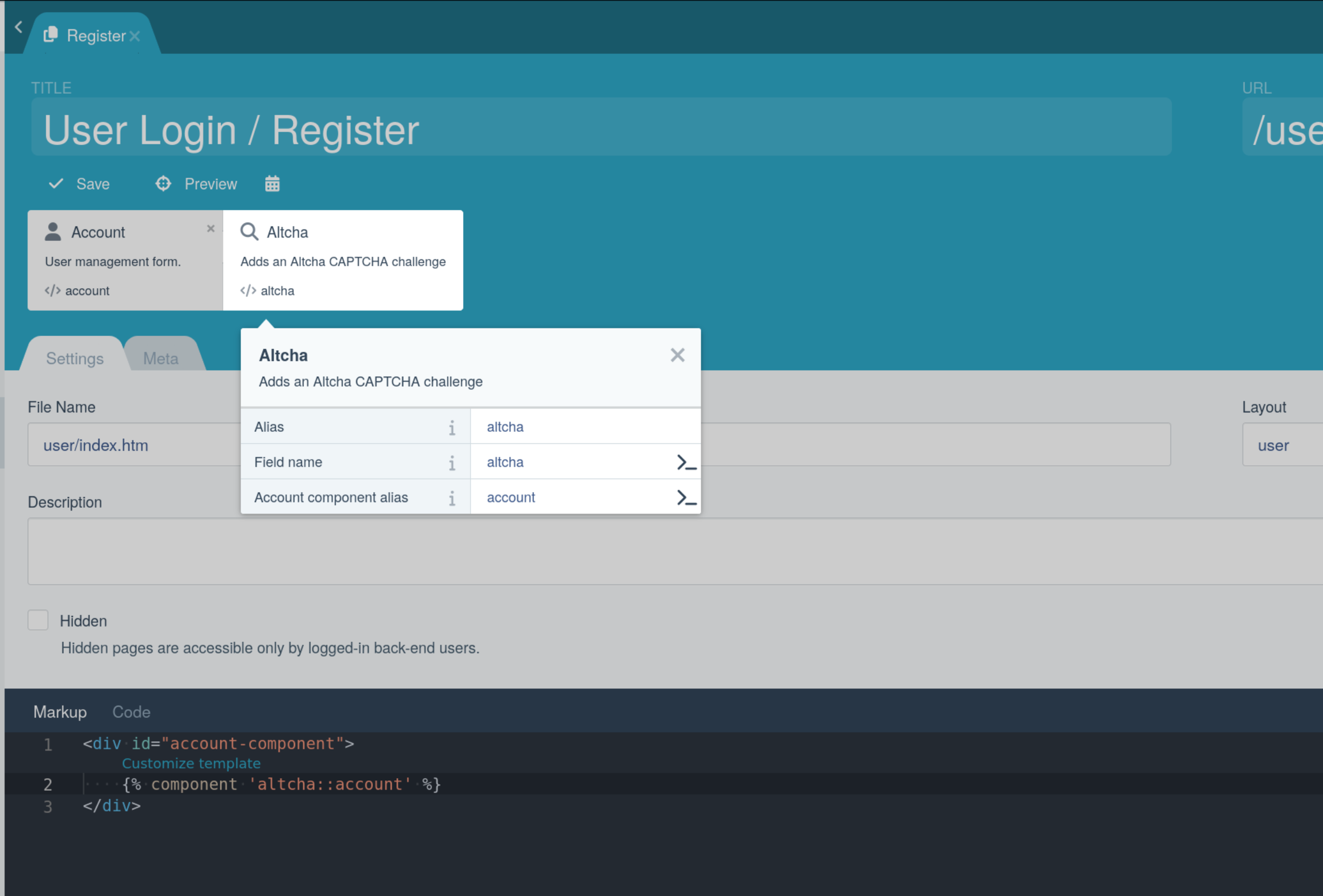
Ensure that the Account component alias property in the Altcha component is set to the same alias as the Account component on the page (defaults to account). You must then include the Altcha widget in your page markup. If you use the default User component markup, you can simply change the account component to altcha::account in your page markup.
{% component 'altcha::account' %}
If you have customised the User component markup, you may instead include the Altcha widget directly in your page markup, within the registration form.
{% component 'altcha' %}
With other plugins
If you wish to verify a form submission from another plugin, you must ensure that the Altcha widget is included in your form submission:
{% component 'altcha' %}
On the server-side, as part of your plugin, you can verify the Altcha response by calling the verify method on the Winter\Altcha\Classes\Altcha class. This class is a singleton, so you can access it anywhere via the following code:
use Winter\Altcha\Classes\Altcha;

$value = post('altcha_field');
Altcha::instance()->verify($value);
Ensuring that you retrieve the payload from the correct Altcha POST field. The component allows you to specify the name of the POST field (prefixed with the component's alias) - by default, this will be altcha_altcha.
The verify method will throw one of the following exceptions, depending on the result of the verification:
| Exception | Meaning |
|---|---|
Winter\Altcha\Exceptions\NoCaptchaException |
The Altcha field was not present in the form submission. |
Winter\Altcha\Exceptions\InvalidPayloadException |
The Altcha field was present, but the payload sent through was invalid or could not be processed. |
Winter\Altcha\Exceptions\NotVerifiedException |
The Altcha field was present and payload was valid, but the challenge was not successfully verified. |
Adding targets for other forms
If you want to target other custom components' AJAX handlers, you can call the addTargets() method of the Altcha class:
use Winter\Altcha\Classes\Altcha;

Altcha::instance()->addTargets([
    'Your\Custom\Component' => ['handler'],
]);
You can also replace the default targets completely by using the setTargets() method.