
suprim / geomaps

Location fields for Craft CMS: address autocomplete, GeoJSON drawing, proximity search, static and embedded maps, GraphQL and Feed Me support.
Package info
Type:craft-plugin
pkg:composer/suprim/geomaps
Requires
- php: >=8.2
- craftcms/cms: ^5.10.0
Requires (Dev)
- craftcms/ecs: dev-main
- craftcms/feed-me: ^6.0
- craftcms/phpstan: dev-main
- phpstan/phpstan: ^2.1
Suggests
None
Provides
None
Conflicts
None
Replaces
None
This package is auto-updated.
Last update: 2026-10-25 02:06:29 UTC
README

Geo Maps for Craft CMS
Pin an address, draw areas, and find the nearest entries, or the zone that contains an address. Works with OpenStreetMap out of the box, or with Google Maps when you add a key.
Features
- Fast location entry. Address autocomplete, click-to-place and a draggable pin. Street, suburb, postcode, country and coordinates fill in automatically.
- No API key required. Uses OpenStreetMap by default. Add a Google key for Google tiles, Places search and static images; if Google rejects the key, maps fall back to OpenStreetMap.
- Draw shapes. Markers, lines, rectangles and polygons (with holes), with per-shape properties, a GeoJSON editor, and
.geojsonupload and download. - Distance search. Find entries within a radius of an address, coordinates or another entry, sorted nearest first, with the distance on every result.
- Containment search. Find the delivery area, sales territory or bin-collection zone that contains an address.
- Front-end maps. Interactive Leaflet or Google maps with markers and shapes, and Google static map images, straight from Twig.
- Flexible field settings. Hide the pin, drawing, search, address or map; set zoom limits; limit search to up to 5 countries.
- GraphQL and Feed Me. Query, search and save locations in headless projects, and import locations from feeds.
- One-click import. Already using another map plugin? Convert its fields in place. Handles, layouts, content and most templates carry over.
Requirements
Craft CMS 5.10.0 or later, and PHP 8.2 or later.
Installation
Install from the Plugin Store (search for “Geo Maps”), or with Composer:
composer require suprim/geomaps
php craft plugin/install geomaps
Then add a Geo Maps field to a field layout. No configuration is needed; see Configuration to add Google keys or a different tile provider.
Examples
The examples below use a stores section with a Geo Maps field called storeLocation.
Show a location
{% set place = entry.storeLocation %}

{% if place %}
  <address>{{ place.address1 }}, {{ place.suburb }} {{ place.postcode }}</address>
  {{ place.embed({ width: '100%', height: 360, zoom: 15 }) }}
{% endif %}
Find the nearest stores
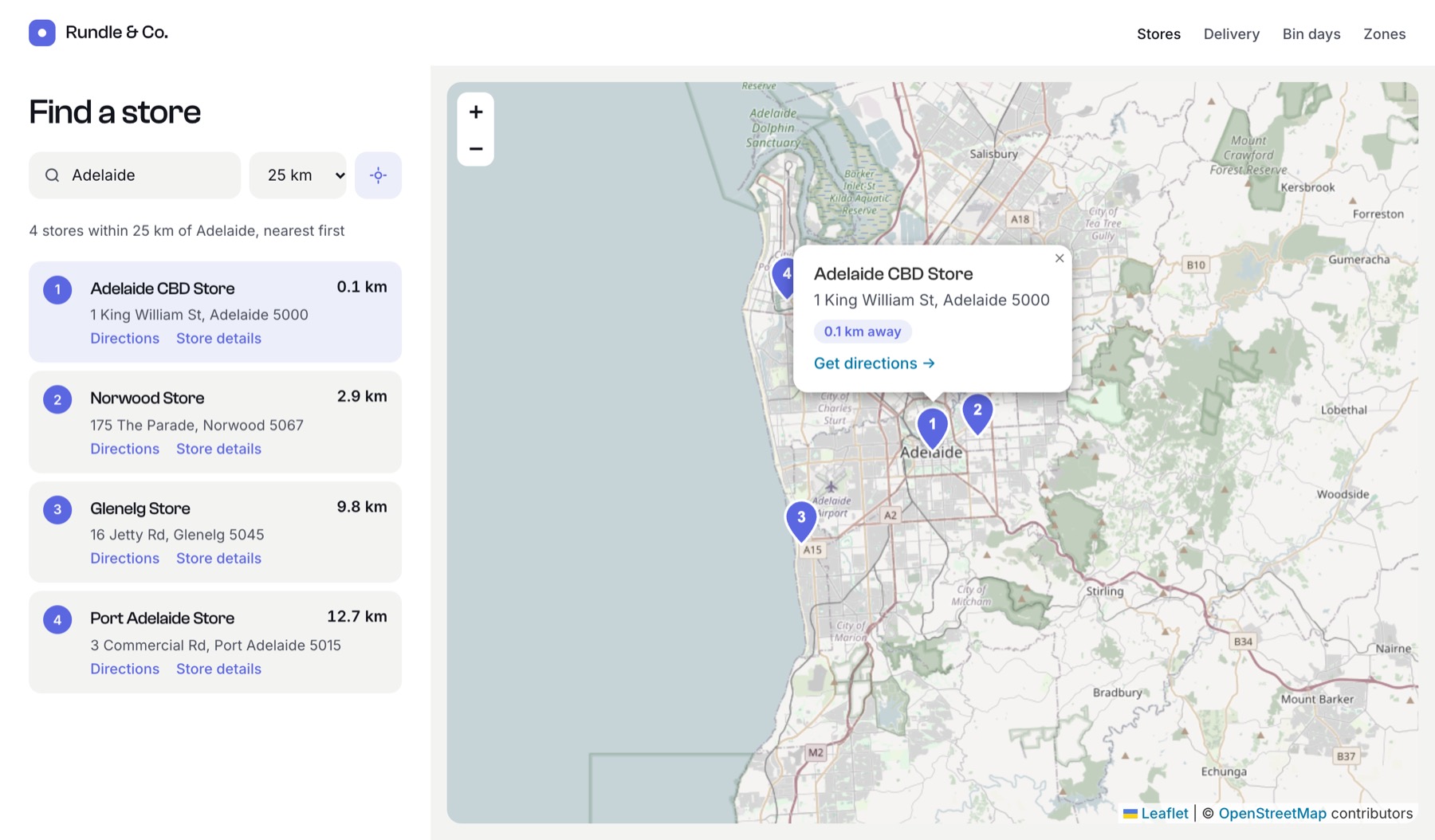
{% set stores = craft.entries()
  .section('stores')
  .storeLocation({ location: 'Glenelg, South Australia', radius: 25, unit: 'km' })
  .all() %}

{% for store in stores %}
  {{ store.title }} ({{ store.storeLocation.distance|number_format(1) }} km)
{% endfor %}
location also accepts { lat: …, lng: … } or another entry’s location. Results are nearest first.
Find the zone that contains an address
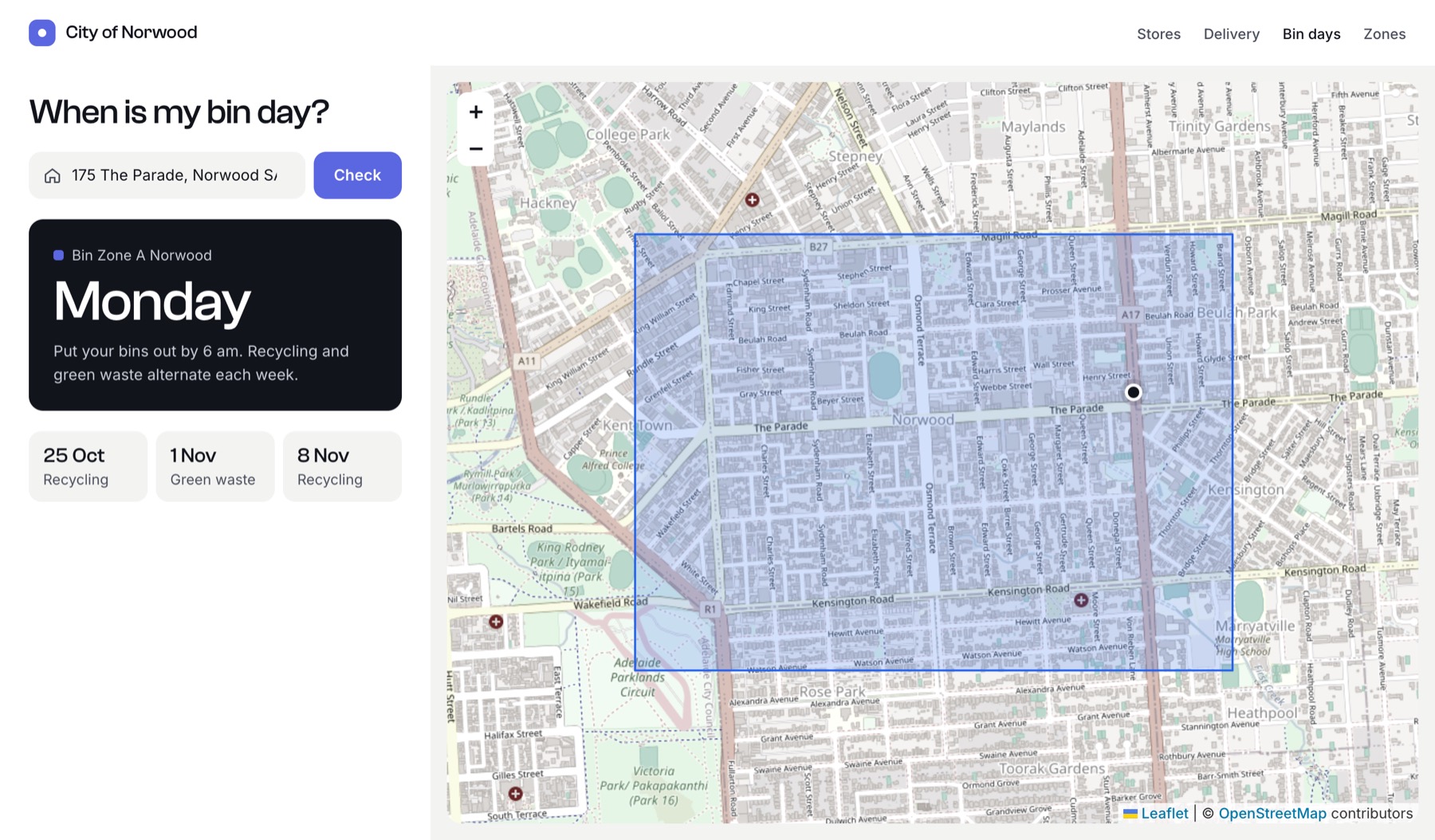
{% set zone = craft.entries()
  .section('binZones')
  .zoneArea({ contains: '175 The Parade, Norwood SA 5067', country: 'AU' })
  .one() %}

{{ zone ? "Your bins are collected on #{zone.collectionDay}." : 'Not in a collection zone.' }}
A map with many markers
{{ craft.geomaps.embed({
  center: 'Adelaide, Australia',
  zoom: 11,
  width: 900,
  height: 450,
  markers: stores|map(s => {
    location: { lat: s.storeLocation.lat, lng: s.storeLocation.lng },
    label: s.title,
  }),
}) }}
Static map image
Requires a Google key with the Maps Static API enabled.
{% set src = entry.storeLocation.img({ width: 600, height: 300 }) %}
{% if src %}<img src="{{ src }}" width="600" height="300" alt="Map">{% endif %}
GraphQL
{
  entries(section: "stores", storeLocation: { location: "Glenelg SA", radius: 25 }) {
    title
    ... on store_Entry {
      storeLocation { full_address lat lng distance }
    }
  }
}
Complete examples in the docs:
- Store locator, with “use my location” and pagination
- Location page, with directions, nearby places and structured data
- Bin collection zones, including a GraphQL version that doesn't reload the page
- Map of areas, with one colour per zone
Switching from another map plugin
Go to Utilities → Geo Maps Import and click Import on a field, or Import all. From the command line:
php craft geomaps/import                    # every field
php craft geomaps/import --field=storeMap   # one field
Common template patterns (entry.map.address, .parts, .img(), .imgSrcSet()) keep working.
Roadmap
Geo Maps is free, and everything it does today stays free. See ROADMAP.md for what’s planned next, and suggest features on GitHub.
License
Geo Maps is licensed under the Craft License. Bundled open-source libraries are listed in THIRD-PARTY-LICENSES.md.