
shadcs / ferga-builder-mutlilanguage-rtl-support

Drag-and-drop visual page builder for Filament with multilingual content, RTL support (Arabic, Kurdish, Persian, Hebrew) and ready-made templates.
Package info
github.com/shadcs/ferga-builder-mutlilanguage-rtl-support
pkg:composer/shadcs/ferga-builder-mutlilanguage-rtl-support
Requires
- php: ^8.3
- filament/filament: ^4.13|^5.8
- illuminate/contracts: ^11.28|^12.0|^13.0
Requires (Dev)
- laravel/pint: ^1.32
- orchestra/testbench: ^9.0|^10.0|^11.0
- pestphp/pest: ^3.0|^4.0
- pestphp/pest-plugin-laravel: ^3.0|^4.0
- pestphp/pest-plugin-livewire: ^3.0|^4.0
Suggests
None
Provides
None
Conflicts
None
Replaces
None
README

A drag-and-drop visual page builder for Filament with multilingual content, right-to-left (RTL) support and ready-made templates.
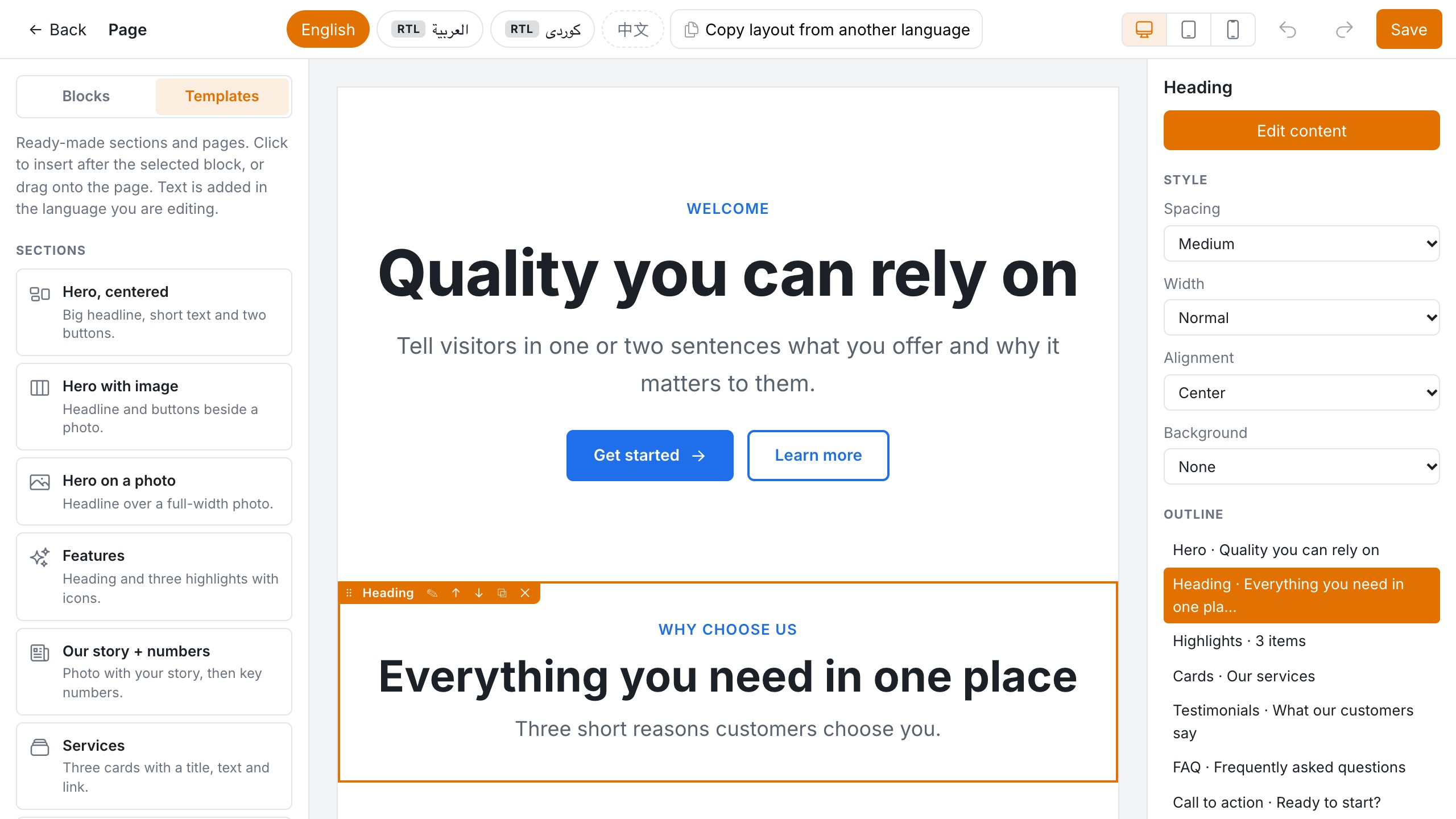
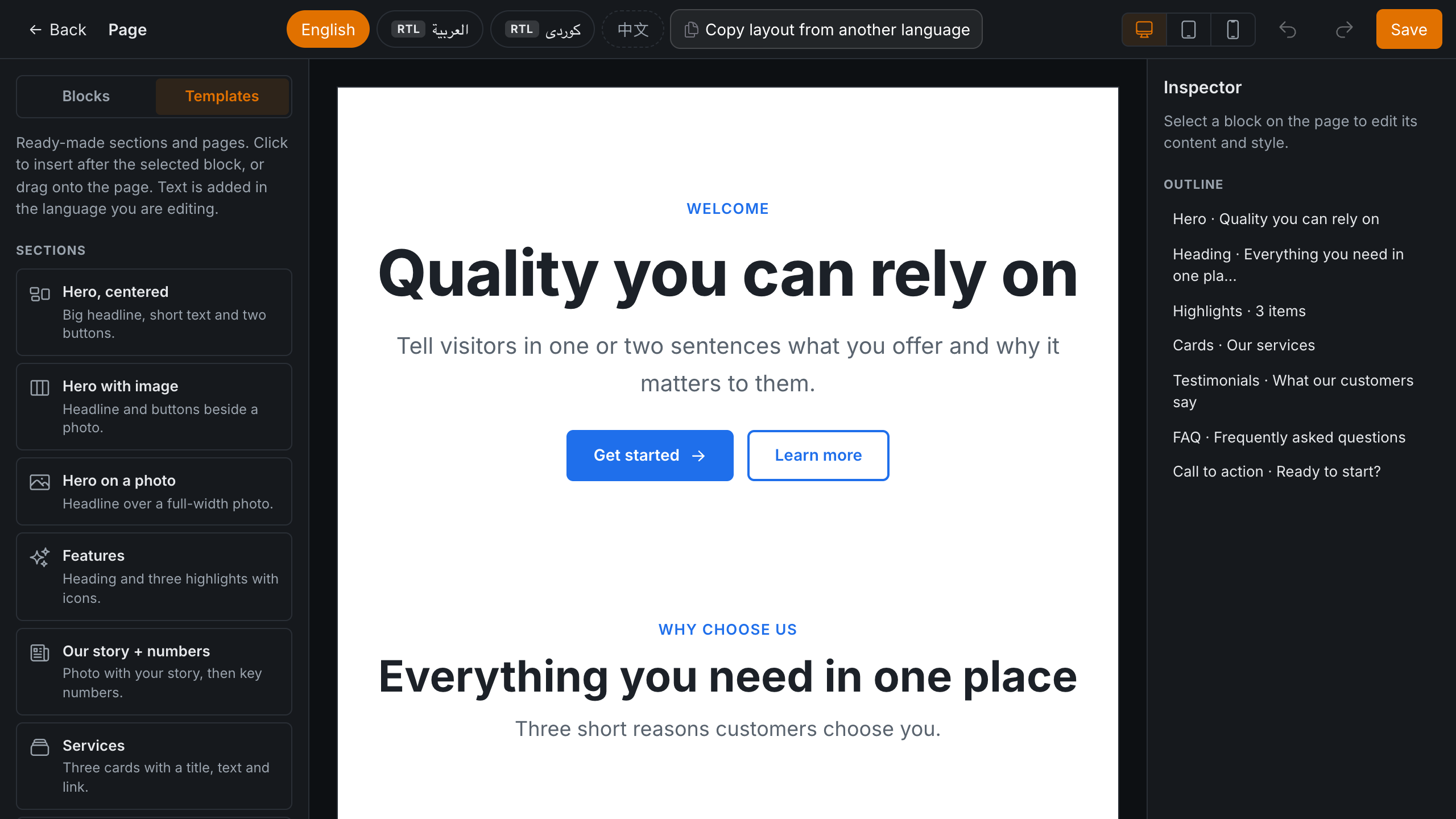
- Visual canvas: drag blocks onto a live preview, put them in columns, then style, reorder, undo/redo and save
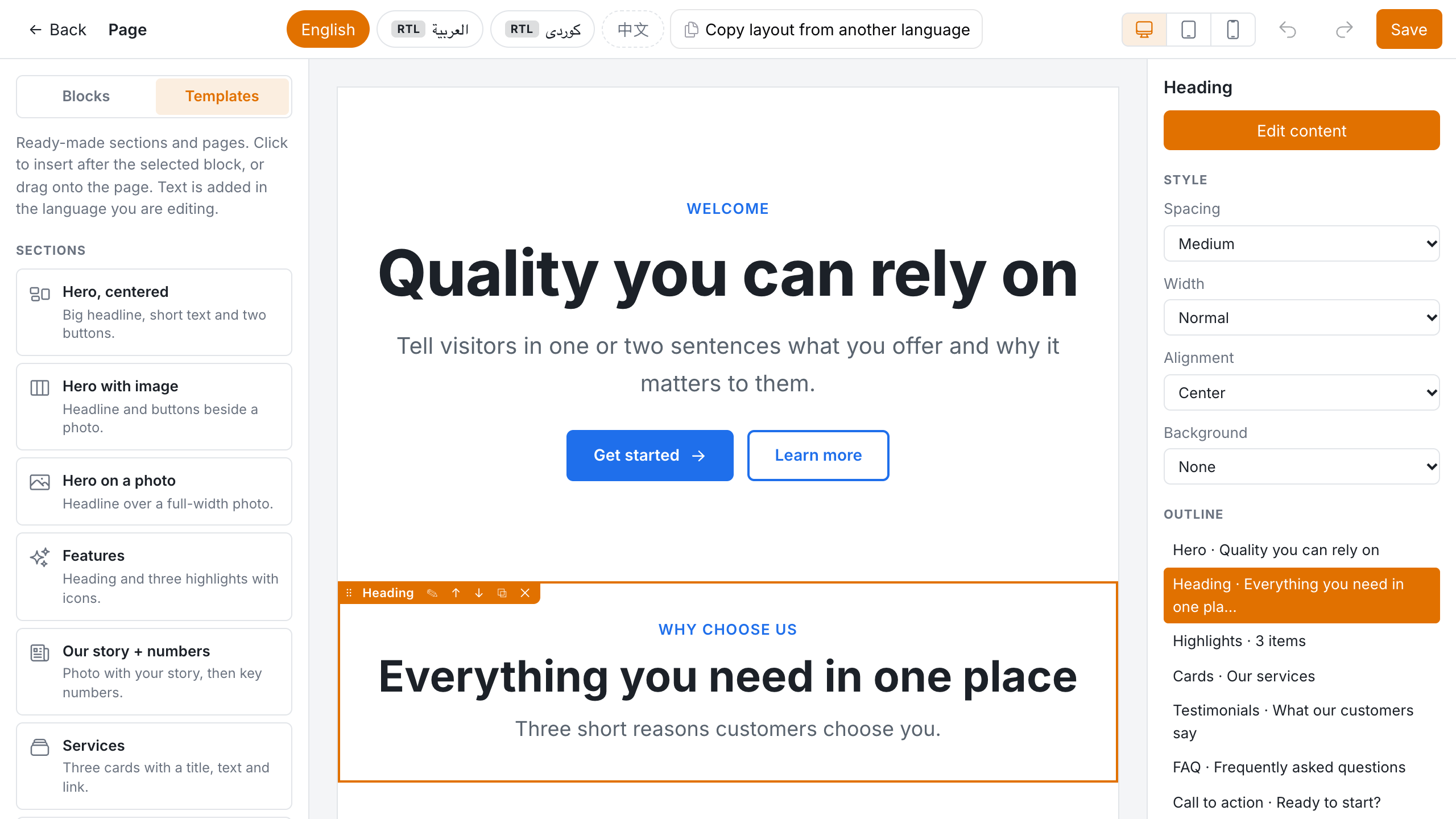
- Templates: 11 ready-made sections and 4 full pages (landing, product, about, services). Sample text is inserted in the language you are editing.
- 20 blocks: hero, call to action, FAQ, cards, testimonials, logos, columns, text, images, gallery, video and more
- Every language has its own blocks, with fallback to the default language and "copy layout from another language"
- RTL that works:
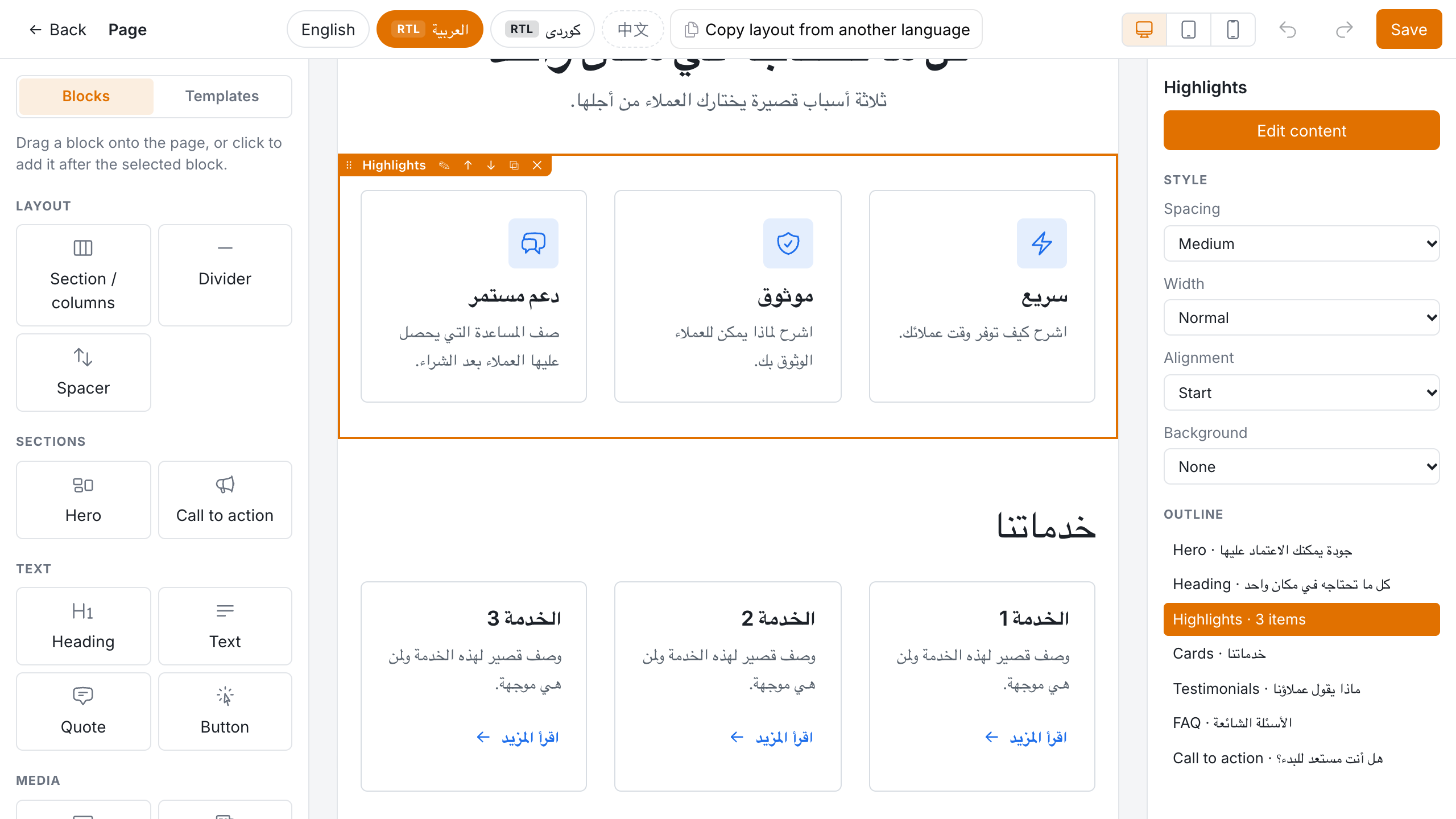
dir/langper language, CSS logical properties, and arrows that mirror for Arabic, Kurdish, Persian, Hebrew and Urdu - Editor UI in English, العربية, کوردی (Sorani) and 中文
- Flat, themable CSS with no shadows and no build step for your app
- Pluggable storage: a JSON column, a column per language, or your own translations table
Requires PHP 8.3+, Laravel 11.28+ / 12 / 13 and Filament 4.13+ or 5.8+.
| Templates | Arabic (RTL) |
|---|---|
 |
 |
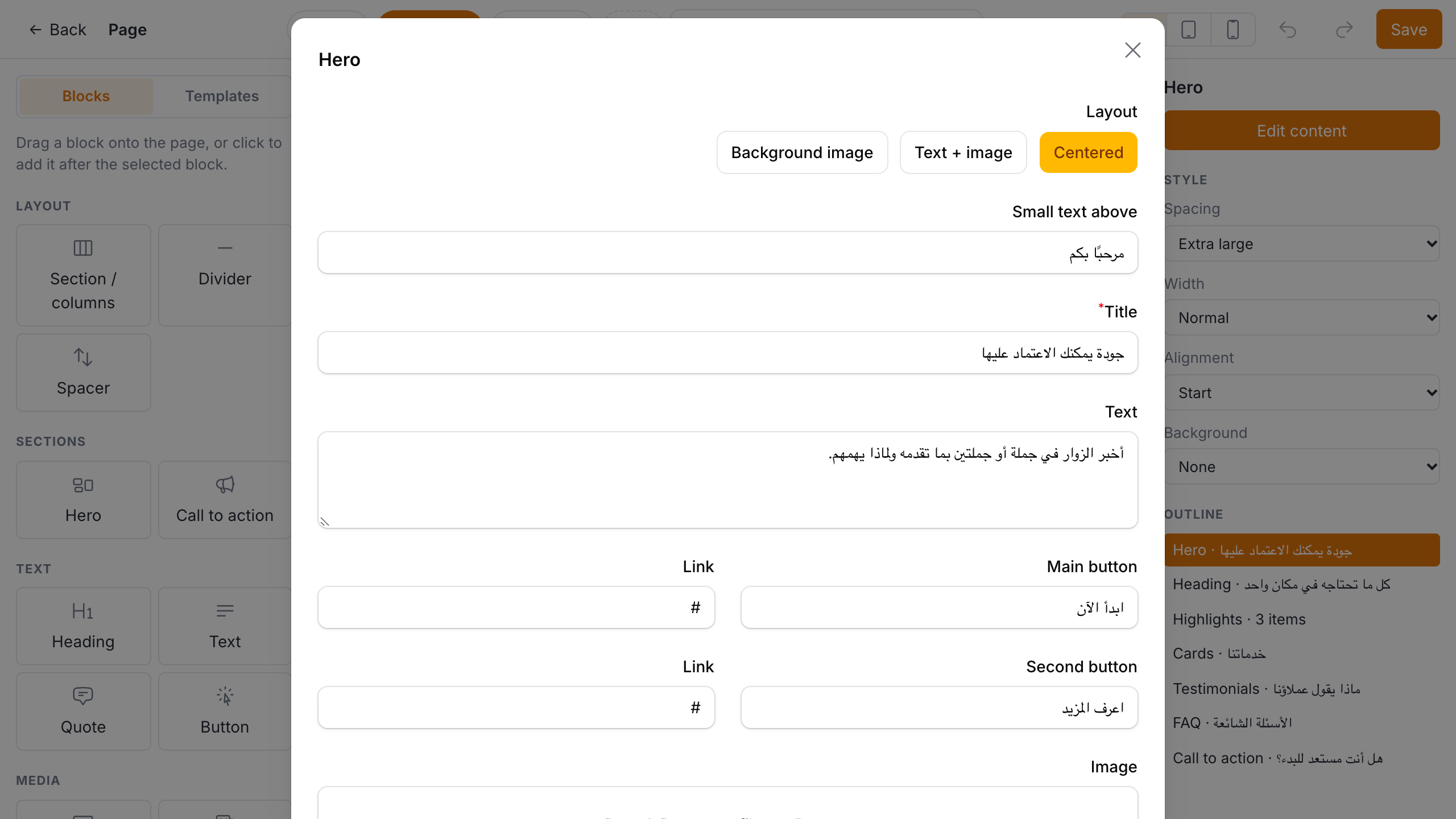
| Block form in a modal | Dark mode |
 |
 |
Installation
composer require shadcs/ferga-builder-mutlilanguage-rtl-support
php artisan filament:assets
filament:assets copies the editor styles into public/. Most Filament apps already run it after every composer update (@php artisan filament:upgrade).
Register the plugin in your panel:
use Ferga\FilamentBuilder\FergaBuilderPlugin;

public function panel(Panel $panel): Panel
{
    return $panel
        // ...
        ->plugin(
            FergaBuilderPlugin::make()
                ->locales(['en' => 'English', 'ar' => 'العربية', 'ku' => 'کوردی', 'cn' => '中文'])
                ->defaultLocale('en')
        );
}
Your public site doesn't boot the panel, so publish the config and set the same languages there:
php artisan vendor:publish --tag=ferga-builder-config
// config/ferga-builder.php
'locales' => ['en' => 'English', 'ar' => 'العربية', 'ku' => 'کوردی', 'cn' => '中文'],
'default_locale' => 'en',
You can also set them in a service provider from your existing language config:
app(\Ferga\FilamentBuilder\FergaBuilder::class)
    ->setLocales(config('app.available_locales'))
    ->setDefaultLocale('en');
Usage
1. A JSON column
Schema::table('pages', fn (Blueprint $table) => $table->json('content')->nullable());
use Ferga\FilamentBuilder\Concerns\HasBuilderContent;

class Page extends Model
{
    use HasBuilderContent;

    protected $casts = ['content' => 'array'];
}
The column stores {"en": [...blocks], "ar": [...blocks]}. A column that already holds a plain list of blocks is read as default-language content.
2. The form field
use Ferga\FilamentBuilder\Forms\Components\PageBuilder;

PageBuilder::make('content')
    // ->blocks(['hero', 'rich_text', 'image'])   only these block types
    // ->locales(['en', 'ar'])                    only these languages (others are kept on save)
    // ->templates(false)                         hide "Insert template"
    // ->copyLayout(false)                        hide "Copy layout from another language"
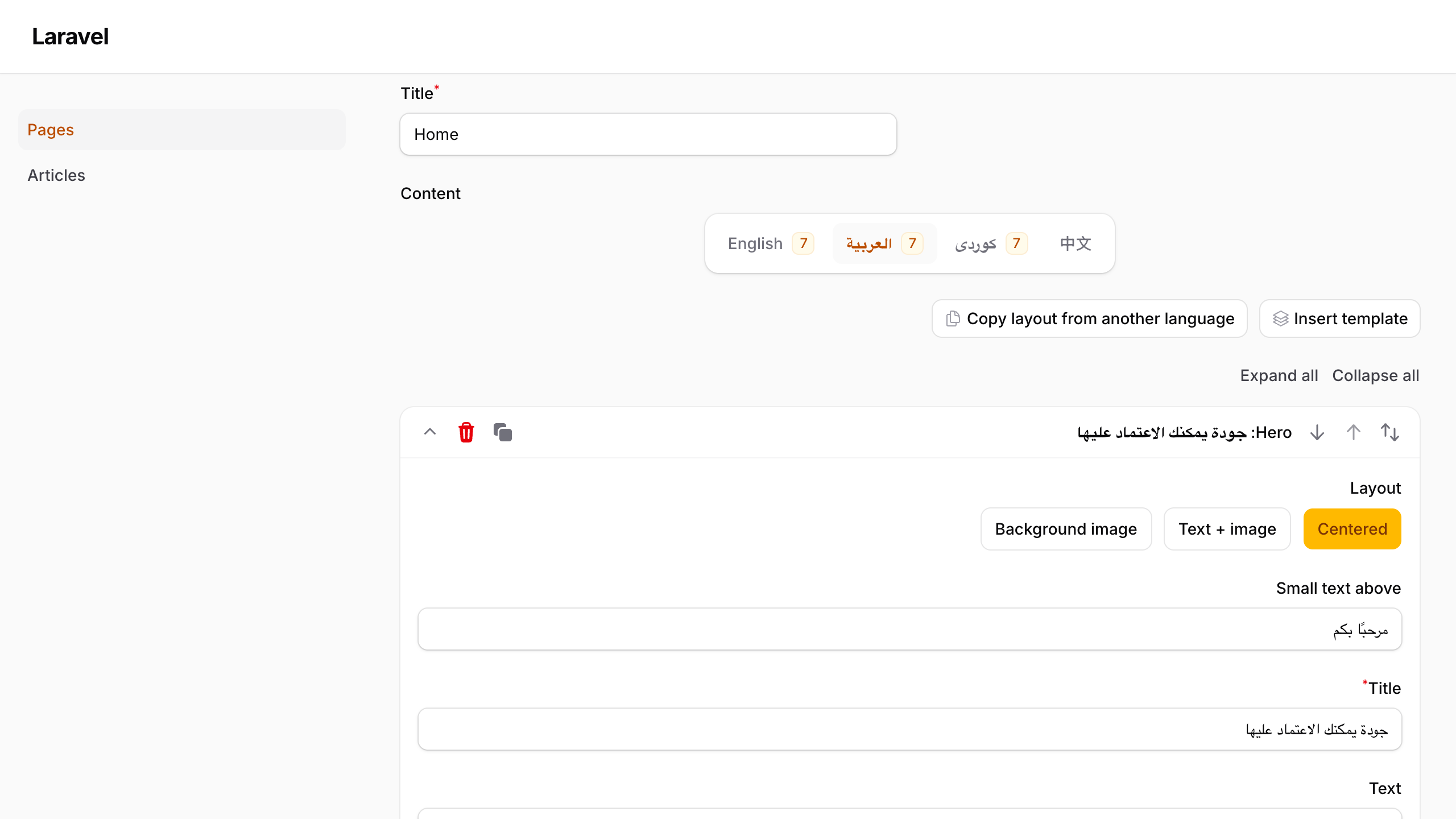
The field has one tab per language, and right-to-left languages are edited RTL. Each tab has Insert template and Copy layout from another language buttons, and an empty language shows a note that visitors will see the default language instead.
3. The visual canvas
use Ferga\FilamentBuilder\Filament\Pages\BuilderCanvas;

class PageBuilderCanvas extends BuilderCanvas
{
    protected static string $resource = PageResource::class;

    // protected static string $contentField = 'content';
}
// PageResource::getPages()
'builder' => PageBuilderCanvas::route('/{record}/builder'),

// EditPage::getHeaderActions()
\Ferga\FilamentBuilder\Filament\Actions\OpenCanvasAction::make(),
The canvas includes:
- Blocks and Templates tabs: drag onto the page, or click to insert after the selected block
- a live preview that uses your public block views, shown in the language's direction
- sections with 1–4 columns: drag blocks into and between columns
- an inspector with Edit content (the block's Filament form in a modal), style options and column layouts
- an outline of the page, a language switcher, Copy layout, and a notice for empty languages
- undo/redo (Ctrl/⌘ Z, Ctrl/⌘ Shift Z), Ctrl/⌘ S to save, Delete and Esc
- desktop, tablet and mobile preview widths, plus dark mode
Access uses the resource's canEdit() policy.
4. Rendering on your site
<head>
    <x-ferga-builder::styles />   {{-- inlines the CSS, or links it once published --}}
</head>

<x-ferga-builder::blocks :record="$page" field="content" />
{{-- or --}}
<x-ferga-builder::blocks :blocks="$page->content" :locale="app()->getLocale()" class="my-page" />
<div class="fb-content my-page" dir="rtl" lang="ar" data-locale="ar"> … </div>
- If a language has no blocks, the default language is shown.
dir/langfollow the language actually shown, and the wrapper getsdata-fallback="true". - Unknown block types are skipped. Render errors are reported and skipped in production, and thrown when
app.debugis on. - To link the stylesheet instead of inlining it, run
php artisan vendor:publish --tag=ferga-builder-assets. Add it topost-update-cmdwith--forceto keep it current.
$page->renderBuilder('content', 'ar');          // HtmlString
$page->builderBlocks('content', 'ar');          // array, with fallback
FergaBuilder::resolve($documents, 'ku');        // ['blocks', 'locale', 'fallback']
Templates
| Sections | Full pages |
|---|---|
| Hero (centered, with image, on a photo) · Features · Our story + numbers · Services · Testimonials · FAQ · Client logos · Call to action · Contact strip | Landing page · Product page · About page · Services page |
Template text is translated (English, Arabic, Kurdish, Chinese) and inserted in the language being edited. A template that uses an unregistered block type leaves that block out.
Add your own:
use Ferga\FilamentBuilder\Templates\Template;
use Ferga\FilamentBuilder\Templates\TemplateCopy;

FergaBuilderPlugin::make()->registerTemplates([
    Template::make('pricing')
        ->label(__('Pricing'))
        ->description(__('Three plans side by side.'))
        ->icon(Heroicon::OutlinedCurrencyDollar)
        ->category(Template::SECTION)            // or Template::PAGE
        ->blocks(fn (TemplateCopy $t, string $locale) => [
            ['type' => 'heading', 'data' => ['text' => __('Plans', locale: $locale), 'level' => 'h2']],
            ['type' => 'cards', 'data' => ['columns' => 3, 'items' => [/* … */]]],
        ]),
]);

// ->templates([...]) replaces the built-in templates, ->templates(false) removes them.
// Or set 'core_templates' => false in the config.
Blocks
| Type | Group | Notes |
|---|---|---|
section |
layout | 1–4 columns (1, 1-1, 1-2, 2-1, 1-1-1, 1-2-1, 1-1-1-1), gap, vertical alignment |
hero |
sections | centered, text + image, or text over a photo; two buttons |
call_to_action |
sections | title, text, two buttons; brand-colour background by default |
heading |
text | eyebrow, text, subtitle, H1–H4 |
rich_text |
text | Filament RichEditor |
quote |
text | text, author, role |
button |
text | filled / outline / link, arrow, new tab |
image, image_text, gallery |
media | JPEG, PNG, GIF, and WebP uploads; alt text, captions, links |
video |
media | YouTube/Vimeo links become youtube-nocookie / player.vimeo.com?dnt=1 embeds |
logos |
media | partner logos, grey until hovered |
highlights |
content | items with Heroicons |
cards |
content | image, title, text, link |
stats |
content | value + label |
testimonials |
content | quote, name, role, photo (or initial) |
faq |
content | native <details> that works without JavaScript |
file_download |
content | PDF, text, CSV, RTF, and standard Word/Excel/PowerPoint downloads; shows file type and size |
divider, spacer |
layout |
Every block has style options: spacing (none–xl), width (narrow, normal, wide, full), alignment (start, center, end) and background (none, muted, primary, dark).
Custom blocks
use Ferga\FilamentBuilder\Blocks\Block;
use Filament\Forms\Components\TextInput;

class AlertBlock extends Block
{
    public static function type(): string { return 'alert'; }

    public function label(): string { return __('Alert'); }

    public function icon(): string|\BackedEnum { return Heroicon::OutlinedExclamationTriangle; }

    public function schema(): array
    {
        return [TextInput::make('text')->required()];
    }

    public function view(): string { return 'blocks.alert'; }   // gets $data, $context, $locale, $isRtl
}

FergaBuilderPlugin::make()->registerBlocks([AlertBlock::class]);
You can also override group(), defaults() (data for new blocks on the canvas), preview() (outline text), fileFields() (supports items.*.image), nestable(), canvasSchema() and viewData(). Replacing a core block works too: register a class with the same type().
Theming
.fb-content {
    --fb-primary: #0a7cff;
    --fb-primary-contrast: #fff;
    --fb-text: #1c2128;
    --fb-text-muted: #59636e;
    --fb-surface: #f3f4f6;   /* "muted" background */
    --fb-dark: #111418;      /* "dark" background */
    --fb-border: #d8dde3;
    --fb-radius: 6px;
    --fb-max-width: 72rem;
    --fb-font: inherit;
    --fb-heading-font: inherit;
}
To change the markup, publish the views: php artisan vendor:publish --tag=ferga-builder-views.
Languages and RTL
- RTL languages are configurable. The default list is
ar, ku, ckb, fa, he, ur, ps, sd, yi, dv, matched by prefix, soar_IQcounts as RTL. cnmaps tolang="zh-CN"andkutolang="ckb".- Layout uses logical properties throughout, so columns, borders and alignment mirror automatically.
- The editor UI follows the admin's language, and the preview follows the content language.
Storage
| Store | Use |
|---|---|
Storage\JsonColumnStore (default) |
one JSON column with all languages |
Storage\ColumnPerLocaleStore |
content_en, content_ar, … |
Storage\CallbackStore |
closures for anything else |
your class implementing Contracts\ContentStore |
load(Model, field): array / save(Model, field, array) |
To pick a store per model, implement Contracts\HasBuilderContentStore:
class Post extends Model implements HasBuilderContentStore
{
    public function builderContentStore(string $field): ?ContentStore
    {
        return new MyTranslationsTableStore;   // e.g. Voyager-style `translations` table
    }
}
You can also pass a store to a single field (PageBuilder::make('content')->store(...)) or override getContentStore() on a canvas page. FergaBuilder::files($documents) lists every uploaded file a page uses, which helps clean up unused uploads.
Translations
The editor and templates ship in en, ar, ku / ckb (Sorani) and zh_CN / cn / zh. Other languages fall back to your app's fallback_locale. To override strings:
php artisan vendor:publish --tag=ferga-builder-translations
Corrections from native speakers are welcome.
Testing
composer test     # Pest + Testbench, boots a real Filament panel
composer lint     # Pint
CI runs on PHP 8.3 and 8.4, with Laravel 12 and 13 and Filament 4 and 5.
Changelog, contributing, security
See CHANGELOG and CONTRIBUTING. Please report vulnerabilities privately; see SECURITY.
Credits
- Ferga Solutions
- Inspired by Carl Janzell's MIT-licensed filament-page-builder. Ferga-Builder is an independent implementation written from scratch and contains no code from that package.
License
MIT. See LICENSE.