
rmb32 / barnspec

Capture user stories and Given/When/Then acceptance scenarios as a living Specification — story mapping for a Business Driven approach
Requires
- php: ^8.5
- ext-ds: ^2.0
- php-ds/php-ds: ^2.0
- rmb32/barncept: ^5.1@dev
- rmb32/filesystem: ^1.0@dev
- rmb32/typed-input: ^1.0@dev
- symfony/console: ^7.0
- symfony/uid: ^7.0|^8.0
Requires (Dev)
- deptrac/deptrac: ^4.7
- infection/infection: ^0.35.4
- phpstan/phpstan: ^2.2
- phpunit/phpunit: ^12.0
- rector/rector: ^2.6
- rmb32/kevin: ^1.0@dev
- rmb32/typed-json: ^1.0@dev
- squizlabs/php_codesniffer: ^4.0
Suggests
None
Provides
None
Conflicts
None
Replaces
None
README
Part of Barn.
Capture user stories and their Given/When/Then acceptance scenarios in plain language, in one place, and turn them into readable documents, a glossary, a visual story map, tracked work tickets and runnable tests.
You describe stories and scenarios once, one question at a time in the GUI, in the same "Complete the sentence…" style throughout — no code or framework knowledge needed. Until its Phase is released, anything can be reworded or deleted. Everything is written back as sentences that still read correctly, so anyone on the team can review it.
In a barn it is the Business tab, beside Barnark's architecture. It works on its own in any project too.
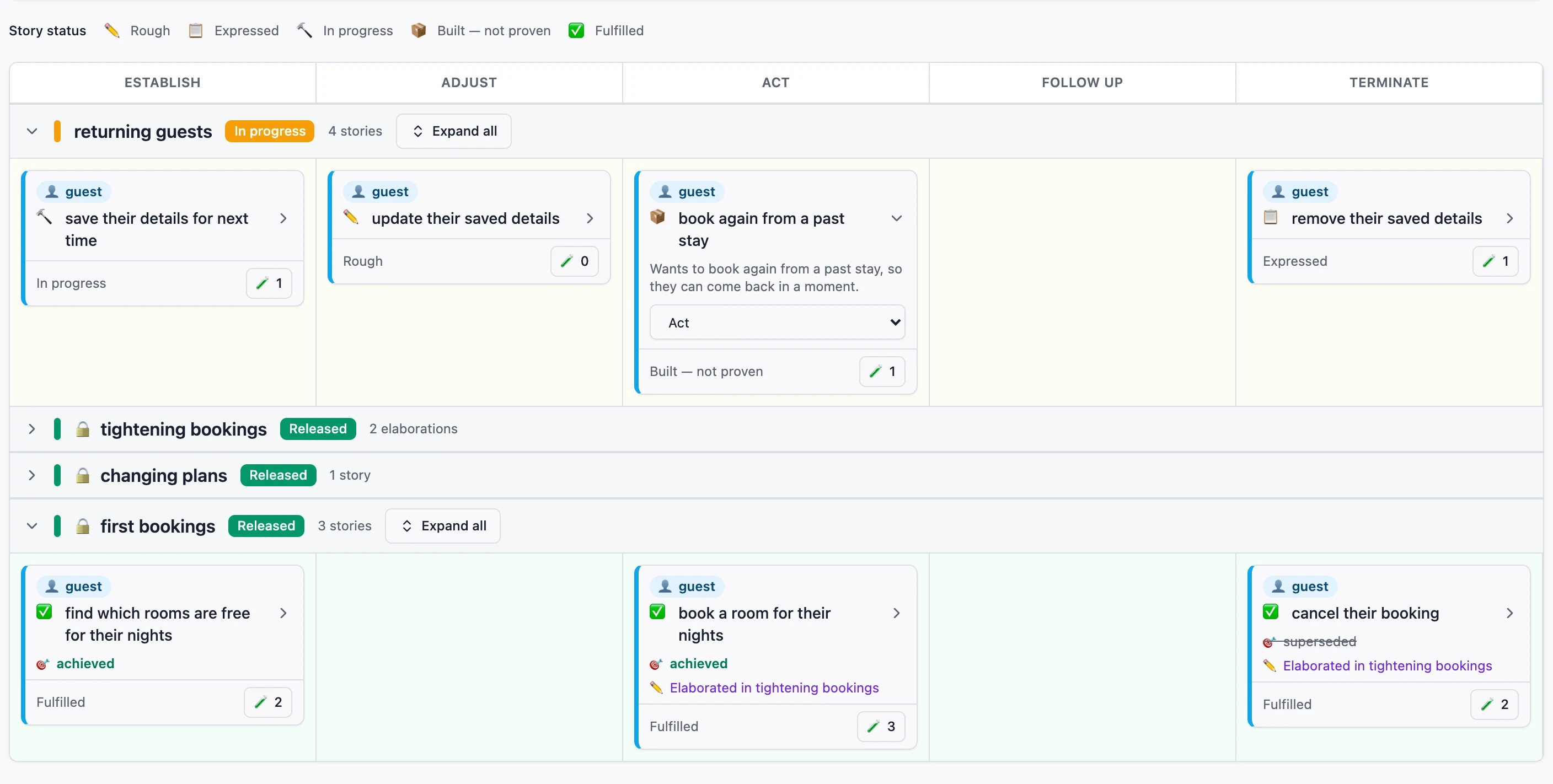
The easiest way to use it is Barnspec GUI, in your browser: the story map, every capture flow and the Work board. The command line does the same from a terminal, and is the better fit for scripts, CI and AI agents.
Requirements
- PHP 8.5+
- Composer
The ds PHP extension is used when present but isn't required: the
php-ds/php-ds polyfill comes in as a dependency and satisfies it.
Installation
composer require --dev rmb32/barnspec rmb32/barnspec-cli rmb32/barnspec-gui
vendor/bin/barnspec gui        # opens the GUI in your browser
rmb32/barnspec is the library; barnspec-cli provides
the vendor/bin/barnspec binary, and barnspec-gui
adds its gui command. Leave the GUI out where only the command line is needed. See the
quick start for shorter ways
to type it.
Quick start
From your project's root:
vendor/bin/barnspec create-story --area-of-business="Commerce" --role="Customer" --role-meaning="Someone who buys" \
    --goal="update basket quantities" --reward="get exactly what they want"
vendor/bin/barnspec refine     # add Given/When/Then Scenarios
vendor/bin/barnspec reword     # change the wording, until its Phase is released
vendor/bin/barnspec show       # see what's been captured
refine is interactive on purpose — some questions (accepted or rejected?) are a
human judgement call. Everything else has a non-interactive form for scripts, CI and
AI agents (create-area-of-business, create-phase, restage-story, delete,
create-scenario --file=…, show --json). The quick start
walks through both side by side.
The lifecycle backbone
A Story can sit at one stage of the role's life with the business —
establish, adjust, transact, resolve or close, in that order. The
vocabulary is fixed across every area of business rather than defined per area
of business, so story maps across areas of business line up column for column. It is deliberately not CRUD:
transact and resolve have no mutation-verb analogue, which is the point —
the ordering principle is where in the lifespan a story sits, not which verb
it uses.
A stage is optional. A Story without one is Unassigned — a permanent home
for the stories that genuinely are not about a lifespan (reporting, compliance,
notification), not a staging area. Set one at capture time
(create-story --stage=…, or the skippable step in review) or afterwards
(restage-story, or the selector on a card in the GUI), until the Story's Phase
is released. After that the stage is locked like the rest of the Story, and
changes only through an elaboration.
Changing a released Story
Once a Story's Phase is released its Scenarios no longer change directly —
create-scenario and the editor refuse, and say what to run instead. A change
goes through an elaboration of the Story in the active Phase:
vendor/bin/barnspec elaborate-story --area-of-business=commerce --story=add-a-product-to-the-basket \
    --goal="add any product to the basket"          # optional new wording
vendor/bin/barnspec create-scenario --file=new-case.json      # with "elaboration": true
vendor/bin/barnspec create-scenario --file=better-case.json   # with "amends": "<scenario slug>"
vendor/bin/barnspec retire-scenario --area-of-business=commerce --story=add-a-product-to-the-basket \
    --scenario=adds-a-unit-to-a-locked-basket
vendor/bin/barnspec withdraw-from-elaboration …              # undo a pending change
refine offers a released Story once it is elaborated, and captures into the
elaboration. When the Phase is released the elaboration is merged into the
Story: its new and amended Scenarios hold from then on, retired ones stop
holding, and what was replaced is kept as history. Until then
scenario-bridge run-all --released skips the Scenarios being changed, so the
released Phases stay green while the new behaviour is built.
Was the reward delivered?
Scenarios prove a Story's goal. Its Impact records whether the reward
followed. Each Story gets one per Phase it shipped in, as dated, attributed
observations: evaluating, achieved, none or superseded.
vendor/bin/barnspec release-phase --area-of-business=commerce   # asks about earlier Phases' rewards first
vendor/bin/barnspec record-impact --area-of-business=commerce --story=add-a-product-to-the-basket \
    --state=achieved --observation="I filled my basket in one visit" --source=role --who="a regular customer"
A Phase is released only once it is proven: every Story in it green, each of
its Scenarios with its tickets done and a passing run recorded. An empty Phase
has nothing proven, so it can't be released. An elaboration that only rewords,
restages or retires needs no run. release-phase never refuses to
release because a reward is unanswered; it asks, and you can leave any answer
blank. achieved is settled only by the
role or someone speaking for them. Impact never changes a Story's colour.
Where your data lives
Outside a barn, Barnspec stores readable, diffable JSON under .barnspec/ at
your project root — one document per Area of Business and one for its Scenarios.
Commit it with your code.
In a barn (a project whose root holds .barn/barn.json), Barnspec keeps its own
records under .barn/barnspec/ and manages the Area of Business structure
through Barncept under .barn/concepts/. The Barnspec GUI and CLI still use the
Barnspec API. On first use in an existing barn, Barnspec safely migrates legacy
Area of Business JSON from .barn/barnspec/areas-of-business/, verifies the
copy, and retains the original files. A conflict stops migration before any
records are written. Barnspec records the selected store in
.barn/barnspec/area-of-business-storage.json; subsequent commands and the
Barn status view follow that selection. Every Barnspec command finds the barn
from any folder inside it.
vendor/bin/wizard-reset (from Barnspec CLI) previews wiping it all so you can
start over; add --force to do it.
Render what you've captured
vendor/bin/barnspec write commerce --output-dir=docs/stories/commerce  # one doc per Story
vendor/bin/barnspec glossary commerce --output=docs/glossary.md          # ubiquitous-language glossary
vendor/bin/barnspec glossary --output-dir=docs/glossary                  # every area, plus a linked index.md
vendor/bin/barnspec map --output-dir=docs/map --stories-dir='../stories/{area-of-business}'   # HTML story map
The same three are available as vendor/bin/barnspec write | glossary | map.
Link scenarios to real work (Work)
Work tracks tickets against Scenarios and is the source of truth for their
status. Every work:* command names the area, the Story and then the
Scenario within it.
vendor/bin/barnspec work:create commerce basket-quantity-updates caps-at-the-stock-level --title="Cap quantity" --reference=SHOP-42
vendor/bin/barnspec work:list commerce basket-quantity-updates caps-at-the-stock-level
vendor/bin/barnspec work:status commerce <ticket-id> in-progress    # to-do | in-progress | done
vendor/bin/scenario-bridge run commerce caps-at-the-stock-level    # this is what turns it green
A Scenario's fulfilment colour is worked out live: yellow while any ticket
isn't done, red when all are done but the Scenario has not passed a
scenario-bridge run, green once it has. There is no command to confirm a
Scenario by hand — a passing run is the only thing that makes one green, and a
later failing run takes it back to red. work:list prints the last run beside
the colour, so a red Scenario says whether it has never been run or is
currently failing.
A recorded run never expires on a clock. Creating a new ticket on a green Scenario drops it back to yellow and discards the run: the evidence predates the new work, so the Scenario has to be run again once that ticket is done.
A Story's colour is then rolled up from its Scenarios rather than stored:
green when every Scenario is green, red when every Scenario is red or green
and at least one is red, yellow otherwise — including while one Scenario is
untouched and a sibling is already under way. A Story with no Scenario at all
has no colour, and work:create refuses it: run refine and capture one
concrete case first.
Turn scenarios into running tests
Two optional packages take your captured Scenarios to executable tests:
vendor/bin/port-generator generate commerce            # write Arrange/Assert/Act/Authenticate stubs
# fill in the stubs with real application logic, then:
vendor/bin/scenario-bridge run commerce basket-quantity-updates
vendor/bin/scenario-bridge run-all commerce --summary --xml-report=build/report.xml
See Port Generator and
Scenario Bridge. Configure where stubs go in
a barnspec.json next to .barnspec/ (in a barn, .barn/barnspec.json).
Related packages
- Barnspec CLI —
barnspec(wizard, write, glossary, map and work:* subcommands). - Barnspec GUI — browser front end.
- Port Generator (library +
port-generatorCLI) — generate Port stubs. - Scenario Runner · Scenario Runner CLI — execution engine and unit-test scaffolding.
- Scenario Bridge (library +
scenario-bridgeCLI) — run captured Scenarios. - Menu and Filesystem — shared plumbing.
More docs
Quick start · Philosophy · Contributing · Internals · History · Known issues
License
Proprietary. See LICENSE. Copyright (c) Roger Barnfather.