
pascualmg / symfony-command-ui

Web UI + API to execute Symfony console commands from the browser or any AI agent. Auto-discovers commands, dynamic forms, NDJSON streaming terminal.
Package info
github.com/pascualmg/symfony-command-ui
Type:symfony-bundle
pkg:composer/pascualmg/symfony-command-ui
Requires
- php: >=7.1
- symfony/framework-bundle: ^3.4 || ^4.4 || ^5.4 || ^6.0 || ^7.0 || ^8.0
- symfony/http-foundation: ^3.4 || ^4.4 || ^5.4 || ^6.0 || ^7.0 || ^8.0
- symfony/process: ^3.4 || ^4.4 || ^5.4 || ^6.0 || ^7.0 || ^8.0
- symfony/routing: ^3.4 || ^4.4 || ^5.4 || ^6.0 || ^7.0 || ^8.0
Requires (Dev)
None
Suggests
None
Provides
None
Conflicts
None
Replaces
None
README

Web UI + API to execute Symfony console commands from the browser — or from any AI agent.
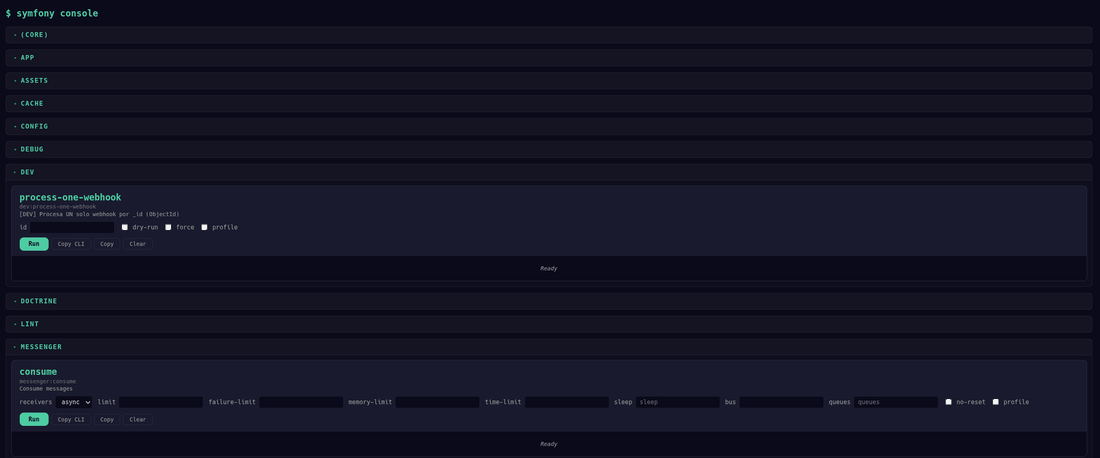
Drop this bundle into any Symfony project (3.4 through 8.x, PHP 7.1+) and get:
- A web dashboard with independent cards for each command (form + terminal)
- Real-time streaming output via NDJSON protocol
- Auto-discovery of commands from your
InputDefinition— zero manual config - An AI-ready API that any LLM, agent, or MCP server can use to operate your app
Production-tested across multiple Symfony projects. The official Symfony Flex recipe was merged into
symfony/recipes-contribon May 5, 2026 — a singlecomposer requireis now all you need.
composer require pascualmg/symfony-command-ui
Architecture
                                    ┌─────────────────────────────────┐
                                    │        YOUR SYMFONY APP         │
                                    │                                 │
                                    │   src/Command/                  │
                                    │     app:users:sync              │
                                    │     app:payments:process        │
                                    │     app:reports:generate        │
                                    │     ...                         │
                                    └──────────┬──────────────────────┘
                                               │
                               bin/console list --format=json
                                               │
                  ┌────────────────────────────▼────────────────────────────┐
                  │              symfony-command-ui bundle                   │
                  │                                                         │
                  │  GET /commands ─── auto-discovery ─── whitelist filter  │
                  │       │                                                 │
                  │       ▼                                                 │
                  │  JSON config ──► <symfony-command> Web Component        │
                  │                    ┌──────────────────────────┐         │
                  │                    │ ┌──────────────────────┐ │         │
                  │                    │ │ app:users:sync       │ │         │
                  │                    │ │ [--limit ▼] [--dry ☐]│ │         │
                  │                    │ │ [Run] [Copy] [Clear] │ │         │
                  │                    │ │ ░░░ terminal ░░░░░░░ │ │         │
                  │                    │ └──────────────────────┘ │         │
                  │                    │ ┌──────────────────────┐ │         │
                  │                    │ │ app:payments:process │ │         │
                  │                    │ │ [--gateway ▼] ...    │ │         │
                  │                    │ │ [Run] [Copy] [Clear] │ │         │
                  │                    │ │ ░░░ terminal ░░░░░░░ │ │         │
                  │                    │ └──────────────────────┘ │         │
                  │                    └──────────────────────────┘         │
                  │                                                         │
                  │  POST /execute ─── Process ─── NDJSON stream ──► browser│
                  └─────────────────────────────────────────────────────────┘
                           │                              │
                      AI agents                       Humans
                    (HTTP + JSON)                   (browser UI)
Why this matters
For humans
You maintain a Symfony app with 20+ console commands. Some you run daily, some monthly, some only when debugging. Today you SSH into the server, remember the exact syntax, type it out.
With this bundle: open a URL, click Run. Each command is an independent card with its own form and terminal. Outputs persist — run Stats while Generate JWT keeps its result.
For AI agents
Your Symfony commands encapsulate business logic: process payments, sync users, generate reports, manage subscriptions. This bundle turns them into an HTTP API that any agent can use:
┌──────────────┐         ┌───────────────────┐         ┌──────────────┐
│   AI Agent   │── GET ─►│  /commands        │── JSON ─►│  "I can run  │
│  (Claude,    │         │  Auto-discovery   │         │  these 5     │
│   GPT, etc.) │         └───────────────────┘         │  commands"   │
│              │                                        └──────────────┘
│              │         ┌───────────────────┐         ┌──────────────┐
│              │── POST ►│  /execute         │─ NDJSON ►│  Streaming   │
│              │         │  {command, opts}  │         │  output      │
└──────────────┘         └───────────────────┘         └──────────────┘
This is essentially an MCP-compatible endpoint for your Symfony application. Any AI agent that can make HTTP calls can now operate your app's business logic through your existing console commands.
Quick start
1. Install
composer require pascualmg/symfony-command-ui
2. Register the bundle
// config/bundles.php
return [
    // ...
    Pascualmg\SymfonyCommandUI\SymfonyCommandUIBundle::class => ['all' => true],
];
3. Import routes
# config/routes/symfony_command_ui.yaml
symfony_command_ui:
    resource: '@SymfonyCommandUIBundle/Resources/config/routes.php'
    prefix: /symfony-console
4. Configure your commands
# config/packages/symfony_command_ui.yaml
symfony_command_ui:
    route_prefix: /symfony-console
    allowed_commands:
        - app:users:list
        - app:payments:process
        - app:reports:generate
    overrides:
        app:payments:process:
            --gateway: [stripe, paypal, braintree]
            --limit: [10, 50, 100, 500]
5. Open your browser
https://your-app.com/symfony-console
That's it. Your commands are auto-discovered and ready to use.
How it works
Request flow
Browser opens /symfony-console
        │
        ▼
GET /commands ─────────────────────────────────────────────┐
        │                                                   │
        │   Backend runs: php bin/console list --format=json│
        │   Filters by allowed_commands whitelist            │
        │   Merges config overrides (dropdowns)              │
        │   Returns JSON array of commands                   │
        │                                                   │
        ▼                                                   │
<symfony-command> Web Component                              │
        │                                                   │
        │   Renders one card per command                     │
        │   Each card: name + description + form + terminal  │
        │                                                   │
        │   User clicks [Run] on a card                     │
        ▼                                                   │
POST /execute ──────────────────────────────────────────────┤
        │                                                   │
        │   Backend validates command ∈ whitelist             │
        │   Runs: php bin/console {command} {options}        │
        │   Streams stdout as NDJSON (line by line)          │
        │                                                   │
        ▼                                                   │
Terminal shows output in real-time                           │
        │                                                   │
        │   {"type":"line","text":"Processing..."}           │
        │   {"type":"line","text":"Done: 95 items"}          │
        │   {"type":"complete","exitCode":0,"duration":"2s"} │
        │                                                   │
        ▼                                                   │
[Copy] button copies clean output (no timestamps, no chrome)│
────────────────────────────────────────────────────────────┘
Auto-discovery
The bundle runs php bin/console list --format=json via Symfony\Component\Process and filters by your whitelist. Each command's InputDefinition is translated automatically:
| Symfony InputDefinition | JSON value | UI element |
|---|---|---|
InputOption::VALUE_NONE (flag) |
false |
Checkbox (unchecked) |
InputOption::VALUE_REQUIRED with default |
"default value" |
Text input (pre-filled) |
InputOption::VALUE_REQUIRED without default |
"" |
Text input (empty) |
InputArgument required |
"" |
Text input (empty) |
| Override with array values | ["a", "b", "c"] |
Dropdown select |
Adding a new command = adding one line to allowed_commands. The UI generates itself.
Want a dropdown for a specific option? Add it to overrides. Everything else is auto-discovered.
NDJSON streaming protocol
When you execute a command, the backend streams each line of stdout as a JSON object (Newline-Delimited JSON):
Content-Type: application/x-ndjson
X-Accel-Buffering: no

{"type":"line","text":"Processing batch 1..."}
{"type":"line","text":"[OK] 95 items processed"}
{"type":"batch","batch":1,"processed":95,"errors":2}
{"type":"complete","exitCode":0,"duration":"2.3s"}
The terminal renders each type with a different color:
| Type | Color | Meaning |
|---|---|---|
line |
Gray | Standard output |
batch |
Blue | Batch progress |
complete (exit 0) |
Green | Success |
complete (exit != 0) |
Red | Failure |
No WebSocket. No Server-Sent Events. Just fetch() + ReadableStream + TextDecoder. Works everywhere.
Buffered response mode (Accept: application/json)
NDJSON streaming is great when you want to see progress in real time. But for short commands that emit structured output (a single JSON document, a CSV, a value), having to reassemble line-by-line on the client is friction. Since v1.3.0 you can opt into a buffered response with content negotiation:
# Default: streaming NDJSON
curl -X POST "$BASE/execute" \
    -H "Content-Type: application/json" \
    -d '{"command":"app:stats","config":{"--json":true}}'

# Buffered: one shot, structured response
curl -X POST "$BASE/execute" \
    -H "Content-Type: application/json" \
    -H "Accept: application/json" \
    -d '{"command":"app:stats","config":{"--json":true}}'
Buffered response shape:
{
  "command": "app:stats",
  "exitCode": 0,
  "duration": "4.6s",
  "stdout": "{\n    \"users\": 4532,\n    ...\n}\n",
  "stderr": "",
  "truncated": false
}
Now the client can jq -r .stdout | jq and get the original JSON without rebuilding it from NDJSON fragments.
When to use which:
| Scenario | Mode | Why |
|---|---|---|
| Long-running commands (process, sync, consume) | streaming (default) | Live progress |
Short commands with JSON/structured output (app:stats --json, app:user:show) |
buffered | One parse, no friction |
| Chat ops where progress matters | streaming | Pipe lines to channel |
| AI agent calling RPC-style tools | buffered | Single parse, atomic result |
| Cache-clear, healthchecks, anything sub-second | either, buffered is shorter to consume |
Output is capped per stream by max_buffered_output_kb (default 5 MB). If a command emits more, the stream is truncated and the response carries "truncated": true — the command is still allowed to finish so exitCode is meaningful. Lower the cap on memory-constrained servers, raise it for export-style commands:
# config/packages/symfony_command_ui.yaml
symfony_command_ui:
    max_buffered_output_kb: 51200  # 50 MB for big exports
Backwards compatible: clients that don't send Accept (or send Accept: */*, application/x-ndjson) keep getting NDJSON streaming, exactly as before.
Card layout
Each command renders as an independent card:
┌─────────────────────────────────────────────────────────┐
│  app:payments:process                                    │
│  Process pending payments                                │
│                                                          │
│  gateway: [stripe ▼]  limit: [100 ▼]  ☐ dry-run        │
│  [Run]  [Copy]  [Clear]                                  │
│  ┌────────────────────────────────────────────────────┐  │
│  │ $ bin/console app:payments:process --gateway=stripe│  │
│  │ Processing batch 1... 50 payments                  │  │
│  │ Processing batch 2... 48 payments                  │  │
│  │ [OK] exit=0 duration=3.2s                          │  │
│  └────────────────────────────────────────────────────┘  │
├─────────────────────────────────────────────────────────┤
│  app:reports:generate                                    │
│  Generate monthly reports                                │
│                                                          │
│  format: [pdf ▼]  ☐ json                                │
│  [Run]  [Copy]  [Clear]                                  │
│  ┌────────────────────────────────────────────────────┐  │
│  │ Ready                                              │  │
│  └────────────────────────────────────────────────────┘  │
└─────────────────────────────────────────────────────────┘
- Each card has its own terminal — outputs persist across commands
- Copy copies clean output (no timestamps, no
[OK] exit=...chrome) - Clear resets only that card's terminal
- Cards can run simultaneously (each is independent)
Web Component
A single <symfony-command> custom element with Shadow DOM. Zero dependencies. Served by the bundle as a static asset — no npm, no webpack, no build step.
<!-- Auto-discovery mode (recommended) -->
<symfony-command endpoint="/symfony-console"></symfony-command>

<!-- Static mode (provide commands directly) -->
<symfony-command
  endpoint="/symfony-console"
  commands='[{"command":"app:example","label":"Example","config":{"--verbose":false}}]'>
</symfony-command>
Theming
Override CSS custom properties to match your app:
/* Dark theme (default) */
symfony-command {
    --cmd-bg: #0a0a1a;
    --cmd-surface: #1a1a2e;
    --cmd-text: #e0e0e0;
    --cmd-accent: #4ecca3;
}

/* Light theme */
symfony-command {
    --cmd-bg: #ffffff;
    --cmd-surface: #f8f9fa;
    --cmd-text: #212529;
    --cmd-accent: #0d6efd;
    --cmd-success: #198754;
    --cmd-error: #dc3545;
    --cmd-batch: #0d6efd;
    --cmd-info: #6c757d;
    --cmd-border: rgba(0,0,0,0.12);
    --cmd-font: 'SF Mono', 'Fira Code', monospace;
    --cmd-radius: 6px;
}
Custom events
const el = document.querySelector('symfony-command');
el.addEventListener('command-started', e => console.log('Started:', e.detail));
el.addEventListener('command-completed', e => console.log('Done:', e.detail));
el.addEventListener('command-error', e => console.log('Error:', e.detail));
Using with AI agents
Discovery + Execute (any HTTP client)
import requests, json

BASE = "https://app.com/symfony-console"

# 1. Discover available commands
commands = requests.get(f"{BASE}/commands").json()
for cmd in commands:
    print(f"  {cmd['command']}: {cmd['label']}")
    # app:users:sync: Synchronize users with external services
    # app:payments:process: Process pending payments
    # ...

# 2. Execute a command
response = requests.post(f"{BASE}/execute",
    json={"command": "app:users:sync", "options": {"--limit": 100, "--dry-run": True}},
    stream=True
)

# 3. Stream output
for line in response.iter_lines():
    event = json.loads(line)
    print(event.get("text", ""))
    if event["type"] == "complete":
        print(f"Exit code: {event['exitCode']}, Duration: {event['duration']}")
With Claude Code / MCP
Wrap these two endpoints as MCP tools and your AI assistant can operate your Symfony app conversationally:
You: "Check if there are any pending payments over $1000"
Claude: GET /commands → finds
app:payments:listPOST /execute with{"command":"app:payments:list","options":{"--min-amount":1000,"--status":"pending","--json":true}}Claude: "There are 3 pending payments over $1000: #4521 ($2,340), #4523 ($1,100), #4529 ($5,600). Want me to process them?"
You: "Process them with dry-run first"
Claude: POST /execute with
{"command":"app:payments:process","options":{"--ids":"4521,4523,4529","--dry-run":true}}Claude: "Dry run complete. All 3 would process successfully. Total: $9,040. Run for real?"
MCP tool definition example
{
  "name": "symfony_console",
  "description": "Execute Symfony console commands on the application server",
  "input_schema": {
    "type": "object",
    "properties": {
      "action": {"type": "string", "enum": ["discover", "execute"]},
      "command": {"type": "string"},
      "options": {"type": "object"}
    }
  }
}
Security
This bundle does NOT include authentication. You must protect the routes yourself:
# Option 1: Symfony security
security:
    access_control:
        - { path: ^/symfony-console, roles: ROLE_ADMIN }

# Option 2: IP whitelist in your web server (nginx/apache)
# Option 3: VPN-only access
# Option 4: Your own middleware / event subscriber
The bundle provides allowed_commands as a whitelist — only commands in this list can be discovered and executed. But route-level access control is your responsibility.
Configuration reference
symfony_command_ui:
    # URL prefix for all bundle endpoints
    route_prefix: /symfony-console        # default

    # Whitelist: only these commands can be discovered and executed
    allowed_commands:
        - app:my:command
        - app:another:command

    # Override auto-discovered options with rich UI elements
    # Arrays become dropdown selects instead of text inputs
    overrides:
        app:my:command:
            --option-name: [value1, value2, value3]
Endpoints
| Method | Path | Description |
|---|---|---|
| GET | {prefix}/ |
HTML page with <symfony-command> Web Component |
| GET | {prefix}/asset/symfony-command.js |
The Web Component JS file |
| GET | {prefix}/commands |
Auto-discovered command list (JSON) |
| POST | {prefix}/execute |
Execute a command. Returns NDJSON stream by default, or buffered JSON with Accept: application/json (since v1.3.0) |
Requirements
- PHP: 7.1 through 8.3 (tested against every minor)
- Symfony: 3.4, 4.4, 5.4, 6.x, 7.x, 8.x
Supported matrix
Every combination below is exercised by CI (install in a real Symfony skeleton):
| PHP | Symfony | Status |
|---|---|---|
| 7.1 | 3.4 | ✓ |
| 7.2 | 4.4 | ✓ |
| 7.4 | 5.4 | ✓ |
| 8.1 | 6.4 | ✓ |
| 8.2 | 7.0 | ✓ |
| 8.3 | 7.4 | ✓ |
Plus php -l on PHP 7.1, 7.2, 7.3, 7.4, 8.0, 8.1, 8.2, 8.3.
The bundle has zero runtime dependencies beyond symfony/framework-bundle, symfony/process, symfony/http-foundation, and symfony/routing — all stable APIs since Symfony 3.x.
Contributing
This bundle exists because I think the Symfony community needs it. If you agree, the best way to help is to use it, break it, and tell me what's missing.
- Bugs and questions → open an issue. No issue is too small. "I expected X, got Y" is enough.
- Pull requests → very welcome. New filtering modes, new themes, accessibility improvements, translations of the UI labels, new examples in the docs, integrations with chat ops platforms (Slack/Telegram), MCP server adapters, you name it. Please run the existing CI matrix locally if your change touches the bundle code.
- Real-world feedback → if you ship this in production, I'd love to hear about it. Open a discussion or drop me a line. Real use cases drive the roadmap.
The goal is a small, sharp tool that does one thing well: turn any Symfony app into something humans and AI agents can both operate. Every contribution that pushes towards that goal is welcome.
License
MIT — Pascual Munoz Galian