
packstub / filament-spreadsheet

Edit hundreds of Eloquent records like a spreadsheet inside Filament: an inline-editable table with keyboard navigation, paste from Excel, fill-down, undo and one batched Save that validates every cell, checks policies and detects conflicts on the server.
Package info
github.com/packstub/filament-spreadsheet
Language:JavaScript
pkg:composer/packstub/filament-spreadsheet
Fund package maintenance!
Requires
- php: ^8.3
- filament/filament: ^4.13 || ^5.0
- illuminate/contracts: ^12.0 || ^13.0
- spatie/laravel-package-tools: ^1.92
Requires (Dev)
- laravel/pint: ^1.27
- orchestra/testbench: ^10.0 || ^11.0
- pestphp/pest: ^4.0 || ^5.0
- pestphp/pest-plugin-livewire: ^4.0 || ^5.0
Suggests
None
Provides
None
Conflicts
None
Replaces
None
This package is auto-updated.
Last update: 2026-10-29 14:26:31 UTC
README
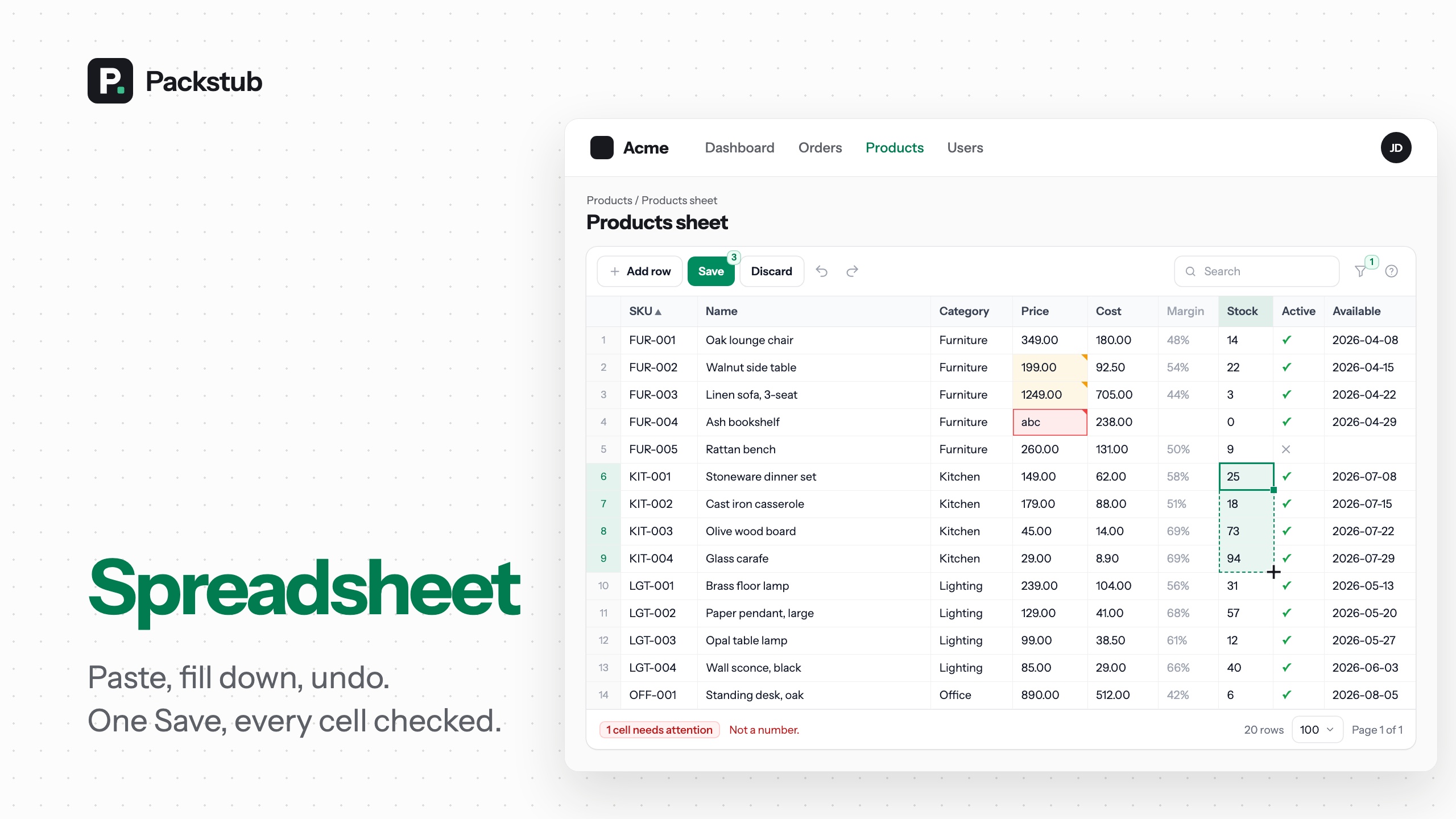
An inline-editable table for bulk editing Eloquent records in Filament: a sheet page for any resource where you edit cells in place with the keyboard, paste rows from Excel or Google Sheets, fill down, undo, and press Save once. The server validates every cell with your rules, checks your policies row by row, detects conflicts, and writes the whole batch in one transaction. Edit multiple records at once without a form per record.
Features
- One Save for hundreds of cells: edits wait across pages, one transaction writes them.
- Rules, policies and conflicts on the server: every cell validated, every row authorized.
- A keyboard grid: ranges, fill down, undo and redo.
- Paste from Excel or Sheets: extra rows become new records.
- Seven column types: text, number, boolean, select, dates and formulas.
- Add and delete rows: behind your policy, written with the next Save.
- Search, sort, filters and pages: on the server, unsaved cells kept.
- A resource page or your own: an Edit as sheet button on any resource.
- Events and hooks:
RowsSaved,RowSaveFailed, before and after a save. - Dark mode, RTL and translations: Tabulator bundled, nothing else to install.
Compatibility
| Plugin | Filament | Laravel | PHP |
|---|---|---|---|
| 1.x | 4.13+, 5.x | 12.x, 13.x | 8.3+ |
1.x is built for a desktop browser: keyboard, pointer and clipboard. On a touch screen a sheet can be read, searched, filtered and paged; editing cells by touch is planned.
Installation
composer require packstub/filament-spreadsheet
php artisan filament:assets
No migrations: the sheet reads and writes your own columns. The config file is optional (php artisan vendor:publish --tag=packstub-spreadsheet-config).
A sheet in a minute, next to a resource:
use App\Filament\Resources\Products\ProductResource;
use Packstub\Spreadsheet\Columns\BooleanColumn;
use Packstub\Spreadsheet\Columns\NumberColumn;
use Packstub\Spreadsheet\Columns\SelectColumn;
use Packstub\Spreadsheet\Columns\TextColumn;
use Packstub\Spreadsheet\Pages\SpreadsheetResourcePage;
use Packstub\Spreadsheet\Spreadsheet;

class ProductsSheet extends SpreadsheetResourcePage
{
    protected static string $resource = ProductResource::class;

    public function spreadsheet(Spreadsheet $spreadsheet): Spreadsheet
    {
        return $spreadsheet
            ->columns([
                TextColumn::make('sku')->rules(['required', 'max:32', 'unique:products,sku'])->frozen(),
                TextColumn::make('name')->rules(['required', 'max:120']),
                SelectColumn::make('category_id')->relationship('category', 'name'),
                NumberColumn::make('price')->decimals(2)->min(0),
                NumberColumn::make('stock')->integer()->min(0),
                BooleanColumn::make('is_active')->default(true),
            ])
            ->searchable(['sku', 'name'])
            ->defaultSort('sku')
            ->creatable()
            ->deletable();
    }
}
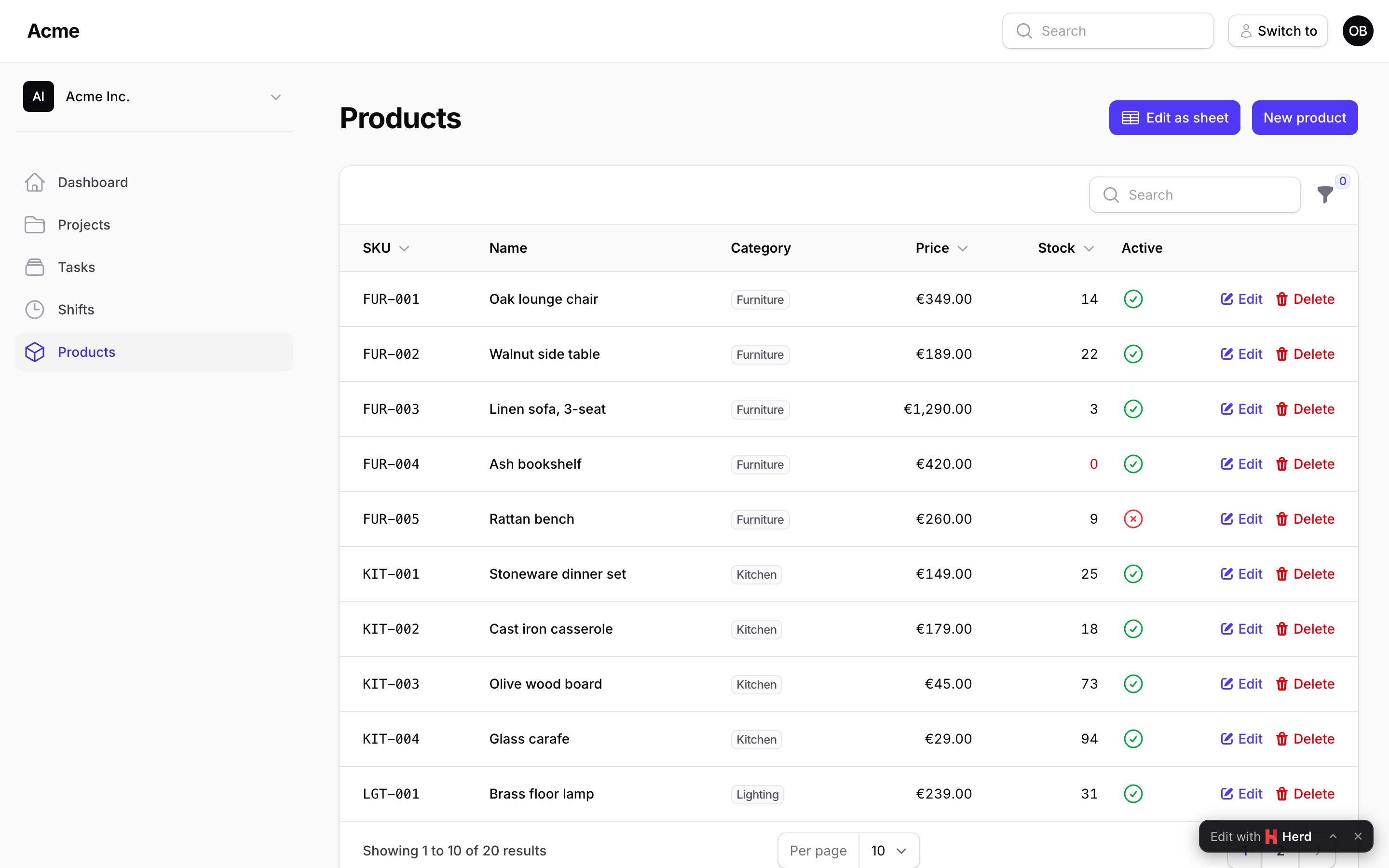
Register it in the resource's getPages(): 'sheet' => ProductsSheet::route('/sheet'), and add SheetAction::make() to the list page's header actions to link to it. Rows come from ProductResource::getEloquentQuery() (tenant-scoped); each row's update, create and delete go through the resource's canEdit(), canCreate() and canDelete().
Read more: Installation · Your first sheet.
Columns
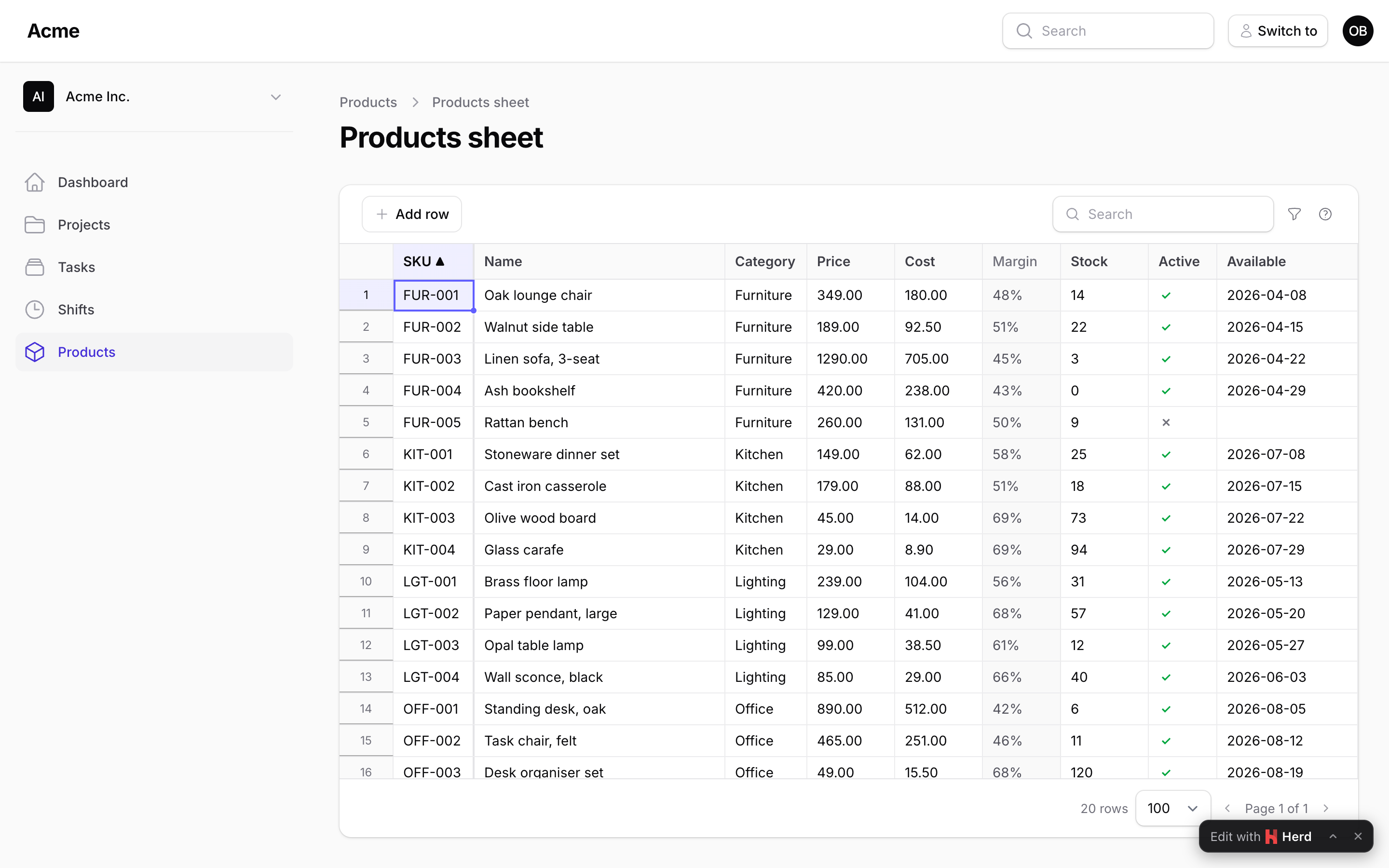
A column names an attribute and says how to read and write it. Every write is coerced by its column, validated with its rules and the type's, and refused on the cell when it cannot be read:
TextColumn::make('name')->rules(['required'])->maxLength(120),
NumberColumn::make('price')->decimals(2)->min(0),
NumberColumn::make('stock')->integer()->readOnly(fn (Product $product) => $product->is_locked),
BooleanColumn::make('is_active')->default(true),
SelectColumn::make('status')->options(Status::class),
SelectColumn::make('category_id')->relationship('category', 'name', fn (Builder $query) => $query->where('active', true)),
DateColumn::make('available_on')->format('d/m/Y'),
DateTimeColumn::make('published_at'),
ComputedColumn::make('margin')->formula('price - cost')->decimals(2),   // recomputed in the browser as you type
ComputedColumn::make('orders')->state(fn (Product $product) => $product->orders_count),
A formula() is a small expression over the sheet's own columns (if(stock < 5, 'Reorder', 'OK'), round(price * 1.2, 2), coalesce(cost, 0)): the server computes it for every row and the browser again over the unsaved cells, so the value follows an edit, an undo and a paste before Save.
Read more: Columns.
Editing
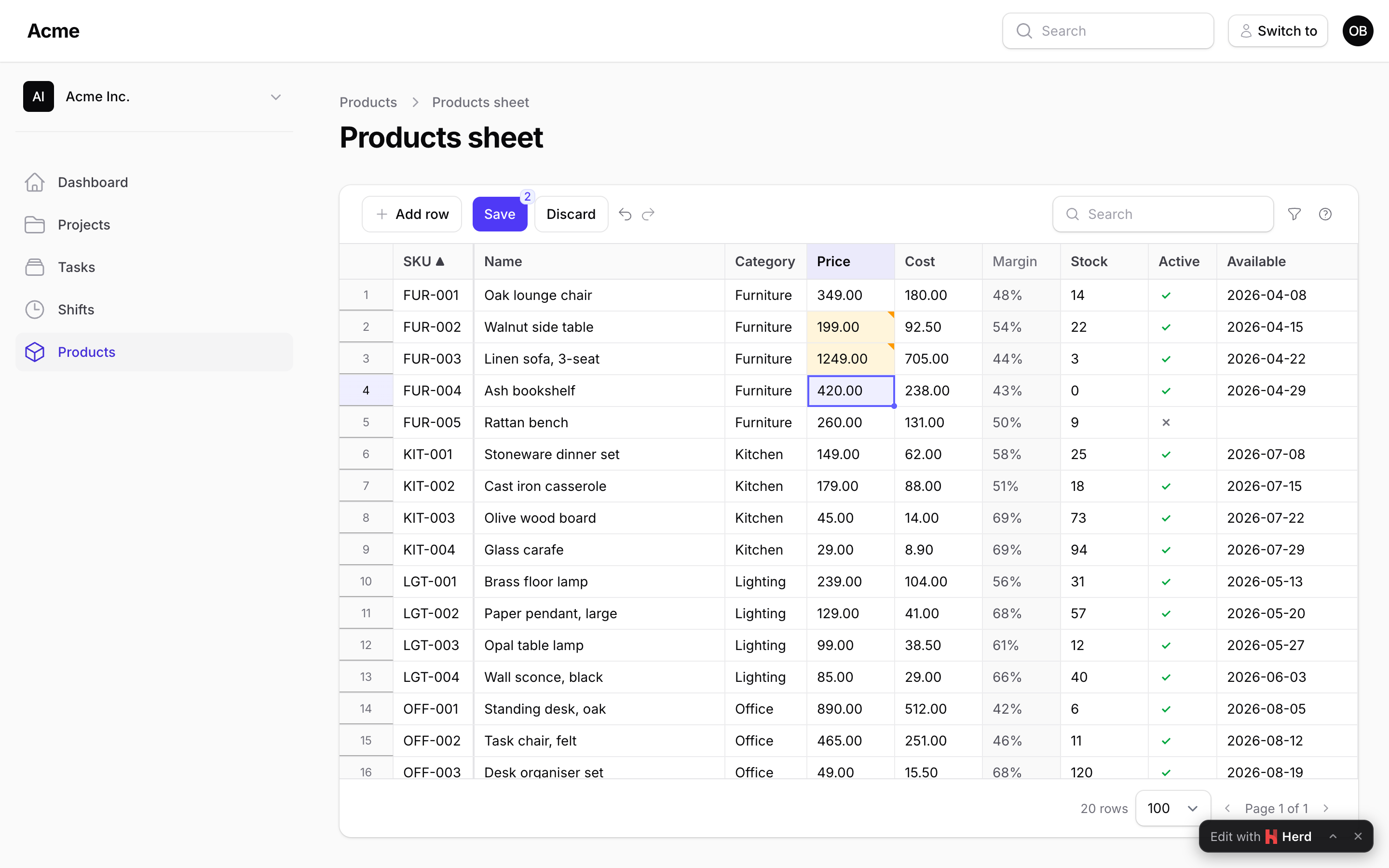
Click a cell to select it, type to replace it, double-click, Enter or F2 to edit it in place. Enter moves down, Tab moves right, Escape cancels. Shift+arrows select a range; Ctrl+C copies it as tab-separated text (labels for selects, ISO dates), Ctrl+X cuts it, Ctrl+V pastes whatever is on the clipboard, Delete clears it (the cells you may edit), Ctrl+D fills the first row down, and the small handle at the corner of the selection drags to fill. Ctrl+Z and Ctrl+Y walk the history, across pages. Changed cells get an amber corner; a cell the column cannot read ("abc" in a number) is red at once, before you even save.
Read more: Editing.
Saving
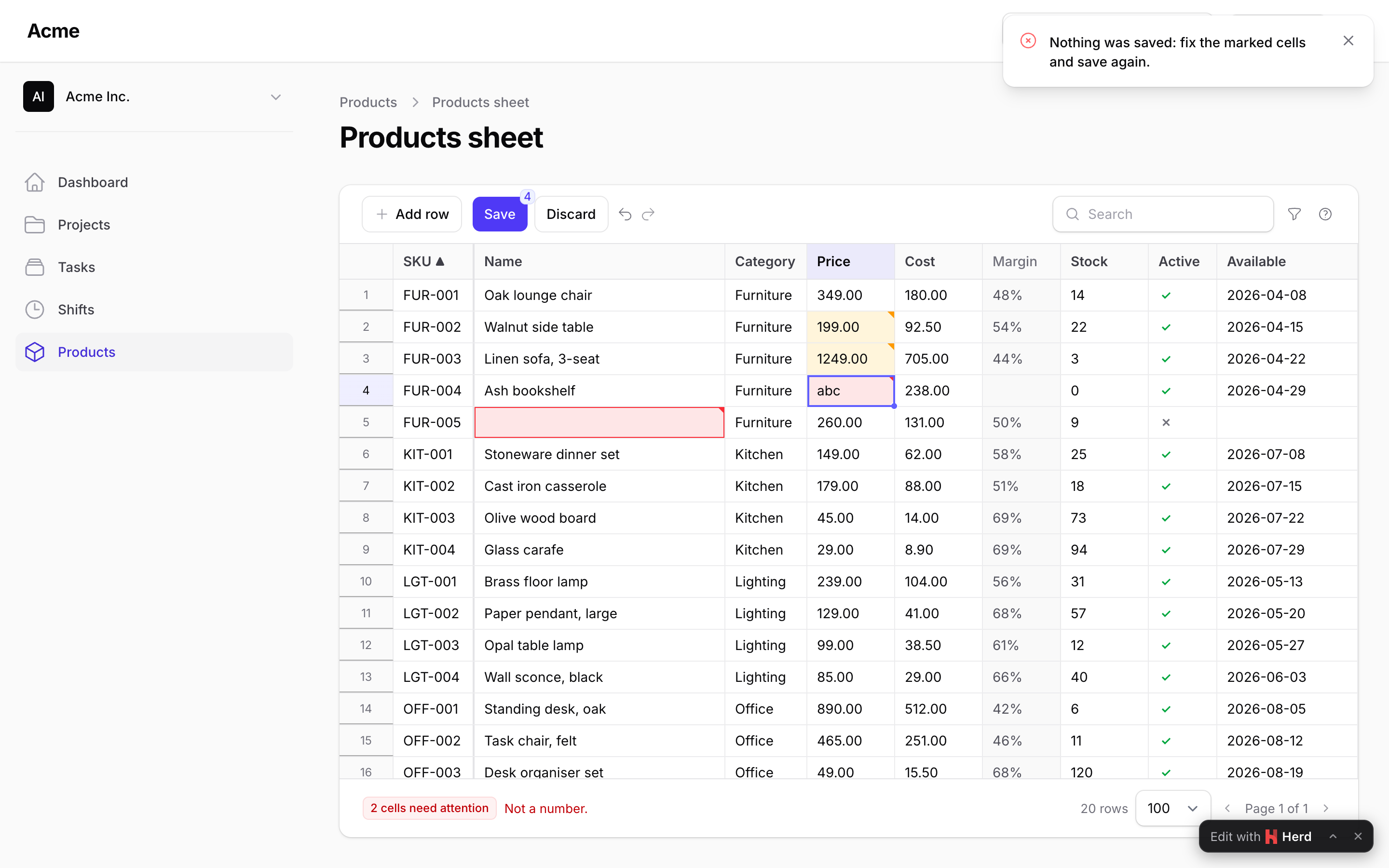
Save (or Ctrl+S) sends every changed cell, the new rows and the deletions in one call. The server loads each record through the sheet's query, checks the policy, compares the version, coerces and validates, and writes:
->saveMode(SaveMode::PerRow)                    // or AllOrNothing (the default)
->versionColumn('lock_version')                 // updated_at by default; false to skip the check
->mutateRowBeforeSave(fn (array $data, ?Product $record) => $data + ['updated_by' => auth()->id()])
->beforeSave(fn (SavePayload $payload) => throw_if($payload->rowCount() > 500, new SaveRejected('Save in smaller batches.')))
->afterSave(fn (Collection $products) => ProductIndexer::dispatch($products->modelKeys()))
The answer tells the browser which rows went through (with their values after casts and mutators), which cells were refused (the message on the cell), and which rows changed on the server meanwhile (purple, with their value next to yours; save again to win). RowsSaved fires after the transaction commits, RowSaveFailed for each refused row.
Read more: Saving · Authorization.
Adding and deleting rows
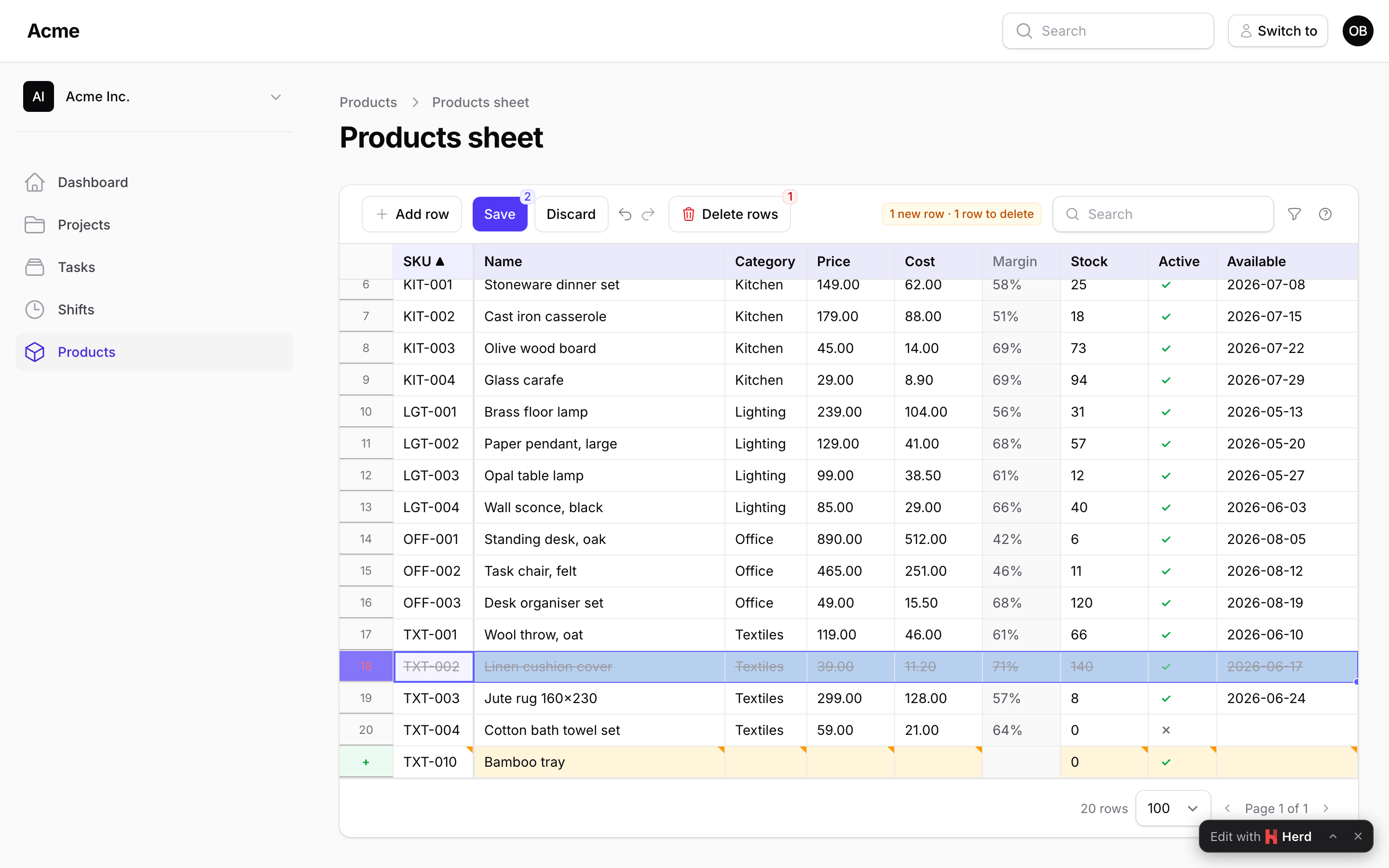
->creatable() shows an Add row button (Ctrl+Enter) and lets a paste past the last row create records; new rows start with the columns' default() values and are validated over every column. ->deletable() lets a row selection (click its number) or the row's context menu mark rows for deletion; they go with the next Save. Both are gated by the policy (create, delete) or your authorizeCreate() / authorizeDelete() closures.
Read more: Adding and deleting rows.
Search, sort, filters, pagination
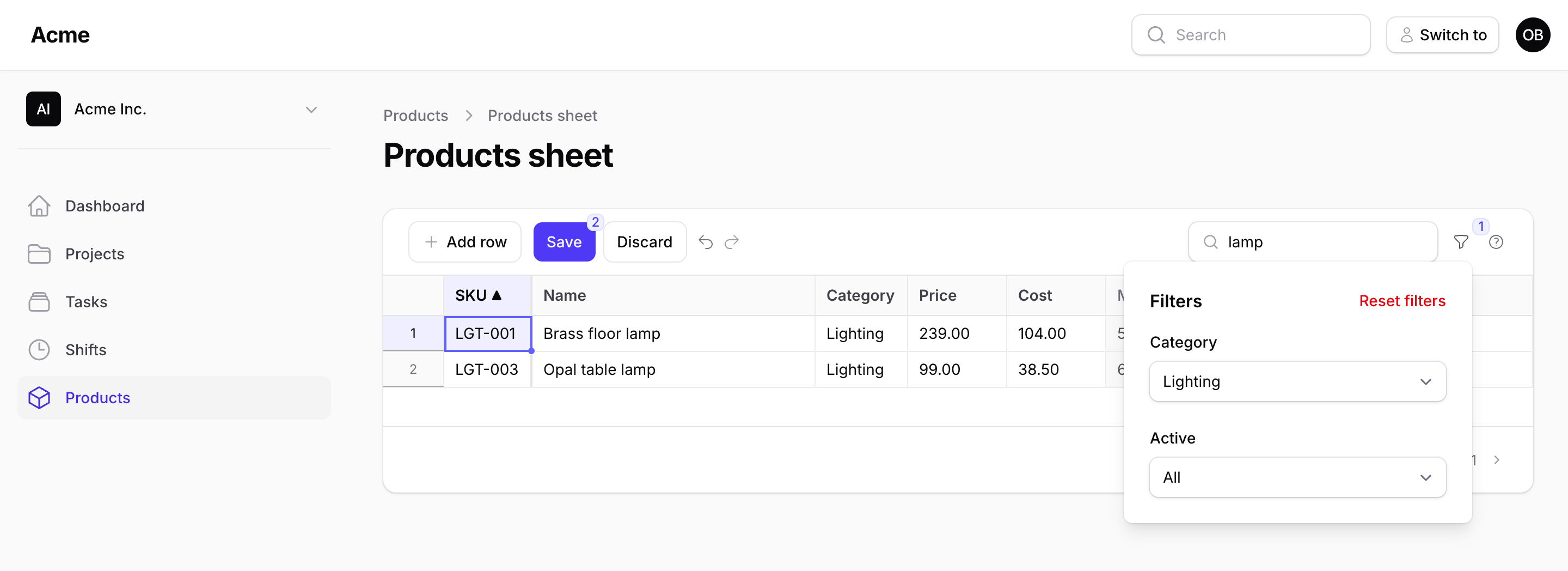
Everything the toolbar does happens on the server: the search box looks in searchable([...]), a header click sorts by that column, filters([...]) are Filament's own fields applied to the query (a select, also multiple() or searchable(), a yes/no select, a toggle, a date range with Filament's date picker; the same Filter as Kanban and Gantt), and the page size runs from 25 to 1,000 rows. Unsaved cells stay in the browser through all of it: the badge says how many and on how many pages.
->searchable(['sku', 'name', 'category.name'])
->defaultSort('sku')
->perPage(200)
->filters([
    Filter::select('category_id')->options(fn () => Category::pluck('name', 'id')->all()),
    Filter::select('supplier_id')->searchable()->options(fn () => Supplier::pluck('name', 'id')->all()),
    Filter::boolean('is_active'),
    Filter::toggle('low_stock')->query(fn (Builder $query) => $query->where('stock', '<', 5)),
    Filter::dateRange('available_on'),
])
->filtersLayout(FiltersLayout::Dropdown) // the funnel button (default), Toolbar, AboveContent
Read more: Search, sort, filters, pagination.
Configuration
$spreadsheet
    ->perPage(200)                       // rows per page (25 to 1,000)
    ->searchable(['sku', 'name'])        // what the search box looks in
    ->defaultSort('sku')                 // a header click sorts by any column
    ->creatable()->deletable()           // Add row, paste past the end, mark rows for deletion
    ->saveMode(SaveMode::PerRow)         // or AllOrNothing, the default
    ->versionColumn('updated_at')        // the conflict check; false to skip it
    ->filtersLayout(FiltersLayout::Dropdown)
    ->readOnly(fn () => ! auth()->user()->isAdmin())
    ->key('products');                   // the sheet's name in RowsSaved / RowSaveFailed
config/packstub-spreadsheet.php holds the defaults: rows per page and the maximum, the most rows one Save may carry, the save mode, the version column, whether leaving with unsaved changes asks first, a pinned first column (off by default), where the filters are (a dropdown, the toolbar or a row above the grid), the row height, the keyboard shortcuts, the date formats and the first day of the week in the filters' calendars.
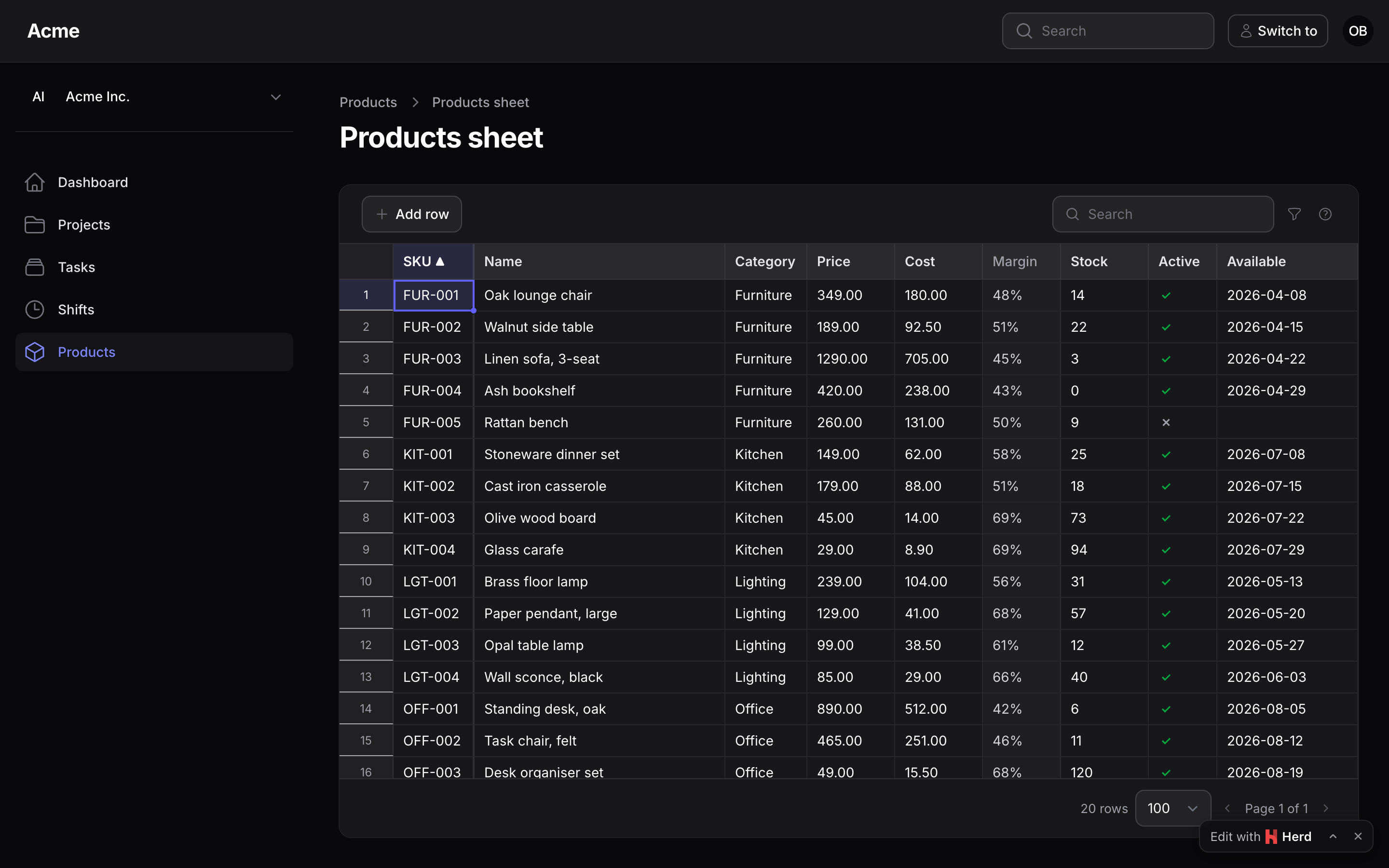
The sheet is a table-style container, the same shell as a Filament table and as Kanban and Gantt, its controls Filament's own components; the stylesheet maps Tabulator's surfaces to Filament's colour variables, follows dark mode and reads right-to-left with the panel. Restyle it with the --ps-sheet-* variables on .ps-sheet (--ps-sheet-bg, -border, -ring, -radius… the names Kanban and Gantt use with their own prefix).
Read more: Styling.
Editable columns or a sheet?
Filament's editable table columns (TextInputColumn, SelectColumn, ToggleColumn) are perfect for flipping a toggle or fixing one price: one cell, saved as you leave it. This plugin is for the afternoon when you need to fix three hundred of them: the same cells, but edited like a spreadsheet, validated together, checked against your policies, and written in one go. Keep the editable columns on your list page; add a sheet page next to it for the bulk work.
Documentation
- Installation
- Your first sheet
- Columns
- Editing
- Saving
- Adding and deleting rows
- Search, sort, filters, pagination
- Authorization
- Tenancy
- Events and hooks
- A sheet outside a resource
- Styling
- Performance
- Editable columns vs a sheet
- Upgrading
The same pages live in the docs/ directory of this repository.
Testing
composer test      # the Pest suite
composer test:js   # the browser side's pure parts (TSV, coercion, the buffer, undo, paste) on plain Node
Changelog
See the changelog.
Security vulnerabilities
Please e-mail support@packstub.dev rather than opening a public issue.
Credits
- Ion Caliman
- Tabulator by Oli Folkerd, the grid engine (MIT)
- All contributors
License
MIT. See the license file.
Search terms: filament inline edit table, filament editable table, filament bulk edit records, filament edit multiple records, filament spreadsheet, filament excel like editing, filament paste from excel, filament TextInputColumn save button, laravel spreadsheet editor livewire, filament grid editor, filament datasheet.