
packstub / filament-gantt

A fast Gantt chart and resource timeline for Filament: any Eloquent query with a start and an end becomes draggable bars on a day, week or month axis, grouped by project, assignee or room, with the rules enforced on the server.
Fund package maintenance!
Requires
- php: ^8.3
- filament/filament: ^4.13 || ^5.0
- illuminate/contracts: ^12.0 || ^13.0
- spatie/laravel-package-tools: ^1.92
Requires (Dev)
- laravel/pint: ^1.27
- orchestra/testbench: ^10.0 || ^11.0
- pestphp/pest: ^4.0 || ^5.0
- pestphp/pest-plugin-livewire: ^4.0 || ^5.0
Suggests
None
Provides
None
Conflicts
None
Replaces
None
This package is auto-updated.
Last update: 2026-10-29 05:19:07 UTC
README
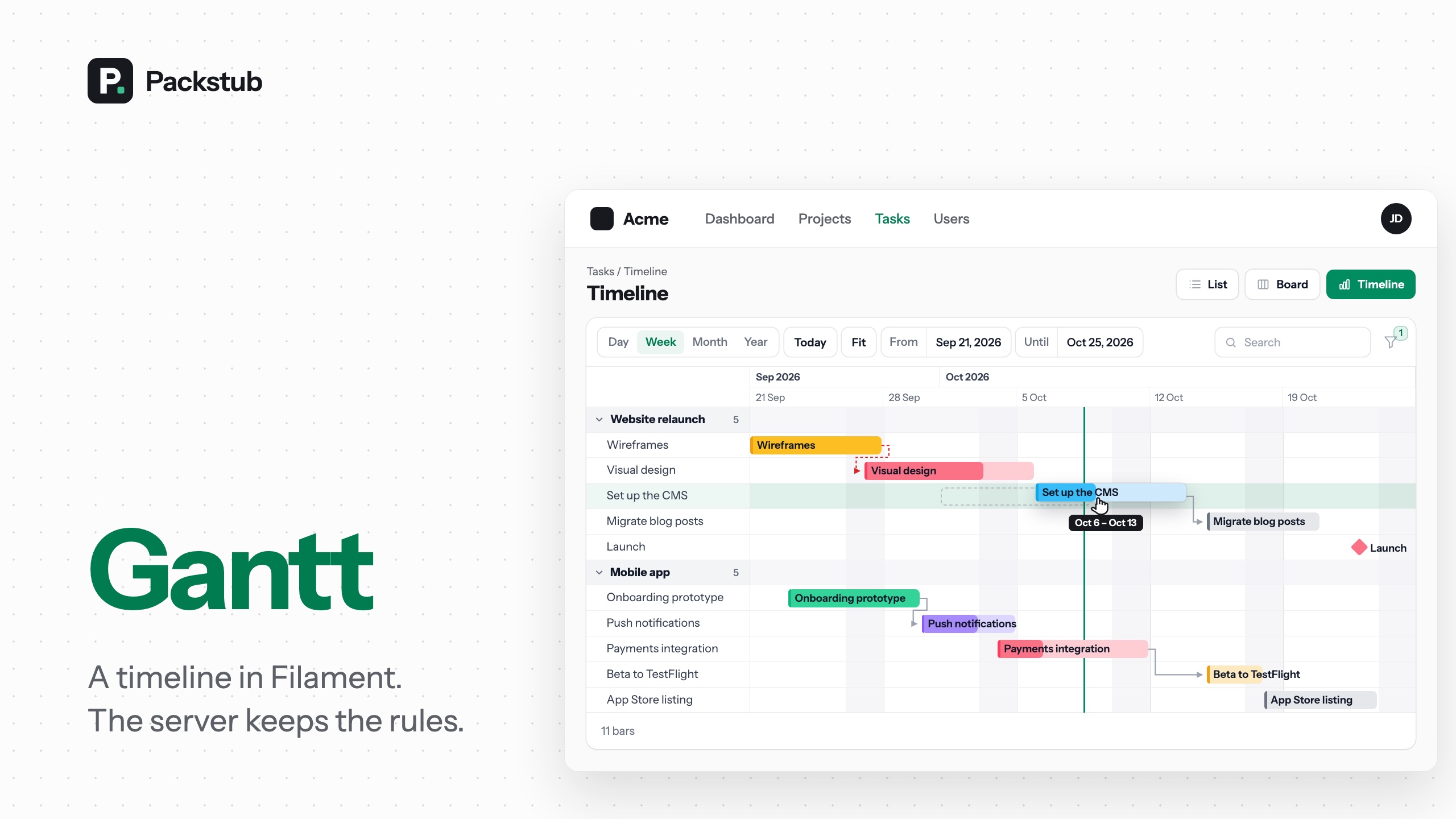
A Gantt chart and resource timeline for Filament: any Eloquent query with a start and an end becomes draggable bars on an hour, day, week, month or year axis, grouped by project, assignee, room or machine, with every rule enforced on the server. The sibling of Filament Kanban.
Features
- Drag to move, resize or reassign: bars move at once, by an edge or to another row.
- Rules on the server: policies, durations and a locked past, always checked.
- Groups and resource timelines: rows by project, assignee, room or machine.
- Milestones, progress and dependencies: diamonds, fills and finish-to-start arrows.
- Filament actions on bars: click to edit, right-click for more, click to create.
- Hour to year, zoom and Fit: five scales, wheel or pinch zoom, the whole plan in one screen.
- Search and filters: Filament's filter fields, kept in the URL.
- Keyboard and touch: move and resize with the arrows, drag on touch.
- Resource page, standalone page or widget: wherever your panel needs a timeline.
- No Gantt library, no build step: dark mode, RTL and four languages.
Compatibility
| Plugin | Filament | Laravel | PHP |
|---|---|---|---|
| 1.x | 4.13+, 5.x | 12.x, 13.x | 8.3+ |
Installation
composer require packstub/filament-gantt
php artisan filament:assets
No migrations: the chart reads and writes your own start and end columns (date or datetime casts, or plain strings). The config file is optional (php artisan vendor:publish --tag=packstub-gantt-config).
A chart in thirty seconds, next to a resource:
use App\Filament\Resources\Tasks\TaskResource;
use App\Models\Task;
use Filament\Actions\EditAction;
use Packstub\Gantt\Gantt;
use Packstub\Gantt\Pages\GanttResourcePage;

class TasksGantt extends GanttResourcePage
{
    protected static string $resource = TaskResource::class;

    public function gantt(Gantt $gantt): Gantt
    {
        return $gantt
            ->query(fn () => Task::query()->with('project'))
            ->start('starts_on')->end('ends_on')
            ->label('title')
            ->color(fn (Task $task) => $task->priority->getColor())
            ->progress('progress')
            ->groupBy('project', label: 'project.name')
            ->movable(fn (Task $task) => $task->status !== 'done')
            ->lockedBefore(today())
            ->barAction(EditAction::make()->schema(TaskResource::fields()));
    }
}
Register it in the resource's getPages(): 'gantt' => TasksGantt::route('/gantt'). A standalone GanttPage and a GanttWidget ask for the same gantt() method. (TaskResource::fields() is your own helper returning the form components; ->schema(fn (Schema $schema) => TaskResource::form($schema)) reuses the resource's form.)
Read more: Installation.
Defining bars
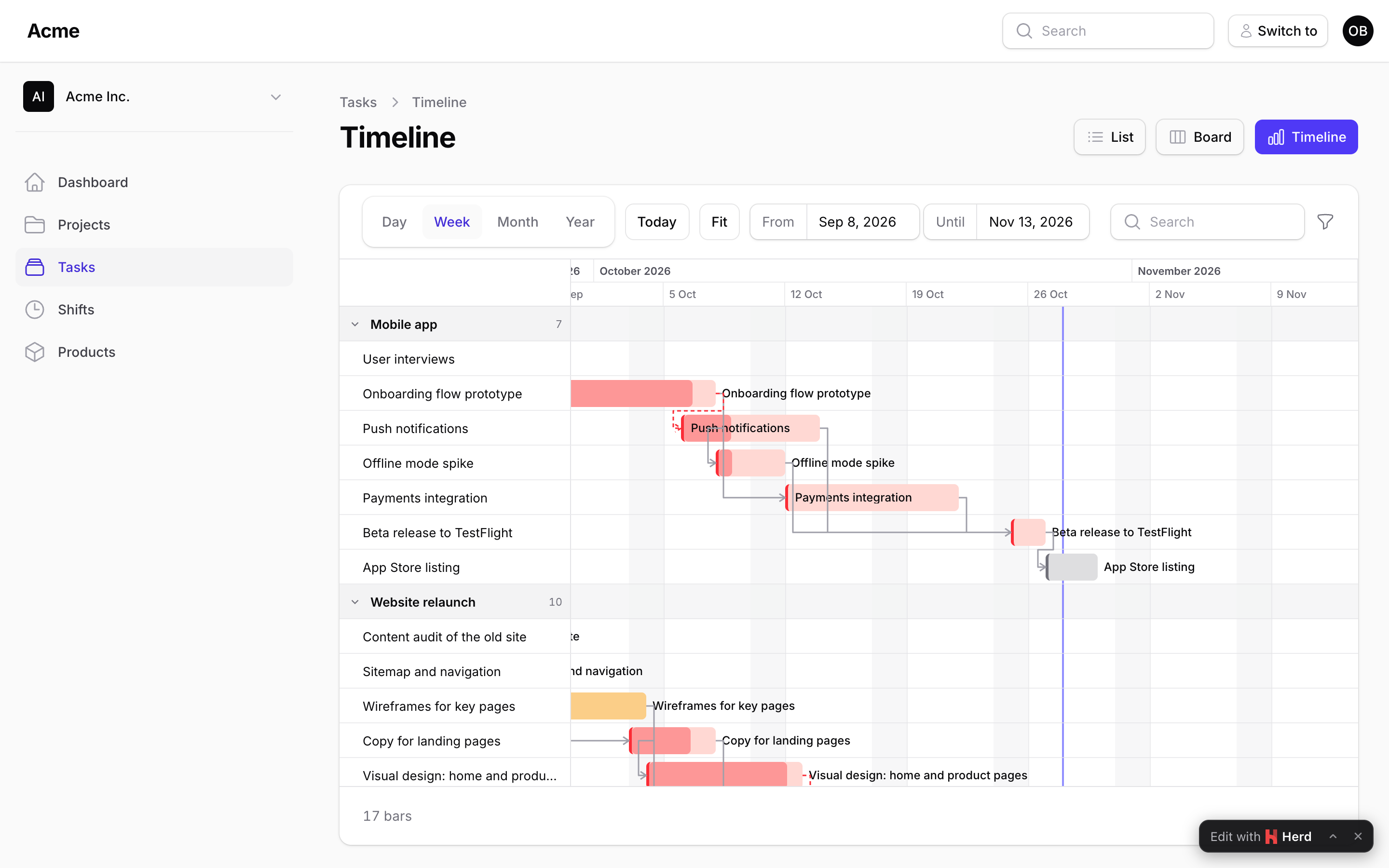
start() and end() name the attributes; label(), color() and progress() take an attribute name or a closure. Whole-day records (a date cast) include their end day in the bar; datetime records end at the moment they say. A null end is a milestone. For anything else, shape the bar in one closure:
->bar(fn (Task $task) => Bar::make()
    ->label($task->title)
    ->color($task->is_late ? 'danger' : 'sky')
    ->progress($task->progress)
    ->tooltip($task->assignee?->name)
    ->actions($task->is_locked ? ['view'] : ['view', 'edit', 'delete']))
Read more: Bars.
Groups and resource timelines
Group rows by a column or a BelongsTo relation; each group is a collapsible row with a count. For a resource timeline (rooms × bookings, machines × jobs) list the resources yourself so empty ones appear, and use the compact layout:
->groupBy('room', label: 'room.name')
->groups(fn () => Group::fromModels(Room::query()->orderBy('name')->get()))
->compact()
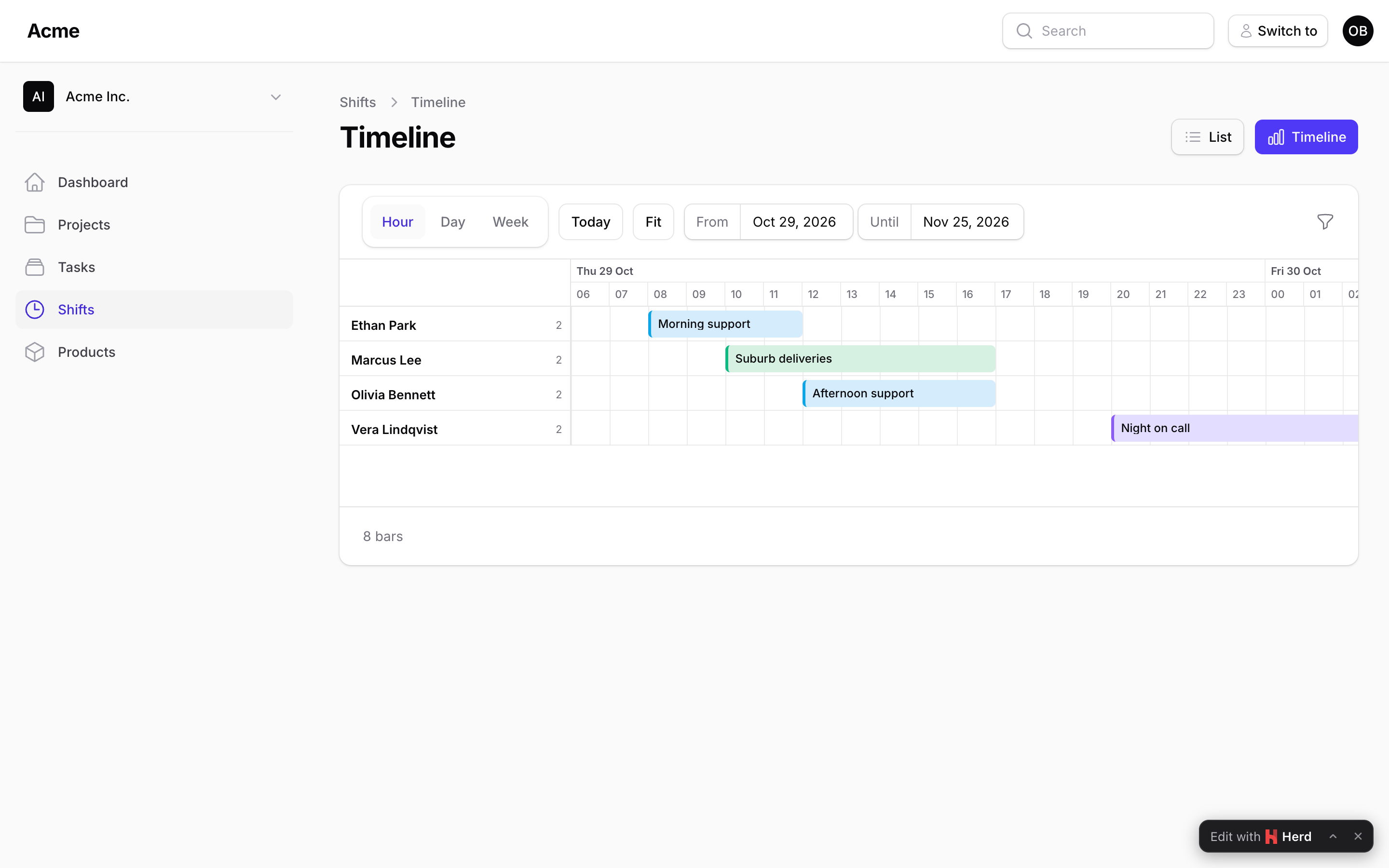
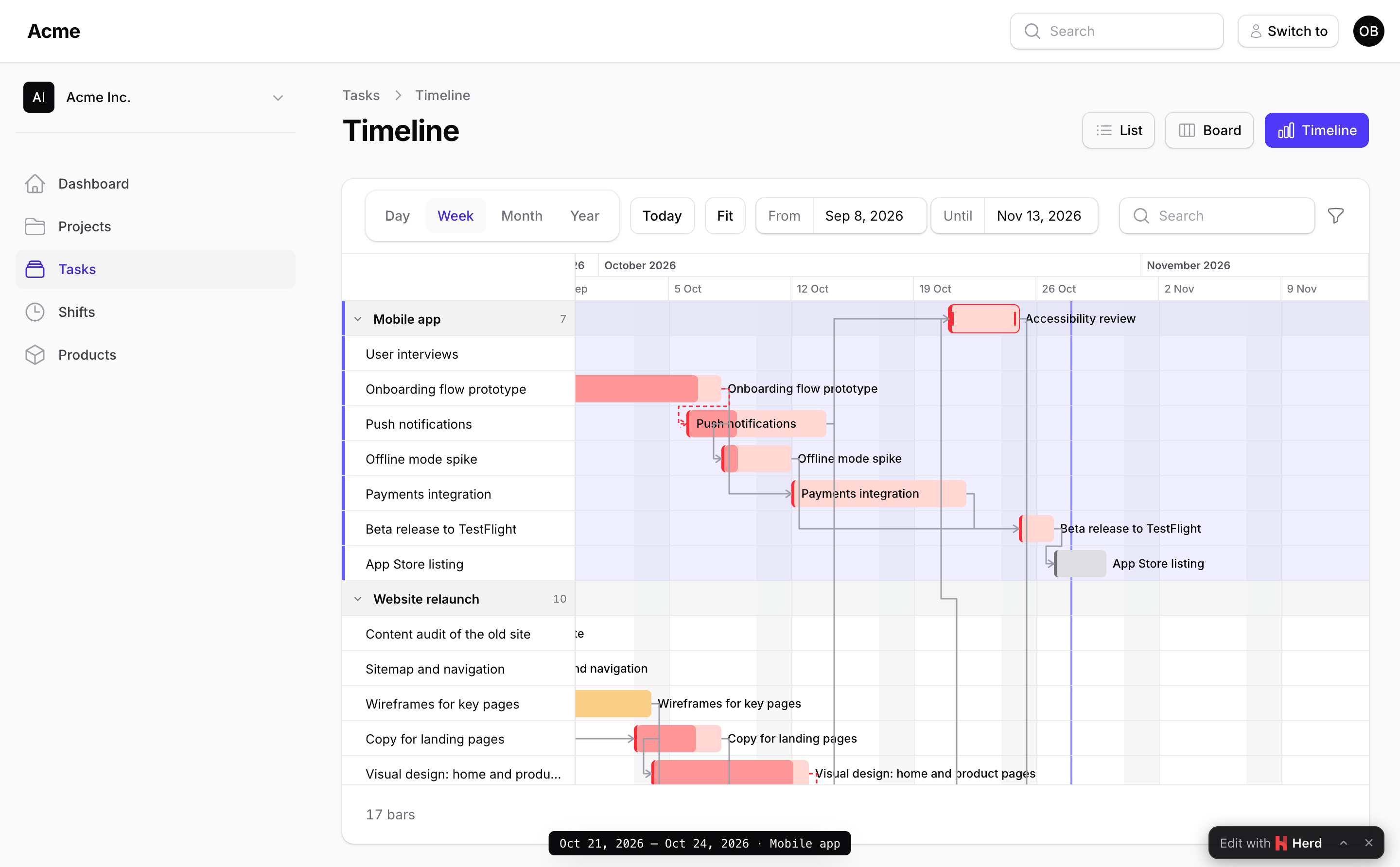
A bar dragged up or down lands in the group under the pointer (a booking in another room), within regroupable() and canRegroup():
Read more: Groups.
Moving and resizing
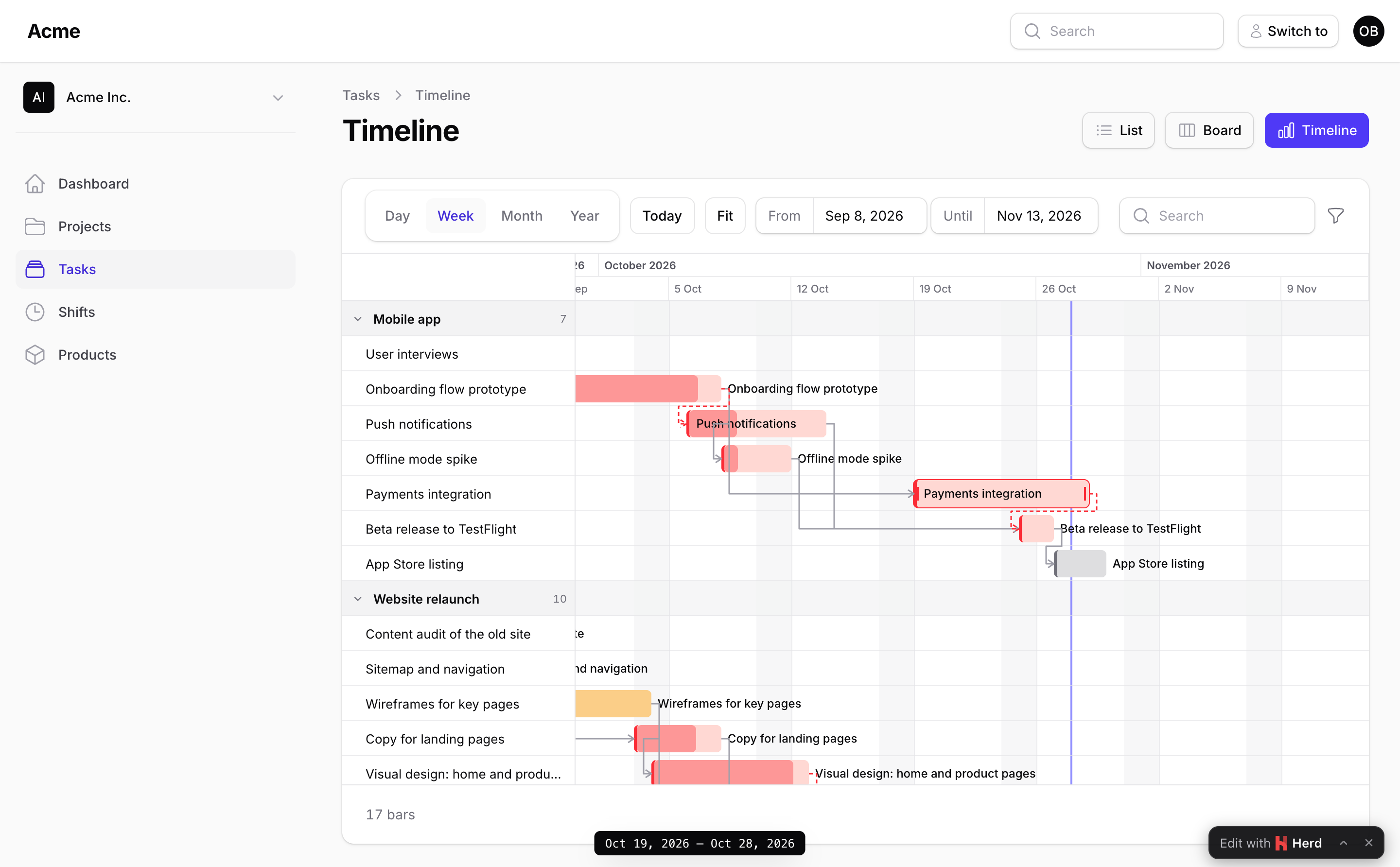
A drag changes the bar in the browser and sends ganttMove(id, start, end, group), a renderless Livewire call (the group only when the bar was dragged to another row). The server loads the record through the chart's query(), snaps the dates, checks every rule and saves; the bar flashes when it is saved or slides back with the reason when it is refused.
->snapTo(Unit::Day)                     // or Unit::Hour for datetime records
->authorizeMoves(fn (Task $task) => auth()->user()->can('update', $task))   // the default when Task has a policy
->movable(fn (Task $task) => $task->status !== 'done')
->resizable(true)
->regroupable(fn (Task $task) => $task->status !== 'done')   // may it be dragged to another row (project)?
->minDuration(days: 1)->maxDuration(days: 30)
->lockedBefore(today())                 // the past stays as it happened
->canMove(fn (Task $task, CarbonImmutable $start) => $start->isWeekend() ? 'Not on a weekend.' : true)
->afterMove(fn (Task $task, CarbonImmutable $start, CarbonImmutable $end) => $task->touch())
Give your own persistence to moveUsing() and throw MoveRejected to refuse with a message (any other exception is reported and the user sees a generic one). Packstub\Gantt\Events\BarMoved fires after every saved move. The chart's own maths is on wall-clock moments tagged UTC, so a daylight-saving change never lengthens a bar; your closures and the event get the same moments in the app's timezone, so $start->isPast() reads naturally. Escape abandons a drag. On a focused bar, ←/→ move it, ↑/↓ carry it to another row, Shift+←/→ move its end and Alt+←/→ its start.
Read more: Moving and resizing.
The time window
Hour, day, week, month and year scales, a today line, weekend shading, a date-range picker, a search box and filters in a table-style toolbar. The window defaults to a week before the earliest bar and two weeks after the latest (around today for a history longer than two years), or set it with startDate()/endDate(). The search and the filters are applied on the server; the filters sit behind a funnel button by default, inline or above the chart with filtersLayout():
->scale(Scale::Week)
->searchable(['title', 'project.name'])
->filters([
    Filter::select('assignee_id')->options(fn () => User::pluck('name', 'id')->all()),
    Filter::select('tags')->multiple()->options(['bug' => 'Bug', 'feature' => 'Feature']),
    Filter::boolean('is_billable'),
    Filter::toggle('mine')->query(fn ($query) => $query->where('assignee_id', auth()->id())),
    Filter::dateRange('starts_on'),
])
->filtersLayout(FiltersLayout::Toolbar)
The year scale fits a plan of two years in one screen, quarters over months:
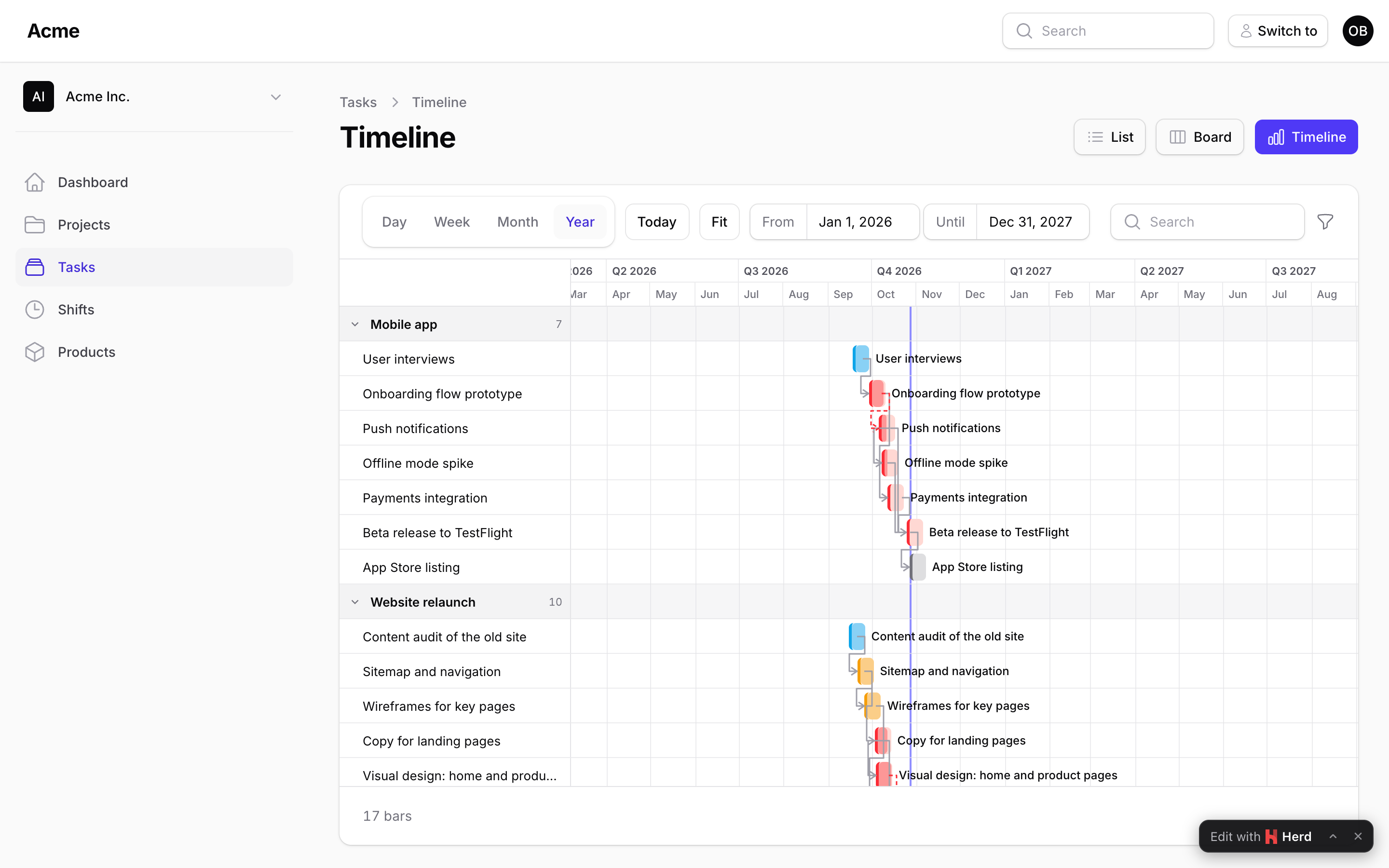
Read more: Filters and the time window.
Actions
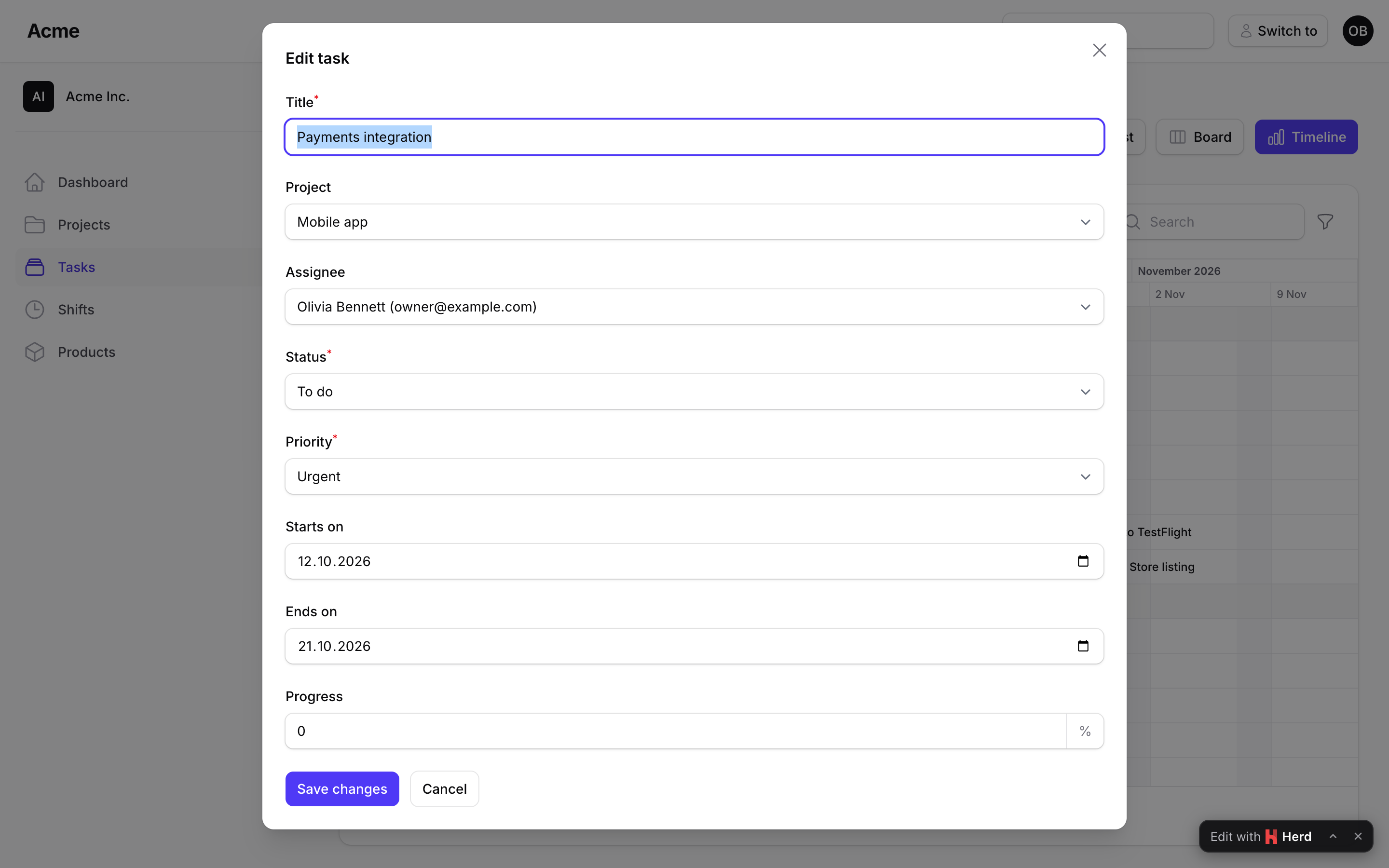
Your Filament actions work on bars: barAction(EditAction::make()->schema([...])) opens on click, barActions([...]) fills the right-click menu, and createAction(CreateAction::make()->schema([...])) opens the create form with the clicked spot's start, end and group filled in. Records are resolved through the chart's query, so an action can never reach a record the user cannot see, and each bar offers only the actions the user may run on its record (on a resource page, the resource's policy).
Read more: Actions.
Widget and read-only mode
GanttWidget puts a chart on the dashboard, read-only by default; ->readOnly() on any chart shows it without drag handles or create clicks, and the server refuses moves too.
Read more: Widget and read-only mode.
Kanban + Gantt on the same records
Both plugins take the same query() and the same Filament actions, so a TaskBoard and a TasksGantt page can sit next to each other in one resource, one for the flow, one for the schedule. A BarMoved listener can update the status and a CardMoved listener the dates.
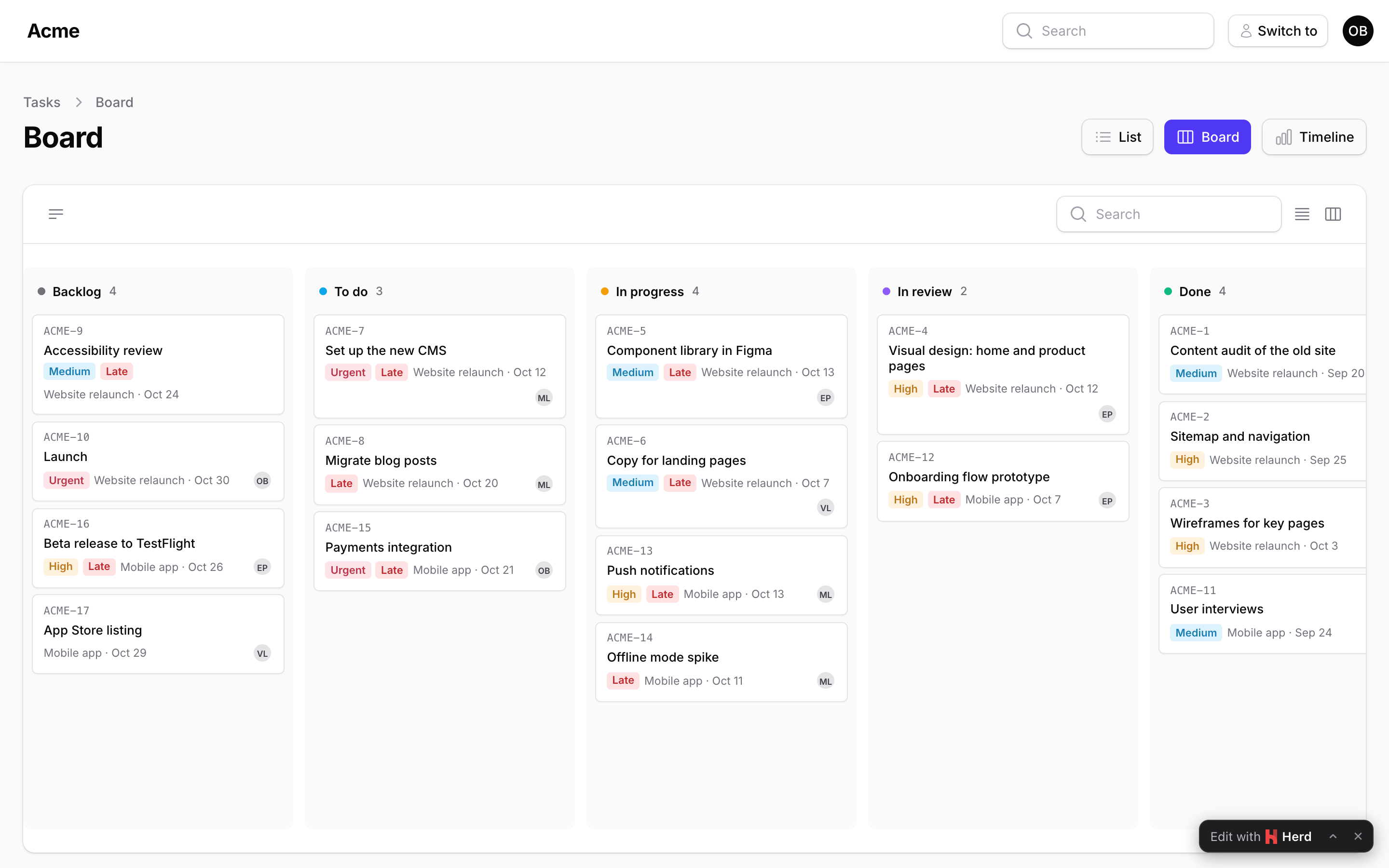
Read more: Kanban + Gantt.
Configuration
$gantt
    ->scale('week')            // hour | day | week | month | year; the user can change it
    ->scales(['day', 'week'])  // the zoom levels offered
    ->snapTo('day')            // day | hour
    ->firstDayOfWeek(1)        // 1 = Monday … 7 = Sunday
    ->startDate('2026-01-01')->endDate('2026-12-31')
    ->refreshOn(['task-updated'])
    ->poll('30s')
    ->key('tasks');            // where the browser remembers the zoom and folded groups
config/filament-gantt.php holds the defaults: scale, first day of week, weekend days, row height, pixels per day per scale, window padding and bounds, max_bars, polling, where the filters are shown (filters_layout) and the date formats of tooltips (the locale's by default).
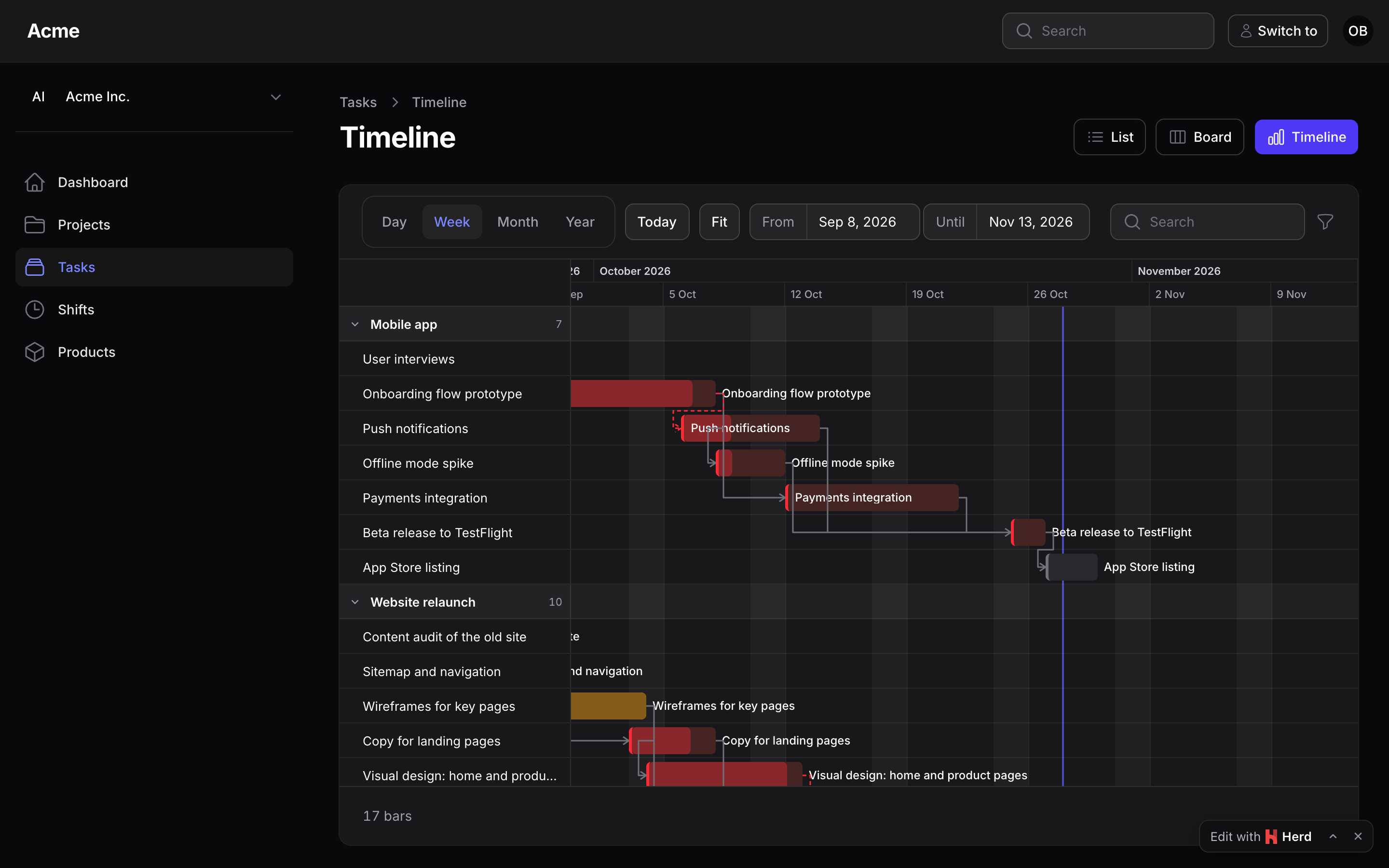
The chart sits in a table-style container whose toolbar, filters and menus are Filament's own components, so the panel's theme styles them. The stylesheet is plain CSS on Filament's colour variables and follows dark mode; it uses logical properties, so it reads right-to-left with the panel. Restyle it with the --ps-gantt-* variables on .ps-gantt from your theme (the same scheme as Kanban's --ps-kanban-* and Spreadsheet's --ps-sheet-*):
.fi-body .ps-gantt {
    --ps-gantt-label-width: 18rem;
    --ps-gantt-today: var(--danger-500);
}
Read more: Styling.
Documentation
- Installation
- Bars
- Groups
- Moving and resizing
- Filters and the time window
- Actions
- Widget and read-only mode
- Styling
- Performance
- Kanban + Gantt
- Upgrading
The same pages live in the docs/ directory of this repository.
Testing
composer test      # the Pest suite
composer test:js   # the browser side (layout, drag, menu) on plain Node, no packages
Changelog
See the changelog.
Security vulnerabilities
Please e-mail support@packstub.dev rather than opening a public issue.
Credits
License
MIT. See the license file.