
opscale-co / nova-toolbar-actions

Show Nova actions directly in the toolbar
Package info
github.com/opscale-co/nova-toolbar-actions
pkg:composer/opscale-co/nova-toolbar-actions
Requires
- php: >=8.2
Requires (Dev)
- laravel/nova: ^5.4
- laravel/nova-devtool: ^1.0
- phpunit/phpunit: ^10.5
- tightenco/duster: ^2.7
Suggests
None
Provides
None
Conflicts
None
Replaces
None
README
At Opscale, we’re passionate about contributing to the open-source community by providing solutions that help businesses scale efficiently. If you’ve found our tools helpful, here are a few ways you can show your support:
⭐ Star this repository to help others discover our work and be part of our growing community. Every star makes a difference!
💬 Share your experience by leaving a review on Trustpilot or sharing your thoughts on social media. Your feedback helps us improve and grow!
📧 Send us feedback on what we can improve at feedback@opscale.co. We value your input to make our tools even better for everyone.
🙏 Get involved by actively contributing to our open-source repositories. Your participation benefits the entire community and helps push the boundaries of what’s possible.
💼 Hire us if you need custom dashboards, admin panels, internal tools or MVPs tailored to your business. With our expertise, we can help you systematize operations or enhance your existing product. Contact us at hire@opscale.co to discuss your project needs.
Thanks for helping Opscale continue to scale! 🚀
Description
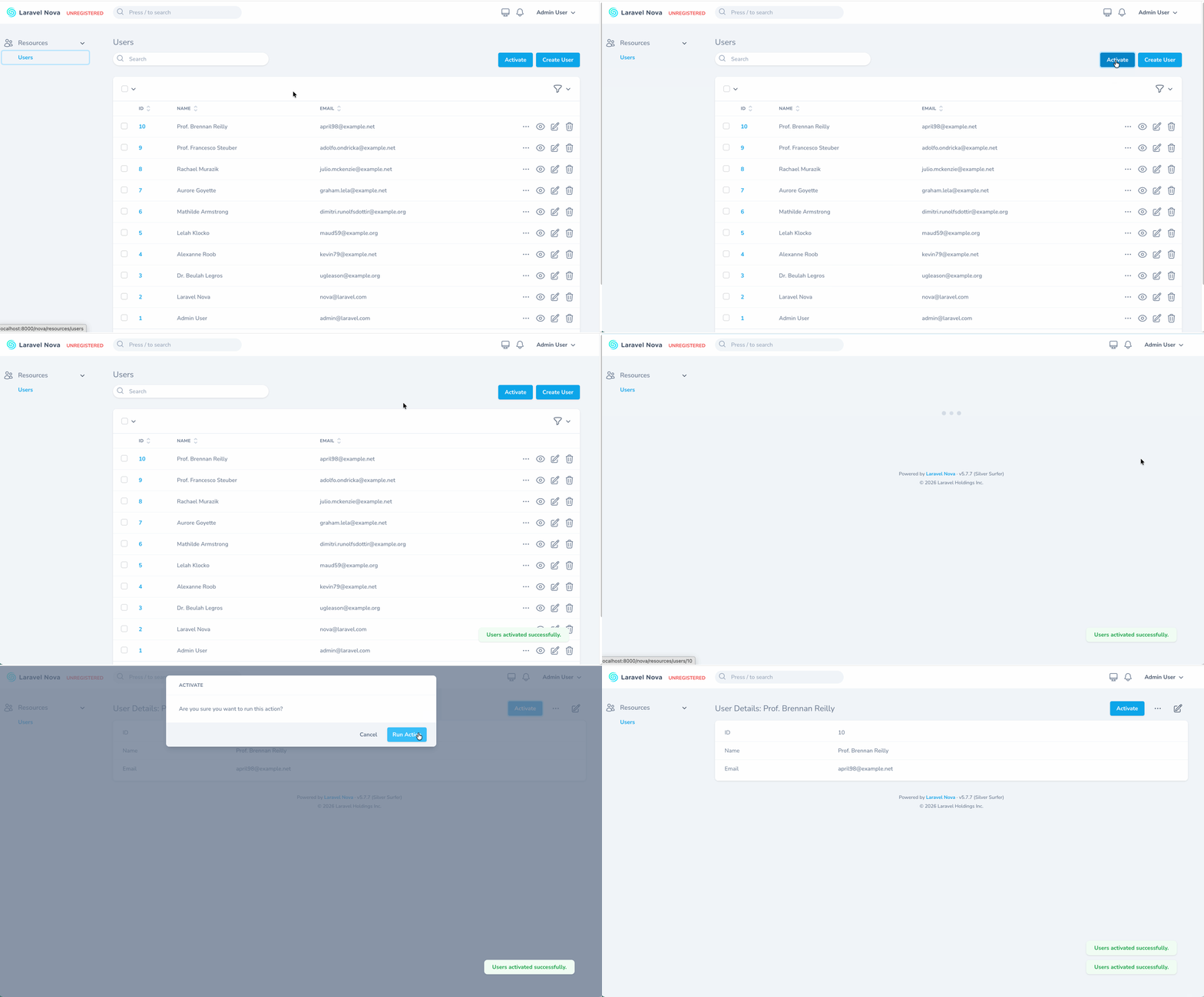
Display Nova actions as buttons directly in the index or detail toolbar, instead of burying them inside dropdown menus. Compatible with Nova 5.
Installation
You can install the package in to a Laravel app that uses Nova via composer:
composer require opscale-co/nova-toolbar-actions
The package will auto-register its service provider.
Usage
Add the ShowAsButton trait to any Nova action, then use the available methods to control where the action appears as a button.
use Laravel\Nova\Actions\Action;
use Opscale\NovaToolbarActions\ShowAsButton;

class ActivateUser extends Action
{
    use ShowAsButton;

    public $standalone = true;

    // ...
}
Then in your resource's actions() method:
public function actions(NovaRequest $request): array
{
    return [
        ActivateUser::make()->showAsButton(),
    ];
}
Available Methods
| Method | Description |
|---|---|
showAsButton() |
Show the action as a button on both index and detail toolbars |
showOnIndexToolbar() |
Show the action as a button on the index toolbar only |
showOnDetailToolbar() |
Show the action as a button on the detail toolbar only |
All methods accept a bool parameter to enable/disable (true by default) and return the action instance for chaining.
Note: On the index page, only standalone actions (
$standalone = true) can be displayed as toolbar buttons, since they don't require resource selection. On the detail page, any action can be shown as a toolbar button.
Testing
npm run test
Changelog
Please see CHANGELOG for more information on what has changed recently.
Contributing
Please see CONTRIBUTING for details.
Security
If you discover any security related issues, please email development@opscale.co instead of using the issue tracker.
Credits
License
The MIT License (MIT). Please see License File for more information.