
klehm / content-blocks

Modular page builder for Symfony — entities, admin UI, form integration.
Requires
- php: >=8.2
- doctrine/collections: ^1.8 || ^2.0 || ^3.0
- doctrine/doctrine-bundle: ^2.10 || ^3.0
- doctrine/orm: ^2.15 || ^3.0
- maennchen/zipstream-php: ^3.1
- symfony/config: ^6.4 || ^7.0 || ^8.0
- symfony/console: ^6.4 || ^7.0 || ^8.0
- symfony/dependency-injection: ^6.4 || ^7.0 || ^8.0
- symfony/event-dispatcher: ^6.4 || ^7.0 || ^8.0
- symfony/form: ^6.4 || ^7.0 || ^8.0
- symfony/framework-bundle: ^6.4 || ^7.0 || ^8.0
- symfony/http-foundation: ^6.4 || ^7.0 || ^8.0
- symfony/http-kernel: ^6.4 || ^7.0 || ^8.0
- symfony/mime: ^6.4 || ^7.0 || ^8.0
- symfony/options-resolver: ^6.4 || ^7.0 || ^8.0
- symfony/property-access: ^6.4 || ^7.0 || ^8.0
- symfony/routing: ^6.4 || ^7.0 || ^8.0
- symfony/security-csrf: ^6.4 || ^7.0 || ^8.0
- symfony/stimulus-bundle: ^2.36 || ^3.0
- symfony/translation-contracts: ^2.5 || ^3.0
- symfony/twig-bundle: ^6.4 || ^7.0 || ^8.0
- symfony/ux-live-component: ^2.36 || ^3.0
- symfony/ux-twig-component: ^2.36 || ^3.0
- symfony/validator: ^6.4 || ^7.0 || ^8.0
- twig/twig: ^3.27
Requires (Dev)
- phpunit/phpunit: ^11.5
- symfony/asset: ^6.4 || ^7.0 || ^8.0
- symfony/webpack-encore-bundle: ^2.0
Suggests
- symfony/asset: Resolves the paths a block declares for its CSS and JS (BlockAssetsInterface)
- symfony/webpack-encore-bundle: Links Webpack Encore entries a block declares, with their runtime and chunks
Provides
None
Conflicts
None
Replaces
None
- dev-main / 1.6.x-dev
- v1.5.0
- v1.4.0
- v1.3.1
- v1.3.0
- v1.2.0
- v1.1.0
- v1.0.0
- v1.0.0-RC17
- v1.0.0-RC16
- v1.0.0-RC15
- v1.0.0-RC14
- v1.0.0-RC13
- v1.0.0-RC12
- v1.0.0-RC11
- v1.0.0-RC10
- v1.0.0-RC9
- v1.0.0-RC8
- v1.0.0-RC7
- v1.0.0-RC6
- v1.0.0-RC5
- v1.0.0-RC4
- v1.0.0-RC3
- v1.0.0-RC2
- v1.0.0-RC1
- v0.1.0-beta.7
- v0.1.0-beta.6
- v0.1.0-beta.5
- v0.1.0-beta.4
- v0.1.0-beta.3
- v0.1.0-beta.2
- v0.1.0-beta.1
- v0.1.0-alpha.24
- v0.1.0-alpha.23
- v0.1.0-alpha.22
- v0.1.0-alpha.21
- v0.1.0-alpha.20
- v0.1.0-alpha.19
- v0.1.0-alpha.18
- v0.1.0-alpha.17
- v0.1.0-alpha.16
- v0.1.0-alpha.15
- v0.1.0-alpha.14
- v0.1.0-alpha.13
- v0.1.0-alpha.12
- v0.1.0-alpha.11
- v0.1.0-alpha.10
- v0.1.0-alpha.9
- v0.1.0-alpha.8
- v0.1.0-alpha.7
- v0.1.0-alpha.6
- v0.1.0-alpha.5
- v0.1.0-alpha.4
- v0.1.0-alpha.3
- v0.1.0-alpha.2
- v0.1.0-alpha
This package is auto-updated.
Last update: 2026-10-21 12:59:02 UTC
README
Modular page builder for Symfony. Build content areas from sections, columns and blocks, with an extensible block-type system.
This package provides the core: entities, admin UI (Live Components + Stimulus), ContentAreaType form, and the block-type registry. Use it together with klehm/content-blocks-kit for ready-to-use blocks.
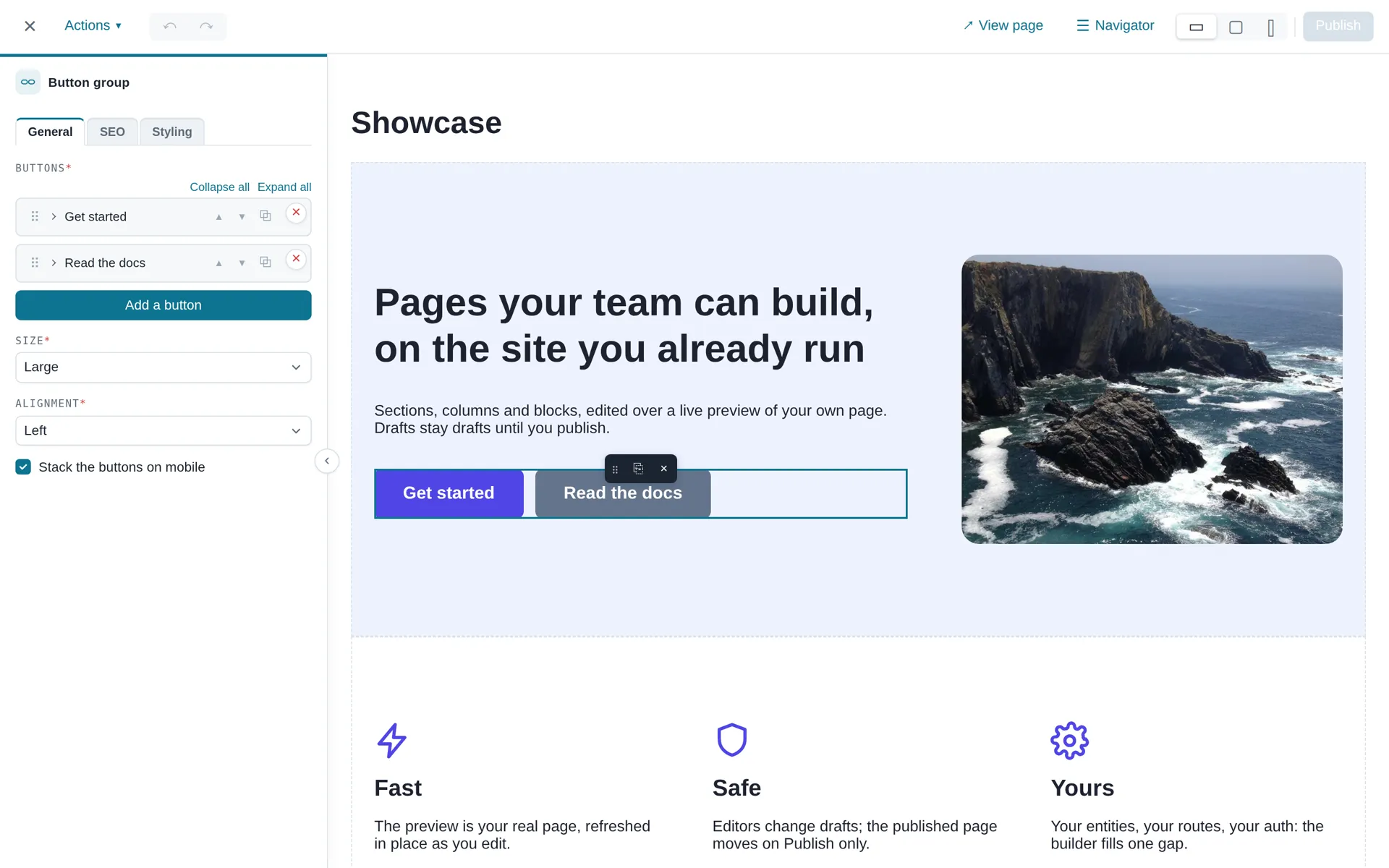
Live demo
See the builder at work on blocks.clementmuller.fr — no install needed.
Requirements
- PHP >= 8.2 (>= 8.4 for Symfony 8.0)
- Symfony 6.4 LTS, 7.x or 8.x (including
symfony/validator, pulled in as a dependency) - Doctrine ORM ^2.15 or ^3.0, on MySQL 8.0 or PostgreSQL 16 (both tested in CI) or any database Doctrine supports
- Symfony UX ^2.36 or ^3.0
Installation
The packages are tagged as 0.1.0-alpha.* pre-releases. With minimum-stability: stable, add an explicit constraint (composer require klehm/content-blocks:^0.1@alpha), or lower the stability to alpha/dev with prefer-stable: true.
With the Flex recipe (recommended)
A self-hosted Flex recipe endpoint automates the bundle registration, route mounts and config templates. Add it before requiring the packages:
composer config extra.symfony.endpoint \
  '["https://raw.githubusercontent.com/klehm/content-blocks-project/flex/main/index.json", "flex://defaults"]'
composer require klehm/content-blocks klehm/content-blocks-kit
Each package has its own recipe: requiring only klehm/content-blocks applies only its recipe; the kit's recipe (its bundle, upload route and file-storage config template) is applied when klehm/content-blocks-kit is required.
The recipe registers the bundles, mounts the /_content-blocks/* routes, and copies a documented config/packages/content_blocks.yaml where the two required host services are wired (see below). Flex itself (independently of the recipe) syncs the Stimulus controllers and the sortablejs importmap entry into your assets/controllers.json.
Without Flex
If you don't use Flex, add them manually:
// config/bundles.php
return [
    // ...
    ContentBlocks\ContentBlocksBundle::class => ['all' => true],
    ContentBlocks\Kit\ContentBlocksKitBundle::class => ['all' => true],
];
# config/routes/content_blocks.yaml
content_blocks:
    resource: '@ContentBlocksBundle/config/routes.php'
This mounts everything under /_content-blocks. The mount point is yours: see Mounting the routes below.
Stimulus controllers & admin CSS (required — written by Flex, manual otherwise)
The host's Symfony Stimulus Bundle reads assets/controllers.json from your project — it does not auto-discover controllers shipped by third-party packages. Without an entry for each controller, the builder UI loads no JS and the "Edit content" button does nothing.
Flex writes that block for you: both packages carry the symfony-ux keyword, so composer require runs Flex's PackageJsonSynchronizer over their assets/package.json — independently of the recipe endpoint above. Install without Flex and it is yours to add:
{
    "controllers": {
        "@klehm/content-blocks": {
            "cb-builder-launcher": {
                "enabled": true,
                "fetch": "eager",
                "autoimport": {
                    "@klehm/content-blocks/styles/admin.css": true
                }
            },
            "cb-builder":               { "enabled": true, "fetch": "eager" },
            "cb-autosave":              { "enabled": true, "fetch": "eager" },
            "cb-section-settings-form": { "enabled": true, "fetch": "eager" },
            "cb-spacing-link":          { "enabled": true, "fetch": "eager" },
            "cb-viewport-tabs":         { "enabled": true, "fetch": "eager" },
            "cb-collection-sort":       { "enabled": true, "fetch": "eager" },
            "cb-condition":             { "enabled": true, "fetch": "eager" },
            "cb-file-upload":           { "enabled": true, "fetch": "eager" },
            "cb-tree":                  { "enabled": true, "fetch": "eager" }
        }
    },
    "entrypoints": []
}
That file is the same under either bundler — assets/controllers.json is Symfony
UX's format, not AssetMapper's.
With AssetMapper, nothing else to declare. cb-collection-sort (drag-and-drop
reordering of collection fields) and cb-tree (the navigator panel) depend on
SortableJS — pin it in your importmap once:
php bin/console importmap:require sortablejs
Then re-run php bin/console asset-map:compile (or your normal asset build).
With Webpack Encore, link each package's assets/ directory as a local npm
package (the pattern Symfony UX uses for @symfony/ux-live-component), then
enable the Stimulus bridge on the build that serves your admin:
npm install --save "@klehm/content-blocks@file:vendor/klehm/content-blocks/assets"
npm install --save "@klehm/content-blocks-kit@file:vendor/klehm/content-blocks-kit/assets"
npm install --save sortablejs
// webpack.config.js
Encore.enableStimulusBridge('./assets/controllers.json');
The admin entry must start a Stimulus application (startStimulusApp in a
bootstrap.js) — worth checking if you are bolting the builder onto an older,
jQuery-based back office. Full walkthrough:
Installation → With Webpack Encore.
The autoimport block on cb-builder-launcher pulls in admin.css (styles for the launcher button, builder dialog and sidebars). You do not need to add import '@klehm/content-blocks/styles/admin.css' in app.js — the entry above handles it, under either bundler.
Public assets loaded inside the preview iframe
The bundle exposes four routes under /_content-blocks/public/* that serve the styles and the overlay JS injected into the front-end iframe:
/_content-blocks/public/layout→text/css(PUBLIC + PREVIEW)/_content-blocks/public/styling→text/css(PUBLIC + PREVIEW)/_content-blocks/public/builder→text/css(PREVIEW only)/_content-blocks/public/preview-overlay→application/javascript(PREVIEW only)
The render template injects these <link> and <script> tags itself, so the host has nothing to wire. They are deliberately split out from the admin endpoints (/_content-blocks/sections/*, /_content-blocks/blocks/*, /_content-blocks/upload) so a host can lock the admin endpoints down without 404-ing the iframe assets — see Firewalls & access control below.
Database schema
This package ships Doctrine entities (cb_content_area, cb_section, cb_column, cb_block) but no migrations — generate them in your own pipeline:
php bin/console doctrine:migrations:diff
php bin/console doctrine:migrations:migrate
Or, for a brand-new database:
php bin/console doctrine:schema:update --force
Quick start
Attach a ContentArea to your own entity (e.g. Page). The cascade: ['persist', 'remove'] is required — ContentAreaType returns a transient ContentArea on submit and relies on cascade to commit it together with the host entity:
use ContentBlocks\Entity\ContentArea;

#[ORM\Entity]
class Page
{
    #[ORM\OneToOne(targetEntity: ContentArea::class, cascade: ['persist', 'remove'])]
    #[ORM\JoinColumn(nullable: true, onDelete: 'SET NULL')]
    private ?ContentArea $contentArea = null;
}
Render the builder in any Symfony form:
$builder->add('contentArea', ContentAreaType::class);
Render the ContentArea on the public page
This step is required — without it the builder iframe loads a page with no editable markers, so add-section trays, block toolbars and the preview overlay never appear.
The builder is a thin shell that opens the host's public URL inside an iframe. All the in-context editing UI (section/block guides, "+ section" tray, overlay script) is injected by the package's render template inside that public page, so the public template must call cb_render_content_area() to produce the markers Stimulus controllers attach to:
{# templates/page/show.html.twig — your public template #}
<article>
    <h1>{{ page.title }}</h1>
    {{ cb_render_content_area(page.contentArea) }}
</article>
cb_render_content_area() accepts null and renders an empty string in that case, so you don't need an {% if page.contentArea %} guard around it when the host entity may not yet have a linked area.
Render-mode is auto-detected from the request: a query string ?cb_preview=1 combined with AccessCheckerInterface::canEdit() granting access switches to preview mode (markers + overlay injected); anything else falls through to public mode (clean published HTML, no markers).
Overriding render templates
The render pipeline is split into four templates so you can override the markup of an individual level (section, column, block) without forking the whole entry-point. Drop a file at the same relative path under templates/bundles/ContentBlocksBundle/ in your host app to override one.
Requires
klehm/content-blocks >= 0.1.0-alpha.4for overrides to take priority. Earlier versions manually registered the vendortemplates/path under@ContentBlocks, which (counter-intuitively) shadowed the host'stemplates/bundles/ContentBlocksBundle/directory.
| Template | Receives | Responsibility |
|---|---|---|
@ContentBlocks/render/content_area.html.twig |
sections (array), mode (RenderMode), blockTypes (array) |
Top-level wrapper, layout/builder CSS <link>s, sections loop, preview-only section tray + overlay scripts. |
@ContentBlocks/render/section.html.twig |
section (Section), isPreview (bool) |
<section class="cb-section …"> element, inline styles + extra attributes from section decorators, columns loop. |
@ContentBlocks/render/column.html.twig |
column (Column), isPreview (bool) |
<div class="cb-col …"> element, blocks loop, preview-only "+ block" inline button. |
@ContentBlocks/render/block.html.twig |
block (Block), isPreview (bool) |
<div class="cb-block …"> element, include of block.viewTemplate with data. |
Sub-templates are included with with_context = false — the listed variables are the contract; anything else from the parent scope is not available.
If you override section/column/block, keep the existing cb-* classes and data-cb-* attributes intact. The builder's Stimulus controllers and the preview-overlay script attach to those selectors; renaming them breaks the in-context editing UI. The same goes for content_area: the overlay inserts a new section right before the single .cb-add-section-tray, and toggles cb-content-area--empty on its .cb-content-area parent.
Preview hot reload
After an inline block edit, the builder refreshes the preview iframe. By default a block type triggers a full iframe reload (AbstractBlockType::supportsPreviewHotReload() returns false). When a block's view is self-contained — static HTML or CSS-only behaviour, with no JavaScript init needed once the markup is in the DOM — override it to return true:
public function supportsPreviewHotReload(): bool
{
    return true;
}
The builder then swaps just that block's markup in place (no flash, no re-running the host page's scripts) by fetching GET /_content-blocks/block/{id}/render. The server has the final say: an unknown type or one that returns false answers { "hotReload": false } and the builder falls back to a full reload.
Your opt-in only matters where a block's markup is (re)rendered: editing it, adding it, duplicating it or a section that contains it. Structural changes that render no block never reload the preview, whatever your blocks declare — moving a block or a section, deleting a block or a section, and adding a section (it starts empty). Undoing an action (snackbar or Ctrl-Z) still reloads.
This is about the rendered view, not the edit form — the kit's image and rich_text blocks opt in even though their forms use JavaScript (upload widget, TinyMCE), because that JS lives in the sidebar, never in the preview.
If a view needs a little JavaScript but you still want hot reload, return true and (re)initialise idempotently from the cb:block:rendered DOM event the overlay dispatches on the freshly-swapped element:
// runs inside the preview iframe
document.addEventListener('cb:block:rendered', (e) => {
    initMyWidget(e.target); // e.detail.blockId is also available
});
Section-library thumbnails (BlockPreviewHintInterface)
Cards in the section library carry a thumbnail — a small diagram of the saved section, drawn from its stored payload: the real column presets, one tile per block. It is not a screenshot, so there is nothing to store, nothing to migrate, no headless browser, and sections saved before this existed get one too.
The core knows the structure but not what a block holds — that is the block type's business. So a block says what it is worth showing by implementing the optional BlockPreviewHintInterface:
use ContentBlocks\BlockType\BlockPreviewHint;
use ContentBlocks\BlockType\BlockPreviewHintInterface;

final class QuoteBlock extends AbstractBlockType implements BlockPreviewHintInterface
{
    public function previewHint(array $data): ?BlockPreviewHint
    {
        return BlockPreviewHint::text($data['quote'] ?? null);
    }
}
Six shapes are available: image() (a real <img> pointing at the stored file), heading(), text(), button(), rule() and generic(). Text is collapsed onto one line and truncated for you.
Background colours need no hint: the styling sub-tree is the package's own schema (added to every section and every block), so the thumbnail reads it directly — including the one a section inherits from its style preset, resolved with the same precedence as the renderer. Copy is repainted for dark grounds, section-wide and per tile. Padding, margins and min-heights are deliberately left out: at thumbnail size they add noise, not recognition.
Implementing it is optional. A block type that doesn't still appears in the thumbnail — as a tile bearing its label — so nothing breaks and no existing block needs touching. The kit implements it on the fourteen blocks that have something to show; icon, table and html_raw deliberately stay labelled tiles.
Two things to keep in mind when writing one: the $data you receive is raw stored data of unknown age (an older version of your block may have written a different shape, so null-coalesce and check types rather than assume), and no BlockDataResolverInterface has run on it — a hint sees stored values, not resolved ones. Returning null is always safe and means "nothing to show here".
Navigator — the area as an outline
The topbar's Navigator button, beside the viewport switcher, opens a floating panel listing the area as sections → columns → blocks, with drag-to-reorder, duplicate and delete on every section and block. It is how an editor sees a long page at a glance, and how a block gets from the top of one to the bottom without being dragged past everything in between.
The panel is draggable by its header: it floats over the content it describes, so it has to be movable off whatever it is hiding. It is kept inside the builder window (a panel dragged fully out has no way back) and remembers both its open state and where it was parked.
Selecting a row opens the same sidebar a click in the preview opens, and brings the preview to that element — the tree is a second way in, not a second state: the panel highlights whatever the sidebar has open, whichever side the click came from. Every action it offers is an endpoint the builder already had, so everything still writes to the draft and Publish / Discard behave exactly as before, snackbar undo included.
Nothing to configure. Two things worth knowing:
- A block row is its icon plus a line of text. The text comes from
BlockPreviewHintInterface— the same seam the section-library thumbnails read (above) — falling back to the type's label when the block has nothing to summarise. The icon is the block type's owngetIcon(), the same glyph the add-block picker shows; a type shipping neither still gets a readable row. - Columns are read-only nodes. They are derived from the section's layout and have no operations of their own; they appear so the outline stays structurally honest, but only sections and blocks are actionable.
Copy / paste (Ctrl/Cmd-C, Ctrl/Cmd-V)
Editors can copy a section or a block and paste it elsewhere — another section, another area, another page. It is deliberately keyboard-only: no toolbar button, no menu entry. The shortcut also works from inside the preview iframe (the overlay relays it), and it stands back whenever the keystroke belongs to the editor's text — focus in a field, or a live text selection.
What gets copied is whatever the sidebar has open: clicking an element is what opens it, so the sidebar is the selection. A copy changes nothing on screen, so it is acknowledged in the snackbar.
Where a paste lands follows the same selection: a section right after the
selected section (at the end of the area when nothing is selected), a block
right after the selected block, or at the end of the selected section's first
column. Pasting a block with nothing selected has no answer to where, so it is
refused with a message rather than guessed. Paste writes to the draft —
Publish commits it, Discard reverts it — and canEdit() is checked on the
target area.
Nothing to configure. Two things worth knowing:
- The clipboard is the browser's
localStorage, which is what lets a copy survive leaving the page — and what makes the payload untrusted. Every pasted block is replayed through its own form, so a key your block type does not declare never reachesBlock.data, and a value yourconstraintsrefuse is reset to the type's default and reported rather than costing the whole block. Custom blocks get this for free: the form you already wrote is the filter. - A copy is refused across
content_versionbumps. Unlike a stored section template — which routes throughContentVersionUpgraderInterface— a clipboard entry is minutes old, so a mismatch is refused outright and the editor copies again.
Undo / redo (Ctrl/Cmd-Z, Ctrl/Cmd-Shift-Z)
Every builder action is journalled per builder session and undone by replaying an
inverse server-side — create, move, duplicate, delete, paste, insert content,
import, section settings and block fields. Ctrl-Y redoes too, for the Windows
habit. Same rules as copy/paste: keyboard-only, relayed from inside the preview,
and never stealing a keystroke meant for the editor's text.
- Draft-scoped. Undo writes to draft fields only, so the published page does not move until Publish — the same guarantee every other builder action carries.
- The stack survives a reload. It is a table keyed by content area and hashed HTTP session, which is what makes it useful at the moment an editor panics. Publish and Discard empty it.
- A step whose target moved under it is refused, with a message rather than a guess, so two editors on one area cannot silently undo each other.
- Sidebar autosaves are coalesced, so a paragraph of typing is one undo step and not forty.
Requires the cb_action_log table — see
the sandbox migration. Without it
the endpoints have nowhere to write and undo reports itself unavailable.
Lifecycle
ContentAreaType does not write to the database on a GET request. If the host entity has no ContentArea yet (new entity, or legacy data), the widget renders a "save first" placeholder instead of the builder. Once the form is submitted and the host entity is persisted, the next edit shows the builder normally.
Required host services
Two interfaces have no useful default and must be configured by the host app:
AccessCheckerInterface — authorization
ContentBlocks does not know your auth model. The default (DenyAllAccessChecker) blocks every mutation. Provide your own:
# config/services.yaml
ContentBlocks\Security\AccessCheckerInterface:
    class: App\Security\PageAccessChecker
use ContentBlocks\Security\AccessCheckerInterface;
use ContentBlocks\Entity\ContentArea;

final class PageAccessChecker implements AccessCheckerInterface
{
    public function canEdit(ContentArea $contentArea): bool
    {
        // Check that the current user owns the Page linked to this ContentArea
    }

}
ContentAreaUrlResolverInterface — preview URL
The builder shell loads the public page in an iframe to preview edits in context. The resolver maps a ContentArea back to the host's public URL. The default (NullContentAreaUrlResolver) throws — without a real implementation, rendering the widget fails:
# config/services.yaml
ContentBlocks\Preview\ContentAreaUrlResolverInterface:
    class: App\Preview\PageContentAreaUrlResolver
use ContentBlocks\Entity\ContentArea;
use ContentBlocks\Preview\ContentAreaUrlResolverInterface;
use Doctrine\ORM\EntityManagerInterface;
use Symfony\Component\Routing\Generator\UrlGeneratorInterface;

final class PageContentAreaUrlResolver implements ContentAreaUrlResolverInterface
{
    public function __construct(
        private readonly EntityManagerInterface $em,
        private readonly UrlGeneratorInterface $urls,
    ) {}

    public function resolve(ContentArea $area): string
    {
        $page = $this->em->getRepository(Page::class)->findOneBy(['contentArea' => $area]);
        if (!$page) {
            // Fallback while the parent entity is being created and is not yet linked
            return $this->urls->generate('app_home');
        }

        return $this->urls->generate('app_page_show', ['id' => $page->getId()]);
    }
}
ContentAreaProviderInterface — replace-content picker (optional)
The builder's Insert content button (topbar) lets editors overwrite the current area with the content of any other ContentArea in the system. The picker is populated by a host-provided query so users see meaningful labels (page title, slug, last edit…) instead of opaque ids.
A default implementation ships with the bundle: it searches by id and labels rows as #<id> — <updatedAt>. It works out of the box but is rarely the right UX — implement the interface and alias it in your services.yaml to surface what your editors actually search on:
# config/services.yaml
ContentBlocks\Replace\ContentAreaProviderInterface:
    class: App\ContentBlocks\PageContentAreaProvider
use App\Entity\Page;
use ContentBlocks\Entity\ContentArea;
use ContentBlocks\Replace\ContentAreaProviderInterface;
use Doctrine\ORM\EntityManagerInterface;
use Doctrine\ORM\QueryBuilder;

final class PageContentAreaProvider implements ContentAreaProviderInterface
{
    public function __construct(private readonly EntityManagerInterface $em) {}

    public function createQueryBuilder(?string $filter): QueryBuilder
    {
        // Join through the host's owning entity (Page) so the picker can
        // search on title + return only areas that have a real Page parent.
        $qb = $this->em->createQueryBuilder()
            ->select('a')
            ->from(ContentArea::class, 'a')
            ->innerJoin(Page::class, 'p', 'WITH', 'p.contentArea = a');

        if ($filter !== null && $filter !== '') {
            $qb->andWhere('p.title LIKE :q')->setParameter('q', '%' . $filter . '%');
        }

        return $qb;
    }

    public function getLabel(ContentArea $area): string
    {
        $page = $this->em->getRepository(Page::class)->findOneBy(['contentArea' => $area]);
        if (!$page) {
            return '#' . $area->getId();
        }
        $when = $area->getUpdatedAt()?->format('Y-m-d') ?? '—';

        return sprintf('%s — %s', $page->getTitle(), $when);
    }
}
The controller appends ordering (updatedAt DESC then id DESC) and pagination (10 items + 1 sentinel for hasMore); the target area is always excluded from results. ContentArea::updatedAt is touched by a Doctrine onFlush listener whenever any descendant Section / Column / Block changes — your provider does not need to maintain it.
The replace itself writes to the draft state on the target: existing sections are soft-deleted and clones of the source's sections are inserted. The user then publishes (commits the swap) or discards (restores the original content).
File storage (optional, only if your blocks accept uploads)
The quickest opt-in is the bundle config — it registers a LocalFileStorage
and enables the /_content-blocks/upload endpoint (CSRF-guarded, size-capped,
MIME-whitelisted):
# config/packages/content_blocks.yaml
content_blocks:
    upload:
        directory: '%kernel.project_dir%/public/uploads/content-blocks'
        public_prefix: '/uploads/content-blocks'
        # max_size: 10485760                       # bytes, default 10 MB
        # allowed_mime_types: ['image/jpeg', ...]  # default: common images + PDF
For S3/Flysystem/CDN storage, alias the interface to your own implementation instead:
ContentBlocks\Storage\FileStorageInterface:
    class: App\Storage\S3FileStorage
Block forms get upload UI for free through ImageUploadType (file picker +
preview around a hidden path input, wired to the cb-file-upload controller):
use ContentBlocks\Form\Type\ImageUploadType;

$builder->add('src', ImageUploadType::class);
The widget frames its preview in a drop zone, and offers three ways to fill the field:
- pick a file from the dialog,
- drop one anywhere on the widget — same endpoint, CSRF token and limits,
filtered client-side against the field's own
accept, - paste a path behind the link toggle, for an image that already exists (a
media library, an asset migrated from a previous CMS, a CDN URL). Nothing is
uploaded; an absolute URL on the builder's own origin is stored as its path,
anything else exactly as typed. Such a value lives outside
FileStorageInterface, so export/import does not bundle it — constrain the field if your blocks should only reference your own storage.
A Remove button clears the reference; the stored file itself is never deleted by ContentBlocks.
Image optimization (ImageUrlResolverInterface, optional)
The package ships no image processing: a stored file is served as-is and only
its display box is controlled by CSS. Shrinking bytes needs an image library
or a transforming CDN, so it is a seam with a passthrough default rather than a
dependency. Alias it and every image the kit renders gains srcset/sizes,
with no template override:
use ContentBlocks\Image\ImageUrlResolverInterface;
use ContentBlocks\Image\ResolvedImage;

final class CdnImageResolver implements ImageUrlResolverInterface
{
    public function resolve(string $src, ?int $width = null, ?int $height = null): ResolvedImage
    {
        if (!str_starts_with($src, '/uploads/')) {
            return new ResolvedImage($src);   // not ours — pass it through
        }

        $at = static fn (int $w): string => "/cdn-cgi/image/width={$w},format=auto{$src}";

        return new ResolvedImage(
            $at($width ?? 1200),
            implode(', ', array_map(static fn (int $w) => $at($w) . " {$w}w", [400, 800, 1200])),
        );
    }
}
ContentBlocks\Image\ImageUrlResolverInterface:
    class: App\Image\CdnImageResolver
$width/$height are the display box the view intends, in px, and are null
where the layout is genuinely fluid — return candidates and own sizes in that
case. Your own block templates reach the same seam through cb_image():
{% set img = cb_image(data.src, 800) %}
<img src="{{ img.src }}"{% if img.srcset %} srcset="{{ img.srcset }}"{% endif %}>
With nothing wired, the default resolver returns the source untouched and no
srcset/sizes is rendered. Full details in
the host-services guide; for real
compression and WebP, see the
LiipImagine recipe, which is what
the sandbox runs.
Content versioning (content_blocks.content_version)
The shape of what a block stores is decided by its block type — yours, or the kit's — not by this package. So the schema generation of your content is yours to declare:
# config/packages/content_blocks.yaml
content_blocks:
    content_version: 1   # bump when anything that shapes your block data changes
Bump it whenever your own blocks change their stored keys, when a kit upgrade renames some, or when a core upgrade note says so. As content is written, the current value is stamped onto cb_content_area.content_version (and onto cb_section_template.content_version when a snapshot is saved), so a later migration can find what predates the change:
SELECT id FROM cb_content_area WHERE content_version < 2 OR content_version IS NULL;
::: warning What the number means — and does not
It records the version the area was last written under, not that every block in it conforms. Editing a single block re-stamps the whole area while its other blocks keep whatever shape they had — so run your migration before letting editors work on the new version, otherwise they quietly remove areas from your own WHERE content_version < N.
A section template has no such caveat: a snapshot is frozen, so its stamp keeps describing its payload.
NULL means "predates versioning" — decide explicitly what to do with those rows; it is not the same as 0.
:::
An export payload carries the emitting app's contentVersion too, but purely for information: a version number means something only inside the installation that issued it, so importing stamps the target with your local version instead.
Deciding what happens to older content
Section templates are the one place where a stored version is comparable — the number came from this same installation. What to do about a mismatch is yours to decide, through ContentVersionUpgraderInterface:
use ContentBlocks\Versioning\ContentVersionUpgraderInterface;

final class MyUpgrader implements ContentVersionUpgraderInterface
{
    public function supports(?int $stored, int $current): bool
    {
        return $stored === null || $stored >= 2;   // cheap: drives the picker
    }

    public function upgrade(array $payload, ?int $stored, int $current): array
    {
        if ($stored === 2) {
            $payload = $this->renameSubtitleToKicker($payload);
        }

        return $payload;   // transient — the stored row is never rewritten
    }
}
# config/services.yaml
ContentBlocks\Versioning\ContentVersionUpgraderInterface: '@App\ContentBlocks\MyUpgrader'
supports() is called once per row when listing the library, so the picker greys out what you refuse instead of letting an editor click into an error; upgrade() runs only on the way in. Upgrading is transient: what you return is instantiated, the template row is untouched. Rewriting it for good is a migration, and stays your call.
The shipped default, DenyOnMismatchUpgrader, refuses a known mismatch and accepts null. That asymmetry is deliberate: every row written before versioning existed carries null, and refusing those would make your whole library unusable the day you upgrade.
Import does not consult this seam — a payload's version belongs to the app that exported it. If you control both ends of a transfer and want to gate it, decorate ContentAreaImporterInterface.
The other half: the envelope
There are two schemas in a stored payload, with two owners. The content inside it is shaped by the block types, so migrating it is yours (above). The envelope around it — {format, contentArea: {sections: […]}, assets} for a transfer, {format, layout, settings, columns} for a section template — belongs to this package, so migrating it is ours.
When a release changes that structure, it ships an EnvelopeUpgraderInterface step alongside; EnvelopeUpgradeChain walks a stored payload from the format it declares to the one the code reads, and your old templates and export files keep working. Nothing to do on your side.
You can add your own step (it is autoconfigured — just implement the interface) if you invented a format of your own, but the normal case is that this is invisible to you.
📖 Full walkthrough, including a complete migration and the order to deploy it in: Content versioning.
Styling sections and blocks
Each section's settings sidebar carries a Styling group with padding, margin (per viewport), background color, min-height and alignment. Block edit forms carry the same group with padding, margin, background color and max-width.
On sections, the styling fields sit behind a "Customize styling" switch (progressive disclosure): everyday editors only see the style-preset dropdown; flipping the switch reveals the full fields, prefilled from the selected preset. While the switch is off, the styling subtree is dropped on save so a later preset change never fights stale values.
These fields land in JSON under settings.styling for sections and data.styling for blocks. They are stored as-is — no DB migration; existing content keeps working untouched (sections saved before the switch existed are treated as customized).
Color palette
Background colors use PaletteColorType: a dropdown of named project colors plus a Custom… option revealing a free color picker. It stores a plain #hex ('' for none) so decorators and templates are unaffected. Declare the palette in config:
# config/packages/content_blocks.yaml
content_blocks:
    palette:
        - { label: 'Primary', color: '#eb0540' }
        - { label: 'Dark',    color: '#252525' }
…or implement ContentBlocks\Palette\ColorPaletteProviderInterface (autoconfigured) for runtime palettes; both sources merge. With no palette declared, the dropdown still offers None / Custom… — which is what gives the field a real empty state (backgrounds now default to transparent; the old #ffffff pre-fill hack is gone).
PaletteColorType is reusable in your own block forms (option allow_custom: false locks editors to the palette).
Section style presets
Presets are named styles offered in the section sidebar. Each carries a CSS class and/or settings values applied underneath the section's own settings at render time (the user's explicit values win key-by-key):
content_blocks:
    section_styles:
        - name: boxed
          label: 'Boxed'
          css_class: 'my-section--boxed'
          settings:
              styling:
                  backgroundColor: '#f1f5f9'
                  padding: { desktop: { top: 40, right: 40, bottom: 40, left: 40 } }
        - name: airy            # settings-only preset (no class)
          label: 'Airy'
          settings:
              styling: { padding: { desktop: { top: 96, bottom: 96 } } }
…or implement ContentBlocks\Section\SectionStyleProviderInterface and return SectionStyle instances (the fourth constructor arg is the settings array).
A builder without sections
content_blocks.structure.sections: hidden turns the builder into a stack of blocks, with no section in the UI; fixed keeps the sections in place but lets no editor add, move or delete one; structure.columns: false locks the columns. Alias BuilderStructureResolverInterface to choose per area. See docs/guide/builder-structure.md.
A builder without styling fields
content_blocks.styling: false hides the free styling fields in both sidebars ({ block: false } or { section: false } for one). Section presets stay offered, so they become the only way to style a section. UI-only: stored values still render. See docs/guide/styling.md.
Conditional form fields (cb-condition)
The sidebar's show/hide logic is a generic Stimulus controller you can reuse in your own block forms: attach data-controller="cb-condition" on a container (form type attr) and tag rows with row_attr → data-cb-condition="field:value1|value2" (checkboxes match true/false; field alone means "non-empty"). Combine conditions with AND by separating clauses with ; (e.g. size:custom;customHeightAuto:false); each clause still ORs its values with |. The field name matches the last bracket segment of the input's name.
At render time, two decorators (StylingSectionDecorator, StylingBlockDecorator) translate the values into CSS custom properties on the outer element, and a stylesheet shipped at /_content-blocks/public/styling maps those vars to real properties with @media rules for tablet (max-width: 991px) and mobile (max-width: 575px) — so per-viewport overrides actually work (inline style can't carry media queries).
The fallback chain inside each @media block is: mobile → tablet → desktop → 0. A viewport you leave blank inherits the next-wider one.
Extending the Styling sub-form
The StylingType form holds the styling fields. Register a Symfony FormTypeExtension against it to inject (or override, by re-add()ing an existing name) fields without forking — they will render inside the sidebar's Styling group, for sections and blocks alike:
use ContentBlocks\Form\Type\Styling\StylingType;
use Symfony\Component\Form\AbstractTypeExtension;
use Symfony\Component\Form\Extension\Core\Type\IntegerType;
use Symfony\Component\Form\FormBuilderInterface;

final class ZIndexExtension extends AbstractTypeExtension
{
    public static function getExtendedTypes(): iterable
    {
        return [StylingType::class];
    }

    public function buildForm(FormBuilderInterface $builder, array $options): void
    {
        // `include_gap` is only true for sections — use it to gate
        // section-only fields.
        if ($options['include_gap']) {
            $builder->add('zIndex', IntegerType::class, ['required' => false]);
        }
    }
}
Pair it with a SectionDecoratorInterface reading $settings['styling']['zIndex'] to emit the style. (For curated background colors, prefer the built-in palette config above.)
Adding a field to a block's edit form
Every block is edited through one shared form type (BlockFormType), so a stock Symfony FormTypeExtension can't be scoped to a single block — it fires for all of them. Use the block form extension seam instead: declare which block type ids it targets (or '*' global) and add fields to their edit form.
use ContentBlocks\Form\Extension\AsBlockFormExtension;
use ContentBlocks\Form\Extension\BlockFormExtensionInterface;
use Symfony\Component\Form\Extension\Core\Type\TextType;
use Symfony\Component\Form\FormBuilderInterface;

#[AsBlockFormExtension('button')]          // one type
// #[AsBlockFormExtension(['button', 'card'])]  // several
// #[AsBlockFormExtension]                       // every block (global)
final class ButtonRelExtension implements BlockFormExtensionInterface
{
    public function buildForm(FormBuilderInterface $builder, array $data, string $blockType): void
    {
        $builder->add('rel', TextType::class, ['required' => false, 'data' => $data['rel'] ?? '']);
    }
}
Auto-tagged with content_blocks.block_form_extension (autoconfigured); BlockFormType calls every matching extension after the block's own buildForm(), in priority order (#[AsBlockFormExtension('button', priority: 10)] — higher first). Keyed by block type id, so it survives block subclassing. The added field round-trips into Block.data like any other (block data is not pruned); render it via a host block-template override. Add 'cb_group' => 'SEO' to the field to give it its own tab in the block sidebar, cb_panel to fold it into a collapsible panel, cb_icons to draw a choice as icon buttons — see Laying out sidebar fields.
For a global extension, pair it with a block decorator (next section) rather than overriding every template: the decorator turns the stored key into a class / attribute / inline style for every block at once.
The builder is the block's own, so the seam is not add-only: $builder->remove('fullWidth') drops a field (its stored value is frozen rather than deleted, and a POST still carrying it is ignored), and re-adding child builders ($b->add($b->get('url'))) reorders the form — children render in insertion order, and the "Style" tab is always appended last. All four patterns are wired in the sandboxes — see apps/content-blocks-sandbox/src/ContentBlocks/ — and detailed in the Add a field to a block recipe in the docs.
Adding your own block decorator
Implement ContentBlocks\Block\BlockDecoratorInterface (mirror of SectionDecoratorInterface). It is auto-tagged with content_blocks.block_decorator when autoconfigure: true is on, and called for every block being rendered. Return a BlockDecoration (classes / inline styles / attributes) — the bundle merges all decorators' output into the block's outer <div>.
Replacing or decorating a core service
The services that carry the builder's core behaviour are each registered as a concrete class aliased to an interface, and every consumer type-hints the interface. To change one, alias it to your own implementation — or, more often, decorate the shipped one:
| Interface | Default | Responsibility |
|---|---|---|
Rendering\BlockRendererInterface |
BlockRenderer |
renders an area / section / block to HTML |
Publishing\ContentAreaPublisherInterface |
ContentAreaPublisher |
publishes or discards the draft state |
Section\SectionClonerInterface |
SectionCloner |
deep-clones a section (duplicate + replace flows) |
Transfer\ContentAreaExporterInterface |
ContentAreaExporter |
area → self-contained JSON payload |
Transfer\ContentAreaImporterInterface |
ContentAreaImporter |
JSON payload → draft sections |
SectionTemplate\SectionTemplateSerializerInterface |
SectionTemplateSerializer |
section → reusable library snapshot |
SectionTemplate\SectionTemplateInstantiatorInterface |
SectionTemplateInstantiator |
snapshot → detached draft section |
To react to a publish (audit trail, cache invalidation, webhook), you do not need to decorate anything: listen to AfterContentAreaPublishEvent, one of the server-side events.
use ContentBlocks\Event\AfterContentAreaPublishEvent;
use Symfony\Component\EventDispatcher\Attribute\AsEventListener;

#[AsEventListener]
final class PurgeOnPublish
{
    public function __invoke(AfterContentAreaPublishEvent $event): void
    {
        // … your audit trail, cache invalidation, webhook …
    }
}
To stop a publish, refuse BeforeContentAreaPublishEvent. Decorate the publisher only to change what a publish does:
use ContentBlocks\Entity\ContentArea;
use ContentBlocks\Publishing\ContentAreaPublisherInterface;
use ContentBlocks\Publishing\PublishContext;
use Symfony\Component\DependencyInjection\Attribute\AsDecorator;

#[AsDecorator(ContentAreaPublisherInterface::class)]
final class GuardedPublisher implements ContentAreaPublisherInterface
{
    public function __construct(private readonly ContentAreaPublisherInterface $inner) {}

    public function publish(ContentArea $area, ?PublishContext $context = null): void
    {
        // … prepare something before the inner publish …
        $this->inner->publish($area, $context);
    }

    public function discardDraft(ContentArea $area, ?PublishContext $context = null): void
    {
        $this->inner->discardDraft($area, $context);
    }
}
One contract to keep in mind when replacing rather than decorating: publish() / discardDraft() flush the EntityManager — they are the terminal operations of the draft lifecycle. The services that build rather than commit (cloner, importer, instantiator) leave the flush to their caller.
Customizing default values
A few section and block fields ship with a baked-in default so the form always presents a usable value and the renderer can fall back when the user leaves a field empty. The two surfaces (form pre-fill + renderer fallback) read the same source, so changing the default in one place keeps them in sync.
Section maxWidth (built-in)
When the user picks Centered width without typing a number, the section is capped at 1320px. The same value pre-fills the input box and shows up as the placeholder. Typing 0 explicitly opts out of any cap.
The number is exposed as a service parameter — the simplest override is one line of YAML:
# config/services.yaml
parameters:
    content_blocks.section.default_max_width: 1400
Both BuiltInSectionDecorator and CoreSectionDefaults are bound to this parameter, so the form pre-fill, placeholder, and rendered fallback all move together.
Note on centered sections. The cap is applied to the inner
.cb-row, not the<section>element — so a centered section's background spans the full viewport width while its content stays contained (the standard full-bleed pattern). The cap is emitted as a--cb-row-max-wcustom property read bylayout.css.
Default section width mode (built-in)
New sections start in full width by default. To make every new section start centered project-wide, set the width mode default — via a parameter or the CONTENT_BLOCKS env layer:
# config/services.yaml
parameters:
    content_blocks.section.default_width_mode: centered   # 'full' (default) | 'centered'
    content_blocks.section.default_max_width: 1140         # the cap centered sections use
Like maxWidth, this drives the form radio pre-selection (SectionSettingsType), the defaults provider (CoreSectionDefaults), and the render fallback (BuiltInSectionDecorator) in lock-step.
Adding (or overriding) defaults via a provider
For multi-key defaults, nested values, or anything computed at runtime, register a SectionSettingsDefaultsProviderInterface:
use ContentBlocks\Section\SectionSettingsDefaultsProviderInterface;

final class AppSectionDefaults implements SectionSettingsDefaultsProviderInterface
{
    public function getDefaults(): array
    {
        return [
            // Top-level section setting.
            'maxWidth' => 1400,
            // Nested under the Styling sub-form (deep-merged).
            'styling' => [
                'backgroundColor' => '#f7f7f7',
            ],
        ];
    }
}
The interface is autoconfigured — no tag needed. All providers are aggregated via array_replace_recursive, later providers win on key conflict, so a host provider always overrides CoreSectionDefaults / CoreStylingDefaults.
At render time, values equal to the default are stripped from the saved settings before the decorator pipeline runs (SectionSettingsDefaults::withoutDefaults()) — so a section saved with the default cap produces no inline max-width style; only user-overridden values do. The decorator re-applies the default itself when the key is missing.
Block-side equivalent
For block defaults, implement ContentBlocks\Block\BlockDataDefaultsProviderInterface (mirror of the section interface). It's the same pattern: form pre-fill + BlockDataDefaults::withoutDefaults() at render. The package's CoreBlockStylingDefaults sets styling.backgroundColor = '' (transparent) — override it the same way if your project wants a different starting background.
Toggling topbar features (Insert content, Import / Export)
The builder topbar ships two optional features:
- Insert content (
⇆) — overwrite the area's content with a clone of another area's content (the replace-content flow). - Import / Export (
⇅) — export aContentAreato a self-contained JSON file (sections + blocks + base64-encoded assets) and re-import it elsewhere.
Both are on by default and are toggled per field, via ContentAreaType options — so the host picks its own strategy per form (an admin form can keep them, a lighter editor can drop them):
$builder->add('contentArea', ContentAreaType::class, [
    'enable_replace' => false,        // hide the "Insert content" button + picker
    'enable_import_export' => false,  // hide the Import / Export button + overlay
    // or one half only, e.g. keep Export and drop Import:
    'enable_import' => false,         // null (default) follows enable_import_export
    'enable_public_link' => false,    // hide the "View page" link
]);
Both options are UI-only: they hide the topbar button and its overlay. The underlying endpoints (…/replace-with, …/export, …/import) stay reachable and remain protected by your AccessCheckerInterface (and CSRF for writes). If you need to close the endpoints server-side too, gate them with your firewall or AccessChecker — the form option does not, by design, since the route has no per-form context.
Carrying your own rows through export / import (ContentAreaTransferExtensionInterface)
If your bundle stores something beside a block — its own table keyed by block id, the way klehm/content-blocks-i18n stores translations — nothing carries it through an export on its own. Implement the interface and it is autoconfigured:
use ContentBlocks\Transfer\{AssetRewriter, AssetTokenizer, ContentAreaTransferExtensionInterface};

final class ReviewTransferExtension implements ContentAreaTransferExtensionInterface
{
    public function key(): string { return 'acme/reviews'; }

    /** @param array<string, Block> $blocks  payload ref => block */
    public function export(ContentArea $area, array $blocks, AssetTokenizer $assets): array
    {
        // Return [] to write no key at all. $assets->tokenize() embeds any file
        // your values reference, exactly as block data is embedded.
    }

    public function import(ContentArea $area, array $blocks, array $fragment, AssetRewriter $assets): void
    {
        // Called only when the payload carries your key. Persist your rows;
        // flushing stays the caller's job.
    }
}
Blocks are addressed by the ref the payload gives them (s0.c1.b2) — database ids mean nothing on the other side of a transfer. A block the importer skipped (its type is not registered here) is absent from $blocks, so its rows are dropped with it instead of landing on a neighbour.
Security notes
CSRF
AJAX endpoints (/_content-blocks/* by default) require an X-CSRF-Token header bound to the token id content_blocks. Stimulus controllers read it from a data-cb-csrf-token attribute rendered by the bundle. Your app needs:
framework.session: true(CSRF tokens are session-bound)framework.csrf_protection.enabled: true
Mounting the routes
/_content-blocks is a default: route names are the contract, the paths belong to your app. The routes come in two families, each in its own prefix-free file, and they must not share a mount:
config/routes/editor.php— every builder endpoint (sections, blocks, sidebars, upload, clipboard, history, import/export, asset report).config/routes/public.php— the CSS/JS a public page links (layout,styling,builder,preview-overlay). Keep it outside any firewall.
# config/routes/content_blocks.yaml — instead of routes.php
content_blocks_editor:
    resource: '@ContentBlocksBundle/config/routes/editor.php'
    prefix: /admin/content-blocks
content_blocks_public:
    resource: '@ContentBlocksBundle/config/routes/public.php'
    prefix: /_content-blocks/public
The builder reads the mount from the router (data-cb-api-base on the shell, cb_api_base() in Twig), so nothing else changes and a firewall on ^/admin covers it. Import editor.php as a whole: the mount is derived from one of its routes. A script of your own inside the builder reads closest('[data-cb-api-base]').dataset.cbApiBase rather than hardcoding the path.
Firewalls & access control
The bundle exposes two URL families with different exposure:
| Path prefix | Audience | Mode |
|---|---|---|
/_content-blocks/public/* |
Anyone (loaded inside the public iframe) | Public |
/_content-blocks/* (everything else) |
Authenticated admin (block CRUD, section CRUD, sidebars, upload) | Admin-only |
The public sub-prefix is intentional: it lets you lock the admin endpoints down without breaking the iframe's CSS and overlay JS.
The simplest setup is to mount the admin endpoints under your admin path, where the rule you already have covers them — see Mounting the routes. The rest of this section assumes the default mount.
With a single firewall, an access_control split is enough:
# config/packages/security.yaml
security:
    access_control:
        - { path: ^/_content-blocks/public, roles: PUBLIC_ACCESS }
        - { path: ^/_content-blocks,        roles: ROLE_ADMIN }
With separate admin and front-office firewalls, extend the admin firewall's pattern to cover the admin endpoints (and exclude the public sub-prefix), otherwise the builder's AJAX calls run unauthenticated:
security:
    firewalls:
        admin:
            pattern: ^/(admin|_content-blocks(?!/public))
            # ...
        main:
            # public site — handles the iframe URL, no admin auth here
            pattern: ^/
Cross-firewall auth detection in AccessCheckerInterface
The render template auto-detects preview mode by calling AccessCheckerInterface::canEdit() while serving the public URL — i.e. the request passes through the public/main firewall, but the user authenticated against the admin firewall. With separate firewall contexts (context: admin), Symfony's standard Security::isGranted() will not see the admin token from the main firewall and the iframe falls back to public mode (no editing UI, even when an admin opens the builder).
If your firewalls use isolated contexts, the access checker has to read the admin token directly from the session:
use ContentBlocks\Security\AccessCheckerInterface;
use ContentBlocks\Entity\ContentArea;
use Symfony\Component\HttpFoundation\RequestStack;
use Symfony\Component\Security\Core\Authentication\Token\Storage\TokenStorageInterface;
use Symfony\Component\Security\Core\Authentication\Token\TokenInterface;

final class PageAccessChecker implements AccessCheckerInterface
{
    public function __construct(
        private readonly TokenStorageInterface $tokens,
        private readonly RequestStack $requests,
    ) {}

    public function canEdit(ContentArea $contentArea): bool
    {
        return $this->isAdmin() && $this->ownsArea($contentArea);
    }

    private function isAdmin(): bool
    {
        // 1) Standard path: a token is in the current firewall's storage.
        $token = $this->tokens->getToken();
        if ($token && \in_array('ROLE_ADMIN', $token->getRoleNames(), true)) {
            return true;
        }

        // 2) Cross-firewall fallback: the iframe runs under the public
        // firewall, so the admin token isn't visible via $tokens. Read
        // the serialized admin token from the session directly. The key
        // is `_security_<context_or_firewall_name>` — `_security_admin`
        // when `context: admin` or the firewall name is `admin`.
        $request = $this->requests->getMainRequest();
        if (!$request || !$request->hasSession()) {
            return false;
        }

        $serialized = $request->getSession()->get('_security_admin');
        if (!\is_string($serialized)) {
            return false;
        }

        $adminToken = unserialize($serialized);
        return $adminToken instanceof TokenInterface
            && \in_array('ROLE_ADMIN', $adminToken->getRoleNames(), true);
    }

    private function ownsArea(ContentArea $area): bool
    {
        // your app's ownership check
    }
}
Known install-time warnings
composer audit may flag doctrine/annotations as abandoned. This package does not require doctrine/annotations — the warning comes from your host project (typically pulled in by an older Symfony Framework Bundle setup or a legacy Doctrine config). Remove it with composer remove doctrine/annotations and set framework.annotations: false in your config if your app no longer uses annotation-based metadata.
Documentation & contributing
Full development setup, sandbox apps, and JS test suite live in the monorepo: github.com/klehm/content-blocks-project
Backward compatibility. From 1.0.0, what is covered by semver — and what is deliberately not — is listed in the
backward compatibility page.
Anything tagged @internal sits outside the promise.
Author & services
Built with passion by Clément Muller. Installation, integration and customization services available — see clementmuller.fr.
License
MIT