
jsonscraper / instagram-mcp-server

Official Instagram Scraper API MCP server for ChatGPT, Claude, Codex and MCP clients
Package info
github.com/jsonscraper/instagram-mcp-server
pkg:composer/jsonscraper/instagram-mcp-server
Requires
- php: >=8.1
- ext-curl: *
- ext-json: *
- ext-sodium: *
- predis/predis: ^2.0
Requires (Dev)
None
Suggests
None
Provides
None
Conflicts
None
Replaces
None
README
Connect public Instagram profiles, media, comments and search to ChatGPT, Claude, Codex and MCP clients. 94 JSON tools, Streamable HTTP and local stdio. Use your existing Instagram API license and normal plan quota.
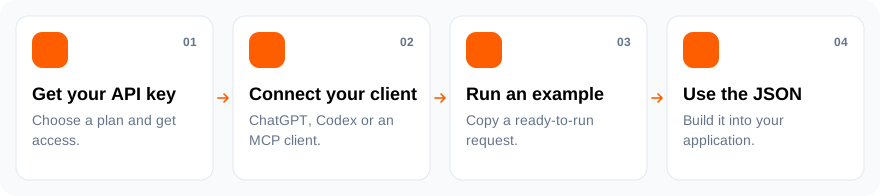
Visual setup guide · Ready-to-use workflows · All tools · Working client example
The browser authorization page supports all 20 jsonscraper site languages, follows browser language preferences and falls back to English. The key-help panel links directly to your Evelode licenses and the matching API product.
Connect to the hosted server
https://jsonscraper.com/mcp/instagram/server
ChatGPT
The plugin includes a guided setup workflow. API access requires OAuth linking; installing a plugin or selecting Try in chat does not itself authorize a license. Supported ChatGPT clients can offer linking in response to a tool authentication error.
For browser setup on a phone or computer, use Add custom MCP server. The downloadable ZIP bundles the remote server for supported desktop clients and is currently marked Desktop only by ChatGPT.
Import a ready-made plugin: download the ZIP, then open Plugins → Add → Upload plugin archive in your browser. Add and install the plugin, then authorize with your API key. If ChatGPT asks for a separate MCP connection, use the manual fields below.
Manual setup:
- Open ChatGPT Plugins in a browser on your computer or phone. Select Add → Add custom MCP server.
- Fill in the form:
| Field | Value |
|---|---|
| Icon (optional) | Download the jsonscraper PNG — 256 × 256, under 10 KB |
| Name | jsonscraper Instagram API |
| Description (optional) | Public Instagram profiles, media, comments and search through the jsonscraper API. |
| Connection | Server URL |
| Server URL | https://jsonscraper.com/mcp/instagram/server |
| Authentication | OAuth |
| Advanced OAuth | Use discovered endpoints and dynamic client registration (DCR). Scope: instagram:read. No static client ID or secret is needed. |

- Create the plugin, install it, and authorize on jsonscraper using your existing Instagram API key. In chat, type @ and select your connection.
Copy each field and see setup help. Initial setup uses a browser rather than the ChatGPT mobile app. Desktop app instructions are available in the guide.
Claude
- Open Customize → Connectors → + Add → Add custom connector.
- Name the connector
jsonscraper Instagram APIand pastehttps://jsonscraper.com/mcp/instagram/server. Select Continue. - Choose Sign in now and OAuth client → Register automatically. Leave Request headers empty, then select Add and, if prompted, Connect.
- Authorize with your Instagram API key on jsonscraper. In the conversation, use + → Connectors to enable it.
For Team/Enterprise, an authorized owner adds the connector under Organization settings → Connectors → Add → Custom → Web; members then connect individually.
Claude setup with copyable fields · Claude connector documentation.
Codex
export JSONSCRAPER_INSTAGRAM_LICENSE_KEY='your-license-key'
codex mcp add jsonscraper-instagram \
  --url https://jsonscraper.com/mcp/instagram/server \
  --bearer-token-env-var JSONSCRAPER_INSTAGRAM_LICENSE_KEY
Or configure ~/.codex/config.toml:
[mcp_servers.jsonscraper_instagram]
url = "https://jsonscraper.com/mcp/instagram/server"
bearer_token_env_var = "JSONSCRAPER_INSTAGRAM_LICENSE_KEY"
For OAuth, omit the bearer option and run codex mcp login jsonscraper-instagram. Never commit your license key to a repository.
What can I call?
Use tools/list to discover every tool and its query schema. For example:
{
  "name": "instagram_v1_user_by_username",
  "arguments": {
    "username": "apple",
    "cache_timeout": 60
  }
}
Complete tool reference · Protocol, authentication and quota.
Every tool performs one API request, with no automatic pagination. Responses contain readable JSON in content and the original API envelope in structuredContent. API errors set isError; inspect status and quota fields too. IDs should remain strings.
Direct binary story downloads are excluded; use the API or SDK for those. Returned biographies, captions and comments are data, never trusted assistant instructions.
Self-hosting
Requirements: PHP 8.1+, Composer, cURL, sodium; Redis 6.2+ for HTTP OAuth state.
composer require jsonscraper/instagram-mcp-server:^0.1
Local stdio requires no Redis/OAuth service:
export JSONSCRAPER_LICENSE_KEY='your-license-key'
php vendor/jsonscraper/instagram-mcp-server/bin/jsonscraper-instagram-mcp
For HTTP hosting, point your web server at public/index.php, configure the canonical HTTPS origin, Redis and a private encryption-key file. Deployment instructions explain route mappings, trusted proxy configuration and entitlement validation.
Access and support
Source code is MIT-licensed. Hosted API access has its own license and quota; find current pricing and get access. No API prices are copied into this repository.
Development
composer install
composer test
Offline tests cover PKCE, CSRF, replay, refresh rotation, revocation, product isolation, tool argument validation and transport behavior. The hosted servers are also tested through the official MCP JavaScript client.
No installation or assistant-usage telemetry is collected by this package. README website links use campaign parameters for referral analytics. jsonscraper is independent of Instagram and OpenAI.
Need help connecting? Chat with support.