
hoceineel / filament-keyboard-shortcuts

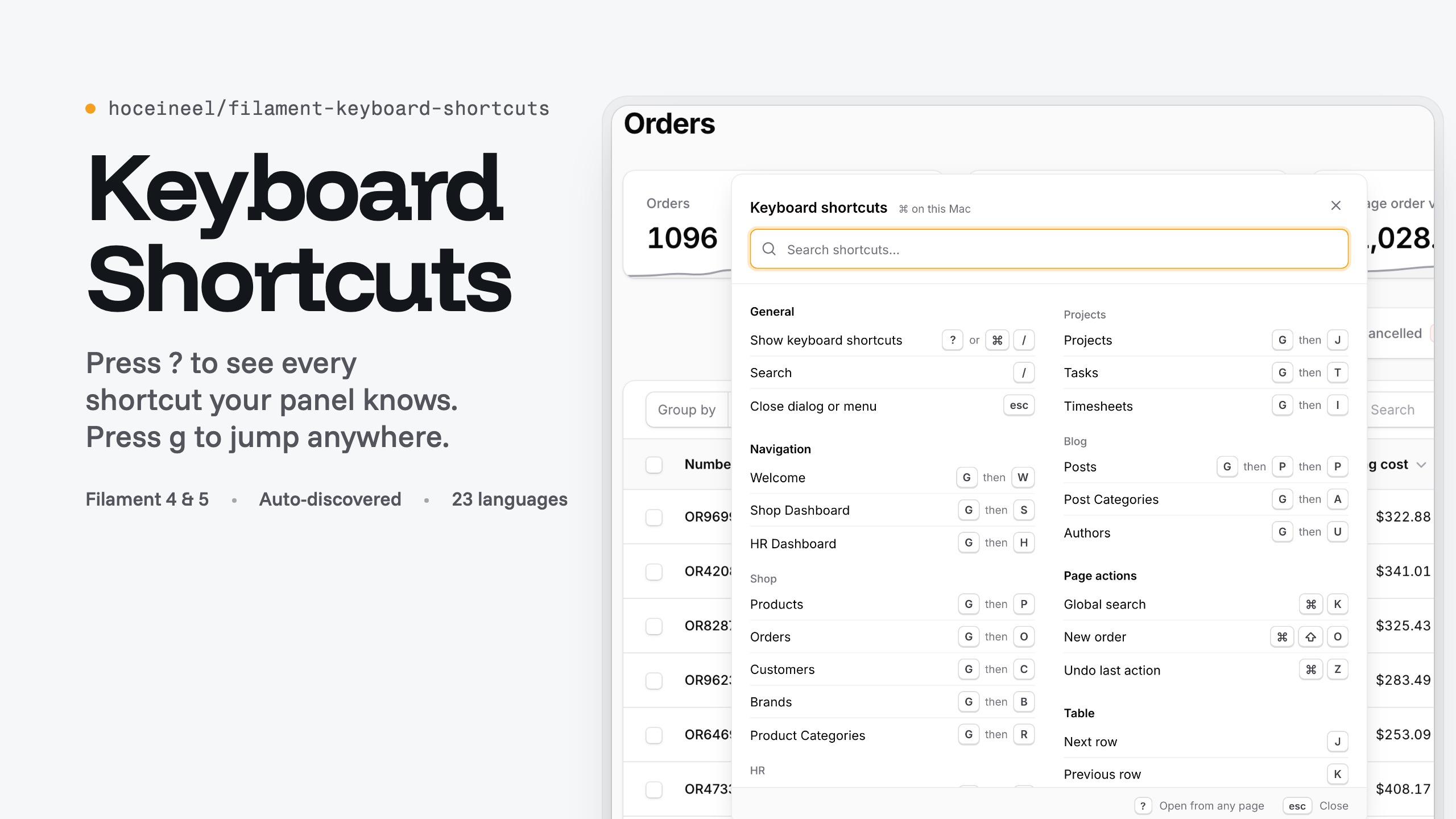
A ? cheat sheet, Gmail-style navigation chords and keyboard table navigation for Filament panels, generated from the live page.
Package info
github.com/HoceineEl/filament-keyboard-shortcuts
pkg:composer/hoceineel/filament-keyboard-shortcuts
Requires
- php: ^8.3
- filament/filament: ^4.0|^5.0
- illuminate/contracts: ^11.0|^12.0|^13.0
- spatie/laravel-package-tools: ^1.16
Requires (Dev)
- larastan/larastan: ^3.0
- laravel/pint: ^1.24
- orchestra/testbench: ^10.0|^11.0
- pestphp/pest: ^4.0
- pestphp/pest-plugin-laravel: ^4.0
- pestphp/pest-plugin-livewire: ^4.0
Suggests
None
Provides
None
Conflicts
None
Replaces
None
README
Keyboard Shortcuts for Filament
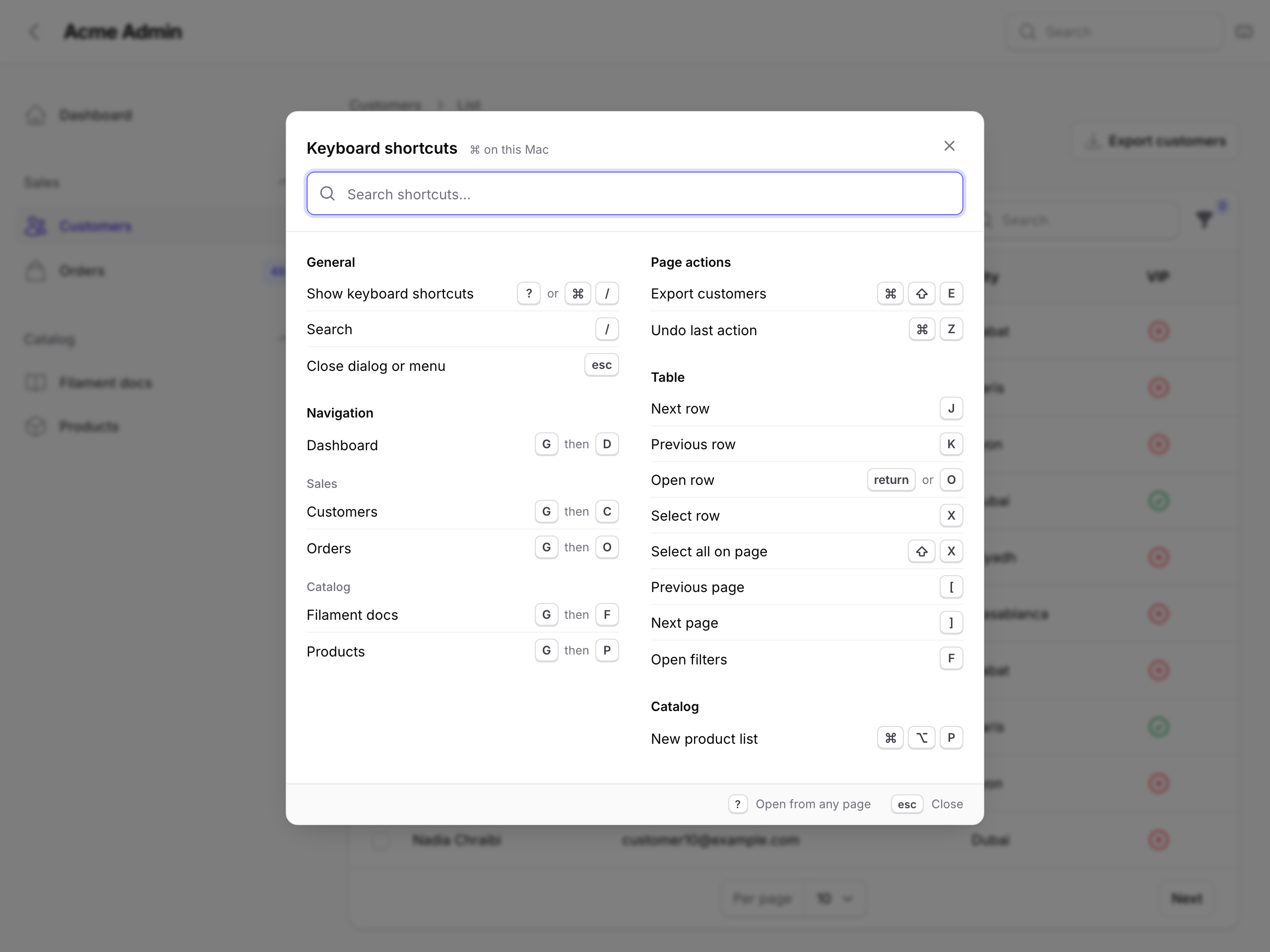
Keyboard shortcuts for Filament 4 and 5 panels: a ? cheat sheet of every key that works on the current page, Gmail-style g chords to every navigation item, hint badges that show those letters, and Vim-style keys for tables.
The sheet is built at runtime from your panel navigation, the actions on the page that use ->keyBindings(), and the shortcuts you register on the plugin.
Requirements
| Dependency | Version |
|---|---|
| PHP | 8.3+ |
| Laravel | 12 or 13 (11 is allowed by the constraints but not tested) |
| Filament | 4.x or 5.x |
Installation
composer require hoceineel/filament-keyboard-shortcuts
php artisan filament:assets
If your composer.json runs @php artisan filament:upgrade in post-autoload-dump (the Filament installer adds it), assets are republished on every composer update.
There is no config file, migration or theme step. The stylesheet does not use Tailwind, so you don't add the package to your theme's sources.
Quick start
use HoceineEl\KeyboardShortcuts\KeyboardShortcutsPlugin;

public function panel(Panel $panel): Panel
{
    return $panel
        // ...
        ->plugin(KeyboardShortcutsPlugin::make());
}
Open a page and press ?. Every feature is on by default and can be turned off in the configuration.
Default shortcuts
mod is ⌘ on macOS and Ctrl elsewhere.
| Keys | Action |
|---|---|
? or mod+/ |
Open the shortcuts sheet |
/ |
Focus global search, or the table search when the panel has no global search |
Esc |
Close the sheet or cancel a pending chord |
g then a letter |
Open a navigation item (g c for Customers) |
g then two letters |
Two-letter chord on large panels (g c u) |
Enter during a chord |
Open the item matching what you typed, without waiting |
On pages with a table:
| Keys | Action |
|---|---|
j / k |
Next / previous row (the first j activates the first row) |
Enter or o |
Open the active row's record URL or record action |
x |
Toggle the active row's checkbox |
shift+x |
Toggle every row on the page |
[ / ] |
Previous / next page |
f |
Open the filters (dropdown, modal or collapsible) |
The sheet also lists the key bindings of actions on the current page and your own shortcuts. Typing customers or shift+x in its search field filters rows by label or by key.
Filament's mod+k and the panel's ->globalSearchKeyBindings() are never intercepted.
Navigation chords
Press g, release it, then press a letter. The plugin waits 1.2 seconds (KeyboardShortcutsPlugin::CHORD_TIMEOUT) for each next key, then navigates with Livewire.navigate() in SPA mode, a normal page load otherwise, or a new tab if the item is set to open in one.
Chords come from Filament::getCurrentPanel()->getNavigation(), so they cover resources, pages, custom NavigationItems and child items, and respect visibility and authorization. Items without a URL are skipped.
Hint mode
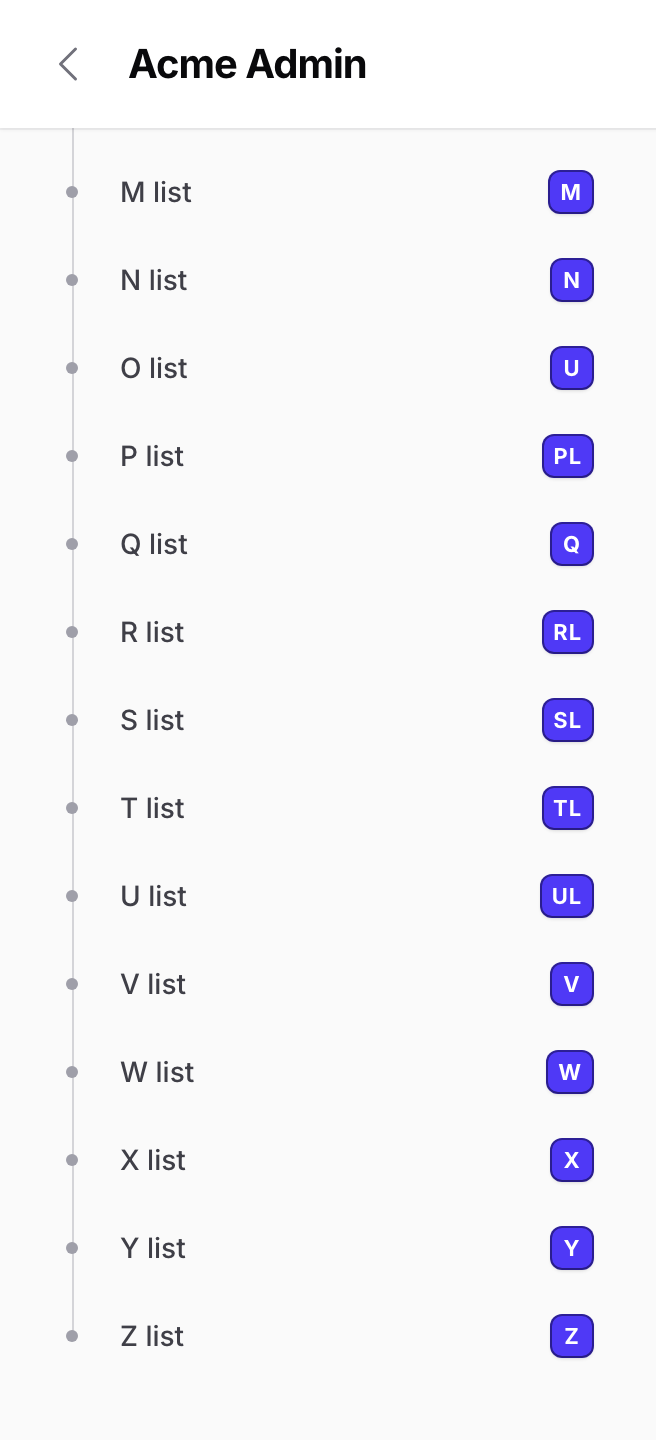
While a chord waits for its next key, each sidebar item (and each topbar navigation link) shows its letter as a badge, and a pill at the bottom of the screen shows the keys typed so far. On large panels the badges narrow as you type: after g p, only items starting with p keep theirs.
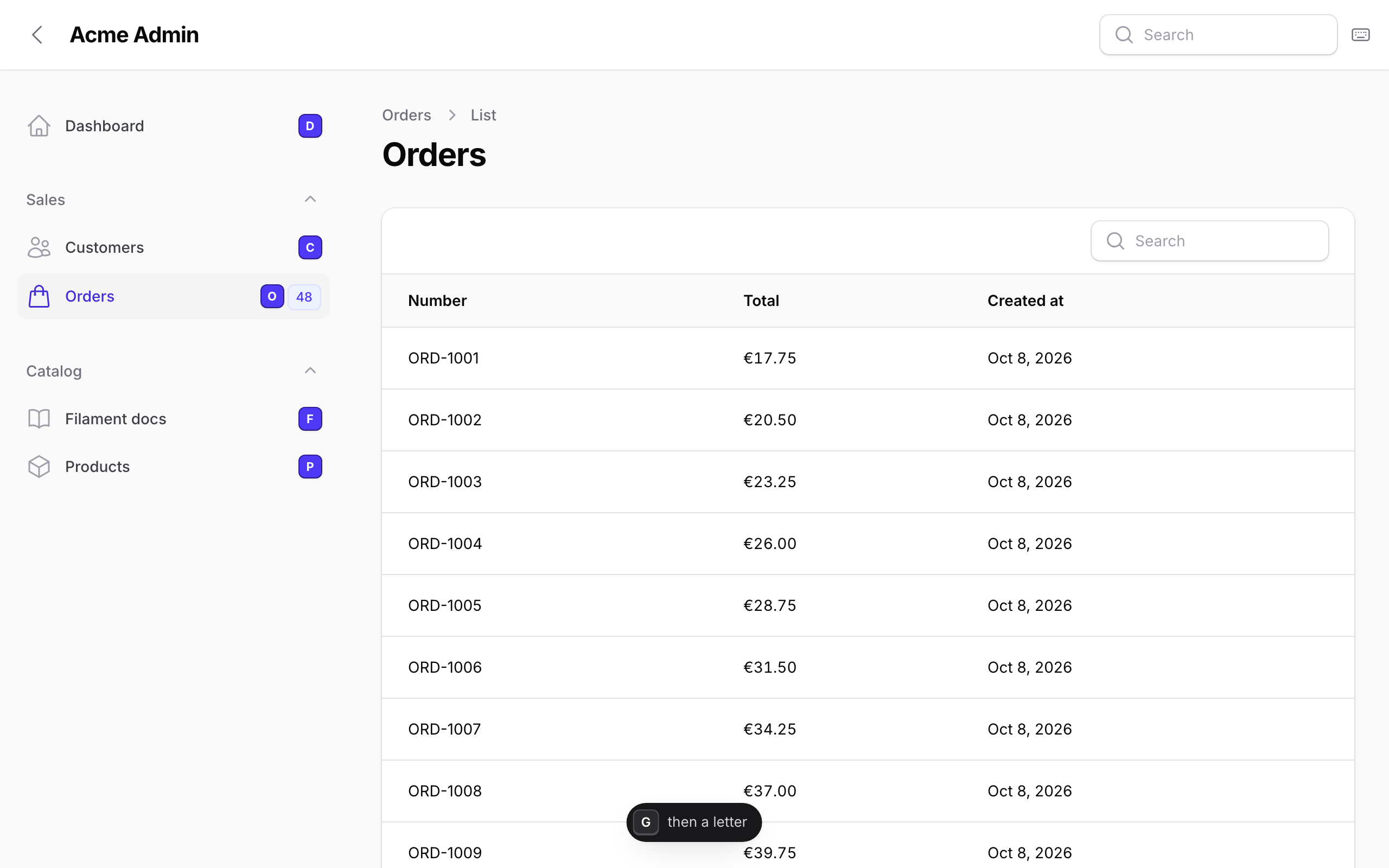
Sidebar links also get aria-description="Shortcut: G then C", and the same text as title when Filament doesn't already show a tooltip. ->navigationHints(false) turns badges and descriptions off; chords keep working.
How letters are picked
HoceineEl\KeyboardShortcuts\Support\ChordAssigner walks the navigation in order and gives each item the first free candidate:
- A plugin override from
->chordOverrides(). - A letter pinned on the resource or page class.
- The first letter of each word in the label, then any other letter of the label, then of the class name (
CustomerResourcegivescustomer) and the URL slug. - Two letters, once single letters run out: word initials (
Customer usersgivescu), then a word's first letter plus a later one. - Digits
1to9, then0. After that the item has no chord.
The result depends only on the navigation, so it is the same on every page, and appending an item never changes the letters above it. Labels are transliterated to ASCII and non-Latin text is ignored, so العملاء on CustomerResource still gets c. When c and cu both exist, g c waits for the timeout; press Enter to open c straight away.
Fixing a letter
Pin it on the class, with a property (may be protected) or a public static method, which wins over the property:
class CustomerResource extends Resource
{
    protected static ?string $keyboardShortcut = 'c';
}

class Reports extends Page
{
    public static function getKeyboardShortcut(): ?string
    {
        return 'rp';
    }
}
Or override it from the plugin, which also works for resources from other packages:
KeyboardShortcutsPlugin::make()
    ->chordOverrides([
        CustomerResource::class => 'c',
        'Dashboard' => 'h',
        'invoices' => 'iv',
    ]);
Override keys match the navigation item key (class name, ->key(), or label for custom items), then the label, class base name or URL slug, case-insensitively. Unmatched overrides are ignored. Values must be one or two of a-z and 0-9; anything else throws an InvalidArgumentException. A pinned letter that is already taken falls back to automatic assignment.
Change the prefix with ->navigationChordPrefix('space'). It must be a single key without modifiers.
Table keys
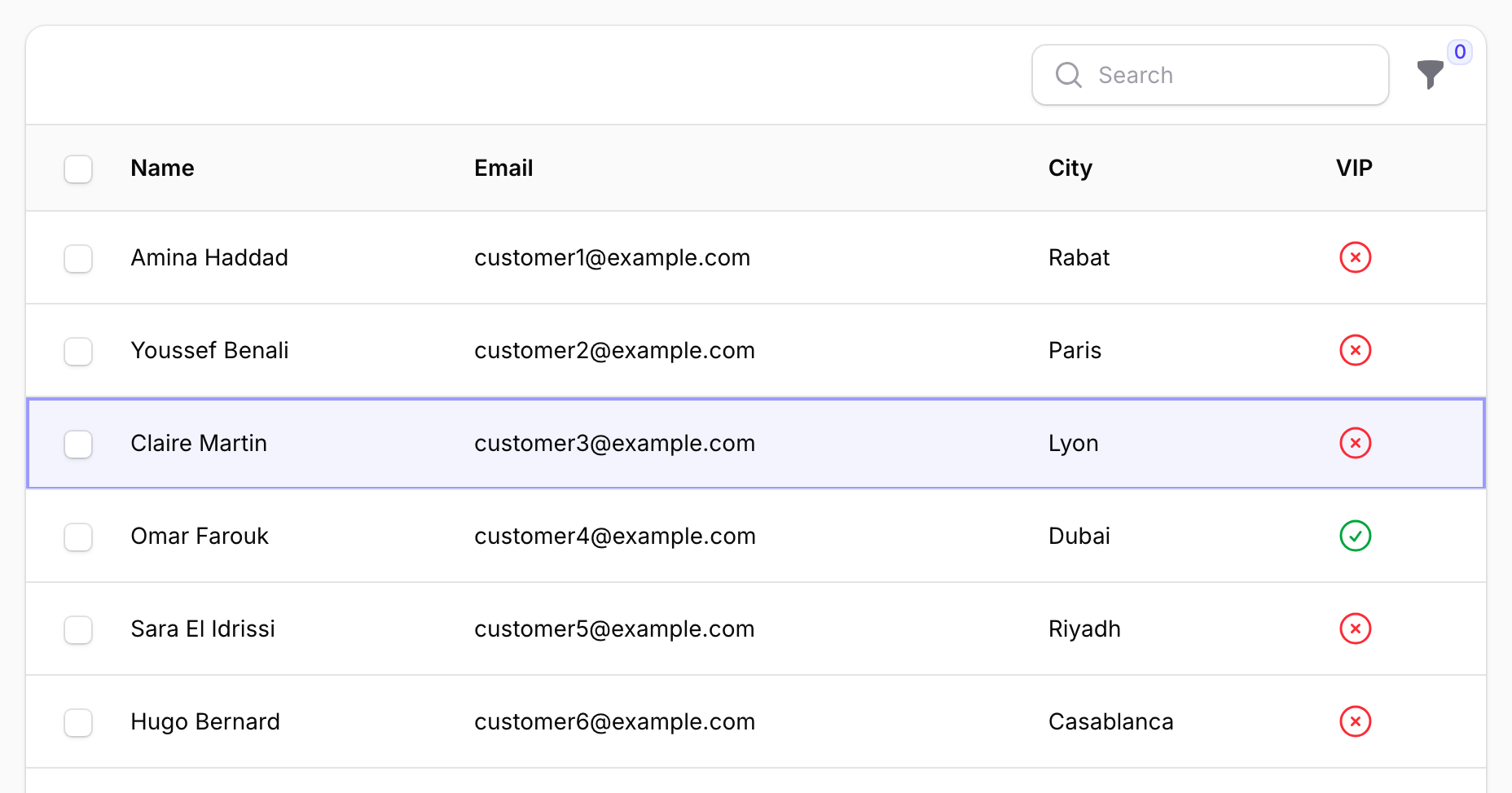
The keys act on the table that contains focus, then the one with an active row, then the first visible table. Tables in modals are ignored. The active row survives Livewire re-renders (after an action or a poll) because the plugin remembers its wire:key.
x and shift+x click the real checkboxes, so bulk actions and counters update as usual; tables without bulk actions have no checkboxes. Enter on a focused link or button is left alone. Grid and stacked layouts work; group header rows are skipped.
Turn table keys off with ->tableNavigation(false).
Page actions in the sheet
Each time the sheet opens it scans the page for key bindings and lists them under Page actions.
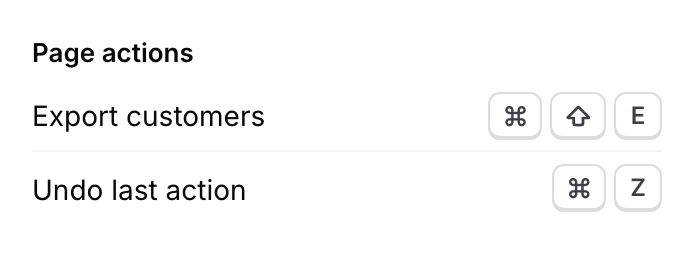
Any Filament action with ->keyBindings() is picked up, whether it is a header, table or form action or comes from another plugin:
Action::make('export')
    ->label('Export customers')
    ->keyBindings(['mod+shift+e'])
    ->action(fn () => $this->export()),
The row label is the element's aria-label, then its <label>, visible text or title, or "Unnamed action". Only actions rendered and visible when the sheet opens are listed, so actions inside a closed action group are missing. Filament runs the action, not the plugin. If an action binds a key the plugin also uses (j, /, ?), the action wins.
Announcing keys from other plugins
Packages and Blade views that handle keys themselves can list them with a data attribute:
<div
    hidden
    data-keyboard-shortcut="mod+z"
    data-keyboard-shortcut-label="Undo last action"
></div>
data-keyboard-shortcuttakes one or more bindings separated by spaces ("mod+z ctrl+y"), normalised with the key syntax.- These markers are listed even when hidden, so one invisible element is enough.
- The plugin only lists the binding; your code still handles the key. The plugin treats the key as taken and won't use it.
To add a marker to one page from PHP, use a render hook:
$panel->renderHook(
    PanelsRenderHook::PAGE_END,
    fn (): string => '<span hidden data-keyboard-shortcut="mod+z" data-keyboard-shortcut-label="Undo last action"></span>',
    scopes: ListCustomers::class,
);
Keys from Quick Action Dock and Undo Toast show up in the sheet automatically.
Custom shortcuts
Each shortcut needs keys and one behaviour: url(), dispatch() or js().
use HoceineEl\KeyboardShortcuts\KeyboardShortcutsPlugin;
use HoceineEl\KeyboardShortcuts\Shortcut;

KeyboardShortcutsPlugin::make()
    ->shortcuts([
        Shortcut::make('mod+alt+n')
            ->label('New invoice')
            ->group('Billing')
            ->url(fn (): string => InvoiceResource::getUrl('create')),

        Shortcut::make('mod+shift+e')
            ->label('Export')
            ->group('Billing')
            ->dispatch('export-requested', ['format' => 'csv']),

        Shortcut::make('mod+b')
            ->label('Toggle sidebar')
            ->js('$store.sidebar.isOpen ? $store.sidebar.close() : $store.sidebar.open()'),

        Shortcut::make(['mod+alt+h', 'f1'])
            ->label('Help centre')
            ->url('https://help.example.com', shouldOpenInNewTab: true)
            ->visible(fn (): bool => auth()->user()->isStaff()),
    ]);
->shortcuts() appends on every call and also accepts a closure that returns an array.
| Method | Description |
|---|---|
Shortcut::make(string|array $keys) |
One binding or a list of alternatives. Reserved combinations throw. |
label(string|Closure|null) |
Text in the sheet. Defaults to the keys. |
group(string|ShortcutGroup|Closure|null) |
Sheet section. Defaults to ShortcutGroup::Custom ("More shortcuts"). |
url(string|Closure|null $url, bool|Closure $shouldOpenInNewTab = false) |
Navigate, with Livewire.navigate() in SPA mode. |
dispatch(string $event, array|Closure $payload = []) |
Livewire.dispatch($event, $payload); listen with #[On('export-requested')]. |
js(string $expression) |
Alpine expression, so $store and $dispatch are available. |
visible(bool|Closure) / hidden(bool|Closure) |
Hidden shortcuts are left out of the sheet and the script. |
The last behaviour call wins, and a shortcut with none throws a LogicException when the panel renders. js() runs in the user's browser, so never build it from user input.
Pass a HoceineEl\KeyboardShortcuts\Enums\ShortcutGroup case (General, Navigation, PageActions, Table, Custom) to add rows to a built-in section, or any string for a new one. Your sections appear after the built-in ones in registration order, with "More shortcuts" last. Rows in the Table section only show on pages with a table.
Custom shortcuts don't fire while typing in a field, and a page action bound to the same key wins on that page.
Configuration
All methods chain and accept these defaults:
KeyboardShortcutsPlugin::make()
    ->sheetKeyBindings(['?', 'mod+/'])
    ->searchKeyBindings(['/'])
    ->navigationChords(true)
    ->navigationChordPrefix('g')
    ->chordOverrides([])
    ->navigationHints(true)
    ->tableNavigation(true)
    ->topbarButton(true)
    ->shortcuts([]);
| Method | Description |
|---|---|
sheetKeyBindings(array) |
Bindings that open the sheet. [] leaves only the button. A binding starting with mod+ also works inside text fields. |
searchKeyBindings(array) |
Bindings that focus search. [] disables it. |
navigationChords(bool|Closure) |
Chords, their sheet section and hints. |
navigationChordPrefix(string) |
Key that starts a chord. |
chordOverrides(array) |
Fixed letters. Replaces earlier overrides. |
navigationHints(bool|Closure) |
Hint badges and aria-description on sidebar links. |
tableNavigation(bool|Closure) |
Table keys and the Table section. |
topbarButton(bool|Closure) |
The open-sheet button. |
shortcuts(array|Closure) |
Append custom shortcuts. |
Closures are evaluated per request, so features can depend on the user:
KeyboardShortcutsPlugin::make()
    ->tableNavigation(fn (): bool => auth()->user()->can('use-keyboard-tables'));
Each panel registers the plugin with its own configuration, and KeyboardShortcutsPlugin::get() returns the current panel's instance. To list the chords elsewhere, such as a help page:
$plugin = KeyboardShortcutsPlugin::get();

foreach ($plugin->getNavigationChords() as $chord) {
    echo $chord->label.': '.$chord->sequence($plugin->getNavigationChordPrefix()); // Customers: g c
}
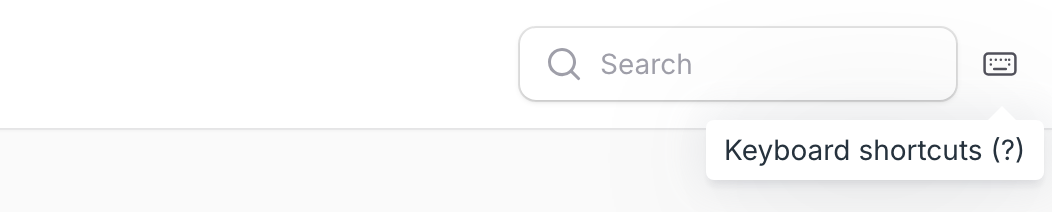
The open-sheet button
A keyboard icon button opens the sheet for mouse and touch users. It renders inside the global search field (in the topbar or sidebar), at the end of the topbar when global search is off, or in the sidebar footer when the panel has neither. It is hidden below 1024px. Change its icon with the keyboard-shortcuts::topbar-button alias in FilamentIcon::register(), and add your own trigger anywhere with a data-ks-open attribute:
<x-filament::button data-ks-open>Keyboard shortcuts</x-filament::button>
Key syntax
Bindings use the same syntax as Filament's ->keyBindings():
- Join keys with
+:mod+shift+e. Modifier order doesn't matter. - Use
modrather thanctrlorcmdso the binding works on every OS.cmd,command,meta,ctrlandcontrolall becomemod;optionandoptbecomealt. - Named keys:
enter,escape,space,tab,backspace,delete,up,down,left,right,f1tof12.esc,return,delandspacebarare accepted. - Write symbols as typed (
?,/,[) withoutshift. A literal plus is+ormod++. - Bindings are case-insensitive.
These throw an InvalidArgumentException when passed to Shortcut::make(), sheetKeyBindings() or searchKeyBindings():
mod+k, mod+l, mod+n, mod+q, mod+r, mod+t, mod+w, mod+tab, mod+shift+n, mod+shift+q, mod+shift+r, mod+shift+t, mod+shift+w, mod+shift+tab
Keys are shown the way the user's keyboard prints them: ⌘ ⇧ ⌥ on macOS and iOS, Ctrl Shift Alt elsewhere, translated per locale (Strg, Maj).
How key presses are handled
- Keys are ignored while focus is in an
input,textarea,selectorcontenteditableelement, except sheet bindings that start withmod+. - Nothing fires while a Filament modal is open. While the sheet is open, only
EscandTabare handled. - A page action bound to the same key wins.
- Held keys don't repeat, and IME composition is ignored.
- On non-Latin layouts (Arabic, Hebrew, Cyrillic, Greek) and with
alton macOS, letters are read from the physical key, so chords and table keys still work. /passes through when the page has no visible search field.- The script re-initialises after
livewire:navigated.
Accessibility
The sheet is a labelled role="dialog" that traps focus and returns it on close. aria-modal is set only while it is open, so Filament's own key bindings keep working. Rows are <dl> lists, so screen readers read "Customers, G then C", and macOS glyphs have names ("Command"). The chord pill is a polite live region, and hint badges are aria-hidden with the same text on each link. Under prefers-reduced-motion the sheet, pill and badges only fade.
Right-to-left
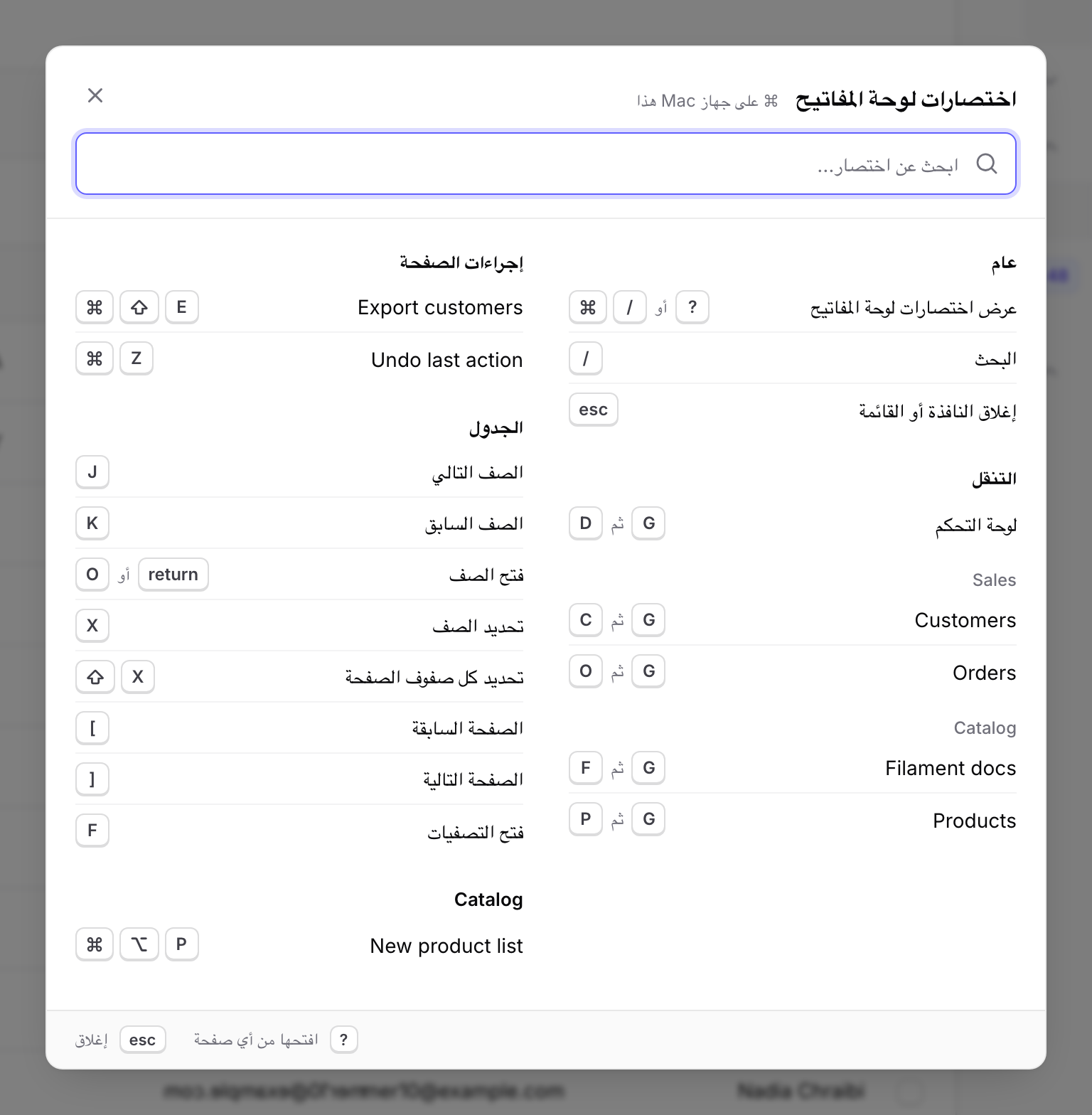
In RTL locales the sheet, its columns and the hint badges mirror. Key combinations stay left to right (⌘ /), as they appear on the keyboard.
Translations
The package ships ar, cs, de, en, es, fa, fr, he, hi, id, it, ja, ko, nl, pl, pt, pt_BR, ru, tr, uk, vi, zh_CN and zh_TW, and follows the app locale. Wording matches Filament's own translations.
php artisan vendor:publish --tag=keyboard-shortcuts-translations
Edit lang/vendor/keyboard-shortcuts/{locale}/shortcuts.php; missing keys fall back to the package. To add a language, copy en/shortcuts.php into a new locale folder. Views publish with --tag=keyboard-shortcuts-views, but they depend on the script's data-ks-* hooks, so prefer CSS variables.
Theming
The plugin uses your panel's primary and gray palettes and follows dark mode. Override these on .ks-root (and .dark .ks-root):
| Variable | Default (light) | Controls |
|---|---|---|
--ks-width |
min(44rem, calc(100vw - 2rem)) |
Sheet width |
--ks-max-height |
80dvh |
Sheet max height |
--ks-z |
50 |
z-index of sheet, pill and hints |
--ks-radius |
0.75rem |
Sheet corner radius |
--ks-surface, --ks-surface-muted |
#fff, var(--gray-50) |
Backgrounds |
--ks-border |
8% gray-950 |
Dividers |
--ks-ink, --ks-ink-muted |
var(--gray-950), var(--gray-500) |
Text |
--ks-key-bg, --ks-key-ink, --ks-key-edge |
#fff, var(--gray-700), 14% gray-950 |
Key caps |
--ks-ring |
0 0 0 2px var(--primary-500) |
Focus ring |
--ks-scrim |
rgb(0 0 0 / 0.5) |
Backdrop |
--ks-shadow |
layered shadow | Sheet and pill shadow |
--ks-hint-bg, --ks-hint-ink |
var(--primary-600), #fff |
Hint badges |
--ks-enter, --ks-exit |
180ms, 120ms ease-in |
Transitions |
The active table row is outside .ks-root; set its background with --ks-row-active on :root. All classes use the ks- prefix.
FAQ
? does nothing. Run php artisan filament:assets and hard-reload. Check that focus isn't in a field, no modal is open, and no page action binds ?. window.__keyboardShortcuts should be true in the console.
? needs AltGr on my layout. Use mod+/, or add a binding: ->sheetKeyBindings(['?', 'mod+/', 'f1']).
My shortcut clashes with the browser. Only the most common combinations are blocked. Others like mod+d, mod+p, mod+s and mod+f vary by browser, and some can't be overridden at all. mod+alt+… and mod+shift+… are rarely taken.
An action shows as "Unnamed action". It is icon-only. Give it a ->label(), ->tooltip() or aria-label.
A navigation item is missing from the sheet. It is hidden for this user, has no URL, or ran out of letters. Give it an override.
Chords do a full page load. Enable ->spa() on the panel.
The button is missing. It is hidden below 1024px, and won't render if a custom global search or topbar component skips Filament's render hooks.
Testing
composer test         # Pest
composer analyse      # PHPStan
composer format       # Pint
npm test              # JavaScript unit tests
npm run test:e2e      # Playwright against the Testbench workbench
Build the JavaScript with npm run build (or npm run dev); the compiled dist/ is committed. For the browser suite, run npx playwright install chromium once or set KS_CHROMIUM_PATH.
composer serve starts the workbench panel at /admin. ?locale=ar, ?big=1 (two-letter chords), ?hints=0 and ?topbar=0 are remembered in the session. KS_SCREENSHOTS=1 npx playwright test screenshots regenerates the images in docs/images.
More from Hoceine
Paid packages for Filament 4 and 5 by the same author:
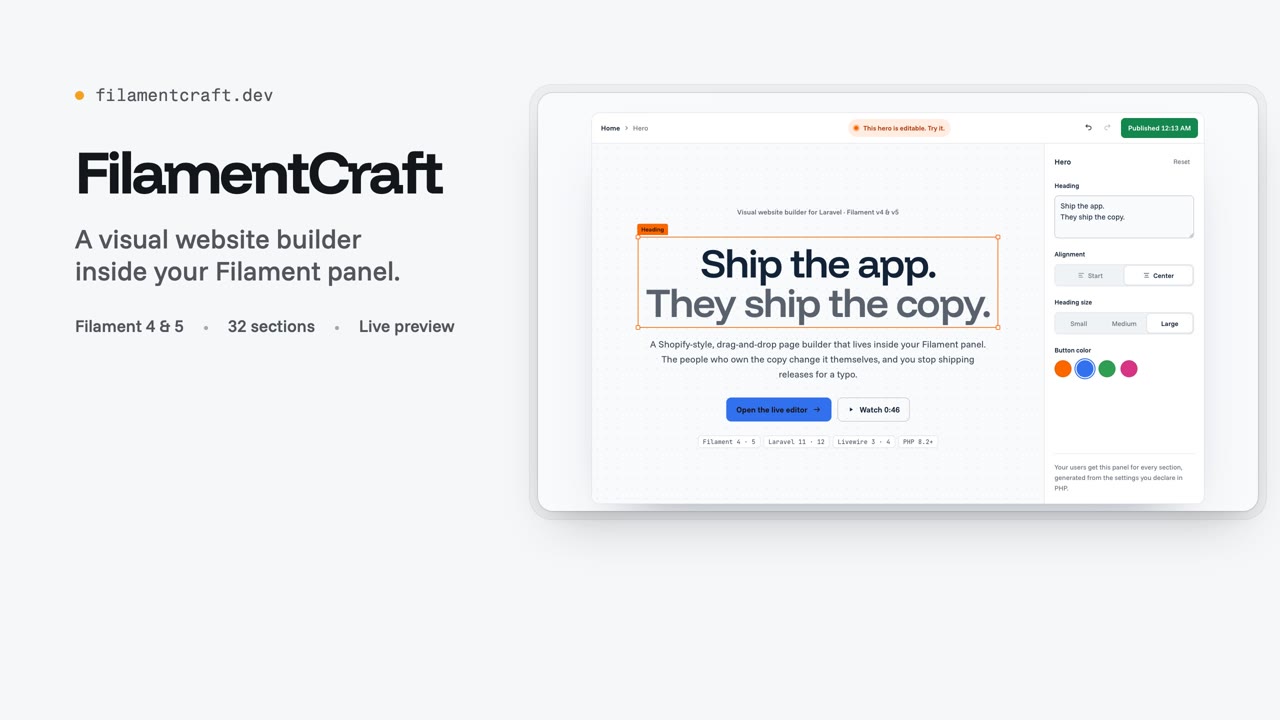 FilamentCraft A visual website builder inside your Filament panel: drag sections onto a live canvas, edit against a preview, publish. |
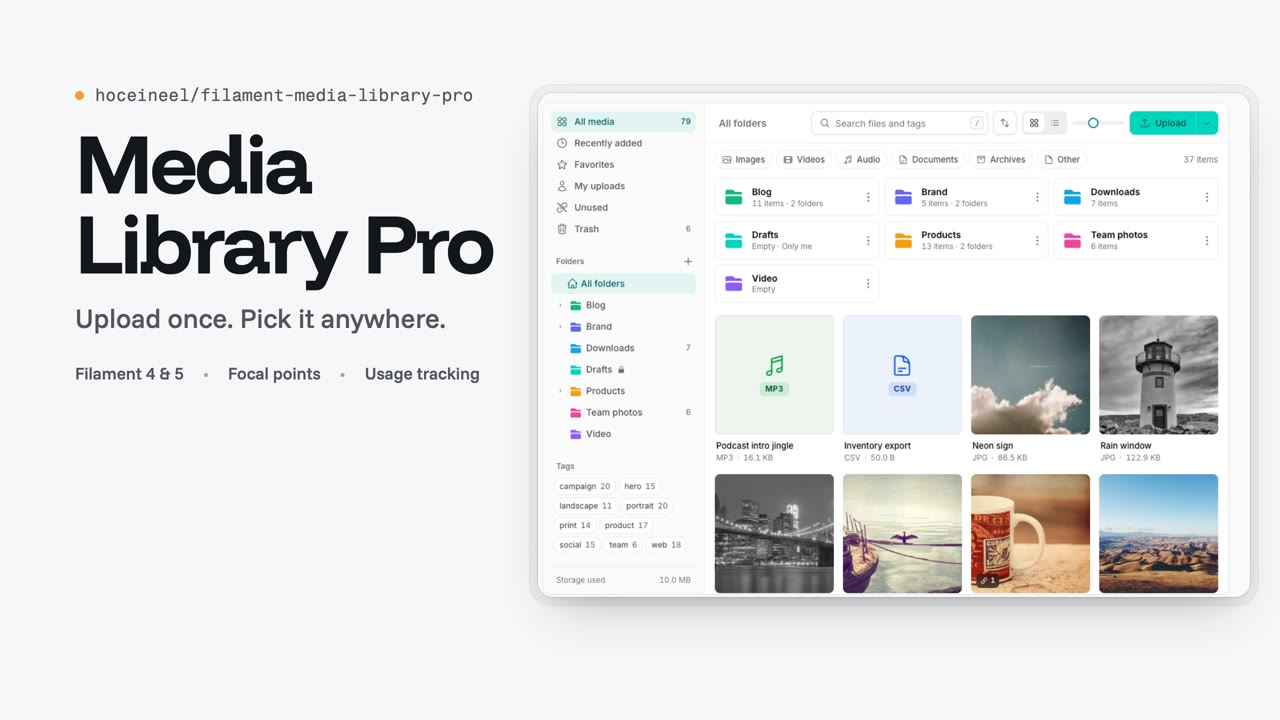 Media Library Pro One shared media library: folders, tags, focal points, chunked uploads, duplicate detection and usage tracking. |
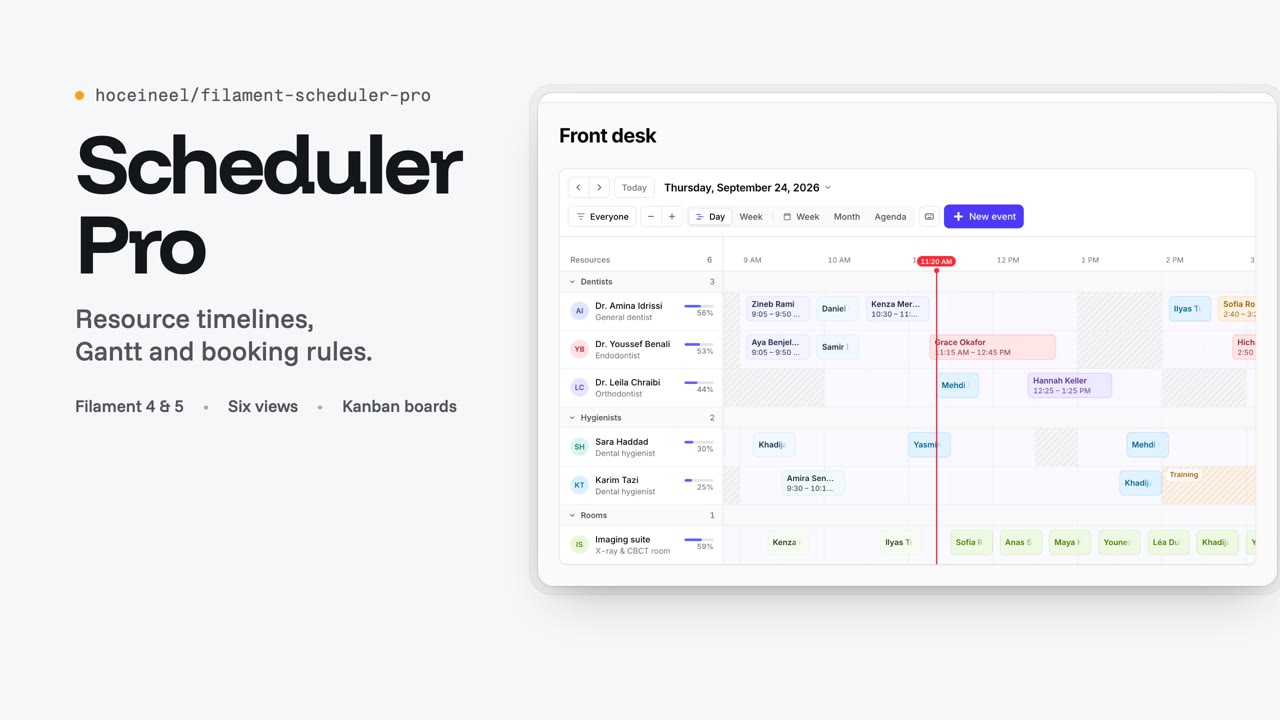 Scheduler Pro Resource timelines, Gantt with dependencies, availability-aware booking, recurring events and Kanban boards. |
Contributing
Run the commands above, rebuild dist/ when you change resources/js or resources/css, and add tests for behaviour changes. For translations, edit resources/lang/{locale}/shortcuts.php; composer test checks every locale against English.
See CHANGELOG.md for release notes. Report security issues to contact@hoceine.com, not in a public issue (SECURITY.md).
Credits
License
MIT. See LICENSE.md.