
erag / laravel-orphan-files

Find the uploaded files your Laravel app no longer uses, like old avatars and images from deleted posts, and clean them up safely with a preview and a restorable trash. Works with local disks, S3, MinIO and RustFS.
Fund package maintenance!
Requires
- php: ^8.2
- illuminate/console: ^12.0|^13.0
- illuminate/contracts: ^12.0|^13.0
- illuminate/database: ^12.0|^13.0
- illuminate/filesystem: ^12.0|^13.0
- illuminate/queue: ^12.0|^13.0
- illuminate/support: ^12.0|^13.0
Requires (Dev)
- laravel/pint: ^1.13
- orchestra/testbench: ^10.0|^11.0
- pestphp/pest: ^3.0|^4.0|^5.0
Suggests
- league/flysystem-aws-s3-v3: Required to scan and batch-delete files on S3, MinIO, RustFS and other S3-compatible disks.
Provides
None
Conflicts
None
Replaces
None
README
Laravel Orphan Files
Find the uploaded files your Laravel app no longer uses, and clean them up safely so they stop filling your disk and your S3 bill.
Why you need it
When a user changes their profile photo, deletes a post or removes a comment, the database moves on, but the old file stays in storage. Nothing uses it any more, yet it keeps taking space on your server and adds to your S3 bill every month. These leftover files are called orphaned files, and every app that accepts uploads collects them.
What it does
Laravel Orphan Files finds those files for you. It looks at every file on the disks you choose, checks your database to see which files are still in use, and lists the ones nothing points to. You can then move them to a trash folder, restore them if you change your mind, or delete them for good.
It is careful by default:
- Nothing changes until you add
--force, so the first run is always a preview. - Cleaned files go to a trash folder you can restore from.
- Recent uploads are skipped (the last 24 hours by default), so a file that is still being saved is never removed.
- The clean stops if more than 90% of a disk looks unused (by default), because that usually means a config mistake.
It is just a few Artisan commands, with no migrations, no tables and no UI. It works with local disks, Amazon S3 and S3-compatible storage such as MinIO and RustFS, so it fits any app with profile photos, comment images, rich-text editors or product galleries.
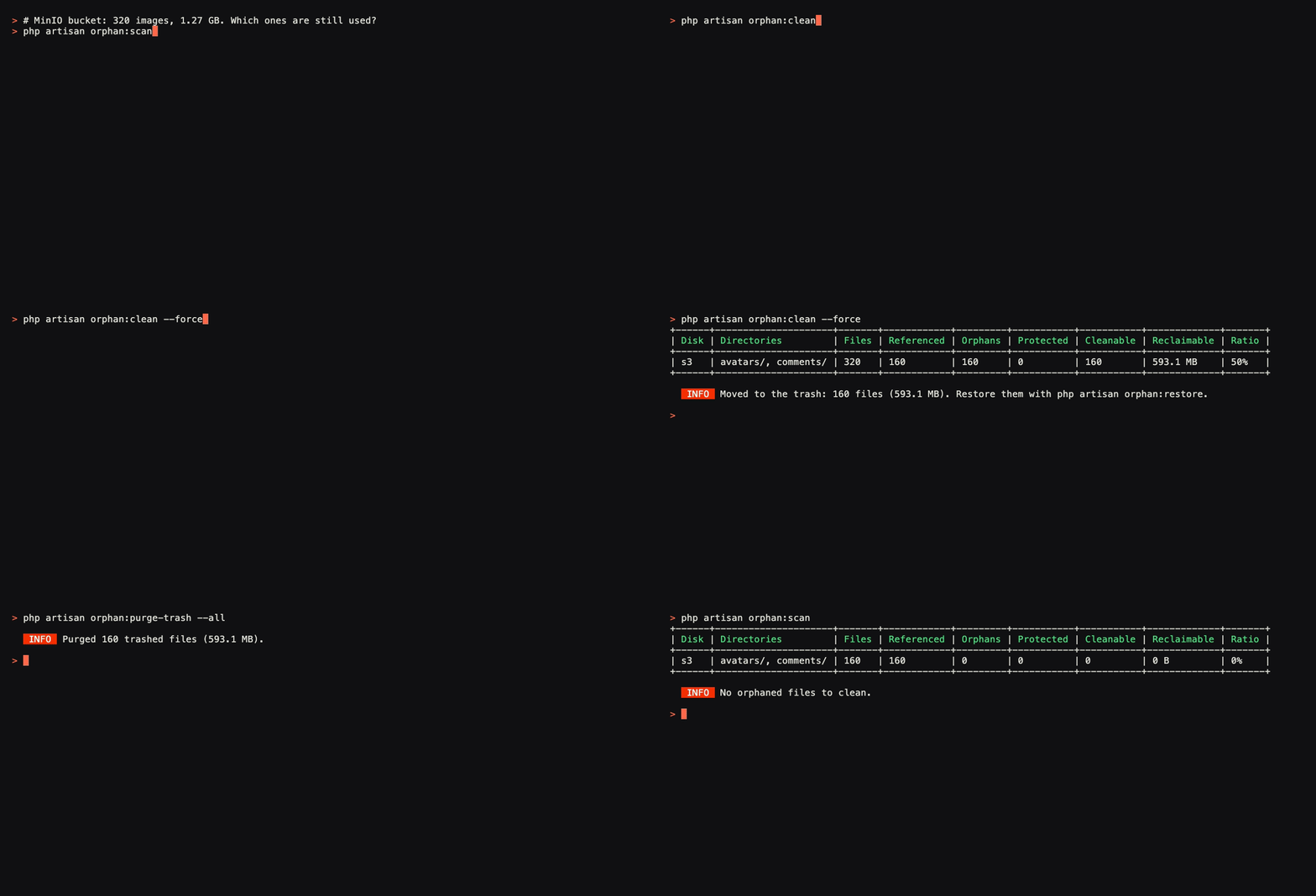
In the demo below, a MinIO bucket holds 320 images (1.27 GB), and 160 of them (593 MB) are no longer used.
Installation
Install the package with Composer, then run the install command:
composer require erag/laravel-orphan-files
php artisan orphan:install
Laravel registers the package automatically. orphan:install creates config/orphan-files.php, where you list your disks and the columns that point to files, and prints the next steps. If the config file already exists, it asks before overwriting it; --force overwrites without asking. It never touches your database and creates no migrations. The quick start below shows a first setup.
Features
- Works on any Laravel disk:
local,public, Amazon S3 and S3-compatible storage, including MinIO and RustFS. - Streams storage listings, so a bucket with millions of objects doesn't have to fit in memory.
- Reads file references from path columns, JSON columns, rich text (HTML or Markdown) and full URLs.
- Maps
Storage::url()links, CDN URLs, S3, MinIO and RustFS endpoints and signed URLs back to disk paths. - Lets you list columns in the config file, or declare them on a model with the
HasStorageFilestrait. - Keeps soft-deleted rows' files, because global scopes are ignored.
- Dry run by default: nothing changes until you add
--force. - Moves unused files to a trash folder with a 30 day retention, or deletes them (1,000 per request on S3).
- Restores trashed files to their original paths with one command.
- Skips recent uploads, excluded paths and anything outside your size or extension rules.
- Exports every orphan to CSV or prints the summary as JSON for monitoring.
orphan:explaintells you why a single file is kept, or which column is missing.- No migrations, no tables and no UI: just Artisan commands, queued jobs and events.
How it works
- It lists the files in the disks and folders you configure, for example
avatars/on the public disk. - It reads every column that can point to a file and compares those paths with the files on disk. Anything nobody references is an orphan.
- It moves the orphans to a trash folder that keeps their original paths, so restoring a file is a single command. You can purge the trash later, or delete files directly if you prefer.
What it can read
- A path column holds one file, like
users.avatarstoringavatars/jane.jpg. - A JSON column holds several files, like a comment's image gallery. You tell it which key holds the path.
- An HTML column is rich text, like a blog post body. Images and links are read from
src,href,srcset, CSSurl()and Markdown. - A URL column stores a full link, like a product image served from a CDN or a signed S3 URL. The URL is turned back into the file's path on the disk.
You can add your own column types for editors like Editor.js. See sources in the docs
Requirements
| Laravel | PHP |
|---|---|
| 12.x | 8.2, 8.3, 8.4 |
| 13.x | 8.3, 8.4 |
Quick start
After installing, open config/orphan-files.php and tell it where files live and which columns point to them:
'disks' => [
    'public' => ['avatars/'],
],

'sources' => [
    ['table' => 'users', 'column' => 'avatar', 'type' => 'path', 'disk' => 'public'],
],
Then scan, preview and clean:
php artisan orphan:scan            # how many orphans, and how much space they use
php artisan orphan:clean           # dry run: lists what would be trashed
php artisan orphan:clean --force   # moves the orphans to the trash
Installation guide · Quick start
Commands
| Command | What it does |
|---|---|
orphan:install |
Publishes config/orphan-files.php and prints the next steps. Asks before overwriting; --force skips the question. |
orphan:scan |
Counts files, referenced files and orphans, and shows how much space you'd get back. Can export CSV or print JSON. |
orphan:clean |
Shows what would be cleaned. With --force it moves orphans to the trash, or deletes them with --mode=delete. |
orphan:restore |
Moves trashed files back to where they were, one file, one folder or everything. |
orphan:purge-trash |
Permanently deletes trash older than the retention period (30 days by default). |
orphan:explain |
Shows which rows reference a file, or why it counts as an orphan. |
All command options and sample output
Delete unused images in Laravel safely
Deleting files is easy to get wrong, so the package is careful by default:
orphan:cleanis a dry run until you add--force.- Cleaned files go to a trash folder first. Permanent deletion is opt-in with
--mode=deleteororphan:purge-trash. - Files modified in the 24 hours before the database was read are skipped, so uploads whose row isn't saved yet stay put.
- If more than 90% of a disk would be cleaned, the clean stops. That ratio usually means a column is missing from the config.
- If a configured table or column doesn't exist, the command stops before it reads or touches anything.
- Only the folders you list are ever scanned.
Clean up orphaned files on S3, MinIO and RustFS
S3 disks work the same way as local ones, and so do S3-compatible stores such as MinIO and RustFS, because they all use Laravel's s3 driver. Listings are paginated, so large buckets are fine, and deletes go out in batches of 1,000 keys. URLs stored in your database, including CDN domains and signed URLs, are matched back to the right object. URLs and CDNs in the docs
FAQ
How do I find unused files in Laravel storage?
List your upload folders and the columns that store paths in config/orphan-files.php, then run php artisan orphan:scan.
Will it delete files that are still in use?
Not unless a column that references them is missing from your config. Run a scan first and check a few files with orphan:explain. Cleaned files go to a restorable trash by default.
Can I undo a clean?
Yes. php artisan orphan:restore path/to/file moves a trashed file back, and --all restores everything from a disk.
Does it work with Livewire or Inertia file uploads? Yes. It doesn't care how a file was uploaded. It only compares what's on the disk with the paths your database stores, and if you store them in an unusual format you can add a custom extractor.
Does it slow down my app? No. It only runs when you call a command or schedule one. It doesn't listen to model events and adds nothing to your requests.
Can I run it on a schedule? Yes. Most people schedule a weekly scan first, then a weekly clean once the reports look right. Scheduling
Documentation
Full documentation, configuration options and examples: Read the docs
Changelog and contributing
See the changelog for what changed. To help out, read CONTRIBUTING.md and use the issues, pull requests and discussions on GitHub.
Credits
Built and maintained by Er Amit Gupta.
License
MIT. See LICENSE.md.