
emporiqa / shopware-plugin

Integrates your Shopware store with Emporiqa, an AI shop assistant for sales and support in your shop's chat and customer emails.
Package info
Type:shopware-platform-plugin
pkg:composer/emporiqa/shopware-plugin
Requires
- php: >=8.2
- shopware/core: >=6.6.0 <6.8.0
- shopware/storefront: >=6.6.0 <6.8.0
Requires (Dev)
- phpunit/phpunit: ^10.0 || ^11.0
Suggests
None
Provides
None
Conflicts
None
Replaces
None
README
Emporiqa is an AI shop assistant for sales and support, in the chat on your shop and in your shop's customer emails, working with your team: a person can take over any chat. Before the purchase, shoppers describe what they need or upload a photo, and it finds matching products from your catalog, compares them and adds them to the cart. After it, it answers questions from your CMS pages and tells customers where their order is. A signed-in customer sees their own prices, as your shop calculates them, and is greeted by name. When a shopper needs a person, your team takes over the chat. It answers in 65 languages. It also drafts replies to your shop's customer emails (see below). This plugin syncs your product catalog and CMS pages to Emporiqa, embeds the chat widget on your storefront, and exposes endpoints for in-chat cart operations and order tracking.
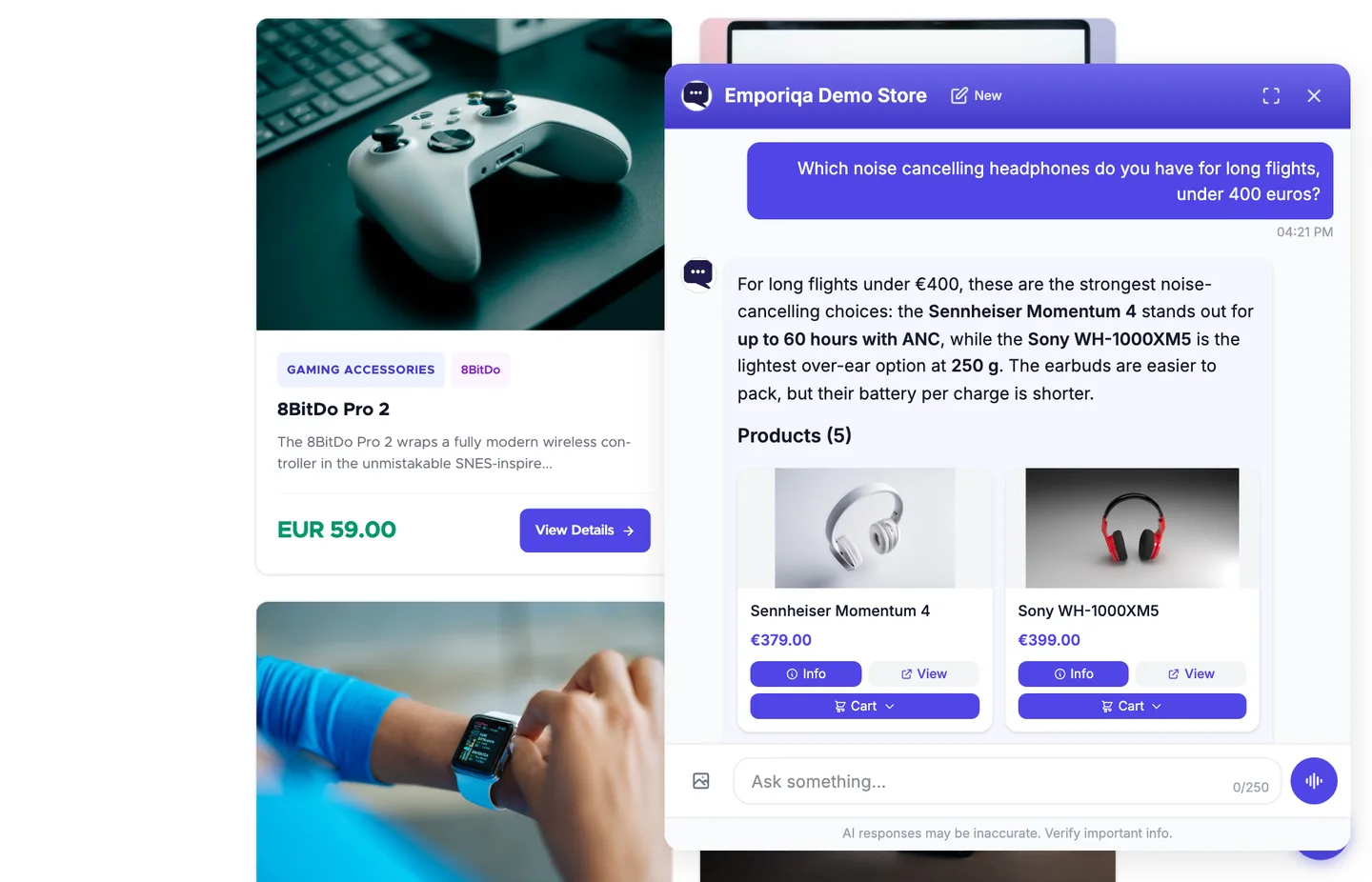
- Integration overview: emporiqa.com/integrations/shopware/
- Full documentation: emporiqa.com/docs/shopware/ (webhook format reference, CLI and admin API reference, event examples, troubleshooting)
- Features: emporiqa.com/features/ · FAQ: emporiqa.com/faq/ · Pricing: emporiqa.com/pricing/
- Live demo: demo.emporiqa.com and a 30-second video. That demo sells electronics; on your shop it answers from your own catalog, so a cosmetics shopper can ask for "a fragrance-free moisturiser for sensitive skin under $30" the same way.
- Set it up from Claude or ChatGPT: connect your assistant and it creates your store, sets up the chat and walks you through the install (emporiqa.com/docs/ai-assistants/). You install the plugin and press Go live yourself.
Requirements
- Shopware 6.6 or 6.7. Self-hosted Shopware 6 (incl. PaaS). Not Shopware Cloud. Not in the Shopware Store: install from GitHub or Composer.
- PHP 8.2+
- An Emporiqa account. Sign up with no card; $25 of signup credit (about 100 conversations, once) is applied when the store is created
Installation
Via the Extension Manager
- Download the latest
EmporiqaIntegration-x.y.z.zipfrom the Releases page. - In your Shopware Administration, go to Extensions > My Extensions > Upload extension and upload the zip.
- Install and activate the extension.
Via Composer (self-hosted)
composer require emporiqa/shopware-plugin
bin/console plugin:refresh
bin/console plugin:install --activate EmporiqaIntegration
bin/console cache:clear
Connect and sync
After installing by either method above:
- Open the Emporiqa extension and click Connect to Emporiqa. A new tab opens on emporiqa.com. Create a free account (no card required, $25 of signup credit) or sign in if you already have one, then pick the store you want to connect (or create a new one). The plugin is connected when you return.
- On the Sync tab, click Sync All. Products and pages flow through.
- When the sync is done, test the chat in your Emporiqa dashboard and press Go live. New stores start with the chat off: shoppers see nothing on your storefront until you do.
On HTTP, or prefer to paste credentials yourself? In the Connection settings, paste a Store ID and Webhook Secret from your Emporiqa dashboard under Settings → Integration. Both flows reach the same place.
Order status. Once Emporiqa offers ready-made rules to your store (after connecting or a Test connection), the Settings tab shows a Ready-made rules card with the plugin's Order status address. Click Open in Emporiqa next to Order status, then in Emporiqa click Try it to test the rule and Go live to switch it on. You do not need to copy anything: Emporiqa fills in your shop's address by itself when you connect in one click. If it ever asks for the address, use the one on the card (it has a Copy button). The rule answers "Where is my order?" from your Shopware orders: a signed-in shopper only gives the order number, a guest also gives the order email. Once the order is proven theirs, the chat can tell them its status, date, tracking, delivery time, items and total, and when they ask, the payment, shipping and billing details. The other ready-made rules in Emporiqa (Settings > Rules) pass returns, cancellations, order changes, quotes and invoice requests to your team by email.
Customer info. For a signed-in shopper the plugin also answers Emporiqa's signed customer info call: the name and email of their customer account and their 10 newest orders (number, date, status and total), so the chat answers "where is my order?" with their newest order when they give no number, and fills in their email in your rules. Only the account's own orders in the sales channels synced to your Emporiqa store are included; a guest order placed with the same email is not. Nothing to set up.
The older order tracking keeps working as before for stores that use it; a new install has it switched off, since the Order status rule replaces it. Where ready-made rules are offered it sits under Advanced as Old order tracking (deprecated): once Order status is on, remove its address in your Emporiqa dashboard (Settings > Integration > For your developer > Order tracking API URL), then switch it off.
Customer emails. In your Emporiqa dashboard, connect your shop's mailbox (Gmail, Google Workspace, Microsoft 365, Outlook.com, IONOS, Strato, OVHcloud or any IMAP mailbox) and Emporiqa drafts each reply from your catalog and pages, in the customer's language. Order details in drafts, and automatic replies, work on Gmail, Google Workspace and Microsoft (Outlook.com and Microsoft 365). Automatic replies are off until you switch them on. They cover only topics your team has already answered many times without changing the draft, and each waits 10 minutes so anyone can stop it. Every other reply is a draft your team checks and sends from your own address. Emporiqa never refunds, cancels or changes an order. Nothing to set up in Shopware. See emporiqa.com/customer-emails/.
Configuration
All settings are managed from the plugin configuration page (Extensions > My Extensions > Emporiqa > ⋯ > Settings):
Connection Settings
The recommended path is Connect to Emporiqa (one-click handshake, no credentials to paste). For HTTP sites or manual setup, enter the values by hand:
| Setting | Description | Default |
|---|---|---|
| Store ID | Your Emporiqa store identifier (filled automatically by one-click connect) | (none) |
| Webhook Secret | HMAC-SHA256 signing secret (filled automatically by one-click connect) | (none) |
| Order Tracking URL | Read-only endpoint of the old order tracking (shown here until ready-made rules are offered) | auto-generated |
Advanced
| Setting | Description | Default |
|---|---|---|
| Sync Products | Enable real-time product sync | On |
| Sync Pages | Enable real-time CMS page sync | On |
| Webhook URL | Emporiqa webhook endpoint (must start with https://; any other address is ignored and the default is used) |
https://emporiqa.com/webhooks/sync/ |
| Batch Size | Products/pages per webhook request during bulk sync | 50 |
| Old order tracking (deprecated) | Shown where ready-made rules are offered; replaced by the Order status rule | Off on a new install; an update keeps your setting |
The Sync tab shows how many products and pages a sync sends: products visible in a synced sales channel, and pages reachable there (a category page only when it has text of its own, the home page only when it has any text).
Headless sales channels (type Headless/API) are not synced: Shopware creates no product page addresses (SEO URLs) for them, so the chat would have no product links to give. Storefront sales channels are synced as usual. Test connection and the Sync tab name any active headless channel that shows products. The chat widget comes with the Storefront theme; on a frontend Shopware does not render, add it with the embed code.
In-chat cart operations are always enabled. The signed-in shopper's identity reaches the chat only from an uncached endpoint when the chat opens, never through the page or the widget URL.
AI disclosure
The chat's default greeting tells the shopper it is the store's AI assistant, in every language the chat speaks. A custom greeting must keep that disclosure; one that drops it is refused when you save it. Section 8.6 of the Emporiqa Terms treats removing the disclosure, including through custom CSS or custom code, as a breach.
Keeping your catalog in sync
The plugin pushes product, page, and order changes to Emporiqa automatically as they happen, through Shopware's data layer (DAL) events. Pure stock or out-of-stock changes emit a compact availability-only update instead of rebuilding the whole product, and product media or price changes re-emit the affected product on their own.
Some changes affect the whole catalog (category, brand, or currency edits, a new language, promotion changes). Running a synchronous per-product re-sync from those events would block the admin request, so the plugin logs an actionable warning to Shopware's log (var/log/) instead and leaves the catalog refresh to a manual run.
If Emporiqa cannot be reached or answers with a server error, a change is sent again after 1, 5 and 15 minutes and then hourly, six times in all (about 2 hours 20 minutes), so a short outage loses nothing. When a newer save of the same product or page reaches Emporiqa first, the older version is not sent over it. A change Emporiqa refuses (for example after the webhook secret changed) is not retried; it is logged and kept in Shopware's failed queue, from where bin/console messenger:failed:retry sends it again once the cause is fixed.
Dated sales (advanced prices on a rule with a date range) reach the chat when they start and leave it when they end: a scheduled task re-syncs the affected products every 15 minutes, so your shop must run Shopware's scheduled tasks (bin/console scheduled-task:run, or the admin worker). Prices on rules by time of day or weekday are never sent; the chat quotes the price that applies outside them.
Re-run a full sync from the Sync tab when:
- You see one of the "catalog-wide change" warnings in the Shopware log
- You add or reassign a sales channel (existing products won't carry the new channel's data until something else touches them)
- You import products in bulk or write catalog data directly to the database (bulk paths can bypass standard events)
- Emporiqa was unreachable for more than about two hours, or refused changes (network outage, planned maintenance, expired credentials)
As a safety net, run a full sync once a week to catch any drift that may have built up from background failures.
Product payload fields
Beyond the fields shown in the webhook payload reference, the full product and variant payload carries these merchandising and pricing fields:
tier_prices: per-currency list of quantity-based breaks ([{min_quantity, price}]) from Shopware's advanced rule prices, present on a price entry only when the product or variant has them configured.is_virtual: boolean; true for downloadable products with no shipping (from Shopware's downloadable-product state).condition: included for cross-platform payload parity. Shopware has no native product-condition field, so it ships as a fixednull.available_for_order: included for cross-platform payload parity. Shopware has no native display-only / catalog-mode flag, so it ships as a fixedtrue.
These fields are part of the full product and variant payload, not the lightweight product.availability event, which carries only the identification number, SKU, per-channel availability statuses, and stock quantities.
Plugin structure
EmporiqaIntegration/
├── src/
│   ├── EmporiqaIntegration.php          # Plugin lifecycle (uninstall cleanup: config + order markers)
│   ├── Command/                         # CLI: sync:products, sync:pages, sync:all, test-connection
│   ├── Controller/
│   │   ├── Admin/SyncController.php     # Admin sync + data-preview endpoints
│   │   ├── Admin/ConnectController.php  # One-click connect (PKCE) endpoints
│   │   ├── ActionController.php         # Ready-made rules: order status, customer prices, customer info + verify (signed both ways)
│   │   ├── CartController.php           # In-chat cart API
│   │   ├── UserTokenController.php      # Uncached signed-in customer token for the chat
│   │   └── OrderTrackingController.php  # Old HMAC-signed order tracking endpoint (deprecated)
│   ├── Service/
│   │   ├── SyncService.php              # Bulk sync orchestration + channel contexts
│   │   ├── ProductFormatter.php         # Product/variant payload formatting
│   │   ├── CmsPageFormatter.php         # Landing page / category page payload formatting
│   │   ├── ChannelResolver.php          # Sales channel to Emporiqa channel mapping
│   │   ├── ConnectService.php           # One-click connect (PKCE) handshake
│   │   ├── ConfigService.php            # Settings access
│   │   └── WebhookClient.php            # HMAC-SHA256 signed webhook HTTP client
│   ├── Subscriber/                      # Real-time DAL event listeners
│   ├── ScheduledTask/                   # Re-syncs products when a dated sale starts or ends
│   ├── MessageQueue/                    # Async webhook and full-sync handlers
│   ├── Event/                           # Extension events (payload / widget hooks)
│   └── Resources/
│       ├── app/administration/          # Admin UI (sync dashboard, settings, one-click connect)
│       ├── app/storefront/              # Widget embed and cart storefront plugins
│       └── config/                      # config.xml, services, snippets
├── composer.json
└── CHANGELOG.md
Registered subscribers
| Subscriber | Purpose |
|---|---|
StorefrontSubscriber |
Embeds the chat widget on the storefront (StorefrontRenderEvent) |
ProductSubscriber |
Syncs products on write/delete, variant-precise deletes, and re-syncs on media or price changes |
ProductSubscriber (availability) |
Emits a lightweight product.availability event on stock changes (ProductStockAlteredEvent), no full rebuild |
LandingPageSubscriber |
Syncs landing pages on create/update/delete |
CategorySubscriber |
Syncs category shop pages on create/update/delete |
OrderSubscriber |
Captures the chat session and sends order.completed on order placement and completing state transitions |
CatalogChangeSubscriber |
Logs an actionable warning for catalog-wide changes (category, manufacturer, currency, language, promotion, tax, pricing rule) so the merchant can run a full sync |
Extensibility
Developers can subscribe to Symfony events to customize payloads or widget behavior:
| Event | Purpose |
|---|---|
PostProductFormatEvent |
Modify the product/variant payload before sending |
PostPageFormatEvent |
Modify the page payload before sending |
PostOrderFormatEvent |
Modify the order payload before sending |
OrderStatusResponseEvent |
Modify the Order status rule's answer (data) |
CustomerInfoResponseEvent |
Modify the customer info answer (data): remove fields or add extra |
OrderTrackingResponseEvent |
Modify the old order tracking response |
WidgetParamsEvent |
Modify the chat widget embed parameters |
PreSyncEvent / PostSyncEvent |
Run logic before and after a bulk sync session |
Custom fields in the Order status answer. OrderStatusResponseEvent runs after the plugin has filled data (status, dates, tracking, order number, customer name, currency, items, totals, payment and shipping method, payment status, delivery time, shipping and billing address), so a subscriber can change any of it. Put your own fields under extra: Emporiqa drops any other key it does not know. extra takes string keys with text, number or yes/no values, or nested lists and objects, at most 3 levels deep, 30 keys in all, texts up to 500 characters. The chat uses them when the shopper asks. Add only what the shopper may see: the answer is given after they proved the order is theirs.
public static function getSubscribedEvents(): array
{
    return [OrderStatusResponseEvent::class => 'onOrderStatus'];
}

public function onOrderStatus(OrderStatusResponseEvent $event): void
{
    $data = $event->getData();
    $data['extra'] = [
        'gift_wrap' => true,
        'pickup_point' => 'Store Berlin-Mitte',
    ];
    $event->setData($data);
}
Changing the customer info answer. CustomerInfoResponseEvent runs after the plugin has filled data: customer (name, first_name, last_name, email) and orders (up to 10, newest first, each order_number, placed_at, status_code, status_label, total, currency). getCustomer() and getOrders() give the loaded entities. Remove what you do not want to share, or add your own fields under extra (the same limits as for Order status). The answer is about the signed-in shopper only, so add nothing about anyone else.
public static function getSubscribedEvents(): array
{
    return [CustomerInfoResponseEvent::class => 'onCustomerInfo'];
}

public function onCustomerInfo(CustomerInfoResponseEvent $event): void
{
    $data = $event->getData();
    unset($data['customer']['email']);
    $data['extra'] = ['loyalty_tier' => 'Gold'];
    $event->setData($data);
}
Every service is defined against an interface (ProductFormatterInterface, CmsPageFormatterInterface, SyncServiceInterface, WebhookClientInterface, ChannelResolverInterface, ConfigServiceInterface, ConnectServiceInterface), so you can decorate any of them with a standard Symfony service decorator. A decorator of WebhookClientInterface that should keep the retry behaviour also implements TransientFailureAwareInterface (forwarding isLastFailureTransient()); without it, every failed send is retried as if Emporiqa were unreachable.
Pricing
The plugin is free. The Emporiqa service itself is pay-as-you-go: $0.25 per conversation and $0.15 per AI-drafted email reply you send, with $25 of signup credit (about 100 conversations, once) and no card required at signup. No seat fees, and AI model costs are included. You set a monthly limit on the billing page ($199 for new stores, lower it any time): a ceiling, not a charge, which you can also raise or clear. At the limit the chat is hidden from your shop and charging stops. Voice mode (the shopper speaks and hears the answer read aloud) is optional and off by default: a conversation where the shopper speaks costs $0.15 more, charged once, and counts toward that limit. Prices exclude VAT. Enterprise option for catalogs over 100,000 products. Full pricing at emporiqa.com/pricing/.
Data protection
The application, databases and search index run on Hetzner servers in Germany. Answers are generated by OpenAI in the US under the EU Standard Contractual Clauses; your data is not used for training, and OpenAI keeps requests up to 30 days to check for abuse. Chat history is deleted after 90 days. The Data Processing Addendum applies automatically, with no signature needed. A copy signed by Rosel Group can be downloaded from emporiqa.com/dpa. Sub-processors are listed at emporiqa.com/subprocessors/.
Support
Email support@emporiqa.com. Rosen Hristov works with every store himself, before and after the sale.