
assetfeed / nova-ai-detector

A Laravel Nova field that checks a text attribute for AI-written passages with the AssetFeed AI content detector and marks them on the detail page.
Requires
- php: ^8.1
- ext-json: *
- guzzlehttp/guzzle: ^7.2
- illuminate/cache: ^10.0|^11.0|^12.0
- illuminate/http: ^10.0|^11.0|^12.0
- illuminate/support: ^10.0|^11.0|^12.0
- laravel/nova: ^4.0|^5.0
Requires (Dev)
- orchestra/testbench: ^8.0|^9.0|^10.0
- phpunit/phpunit: ^10.5|^11.0
Suggests
None
Provides
None
Conflicts
None
Replaces
None
README
A Nova field that checks a text attribute for AI-written passages with the AssetFeed AI content detector and marks them on the detail page:
- an orange bar for likely AI, amber for unsure, green for likely human;
- a tint behind the passages the detector is most sure about;
- a card with the verdict, word count and score when you hover a passage;
- a bar under the text with the share of AI text, a switch between highlights, side bars only and no marks, and a Recheck button.
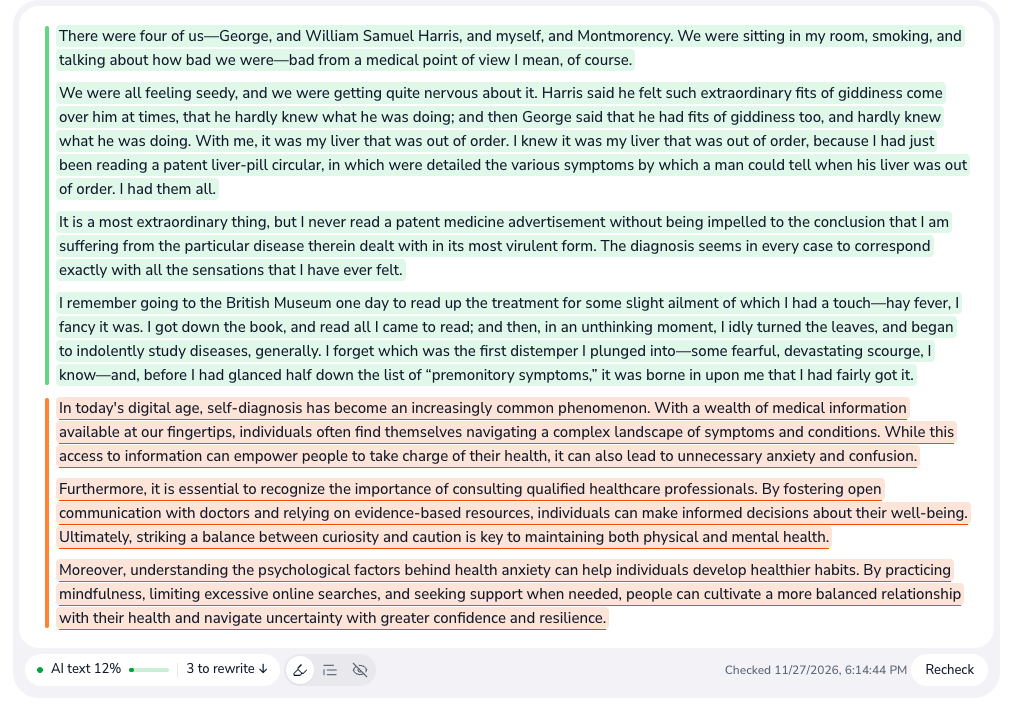
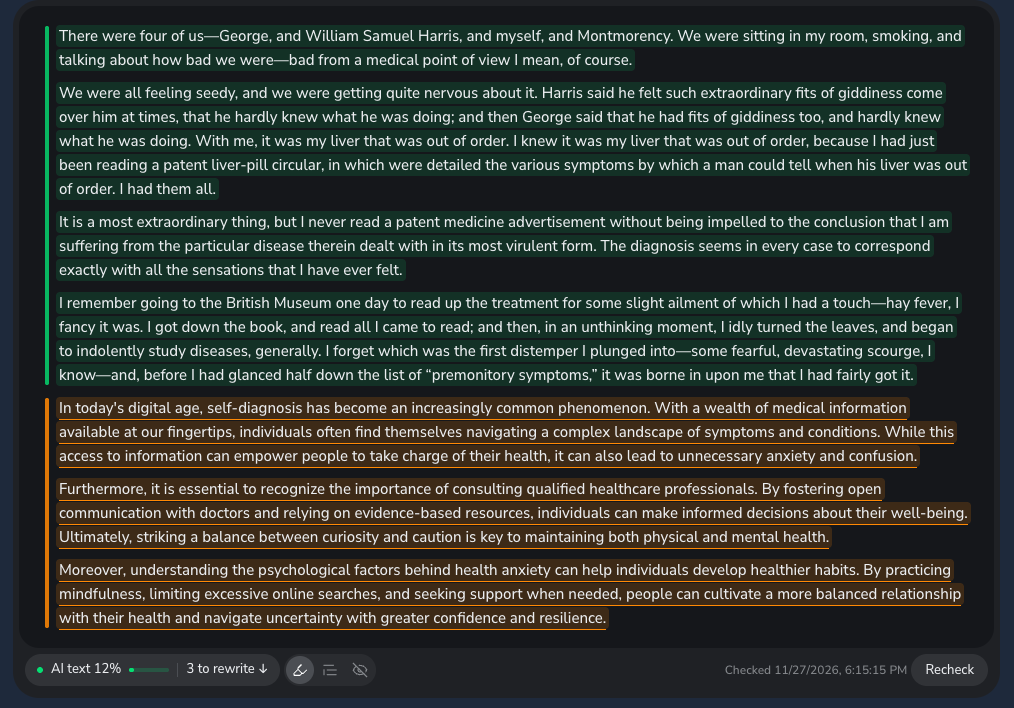
The check runs on your server: the field takes the text from the record, and the API key never reaches the browser. The last result is kept in the Laravel cache, so no migration is needed. If the text is edited after a check, the field says so and asks for a recheck.
Install
composer require assetfeed/nova-ai-detector
Requires PHP 8.1+, Laravel 10, 11 or 12 and Nova 4 or 5. Tested on Nova 5.9.5 with Laravel 12, and on Nova 4.35.11 with Laravel 10 and 11, all on PHP 8.4. The service provider is discovered automatically.
Configure
Checks spend credits on an AssetFeed account. Free accounts include 500 credits per month, and one check uses 5 credits (plans). Get a key at assetfeed.com/api-keys and put it in .env:
ASSETFEED_API_KEY=your-key
Optionally publish the config (endpoint, timeout, cache store and TTL, text size limit, throttle):
php artisan vendor:publish --tag=nova-ai-detector-config
The endpoint must use https. Texts above the size limit are not sent, and the throttle caps how often checks can be run.
Results live in the cache store from nova-ai-detector.cache.store (the default store when null). Use a persistent store, not array. Checks made with a key are not saved to a check history on AssetFeed's side (see the privacy policy).
If you use Laravel Telescope, it records the headers of outgoing requests, so the X-Api-Token header with your key may appear there.
Use
use AssetFeed\NovaAiDetector\AiDetection;

public function fields(NovaRequest $request): array
{
    return [
        AiDetection::make('Body'),                    // the attribute holds HTML
        AiDetection::make('Notes')->plainText(),      // the attribute holds plain text
    ];
}
The field shows on the detail page only. The HTML is cleaned in the browser before it is shown (scripts, styles, images and all attributes are dropped). Anyone who can view the resource and see the field can run a check, and each check uses credits of the key's account. English text only, from about 50 words. The score is an estimate, not proof of how a text was written.
Build the assets
dist/ is committed. To rebuild after changing resources/js: npm install && npm run build. Tests: composer test and npm test.
Related
Plugins for TinyMCE, HugeRTE, Tiptap and Editor.js: assetfeed/ai-detector-plugins.
MIT licence.