
asignua / filament-translatable-fields

Per-field language tabs for spatie/laravel-translatable in Filament 5. Every locale is a real input in the form state at the same time, so translations survive Repeater, Builder, ->relationship() repeaters, settings pages and custom pages without a model. No global locale switcher that loses repeate
Package info
github.com/asignua/filament-translatable-fields
pkg:composer/asignua/filament-translatable-fields
Requires
- php: ^8.3
- filament/filament: ^5.0
- illuminate/contracts: ^12.0|^13.0
- spatie/laravel-package-tools: ^1.16
- spatie/laravel-translatable: ^6.11
Requires (Dev)
- larastan/larastan: ^3.0
- laravel/pint: ^1.18
- orchestra/testbench: ^10.0|^11.0
- phpunit/phpunit: ^11.5|^12.0
Suggests
None
Provides
None
Conflicts
None
Replaces
None
README

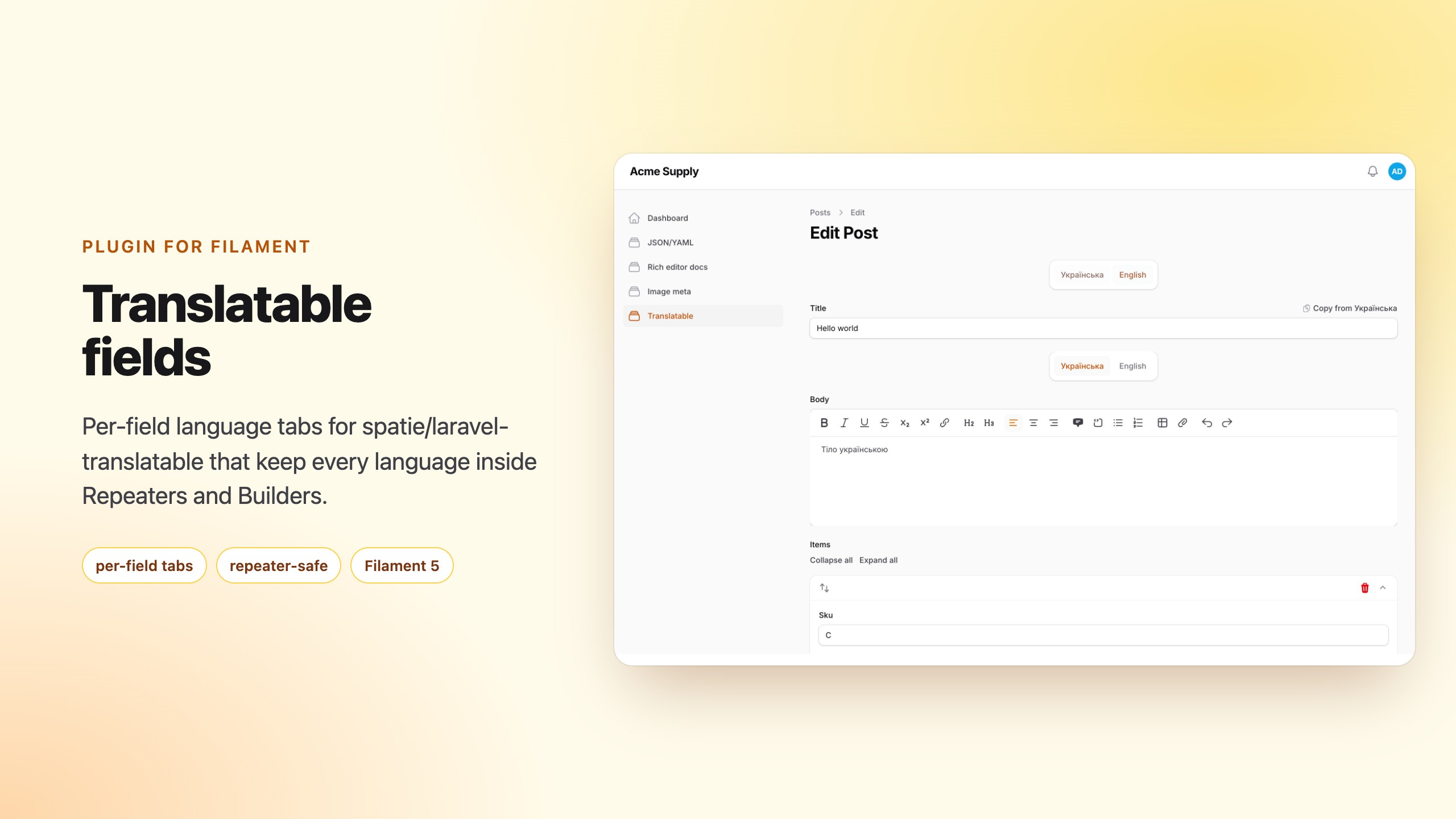
Per-field language tabs for spatie/laravel-translatable in
Filament 5. Every language is a real input in the form state at the same time, so
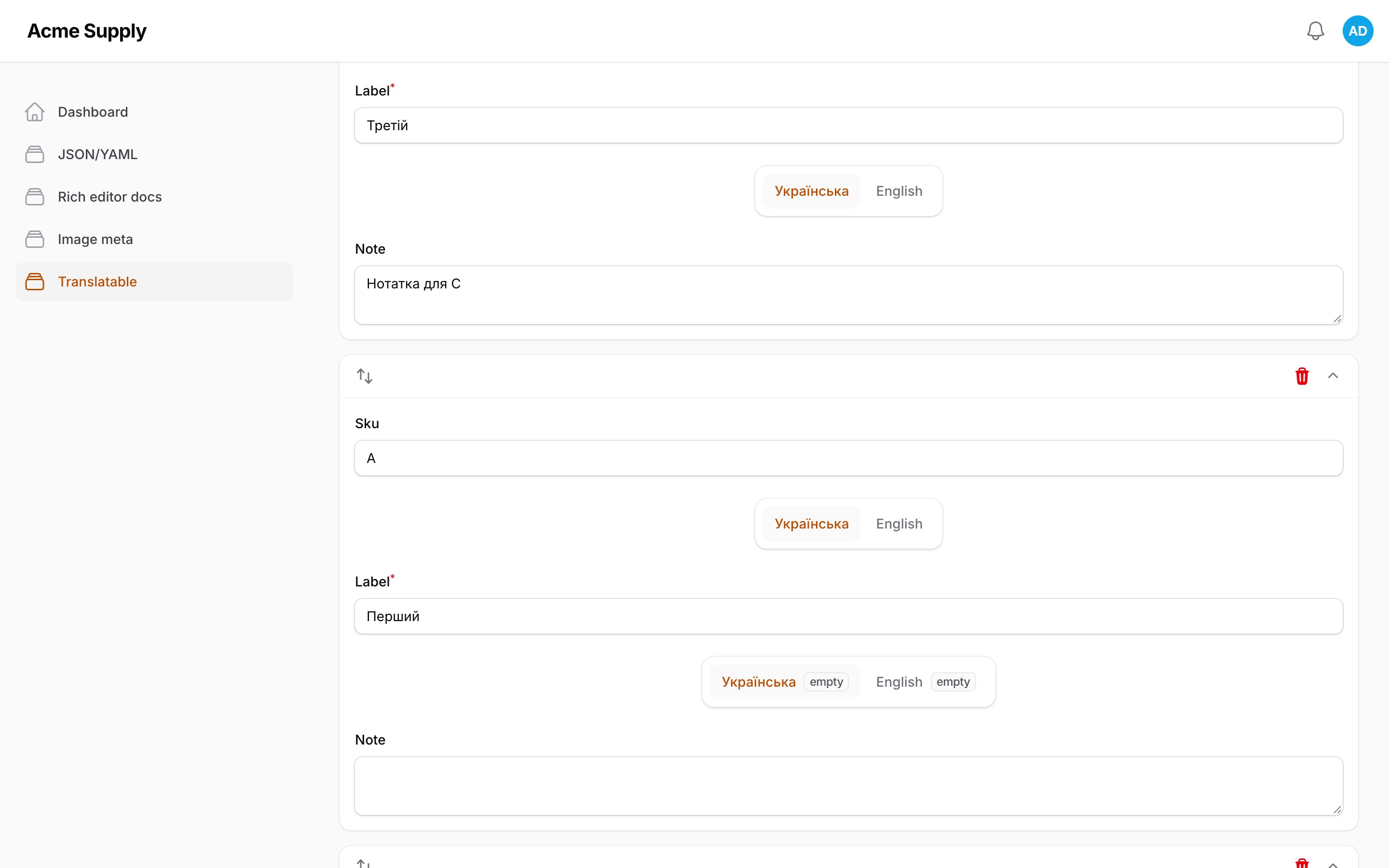
translations survive a Repeater, a Builder, a ->relationship() repeater and a settings page.
Filament's official translatable plugin was discontinued after v3, and the replacements switch ONE global locale for
the whole form. That is exactly what breaks nested fields: the order and the data of a repeater are lost after the
editor switches language (filamentphp/filament#8328, plus dozens of
help threads and ideas about repeaters, builders, relationships and settings pages). Here there is no global locale:
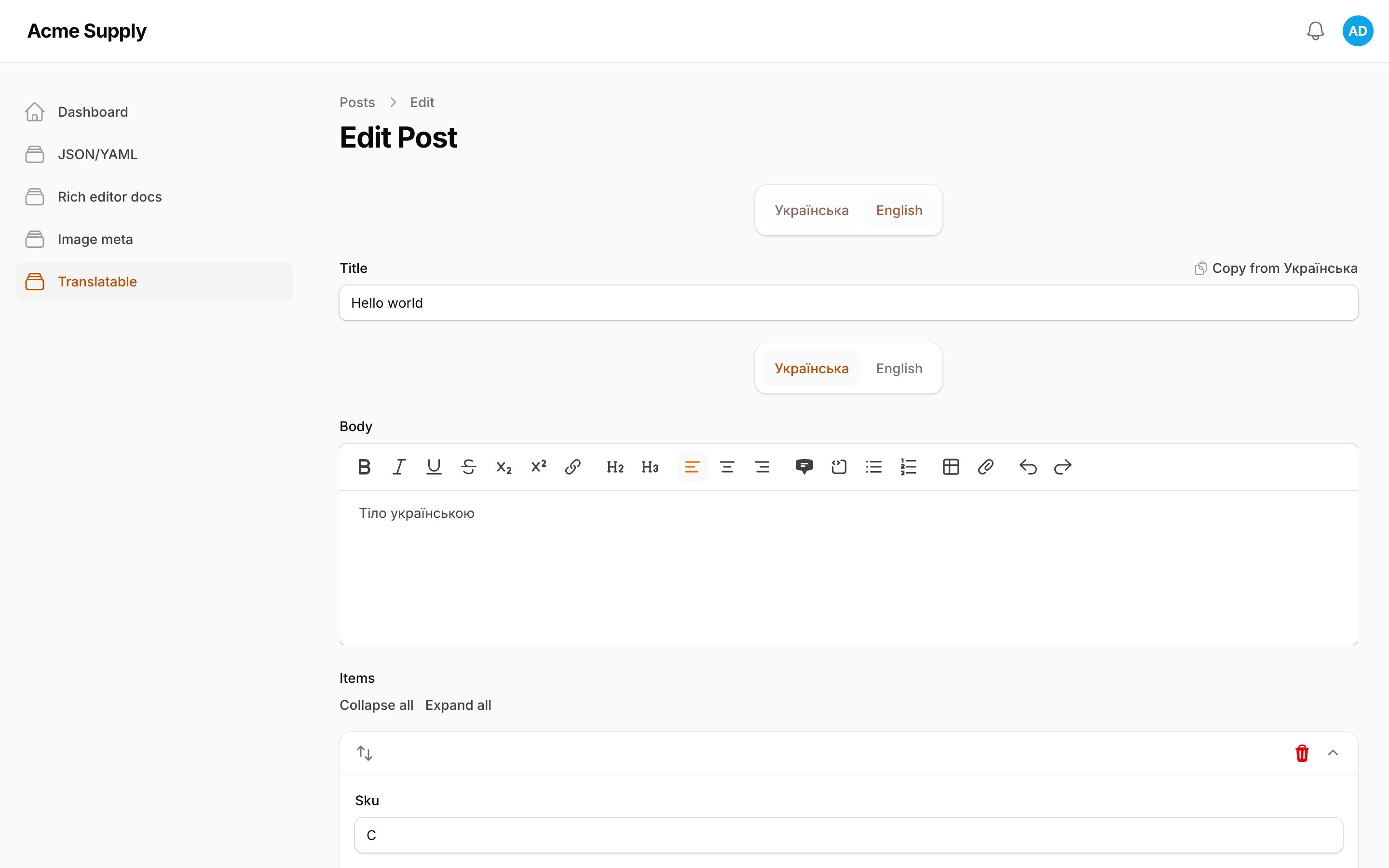
each translatable field carries its own tabs and its own title.uk / title.en state.
- Screenshots
- Requirements
- Installation
- Usage
- Repeaters, builders, relationships, settings pages
- Saving
- Tables and infolists
- Configuration
- Gotchas
- Translations
- AI agents
- Testing
Screenshots
Requirements
- PHP 8.3+
- Laravel 12 or 13
- Filament 5
spatie/laravel-translatable^6.11 (installed as a dependency)
Installation
composer require asignua/filament-translatable-fields
There is no panel plugin to register and no asset to publish: the package is plain Filament components. Optionally publish the config:
php artisan vendor:publish --tag="filament-translatable-fields-config"
Your model uses spatie as usual:
use Spatie\Translatable\HasTranslations;

class Post extends Model
{
    use HasTranslations;

    public array $translatable = ['title', 'body'];
}
Usage
use Asignua\FilamentTranslatableFields\Forms\Translatable;
use Asignua\FilamentTranslatableFields\Forms\TranslatableTabs;

// A factory: you build the input for each language.
TranslatableTabs::make('title', fn (string $locale) => TextInput::make('title')->maxLength(255))
    ->requiredDefault(),

// Or wrap a ready field: it is cloned once per language.
Translatable::field(RichEditor::make('body'))->requiredAny(),
The factory component keeps the attribute name (title); the plugin binds it to title.{locale}. Inside the tabs:
| Method | Effect |
|---|---|
requiredDefault() |
the default language must be filled (the field's first language when its locales() leave the global default out) |
requiredIn(['uk', 'en']) |
those languages must be filled |
requiredAll() |
every language of the field (its own locales()) must be filled |
requiredAny() |
at least one language; the error shows on the default language (with one language: plain required()) |
locales(['uk', 'en']) |
this field only offers these languages |
copyFromDefault(false) |
hide the "Copy from Українська" hint action (it asks before overwriting a filled language; with the default one empty it shows a "nothing to copy" notification instead) |
emptyBadges() |
opt in to an "empty" badge on tabs of unfilled languages (off by default) |
A tab whose input (or anything inside it, e.g. a repeater in a language tab) has a validation error gets a red ! badge. Error messages name the language (Title (English)).
Repeaters, builders, relationships, settings pages
Nothing special — put the component where the field goes:
Repeater::make('items')->schema([
    TextInput::make('sku'),
    Translatable::field(TextInput::make('label')),          // JSON column: items.{uuid}.label.{locale}
]),

Builder::make('blocks')->blocks([
    Builder\Block::make('heading')->schema([
        Translatable::field(TextInput::make('text')),
    ]),
]),

Repeater::make('sections')->relationship()->orderColumn('sort')->schema([
    Translatable::field(TextInput::make('heading')),        // Section uses HasTranslations
]),
On a page without a model (settings in a table, a cache, a config file) the state is simply an array:
->fill(['site_name' => ['uk' => '…', 'en' => '…']]) and $this->form->getState() returns the same shape.
How it decides where the value comes from: whatever was passed to fill() wins. EditRecord and a ->relationship()
repeater fill the form from attributesToArray(), which already holds the whole map, so a change made in
mutateFormDataBeforeFill() stays. Only when {field} did not arrive as an array — or when the form is filled with no
data at all (a record Action's default mount, a custom page with ->record($record) and fill()) — are the languages
read from $record->getTranslation($field, $locale, false), and only when the field sits directly in the schema that
was given that record. The record is read before the language inputs hydrate, so their own afterStateHydrated()
hooks receive the record's value. A JSON repeater/builder item, or a group with its own statePath(), is never read from the record — so an
item field called title is never overwritten by the record's own title.
Saving
Filament's default save already works with spatie: $model->fill(['title' => ['uk' => 'a', 'en' => 'b']]) calls
setTranslations(), and a cleared language ('en' => null) is cleared. You do not need anything else for a normal
model. The optional page trait is a helper for the rest:
use Asignua\FilamentTranslatableFields\Concerns\HandlesTranslatableFields;

class EditPost extends EditRecord
{
    use HandlesTranslatableFields;
}
fillTranslations($record, $data, forgetEmpty: false)writes the maps withsetTranslation()and returns the rest of$data— for models with$guarded = ['*']wherefill()writes nothing.forgetEmpty: trueremoves cleared languages from the JSON instead of storing''.- Its
mutateFormDataBeforeCreate/Save()store a cleared language as''instead ofnull(tidiness, not correctness). A locale key that is absent (a hidden or disabled input) is left untouched — spatie merges the languages it is given into the stored ones. A page that defines its ownmutateFormDataBeforeSave()replaces the trait's: call$this->normalizeTranslatableData($data, $this->translatableModel())there if you want it. - In a relation manager the page hooks are never called (they belong to the actions): call
$this->normalizeTranslatableData($data, Related::class)from the action's->mutateDataUsing().translatableModel()itself returns the related model there (and on aManageRelatedRecordspage).
For the same normalisation outside a page: TranslatableFields::normalize($data, ['title', 'body']).
Tables and infolists
TranslatableColumn::make('title')->searchAcrossLocales()->sortableByLocale(),
TranslatableColumn::make('team.name')->marker(false),
TranslatableEntry::make('title'),
The value of the current language; if it is empty, the default language, then any filled one, prefixed with a marker
([en] Hello) so an editor can tell a borrowed text from a translated one. Nothing is written back. Use them in the
admin only — [en] in a public <title> is an SEO bug. searchAcrossLocales() searches title->uk, title->en, …
case-insensitively — ilike on PostgreSQL, lower(…) like lower(?) on MySQL/MariaDB, plain like on SQLite (ASCII
letters only); team.name searches through whereHas('team'). sortableByLocale() sorts by
the shown text — the current language, then the default, then the rest — and works on the table's own attributes only
(it throws for team.name). A cleared language (stored by spatie as JSON null) neither matches a search nor sorts as
the text null: on MySQL/MariaDB it is mapped to SQL NULL and falls through to the next language.
Configuration
// config/filament-translatable-fields.php
'locales' => null,         // null → your app's translatable.locales, if defined → [app.locale, app.fallback_locale]
'default_locale' => null,  // null → app.locale (or the first language)
'labels' => [],            // ['uk' => 'Українська']; default: the language's own name (intl) or the code
'marker' => '[:locale] ',  // '' disables the marker
'empty_badges' => false,   // opt-in: the inputs become live(onBlur: true) to keep the badge current
In code (for example AppServiceProvider::boot()), which wins over the config:
TranslatableFields::locales(['uk', 'en', 'pl']);   // or a closure
TranslatableFields::defaultLocale('uk');
TranslatableFields::labels(['pl' => 'Polski']);
Gotchas
- Configure the languages. Without
localesin the config orTranslatableFields::locales([...]), the plugin offersapp.locale+app.fallback_locale(spatie/laravel-translatable has no language list of its own) — on a fresh Laravel app that is a singleentab. - Your factory's own
afterStateHydrated()is kept and runs after the plugin has read the record (see above), so it sees — and may change — the record's value for its language. - Empty badges are opt-in (
emptyBadges()orempty_badges => true) because they make the inputslive(onBlur: true)— one request per blur, which adds up on large forms — unless your factory already choselive(). - spatie hides
'':getTranslations('title')omits languages stored as an empty string; read the raw column, orgetTranslation($field, $locale, false), when you need to see exactly what was stored. - No nested/dotted attribute names (
meta.title): the attribute is the first state segment. - The component name must match the attribute:
make('title', fn () => TextInput::make('title')). - Fields in a
Section/Gridwith the language tabs inside work; wrapping the tabs in a component that has its ownstatePath()makes the field belong to that array (no record lookup), which is what you want for JSON groups.
Translations
The interface ships in English, Ukrainian, German, Spanish, French, Italian, Dutch, Polish, Brazilian Portuguese and
Turkish under the filament-translatable-fields::translatable-fields namespace; a test keeps every language in step.
AI agents
The package ships Laravel Boost guidelines
(resources/boost/guidelines/core.blade.php).
Testing
composer install
vendor/bin/phpunit
vendor/bin/phpstan analyse --memory-limit=1G
vendor/bin/pint --test
The suite runs on Orchestra Testbench with a workbench/ resource (a model with
translatable columns, a JSON Repeater, a Builder, a relationship Repeater) and a Livewire settings page.
Changelog
See CHANGELOG.md.
License
The MIT License (MIT). See LICENSE.md.