
asignua / filament-image-meta

Per-file alt text (per locale), a decorative flag, caption, title and focal point for Filament 5's own FileUpload and SpatieMediaLibraryFileUpload — one wrapper around the upload you already have, no media library to adopt. A missing alt is reported (form badge, optional validation, data attribute)
Requires
- php: ^8.3
- filament/filament: ^5.0
- illuminate/contracts: ^12.0|^13.0
- spatie/laravel-package-tools: ^1.16
Requires (Dev)
- filament/spatie-laravel-media-library-plugin: ^5.0
- larastan/larastan: ^3.0
- laravel/pint: ^1.18
- orchestra/testbench: ^10.0|^11.0
- phpunit/phpunit: ^11.5|^12.0
- spatie/laravel-medialibrary: ^11.0
Suggests
- filament/spatie-laravel-media-library-plugin: Store the details in the custom properties of each media item (SpatieMediaLibraryFileUpload).
- spatie/laravel-medialibrary: Read the details back with ImageMeta::forMedia().
Provides
None
Conflicts
None
Replaces
None
README

Per-file alt text, a decorative flag, caption, title and a focal point for Filament 5's own FileUpload
and SpatieMediaLibraryFileUpload: one wrapper around the upload you already have, no media system to adopt.
Core FileUpload has no per-file metadata at all, and people keep asking for it:
- filamentphp/filament#8455: alt text per uploaded file.
- filamentphp/filament#14652: a focal point on images.
The alternatives are all-or-nothing: Curator solves it if you move your whole media handling into Curator, and the focal-point pickers are a separate field that knows nothing about the upload. This plugin is the small layer in between, with an accessibility and SEO point of view:
-
Alt text, per language if you need it. An image without alt makes screen readers read the file name; an image with
alt="IMG_0042-final.jpg"is worse than none. The plugin never falls back to the file name. -
"Decorative image" is a decision, not an empty box. A decorative image renders
alt=""on purpose; an image nobody described is reported as missing (a badge in the form, an optionaldata-alt-missingin the HTML, an optional validation error), never silently treated as decorative. -
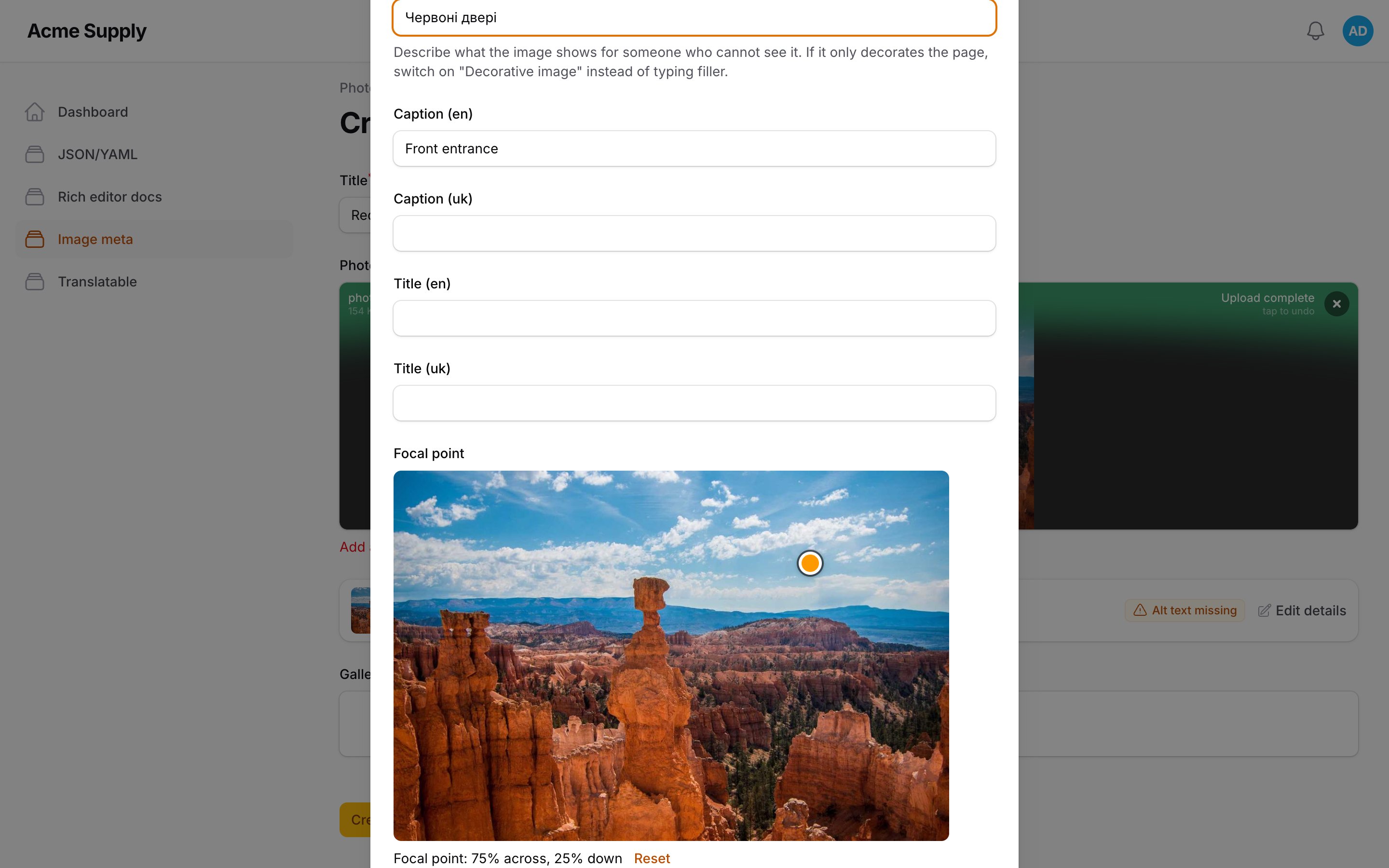
A focal point (x/y in percent) you set by clicking, dragging or with the arrow keys, rendered as
object-positionso a crop keeps the face in the frame.
Screenshots
Requirements
- PHP 8.3+
- Laravel 12 or 13
- Filament 5
Optional: filament/spatie-laravel-media-library-plugin and spatie/laravel-medialibrary for SpatieMediaLibraryFileUpload.
Installation
composer require asignua/filament-image-meta
php artisan filament:assets
The plugin registers itself (no panel plugin to add). The focal-point picker is a small Alpine component that is only downloaded by a page that opens the modal. Optionally publish the config:
php artisan vendor:publish --tag=image-meta-config
Usage
Wrap the upload:
use Asignua\FilamentImageMeta\ImageMetaUpload;
use Filament\Forms\Components\FileUpload;

$schema->components([
    ImageMetaUpload::make(
        FileUpload::make('photo')->image()->disk('public')->directory('posts'),
        locales: ['en', 'uk'],
        caption: true,
        focalPoint: true,
        requireAlt: true,
    ),
]);
SpatieMediaLibraryFileUpload works the same way:
ImageMetaUpload::make(
    SpatieMediaLibraryFileUpload::make('gallery')->collection('gallery')->multiple()->image(),
    locales: ['en', 'uk'],
)
| Argument | Default | |
|---|---|---|
alt |
true |
Collect alt text. |
decorative |
true |
The "Decorative image" switch (alt is cleared and alt="" is rendered). |
caption |
false |
A caption (for <figcaption>). |
title |
false |
A title (the title attribute). |
focalPoint |
false |
The focal-point picker in the modal. |
locales |
[] |
['en', 'uk'] = one input per language; empty = one language-less value. |
requireAlt |
false |
bool or Closure: see Validation. |
requiredLocales |
first of locales |
Languages that need alt text when requireAlt is on. |
statePath |
{name}_meta |
Name of the sibling attribute of a plain upload. |
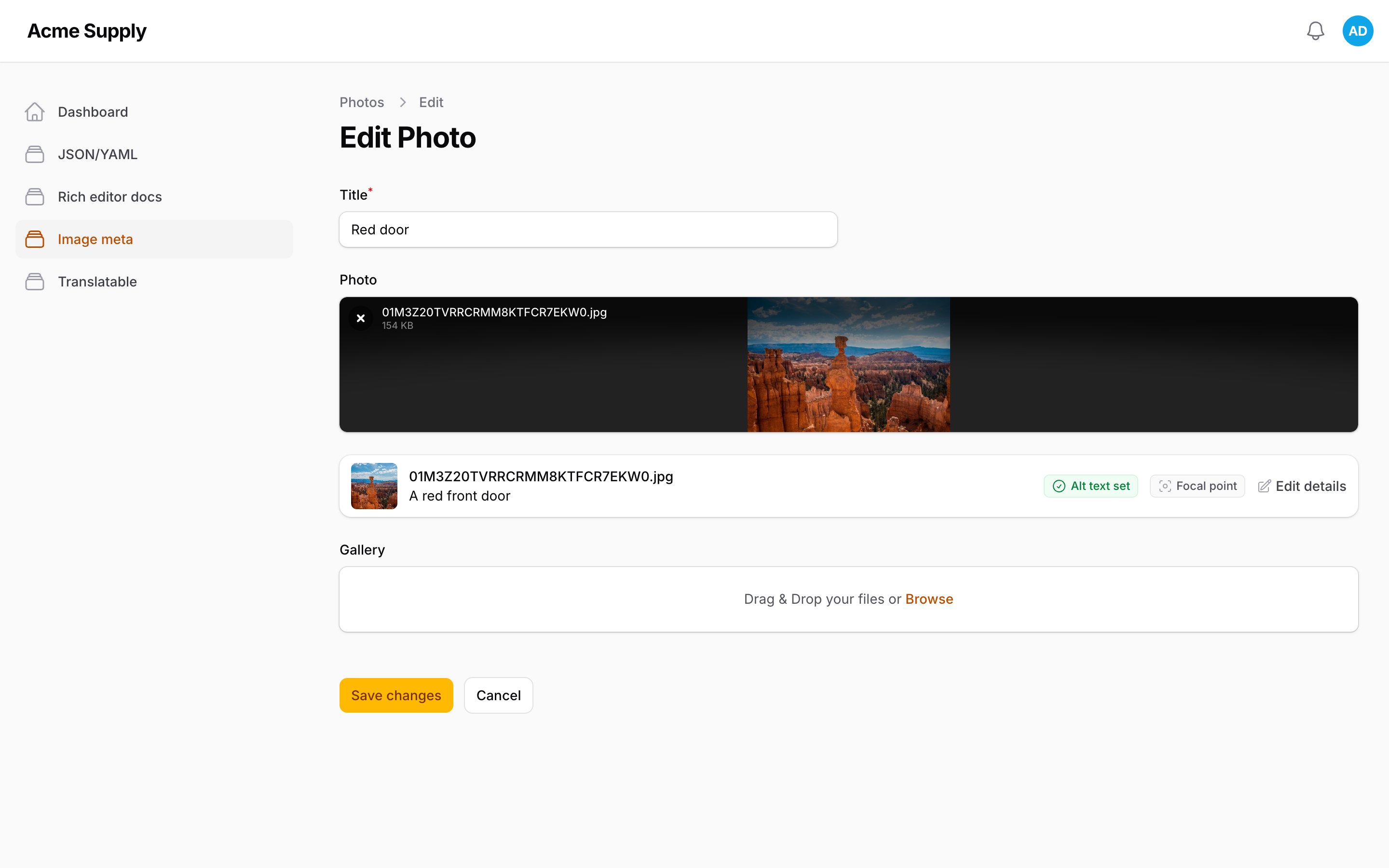
Every uploaded image gets a row under the upload: thumbnail, name, the alt text, a status badge (Alt text set, Decorative, Alt text missing, Focal point) and an Edit details button that opens the modal. It works on new, not-yet-saved uploads too.
ImageMetaUpload::make() returns a plain Group that contains the upload and the details panel side by side. Put the
result in components([...]); configure the upload (->image(), ->disk(), ->multiple()...) before wrapping it.
- Layout is set on the returned
Group, which spans the full row by default: a->columnSpan()on the upload no longer moves anything once it is wrapped. UseImageMetaUpload::make(...)->columnSpan(1)instead. - The panel follows the upload. A
->disabled()upload gets a read-only panel without the Edit details button, and its details are not saved; a->hidden()upload hides the panel too.
Storage
Plain FileUpload
The details are written to a sibling attribute called {name}_meta (photo → photo_meta), as one JSON object keyed
by the stored file path:
{
  "posts/01J8.jpg": {
    "alt": {"en": "A red door", "uk": "Червоні двері"},
    "caption": {"en": "Front entrance"},
    "focal": {"x": 31.5, "y": 20}
  },
  "posts/01J9.jpg": {"decorative": true}
}
Schema::table('posts', fn (Blueprint $table) => $table->json('photo_meta')->nullable());

protected function casts(): array
{
    return ['photo_meta' => 'array'];
}
A language-less field (locales: []) stores plain strings ("alt": "A red door"). Files that are removed take their
details with them on save; a new file stored under the path of a removed one starts with no details.
A save rewrites only what the field manages, for every kept file whether its modal was opened or not: the details it
does not collect (a field without caption: keeps the stored caption, title and focal point the same way) and the
texts in languages outside its locales (an earlier language list, another site or tool) are kept from the stored entry.
Marking an image decorative removes its alt text in every language.
SpatieMediaLibraryFileUpload
Nothing to add to the model. After the upload has saved its files, the details are written to the custom_properties
of each media item. The property names are configurable (see Configuration); the defaults are
alt, alt_decorative, caption, title and focal_point, so a site that already keeps alt / alt_decorative /
caption there needs no data migration. Properties the plugin does not manage (credit, ...) are left alone, and so are
the details a field does not collect (a field without title: never touches title), and the texts in languages outside
the field's locales (alt.pl survives a field with locales: ['en', 'uk']); a detail that is cleared is removed from
the media item.
Rendering
<x-image-meta::img :src="$post->photoUrl()" :meta="Asignua\FilamentImageMeta\ImageMeta::for($post, 'photo')" :locale="app()->getLocale()" class="h-64 w-full object-cover" />

<x-image-meta::figure :src="$url" :meta="$meta" class="my-6" img-class="rounded-lg" />
- Text alt →
alt="..."(escaped). - Decorative →
alt="", norole, noaria-hidden. (aria-hiddenon an<img>is redundant;role="presentation"is redundant with an empty alt. Both are common mistakes.) - Not described →
alt=""as well, and never the file name. Withimage-meta.mark_missing_alton, the tag also carriesdata-alt-missing, so an audit (or[data-alt-missing] { outline: 3px solid red }in staging) finds it. - Focal point →
style="object-position: 31.5% 20%;", appended to astyleyou pass. Pair it withobject-fit: cover(Tailwindobject-cover); on its own it does nothing. title→ thetitleattribute (not for decorative images).<x-image-meta::figure>adds<figcaption>.
:meta takes an ImageMeta or the stored array. Attributes you pass are merged, never duplicated: your own alt or
title replaces the stored one, your style is kept.
Reading the details
use Asignua\FilamentImageMeta\ImageMeta;

$meta = ImageMeta::for($post, 'photo');              // a FileUpload column (first file)
$meta = ImageMeta::for($post, 'gallery', $path);     // one file of a multiple upload
$all  = ImageMeta::allFor($post, 'gallery');         // [path => ImageMeta]
$meta = ImageMeta::for($article, 'gallery');         // no such column: the first media item of the collection
$meta = ImageMeta::forMedia($media);                 // a media-library item

$meta->alt('uk');            // ?string: null when missing or decorative
$meta->altAttribute('uk');   // string: the exact alt="" value
$meta->isDecorative();
$meta->isMissingAlt('uk');   // neither described nor decorative: what an audit looks for
$meta->caption('uk'); $meta->title('uk');
$meta->objectPosition();     // "31.5% 20%" | null
There is no fallback between languages unless you set image-meta.fallback_locale: an empty Ukrainian alt on /uk is
reported as missing rather than showing the English sentence to a screen reader that expects Ukrainian.
Validation
requireAlt: true adds a rule to the details panel (so it also covers images that are already stored): every image must have alt text in the required locales or be marked
decorative; the error names the file and is shown under the file list. fallback_locale does not count: a required language needs its own text. requireAlt also takes a closure, e.g. fn () => auth()->user()->isEditor().
By default only the first locale is required (an English-first site that translates later); list more with
requiredLocales: ['en', 'uk'].
Configuration
config/image-meta.php:
| Key | Default | |
|---|---|---|
media_properties |
alt, alt_decorative, caption, title, focal_point |
Custom property names on a media item. |
meta_suffix |
_meta |
Sibling attribute of a plain upload. |
fallback_locale |
null |
Language to fall back to when the requested alt is empty (null = never). |
mark_missing_alt |
false |
Add data-alt-missing to undescribed images. |
alt_max_length |
250 |
Maximum alt text length in the modal; new texts are cut to it on save. Stored texts that are longer are kept as they are. |
Gotchas
- The plain-upload column must be written by your save code. The panel adds
photo_metato the form state. Passing$form->getState()toModel::create()works if the attribute is fillable; a model with$guarded = ['*']written through a repository or DTO must assign it explicitly, or the value is dropped without an error. - JSON encoding. The
arraycast escapes non-ASCII (Д...) in the column. Use a cast that keeps Unicode if you read the database by eye. - Wrap the finished upload.
ImageMetaUpload::make($upload)reads the upload's configuration at render time but returns aGroup: methods of the upload (->required(),->disk()) cannot be called on the result. - Why a wrapper and not
FileUpload::make()->imageMeta()? The details have to live in a state path next to the upload. A component nested inside the upload (belowContent()) gets its state path under the upload's, so it would write into the list of files; and aSpatieMediaLibraryFileUploadis not dehydrated, which makes Filament skip everything nested in it. Siblings avoid both. - Only images get a row. A non-image file in the same upload is ignored.
- A moved or renamed file loses its details. A plain upload keys the details by stored path; replacing the file creates
a new path. (Media-library items are keyed by their
uuidand keep theirs.) - Private disks. The thumbnails use the temporary URLs Filament already generates for the upload.
Translations
English, Ukrainian, German, Spanish, French, Italian, Dutch, Polish, Brazilian Portuguese and Turkish. Publish to override:
php artisan vendor:publish --tag=image-meta-translations
AI agents
Laravel Boost guidelines ship in resources/boost/guidelines/core.blade.php.
Testing
composer test
composer analyse
composer format
The Alpine component is built with npm install && npm run build (esbuild; resources/dist/focal-point.js is committed).
Changelog
See CHANGELOG.
License
The MIT License (MIT). See LICENSE.