
timmcleod / agent-workflows-ui

A read-only dashboard for timmcleod/agent-workflows: watch runs as live flowcharts with step status, interrupts, failures, and token usage.
Package info
github.com/timmcleod/agent-workflows-ui
Language:Blade
pkg:composer/timmcleod/agent-workflows-ui
Requires
- php: ^8.3
- illuminate/contracts: ^12.0|^13.0
- illuminate/support: ^12.0|^13.0
- timmcleod/agent-workflows: ^0.9|^0.10|^0.11|^0.12|^0.13|^0.14|^0.15|^0.16
Requires (Dev)
- larastan/larastan: ^3.0
- laravel/pint: ^1.13
- orchestra/testbench: ^10.0|^11.0
- pestphp/pest: ^3.0|^4.0
- phpstan/phpstan: ^2.0
Suggests
None
Provides
None
Conflicts
None
Replaces
None
README

A read-only dashboard for timmcleod/agent-workflows. Install it alongside the core package and get a live view of every workflow run: the definition rendered as a flowchart with each step's status overlaid, the step-by-step audit trail with attempts and token counts, and the checkpointed state bag.
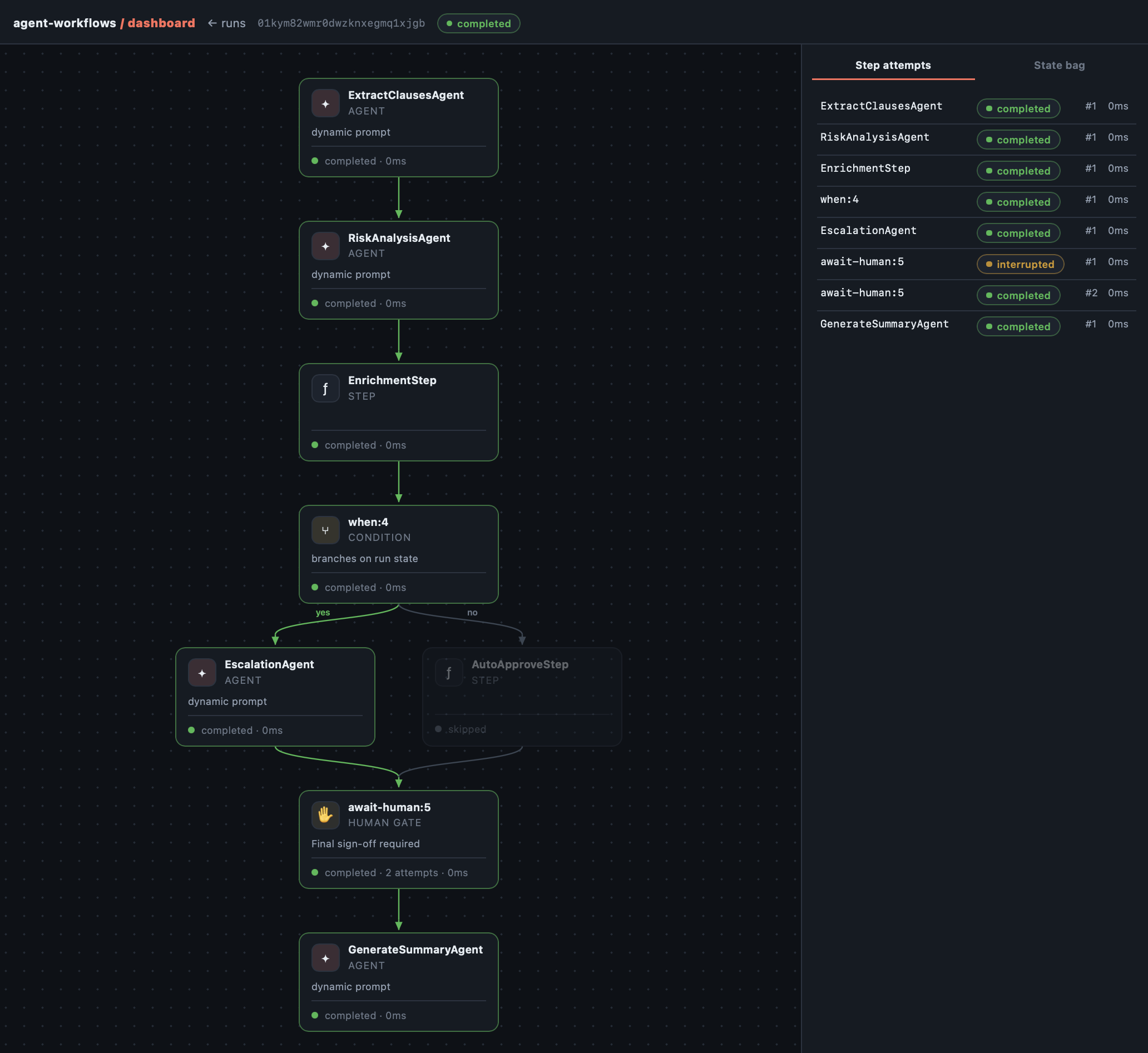
One run, most of the package: this workflow took the high-risk escalation branch (the auto-approve branch dimmed as skipped), parked at the human gate (the audit trail shows the gate interrupted on attempt #1, then completed on attempt #2 after sign-off arrived through the application's resume() call), and finished with the summary agent. Note every step shows exactly one execution: checkpointed results are never re-run, and their tokens are never paid twice.
It is strictly read-only. Acting on runs (approving sign-offs, delivering events, retrying, cancelling) stays in your application through the core API: $run->resume(), $run->deliverEvent(), $run->retry(), $run->cancel(). The dashboard's job is the watching:
- Parked runs show what they are waiting for. The interrupt reason, the deadline countdown, the awaited event name, and the expected response fields from the gate's schema.
- Failed runs show where and why. The failed step, the failure reason, and every attempt in the audit trail.
- Every attempt opens up. Each step attempt expands to the provider calls inside the turn: the responding model, per-call tokens, finish reason, and tool calls with their arguments and results (requires core >= 0.14, which records them; older cores simply show no expander).
- Live progress. Steps light up as workers complete them, with token counts and the checkpointed state bag.
The dashboard is plain server-rendered Blade with light polling: no build step, no assets to publish, nothing to go stale after upgrades.
Status: pre-release. Tracks the pre-1.0 core package; APIs and screens may change.
Requirements
- PHP 8.3+
- Laravel 12 or 13
timmcleod/agent-workflows^0.9 through ^0.14
Installation
composer require timmcleod/agent-workflows-ui
That's it — the dashboard is mounted at /agent-workflows.
Authorization
Like Horizon and Telescope, the dashboard is open in the local environment. In every other environment, all requests are refused until your application defines a viewAgentWorkflows gate:
// app/Providers/AppServiceProvider.php

use Illuminate\Support\Facades\Gate;

public function boot(): void
{
    Gate::define('viewAgentWorkflows', function ($user) {
        return $user->isAdmin();
    });
}
Treat access as sensitive: the dashboard exposes run state, which may contain document text and agent output.
Configuration
php artisan vendor:publish --tag=agent-workflows-ui-config
return [
    // URI prefix the dashboard is mounted under.
    'path' => env('AGENT_WORKFLOWS_UI_PATH', 'agent-workflows'),

    // Middleware for the dashboard routes.
    'middleware' => ['web', TimMcLeod\AgentWorkflowsUi\Http\Middleware\Authorize::class],

    // How often (ms) pages refresh their data.
    'polling' => 2500,

    // How many runs the index lists.
    'runs' => 50,
];
Views can be overridden the standard way: php artisan vendor:publish --tag=agent-workflows-ui-views.
Notes
- Steps execute on your queue as usual; the dashboard just observes. With a running worker you'll watch steps light up as they complete.
- Runs whose workflow is no longer registered (or whose definition has drifted since they started) still render their audit trail and state; drifted runs are badged.
License
MIT