
pnscripts / filament-broadquill-lite

Broadquill Lite: bulk edit for Filament tables. Select records, tick the fields to change, apply once, with per-record policy checks and a clear summary.
Package info
github.com/pnscripts/filament-broadquill-lite
pkg:composer/pnscripts/filament-broadquill-lite
Requires
- php: ^8.3
- filament/filament: ^4.13|^5.8
- illuminate/support: ^12.0|^13.0
Requires (Dev)
- larastan/larastan: ^3.0
- orchestra/testbench: ^10.0|^11.0
- pestphp/pest: ^3.7|^4.0
- pestphp/pest-plugin-laravel: ^3.0|^4.0
- pestphp/pest-plugin-livewire: ^3.0|^4.0
Suggests
None
Provides
None
Conflicts
None
Replaces
None
README
Bulk edit for Filament tables. Select records, tick the fields you want to change, set the new values once and apply. Each record is saved through Eloquent, the update policy is checked for every record, and the summary tells you exactly what happened.

Filament ships bulk delete, but changing a field on many records means writing a custom bulk action for each field. Broadquill Lite gives you one action that edits any of the fields you list, with the validation rules you already wrote.
Quick start
-
Install the package:
composer require pnscripts/filament-broadquill-lite
-
Add the action to your table and list the fields people may change:
use Filament\Actions\BulkActionGroup;
use Filament\Forms\Components\DatePicker;
use Filament\Forms\Components\Select;
use Filament\Forms\Components\TextInput;
use Filament\Forms\Components\Toggle;
use PNScripts\BroadquillLite\BulkEditAction;

public static function table(Table $table): Table
{
    return $table
        ->columns([/* ... */])
        ->toolbarActions([
            BulkActionGroup::make([
                BulkEditAction::make()->fields([
                    Select::make('status')->options(['draft' => 'Draft', 'active' => 'Active']),
                    Select::make('category_id')->label('Category')->relationship('category', 'name'),
                    Toggle::make('is_featured')->label('Featured'),
                    TextInput::make('price')->numeric()->minValue(0),
                    DatePicker::make('launch_date'),
                ]),
            ]),
        ]);
}
-
Select a few rows, open Bulk actions → Edit selected, tick a field, set its value and click Apply changes.
There is nothing to publish, migrate or register in the panel.
What it does
 |
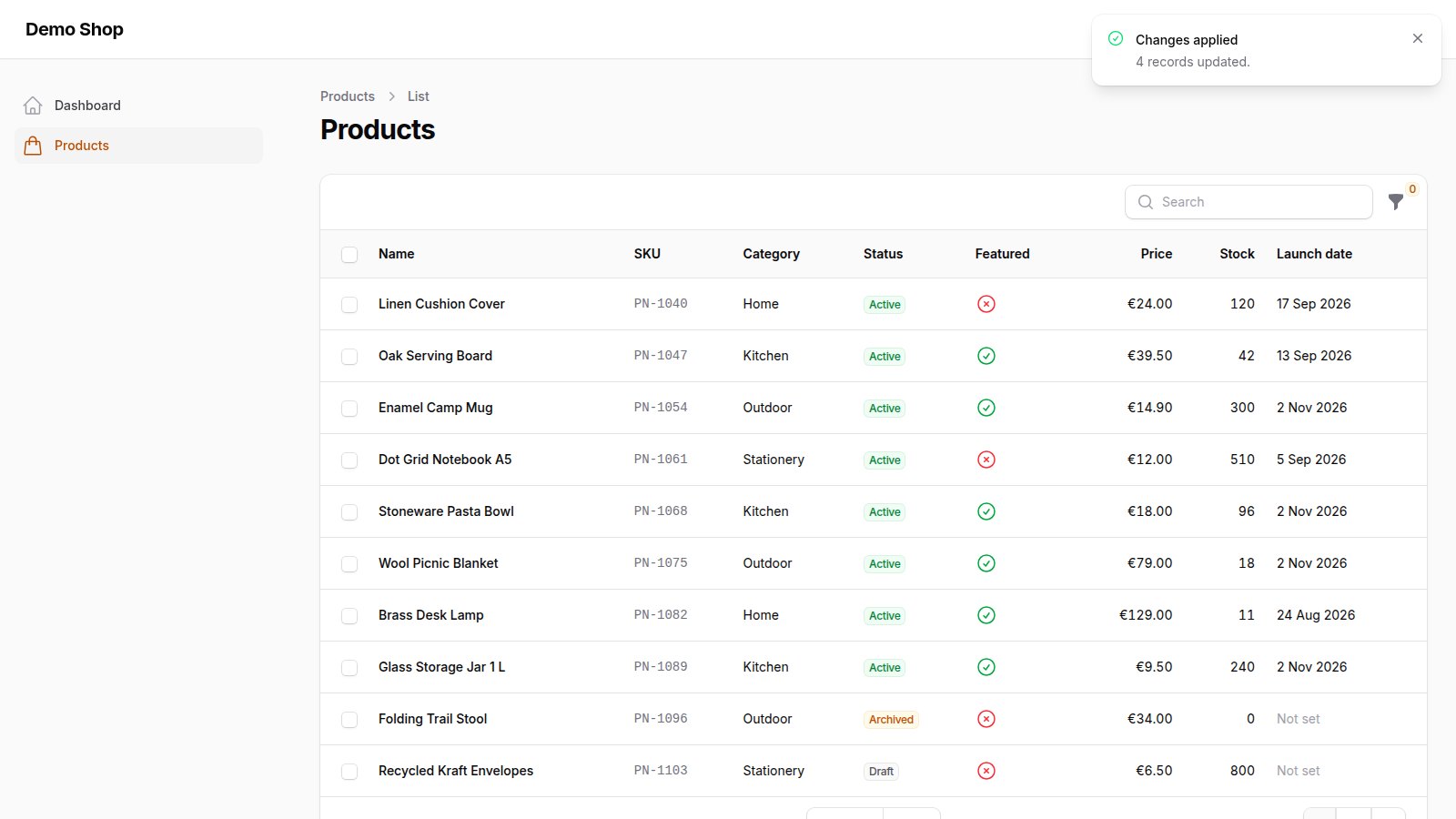 |
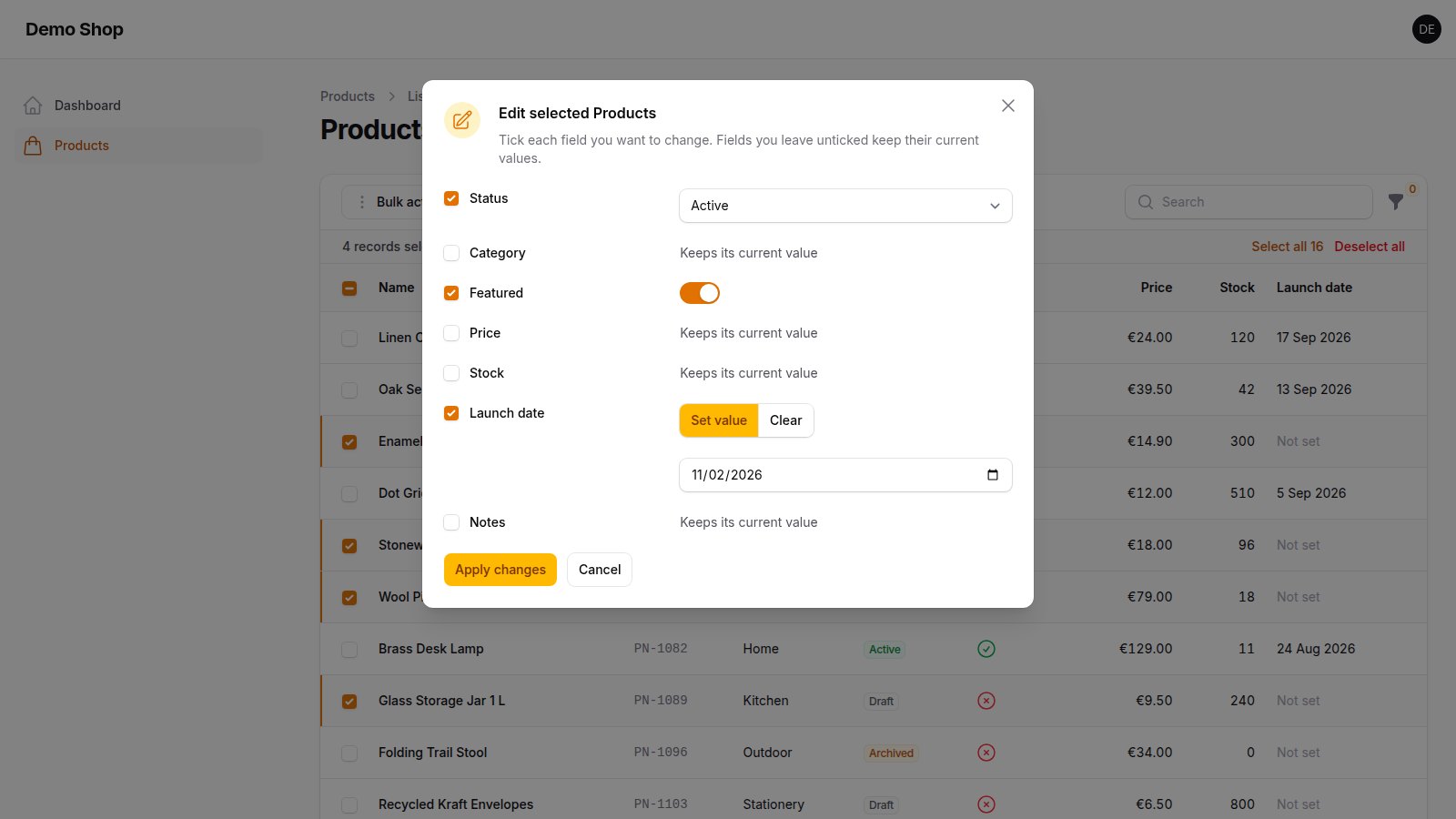
| Tick only the fields you want to change. Unticked fields keep their values. | Every selected record is saved, and the notification counts them. |
 |
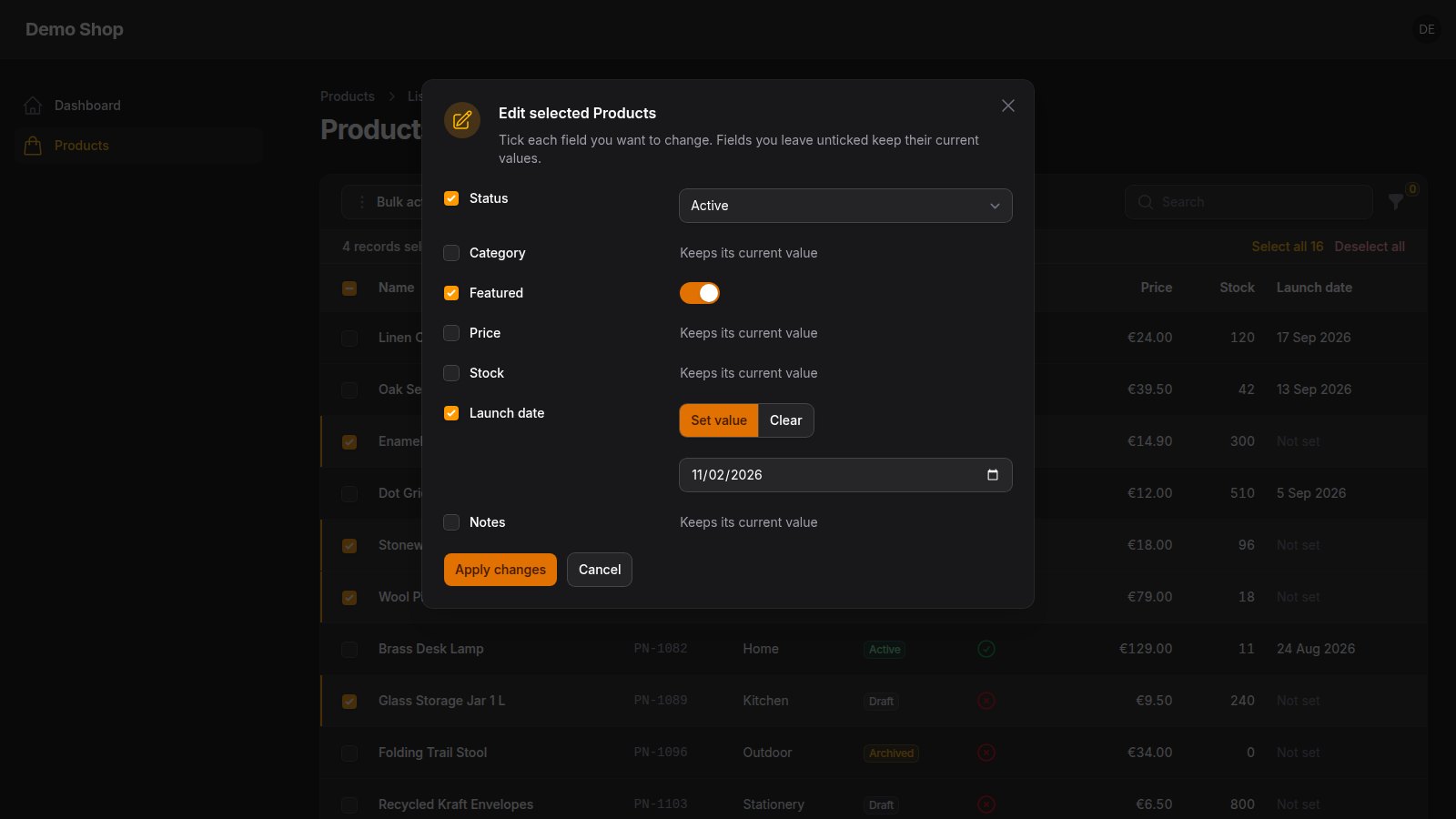 |
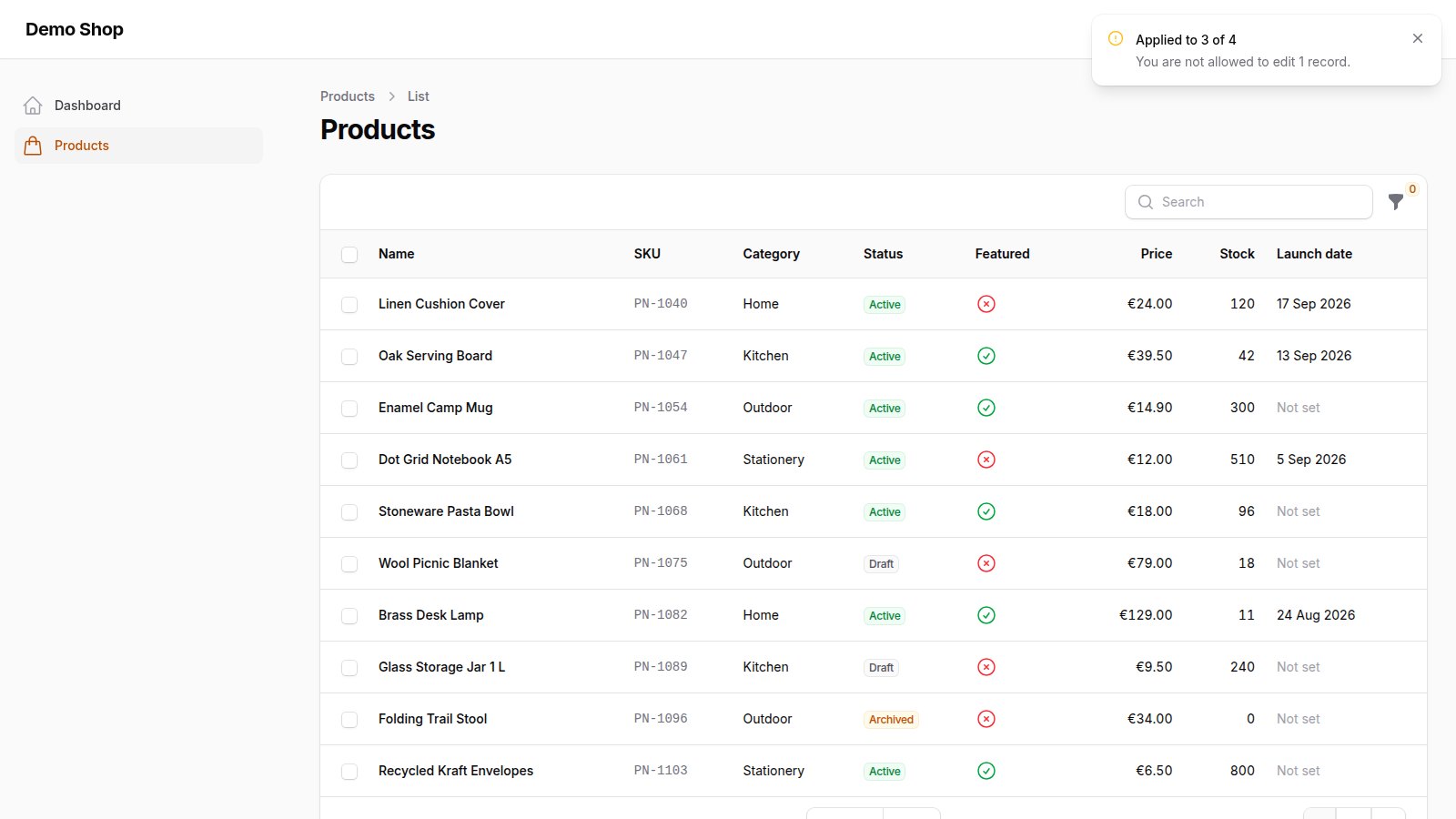
| Records your policy does not allow are skipped and reported. | Built from Filament components, so dark mode and your theme just work. |
- Tick to change. Each field has a checkbox; only ticked fields are written, so you never overwrite a value by accident.
- Your fields, your rules. Pass ordinary Filament form fields. Their validation (
required,minValue,maxLength, options...) applies as usual. - Set or clear. Nullable columns also offer Clear. Broadquill reads the column from the database, so
NOT NULLcolumns never offer it and ask for a value instead. - Per-record authorization. The
updateability of your resource or policy is checked for every selected record. Records that fail are skipped and counted: "Applied to 3 of 4. You are not allowed to edit 1 record." - Saved through Eloquent. Casts, mutators, model events, observers and
updated_atall run, exactly as when a record is edited on its own page. - Honest summary. Records that already had the new value are not saved again and are reported as such.
- All or nothing when you need it.
->atomic()wraps the run in a transaction: if one record fails, every change is rolled back. - Works everywhere a Filament table does: resource list pages, relation managers and standalone Livewire tables.
- English and Bulgarian included; publish the language files to add your own.
Requirements
- PHP 8.3 or newer
- Laravel 12 or 13
- Filament 4.13+ or 5.8+
Tested with the full test suite (48 tests) on:
| PHP | Laravel | Filament | Livewire |
|---|---|---|---|
| 8.3.35 | 13.37.0 | 4.15.2 | 3.8.10 |
| 8.3.35 | 12.70.0 | 4.13.4 | 3.8.10 |
| 8.4.26 | 13.37.0 | 5.10.2, 5.8.4 | 4.4.7 |
| 8.4.26 | 12.70.0 | 5.10.2 | 4.4.7 |
Databases: the suite runs on SQLite and on MySQL 8.0.46. Older Filament 4 and 5 releases (before 4.13 and 5.8) failed in our test harness together with the current Livewire, so the package requires the tested releases. The screenshots come from a Laravel 13.37 app with Filament 5.10 in Chrome; the same flow also passed in a fresh Laravel 13 app with Filament 4.15 on PHP 8.3.
Usage
Fields
fields() takes any Filament form field whose name is a column (or a JSON key, see below) of the table's model:
| Field | Works for |
|---|---|
TextInput, Textarea, MarkdownEditor |
text and numbers |
Select (single), Radio, ToggleButtons |
choices, including ->relationship() on a BelongsTo |
Select::make()->multiple(), TagsInput, CheckboxList without a relationship |
array or JSON columns |
Toggle, Checkbox |
booleans |
DatePicker, DateTimePicker, TimePicker, ColorPicker |
dates, times, colours |
The attributes must be mass assignable (listed in $fillable, or the model unguarded), the same rule Filament's own edit pages follow. If one is not, Broadquill stops with a message that names the attribute.
Many-to-many relationships (->relationship() on a multiple select or a checkbox list) are not supported in Lite; the action stops with a clear message when it is opened.
JSON keys
Use dot notation to change one key inside a JSON column and keep the others:
BulkEditAction::make()->fields([
    TextInput::make('settings.color'),
]);
Add 'settings->color' to $fillable, as Laravel requires for JSON keys.
Clear
By default, a field offers Clear when its database column is nullable (booleans never do). Override it:
BulkEditAction::make()
    ->fields([...])
    ->clearable(['notes', 'launch_date']); // only these
    // ->clearable(false)                  // never
    // ->clearable()                       // every non-boolean field
Authorization
For each selected record, Broadquill asks:
- on a resource page: the resource's
updateauthorization (your policy, or allowed when the resource has no policy); - in a relation manager: the relation manager's
updateauthorization; - in a standalone table: the model policy's
updatemethod, if a policy exists.
Hide the whole action as usual with ->visible() or ->authorize().
Hooks
BulkEditAction::make()
    ->fields([...])
    ->mutateChangesUsing(fn (array $changes, Model $record): array => [
        ...$changes,
        'updated_by' => auth()->id(),
    ])
    ->afterRecordUpdated(function (Model $record, array $changes): void {
        // runs only for records that really changed
    });
All or nothing
BulkEditAction::make()->fields([...])->atomic();
If any record cannot be updated (a policy denies it, a model event cancels the save, the database throws), nothing is changed and the notification says so.
Large tables
For thousands of selected records, let Filament load them in chunks:
BulkEditAction::make()->fields([...])->chunkSelectedRecords(250);
Everything else
BulkEditAction extends Filament's BulkAction, so ->label(), ->icon(), ->color(), ->modalWidth(), ->requiresConfirmation(), ->deselectRecordsAfterCompletion(false) and the rest work as usual. The default action name is bulkEdit.
Translations
English and Bulgarian are included. To change the texts or add a language:
php artisan vendor:publish --tag=broadquill-lite-translations
Not included
Lite sets and clears values. It does not do arithmetic or text operations, preview changes, keep a history or undo, edit many-to-many relationships or run large edits on the queue. Those are the parts of Broadquill Pro (coming soon in the PN Scripts marketplace).
FAQ
Does it work with soft-deleted records, global scopes and tenancy? It edits exactly the records the table lets you select, with the table's own query.
Does it fire my model events and observers? Yes. Every record is filled and saved through Eloquent, one by one.
What happens with a unique column?
Setting the same value on many records breaks a unique index; those records fail and are counted as "could not be saved". Leave unique columns out of fields().
Can I use my own action name or put it outside a group?
Yes: BulkEditAction::make('editProducts'), and it works in toolbarActions() with or without a BulkActionGroup.
Development
composer install
composer test      # Pest, 48 tests
composer analyse   # PHPStan (Larastan) at the max level
tools/matrix.sh php8.4 "^5.0" "^13.0"   # run the suite against another Filament/Laravel pair
Licence
MIT. See LICENSE.
About
Made by PN Scripts (https://pnscripts.com, office@pnscripts.com). Questions and bug reports: GitHub issues or office@pnscripts.com.
Created with AI assistance; the code, tests and texts were checked by PN Scripts with the Pest suite on the PHP, Laravel, Filament and database versions listed above, PHPStan at the max level, and a buyer-style install from the release archive in fresh Laravel 13 apps (Filament 4.15 and 5.10) used in Chrome.